



KuCoin is a centralized cryptocurrency exchange that offers spot trading, advanced order types and access to a large range of crypto markets, but regional availability, KYC requirements and product access depend on the user’s country.
This guide explains how to trade on KuCoin, including how to check eligibility, secure an account, deposit funds into the Trading Account, place a spot trade, calculate trading fees, close the trade, withdraw funds and fix common problems.
Editor’s Note (July 24, 2026): This guide was updated in July 2026 to reflect KuCoin’s current regional restrictions, mandatory identity-verification requirements, account-security controls, Funding and Trading Account structure, spot order types, fee schedule and withdrawal rules. It now includes a complete first-trade walkthrough, worked fee and profit-and-loss examples, deposit and network-selection guidance, trade-management steps, troubleshooting, Proof of Reserves context and risk coverage for custody, leverage, bots, copy trading and API access.
KuCoin Trading Guide: Quick Verdict
KuCoin suits eligible traders seeking broad altcoin access and advanced spot orders, including careful beginners, but regional restrictions, separate account balances and centralized custody reduce its simplicity for some users.
KuCoin's main trading strength is its broad selection of altcoin markets combined with market, limit, stop, OCO, trailing-stop and post-only order tools. Beginners can use the platform for spot trading, provided they complete KYC verification, confirm regional eligibility and understand how funds move between Funding and Trading accounts.
Margin trading and futures trading are separate leveraged products with borrowing, financing and liquidation risks. They should not be treated as automatic next steps after a first spot trade.
Who KuCoin Trading Is Best For
| Platform Fit | Quick Assessment |
|---|---|
| Best for | Eligible spot traders who want broad altcoin access, advanced orders and more control than a simplified buy-and-sell interface provides. |
| Use caution if | You are a beginner, depend on specific fiat routes or are unfamiliar with KYC verification, separate account balances, trading fees and centralized custody. |
| Look elsewhere if | KuCoin restricts your country, you require locally regulated access, or you want the simplest possible interface for buying and holding major crypto assets. |
Disclaimer
This guide is for educational purposes only and is not financial advice. Crypto investing and trading can result in partial or complete loss. Confirm that KuCoin and the selected trading product are available in your country before registering or depositing funds.
Disclosure
Some links in this guide may be affiliate links. If you choose to use a service through these links, we may earn a commission at no additional cost to you.
What to Check Before Trading on KuCoin
Check eligibility before registration or funding. Country of residence, the KuCoin legal entity serving the account and the selected product can each affect access.
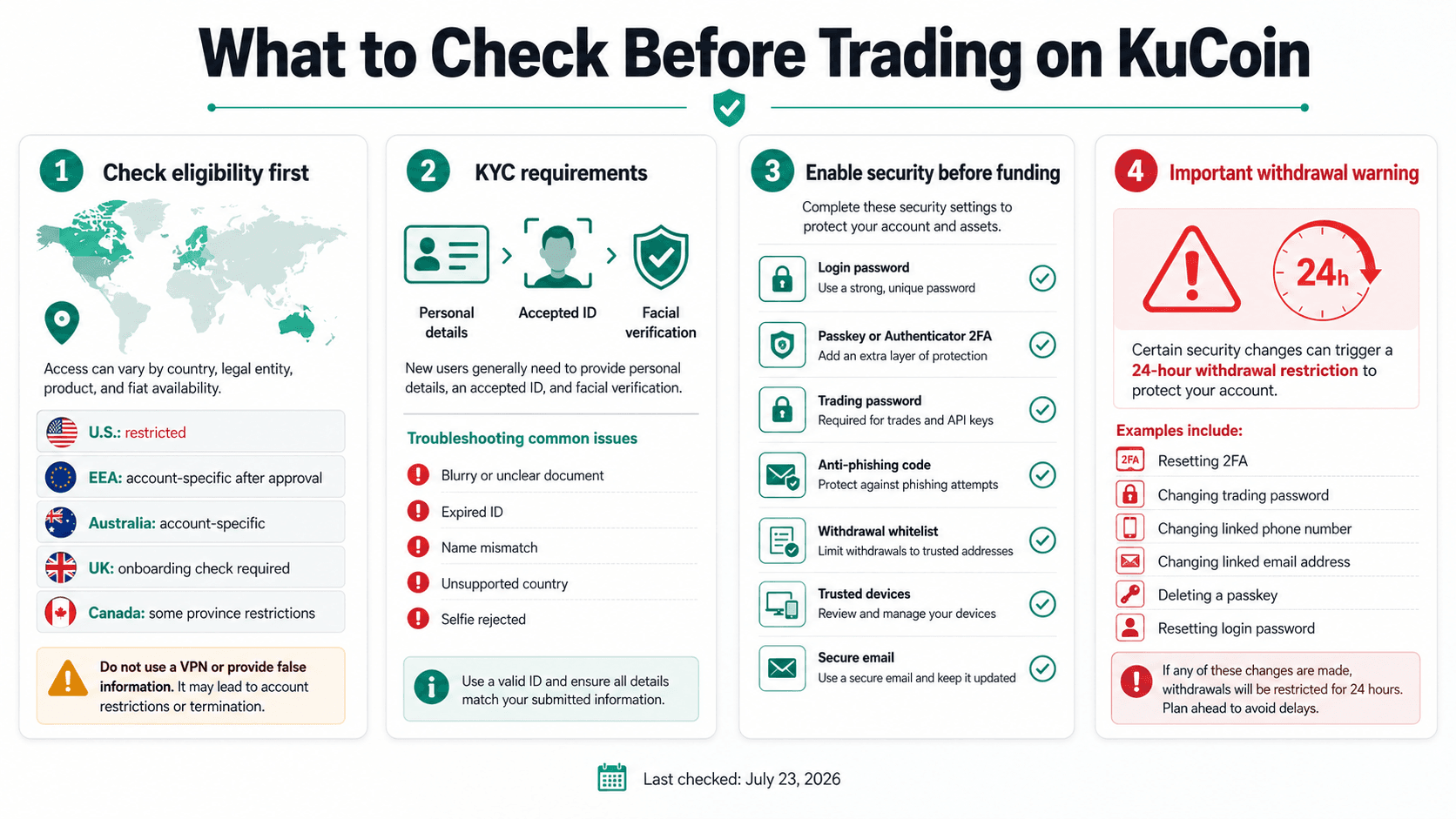 Regional Eligibility, KYC, Security Controls, and Withdrawal Restrictions to Check Before Funding a KuCoin Account
KuCoin Availability and Regional Restrictions
Review the country selected during registration, the terms presented during onboarding, KYC eligibility, payment methods and products displayed after verification.
| Region | Account availability | Spot trading | Leveraged products | Fiat access | Last checked |
|---|---|---|---|---|---|
| United States | Confirmed Global restriction | Not available to new trading accounts | Not available | Not available | July 24, 2026 |
| European Economic Area | KuCoin EU onboarding in supported countries | Account-specific after approval | Only products shown as eligible | Country and account-specific | July 24, 2026 |
| Australia | KuCoin Australia terms apply | Account-specific for supported assets | Separate eligibility applies | Account-specific AUD routes | July 24, 2026 |
| United Kingdom | Live terms and onboarding check required | Only after approval | Product-specific | Methods shown in the account | July 24, 2026 |
| Canada | Ontario and British Columbia are restricted under the Global Terms of Use | Live check elsewhere | Province and product-specific | Provider and province-specific | July 24, 2026 |
The Global list also includes Singapore, mainland China, Hong Kong, Malaysia, Kazakhstan, France, the Netherlands and specified Ukrainian regions. Absence from the list does not guarantee every service. Do not use a VPN, false address or another person’s identity to bypass controls. Doing so can breach platform terms and complicate KYC or withdrawals.
Read our full KuCoin review.
Also Read
KuCoin KYC Requirements
New users must complete KuCoin identity verification before using platform products and services. The process generally requires personal details, an accepted identity document and facial verification. Accepted documents vary by country and may include a passport, national ID card or driving licence.
Verification can fail because a document is expired, cropped, blurry or unsupported, or because the selfie cannot be matched. The legal name should match bank accounts, cards and P2P payment methods. Complete KYC before transferring a large balance.
KYC troubleshooting
| Problem | What to check |
|---|---|
| Blurry document | Retake it in good light with every edge visible |
| Expired ID | Submit a current accepted document |
| Name mismatch | Enter the legal name exactly |
| Unsupported country | Do not provide false details |
| Selfie rejection | Clean the camera and follow the prompts |
Security Settings to Enable First
- Configure KuCoin’s security controls before depositing funds
- Use a unique account password, then enable a passkey or authenticator-based two-factor authentication
- Set a trading password and anti-phishing code
- Activate available withdrawal protections such as an address whitelist
- Review the devices trusted to access the account
Each credential serves a different purpose. The login password opens the account. A passkey uses a trusted device, biometric check, device PIN or security key to verify access without relying on a conventional password. Authenticator 2FA generates temporary verification codes. The trading password is a separate six-digit credential used to approve trading, withdrawals and other sensitive actions.
Protect the devices and email account connected to KuCoin separately. Use a strong email password and 2FA, keep operating systems and browsers updated, remove unfamiliar trusted devices, and avoid creating passkeys on shared or public hardware. The anti-phishing code can help distinguish genuine KuCoin emails from copied messages, while withdrawal protections can limit where funds are sent.
Security changes may temporarily block withdrawals. KuCoin applies a 24-hour withdrawal restriction after specified actions, including deleting a passkey, changing or resetting Google 2FA or the trading password, changing linked phone or email details, unfreezing an account, or resetting a forgotten login password. Complete security changes before depositing or before any time-sensitive withdrawal.
How KuCoin Accounts Work
KuCoin separates assets by purpose. A balance can appear under Assets but remain unavailable for a spot order because it sits in another account or is locked.
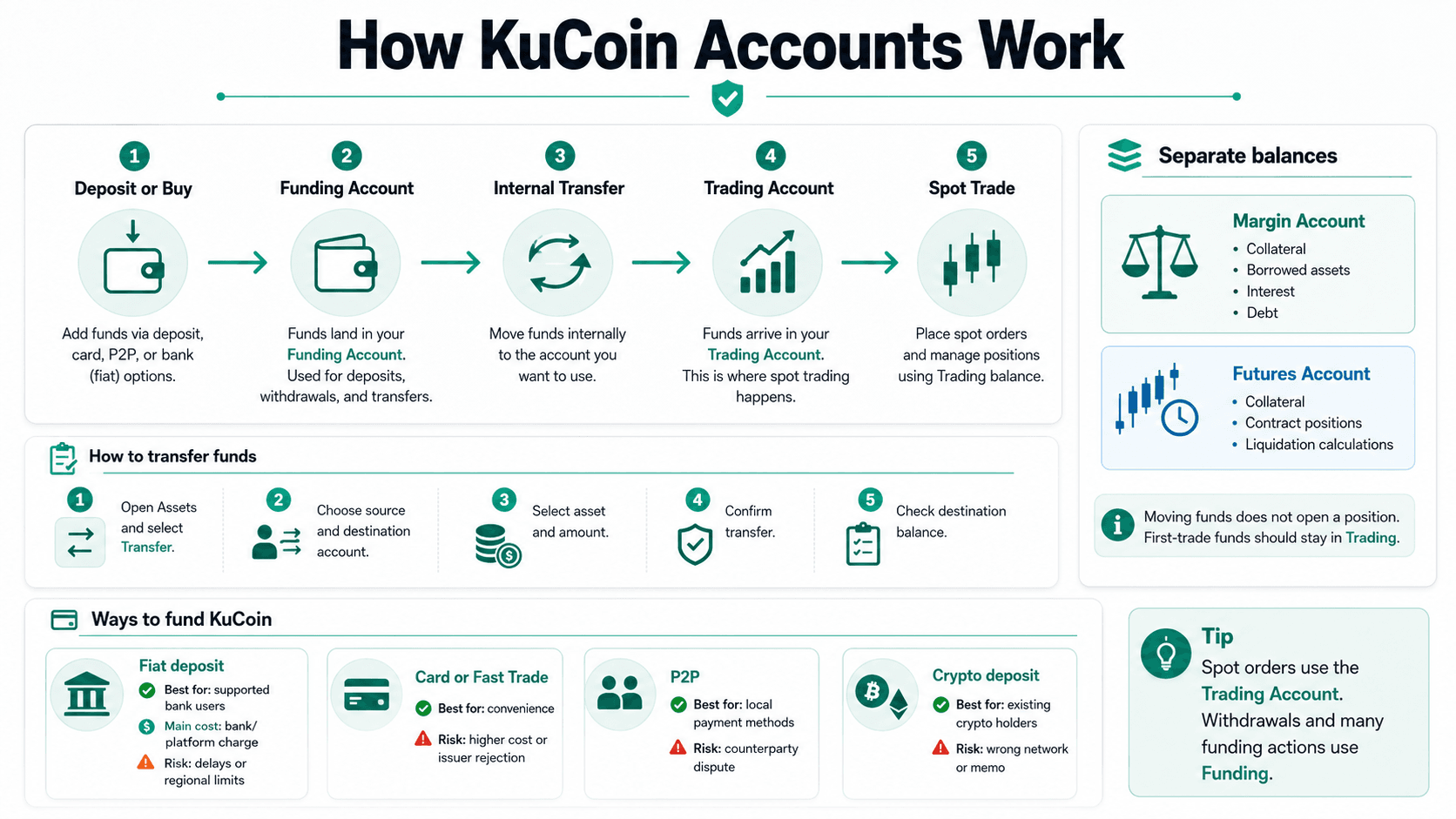 How Funds Move from Deposit Through Funding and Trading Accounts Before a KuCoin Spot Trade
Funding Account vs Trading Account
The Funding Account holds assets used for deposits, withdrawals, purchases and P2P. The Trading Account supplies balances for spot orders, so 100 USDT in Funding may not appear on the BTC/USDT order panel.
Deposit → Funding Account → Internal Transfer → Trading Account → Spot Trade
An internal transfer moves value within KuCoin’s ledger rather than across a blockchain. KuCoin's account-type guide directs users to move assets into Trading for spot orders and keep funds in Funding for withdrawals or P2P.
Margin and Futures Accounts
Margin and futures use separate balances because their assets can support leveraged positions. A Margin Account can contain collateral, borrowed assets, interest and debt, while a Futures Account holds collateral for contract positions and liquidation calculations.
Moving funds does not open a position. Keep first-trade funds in the Trading Account.
How to Transfer Funds Between KuCoin Accounts
- Open Assets and select Transfer.
- Choose the source and destination accounts.
- Select the asset and amount.
- Confirm the transfer.
- Check the destination balance.
Eligible internal account transfers carry no separate charge. Assets tied to an order, loan or collateral requirement remain locked until the obligation is removed.
How to Deposit Funds Into KuCoin
KuCoin can be funded through fiat routes, card or Fast Trade purchases, P2P or cryptocurrency. Compare eligibility, cost and transfer risk.
Buy Crypto With Fiat or Deposit Crypto?
| Method | Best for | Main cost | Main risk |
|---|---|---|---|
| Fiat deposit | Supported bank users | Bank or platform charge | Regional limits and delays |
| Card or Fast Trade | Convenience | Provider fee or spread | Higher cost or issuer rejection |
| P2P | Local payment methods | Advertised exchange rate | Counterparty dispute |
| Crypto deposit | Existing crypto holders | Network fee | Wrong network or memo |
KuCoin Fast Trade aggregates available card, local-payment, fiat-balance, P2P and third-party routes. Providers can impose separate fees, rates, KYC checks and limits. P2P advertisers set their own prices, so a zero platform charge does not guarantee the lowest effective cost.
How to Make a Crypto Deposit
- Open Assets, select Deposit and choose the asset.
- Select a KuCoin-supported blockchain network.
- Confirm that the sending wallet supports the same asset and network.
- Check whether a memo, tag or payment ID is required.
- Copy the deposit address and verify its first and last characters.
- Send a small test amount where practical.
- Check the transaction on a blockchain explorer.
- Wait for the required confirmations.
- Confirm receipt and move the balance to Trading when necessary.
The official crypto-deposit workflow allows supported deposits to reach Funding, Trading or a subaccount. Confirmation time depends on the blockchain and network traffic.
How to Choose the Correct Deposit Network
The token and network are separate selections. USDT can exist as an ERC-20 token on Ethereum, a TRC-20 token on Tron and on other networks.
The sender and receiver must support the same network. Lower fees are insufficient reason to use an unsupported chain, and address appearance cannot prove compatibility. Check both platforms before approval.
What to Do if a Deposit Is Missing
- Confirm that the transaction succeeded on-chain.
- Check the destination address, network and memo.
- Review the required confirmation count and maintenance notices.
- Gather the transaction hash, asset, amount, address and time.
- Use the deposit self-recovery process or contact support.
Recovery is not guaranteed. KuCoin’s incorrect-deposit fee schedule lists charges from no fee to 500 USDT depending on the error. Do not send another large transfer until the first has been traced.
How to Place Your First Spot Trade on KuCoin
Spot trading exchanges one asset for another without borrowing. In this worked example, you will use 100 USDT to purchase BTC through the BTC/USDT trading pair. All prices, quantities and calculated results are examples rather than live market values. The final price, amount received and fee will depend on conditions when the order executes.
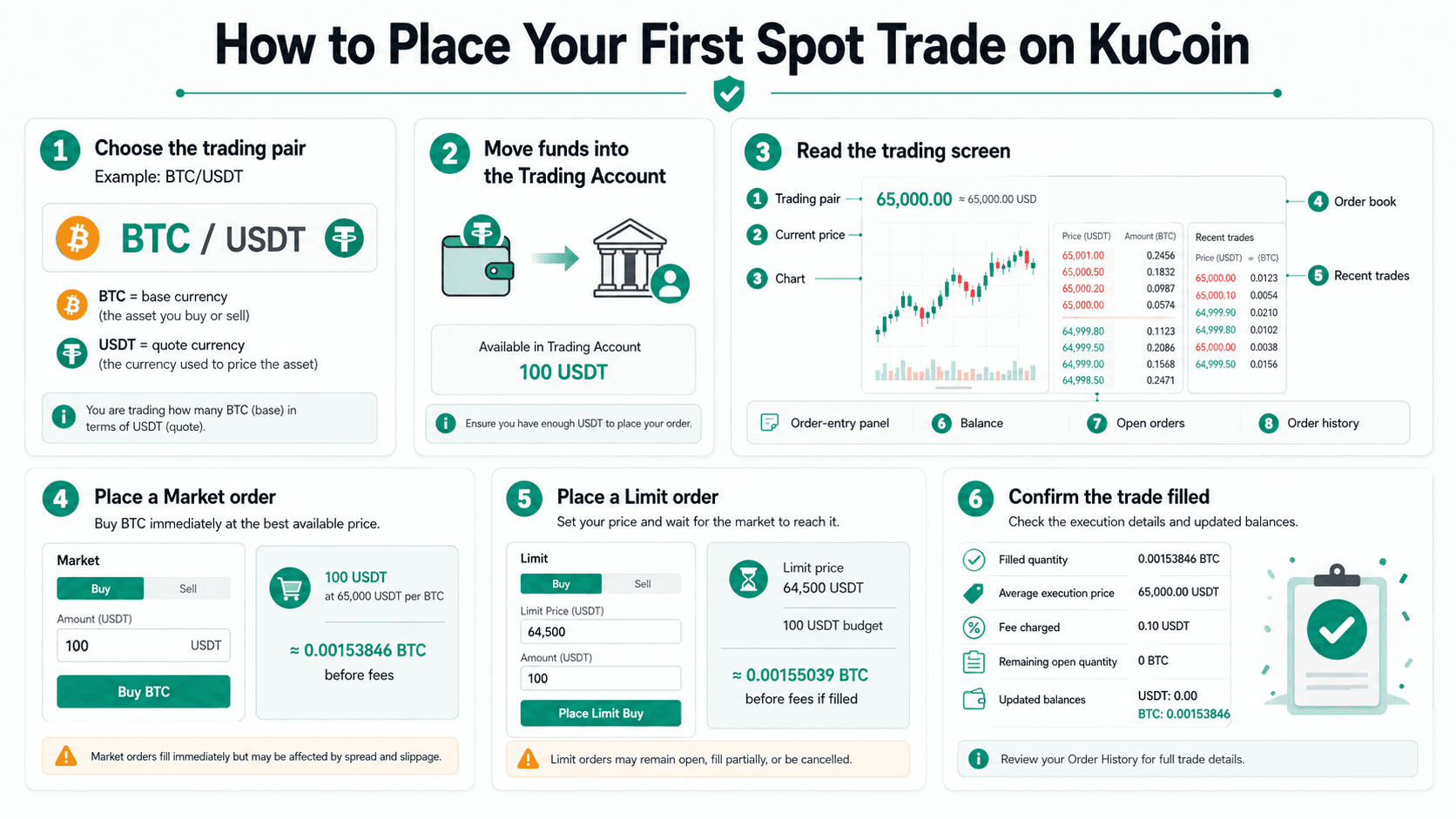 A Beginner Walkthrough for Choosing a Pair, Placing an Order, and Confirming the Trade
Choose a Trading Pair
A trading pair shows the two assets being exchanged. In BTC/USDT:
- BTC is the base currency.
- USDT is the quote currency.
- The displayed price shows how many USDT are required to buy one BTC.
Buying BTC/USDT means spending USDT to receive BTC. Selling BTC/USDT means exchanging BTC for USDT.
Search for the market by entering BTC or BTC/USDT in the market search field. Confirm both ticker symbols and the full asset names before opening the pair. Similarly named tokens, wrapped assets, leveraged products and alternative pairs can represent different assets or products.
Check liquidity before choosing a pair. A liquid market normally has more buy and sell orders, greater market depth and a narrower spread. A thin order book can increase slippage.
Move Funds Into the Trading Account
Confirm that the 100 USDT appears as an available balance in the Trading Account.
When the funds are held in the Funding Account, use KuCoin's internal transfer option to move them into the Trading Account. Check Open Orders if the total USDT balance is higher than the available balance, as funds committed to another order cannot be reused.
Understand the KuCoin Trading Screen
Only a few parts of the trading screen are needed for a first spot trade:
- Trading pair: Confirms that BTC/USDT is selected.
- Current price: Shows the latest displayed BTC price in USDT.
- Price chart: Shows recent price movement.
- Order book: Lists available buy and sell orders.
- Recent trades: Shows completed BTC/USDT trades.
- Order-entry panel: Contains the Market and Limit order controls.
- Available balance: Shows how much USDT can be used.
- Open orders: Shows orders that have not fully executed.
- Order history: Shows completed, cancelled and partially filled orders.
Bids are open buy orders, while asks are open sell orders. For a first trade, confirm that the correct pair is open, the 100 USDT is available and the correct order type is selected.
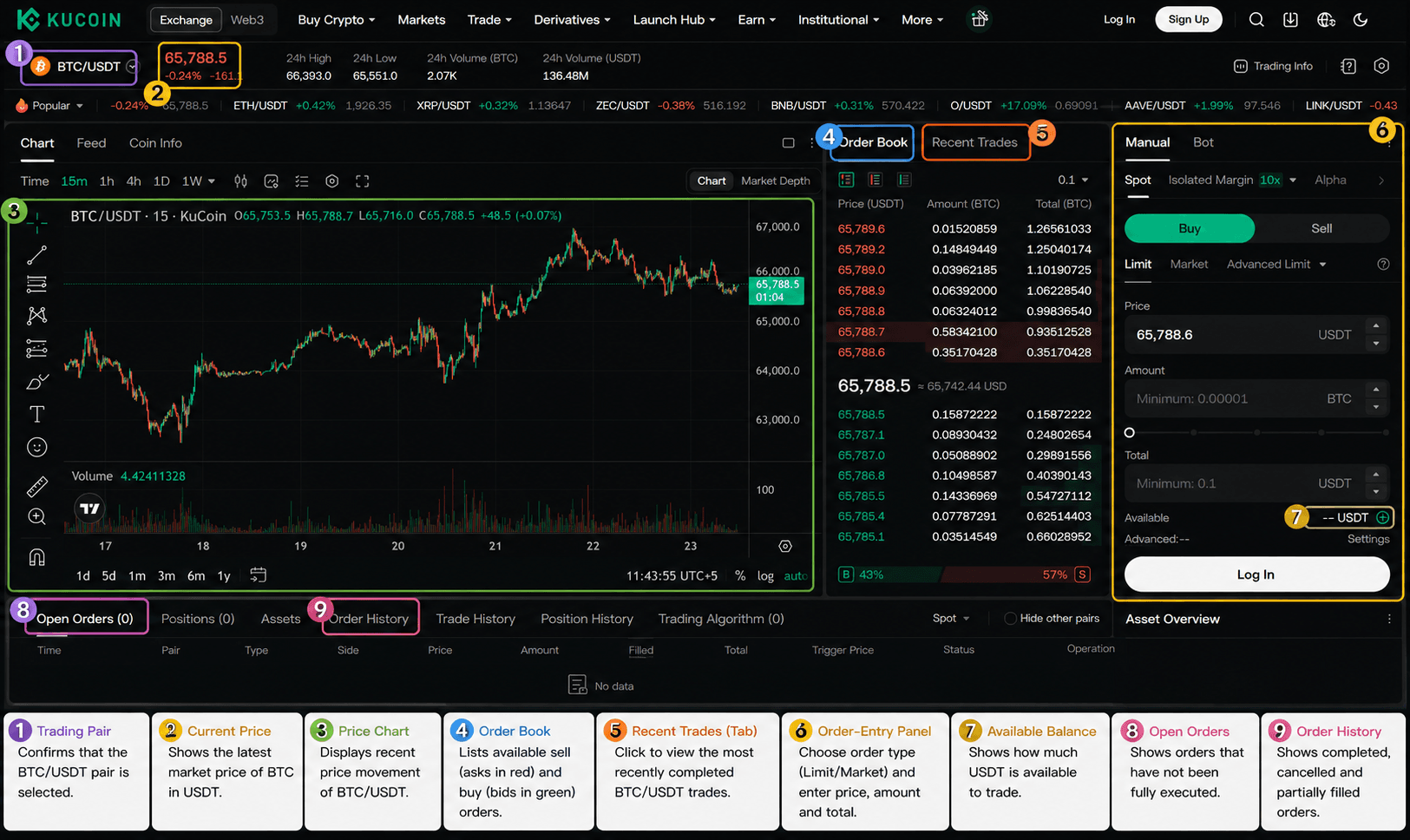 A Trading Screen Visual for Better Understanding. Image via KuCoin
Place a Market Order
A market order attempts to buy BTC immediately using the best available sell orders.
Select Market, confirm that Buy BTC is selected and enter 100 USDT in the amount field.
KuCoin estimates the BTC purchase from the available sell orders. At the example price of 65,000 USDT per BTC, 100 USDT would equal approximately 0.00153846 BTC before fees.
The final quantity and average execution price can differ because the order may match several asks at different prices. The spread is the difference between the highest bid and lowest ask. Slippage is the difference between the expected price and the average execution price.
After submission, open Order History or Trade History and review:
- Filled BTC quantity
- Average execution price
- Fee charged
- Individual fills
See the detailed trading cost section for more on fees, spread and slippage.
Place a Limit Order
A limit order lets you set the highest price you are willing to pay for BTC.
Continue with the same 100 USDT example. Assume BTC is displayed at the example price of 65,000 USDT, but you only want to buy at 64,500 USDT or lower.
Select Limit, enter 64,500 USDT as the limit price, then enter the BTC amount or allocate up to 100 USDT.
At the example limit price of 64,500 USDT, 100 USDT would purchase approximately 0.00155039 BTC before fees.
After submission, the order appears under Open Orders. It may fill completely, fill partially, remain open or be cancelled. To cancel it, locate the BTC/USDT order under Open Orders and select the cancellation option.
A limit order controls the maximum purchase price but does not guarantee execution. It will remain unfilled if sellers do not offer BTC at 64,500 USDT or lower.
Confirm That the Trade Was Filled
Open Order History or Trade History and check:
- Filled quantity: The amount of BTC purchased.
- Average execution price: The average USDT price paid.
- Fee charged: The fee and the asset used to pay it.
- Remaining open quantity: Any part of the order that has not executed.
- Updated asset balance: The new BTC and USDT balances.
- Trade history: The record of each execution.
A filled order has no remaining quantity. A partially filled order leaves the unexecuted portion under Open Orders until it fills or is cancelled.
How do I trade on KuCoin?
- Confirm eligibility and complete the required verification.
- Enable account-security controls.
- Deposit fiat currency or cryptocurrency.
- Move the funds into the Trading Account.
- Open the correct spot trading pair.
- Select a market order or limit order.
- Enter the price and amount, then submit the order.
- Confirm the filled quantity, execution price, fee and updated balance in Trade History.
KuCoin Order Types Explained
KuCoin’s spot orders balance execution speed, price control and the risk of receiving no fill. Test advanced orders with a small amount first.
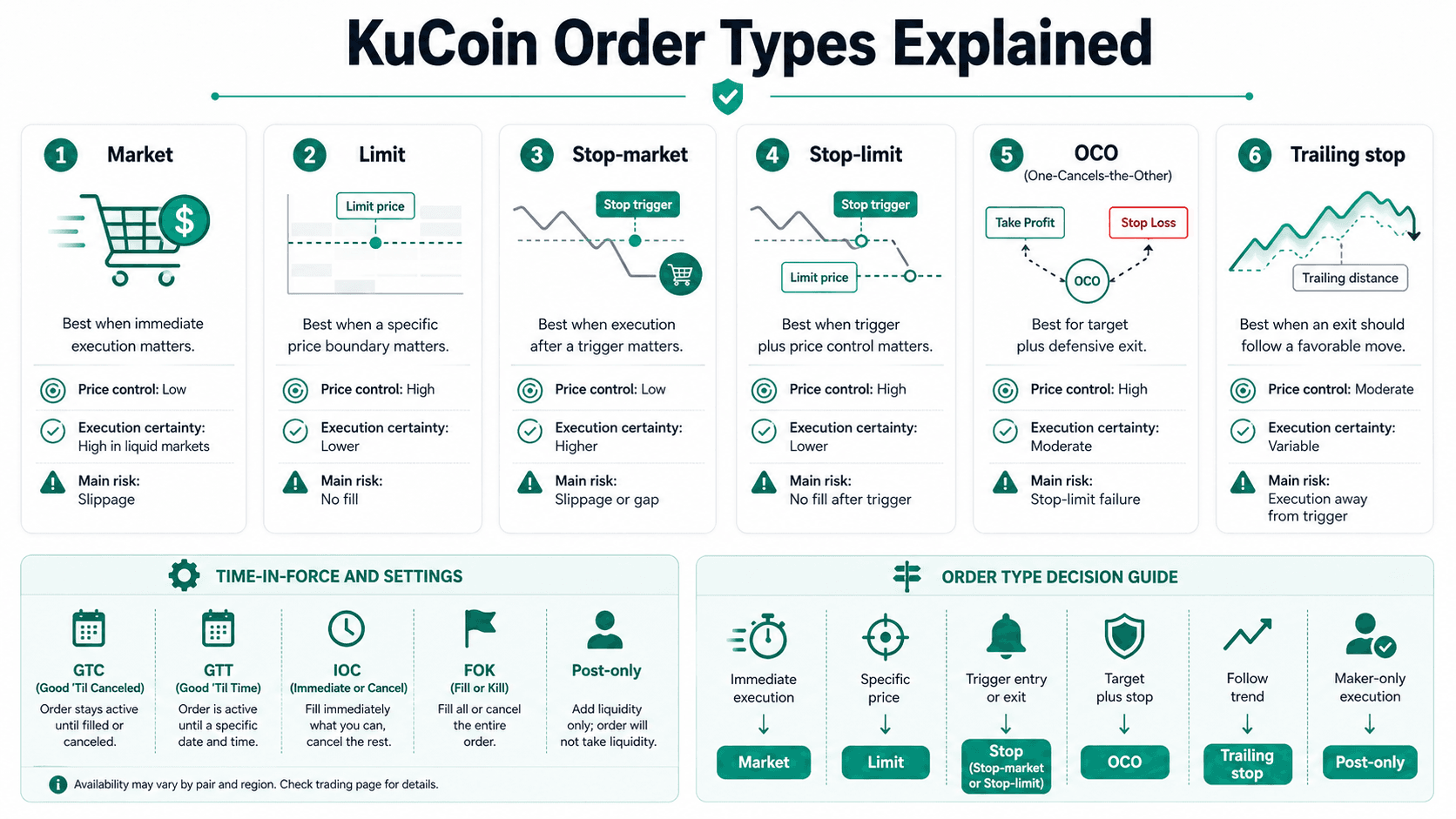 KuCoin Market, Limit, Stop, OCO, and Trailing Orders Compared by Control, Execution, and Risk
| Order type | Best used when | Price control | Execution certainty | Main risk |
|---|---|---|---|---|
| Market | Immediate execution matters | Low | High in liquid markets | Slippage |
| Limit | A price boundary matters | High | Low | No fill |
| Stop-market | Execution after a trigger matters | Low | Higher | Slippage or gap |
| Stop-limit | Trigger and price control matter | High | Low | No fill after trigger |
| OCO | Target and defensive exit are needed | High | Moderate | Stop-limit failure |
| Trailing stop | Exit should follow a favorable move | Moderate | Varies | Execution away from trigger |
Market Order vs Limit Order
A market order removes liquidity and normally receives taker treatment. A limit order qualifies as maker only when it rests on the book; an immediately executable limit can receive the taker fee. Thin altcoin markets can make market orders expensive because a wide spread and weak depth move execution through several prices.
Stop-Market vs Stop-Limit Orders
The stop price activates the instruction. Assume BTC trades at $65,000: a stop-market buy triggered at $66,000 may fill above that level during a rapid rise.
For a sell example, a $62,000 stop and $61,800 limit activate a limit sale at the trigger. A fast drop below $61,800 can leave it unfilled, while a stop-market accepts slippage to improve execution probability.
OCO Orders
An OCO combines a limit order with a stop-limit. After buying at $65,000 USDT, a trader might set a $70,000 target, a $62,000 stop and a $61,800 stop-limit. Execution of either leg cancels the other.
Careful spacing is required because rapid movement can pass through the executable limit before the defensive leg fills.
Trailing Stop Orders
A trailing stop follows favorable movement by a trailing delta, optionally after an activation price. A sell tracks the highest eligible price; a buy tracks the lowest.
A narrow delta can trigger during normal volatility, while a wide delta allows a larger reversal. The trigger does not guarantee the final execution price.
Time-in-Force and Post-Only Settings
| Setting | Meaning | Main use |
|---|---|---|
| GTC | Good-Till-Cancelled | Remains open until filled or cancelled |
| GTT | Good-Till-Time | Cancels after a selected period |
| IOC | Immediate-Or-Cancel | Fills available quantity and cancels the rest |
| FOK | Fill-Or-Kill | Requires the full quantity immediately |
| Post-only | Prevents taker execution | Keeps an eligible limit maker-only |
KuCoin’s advanced-order settings document GTC, GTT, IOC and FOK. Post-only cancels an instruction that would immediately remove liquidity.
Which Order Type Should You Use?
- Immediate execution → Market
- Specific price → Limit
- Entry after a trigger → Stop
- Target and defensive exit → OCO
- Exit following a trend → Trailing stop
- Maker-only execution → Post-only
No order type removes market risk. Each changes the exposure to slippage, missed execution or an unfilled defensive order.
KuCoin Trading Fees and Total Trading Cost
The maker or taker fee is only one part of the cost. The bid-ask spread, slippage, payment charges, withdrawals and financing can also affect the result.
Maker and Taker Fees
A maker order adds liquidity by resting on the order book. A taker order removes liquidity by matching an existing order.
KuCoin maker fee: The charge applied when an execution adds liquidity to the order book.
KuCoin taker fee: The charge applied when an execution removes liquidity from the order book.
A limit order is not always a maker order. A limit order that executes immediately is treated as a taker order. One order can also contain both taker and maker fills if part executes immediately and the remainder rests on the book.
After execution, check Spot Orders > Trade History to identify the fee charged for each fill. KuCoin explains this treatment in its official maker and taker guide.
KuCoin Asset Fee Classes and VIP Levels
KuCoin assigns spot assets to Class A, Class B or Class C. KuCoin assigns assets to these fee classes under its own market classification, so the base asset’s class determines the standard fee rate for the trading pair. Each class has a different base fee, so two trading pairs can carry different rates.
The official KuCoin fee schedule lists these VIP 0 spot rates as of July 24, 2026:
| Asset class | Maker fee | Taker fee |
|---|---|---|
| Class A | 0.10% | 0.10% |
| Class B | 0.20% | 0.20% |
| Class C | 0.30% | 0.30% |
A user’s VIP level can reduce these rates. KuCoin uses qualification routes that include rolling 30-day trading volume and KCS holdings.
Under the current VIP requirements, VIP 1 starts at 1,000 KCS or 1 million USDT in rolling 30-day spot trading volume. Other qualification routes are also available. VIP 1 Class A rates are currently 0.095% maker and 0.10% taker.
KuCoin can change asset classes, VIP requirements and rates. Check the complete official schedule and the rate displayed for the selected pair before trading.
Paying Trading Fees With KCS
KuCoin currently offers a 20% KCS fee discount on eligible spot and margin trading fees when Pay Fees with KCS is enabled.
KuCoin KCS discount: A 20% rebate on eligible spot and margin fees when the required account setting is enabled and enough KCS token balance is available.
KCS must be available in the Funding Account, Trading Account or eligible KCS staking balance. Using staked KCS also requires the Pay Fees with Staked Amount setting.
The advertised discount may not apply fully when:
- The account has insufficient KCS.
- The required fee-payment setting is disabled.
- KCS conversion prices move during calculation.
- The transaction is not eligible.
- The underlying fee rate is below KuCoin’s minimum threshold.
At higher VIP levels, the KCS discount may apply only to taker fees because some maker rates are already zero or below KuCoin’s minimum eligible fee rate. As of July 24, 2024, KuCoin sets the minimum eligible rates at 0.025% for Class A, 0.050% for Class B and 0.075% for Class C. The full rules are available in KuCoin’s official KCS fee-discount guide.
Spread, Slippage and Other Costs
The complete cost stack can include:
- Maker fee or taker fee
- Bid-ask spread
- Slippage
- Deposit or withdrawal fee
- Third-party fiat-provider charge
- Margin interest
- Futures funding rate, where applicable
The bid-ask spread is the difference between the best available buying and selling prices. Slippage is the difference between the expected price and the average execution price.
KuCoin total trading cost: The exchange fee plus the bid-ask spread, slippage, money-movement charges and financing costs.
Thin markets can produce a wider spread and greater slippage, making the total cost higher than the quoted trading fee.
Worked KuCoin Fee Example
Assume a trader places the same 100 USDT BTC/USDT spot purchase used earlier. BTC/USDT is treated as a Class A market, and the account pays the VIP 0 taker fee of 0.10%.
The example uses an illustrative BTC price of 65,000 USDT, an estimated spread cost of 0.03% and estimated slippage of 0.02%. These are example assumptions, not live market figures. Check KuCoin’s BTC/USDT trading page for the current price.
| Component | Example |
|---|---|
| Gross order value | 100.00 USDT |
| Trading fee | 0.10 USDT |
| Estimated spread | 0.03 USDT |
| Estimated slippage | 0.02 USDT |
| Estimated execution price | 65,032.50 USDT |
| Estimated crypto received | About 0.00153769 BTC |
| Estimated entry cost | 0.15 USDT |
| Break-even price movement | About 0.15% |
The example assumes the 0.10 USDT trading fee is paid separately from the 100 USDT order value.
Net trading cost = exchange fee + spread + slippage + financing costs
The estimated execution price is:
65,000 × (1 + 0.03% + 0.02%) = 65,032.50 USDT
The estimated crypto received is:
100 ÷ 65,032.50 = approximately 0.00153769 BTC
The estimated entry cost is:
0.10 + 0.03 + 0.02 = 0.15 USDT
The break-even price must therefore rise by approximately 0.15% from the reference price to recover the estimated entry fee, spread and slippage. Selling creates another fee and may add another spread, slippage or withdrawal fee.
How to Manage and Close a KuCoin Trade
Order submission begins the management stage. Open quantity, partial fills, cancellation and the final sale still require attention.
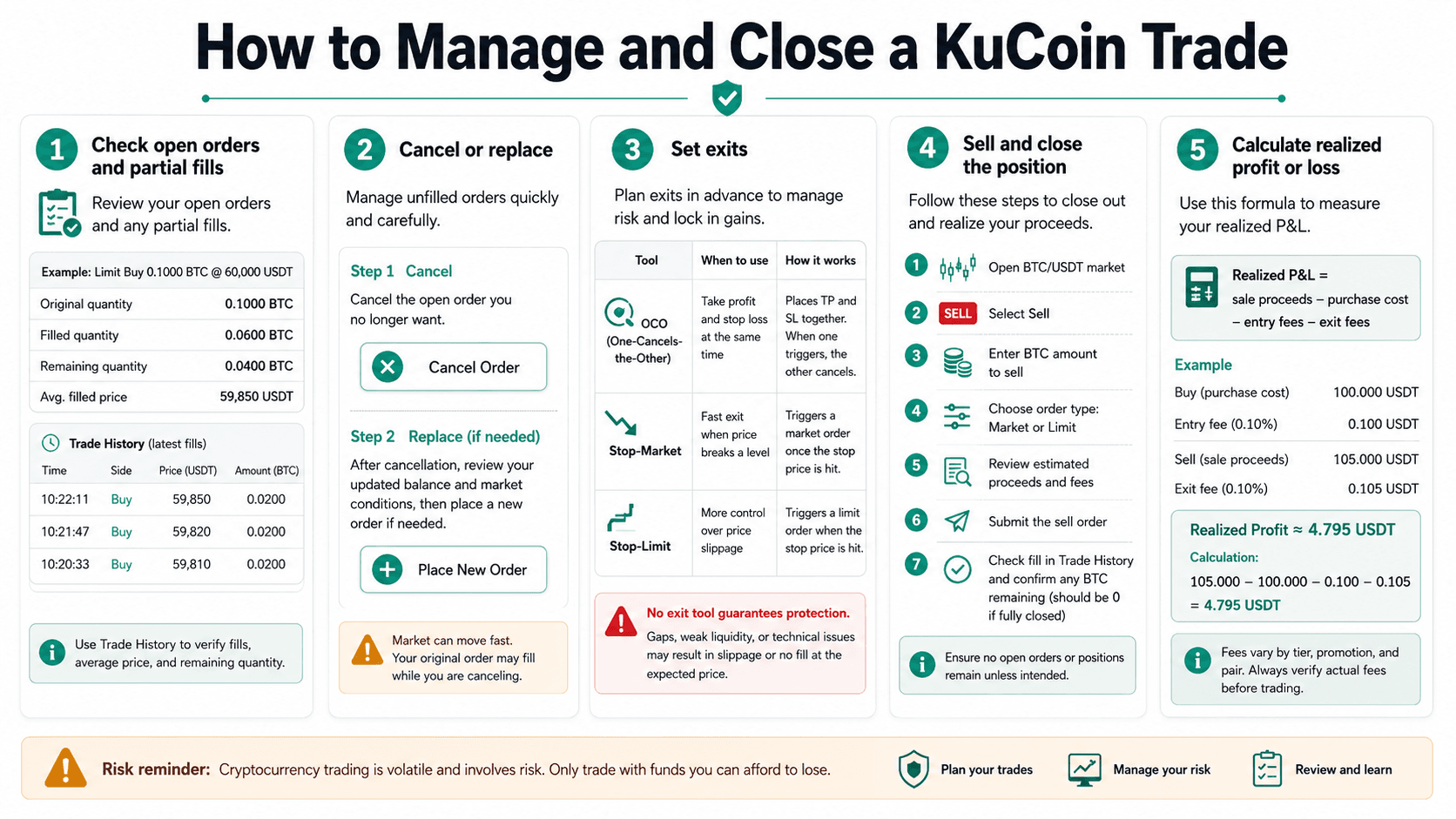 How to Review Fills, Set Exits, Close a Position, and Calculate Realized Profit or Loss
How to Check Open Orders and Partial Fills
Open Orders displays original, filled and remaining quantities, while Trade History records each execution. One order can fill at several prices and incur fees across individual fills; cancelling the remainder does not reverse completed trades.
How to Cancel or Replace an Order
Select "Cancel" beside an open order or "Cancel All" after checking every displayed instruction. Changing price or quantity normally requires cancellation and replacement.
Rapid movement can fill the original during cancellation, so size the replacement from the updated balance.
How to Set a Take-Profit or Stop-Loss
Spot traders can use OCO, stop-market and stop-limit exits. OCO combines a target with a defensive stop-limit, while stop-market prioritizes execution.
None guarantees protection. Gaps, weak liquidity, technical interruption and an unfilled stop-limit can increase the loss.
How to Sell and Close the Position
- Open BTC/USDT and select Sell.
- Enter the BTC amount.
- Choose Market or Limit.
- Review the expected proceeds.
- Submit and check the fill, average price and fee.
- Confirm whether any BTC or open quantity remains.
How to Calculate Realized Profit or Loss
Realized P&L = sale proceeds − purchase cost − entry fees − exit fees
If BTC purchased for 100 USDT is sold for 105 USDT, with a 0.10 USDT entry fee and 0.105 USDT exit fee, realized profit is about 4.795 USDT before tax and other charges. Retain deposit, withdrawal, order and trade records for accounting through KuCoin’s transaction-history export.
How to Withdraw Crypto From KuCoin
Withdrawal completes the trading lifecycle. Check the holding account, address, network, memo, fee and minimum separately.
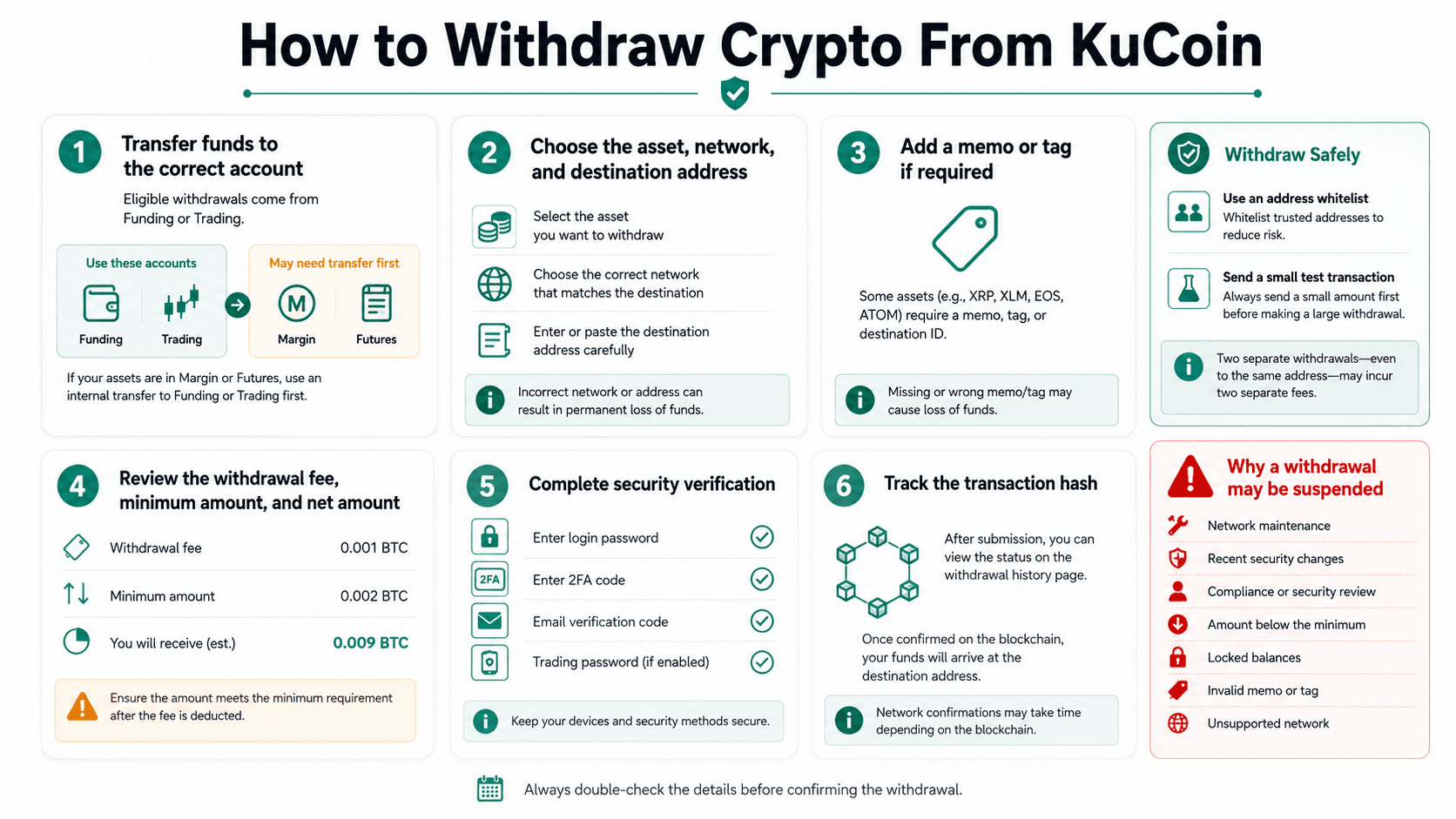 A Step-by-Step Guide to Selecting the Correct Account, Network, Address, Memo, and Withdrawal Settings
Transfer Funds to the Correct KuCoin Account
KuCoin supports withdrawals from eligible Funding and Trading balances. Assets in Margin, Futures or another restricted account may need an internal transfer first.
Open orders, unpaid loans and collateral requirements can reduce the available amount. Remove those obligations before withdrawing.
Choose the Asset, Network and Address
- Select Withdraw and choose the asset.
- Paste the destination address.
- Select the matching network.
- Add a memo or tag where required.
- Review the fee, minimum and net amount.
- Complete security verification.
- Track the transaction hash.
Fees and minimums vary by asset and network and appear before submission.
Use an Address Whitelist and Test Transaction
A whitelist restricts withdrawals to approved destinations. Review the asset, network and memo even for a saved address, and consider a small test before a large transfer. Two withdrawals may create two fees.
Why a KuCoin Withdrawal May Be Suspended
Causes include network maintenance, recent security changes, a compliance or security review, an amount below the minimum, locked balances, an invalid memo or an unsupported network.
Specified security changes create the 24-hour lock. Other reviews have no fixed completion time, so use official support channels.
Common KuCoin Trading Problems and How to Fix Them
Each card identifies the likely cause, checks, evidence and next action. Avoid repeated transactions until the original problem is understood.
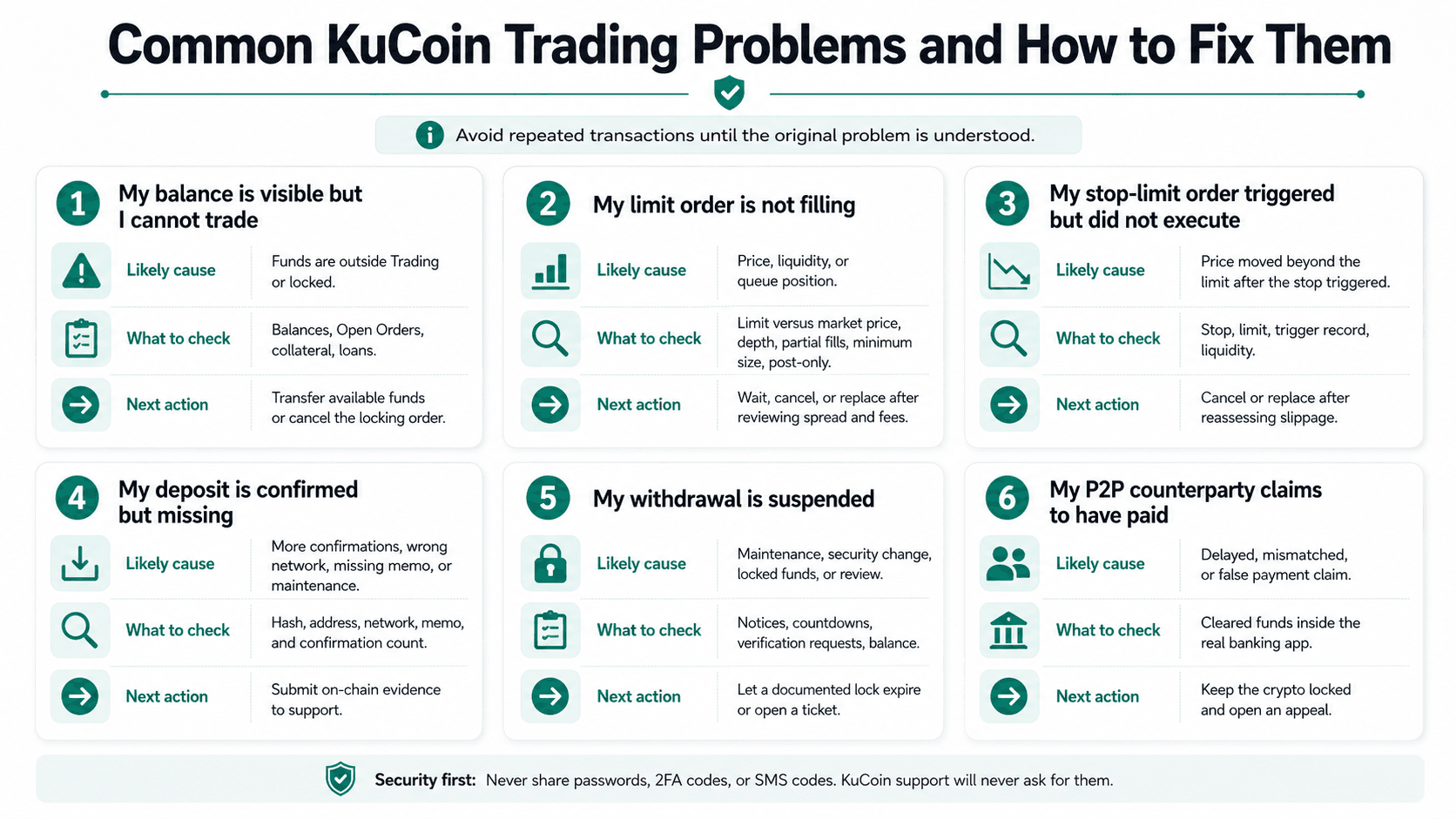 Likely Causes, Checks, and Next Steps for Six Common KuCoin Trading and Transfer Problems
My Balance Is Visible but I Cannot Trade
Likely cause: Funds are outside Trading or locked. Check: account balances, Open Orders, collateral and loans. Do not: redeposit or submit repeated orders. Gather: balance and transfer records. Next: transfer available funds or cancel the locking order.
My Limit Order Is Not Filling
Likely cause: Price, liquidity or queue position. Check: limit versus market price, depth, partial fills, minimum size and post-only. Do not: assume a chart wick guarantees a fill. Gather: order ID, pair, price and time. Next: wait, cancel or replace after reviewing spread and fees.
My Stop-Limit Order Triggered but Did Not Execute
Likely cause: Price moved beyond the limit after the stop triggered. Check: stop, limit, trigger record and liquidity. Do not: confuse triggering with execution. Gather: order ID and market record. Next: cancel or replace after reassessing slippage.
My Deposit Is Confirmed but Missing
Likely cause: More confirmations, wrong network, missing memo or maintenance. Check: hash, address, network, memo and confirmation count. Do not: send another large transfer. Gather: full transaction details. Next: submit on-chain evidence to support.
My Withdrawal Is Suspended
Likely cause: Maintenance, security change, locked funds or review. Check: page notice, countdown, verification requests and balance. Do not: create another account or trust unsolicited support. Gather: error, asset, network and recent changes. Next: let a documented lock expire or open a ticket.
My P2P Counterparty Claims to Have Paid
Likely cause: Delayed, mismatched or falsely represented payment. Check: cleared funds inside the real banking app. Do not: release crypto from a screenshot, email or SMS. Gather: order, chat, payer name and bank record. Next: keep the crypto locked, open an appeal and review Coin Bureau’s P2P exchange safety guide.
Margin, Futures, Bots and Copy Trading on KuCoin
These products use separate accounts, costs and risks. None is required for spot trading.
| Product | How it works | Suitable for | Primary cost | Primary risk |
|---|---|---|---|---|
| Margin | Borrows against collateral | Experienced debt users | Interest and fees | Liquidation |
| Futures | Trades leveraged contracts | Derivatives traders | Fees and funding | Rapid liquidation |
| Bots | Automate rules | Monitored strategies | Trading fees | Automated losses |
| Copy trading | Replicates another trader | Users assessing drawdown | Fees or profit share | Leader risk |
| API/subaccounts | Connect and separate systems | Professional users | Trading and infrastructure | Key compromise |
KuCoin Margin Trading
Margin trading borrows assets. Cross margin shares eligible collateral across positions, while isolated margin restricts collateral and debt to one market.
Interest accrues until repayment, and a rising debt ratio can trigger liquidation. Our crypto margin trading guide covers borrowing, debt ratios and liquidation.
KuCoin Futures Trading
Futures create leveraged exposure through perpetual or dated contracts where available. Mark price supports P&L and liquidation, maintenance margin keeps a position open, and perpetuals can create funding payments.
Reduce-only orders lower exposure, while auto-deleveraging can reduce profitable positions during severe stress. Futures are unnecessary and unsuitable for absolute beginners. See our crypto futures platforms guide.
KuCoin Trading Bots
KuCoin’s bot menu includes Spot Grid, Infinity Grid, DCA, Smart Rebalance and futures strategies where available. Its bot fee rules state that eligible spot bots receive a 20% discount on the VIP 0 rate, while KCS fee deduction does not apply.
A bot automates rules, not profit, and poor parameters can automate losses. Our trading-bot guide covers testing, API security and monitoring.
KuCoin Copy Trading
Copy trading replicates selected lead-trader activity. KuCoin’s copy-trading terms describe fixed-proportion and fixed-amount modes and warn that timing, price and outcome can differ because of liquidity and latency.
Review allocation, leverage, drawdown, slippage and profit-sharing terms. Our copy-trading comparison explains leader-selection risks.
API and Subaccount Trading
API keys let software read data or submit orders. Grant minimum permissions, use IP allowlisting and disable withdrawals unless strictly required.
Subaccounts can separate strategies. Use restricted keys rather than sharing the master credential. KuCoin’s API instructions state that trading keys without an IP address can lose permissions or be deleted after 30 inactive days.
KuCoin Trading Safety and Risk Management
Account controls reduce operational risk but cannot remove market losses, custody exposure, blockchain errors or compliance restrictions.
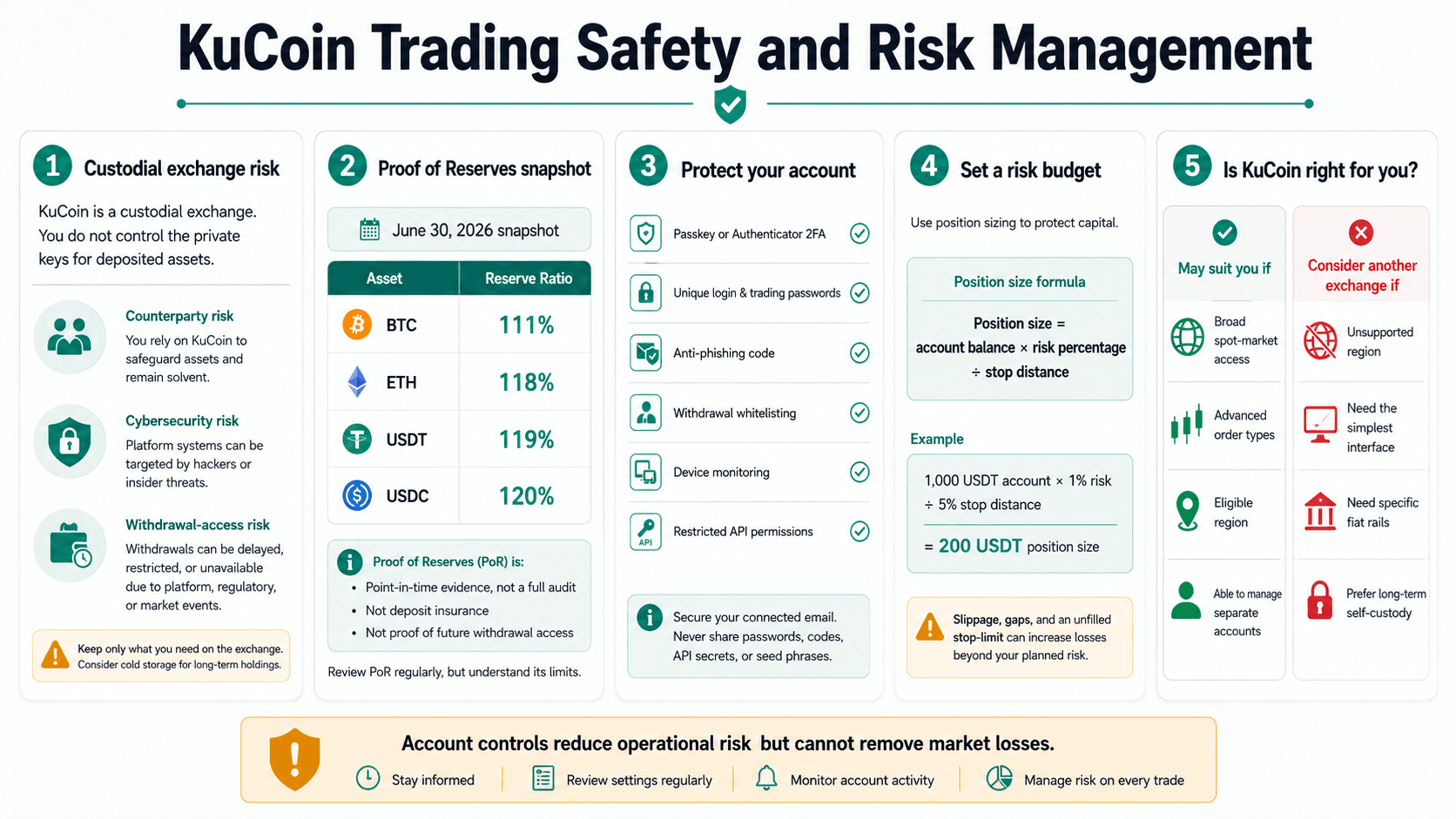 Custody, Account Security, Proof of Reserves, and Position Sizing for Safer KuCoin Trading
Custodial Exchange Risk
KuCoin is a custodial exchange, so users do not control deposited assets’ private keys. This creates counterparty, withdrawal-access, cybersecurity and operational risks.
Trading funds and long-term holdings may need different custody.
Our best crypto wallets and best hardware wallets guides cover self-custody and seed-phrase, device and phishing risks.
What KuCoin Proof of Reserves Can and Cannot Show
KuCoin’s latest published Proof of Reserves snapshot uses data from June 30, 2026.
| Asset | Reported reserve ratio |
|---|---|
| BTC | 111% |
| ETH | 118% |
| USDT | 119% |
| USDC | 120% |
The report compares covered user balances with identified on-chain wallets, while a Merkle tree lets eligible users check inclusion. It is a point-in-time calculation, not proof of future withdrawal access, every off-chain obligation, a complete audit or deposit insurance.
Protect Your KuCoin Account
Use passkeys or authenticator 2FA, unique login and trading passwords, an anti-phishing code, withdrawal whitelisting, device monitoring and restricted API permissions.
Secure the connected email, verify the domain and never provide passwords, codes, API secrets or seed phrases to support contacts.
Set a Risk Budget Before Trading
Position size = account balance × risk percentage ÷ stop distance
With a 1,000 USDT account, 1% risk and a 5% stop distance, the loss budget is 10 USDT and the position size is 200 USDT. Slippage, gaps and an unfilled stop-limit can increase the loss.
Set a maximum daily loss, keep emergency savings outside trading capital and avoid leverage until spot mechanics are understood. Coin Bureau’s risk-management guide covers position sizing and loss limits.

Final Verdict: Is KuCoin the Right Exchange for Trading?
KuCoin suits eligible traders who want broad spot market access and advanced order types. Regional restrictions, fiat support and centralized custody should guide the decision.
| KuCoin may suit you if | Consider another exchange if |
|---|---|
| You want access to a broad range of spot markets | You need locally regulated access in an unsupported region |
| You use advanced order types | You want the simplest possible trading interface |
| You understand centralized-exchange custody | You need specific fiat rails |
| You live in an eligible region | You primarily trade the most liquid major assets |
| You can navigate separate platform accounts | You want to keep long-term holdings in self-custody |
Is KuCoin good for beginners? KuCoin can work for eligible beginners who want spot trading and can manage its separate accounts, but it is not the simplest beginner exchange.
Is KuCoin good for spot trading? Yes. Its broad spot market selection supports altcoin trading and advanced orders, although liquidity varies by pair.
- Who should avoid KuCoin? Users affected by regional restrictions, traders who need unavailable fiat support and anyone unwilling to accept centralized custody should consider another exchange.
KuCoin is a strong spot-trading option for eligible users who prioritize altcoin access and advanced orders. Choose another platform when local access, simple navigation, specific fiat rails or self-custody take priority.