


The best Bitcoin Lightning wallet in 2026 depends on how you plan to use Bitcoin. Phoenix suits users who want self-custody without manual channel management. Wallet of Satoshi is one of the easiest starter wallets where available. ZEUS is best for node runners, Breez and Blink work well for merchants, and Alby is useful for web payments, Lightning Addresses and Nostr zaps.
Bitcoin Lightning wallets are built for fast, low-cost BTC payments over the Lightning Network. They let users send and receive sats through a Lightning invoice, Lightning Address or mobile wallet payment flow. Treat them as Bitcoin spending wallets for small everyday balances, not vaults for long-term storage.
Editor's Note (July 8, 2026): We fully updated this article in July 2026 to reflect the current Bitcoin Lightning wallet landscape, including updated coverage of Phoenix, Wallet of Satoshi, ZEUS, Muun, Breez, Alby, Blink, BlueWallet, Electrum, Speed, Aqua and Strike. We also refreshed guidance on custody models, Lightning fees, inbound liquidity, recovery risks, Lightning Address, LNURL, BOLT12, merchant tools, Nostr payments, stablecoin rails, regional availability and using Lightning wallets as spending wallets rather than long-term Bitcoin storage.
Best Bitcoin Lightning Wallets in 2026: Quick Verdict
Phoenix is the best Lightning wallet for most self-custody users, Wallet of Satoshi is the easiest beginner option where available, ZEUS is best for node runners, Breez or Blink suit merchants, Alby is useful for web and Nostr payments, Muun keeps on-chain and Lightning payments simple, Electrum is best for advanced desktop users, and Speed, Aqua or the Tether Wallet angle fit stablecoin-oriented payment users with extra caveats.
Phoenix
Best for users who want self-custody, simple UX and automatic channel handling without running a node manually.
Wallet of Satoshi
Best for tiny test balances, QR code payments, NFC payments and Lightning Addresses where the app is available.
ZEUS
Best for users who want mobile node control, remote node access or the option to run a Lightning node on the phone.
Breez / Blink
Best for invoices, point-of-sale tools and small Bitcoin payment flows in real-world settings.
Alby
Best for browser-based payments, Lightning Address use, creator payments and Nostr-linked payment workflows.
Speed / Aqua / Tether Wallet
Best treated as an emerging payment segment, with extra custody, issuer, app-design and regional caveats.
| Category | Best Pick | Why |
|---|---|---|
| Best overall self-custody wallet | Phoenix | Strong balance of self-custody, simple UX and automatic channel handling |
| Best beginner custodial-style option | Wallet of Satoshi | Very simple setup, but users should understand custody and regional caveats |
| Best for node runners | ZEUS | Can connect to a remote node or run a Lightning node on the phone |
| Best for merchants | Breez / Blink | POS tools, invoices and small payment flow |
| Best for web and Nostr | Alby | Browser payments, Lightning Address and creator payments |
| Best for simple on-chain and Lightning balance | Muun | Clean UX with a swap-based design |
| Best for advanced desktop users | Electrum | Powerful Bitcoin wallet, but not beginner-friendly |
| Best for stablecoin-oriented Lightning users | Speed / Aqua / Tether Wallet angle | Emerging segment, with custody, issuer, app-design and regional caveats |
Best Lightning Wallet for Most Users
Phoenix is the main recommendation for users who want self-custody without learning manual channel management on day one. It beats many older best-wallet picks because it gives users a cleaner mobile experience, automatic channel handling and a more practical route into Lightning payments while still keeping custody in the user’s hands.
Best Lightning Wallet for Beginners
Wallet of Satoshi is the easiest Bitcoin Lightning wallet for beginners where it is available. It works well for tiny balances, Lightning invoices, QR code payments, NFC payments and Lightning Addresses, but users should check the current custody setup before adding funds, as Wallet of Satoshi now publicly describes both custodial and self-custodial modes.
Best Lightning Wallet for Advanced Users
ZEUS is the best Lightning wallet for advanced users who want node control. ZEUS says users can run a Lightning node on the phone or connect remotely to their own node, which makes it a strong fit for users who already understand channels, Tor, backups, liquidity and the trade-offs of self-managed Lightning.
Risk Note
Lightning wallets are spending wallets, not vaults. Check custody, backups, liquidity, routing, fees, regional availability, mobile security and counterparty risk before storing meaningful BTC balances.
Disclosure
Some links in this guide may be affiliate links. If you choose to use a service through these links, we may earn a commission at no additional cost to you.
Bitcoin Lightning Wallets Compared
| Wallet | Best For | Custody Model | Platforms | Open Source | Lightning Address | LNURL | BOLT12 | On-Chain BTC | Fee Transparency | Region Caveats | Beginner Score |
|---|---|---|---|---|---|---|---|---|---|---|---|
| Phoenix | Self-custody with simple UX | Non-custodial, LSP-assisted | iOS, Android | Yes | Yes | Wallet-specific | Confirm in app | Yes | Fees are shown before payment; Lightning sends may include routing fees, and liquidity or splice costs can apply | Availability can vary | 4/5 |
| Wallet of Satoshi | First Lightning payments | Custodial mode plus self-custodial mode | iOS, Android | No | Yes | Yes | Not a main selling point | Wallet-specific | No Wallet of Satoshi fee on incoming Lightning in custodial mode; on-chain fees are quoted before confirmation | Mode and country availability vary | 5/5 |
| Muun | One clean BTC balance | Self-custody with multisig and swaps | iOS, Android | Partly open components | Not a main focus | Payment support varies | Not a main focus | Yes | Lightning fees can be as low as 1 sat, but swap-based payments can cost more when on-chain fees rise | App availability can vary | 4/5 |
| ZEUS | Node runners | Self-custody, remote node or embedded node | iOS, Android | Yes | Setup-dependent | Setup-dependent | Node-stack dependent | Yes | Fees depend on the connected node, LSP, channels and routing setup | Requires technical setup | 3/5 |
| Breez / Misty Breez | Payments and merchants | Non-custodial, model varies by app | iOS, Android | Yes | Yes | Yes | Confirm by app | Yes or Liquid-backed, depending on app | Breez fees are model-specific; classic Breez and nodeless Breez-based apps can have different fee paths | Availability and model matter | 4/5 |
| Blink | Community payments | Check current account model | iOS, Android | Open-source components | Yes | Yes | Not a main focus | Yes | Blink-to-Blink payments can be free; external payments can carry network or protocol fees | Country and service caveats | 4/5 |
| Alby | Web, creators, Nostr | Self-custodial with Alby Hub; account tools vary | Browser, hub, mobile companion | Open-source components | Yes | Yes | Not universal | Via connected wallet or hub | Fees depend on Alby Hub, connected node, cloud setup and routing | Product setup varies | 3.5/5 |
| BlueWallet | Users with node setup | On-chain self-custody; Lightning via own setup | iOS, Android | Yes | Node-dependent | Node-dependent | Node-dependent | Yes | Fees depend on the user’s own LNDHub or Lightning node setup | Not a beginner hosted Lightning wallet | 2.5/5 |
| Electrum | Advanced desktop users | Self-custody | Desktop, Android | Yes | Not beginner-focused | Limited | Advanced/manual | Yes | Advanced fee controls; Lightning and on-chain fees depend on channels, routing and chosen fee rates | Desktop security matters | 2.5/5 |
| Speed | BTC and stablecoin payments | Provider-managed payment wallet | iOS, Android, web tools | No | Yes | Payment-stack dependent | Not a main focus | Yes | Speed says it offers 0% buy fees; Lightning routing and on-chain network fees can still apply | Country and licensing caveats | 4/5 |
| Aqua | Bitcoin, Liquid and stablecoin rails | Non-custodial Bitcoin and Liquid wallet | iOS, Android | Open-source components | Yes | Lightning via integrated rails | Not a main focus | Yes | Fees are shown in app; swaps, Liquid transactions and Bitcoin network fees can affect total cost | Liquid trust model matters | 4/5 |
| Strike | Regional Bitcoin payment app | Custodial financial app | iOS, Android | No | App-dependent | Lightning payments | Not a main focus | Yes | Strike charges estimated Lightning routing fees; fiat and Bitcoin fees vary by market and product | Availability varies by market | 4/5 |
How We Ranked the Best Lightning Wallets (Methodology)
This ranking checks the areas users should review before choosing a Bitcoin Lightning wallet:
- Custody model
- Backup and recovery process
- Fee transparency
- Ease of sending and receiving payments
- Desktop wallet support
- Privacy requirements
- Regional availability
- App-store availability
- Beginner fit
- Advanced-user fit
- Long-term storage risk
For custody and recovery, we reviewed whether each wallet is custodial, self-custodial or offers multiple modes. We also checked how recovery works, since Lightning adds extra questions beyond a normal Bitcoin wallet, including channel state, inbound liquidity, backups and whether active Lightning funds can be recovered after phone loss.
For privacy, region and app status, we checked official wallet websites, app-store listings and public documentation. We considered login requirements, cloud backup trade-offs, open-source status, country availability and whether the wallet is suitable for travel, business or remittance-style use.
Best Bitcoin Lightning Wallets Reviewed
These reviews explain where each wallet works, where it does not and what risks users should know before adding sats. Keep larger Bitcoin balances in cold storage and use Lightning wallets for spending.
Click a wallet card to expand the full review.
1
Phoenix Wallet: Best Self-Custodial Lightning Wallet for Most Users
Best for: Self-custody users, daily BTC spending, users graduating from custodial wallets
⌄
Phoenix Wallet: Best Self-Custodial Lightning Wallet for Most Users
Phoenix is the best self-custodial Bitcoin Lightning wallet for most users because it removes much of the channel work without taking custody of the user’s keys. It is a mobile BTC wallet built around Lightning payments, sats, automatic channels and automatic inbound liquidity.
Phoenix was created by ACINQ, a long-running Lightning infrastructure company. The wallet is designed to handle Lightning channels in the background while users keep control of their funds. It also supports regular on-chain Bitcoin transactions, so users do not need a separate mobile wallet for basic BTC sends and receives.
Phoenix works well for daily BTC spending, small balances, users leaving custodial wallets and people who want a native Lightning wallet without running their own node. It is also a strong educational step because it exposes users to Lightning terms without forcing them to manage every channel setting.
The fee model deserves attention. Phoenix can charge fees when it needs to create or adjust liquidity, and those costs can feel different from simple routing fees. Users should read the fee preview before receiving larger payments or moving funds between Lightning and on-chain Bitcoin.
Phoenix is not ideal for users who want manual node control, custom routing policies or full infrastructure sovereignty. It also should not be treated like cold storage. A mobile self-custodial wallet still carries phone security, backup, app-update and liquidity risks.
2
Wallet of Satoshi: Easiest Lightning Wallet for Beginners
Best for: First Lightning payments, tiny balances, simple QR code payments, NFC payments and Lightning Address receiving
⌄
Wallet of Satoshi: Easiest Lightning Wallet for Beginners
Wallet of Satoshi is the easiest Lightning wallet for first-time users because setup is quick and the payment flow is simple. It is well suited to small BTC balances, conference payments, test transactions, tipping and a user’s first Lightning invoice.
The custody model needs careful reading. Wallet of Satoshi’s disclosure page says self-custody accounts give users control over private keys and recovery materials, while custodial accounts involve Wallet of Satoshi or designated service providers managing private keys and funds. The same disclosure identifies Spark as the third-party Layer 2 solution supporting its self-custody functionality.
That change improves the wallet’s positioning, but it does not remove the need for caution. Users should check which mode they are using before receiving meaningful funds. A custodial account, a self-custodial Spark-backed flow and a regular Bitcoin wallet do not carry the same risks.
Wallet of Satoshi is a good onboarding wallet, not a long-term Bitcoin storage plan. Provider risk, withdrawal restrictions, account recovery rules and country availability matter. Keep balances small until the wallet mode, backup process and withdrawal path are clear.
Its main strength is payment flow. A beginner can install the app, scan an invoice and make a Lightning payment without learning channels, inbound liquidity or node software. That is useful for onboarding, but convenience should not be mistaken for the security profile of cold storage.
3
ZEUS Wallet: Best Lightning Wallet for Node Runners
Best for: Node runners, privacy-focused Bitcoin users, advanced Lightning users
⌄
ZEUS Wallet: Best Lightning Wallet for Node Runners
ZEUS is the best Lightning wallet for users who want control. It can connect to a remote Lightning node, run a node on the phone and support users who already have Bitcoin infrastructure.
ZEUS positions itself around self-custody, mobile node use and remote node control. Its GitHub repository describes the app as a mobile Bitcoin and Lightning wallet and remote node manager for LND and Core Lightning.
ZEUS is excellent for users who understand channels, Tor, backups, liquidity and remote access. It works especially well for people running LND, Core Lightning or other node stacks and who want mobile control without giving up infrastructure sovereignty.
This wallet is also useful for Bitcoin users who want to learn Lightning at a deeper level. It exposes more of the network’s moving parts, which can be a benefit for node operators and a drawback for casual users.
ZEUS is not the best first wallet for a beginner who only wants to scan a QR code at a coffee shop. More control means more responsibility, and a poor node setup can create payment failures, liquidity problems or recovery headaches.
4
Muun Wallet: Best Simple Bitcoin and Lightning Wallet Hybrid
Best for: Users who want one simple Bitcoin balance and occasional Lightning payments
⌄
Muun Wallet: Best Simple Bitcoin and Lightning Wallet Hybrid
Muun is a clean Bitcoin wallet for users who want one simple BTC balance with Lightning payment support. Its interface hides much of the complexity that makes Lightning confusing.
Muun uses a 2-of-2 multisignature wallet design and an Emergency Kit model. The phone holds one key, while the Emergency Kit contains both keys needed for recovery. That gives Muun a different custody and recovery flow from a regular seed-only mobile wallet.
Muun feels simple because it abstracts Lightning complexity through swaps rather than giving users a conventional node-runner experience. That makes it comfortable for BTC users who want a mobile wallet that can handle both on-chain Bitcoin and Lightning invoices without thinking about channel balances.
The trade-off is fee sensitivity. Swap-based designs can become more expensive when on-chain Bitcoin fees rise. Muun is useful for convenience, but it is not the same as running a native Lightning node with direct channel control.
Muun can work well for users who mostly hold small on-chain balances and occasionally need to pay Lightning invoices. It is less attractive for heavy Lightning users who expect many small payments during high-fee periods.
5
Breez and Misty Breez: Best for Payments and Merchant Tools
Best for: Merchants, small sellers, payment-focused users and developers
⌄
Breez and Misty Breez: Best for Payments and Merchant Tools
Breez is a payment-focused Lightning wallet family with a strong merchant angle. The older Breez Mobile app is known for point-of-sale tools, while Misty Breez belongs to the newer nodeless direction.
Breez focuses on adding non-custodial bitcoin payments to apps and services. Breez Mobile has historically appealed to users who want POS mode and merchant payments, while newer Breez SDK integrations aim to reduce channel friction for app developers and end users. Misty Breez app materials describe it as a self-custodial app for sending and receiving Lightning payments powered by Breez SDK Nodeless.
This makes Breez attractive for merchants, small sellers and users who care about payments more than node management. It is also a strong choice for developers building Lightning into apps through the Breez SDK.
The caveat is that Breez models are not all identical. Older Breez Mobile, Breez SDK integrations and Misty Breez may use different technical designs. Liquid-backed nodeless wallets reduce channel friction, but users should understand the Liquid Network trust model, swap mechanics and wallet-specific recovery before storing funds.
Breez is most compelling when payments are the main job. A small vendor, event organizer or local merchant may care more about invoice creation, payment history and a smooth checkout screen than node configuration. Breez is built closer to that use case than many personal wallets.
6
Alby: Best Lightning Wallet for Web Payments and Nostr
Best for: Nostr zaps, Lightning Address use, creator payments and browser payments
⌄
Alby: Best Lightning Wallet for Web Payments and Nostr
Alby is best understood as web and creator-payment infrastructure, not only as a mobile wallet. It is useful for browser payments, Lightning Address, Nostr zaps, creator tips and users who want Bitcoin payments across websites and apps.
Alby offers an email-like Lightning Address that can receive bitcoin into a self-custodial wallet and also serve as a Nostr identifier. Alby Hub is positioned as a self-custodial Lightning setup that works with web payments, Nostr Wallet Connect and connected apps.
Alby Hub is the stronger route for users who want self-custody while keeping Lightning usable across web apps. It suits creators, Nostr users, podcasters, writers, open-source contributors and people who receive small online payments.
It is not the cleanest choice for someone who only wants in-store mobile payments. A user who never tips online, never uses Nostr and never pays through the browser may prefer Phoenix, Wallet of Satoshi, Breez or Blink.
Alby’s strength is context. It fits the places where Lightning payments already feel natural: zaps, browser extensions, subscriptions, creator tips and open web apps. Those flows are different from buying coffee with a mobile QR code.
7
Blink: Best for Community Payments and Merchant Onboarding
Best for: Community payments, merchant onboarding, local Bitcoin economies and Lightning Address receiving
⌄
Blink: Best for Community Payments and Merchant Onboarding
Blink started as Bitcoin Beach Wallet and is built around community Bitcoin payments, merchant adoption and easy receiving. It is strong for local economies, small shops, fundraising, remittances and users who want BTC payments plus a dollar-denominated option.
Blink’s FAQ describes the wallet as formerly Bitcoin Beach Wallet and as a wallet designed for bottom-up Bitcoin adoption. Current app listings highlight QR codes, NFC, LNURL, Lightning addresses, vouchers and availability in more than 20 languages.
The Stablesats angle matters for users who want a dollar-like balance without leaving the Bitcoin payment flow. That can be useful for merchants who price goods in local currency but receive customer payments over Lightning. Blink’s materials also reference a dollar balance alongside Bitcoin, which can be useful for payment users but adds risk beyond plain BTC custody.
Users still need to check the current custody model, account type and country support. Dollar-like balances introduce extra counterparty, hedging, liquidity and regulatory risks compared with holding plain BTC in self-custody.
Blink is strongest when the user’s goal is participation in a local Bitcoin payment economy. It is less compelling for users who want a pure self-custodial wallet with minimal account features.
8
BlueWallet: Best for Users Who Already Run or Connect to a Node
Best for: Bitcoin users who already understand nodes, remote setup and on-chain wallet management
⌄
BlueWallet: Best for Users Who Already Run or Connect to a Node
BlueWallet remains a respected Bitcoin wallet, but it should be explained carefully in a Lightning wallet article. Users should not assume it still offers the same built-in hosted Lightning setup described in older online guides.
BlueWallet’s LndHub sunset notice said the hosted LndHub.io Lightning node used by some users was being shut down, while regular Bitcoin wallets were not affected. That history matters because many old Lightning wallet lists still describe BlueWallet as if its hosted Lightning setup were the main beginner route.
BlueWallet is best for users who already know what node setup they want, such as connecting to their own LNDHub or using it mainly for on-chain Bitcoin functions. It is a secondary Lightning pick in 2026, not the best beginner recommendation.
BlueWallet still deserves a place because many Bitcoin users trust its on-chain wallet experience and open-source reputation. It is just not the cleanest pick for someone who wants a ready-made Lightning app with no node decisions.
9
Electrum: Best Advanced Desktop Bitcoin Wallet With Lightning Support
Best for: Advanced Bitcoin users, desktop wallet users, multisig users and hardware wallet workflows
⌄
Electrum: Best Advanced Desktop Bitcoin Wallet With Lightning Support
Electrum is a long-running Bitcoin-only wallet with advanced controls, desktop support, hardware wallet integrations, multisig and watch-only setups. It is not mobile-first, and it is not built around the simplest Lightning onboarding flow.
The Electrum Android listing describes it as a libre self-custodial Bitcoin wallet with Lightning Network support. The desktop wallet is better known for advanced Bitcoin controls than for beginner-friendly Lightning UX.
Electrum is best for experienced Bitcoin users who understand desktop wallet security, channel management, fees and backups. Beginners looking for their first Lightning payment should usually start elsewhere.
Electrum is useful when a user already wants a serious Bitcoin wallet and can handle advanced settings. It is not trying to compete with the most polished mobile Lightning apps for simple everyday payments.
10
Speed, Aqua and Strike: Best for Payments, Stablecoins and Regional Use Cases
Best for: Payment users, remittances, stablecoin-oriented users and regional fiat-Bitcoin flows
⌄
Speed, Aqua and Strike: Best for Payments, Stablecoins and Regional Use Cases
Speed, Aqua and Strike are useful for users who want Bitcoin payments tied to stablecoins, fiat rails, remittances or regional payment flows. They should not be judged like pure self-custodial Lightning wallets because their products solve different payment problems.
Speed supports on-chain and Lightning Bitcoin transactions and is available on Android and iOS. Its wallet materials also describe support for BTC, USDT, USDC and USDT-L, which makes it more payment-app than pure Bitcoin wallet.
Aqua focuses on Bitcoin, Liquid and USDt-style wallet use. Aqua’s app materials describe a Bitcoin and Liquid wallet for BTC and USDt-style balances, while current app listings highlight Lightning Address support. Strike is closer to a Bitcoin financial app than a plain Lightning wallet, with app listings that include on-chain payments, Lightning payments and remittances to supported countries.
These wallets can be useful for payments, but availability, licensing, custody, stablecoin exposure, fiat rails and supported assets vary by country. Stablecoins also add issuer, freeze, depeg, platform and regulatory risks that do not exist in plain self-custodied BTC.
Speed and Aqua can make sense for users who want Bitcoin payment rails with dollar-style balances. Strike can make sense where its fiat and remittance features are supported. These apps should be judged by country access, custody model and settlement needs, not only by whether they support Lightning.
Custodial vs Self-Custodial Lightning Wallets
Custody is the biggest decision in Lightning wallet selection. Custodial wallets are easiest because the provider handles the hard parts, while self-custodial wallets give users control and more responsibility.
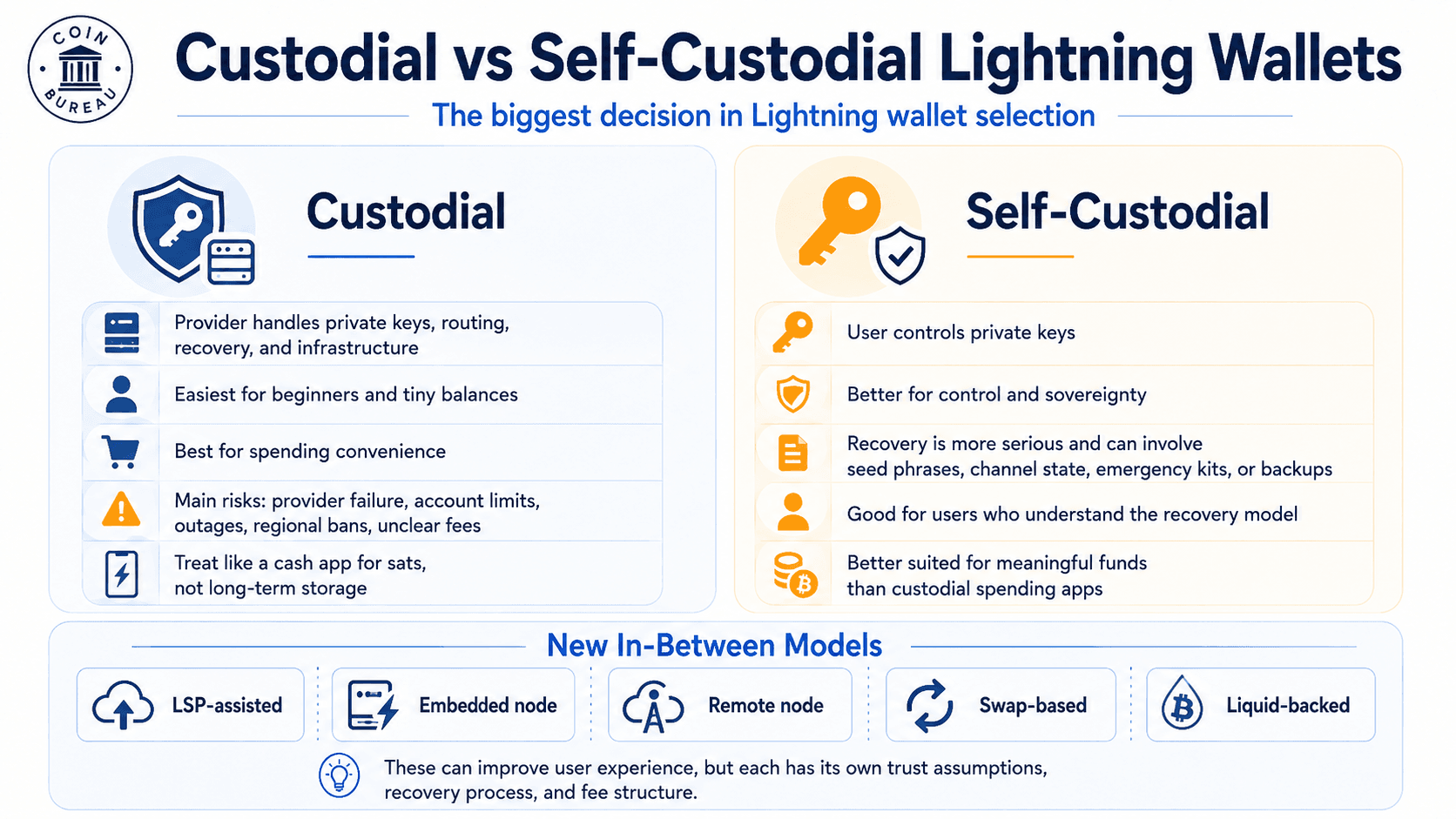 Custody Choice Shapes Who Controls Funds, How Recovery Works and Which Risks Users Accept
Custodial Lightning Wallets
Custodial Lightning wallets are best for beginners, small balances and users who value speed over control. The provider handles private keys, payment routing, account recovery and infrastructure.
The risks are provider failure, account restrictions, withdrawal limits, service outages, regional bans and unclear fee models. Wallet of Satoshi’s custodial mode is the simple example: users get fast setup and easy recovery, but the provider or service provider controls keys in that mode.
Custodial Lightning wallets should be treated like cash apps for sats. They are useful for spending, not for serious Bitcoin storage.
Self-Custodial Lightning Wallets
Self-custodial Lightning wallets give users control of private keys. Phoenix, ZEUS, Muun and Breez-style models all give users more control than a fully custodial account, though they do it in different ways.
Self-custody raises the recovery standard. A lost phone, deleted app or missing backup can be more serious than a normal login problem. Lightning channel state, emergency kits, recovery phrases and cloud backups need to be understood before a wallet carries meaningful funds.
Our guide on how to secure seed phrases is worth reading before funding any self-custodial wallet. Lightning adds extra backup details, but seed phrase discipline is still the foundation. Choosing the right crypto wallet for your needs is also a good read here.
Assisted Self-Custody, LSPs and New Wallet Models
LSP-assisted wallets use a Lightning Service Provider to help with channels and liquidity. Embedded node wallets run Lightning infrastructure on the phone. Remote node wallets control a node somewhere else. Swap-based wallets abstract Lightning with on-chain or submarine swaps.
Liquid-backed nodeless wallets move some payment complexity to the Liquid Network. Spark-style wallets aim to offer self-custodial payment flows with smoother Lightning access. These models can improve UX, but each one has its own trust assumptions, recovery process and fee structure.
Which Custody Model Should You Choose?
| User Type | Best Custody Model |
|---|---|
| First-time user | Custodial or simplest self-custody |
| Daily spender | Self-custody with automated channels |
| Node runner | Remote node or embedded node |
| Merchant | POS wallet or payment processor |
| Long-term holder | Hardware wallet, not Lightning |
For long-term BTC, use a wallet from our best hardware wallets guide. Hardware wallets are built for cold storage. Lightning wallets are built for payments. Our hardware wallets vs software wallets guide is useful for readers comparing hot wallets, cold wallets and spending wallets.
Bitcoin Lightning Wallet Fees Explained
Lightning payments can be cheap, but Lightning wallets are not all priced the same. The user may pay routing fees, channel fees, swap fees or on-chain fees depending on wallet design.
For small everyday payments, Lightning fees are often low. The bigger cost usually appears when a wallet has to open or close a channel, create inbound liquidity, use a liquidity provider, perform a submarine swap or move funds back to on-chain Bitcoin.
Routing Fees
Routing fees are tiny fees paid to route payments across the Lightning Network. They go to the nodes that forward the payment from sender to receiver.
These fees are usually measured in sats, the smallest unit of Bitcoin. One sat equals 0.00000001 BTC. In many normal wallet payments, routing fees are only a few sats or less.
Routing fees are usually not the biggest fee for a normal user. Wallet design matters more. A wallet that handles channels directly, uses a liquidity provider, or relies on swaps may show other costs that are larger than the routing fee.
For custodial Lightning payments, Wallet of Satoshi charges no fee to send or receive through Lightning, although small routing fees may still apply on sent payments. Its support page describes these as usually a few sats or less, with many in-wallet transactions carrying no fee.
Channel Opening and Closing Fees
Self-custodial Lightning wallets often need Bitcoin payment channels. A channel is the connection that lets users send or receive Lightning payments without putting every payment on the Bitcoin blockchain.
Opening a channel uses an on-chain Bitcoin transaction. Closing a channel can also use an on-chain Bitcoin transaction. That means a channel opening fee or channel closing fee can rise when Bitcoin block space is expensive.
The mempool is the waiting area for unconfirmed Bitcoin transactions. When the mempool is busy, users often pay higher on-chain Bitcoin fees to get transactions confirmed faster. That can make Lightning channel operations more expensive, even if the Lightning payment itself is cheap.
This is more relevant for self-custodial wallets because the user, the wallet, or a liquidity provider may need to manage channels. Some wallets abstract this away, but the cost can still appear as a channel fee, liquidity fee, service fee or higher quoted payment cost.
Phoenix is a useful example. In its current splicing-based design, Phoenix charges a fixed 0.4% fee for sending Lightning payments. For receiving on-chain, or receiving Lightning when there is insufficient liquidity, Phoenix lists mining fees plus a one-time 1,000 sat fee.
Inbound Liquidity and Receiving Fees
Receiving over Lightning can cost money because a wallet needs inbound liquidity. Inbound liquidity is the capacity to receive funds through a Lightning channel. Outbound liquidity is the capacity to send funds.
A simple way to think about it: if all the channel balance is already on your side, you can send but you may not be able to receive. To receive, there needs to be capacity on the other side of the channel or along the route to you.
This is why the first large receive can be more expensive than expected. The wallet may need to create receiving capacity, resize a channel, splice funds into a channel or ask a liquidity provider to supply inbound liquidity.
Phoenix is the key example because it automates this process. The benefit is a smoother receiving experience. The cost is that users may pay channel-management costs when the wallet needs to create or adjust receiving capacity.
For inbound payments, Phoenix can estimate when a channel-management fee is needed and show the user before the payment is accepted. Users can also set a maximum acceptable fee. If the fee is too high, Phoenix may wait and retry later for a swap-in or reject the Lightning payment.
Swap Fees
Swap fees appear when a wallet moves funds between on-chain Bitcoin and Lightning. A swap lets a user pay or receive across the two systems without manually managing every channel.
A submarine swap is one common design. It lets a user holding on-chain BTC pay a Lightning invoice through a swap provider, or move value between Lightning and on-chain Bitcoin. This can improve wallet UX, but it can also add cost because the swap may involve an on-chain Bitcoin transaction.
Muun is the common example of a swap-based wallet. Under Muun’s Lightning payment flow, a submarine swap can occur. The payment details may show two fees: a Lightning fee for the routing cost of the off-chain part of the payment, and a swap fee that includes the first on-chain transaction to the swap provider.
Muun’s wallet page notes that Lightning fees can be as low as 1 satoshi, but that does not mean every Muun Lightning payment costs 1 sat. If the wallet needs an under-the-hood on-chain transaction, the user can be exposed to Bitcoin mempool conditions. That can make many small Lightning invoices more expensive during a busy fee market.
Cheapest Wallet Depends on How You Use It
The cheapest Lightning wallet is the one that fits the payment pattern. A wallet with low routing fees may not be cheapest for a large first receive. A wallet with free Lightning sends may not be cheapest when withdrawing to cold storage. A wallet with a clean single BTC balance may not be cheapest when frequent swaps touch the Bitcoin base layer.
| Payment pattern | Fee risk |
|---|---|
| Many tiny sends | Routing fees |
| First large receive | Inbound liquidity or channel cost |
| Moving to cold storage | On-chain fee |
| Switching between on-chain and Lightning | Swap fee |
| Using custodial wallet | Provider spread or hidden service model |
Custodial wallets can hide channel complexity from the user, but they add custody risk and may use a different fee model. For on-chain Bitcoin withdrawals, Wallet of Satoshi charges 1.95% plus a fixed fee that varies with the Bitcoin mempool. For on-chain Bitcoin deposits, Wallet of Satoshi charges 1.95%.
Always check the payment preview before sending. Lightning fees can be low, but wallet architecture decides which costs reach the user.
Best Lightning Wallet by Use Case
Use case matters more than brand rank. A wallet that works well for Nostr zaps may be the wrong tool for a merchant counter, and a merchant wallet may be too limited for a node runner.
| Use Case | Best Wallet Type | Suggested Wallets |
|---|---|---|
| Beginner | Simple custodial or automated self-custody | Wallet of Satoshi, Phoenix |
| Self-custody | Automated channel wallet | Phoenix, Breez, Muun |
| Node runner | Remote or embedded node | ZEUS, BlueWallet |
| Merchant | POS or payment processor | Breez, Blink, Coinsnap, Strike Business |
| Nostr zaps | Web and Lightning Address support | Alby, ZEUS, Wallet of Satoshi |
| Traveler | Simple mobile payments | Wallet of Satoshi, Phoenix, Blink |
| Stablecoin payments | Stablecoin-enabled payment wallet | Speed, Aqua, Tether Wallet |
| Long-term storage | Hardware wallet | Trezor, Ledger, Coldcard, not Lightning |
Best Wallet for Beginners
Wallet of Satoshi is the easiest beginner option where available, especially for tiny sats balances and first Lightning payments. Phoenix is the stronger next step for users who want self-custody with less manual channel work.
Beginners should avoid sending meaningful balances until they understand the recovery process. A Lightning wallet can feel as simple as a payment app, but Bitcoin payments are still final once sent.
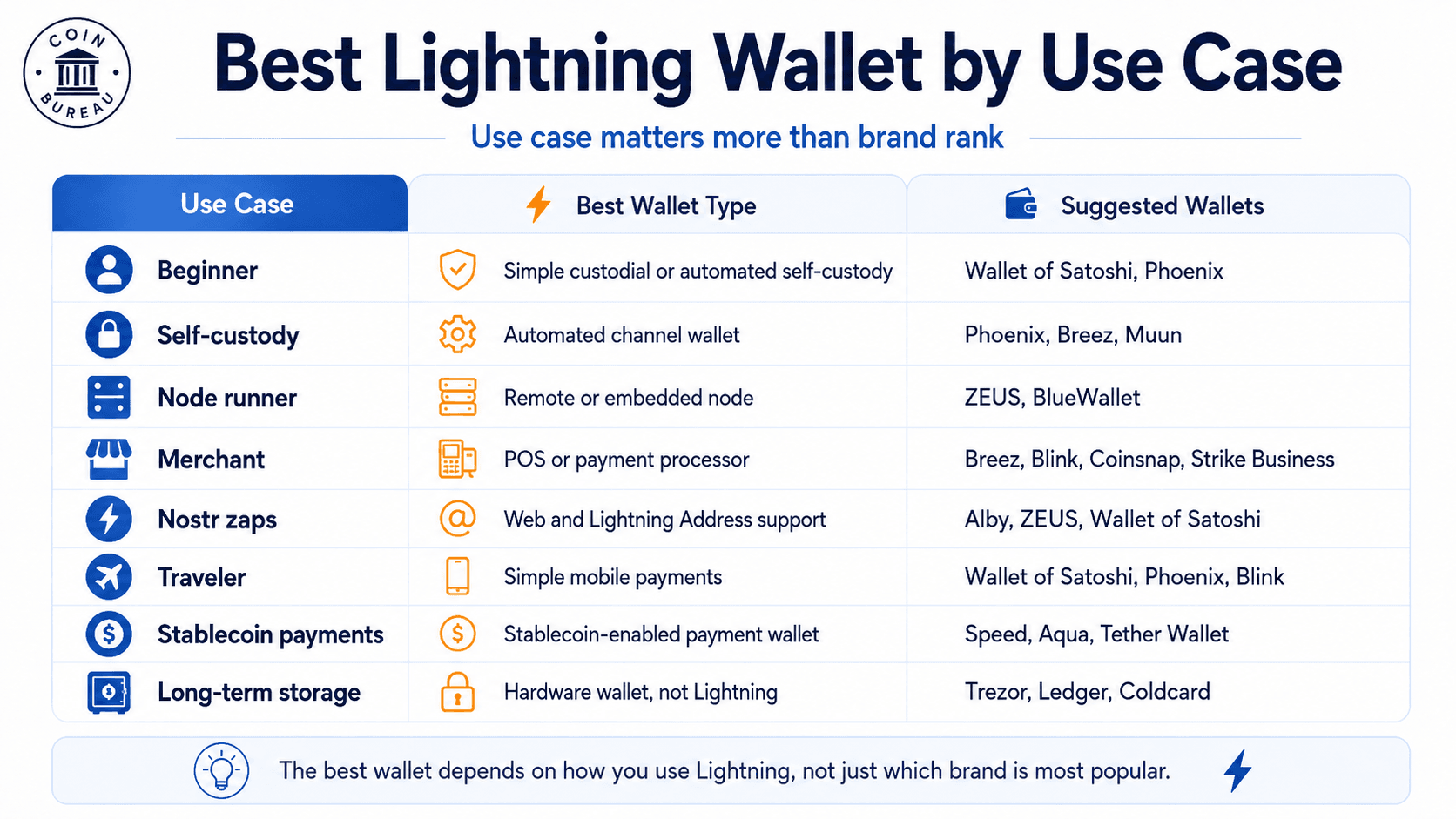 the Best Lightning Wallet Depends on Whether Users Need Simplicity, Self-Custody, Merchant Tools or Nostr Payments
Best Wallet for Self-Custody
Phoenix is the best self-custodial Lightning wallet for most mobile users. ZEUS is stronger for users who want node control. Muun is useful for users who want a simple BTC balance and do not need native channel management.
Self-custody users should read the backup screen before funding the wallet. Recovery models vary, and Lightning can add channel, swap or emergency-kit details that are not obvious from a normal seed phrase workflow.
Best Wallet for Merchants
Breez and Blink are the top wallet-style picks for merchants. Breez has a strong POS angle, while Blink is useful for community payments, Lightning Address receiving and small business onboarding.
Dedicated processors such as Coinsnap or Strike Business may make more sense for businesses that need accounting, fiat settlement, integrations or staff workflows. A solo vendor can often use a wallet app, while a larger business usually needs reporting and role-based access.
Best Wallet for Nostr and Web Payments
Alby is the strongest pick for Nostr zaps, browser payments, creator tips and Lightning Address use. ZEUS and Wallet of Satoshi can also fit users who already have a preferred mobile Lightning setup.
Creators should pay attention to wallet reliability, Lightning Address support and backup quality. Small tips add up, and losing recovery access can be just as painful as a failed payment.
Lightning Wallet Safety Tips
Lightning wallet safety starts with the right mental model. Treat a Lightning wallet like a spending wallet, not a savings account.
- Keep only spending money in a Lightning wallet. Lightning wallets are designed for fast payments, small transfers and regular spending. They are not the best place to store a long-term Bitcoin stack.
- Use cold storage for long-term BTC. Larger Bitcoin balances are better kept in cold storage, ideally with a hardware wallet. This keeps private keys offline and reduces exposure to mobile wallet bugs, phishing, phone theft and app-level risk.
- Understand whether the wallet is custodial. A custodial Lightning wallet means a provider controls the private keys. This can make payments easier, but it adds custodial risk. The provider may restrict access, freeze withdrawals, suffer downtime or change regional availability.
- Test with a small amount first. Send a small test transaction before using a new wallet for travel, business payments, creator payments or regular income. This helps confirm that the wallet, invoice, backup and withdrawal process work as expected.
- Back up before funding the wallet. A Lightning wallet backup can be more complicated than a normal Bitcoin wallet backup. Some wallets use a seed phrase or recovery phrase. Others may also require an emergency kit, recovery code, cloud backup, channel backup or node backup.
- Do not assume a seed phrase restores Lightning channels in every wallet. A seed phrase may restore on-chain Bitcoin funds, but Lightning channels can have extra recovery requirements. Read the wallet’s backup instructions before receiving funds.
- Download apps from official links. Start from the wallet’s official website and follow its verified app-store links. Fake wallet apps are a real risk in crypto. A malicious app can steal a recovery phrase, trick users into unsafe backups or redirect payments.
- Keep recovery material offline. Do not store a seed phrase or recovery phrase in screenshots, cloud notes, email drafts or messaging apps. Anyone who gets the recovery material may be able to move funds.
- Review country availability before relying on a wallet abroad. Custodial wallets and payment apps can change regional access faster than open-source Bitcoin wallets. This matters for travel, remote work, merchant payments and creator income.
- Move larger balances out of Lightning. After receiving meaningful BTC, consider moving excess funds to a cold-storage setup and keeping the Lightning balance small.
Users who lose wallet access should also read our guide on how to recover a crypto wallet. And for broader wallet safety, our guide to common hardware wallet threats covers phishing, seed phrase mistakes and device risk.
Common Bitcoin Lightning Wallet Problems
Lightning payments are fast when the route, liquidity, invoice and wallet state line up. Failures are common enough that users should know the usual causes before blaming the wallet.
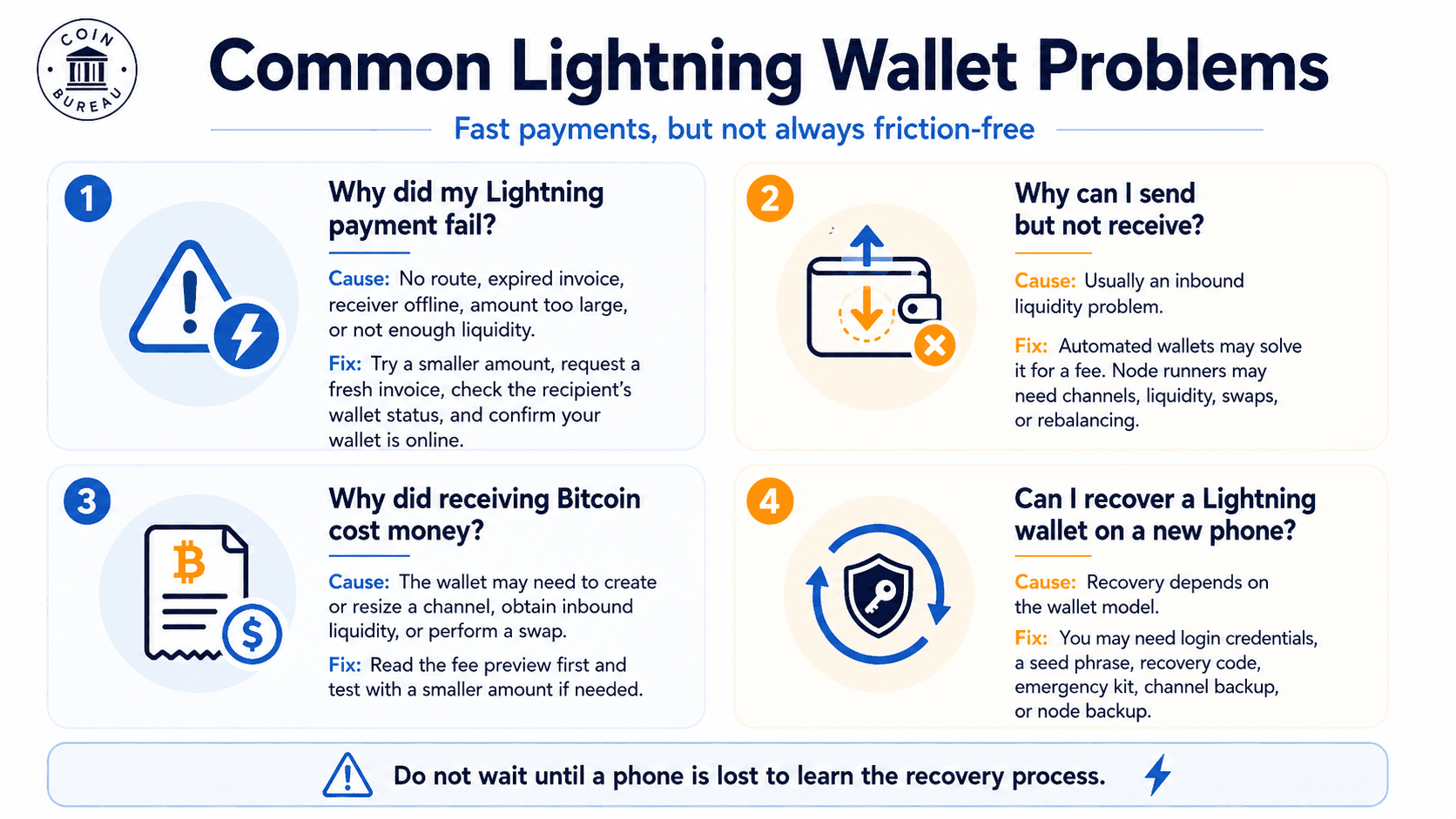 Failed Payments, Liquidity Limits and Recovery Issues Are Common Parts of Using Lightning Wallets
Why Did My Lightning Payment Fail?
A Lightning payment can fail because there is no route, the invoice expired, the receiving wallet is offline, the amount is too large or the route does not have enough liquidity.
Try a smaller amount, request a fresh invoice, check the recipient’s wallet status and confirm that your wallet is online. If the wallet gives a useful error, read it before retrying.
Why Can I Send but Not Receive?
This is usually an inbound liquidity problem. You may have funds available to send, but not enough receiving capacity for the incoming payment.
Wallets with automated liquidity may solve this for a fee. Node runners may need to open channels, receive liquidity, use swaps or adjust channel balances.
Why Did Receiving Bitcoin Cost Money?
Receiving can cost money when the wallet needs to create or resize a channel, obtain inbound liquidity or perform a swap. The payment itself may be Lightning-fast, but the wallet still has to manage capital and on-chain Bitcoin constraints.
Read the fee preview before accepting or sending a payment. If a fee looks high for the amount, use a smaller test payment or choose a different wallet path.
Can I Recover a Lightning Wallet on a New Phone?
Recovery depends on the wallet model. A custodial wallet may recover through login credentials. A self-custodial wallet may need a seed phrase, recovery code, emergency kit, channel backup or node backup.
Do not wait until a phone is lost to learn the recovery process. Test backup instructions with small balances and store recovery materials offline.

Final Verdict: Which Bitcoin Lightning Wallet Should You Use?
The best Bitcoin Lightning wallet depends on custody, payment style and how much control the user wants. For most people, the right answer is a spending wallet for Bitcoin payments, not a place to store long-term BTC.
- For most self-custody users, choose Phoenix Wallet. It gives a strong balance of self-custody, usability and automatic Lightning channel handling.
- For the easiest onboarding, choose Wallet of Satoshi where available. It is simple to use, but it is a custodial wallet, so users should keep balances small and understand the custody trade-off before receiving funds.
- For node runners, choose ZEUS Wallet. It is built for users who want remote node control, embedded node options and more advanced Lightning management from a phone.
- For merchants, start with Breez or Blink. Both can work for Lightning payments, but businesses that need accounting, fiat settlement, staff access or tax reporting may be better served by a dedicated Lightning payment processor.
- For web payments, creator tips and Nostr zaps, choose Alby. It is a natural fit for Lightning Address, browser payments and Nostr-based payments.
- For long-term Bitcoin storage, use a hardware wallet instead. A Lightning wallet should be treated as a spending wallet. For larger balances, use cold storage, protect the seed phrase and move only spending amounts into Lightning.
The best Lightning wallet 2026 pick is not the wallet with the most features. It is the wallet that matches the user’s custody needs, recovery comfort, payment pattern and country availability. Fees, supported regions, app-store access, recovery models, custody modes, Lightning Address support, BOLT12 support, LNURL support and stablecoin rails can change, so users should verify wallet details before relying on any app.