


Trust Wallet gives users direct control over their crypto, but that control comes with sharper edges. Its mobile app, browser extension and SWIFT wallet use different security and recovery models, each with distinct trade-offs.
This guide examines how Trust Wallet protects private keys, how its security record holds up, where users are most exposed and which setup is safest for everyday use, DApps and long-term holdings.
Editor's Note (July 16, 2026): We fully updated this article in July 2026 with a deeper assessment of Trust Wallet's current security model and the risks attached to each version. The refresh adds detailed coverage of the December 2025 extension compromise and an earlier wallet-generation vulnerability, and clearer explanations of private keys, recovery phrases, passkeys, token approvals and local transaction signing. We also expanded the review with incident-response steps, common loss scenarios, hardware-wallet and multisig guidance, security comparisons with MetaMask, Coinbase Wallet and Ledger, and practical checklists for different users.
Quick Verdict: Is Trust Wallet Safe in 2026?
Yes, Trust Wallet is generally safe for everyday self-custody, but its security depends heavily on the user, device and wallet setup.
Trust Wallet keeps standard wallet credentials under the user's control, signs transactions locally and includes app locks, biometrics, security warnings and token approval tools. However, it cannot recover an exposed seed phrase, reverse a blockchain transfer or stop a user from approving a malicious contract.
The mobile app is the strongest fit for routine multichain use. The browser extension introduces additional browser, extension-store and release-channel exposure, while SWIFT replaces the traditional seed phrase with a passkey and cloud-linked recovery model. Large holdings should use a hardware-backed vault rather than relying on Trust Wallet alone.
Trust Wallet Safety Scorecard
Trust Wallet performs best as a locally secured mobile wallet for active personal use. Its weaker areas are browser-extension exposure, irreversible seed phrase loss, malicious DApp approvals and the lack of native multisig or bank-style recovery.
| Safety Category | Rating | Assessment |
|---|---|---|
| Private-key control and local signing | Standard Trust Wallet accounts are non-custodial. Private keys are controlled through the user's recovery phrase, and transactions are prepared and signed locally rather than approved by a centralized Trust Wallet account. | |
| Mobile app security | Device encryption, app locks, biometrics and hardware-backed protections on compatible phones create a credible local security layer when the device is updated, non-rooted and protected by a strong passcode. | |
| Browser extension security | The extension operates alongside websites, browser profiles and other extensions. This adds phishing, malicious-extension, session, publishing and software supply-chain risks beyond those faced by the mobile app. | |
| SWIFT passkey recovery | SWIFT removes the traditional written seed phrase and can simplify recovery through Apple or Google passkey systems. Security then partly depends on the connected cloud account, password manager, signed-in devices and recovery controls. | |
| Transaction warnings and approval controls | The Security Scanner and token approval manager can flag suspicious activity and help users revoke supported permissions. They cannot detect every new malicious contract or guarantee that a transaction is safe. | |
| Security incident record | Trust Wallet has disclosed and responded to extension-specific incidents, including the December 2025 version 2.68 compromise and an earlier wallet-generation vulnerability. These incidents did not affect every Trust Wallet product, but they exposed weaknesses in extension code and software distribution. | |
| Recovery-phrase and phishing risk | Anyone who obtains the seed phrase or private key can recreate the wallet and move its assets. App passwords, biometrics and reinstalling the wallet cannot protect credentials that have already been exposed. | |
| DApp and approval risk | Malicious contracts, unlimited token approvals, deceptive signatures, fake domains and compromised DApp front ends can lead to permanent loss. Disconnecting a DApp does not automatically revoke its on-chain permissions. | |
| Long-term and shared-fund protection | Trust Wallet is a hot wallet without native multisig, government-backed insurance, transaction reversals or company-controlled recovery. Hardware wallets and multisig provide stronger structures for vaults, teams and large portfolios. |
Trust Wallet Safety by Use Case
The safest setup depends on how the wallet will be used and how much value one compromised device, phrase or approval could expose.
| Use Case | Safety Verdict | Main Risk | Better Setup |
|---|---|---|---|
| Everyday mobile use | Seed phrase and device compromise | Strong device lock and offline backup | |
| Browser DApp use | Extension and browser compromise | Current version and separate browser profile | |
| SWIFT wallet | Cloud-account and passkey access | Secure Apple or Google account | |
| Large holdings | Online key exposure | Hardware wallet or separate vault | |
| Experimental DApps | Malicious approvals | Burner wallet with limited funds |
Safety ratings reflect Trust Wallet's security structure and common user risks, not a guarantee against phishing, malware, malicious contracts, compromised recovery credentials or irreversible transaction errors.
Disclosure
Some links in this guide may be affiliate links. If you choose to use a service through these links, we may earn a commission at no additional cost to you.
How Trust Wallet Security Works
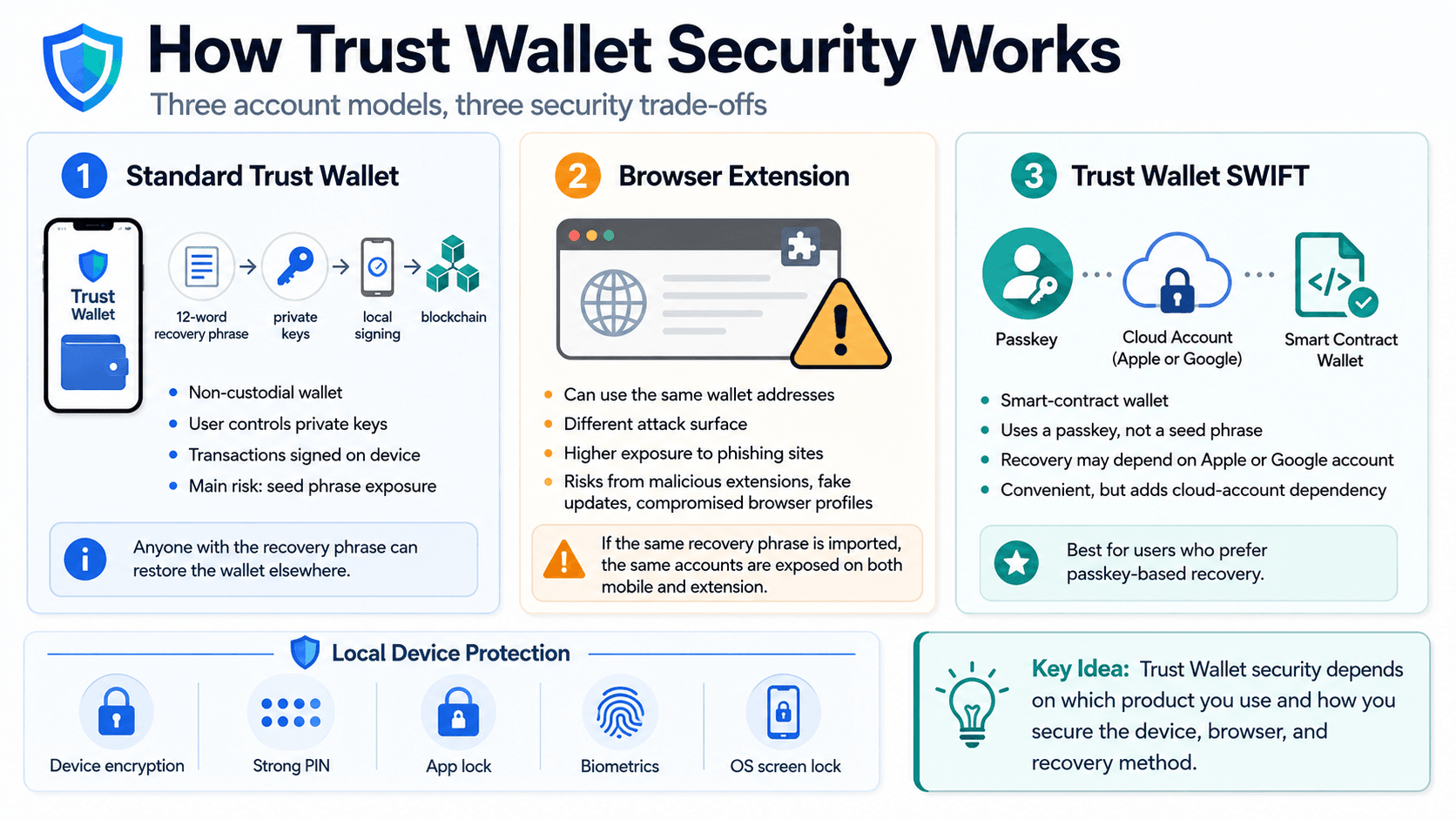
Trust Wallet security begins with the credentials that authorize blockchain transactions. The standard mobile wallet, browser extension and SWIFT wallet use different account and recovery models.
 Recovery Models, Local Signing, Browser Exposure and Passkeys Shape How Trust Wallet Protects User Funds
Standard Trust Wallet: Private Keys, Recovery Phrases and Local Signing
Trust Wallet is non-custodial. This means Trust Wallet does not hold a user’s private keys or control the credentials needed to move crypto. The assets themselves remain recorded on a blockchain. They are not physically stored inside the mobile app. The wallet displays balances, generates public addresses, prepares transactions and communicates with blockchain networks.
A public address identifies an account that can receive funds. A private key creates the transaction signature required to authorize outgoing transfers and smart-contract interactions. Standard recovery-phrase Trust Wallet accounts are externally owned accounts, or EOAs. An EOA is controlled by a private key rather than programmable smart-contract rules.
Our guide to private keys, public keys and wallet addresses explains how these credentials control blockchain accounts.
The recovery phrase, also called a seed phrase, can recreate the wallet and derive its private keys. Trust Wallet’s standard 12-word phrase follows the BIP39 mnemonic format. BIP44 derivation paths help compatible wallets generate accounts for different blockchain networks. Trust Wallet follows the broader structure used by hierarchical deterministic wallets, which derive multiple blockchain accounts from one root backup.
Transactions are prepared and signed locally on the user’s device. The signed transaction is then broadcast to the relevant blockchain. Trust Wallet cannot reset or replace a lost standard recovery phrase. Its wallet recovery guidance explains how the phrase can restore the wallet on another compatible device.
Self-custody removes some exchange-custody risks, but responsibility moves to the user. Losing the recovery phrase, entering it into a phishing site or signing a malicious transaction can result in permanent loss.
Browser Extension: The Same Keys, a Different Attack Surface
Trust Wallet’s mobile app and browser extension can control the same wallet addresses, but they operate in different software environments. Trust Wallet’s mobile app generally has a narrower attack surface than its browser extension because it avoids browser-profile, malicious-extension and extension-store risks. Both remain hot-wallet environments, and either can expose the same accounts when users import the same recovery phrase.
A browser extension runs alongside websites, browser profiles and other extensions. It can face:
- Phishing sites designed to imitate real DApps
- Malicious browser extensions
- Compromised browser profiles
- Fake extension updates
- Stolen browser-session data
- Software supply-chain attacks
- Compromised publishing credentials
The mobile app still faces malware, phishing, device theft and recovery-phrase compromise. It remains a hot wallet running on an internet-connected device.
Importing the same recovery phrase into both the mobile app and Trust Wallet Browser Extension exposes the same accounts through both surfaces. A compromise involving either copy can affect every address derived from that phrase. Updating or removing an extension cannot protect a recovery phrase that has already been exposed. The correct response is to create a new wallet with a new phrase and move the remaining assets.
Extension users should reach the official Chrome Web Store listing through Trust Wallet’s verified browser extension page. They should confirm the publisher, installed version and any current security notices. The Trust Wallet Browser Extension should not be described as universally unsafe. Its risk profile is structurally different because browser software, other extensions and the release channel add more points of failure.
Trust Wallet SWIFT: Passkeys, Smart Contracts and Cloud Recovery
Trust Wallet SWIFT is not simply a different interface for a standard Trust Wallet account. It is an account-abstraction smart-contract wallet. Account abstraction lets a programmable smart contract manage account authorization and recovery rules. A standard Trust Wallet account is an EOA controlled by a private key derived from a recovery phrase. SWIFT replaces the traditional 12-word phrase with a passkey.
A passkey is a cryptographic credential linked to a device ecosystem or password manager. Depending on the device ecosystem and passkey setup, the credential may be synchronized or recovered through the user’s iCloud account or Google Password Manager. Face ID, a fingerprint or a device passcode can unlock it locally.
This recovery model may be easier for users who are uncomfortable storing a written seed phrase or who prefer account-based passkey recovery. The trade-off is cloud-account dependency. SWIFT security partly relies on the connected Apple ID or Google account, password manager, signed-in devices and account-recovery controls.
Users should protect the connected cloud account with a unique password, account-level two-factor authentication and careful review of active devices and recovery methods.
Standard Trust Wallet and SWIFT use separate wallet addresses. Creating a SWIFT account does not convert an existing EOA or automatically transfer its assets. Trust Wallet says a SWIFT passkey can be recovered through the associated Apple or Google account, depending on the device ecosystem. Users moving between device ecosystems should confirm recovery compatibility before relying on the new device.
Device Encryption, App Locks and Biometrics
Trust Wallet users can combine several local security layers:
- Device encryption
- A strong phone PIN or passcode
- Trust Wallet’s app lock
- Face ID or fingerprint authentication
- Secure Enclave protections on compatible Apple devices
- Android Keystore protections where supported
- Automatic operating-system screen locking
These controls restrict local access if a device is lost, stolen or briefly left unattended. Hardware-backed security can make extraction of protected information harder on compatible devices. Device-level and application-level encryption can help protect locally stored wallet information, although protection still depends on the operating system, device integrity and access controls.
They do not provide exchange-style transaction 2FA. Face ID or a fingerprint can unlock the app locally, but the blockchain accepts the cryptographic transaction signature, not the biometric check itself. Trust Wallet does not ask an independent server or authenticator app to approve every standard wallet transaction. The private key provides the transaction signature. Anyone who controls the key can authorize activity without access to a separate Trust Wallet account.
Biometrics and app locks also cannot stop someone who already has the recovery phrase. Malware, a rooted phone or a jailbroken device can weaken the operating system’s isolation and local security controls.
Trust Wallet's Security Record: Hacks, Breaches and Response
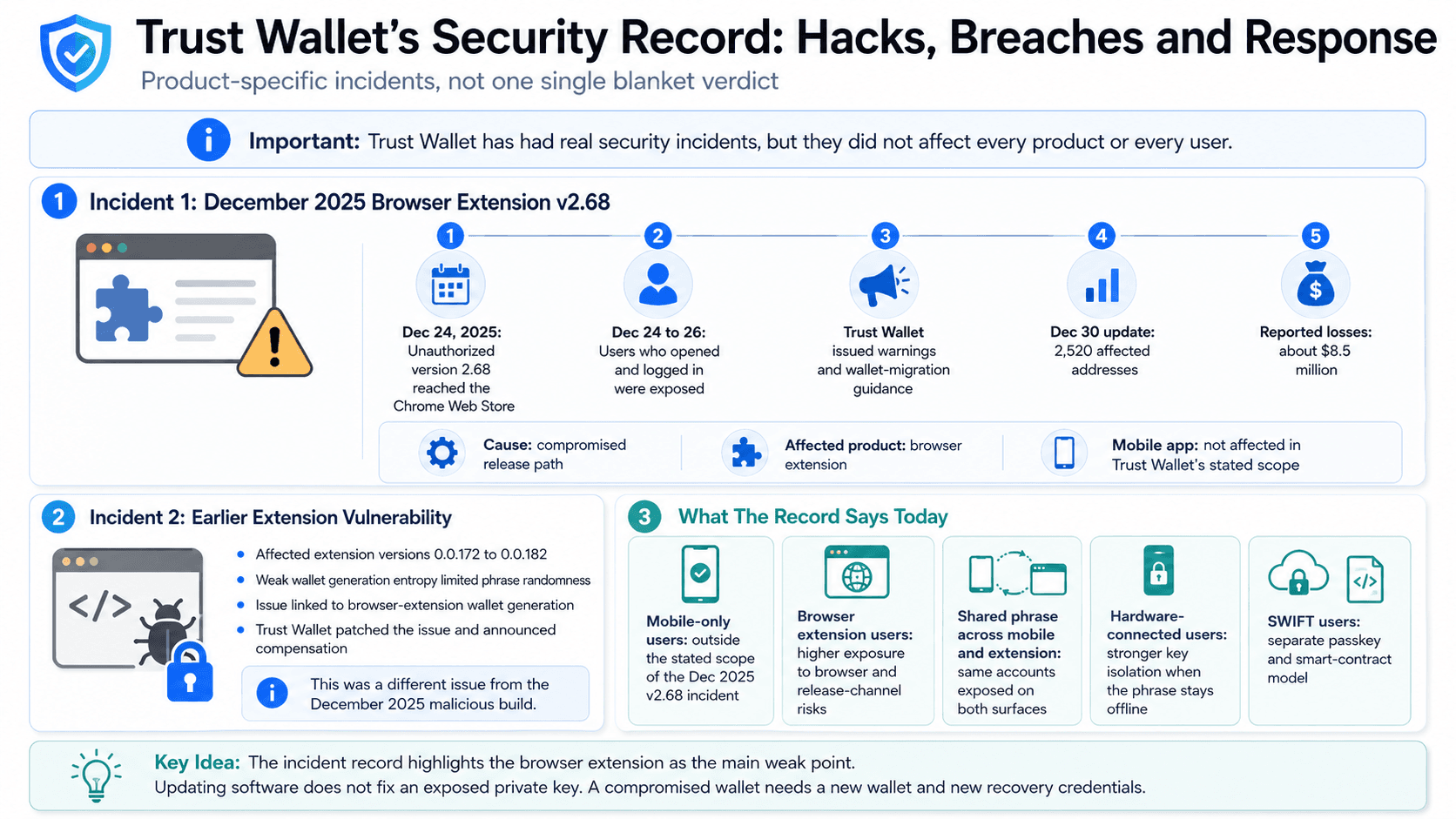
Trust Wallet has experienced security incidents, but they did not affect every product or every user.
 Past Extension Incidents Reveal Different Causes, Affected Users and the Limits of Software Updates
The December 2025 Browser Extension v2.68 Incident
On Dec. 24, 2025, an unauthorized Trust Wallet browser extension version 2.68 reached the Chrome Web Store through a compromised release path. Users who opened and logged into that version between December 24 and 26 were exposed. Trust Wallet reported 2,520 affected addresses and about $8.5 million in associated losses. It said the mobile app and other extension versions were not affected.
The unauthorized build contained malicious code, and Trust Wallet later linked its release path to compromised development secrets and a leaked Chrome Web Store API key.
| Date | Development |
|---|---|
| December 24, 2025 | Unauthorized browser extension version 2.68 reached the Chrome Web Store |
| December 24 to 26 | Users who opened and logged into the affected build faced exposure |
| After detection | Trust Wallet warned users and issued wallet-migration guidance |
| December 30 update | The company reported 2,520 affected addresses and about $8.5 million in associated losses |
| Remediation | Affected users were told to create new wallets, transfer funds and submit reimbursement claims |
Trust Wallet directed affected users to move assets into newly created wallets. It also launched a voluntary reimbursement process. The incident is best described as a browser-extension software supply-chain and release-channel compromise.
The Earlier Browser Extension Vulnerability
Before the December 2025 compromise, Trust Wallet experienced a separate browser-extension vulnerability affecting addresses generated through vulnerable extension versions. A flaw in the WebAssembly wallet-generation implementation limited entropy to 32 bits, leaving a much smaller set of possible recovery phrases than intended.
The affected addresses were linked to browser-extension versions 0.0.172 through 0.0.182 rather than the standard mobile application. Trust Wallet patched the underlying wallet-core issue and announced compensation for verified victims.
What the Incident Record Says About Trust Wallet Today
The available incident record does not show that every standard Trust Wallet mobile wallet was remotely compromised. It does show that browser extensions, development secrets, publishing credentials and software distribution can become serious security weak points. Disclosure, reimbursement and remediation improve Trust Wallet’s incident-response record. They do not erase the original security failures.
A user affected by key exposure needs a completely new wallet. Updating the app, reinstalling the extension or changing a local password does not revoke a compromised private key.
Trust Wallet Security Features: What Helps and What Is Missing
Trust Wallet includes transaction warnings, approval controls and local access protections. These features reduce some risks, but they cannot guarantee that every DApp, address or signature is safe.
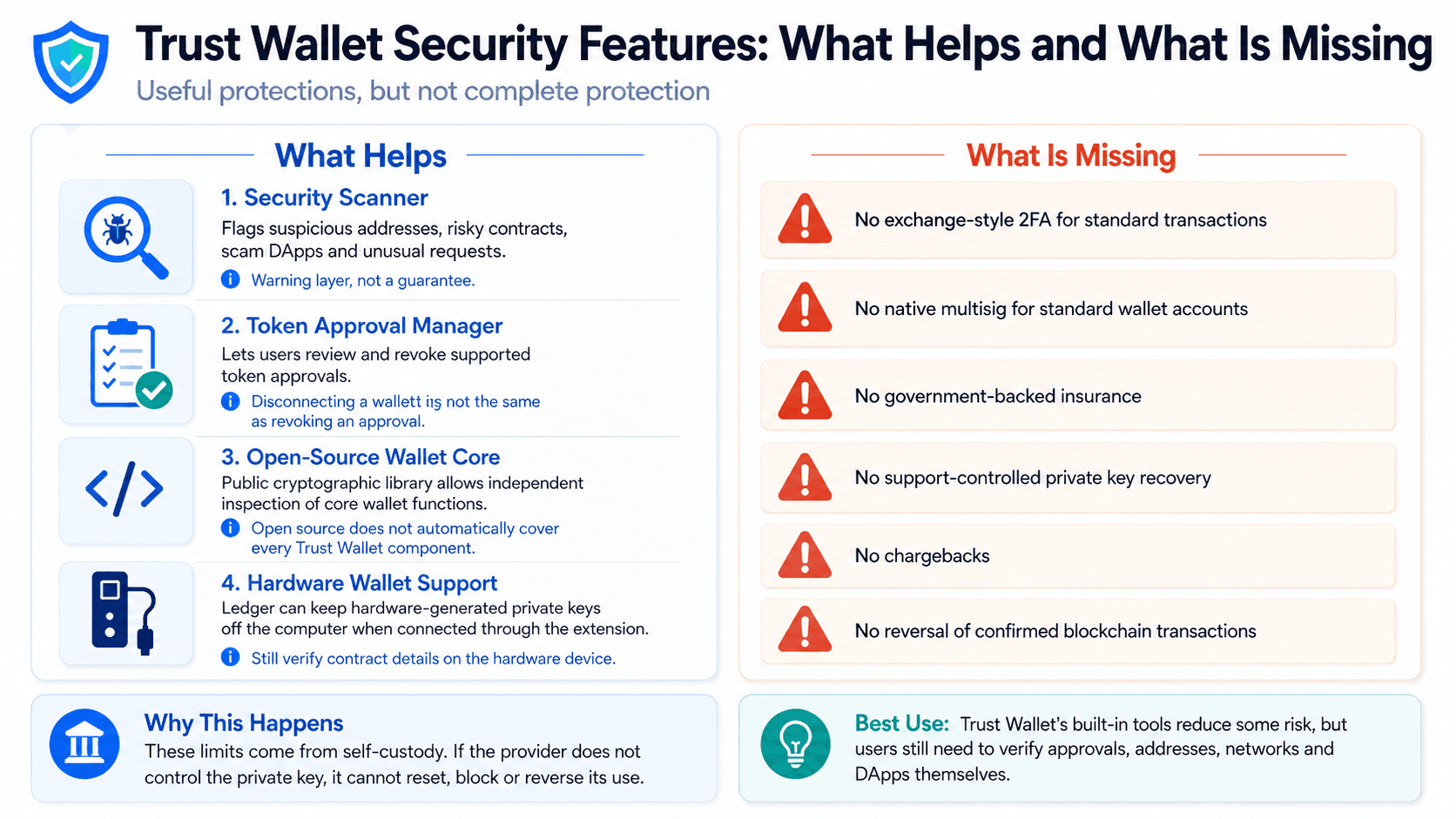 Built-In Warnings and Approval Tools Reduce Risk, but Self-Custody Leaves Important Protections Missing
Security Scanner and Transaction Warnings
The Trust Wallet Security Scanner adds a Web3 security detection layer before a user signs certain transactions.
It may flag:
- Known malicious addresses
- Suspicious smart contracts
- Risky token approvals
- Potential scam DApps
- Unusual transaction requests
- Known wallet-drainer activity
Trust Wallet describes the scanner as a warning layer for risky transactions and suspicious destinations. Depending on the network and transaction, such systems may rely on contract analysis, transaction simulation, risk databases and known scam-address data, with coverage varying between blockchains and transaction types.
A scanner cannot guarantee that every new malicious contract will be detected. A newly deployed wallet drainer may not yet appear in a scam database. Automated systems can also produce a false positive or false negative.
Wallet warnings cannot remove the underlying smart-contract attack risks associated with vulnerable or malicious code.
Token Approvals and DApp Permissions
A token approval gives a spender contract permission to transfer specified tokens or, depending on the token standard, act as an operator for selected assets.
The approved address is called the spender contract. Some DApps request an exact allowance, while others ask for an unlimited approval. Approvals are recorded on-chain. They can remain active after the user closes the DApp or disconnects the wallet.
Disconnecting a WalletConnect session is not the same as revoking a token approval. Disconnecting ends the live connection. Revoking changes the on-chain allowance granted to the spender. Trust Wallet launched a built-in token approval manager in November 2025. It allows users to view, assess and revoke supported approvals in the mobile app and browser extension.
Our guide to how WalletConnect works explains the difference between connecting a wallet, maintaining a session and granting an on-chain token allowance.
Open-Source Code, Audits and Certifications
Trust Wallet's Wallet Core is open source. The public Wallet Core GitHub repository contains a cross-platform cryptographic library for blockchain functions, address generation and transaction signing.
Open-source Wallet Core does not automatically mean every Trust Wallet component is public. Wallet Core’s open-source status should not be extended automatically to the mobile interface, browser-extension package, backend services, security scanner or software-publishing pipeline. Open source allows independent inspection of source code. It does not prove that a deployed application matches the reviewed source or that future vulnerabilities cannot occur.
Security audit claims also require scope. A useful audit identifies:
- The product or codebase assessed
- The version or commit reviewed
- The date of the vulnerability assessment
- The auditing company
- The published security audit report
- Any unresolved findings
Trust Wallet reports ISO/IEC 27001 and ISO/IEC 27701 certifications. ISO/IEC 27001 is an organizational information-security certification, while ISO/IEC 27701 extends an information-security management system with privacy information management controls within the certified scope. These certifications assess management systems and processes within a defined scope. They do not certify every transaction, application build or software release as vulnerability-free.
Hardware Wallet Support and Its Limits
Trust Wallet's browser extension supports connecting a hardware wallet. When connected correctly, a Ledger keeps its hardware-generated private keys on the device rather than exporting them to the computer or Trust Wallet extension.
Trust Wallet can act as the interface for viewing accounts, preparing transactions and connecting to DApps. The Ledger device performs transaction signing after the user confirms the request. Users must check the recipient, network, amount and contract details on the hardware device. Blind signing reduces protection because the user may approve data that is not clearly displayed.
A hardware wallet cannot protect someone who knowingly confirms a malicious transaction. Users should never import a hardware wallet recovery phrase into Trust Wallet. Doing so places the phrase on an internet-connected device and defeats the cold-storage and offline private-key model. The stronger setup is to generate the phrase on the Ledger, keep it offline and connect the hardware account through the Trust Wallet Browser Extension.
Users who interact with complex contracts should also understand crypto blind signing and its risks.
Missing Protections: 2FA, Multisig, Insurance and Reversals
Trust Wallet’s standard self-custody model lacks several protections found in exchanges, banks and institutional wallet systems:
- No exchange-style two-factor authentication: Standard transactions do not require a code from an authenticator app.
- No native multisig: A standard account does not require signatures from several devices or people.
- No government-backed insurance: Assets are not protected by FDIC insurance or an equivalent deposit scheme.
- No company-controlled private key recovery: Support cannot replace a lost or exposed standard recovery phrase.
- No chargebacks: Confirmed blockchain transactions generally cannot be reversed.
- No support-controlled asset seizure: Customer support cannot take funds from another self-custody address and return them.
These limits are partly consequences of self-custody rather than missing convenience features. A provider that does not control the private key cannot independently block or reverse its use.
Shared funds should use a multi-signature wallet with independent signers and documented approval rules. One person’s mobile wallet is a poor structure for a team treasury.
How People Lose Crypto Through Trust Wallet
A loss involving Trust Wallet does not automatically mean the application itself was compromised. Users also lose assets through phishing, malicious approvals, device compromise and irreversible transaction mistakes.
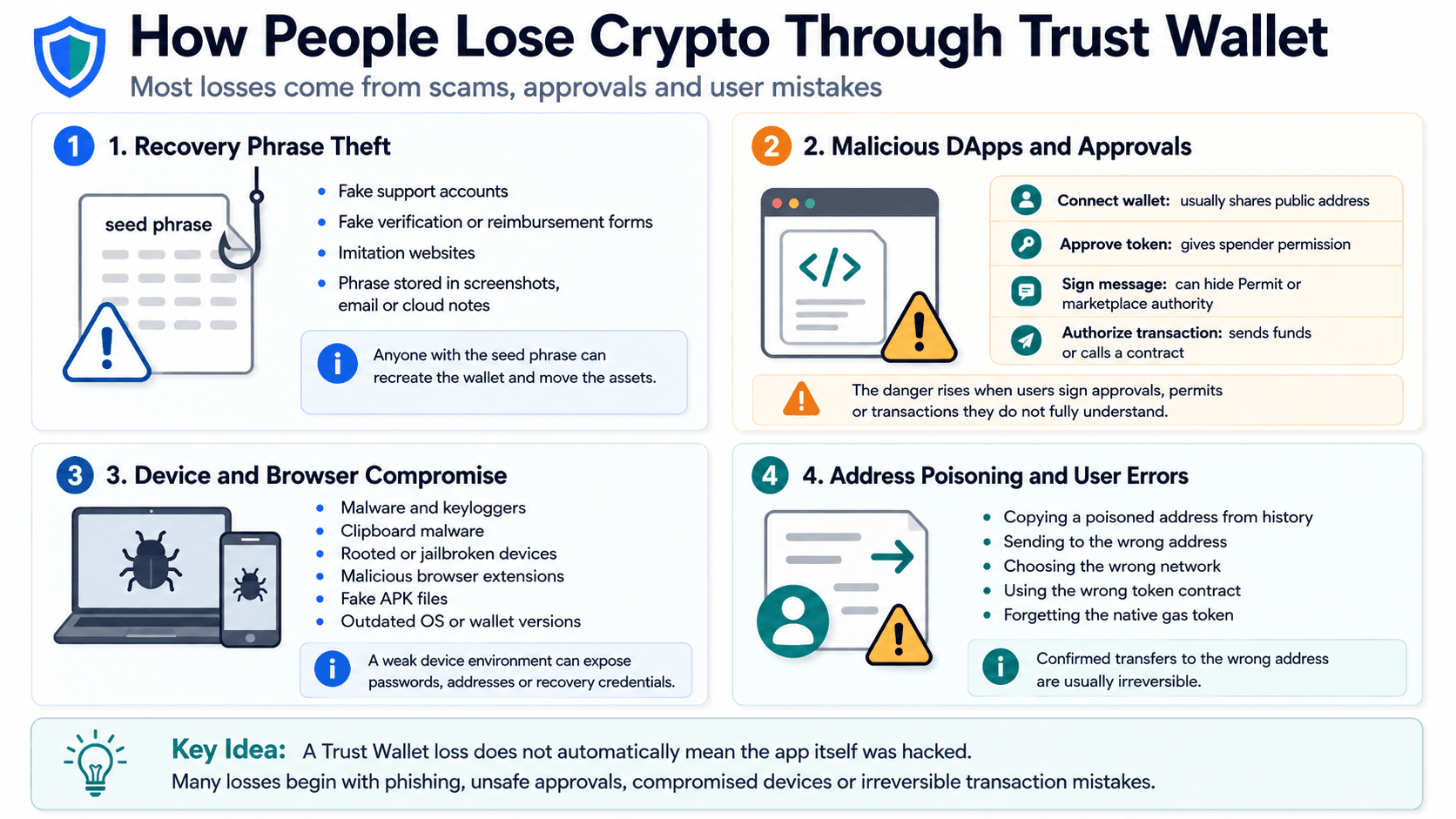 Phishing, Malicious Approvals, Compromised Devices and Transaction Errors Create the Most Common Loss Scenarios
Recovery Phrase Theft, Phishing and Fake Support
Recovery-phrase theft is one of the most serious wallet risks because the phrase can recreate the wallet on another device.
Common scams include:
- Fake Trust Wallet support accounts
- Fake verification forms
- Fake wallet-recovery services
- Search ads leading to imitation websites
- Impersonators offering to “synchronize” a wallet
- Requests to “validate” a recovery phrase
- Fake reimbursement forms
- Recovery phrases stored in screenshots, emails or cloud notes
Anyone with the seed phrase can derive the wallet’s private keys and transfer its assets. The attacker does not need the original phone, app password or biometrics. Many of these tactics also appear in our guide to the most common crypto scams and warning signs.
Trust Wallet support can inspect a public address or transaction hash without a recovery phrase. Anyone requesting the phrase or private key should be treated as an impersonator. Offline backups reduce exposure to cloud-account compromise. A paper or metal backup still needs protection against theft, fire, water damage and unauthorized photography.
Recovery scammers often contact victims after a public theft. They may promise to trace or retrieve funds in exchange for upfront payment or wallet access. No legitimate service can guarantee recovery of irreversible blockchain assets. Users should follow established seed phrase storage and protection practices, including keeping the phrase offline and never sharing it with support staff or websites.
Malicious DApps, Approvals and Deceptive Signatures
Different wallet actions grant different levels of authority:
| Action | What It Usually Does | Main Risk |
|---|---|---|
| Connect a wallet | Shares public addresses with a DApp | Privacy loss and deceptive follow-up requests |
| Approve a token | Gives a spender permission to transfer an allowance | Later token transfers by the contract |
| Sign a message | Proves control or authorizes structured data | Hidden Permit or marketplace authority |
| Authorize a transaction | Sends funds or calls a smart contract | Immediate and usually irreversible execution |
| Grant unlimited spending access | Gives a contract a very high allowance | Long-lived wallet-drainer exposure |
Connecting a wallet does not usually let a DApp transfer assets by itself. The danger rises when the user signs an approval, Permit message or transaction. A familiar-looking DApp can still be unsafe. Its domain may be cloned, its front end may be compromised or its smart contract may contain malicious logic.
WalletConnect provides communication between the wallet and DApp. It does not certify the DApp’s security. Blind signing is risky because the request may not display its full effect in human-readable form. Users should reject signatures and approvals that do not match the intended action.
Device, Browser and Application Compromise
Local wallet security depends partly on the device and browser environment.
Practical threats include:
- Malware
- Keyloggers
- Clipboard malware
- Rooted Android devices
- Jailbroken iPhones
- Malicious browser extensions
- Shared computers or browser profiles
- Fake APK files
- Outdated operating systems
- Outdated wallet versions
Clipboard malware can replace a copied wallet address with an attacker address. A keylogger can capture passwords or a recovery phrase entered on the device. Rooting or jailbreaking can weaken operating-system isolation. Fake APK files can imitate the official Android application while adding malicious code.
Users should avoid installing wallet software on shared computers. A separate browser profile with few extensions can reduce exposure during browser-based DApp use. Operating-system and app updates close known vulnerabilities. Users should still confirm the official publisher and download path because a software release channel can itself become compromised.
Address Poisoning, Wrong Networks and Irreversible Errors
Not every failed or missing transaction involves a wallet hack.
Address poisoning involves sending a tiny or worthless transaction from an address designed to resemble one in the victim’s transaction history. The attacker hopes the user later copies the poisoned address without checking it. Users should compare the full address where possible or verify several characters at both the beginning and end.
Other common errors include:
- Sending to the wrong wallet address
- Selecting the wrong network
- Using a blockchain network the receiving platform does not support
- Interacting with a fake token or NFT
- Using the wrong token contract
- Failing to keep the native gas token
- Copying an address from transaction history without verification
A transaction hash can be checked on the relevant blockchain explorer. The explorer shows the receiving wallet address, network, token contract and confirmation status. A confirmed transfer to the wrong address is generally irreversible. Trust Wallet support cannot cancel it or force the recipient to return the funds.
What to Do If Your Trust Wallet Is Compromised
A fast and organized response can protect assets that have not yet moved. The correct steps depend on whether the recovery credentials, a DApp approval or the physical phone was compromised.
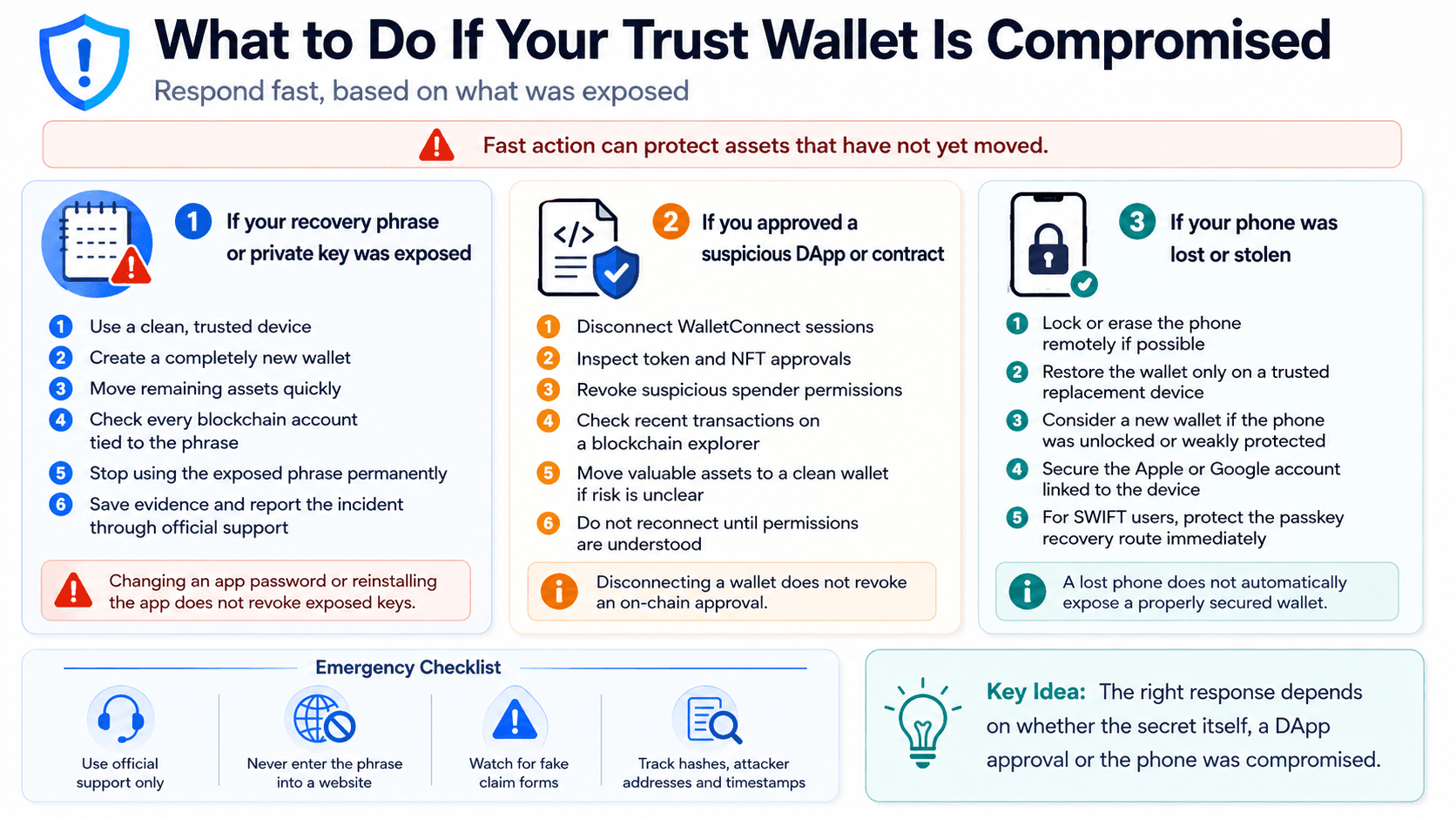 Fast, Targeted Action Can Protect Remaining Assets After Key Exposure, Suspicious Approvals or Device Loss
If Your Recovery Phrase or Private Key Was Exposed
Treat a compromised seed phrase or exposed private key as permanently unsafe.
- Use a clean, trusted device. Do not create the replacement wallet on a device suspected of malware.
- Create a completely new wallet. It must have a new recovery phrase and new addresses.
- Move remaining assets. Transfer funds to the new addresses as quickly as practical.
- Check every affected blockchain account. One seed phrase can derive accounts across several networks.
- Stop using the compromised phrase permanently.
- Do not rely on a password change. Reinstalling Trust Wallet or changing its app lock does not invalidate exposed keys.
- Record evidence. Save transaction hashes, attacker addresses, token contracts and timestamps.
- Report the incident. Use official Trust Wallet support and notify relevant exchanges or platforms.
Eligible users should access the official reimbursement claim route only through a verified Trust Wallet page. Trust Wallet support does not need a recovery phrase or private key to process a claim. Fake forms may ask users to enter a compromised seed phrase or “synchronize” the replacement wallet.
Automated attackers may monitor a compromised address and sweep incoming gas tokens. Asset migration can become complex when funds are spread across several chains or smart contracts.
If You Approved a Suspicious DApp or Contract
A suspicious DApp interaction does not always mean the private key has been exposed.
Take these steps:
- Disconnect active WalletConnect sessions.
- Inspect token allowances and NFT approvals.
- Revoke suspicious spender permissions.
- Check recent transactions on a blockchain explorer such as Etherscan.
- Move valuable assets to a clean wallet when suspicious permissions cannot be identified or revoked confidently, or when unauthorized activity has already occurred.
- Review unlimited approvals and operator permissions.
- Stop interacting with the suspected contract or front end.
Do not reconnect to the DApp or compromised contract until its status and granted permissions are understood. Revoking an allowance usually requires a gas fee. Disconnecting a DApp does not revoke its on-chain approval. Revocation cannot reverse a completed theft. It only blocks future transfers under that permission. A wallet that signed several unclear requests may be safer to retire when the user cannot determine what authority was granted.
If Your Phone Was Lost or Stolen
Use the device manufacturer’s remote tools to lock or erase the phone where possible. A standard wallet can be restored on a trusted replacement device with the recovery phrase. Do not enter the phrase into a website, support chat or remote-access session.
Consider creating a new wallet and moving assets when:
- The phone was unlocked when lost
- The device passcode was weak
- Trust Wallet’s app lock was disabled
- The phone was rooted or jailbroken
- The recovery phrase was stored on the phone
Secure the associated Apple ID or Google account. Change the password, review signed-in devices and confirm that the recovery email and phone number have not changed. SWIFT users should protect the cloud account and passkey recovery route immediately. Access to the relevant Apple or Google account may affect wallet restoration. A lost phone does not automatically expose a properly secured wallet. Weak local protection, cloud-stored secrets and unlocked sessions increase the risk.
Is Trust Wallet Safe for Your Use Case?
Trust Wallet suits active personal use better than shared custody or isolated long-term storage. The recommended setup changes with the user’s activity and loss tolerance.
| User Type | Verdict | Reason |
|---|---|---|
| Beginner | Suitable with education | Simple interface, but recovery mistakes are unforgiving |
| Mobile-first user | Strong fit | Convenient multichain access and local signing |
| Active DeFi user | Suitable as an active wallet | DApp and approval exposure requires stricter habits |
| Long-term holder | Not ideal as the only wallet | A hardware wallet provides stronger key isolation |
| High-value holder | Use a layered setup | Separate active, burner and vault wallets |
| Company or team | Poor fit | No native multisig or role-based approvals |
| User wanting bank-style recovery | Poor fit for standard wallet | No support-controlled key reset or reversal |
| User uncomfortable with seed phrases | Consider SWIFT carefully | Passkeys simplify recovery but add cloud-account dependency |
Beginners can use Trust Wallet after learning how recovery phrases, networks and token approvals work, although the interface cannot prevent every irreversible mistake. Active DeFi users should keep only a limited working balance in the wallet and use a separate burner wallet for unfamiliar DApps, speculative token launches and airdrop claims that require wallet interaction.
Long-term holders and users with high-value portfolios should separate daily activity from storage through a hardware-backed vault. Companies and teams should avoid placing treasury funds under one mobile recovery phrase and use multisig to distribute authorization across independent signers.
New users can also compare Trust Wallet with other crypto wallets for beginners.
Trust Wallet vs MetaMask, Coinbase Wallet and Ledger: Which Is Safer?
Trust Wallet, MetaMask, Coinbase Wallet and Ledger use different platforms and key-storage models. Security depends on the chosen setup rather than brand recognition alone.
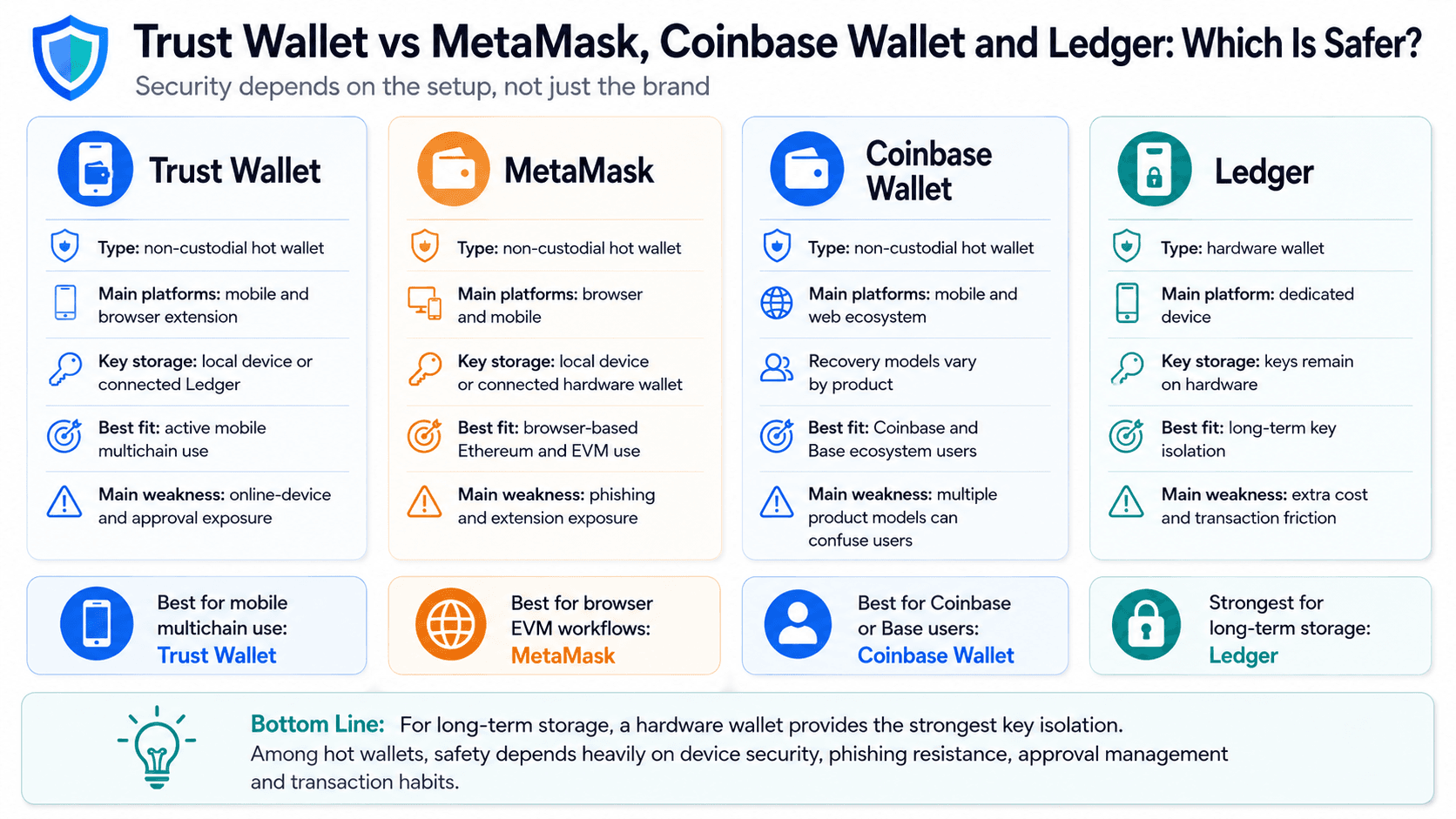 Each Wallet Offers Different Security Trade-Offs Across Mobile Use, Browser Access and Long-Term Storage
| Wallet | Wallet Type | Main Platform | Key Storage | Recovery Model | Hardware-Wallet Support | DApp Access | Native Multisig | Best Security Use Case | Main Weakness |
|---|---|---|---|---|---|---|---|---|---|
| Trust Wallet | Non-custodial hot wallet | Mobile and browser extension | Local device or connected Ledger | Recovery phrase or SWIFT passkey | Ledger through extension | Broad multichain access | No | Active mobile use | Online-device and approval exposure |
| MetaMask | Non-custodial hot wallet | Browser and mobile | Local device or connected hardware wallet | Secret Recovery Phrase | Yes | Deep Ethereum and EVM access | No | Browser-based EVM use | Phishing and extension exposure |
| Coinbase Wallet | Non-custodial hot wallet | Mobile and web ecosystem | User-controlled credentials | Recovery phrase, backup or smart-account model, depending on product | Hardware-wallet support varies by Coinbase Wallet product and interface | Web3 DApps and Base ecosystem integrations | No | Users active in Coinbase and Base ecosystems | Different wallet products and recovery models can be confusing |
| Ledger | Hardware wallet | Dedicated device | Keys remain on hardware | Device-generated recovery phrase | Native hardware model | Through compatible interfaces | No | Long-term key isolation | Cost and transaction friction |
Trust Wallet vs MetaMask
MetaMask and Trust Wallet are non-custodial hot wallets exposed to seed-phrase theft, phishing, malicious DApps and deceptive signatures. MetaMask remains closely associated with browser-based Ethereum and EVM use, with broad compatibility across Ethereum DeFi.
Trust Wallet is more mobile and multichain oriented, making its mobile app suitable for users who want to avoid regular browser-extension use. Neither wallet removes recovery-phrase risk, and safety depends heavily on the device, extension exposure and transaction habits.
Use Trust Wallet for a mobile-first multichain workflow. Use MetaMask when browser-based EVM compatibility is the priority. A hardware wallet can improve key isolation for either setup.
Our separate assessment of whether MetaMask is safe examines its extension risks, recovery model and DApp approval exposure.
Trust Wallet vs Coinbase Wallet
Coinbase Wallet is separate from the Coinbase exchange, and funds held in its self-custody products do not receive the exchange’s custodial protections. Trust Wallet and Coinbase Wallet both give users control over their keys or account credentials, although Coinbase recovery options vary across recovery-phrase, backup and smart-account products.
Coinbase Wallet has closer integration with the Coinbase and Base ecosystems, while Trust Wallet emphasizes broad mobile and multichain access. Cloud backup can simplify restoration but adds cloud-account and password dependencies, so users should confirm the recovery model attached to the specific Coinbase wallet product they use.
Neither product can reverse a completed self-custody transaction.
Readers considering the Coinbase ecosystem can review our analysis of Coinbase Wallet’s security model.
Trust Wallet vs Ledger
Trust Wallet is more convenient for everyday transfers and DApp access. Ledger provides stronger isolation for long-term storage because private keys remain on a dedicated hardware device. Ledger functions as a cold-wallet security layer when its private keys and recovery phrase remain offline.
Trust Wallet can serve as an interface for a connected Ledger through the browser extension. A combined setup can separate active DApp use from long-term storage. Users can keep routine balances in Trust Wallet while holding long-term assets in a Ledger-protected vault.
Every hardware-wallet transaction still needs careful verification. A Ledger cannot prevent loss when the user confirms a malicious contract call or sends funds to the wrong address.
Read our Ledger hardware wallets review.
How to Make Trust Wallet Safer
The strongest Trust Wallet setup separates wallet creation, everyday activity and long-term storage. Start with the checklist and then apply the controls relevant to each wallet role. Follow these steps to reduce the main device, recovery-phrase and DApp risks:
Trust Wallet Safety Checklist
- Download Trust Wallet through its official website or verified store listing.
- Confirm the publisher and installed version.
- Use an updated, non-rooted device with a strong passcode.
- Enable the Trust Wallet app lock and biometrics.
- Write the standard recovery phrase down offline.
- Never enter the phrase into a website, cloud note or support form.
- Verify every DApp domain, network and recipient address.
- Read transaction previews and token approvals.
- Avoid unlimited approvals where possible.
- Review and revoke unused permissions.
- Send a small test transaction to unfamiliar addresses.
- Keep only a working balance in an active hot wallet.
- Use a hardware wallet for long-term holdings.
- Use a burner wallet for experimental DApps.
- Use multisig for shared or organizational funds.
Before Creating or Importing a Wallet
Download the official Trust Wallet app through its verified website, the Apple App Store or Google Play. Browser users should reach the Chrome Web Store listing through Trust Wallet’s official page. Avoid search ads, unofficial download sites and fake extensions. Confirm the application publisher. Android users should avoid unofficial APK files.
Use an updated, non-rooted and non-jailbroken device. Set a strong device passcode and enable the Trust Wallet app lock. Create the wallet in private, away from cameras, screen-sharing software and other people.
Write the recovery phrase down offline. Check the spelling and word order before storing it in a physically protected location. Do not photograph, email or save the phrase in cloud storage. A phrase imported from an older wallet retains the security history of every device and service where it previously appeared.
When Using DApps and Sending Crypto
Verify the DApp domain before connecting. Bookmarks can reduce exposure to fake search results for services used regularly. Read every transaction preview and token approval. Confirm that the requested permission matches the intended action. Avoid unlimited approvals where a limited allowance is available.
Check the asset, blockchain network and recipient address. Verify the full address when the interface allows it. At minimum, compare multiple characters at both ends, confirm the network and use a saved address or small test transfer for high-value transactions. Keep enough of the native gas token for transfers and emergency approval revocations.
Send a small test transaction before moving a larger amount to an unfamiliar address. A test transfer verifies the destination and network, but it does not prove that a smart contract is safe. Review and revoke unused permissions. Disconnect old WalletConnect sessions after use.
When Holding Larger Amounts
Use a layered wallet model rather than placing every asset and activity under one recovery method.
| Wallet Layer | Main Role | Main Security Rule |
|---|---|---|
| Vault wallet | Long-term holdings | Hardware wallet with an offline recovery backup |
| Active wallet | Routine transfers and selected DApps | Keep a limited working balance |
| Burner wallet | Airdrops and unfamiliar DApps | Hold only an amount that can be exposed |
| Recovery backup | Restore access after device failure | Store offline and protect physically |
| Shared wallet | Company, DAO or family funds | Use multisig with independent signers |
There is no universal dollar threshold for buying a hardware wallet. The appropriate threshold depends on the user’s loss tolerance and the financial consequences of losing the portfolio. A vault wallet should not connect regularly to experimental DApps. Transfer only the required amount to an active or burner wallet. A recovery backup should remain offline and physically protected. Storing several unencrypted digital copies increases the number of ways the phrase can leak.
Shared funds need multisig rather than one person’s mobile wallet. Separating vault, active and burner wallets improves portfolio security by limiting how much one compromised wallet can expose. Long-term holders can compare the best hardware wallets by security model, recovery method, asset support and user fit.

Final Verdict
Trust Wallet safety depends on which product and setup a user chooses.
Its standard mobile app is generally suitable for everyday self-custody when the device, recovery phrase and transaction approvals are properly protected. The browser extension has a broader attack surface and carries added browser and release-channel risks, highlighted by the December 2025 compromise. SWIFT reduces seed-phrase friction through a passkey, but adds cloud-account and recovery dependencies.
As a non-custodial wallet, Trust Wallet works well for active crypto use and regular DApp access, provided users inspect each DApp approval carefully. A hardware wallet or multisig setup is preferable for large holdings, long-term storage or shared funds. The main risk remains an exposed recovery method or a malicious transaction the user authorizes.