


Ledger Nano S Plus is the best budget option for occasional desktop signing. Ledger Flex is the best all-around choice of these three for regular transactions and mobile use. Ledger Stax justifies its higher price for buyers who specifically want a larger display, wireless charging, and a premium design.
All three protect private keys using a Secure Element with the same advertised certification level. The meaningful differences are how you connect, what you can review before signing, and how often the device needs charging.
Editor's Note (Oct. 22, 2026): We fully updated this comparison in October 2026 with the latest Ledger Nano S Plus, Flex, and Stax specifications, pricing, and features. We've revised the security analysis to reflect current Secure Element certifications, Clear Signing, Transaction Check, and the October 2026 hardware-implant disclosure. We've also expanded mobile and third-party wallet compatibility, recovery options, and upgrade guidance. The article now includes updated buying recommendations and a comparison with the newer Ledger Nano Gen5.
Quick Verdict: Ledger Nano S Plus, Flex or Stax?
Ledger Flex is our best all-around choice, Nano S Plus is the best budget hardware wallet, and Stax is best for buyers who want a larger screen and premium convenience.
All three use CC EAL6+ Secure Elements to protect private keys. Nano S Plus delivers essential cold storage for $59 but requires a wired connection and button-based navigation. Flex adds a secure E Ink touchscreen, Bluetooth, NFC, and eligible Transaction Check workflows for $249. Stax costs $399 and offers a larger curved display, Qi wireless charging, and premium construction. The right choice depends on your signing frequency, preferred devices, and willingness to pay for convenience.
Who Should Choose Which?
Choose Ledger Nano S Plus if you want:
- Essential hardware wallet security at a $59 reference price
- Cold storage for Bitcoin, Ethereum, and other supported assets
- A battery-free device for occasional transactions and long-term holding
- USB connectivity with desktop computers or compatible Android devices
- CC EAL6+ Secure Element protection without paying for a touchscreen
- An affordable backup signer that can share recovery credentials with another Ledger
Choose Ledger Flex if you want:
- A 2.84-inch secure E Ink touchscreen for easier transaction review
- Bluetooth signing with supported iPhone and Android applications
- Eligible Transaction Check warnings for supported EVM transactions
- USB-C, Bluetooth, and NFC functionality
- Ledger Recovery Key compatibility with an included backup card
- A practical balance between everyday usability and price
Choose Ledger Stax if you want:
- A larger 3.7-inch curved E Ink touchscreen
- More physical display space for reviewing supported transactions
- Qi wireless charging with compatible chargers
- Magnetic stacking and an included protective Magnet Shell
- Bluetooth, NFC, Recovery Key, and eligible Transaction Check functionality
- Premium hardware design and display customization
Ledger Nano S Plus vs. Flex vs. Stax by Category
| Category | Best Fit | Why |
|---|---|---|
| Best overall hardware wallet | Ledger Flex | Combines touchscreen signing, supported mobile connectivity, and eligible transaction-risk screening without Stax's additional $150 premium. |
| Budget cold storage | Nano S Plus | Provides CC EAL6+ Secure Element protection and on-device signing at Ledger's $59 published U.S. reference price. |
| Long-term holding | Nano S Plus | Its battery-free design removes charging requirements and suits users who rarely sign transactions. |
| Frequent transaction signing | Ledger Flex | The touchscreen makes regular navigation and supported transaction review easier than the Nano S Plus button interface. |
| Private-key protection | All Three | All use CC EAL6+ Secure Elements, Ledger OS, PIN protection, and on-device transaction approval. The premium models do not automatically provide stronger fundamental key isolation. |
| Transaction-risk screening | Flex / Stax | Both support Transaction Check for eligible workflows, currently focused on supported EVM transactions. Nano S Plus does not support this feature. |
| iPhone compatibility | Flex / Stax | Both support Bluetooth signing through compatible iOS applications. Nano S Plus does not provide direct iPhone signing. |
| Desktop signing | All Three | All support USB connections with compatible desktop software, including supported external wallet integrations. |
| Display size and readability | Ledger Stax | Its 3.7-inch curved E Ink display provides more physical viewing area than Flex's 2.84-inch screen and Nano S Plus's 1.1-inch OLED. |
| Portable everyday use | Ledger Flex | Bluetooth connectivity, rechargeable operation, and a secure touchscreen make Flex a practical choice for regular mobile signing. |
| Charging convenience | Ledger Stax | Stax supports compatible Qi wireless chargers in addition to USB-C. Flex uses USB-C charging, while Nano S Plus has no battery. |
| Backup and recovery flexibility | Flex / Stax | Both support traditional recovery phrases, Ledger Recovery Key, and optional Ledger Recover. Nano S Plus supports recovery phrases and eligible desktop Recover workflows but not Recovery Key. |
| Lowest device price | Nano S Plus | At $59, it costs $190 less than Flex and $340 less than Stax at Ledger's published U.S. reference prices. |
| Premium design and customization | Ledger Stax | The curved E Ink display, magnetic stacking, wireless charging, and included Magnet Shell distinguish it from the other models. |
| Overall value for active users | Ledger Flex | Offers the key touchscreen and connectivity advantages of Stax at a lower price, although the $179 Nano Gen5 is another option worth comparing. |
Prices and specifications reflect information reviewed as of Oct. 22, 2026. Published U.S. reference prices are $59 for Nano S Plus, $249 for Flex, and $399 for Stax. Regional pricing, availability, firmware, supported integrations, and transaction-security features may change. Clear Signing and Transaction Check depend on supported transactions and do not eliminate signing risks. Verify compatibility and current details before purchasing.
Disclosure
Some links in this guide may be affiliate links. If you purchase a product through these links, we may earn a commission at no additional cost to you.
Disclaimer
This comparison is for educational purposes only and is not financial, investment, or security advice. Hardware wallets reduce private-key exposure but cannot eliminate phishing, malicious transaction approvals, compromised recovery credentials, or supply-chain risks. Our assessment is based on manufacturer specifications, official compatibility documentation, security disclosures, and product information reviewed as of Oct. 22, 2026.
Ledger Nano S Plus vs. Flex vs. Stax: Key Differences at a Glance
These hardware wallets share Ledger's approach to private-key protection. Their main differences concern the display, connectivity, supported transaction safeguards, and convenience.
| Feature | Ledger Nano S Plus | Ledger Flex | Ledger Stax |
|---|---|---|---|
| Manufacturer-published U.S. price reference | $59 | $249 | $399 |
| Secure Element certification | CC EAL6+ | CC EAL6+ | CC EAL6+ |
| Display | 1.1-inch OLED, 128 × 64 pixels | 2.84-inch flat E Ink, 480 × 600 pixels | 3.7-inch curved E Ink, 400 × 670 pixels |
| Controls | Two buttons | Capacitive touchscreen | Capacitive touchscreen |
| Clear Signing | Supported transactions; smaller display | Supported transactions; secure touchscreen | Supported transactions; larger secure touchscreen |
| Transaction Check | Not supported | Eligible transactions | Eligible transactions |
| Connectivity | USB-C | USB-C, Bluetooth 5.2, NFC | USB-C, Bluetooth 5.2, NFC |
| Direct iPhone signing | No | Bluetooth through supported apps | Bluetooth through supported apps |
| Android connection | Compatible USB connection | USB or Bluetooth through supported apps | USB or Bluetooth through supported apps |
| Desktop connection | USB | USB | USB |
| Battery | None; USB-powered | Rechargeable | Rechargeable |
| Wireless charging | No | No | Compatible Qi chargers |
| Recovery phrase | Supported | Supported | Supported |
| Ledger Recovery Key | Not compatible | Compatible | Compatible |
| Optional Ledger Recover | Desktop workflow | Desktop and mobile workflows | Desktop and mobile workflows |
| Current standard-box accessories | USB-A-to-USB-C cable, three recovery sheets, keychain strap | USB-C-to-USB-C cable, recovery sheet, Recovery Key | USB-C-to-USB-C cable, three recovery sheets, Recovery Key, Midnight Black Magnet Shell |
| Best suited for | Budget buyers and occasional signing | Frequent signing and mobile use | Larger-screen preference and premium convenience |
Information is current as of Oct. 22, 2026. These are Ledger's published U.S. prices, not guaranteed checkout totals; current store offers, taxes, shipping, and regional availability can differ.
- What they share: Secure Element protection, Ledger OS, PIN access, recovery-phrase support, and on-device transaction approval.
- What Flex adds: A secure E Ink touchscreen, Bluetooth, NFC features, Recovery Key compatibility, and eligible Transaction Check workflows.
- What Stax adds: A larger curved display, Qi wireless charging, magnetic stacking, and an included protective shell.
Nano S Plus is wired-only, not air-gapped. It communicates with a connected computer or compatible Android phone through USB.
Read our review of Ledger hardware wallets.
Which Ledger Wallet Should You Buy? Best Models by Use Case
Ledger Nano S Plus is the best budget option, Flex is the best balance of security features and everyday usability, and Stax is best for buyers who prioritize a larger display and premium convenience.
Choose based on how often you sign transactions, which devices you use, and how much transaction information you want to review. Beginners who mainly hold Bitcoin or Ethereum can start with Nano S Plus, while those seeking simpler touchscreen navigation or regular DeFi access may prefer Flex.
Ledger Nano S Plus: Best for Budget Buyers and Long-Term Holders
Best for budget buyers and long-term holders who occasionally sign transactions from a computer. Its main limitation is the small, button-operated screen and lack of newer transaction-checking features.
The Ledger Nano S Plus provides essential hardware wallet protection for $59. Its battery-free, USB-only design suits users who primarily hold Bitcoin or Ethereum and rarely move their assets.
Despite its lower price, Nano S Plus shares the CC EAL6+ Secure Element certification of Flex and Stax. Private keys remain isolated within the device, with PIN protection, physical transaction confirmation, and recovery-phrase-based self-custody.
Read our full Ledger Nano S Plus review.
The Main Compromises
- Small screen: Long addresses and smart contract details require more scrolling.
- Limited connectivity: No Bluetooth, NFC, or direct iPhone connection.
- Fewer transaction safeguards: Limited Clear Signing support and no Transaction Check.
These limitations become more noticeable when regularly interacting with DeFi protocols or approving complex smart contracts. Flex provides a larger secure touchscreen and additional transaction-checking capabilities.
Choose this if you want affordable cold storage, mainly transact from a computer, and prefer a battery-free device for long-term holding. It is also a practical backup hardware wallet.
Ledger Flex: Best for Active Users and Everyday Value
Best for active users who want clearer transaction approvals, mobile connectivity, and additional transaction checks. Its main limitation is the higher price compared with Nano S Plus and Nano Gen5.
The Ledger Flex offers the strongest balance of functionality and convenience among these three models. Its 2.84-inch secure E Ink touchscreen makes reviewing transactions easier than on Nano S Plus, while Bluetooth supports compatible iPhone and Android workflows.
Read our full Ledger Flex review.
Useful Features for Frequent DeFi Transactions
- Clear Signing: Displays supported transaction details in a human-readable format before approval.
- Transaction Check: Screens eligible transactions for recognized threats and suspicious activity.
Neither feature guarantees protection against scams. Availability depends on the network, transaction type, and software integration. Third-party mobile wallet and DApp compatibility must also be verified individually.
Flex also supports NFC-based recovery and authentication features, including the included Ledger Recovery Key.
Ledger Stax: Best for Premium Design and a Larger Display
Best for users who prioritize maximum screen space, readability, and premium convenience. Its main limitation is the $150 premium over Flex without stronger foundational private-key protection.
The Ledger Stax has the largest display in this comparison. Its 3.7-inch curved E Ink touchscreen provides more room for reviewing transaction details and navigating wallet functions.
The larger screen may appeal to users who frequently approve transactions or find compact displays uncomfortable, although individual accessibility benefits require hands-on evaluation.
Read our full Ledger Stax review.
Premium Features
- Qi wireless charging: Convenient for users who interact with their hardware wallet regularly.
- Customizable display: Personalize the lock screen with images or NFTs and identify devices using the curved spine.
- Magnetic stacking: Useful for organizing multiple Stax devices.
- Included accessories: Magnet Shell and Ledger Recovery Key, although Flex also includes the Recovery Key.
Stax shares the CC EAL6+ Secure Element certification, Clear Signing, and Transaction Check capabilities of Flex. Its higher price therefore reflects design, screen size, and convenience rather than superior underlying private-key protection.
For someone signing only occasional Bitcoin transfers, these additions are unlikely to justify the extra expense.
Which Ledger Wallet Is Best for Your Use Case?
| Use Case | Best Fit Among These Three | Why |
|---|---|---|
| First hardware wallet on a tight budget | Nano S Plus | Lowest upfront cost and essential self-custody protections |
| Occasional Bitcoin or Ethereum transactions | Nano S Plus | Battery-free operation and straightforward wired signing |
| Frequent DeFi and smart contract interactions | Flex | Clearer transaction review and eligible Transaction Check |
| iPhone-first wallet management | Flex | Supported Bluetooth workflows without Stax pricing |
| Premium interface and larger-screen preference | Stax | Largest display, personalization, and Qi charging |
| Secondary or backup device | Nano S Plus | Affordable spare signer that can be restored using the same recovery phrase |
Bottom line: Nano S Plus remains the economical choice for occasional signing, Flex is the most balanced option among these three for active users, and Stax is a premium upgrade for screen size and convenience. Buyers prioritizing touchscreen value should also consider Nano Gen5 before paying more for Flex.
Readers can explore our best hardware wallets comparison to assess alternatives beyond Ledger. The Nano S Plus was also included in our guide on the best affordable hardware wallets.
Which Ledger Wallet Is More Secure? Nano S Plus vs. Flex vs. Stax
Security has three distinct parts here: protecting private keys, understanding what you sign, and avoiding compromised hardware or software. Paying more does not improve all three equally.
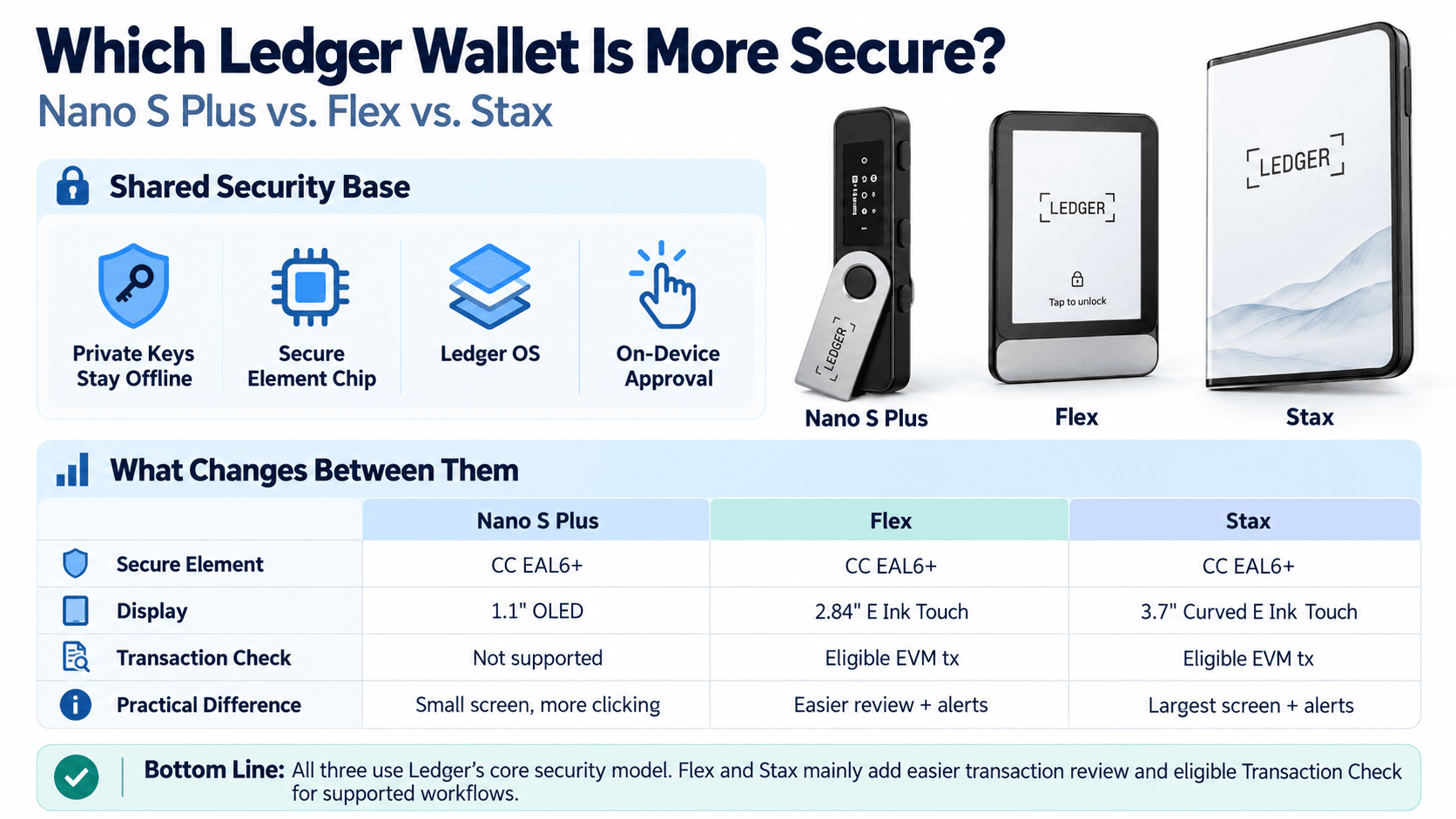 How Nano S Plus, Flex, and Stax Compare on Secure Elements, Transaction Verification, and Supported Security Features
Secure Element, Ledger OS and Private-Key Protection
The shared architecture combines a Secure Element with Ledger OS, historically known as BOLOS. The chip protects sensitive cryptographic material and performs signing operations, while the operating system manages applications and device interactions.
All three use CC EAL6+ Secure Elements. Common Criteria certification applies to the chip within its evaluated scope, rather than the complete wallet, installed apps, and connected services.
A PIN restricts access to the device. A BIP39 recovery phrase enables wallet restoration after loss or failure. On-device verification provides a separate place to inspect transaction information instead of relying entirely on a connected computer or phone.
During ordinary transaction signing, private keys remain inside the hardware wallet. Optional recovery products introduce separate backup mechanisms and should be evaluated independently.
Nano S Plus is wired-only, not air-gapped: it exchanges transaction data with compatible computers or Android phones through USB while protecting keys inside the Secure Element. Flex and Stax use the same underlying key-protection approach. Their security-related upgrade is better visibility into supported transactions, along with eligible Transaction Check warnings.
For readers weighing offline key protection against everyday convenience, our hardware wallets vs software wallets comparison explains the security and usability trade-offs between the two approaches.
Clear Signing and Transaction Check: Why the Screens Make a Difference
Clear Signing presents supported transaction information in a readable form on the device. Blind signing involves approving a request the device cannot fully interpret and display meaningfully.
For an ordinary cryptocurrency transfer, you want to verify the asset, amount, destination, and fee. A token approval is different: it can authorize a smart contract to spend tokens later. The spender and allowance can be more consequential than an immediate transfer amount.
The touchscreen provides more space for supported fields, but an unsupported contract interaction can still require blind signing.
Nano S Plus also supports Clear Signing where the relevant integration provides it. Its smaller screen changes how the information is presented and how much navigation is required.
Transaction Check screens eligible transactions for potential threats. Ledger currently documents its operation around supported Ethereum Virtual Machine workflows. Flex and Stax are eligible devices; Nano S Plus is not.
| Transaction-security feature | Nano S Plus | Flex | Stax |
|---|---|---|---|
| On-device transaction confirmation | Supported | Supported | Supported |
| Clear Signing | Where available, on a smaller display | Where available, on a secure touchscreen | Where available, on a larger secure touchscreen |
| Transaction Check | Not supported | Eligible transactions | Eligible transactions |
| Risks from malicious approvals | Remain | Remain | Remain |
Transaction Check adds screening for supported workflows, currently focused on eligible EVM transactions in Ledger Wallet. An unflagged approval can still be harmful, and unsupported transactions may receive no assessment.
A readable approval can still grant excessive permissions. Review whether the requested action matches your intent, particularly when a DApp requests an unlimited token allowance.
For more on malicious approvals, phishing, and wallet-draining tactics, our guide to common crypto scams covers the warning signs to watch for before signing transactions.
Bluetooth, NFC and Supply-Chain Security: What Are the Actual Risks?
Bluetooth carries messages between the phone and signer. It does not inherently expose private keys: ordinary signing takes place inside the device and requires on-device approval.
Ledger's Bluetooth security explanation distinguishes the transport layer from private-key storage and on-device approval. Wireless communication still adds software and connection behavior that can contain vulnerabilities; it should not be described as risk-free.
NFC serves different functions. Supported uses include Ledger Security Key authentication and interactions with the Recovery Key backup card. NFC is not a general-purpose tap-to-sign route for arbitrary crypto transactions.
In its Oct. 15, 2026, hardware-implant disclosure, Ledger reported that attackers modified genuine devices and redistributed them through resellers in Southeast Asia. Its Donjon researchers investigated added hardware designed to capture recovery phrases during setup.
An original Secure Element can authenticate even if malicious components have been added elsewhere. Ledger Donjon explicitly states that Genuine Check cannot detect every physical modification. It confirms the chip's identity, not the entire device's physical history. Counterfeit devices, modified genuine hardware, and malicious software on a computer pose different risks.
When buying and setting up a device:
- Prefer Ledger's direct store or a trusted purchasing channel, and check current reseller security notices.
- Install genuine Ledger Wallet software from the official website.
- Inspect the device and packaging for unexpected alterations; follow official guidance rather than opening the device experimentally.
- Reject a device supplied with a preset PIN or prewritten recovery phrase.
- Never give recovery words to a seller, support agent, website, or unsolicited application.
Which Ledger Works With iPhone, Android, MetaMask and Other Wallets?
Compatibility depends on the device, operating system, connection method, and wallet application. A supported blockchain alone is not enough.
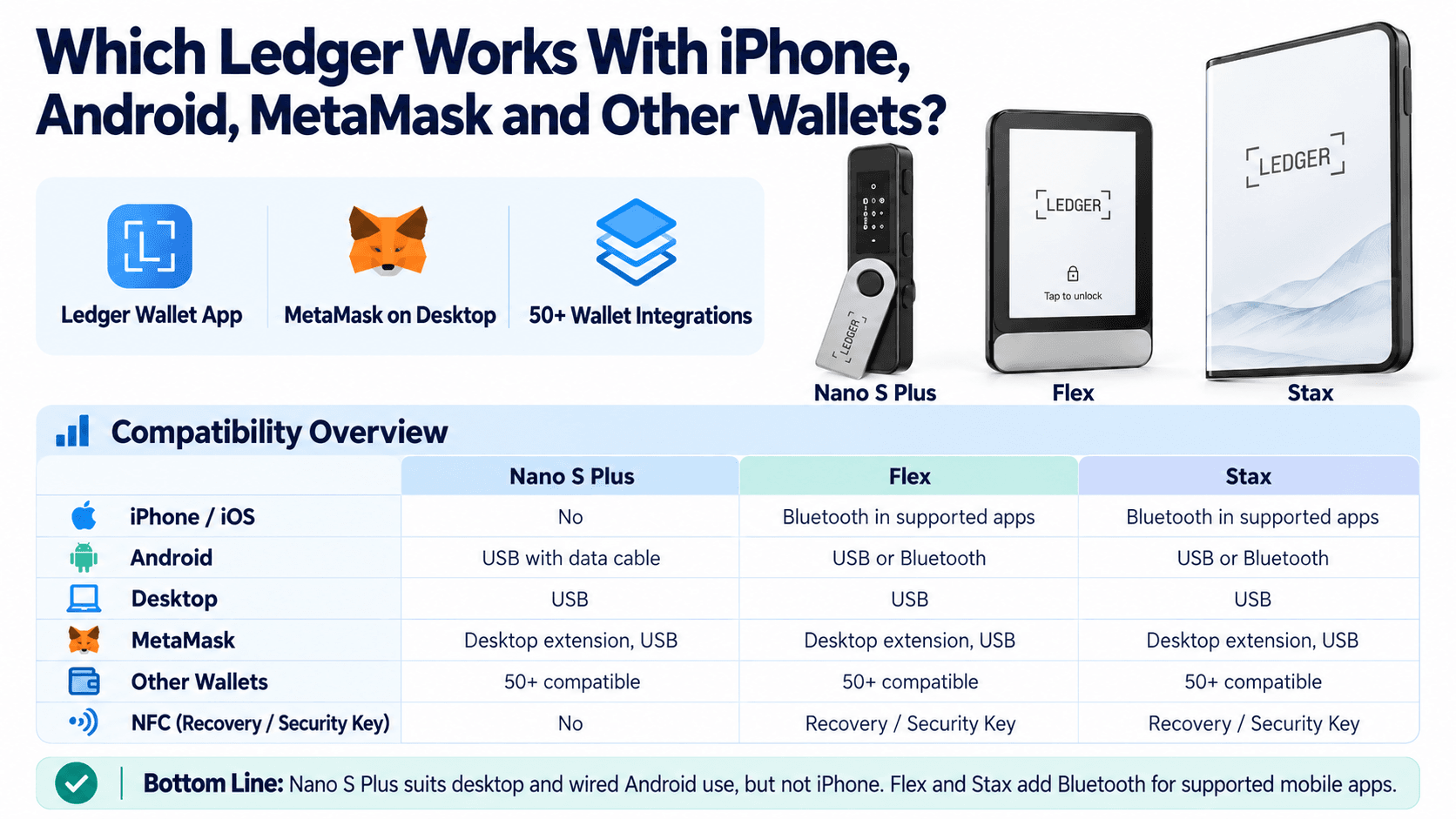 Compare Ledger Device Compatibility Across iPhone, Android, Desktop, Metamask, and Other Wallet Integrations
iPhone, Android and Desktop Compatibility
Nano S Plus suits desktop use and compatible wired Android setups. Flex and Stax extend those options to Bluetooth-based mobile signing.
| Platform or connection | Nano S Plus | Flex | Stax |
|---|---|---|---|
| Windows / macOS / Linux | USB with supported software | USB with supported software | USB with supported software |
| Android | Compatible USB data connection | USB or Bluetooth in supported apps | USB or Bluetooth in supported apps |
| iPhone / iOS | No direct connection | Bluetooth in supported apps | Bluetooth in supported apps |
| Bluetooth | No | Yes | Yes |
| NFC | No | Supported authentication and recovery features | Supported authentication and recovery features |
| USB-C | Yes | Yes | Yes |
Installing an app or viewing an account balance does not mean the phone can connect to the signer. An iPhone's USB-C port does not make Nano S Plus compatible.
Ledger Wallet, formerly Ledger Live, provides Ledger's main desktop and mobile interface. Supported operating-system versions, app releases, firmware, and installed device applications can affect connection availability.
Android users choosing a wired connection need a compatible data cable and USB support. A charging-only cable cannot carry signing requests.
For desktop use, check the external wallet's browser requirements as well. An operating system may support the device even when a particular browser does not support the required connection method.
Bluetooth wallet communication and NFC authentication should also be kept separate. NFC support is for the supported recovery and authentication functions, rather than general crypto signing.
Cryptocurrency, NFT and DApp Compatibility
Bitcoin, Ethereum, Solana, and major ERC-20 tokens are representative supported assets. A high supported-asset count tells you little about whether your preferred application can manage a particular token.
The device may support a blockchain while a particular asset requires external software. Direct management inside Ledger Wallet is a separate question. The supported crypto assets directory identifies relevant asset and software routes.
For MetaMask, Phantom, and Solflare, the connection routes include:
| Wallet and platform | Nano S Plus | Flex | Stax |
|---|---|---|---|
| MetaMask Extension | Desktop USB | Desktop USB | Desktop USB |
| Phantom extension | USB | USB | USB |
| Phantom mobile | No Bluetooth connection | Bluetooth explicitly supported | Bluetooth explicitly supported |
| Solflare desktop | USB with the Solana app | USB with the Solana app | USB with the Solana app |
Mobile support requires more precision than a general "Ledger compatible" label.
Phantom explicitly lists Flex and Stax for mobile Bluetooth and extension USB connections. Phantom also lists Nano Gen5 as unsupported.
Solflare's mobile instructions cover Bluetooth-capable Ledger devices without naming Flex and Stax individually.
Owning an NFT, viewing it in software, displaying its image on a lock screen, and signing a marketplace transaction are different functions. Check each function separately, especially NFT signing through an external marketplace.
WalletConnect can connect supported decentralized applications to compatible wallet software. The underlying wallet still needs to support the blockchain, transaction format, and Ledger model.
Bitcoin multisignature wallets through compatible external software such as Sparrow Wallet are not exclusive to Stax. Ledger Enterprise Multisig is a separate offering with different supported workflows.
Check before you buy: confirm the exact asset, network, external wallet, operating system, device model, and connection route. If one mobile application is essential to your setup, explicit model support should take priority over general connectivity specifications.
How Do the Screens, Battery Life and Everyday Experience Compare?
The screen determines how you navigate and inspect requests. Battery design determines whether the device also needs periodic charging between uses.
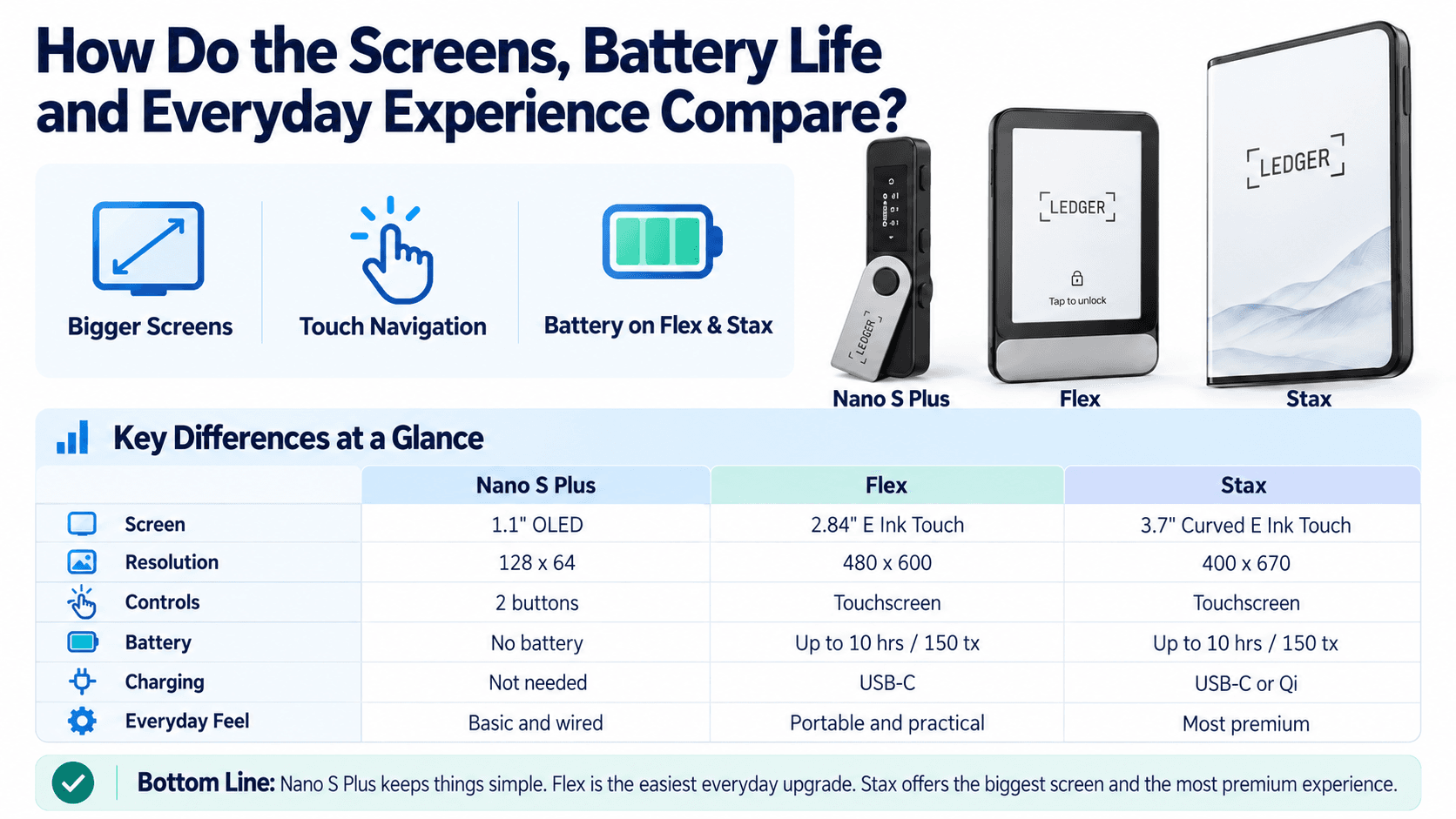 See How Ledger's Three Devices Differ in Screen Size, Touch Controls, Battery Performance, and Charging Options
Display Size, Readability and Transaction Navigation
Nano S Plus uses two buttons to move through menus and approve actions. Its 128 × 64-pixel OLED display presents information in small segments, so reviewing an address or detailed request can require multiple navigation steps.
Flex replaces those controls with a flat capacitive E Ink touchscreen. Its 480 × 600 resolution provides more total pixels than Stax's 400 × 670 display, despite the smaller diagonal. Stax offers more physical display area and a curved edge.
The Flex and Stax screens change several routine interactions:
- PIN entry: Touchscreen input replaces button-based selection.
- Transaction verification: Larger screens provide more room for supported fields.
- Navigation: Touch controls change how users move through menus and transaction pages.
- Readability: Physical size, text rendering, lighting, and individual vision all affect comfort.
Long addresses and contract details may still require scrolling.
Flex and Stax support personalized displays, including NFT images. These features personalize the device rather than add authentication or transaction protection.
For users prioritizing screen readability, Stax deserves consideration. Flex provides a smaller touchscreen with a higher pixel count. Anyone with specific accessibility requirements should assess the interface itself rather than rely on diagonal size alone.
Battery Life, Charging and Long-Term Storage
Nano S Plus draws power through USB and has no internal battery. That removes charging schedules and battery degradation from its storage routine, which is useful when a device may sit unused for months.
Flex and Stax use rechargeable lithium-ion batteries and charge through USB-C. Ledger advertises up to 10 hours of normal use or 150 transactions for these touchscreen models in its device comparison guidance. These are manufacturer estimates. Actual endurance depends on usage and battery condition.
Stax also supports Qi wireless charging, but compatibility is not universal. Ledger's charging guidance excludes Apple MagSafe chargers and identifies compatible equipment.
Ledger recommends charging rechargeable devices approximately every three months. Extended discharge can affect battery condition, while normal aging gradually reduces capacity.
The battery is separate from the credentials controlling your accounts. Device failure does not erase blockchain balances. A compatible replacement can restore access using the correct recovery phrase and any required passphrase.
For frequent portable use, Flex and Stax offer practical convenience. For infrequent storage, Nano S Plus has simpler maintenance requirements.
Is Ledger Flex or Stax Worth the Higher Price?
The premium buys a different interaction experience and additional features. Its value depends on whether those additions improve your regular workflow.
Ledger Nano S Plus vs. Flex vs. Stax: Price and Ownership Costs
As of Oct. 22, 2026, Ledger's published device comparison lists $59 for Nano S Plus, $249 for Flex, and $399 for Stax.
| Model | Device price | Additional cost | Important included extras | What the premium buys |
|---|---|---|---|---|
| Nano S Plus | $59 | Baseline | USB-A-to-USB-C cable, recovery sheets, keychain strap | Essential wired hardware signing |
| Flex | $249 | $190 over Nano S Plus | USB-C-to-USB-C cable, Recovery Key | Touchscreen, Bluetooth, NFC, eligible Transaction Check |
| Stax | $399 | $150 over Flex; $340 over Nano S Plus | USB-C-to-USB-C cable, Recovery Key, Magnet Shell | Larger curved display, Qi charging, magnetic stacking |
Device price is only part of the cost of ownership. Taxes, shipping, regional pricing, replacement cables, and optional hardware wallet accessories can change the final total.
Check the included cable against your computer's ports. A USB-C-only laptop may need a different cable for Nano S Plus. A computer with only USB-A ports needs a suitable USB-A-to-USB-C data cable for Flex or Stax.
The standard Stax box includes a Magnet Shell. Wireless charging may require a separate compatible Qi charger.
Ledger Recover, provided by Coincover, is an optional paid service. Buyers can initialize the device, sign transactions, and restore a wallet from their own recovery phrase without it. An included Recovery Key is a separate physical product and does not create a subscription obligation.
Promotions and store prices may differ from Ledger's published reference figures. Base the actual upgrade cost on the prices offered when you buy.
Does Ledger Nano Gen5 Make the Flex Less Attractive?
Yes, particularly for buyers seeking the core touchscreen features at the lowest price.
Ledger Nano Gen5 is listed at $179, which is $70 below Flex. It provides a secure touchscreen, Clear Signing, eligible Transaction Check, Bluetooth, NFC, and an included Recovery Key.
Flex retains a higher-resolution display: 480 × 600 pixels compared with Nano Gen5's 300 × 400. Its aluminum frame also differs from Nano Gen5's plastic construction.
Nano Gen5 weakens the case for buying Flex solely to obtain a touchscreen and wireless connectivity. Flex remains worthwhile when its display, construction, or confirmed integrations justify the extra $70.
When Is Paying More Actually Worthwhile?
Choose Nano S Plus for occasional wired transfers. Someone sending Bitcoin from a desktop a few times per year gains little from wireless charging or a large personalized display.
Choose Flex for frequent signing and supported mobile workflows. An iPhone user managing Ledger Wallet accounts or supported Phantom transactions gains a connection route Nano S Plus cannot provide. Repeated transaction review also gives the touchscreen a regular purpose.
For frequent on-chain activity, our best DeFi wallets comparison examines how hardware-backed signing fits alongside software wallets used for swaps, staking, and other DApp interactions.
Choose Stax when the larger display and charging convenience are worth $150 over Flex. Someone who keeps a signer nearby and uses it daily may appreciate those additions. Someone who leaves the device stored away probably will not.
Among these three devices, the premium mainly pays for usability, mobile connectivity, and supported transaction-risk screening, rather than stronger fundamental private-key isolation.
How Do Backup, Recovery and Upgrades Work Across Ledger Devices?
Recovery depends on credentials rather than continued operation of the original device. Understanding the available methods also prevents unnecessary transfers during an upgrade.
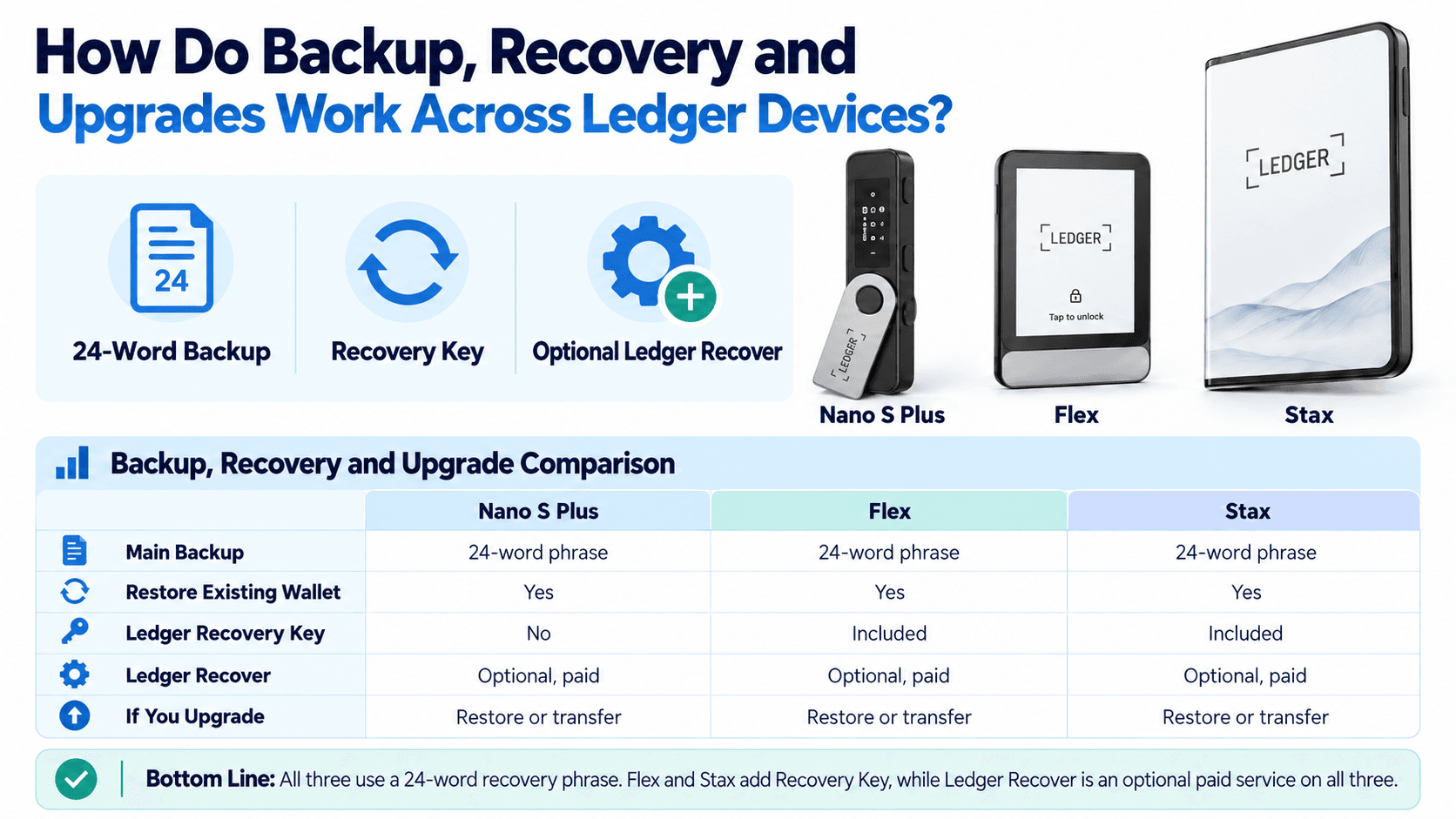 Explore Recovery Phrase Backups, Ledger Recovery Key, Optional Recovery Services, and Wallet Migration Across All Three Devices
Recovery Phrase, Ledger Recovery Key and Ledger Recover Explained
A Secret Recovery Phrase restores the cryptographic material from which a wallet's private keys are derived. A newly initialized Ledger normally generates a 24-word recovery phrase following BIP39. Cryptocurrency remains recorded on its blockchain. Restoring the phrase restores control of supported accounts; it does not move coins from the old device to the new one.
Before setting up a backup or migrating to another device, our guide to securely storing seed phrases covers practical ways to protect recovery credentials against theft, damage, and accidental loss.
| Recovery method | Availability in this comparison | Cost model | Primary trade-off |
|---|---|---|---|
| Secret Recovery Phrase | All three models | No service subscription | You must protect and preserve the words |
| Ledger Recovery Key | Flex and Stax; not Nano S Plus | Physical card, included in current standard touchscreen packages; no service subscription | Requires compatible hardware and careful card/PIN management |
| Ledger Recover | Nano S Plus through desktop; Flex and Stax through desktop or mobile | Optional paid subscription | Identity verification, provider dependence, and eligibility requirements |
Ledger Recovery Key is a PIN-protected physical backup card. It stores an encrypted backup in a Secure Element and communicates with compatible touchscreen devices through NFC. It is distinct from both a paper recovery sheet and the Recover service.
Ledger Recover uses identity-based recovery. When voluntarily activated, the process encrypts recovery material and divides it into three fragments held by separate providers. Two fragments are required for reconstruction through the recovery workflow.
This introduces different assumptions from a backup you hold yourself. Supported countries and identity documents, privacy implications, provider availability, subscription terms, and access to the required software all affect its suitability.
A BIP39 passphrase, if used, is an additional credential that derives different accounts. Ledger Recovery Key does not back up that passphrase. Preserve it separately and understand which accounts require it.
For hardware restoration, enter recovery words directly on the trusted device through its recovery procedure. Never supply them to a website, support conversation, or software prompt claiming to reconnect your Ledger.
Should You Upgrade From Nano S Plus to Flex or Stax?
Upgrade when the existing device creates a recurring limitation: you need direct iPhone connectivity, dislike reviewing transactions with buttons, or want supported touchscreen security features.
Keep a working Nano S Plus if wired signing already meets your needs. The release of a newer model does not invalidate the existing wallet or require account migration.
There are two different upgrade routes:
- Restore the same wallet. Enter the existing recovery phrase on the new trusted device and configure the same passphrase if applicable. Add the relevant accounts in compatible software. No on-chain transfer is required.
- Create a separate wallet. Generate new recovery credentials and transfer assets to addresses controlled by the new wallet. This involves blockchain transactions and applicable network fees.
Creating a new wallet is appropriate when the old phrase may be compromised. Restoring exposed credentials on newer hardware does not remove an attacker's access.
Before resetting the original device, verify that the replacement can access the intended accounts. A working old device can remain useful as a backup signer.

Can Two Ledger Devices Share the Same Wallet?
Yes. Two compatible devices initialized with the same recovery phrase, and the same passphrase where used, can control the same accounts.
This provides redundancy. Either signer can authorize transactions if the other is lost or unavailable. They do not need to synchronize private keys because both derive them from the same credentials.
This is not multisignature protection: either device can approve a transaction independently. Nor are they separate wallets, because both derive the same private keys from shared recovery credentials.
If the shared recovery phrase is compromised, both devices lead to the same exposed accounts. Separate wallets require independently generated recovery credentials.
For an existing Nano S Plus owner, buy Flex when touchscreen review or supported mobile signing solves a real limitation. Keep the Nano S Plus as a backup hardware wallet if wired access remains useful. Choose Stax when its larger display and charging features justify the additional expense.