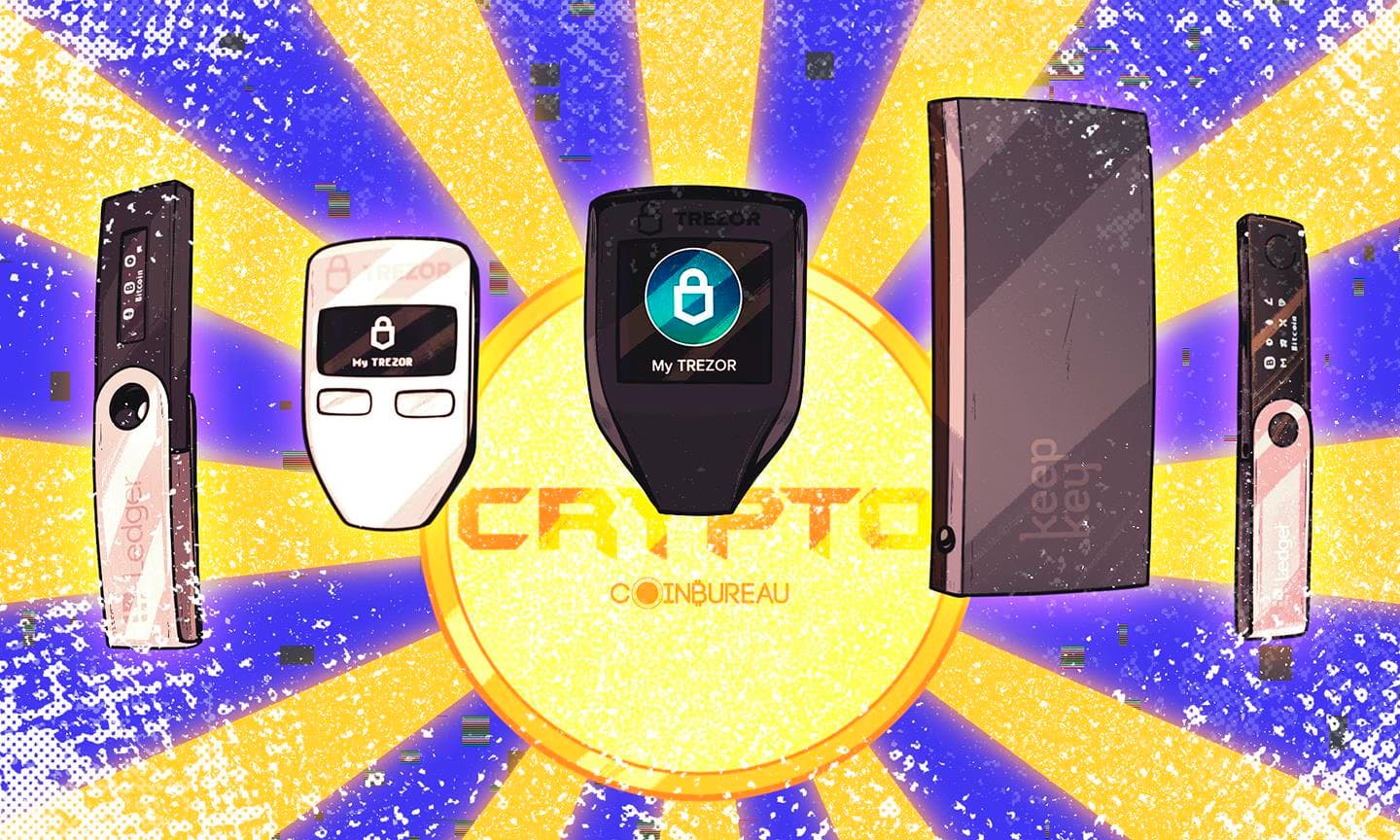



Your seed phrase is the master key to your entire crypto life.
It’s the one thing that can recreate your wallet’s private keys, which means it can recreate control of your funds. If someone gets it, they can usually restore your wallet elsewhere and move assets. If you lose it, there’s typically no recovery, no support fix, and no on-chain way to “prove” ownership.
Most seed phrase disasters aren’t flashy hacks, they’re everyday slip-ups: a screenshot that syncs to the cloud, a “temporary” note, a paper copy that’s lost or destroyed, or backups stored in the same place. Take a look at these examples:
Good seed phrase security is about balance: strong enough to survive real-life risks (theft, fire, moves), simple enough that you can actually recover your funds when it matters.
This guide covers storage methods, product picks, location strategy, inheritance, and verification so you can avoid the mistakes that permanently lock people out.
Quick-Start Box: Secure Your Seed Phrase in 7 Days
A simple, realistic rollout that prioritizes survivability, human-error prevention, and “no single point of failure.”
7-Day Action Checklist
Day 1: Paper backup + safety rules
- Write it down clearly; confirm count, spelling, and order.
- Lock in the rules: no photos, no cloud, no notes, no email.
Day 2: Choose metal + order
- Pick tile vs plate/punch; order direct to reduce counterfeit risk.
- Match your wallet: 12 vs 24 words.
Days 3–5: Decide locations + basic inheritance note
- Choose location #2 (and optional #3) so one event can’t wipe you out.
- Write a short note: where instructions live and who to contact.
Day 6: Transfer to metal (no cameras) + verify
- Set up a no-camera workspace; move word-by-word and check as you go.
- Do a full read-through at the end (every word must be unambiguous).
Day 7: Distribute copies + record locations + schedule checks
- Store copy #1 primary; place copy #2 offsite.
- Keep a separate location log (never the phrase) + set audit reminders.
Non-Negotiables (Don’t Do This)
- No screenshots, photos, scans, or cloud backups.
- No seed phrases in password managers or notes apps.
- No “support” links or verification sites, ever.
- No single-location setup for meaningful holdings.
Ongoing (Maintenance That Saves You)
- Quarterly: check readability + storage conditions.
- Annually: do a controlled recovery dry-run (small test wallet first).
- Anytime: life changes or compromise suspicion = reassess.
Product Comparison Table (Metal Backup Solutions)
| Product | Type (tile/etched/punched) | Material (304/316) | Fire rating | Water/corrosion | Capacity (12/24) | Tamper resistance | Price range | Best for |
| Cryptosteel (Capsule Solo) | Tile | AISI 304/303 (varies by model line) | Manufacturer states it is fireproof up to 1400°C (2500°F) | Stainless design intended for strong corrosion resistance | 12/24 (model dependent) | Some models support seals | Mid to high | Reusable backups and frequent handling |
| Billfodl | Tile | 316 “marine grade” stainless steel | Marketed as fire proof (no UL rating disclosed) | Marketed as water proof and “will never rust” (316) | 24 (stores first 4 letters) | Optional tamper stickers on some bundles | Mid | Set-and-forget, compact storage |
| Cryptotag (Zeus) | Punched | Titanium | Marketed as fireproof | Marketed as waterproof and corrosion-proof | 24 | Physical permanence, but no built-in sealing | High | High durability in harsh environments |
| Trezor Keep Metal | Etched/engraved (punch style plates) | Stainless steel (manufacturer marketed) | Marketed as fire, water & impact-resistant | Strong corrosion resistance implied by stainless construction | 12/24 via 4 letter method | Physical permanence | Mid | Beginners who want guided format |
| Generic DIY steel plate + stamp set | Punched | 304 or 316 (your choice) | Depends on plate thickness and storage, but 304/316 are both described as having good heat resistance (service temps vary) | 316 generally offers better corrosion resistance than 304 in harsher environments | 12/24 | You control tamper evidence | Low | Budget option with careful process |
How we picked
Survivability, readability, error-resistance, portability, reusability, cost, availability.
Top Picks by Persona:
- Best budget: DIY stamped plate (if you can follow a strict process).
- Best reusable: Tile systems like Cryptosteel style designs.
- Best “set-and-forget”: Simple plate systems or Billfodl style formats (minimal assembly steps).
- Best travel: Compact metal systems that do not rattle, shed parts, or attract attention.
- Best multi-seed: Systems with high capacity or multiple plates, plus strong labeling discipline.
Understanding Seed Phrases and Why Security Matters
This section explains what a seed phrase is, how it controls your wallet, and why protecting it is the foundation of safe self-custody.
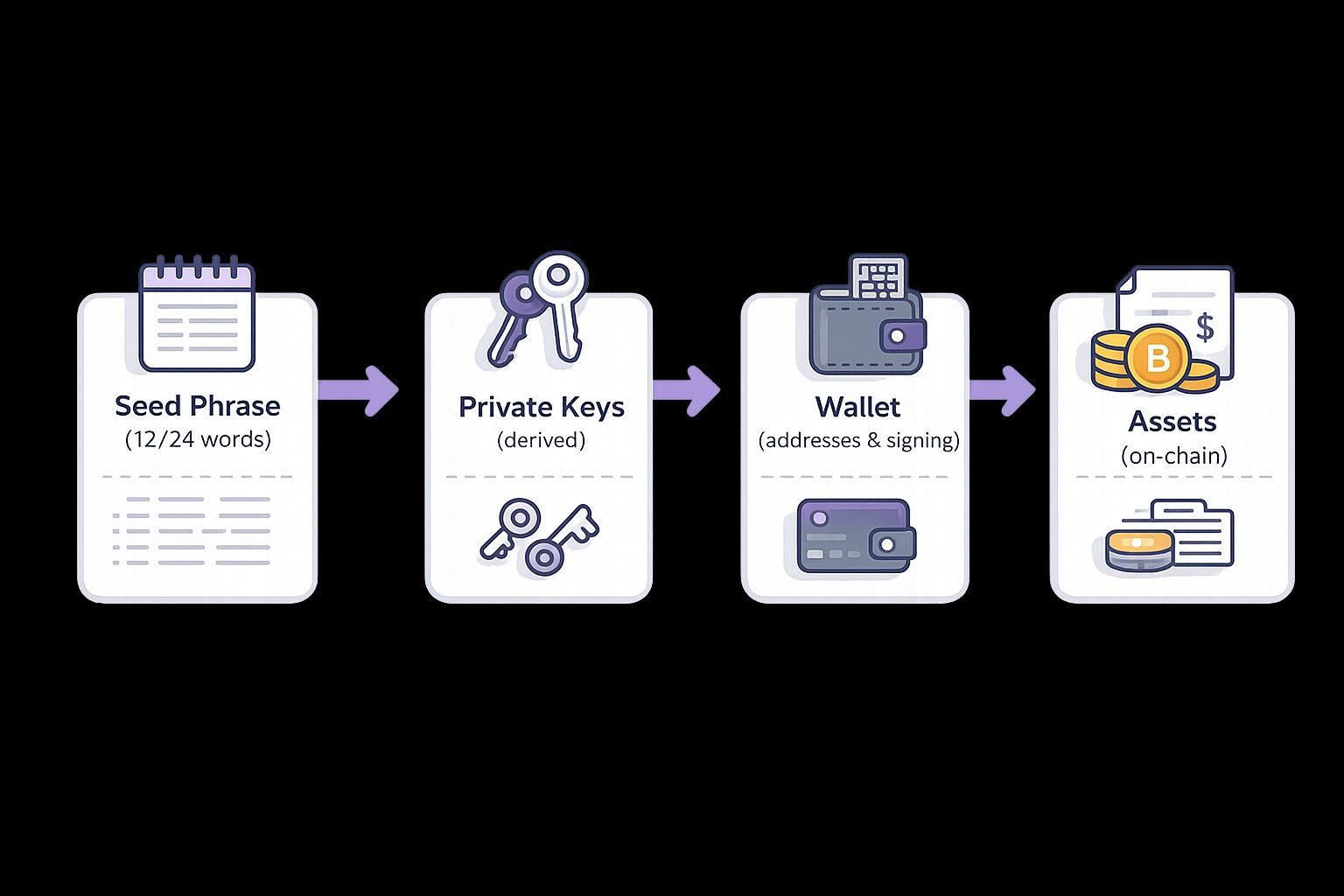 Your Seed Phrase Generates Private Keys, Which Control Your Wallet
What Is a Seed Phrase?
A seed phrase (also called a recovery phrase or mnemonic phrase) is a human readable backup that represents the secret used to generate your wallet’s private keys. Most modern wallets use a standard like BIP39, where your phrase is made of random words.
What “12 vs 24 words” means:
A 12 word phrase is common and provides strong security for most users when handled correctly. Whereas, a 24 word phrase increases entropy and makes brute forcing even less plausible, but in real life, the bigger difference is human error risk: 24 words doubles the chances of writing something down incorrectly.
A very important clarification is required here: seed phrase ≠ PIN ≠ password ≠ private key (but can derive keys).
- A PIN usually protects access to a device.
- A password usually protects an account or app.
- A private key controls a specific address.
- A seed phrase can regenerate many private keys across accounts and chains.
The Power (and Risk) of Your Seed Phrase
Crypto custody is designed to be irreversible. There is no “forgot password” workflow for self custody. If assets are moved out, the network generally treats that as final settlement.
Threat categories to plan for:
- Theft: Someone finds or extracts your phrase.
- Loss: You misplace it, forget where it is, or nobody knows it exists.
- Damage: Fire, water, corrosion, fading ink, or physical destruction.
- Coercion: Someone forces you to reveal it, or forces access through you.
Common Ways People Lose Their Crypto
Below are mini case files with what happened, why it mattered and the lesson to be learned.
LastPass hack (digital storage failure)
- What happened: LastPass disclosed that attackers stole customer vault backups and related data during the 2022 incident. Later reporting connected cracked vaults to crypto thefts years afterward.
- Why it mattered: Many people stored seed phrases in “secure notes” inside password managers. If an attacker cracks the vault, the seed phrase becomes a direct wallet drain path.
- Lesson: Digital storage turns your seed phrase into a breach collectible. “Encrypted” is not the same as “safe forever.”
Stefan Thomas 7,002 BTC (encryption + lost password)
- What happened: Stefan Thomas lost the password to an encrypted IronKey device reportedly holding 7,002 BTC, creating a high stakes lockout scenario.
- Why it mattered: “Encrypted storage” can become a permanent vault if you lose the unlock secret. With limited attempts and strong protections, recovery becomes uncertain.
- Lesson: If your backup requires remembering a second secret, you just created a new failure mode.
James Howells landfill BTC (single point of failure + disposal risk)
- What happened: In perhaps the most famous case in crypto circles, James Howells accidentally discarded a drive with keys to a large BTC stash and has spent years attempting recovery through legal and technical avenues. Reports differ on whether the amount was 7,500 or 8,000 BTC.
- Why it mattered: A single physical item became the only key to the funds. Once it was disposed, recovery became close to impossible.
- Lesson: Single points of failure plus ordinary cleanup is how fortunes disappear.
Most disasters are boring logistics, not Hollywood hacks.
The Golden Rules of Seed Phrase Security (Non-Negotiables)
These non-negotiables cover the few rules that prevent most irreversible mistakes, no matter what wallet or storage method you use.
Rule #1: Never Store Digitally
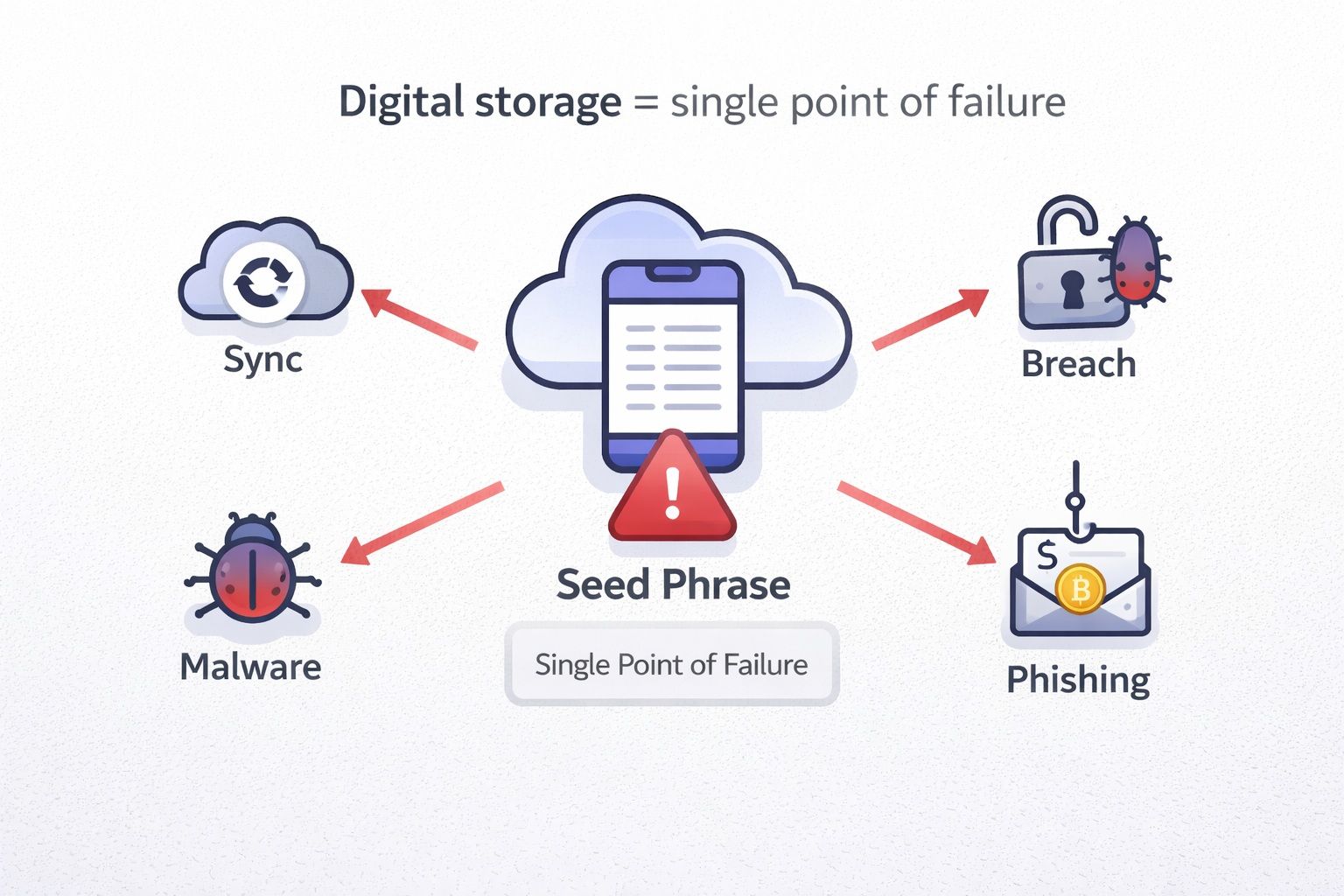 Digital Storage = Single Point Of Failure: Sync, Malware, Breaches, And Phishing Can Expose Your Seed Phrase
Digital storage includes:
- iCloud or Google Photos synced images
- Password managers and “secure notes”
- Screenshots
- Email drafts
- Notes apps
- Cloud documents
The risk is not only “hackers.” It is also sync, backups, device resale, shared albums, account takeovers, and forgotten logged-in sessions.
But what if encrypted?
Encryption still fails in practice because:
- You now must securely store the encryption key or password, which is another secret to lose.
- Malware can capture it at the moment you decrypt or view it.
- Backups and sync can duplicate the encrypted file everywhere, increasing exposure.
- Phishing can trick you into revealing the key or importing the phrase into a fake app.
The LastPass breach is a real world example of “encrypted vault” data turning into long tail wallet drains when weak master passwords were cracked later.
Rule #2: Never Share Your Seed Phrase
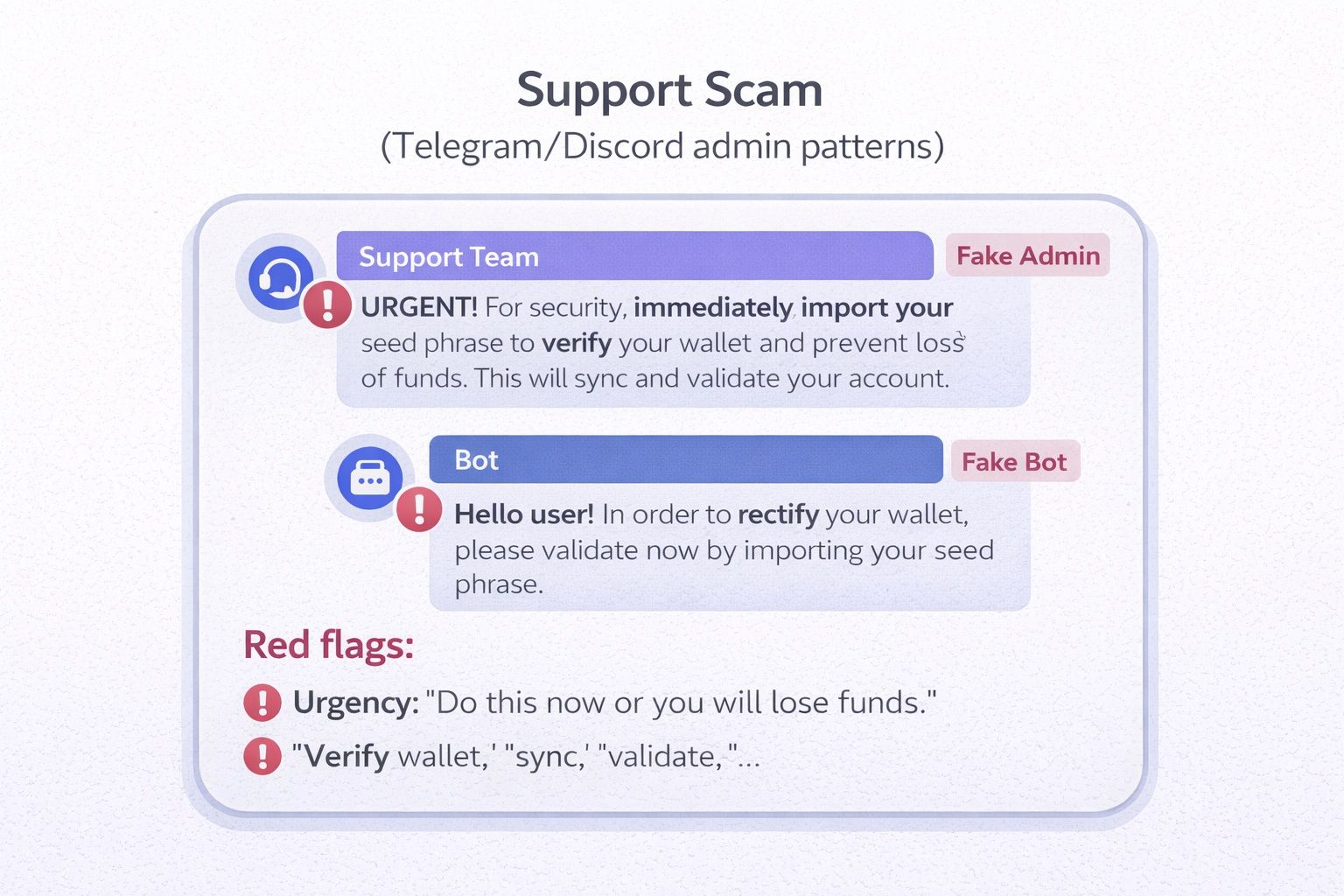 You Should Never Share Your Seed Phrase Under Any Circumstances
Red flags list:
- Urgency: “Do this now or you will lose funds.”
- “Verify wallet,” “sync,” “validate,” “rectify,” “claim airdrop.”
- Asking you to “import your seed phrase” into a website or app.
- Asking for screenshots or screen shares.
Script users can memorize: Legit support will NEVER ask for your seed phrase. Never.
Rule #3: Write It Down Immediately (Then Verify)
Write it down the moment it is generated. Then do a verification pass.
Verification checklist:
- Confirm word count (12 or 24).
- Confirm spelling of every word.
- Confirm word order exactly.
- Confirm each word exists in the BIP39 list.
Plan a test restore later on an offline or clean setup (see Testing and Verification).
Rule #4: Use Multiple Secure Locations (No Single Point of Failure)
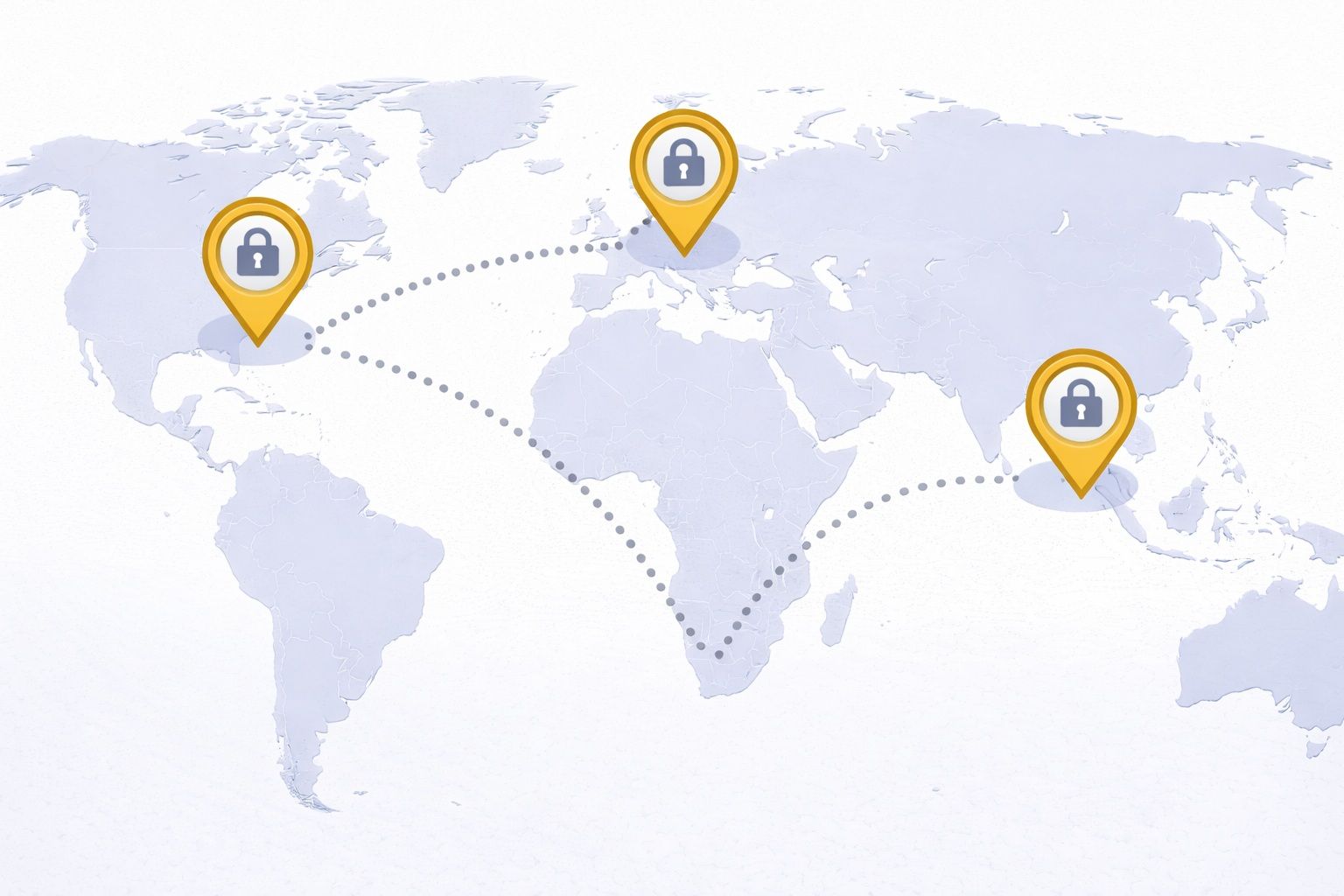 Use Multiple Secure Locations. Do Not Store All Copies In The Same Building.
Simple rule of thumb:
- 1 copy = fragile
- 2 = better
- 3 = resilient
Do not store all copies in the same building. A single event, fire, flood, burglary, eviction, or targeted coercion can wipe out everything at once.
What NOT to Do (Insecure Storage Methods)
This section highlights the common storage choices that fail in real life, and why they tend to lead to theft or permanent loss.
The Worst Places to Store Your Seed Phrase
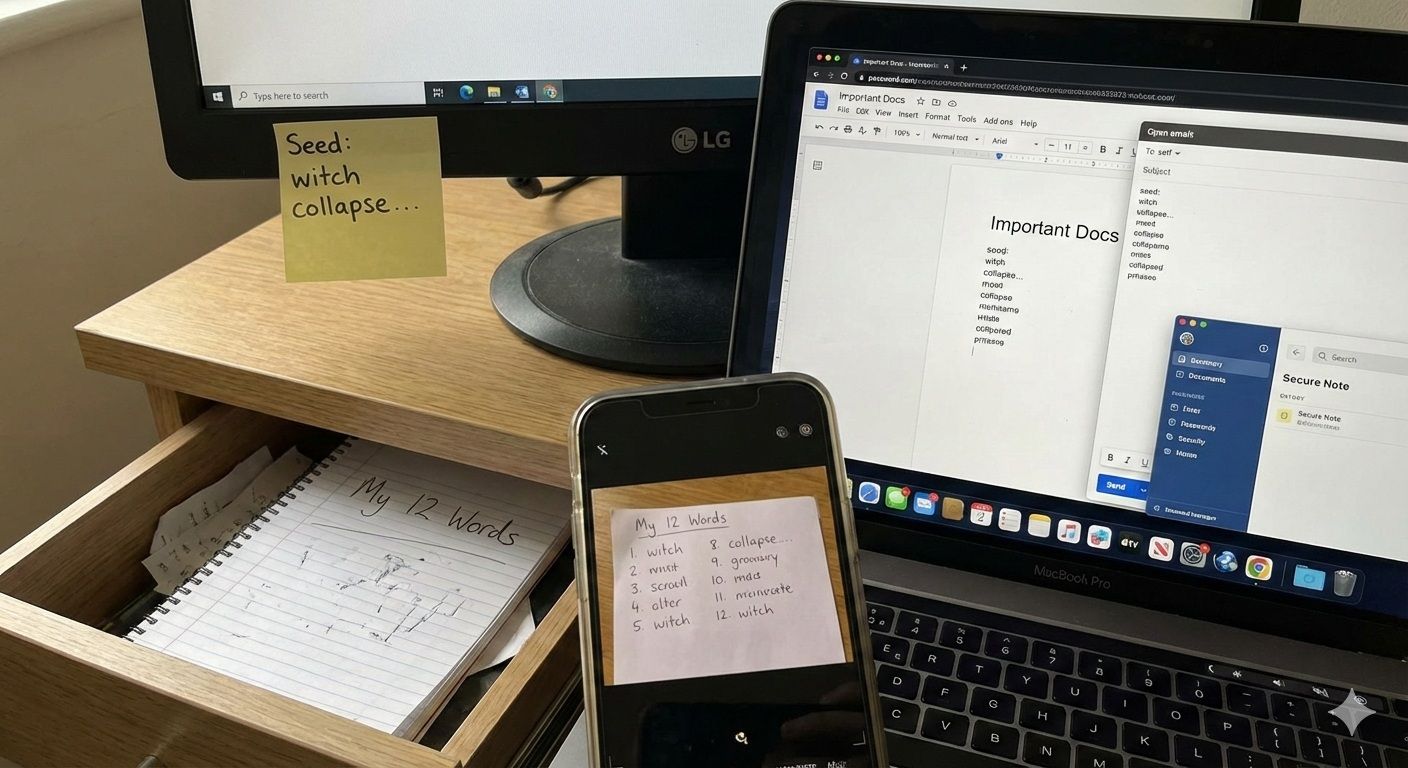 You Shoud Never Store Your Seed Phrase on Sticky Notes, in Desk Drawer, on Cloud or Email
The usual offenders:
- Sticky note on a monitor
- Wallet seed phrase in a desk drawer
- Phone screenshot
- Cloud document
- Email draft
- Password manager entry
- How attackers actually find these:
- Cleaners, guests, contractors, roommates
- Device theft and unlocked sessions
- Cloud sync and shared albums
- Breach dumps and cracked vaults (password managers are valuable targets)
Why Paper Alone Is Often Insufficient
Paper can work, but paper alone is usually a “best effort” solution, not a robust one.
| Attribute | Paper | Metal | Digital |
|---|---|---|---|
| Fire | Weak unless protected by a rated safe | Strong if quality metal and stored well | Not relevant, but devices burn too |
| Water | Smears, warps, grows mold | Strong with corrosion resistant materials | Vulnerable to device loss and account takeover |
| Theft | Easy to steal and read | Easy to steal, but can be better hidden | Easy to copy at scale |
| Time durability | Ink fades, paper degrades | Very long lasting | Depends on formats, devices, passwords |
| Readability | Can be great or terrible | Usually good if engraved or clear stamping | Often “readable,” but exposure risk is huge |
| Ease-of-use | Easy to write | Requires setup | Easy to create, too easy to leak |
The Digital Storage Trap
Reusing the LastPass case file as anchor: breached vault data can become wallet drains long after the incident.
Add a cloud account takeover scenario:
- SIM swap or email compromise leads to account recovery on Google or Apple.
- Attacker gets access to synced Photos or Notes.
- Seed phrase image or text is found.
- Wallet is recreated and drained.
This is why “I only stored it in iCloud for a minute” is still a major risk. Sync is designed to be silent and persistent.
Secure Storage Solutions That Actually Work
Here are the practical storage methods that hold up against fire, water, theft, and human error, with clear guidance on how to implement them.
Metal Backup Solutions (The Gold Standard)
Metal backups are popular because they resist the two most common destruction events: fire and water exposure, plus long term degradation. Many products are not UL rated, but they are still far more durable than paper when stored properly.
| Product | Type | Material | Fire rating | Corrosion | Tamper features | Price | Best for |
| Cryptosteel (Capsule/Cassette) | Tile | AISI 304/303 (varies) | Manufacturer claims high heat resistance; some models cite ~1400°C | Strong, stainless design | Some models support seals | Mid to high | Reusable systems, frequent handling |
| Billfodl | Tile | 316 marine grade stainless steel | Marketed as fire resistant | Strong corrosion resistance | Optional tamper stickers on some bundles | Mid | Compact, “set-and-forget” formats |
| Cryptotag Zeus | Punched | Titanium | Often cited as extremely high heat resistance | Excellent | Permanent marks | High | Harsh environments, permanence |
| DIY stamped plate | Punched | 304 or 316 (your choice) | Depends on your plate thickness and storage | Good if stainless | You decide | Low | Budget but high discipline |
Tile-based vs etched/punched
- Tile-based is often reusable and cleaner to assemble, but you must prevent lost tiles and misalignment.
- Etched/punched is permanent and has fewer parts, but errors are harder to fix.
- Add “First 4 letters” concept (BIP39 uniqueness) and when it’s safe to use:
- In BIP39, the first 4 letters of each word are unique in the word list, which is why some metal products store only 4 letters.
- It is safe only if you are certain your wallet uses standard BIP39 English words and you record the letters clearly and consistently. If you mix languages, non-BIP39 lists, or sloppy lettering, you can create ambiguity.
Step-by-Step Metal Backup Setup
- Step 1: Verify seed phrase
Confirm the phrase is correct in your wallet and that you wrote it accurately on temporary paper. - Step 2: Prepare metal kit + no-camera workspace
Clear the desk. Remove phones. Disable smart assistants. Avoid CCTV and reflective surfaces. - Step 3: Transfer words carefully (one-by-one verification)
Move one word at a time. After each word, compare to the temporary paper. Do not “batch” copy all at once. - Step 4: Seal + re-open test readability
Close the device. Then reopen it and confirm you can read every word or letter grouping without guessing. - Step 5: Store copy #1 securely
Place it in its primary secure location. - Step 6: Create + distribute additional copies
Create at least one more copy and place it at a separate location.
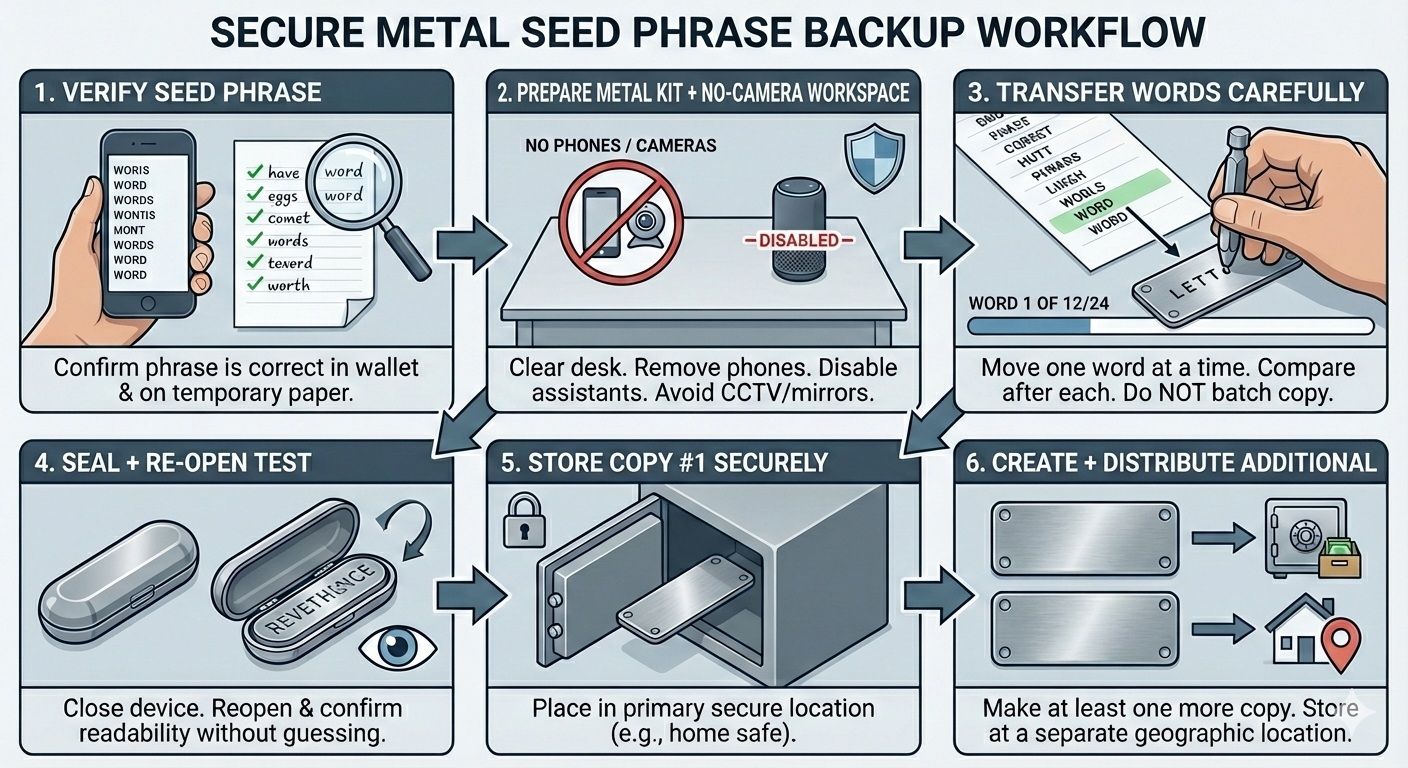 A Visual Guide on How to Backup Metal Seed Phrase
Physical Security Measures (Safes, Placement, Installation)
A metal backup helps, but you still need physical security to reduce theft, tampering, and opportunistic discovery.
Recommended Fireproof Safes
- Budget tier: Entry-level “fire resistant” document safes. Better than a drawer, but often easier to steal because they are small and portable.
- Mid tier: Heavier safes with better burglary resistance, internal organization, and anchoring options.
- Premium tier: True burglary resistant safes or higher grade fire safes, often very heavy and harder to remove.
UL 350 explanation
- A UL Class 350 rating means the safe is tested to keep internal temperature under 350°F, which is intended to protect paper documents.
- It does not automatically mean it protects electronics or digital media. Digital media often requires Class 125 levels because storage devices can be damaged at much lower temperatures.
Best Practices:
- Bolt-down/anchoring: A small safe that can be carried away is a “to go bag” for thieves.
- Concealment: Do not place it in obvious spots like the master closet floor.
- Decoy safe option: A cheap decoy can reduce coercion risk, but only if you understand the legal and personal safety tradeoffs.
- Moisture control: Use silica packs and check humidity. Even stainless can corrode in extreme conditions over time.
Paper (If Properly Protected)
Paper is not automatically wrong. It is simply easy to do badly.
Paper Setup Checklist:
- Use archival quality paper if possible.
- Use a pen that does not smudge easily and does not fade quickly.
- Write in clear block letters.
- Store in a sealed bag to reduce moisture risk.
- Store inside a rated safe or protective container.
When Paper is Acceptable vs NOT Acceptable:
- Acceptable: Short-term bridge, small holdings, or as an emergency backup while waiting for metal.
- Not acceptable: Large holdings, single copy setups, high fire or flood risk areas, or any scenario where paper is the only backup.
- Mini table: Pen/ink types + durability + smudge/water resistance
| Writing tool | Durability | Smudge resistance | Water resistance | Notes |
|---|---|---|---|---|
| Ballpoint | Medium | High | Medium | Can skip on glossy paper, but usually stable |
| Gel pen | Medium | Low to medium | Low | Often smears and runs |
| Permanent marker | Medium | Medium | Medium | Can bleed through paper, may fade over many years |
| Pigment ink pen | High | High | Medium to high | Often best for archival style writing |
Paper is a bridge, not the destination for most users.
DIY Metal Backup (Budget Option)
If you want metal durability without paying for a branded kit, DIY is viable, but only if you can follow process discipline.
Step-by-step Stamping/Engraving Tutorial:
- Buy a stainless steel plate, ideally 304 or 316.
- Draw a spacing grid with a ruler so letters stay aligned.
- Practice on a scrap plate first.
- Stamp the first word (or first 4 letters if using BIP39 uniqueness) cleanly.
- After each word, verify against your temporary paper.
- When complete, do a full read-through to confirm clarity.
- Clean the plate and place it into its protective storage.
Materials list + time/cost:
- Stainless plate(s), letter/number stamp set, hammer, ruler, marker, eye protection.
- Expect one to two hours if you do it carefully.
Quiet alternative (engraver vs hammer):
- A handheld engraver can reduce noise and attention risk, but legibility depends on a steady hand.
Error prevention:
- Practice plate + spacing grid template.
- Do not stamp while tired.
- Do not let anyone “help” unless they understand that seeing the words is full custody compromise.
Advanced Security Strategies (High Value Holdings / Higher Threat Models)
For larger portfolios or higher personal risk, these strategies reduce single points of failure, but only work if they are set up and tested correctly.
Geographic Distribution Strategy
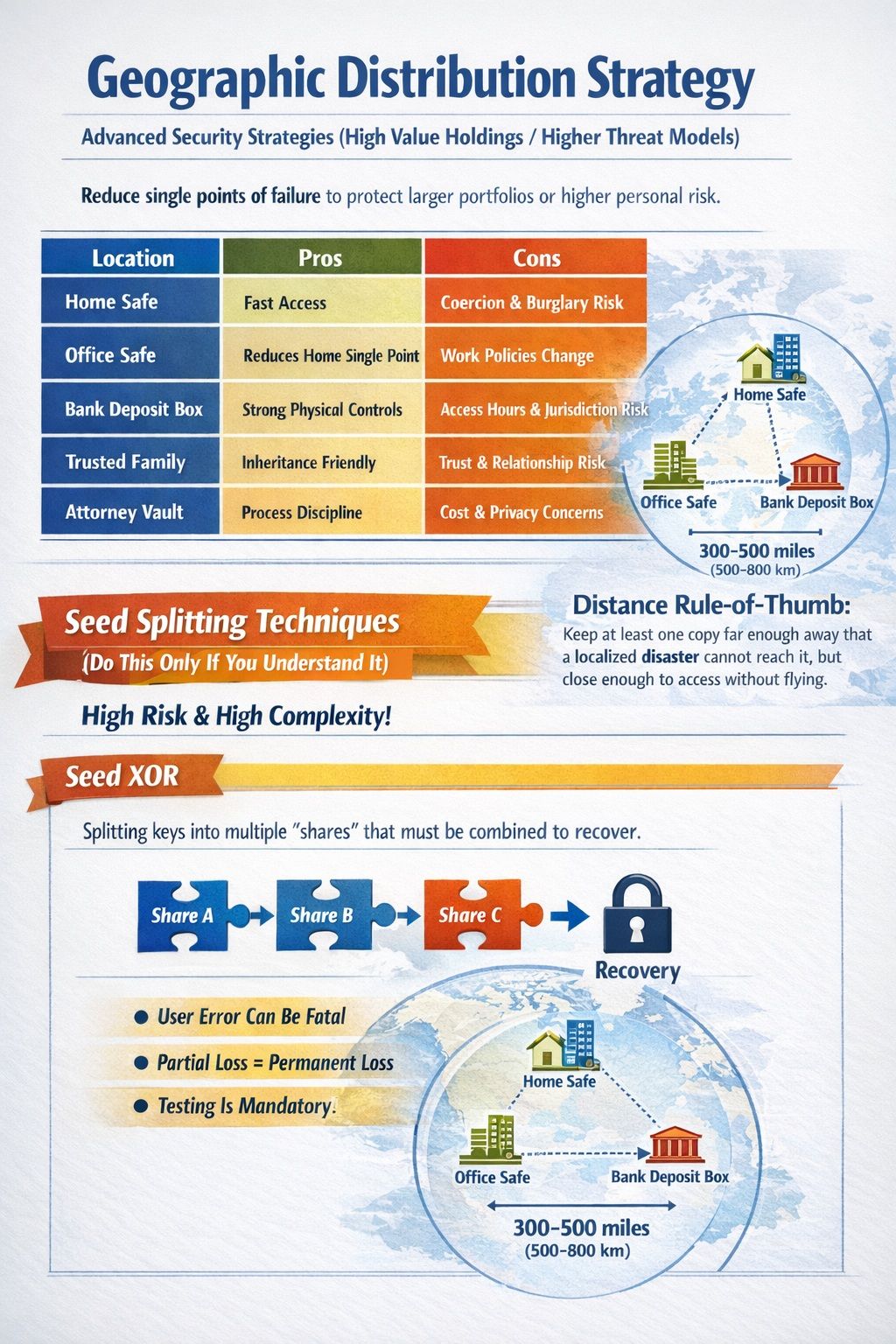 For Larger Portfolios Or Higher Personal Risk, These Strategies Reduce Single Points Of Failure
The principle: Separate your backups so that one event cannot destroy or expose all copies. A useful rule is to keep at least one copy far enough away that a localized disaster cannot reach it, but close enough that you can access it without airline travel.
| Location | Pros | Cons |
|---|---|---|
| Home safe | Fast access | Coercion and burglary risk |
| Office safe | Reduces home single point | Workplace access policies change |
| Bank deposit box | Strong physical controls | Access hours, jurisdiction risk, box freezes |
| Trusted family | Inheritance-friendly | Trust and relationship risk |
| Attorney vault | Process discipline | Cost and availability, privacy concerns |
Seed Splitting Techniques (Do This Only If You Understand It)
Splitting can reduce theft risk, but it can also increase the chance of self-inflicted loss.
Seed XOR
XOR splitting can produce multiple “shares” that must be recombined to recover the seed. It is brittle because any missing or incorrect share can make recovery impossible.
You must be able to recover with certainty, not “probably.”
However, there are several risks involved.
- User error risk is high.
- Partial loss can permanently destroy recovery.
- Testing is mandatory, not optional.
Shamir’s Secret Sharing (SSS / SLIP-39)
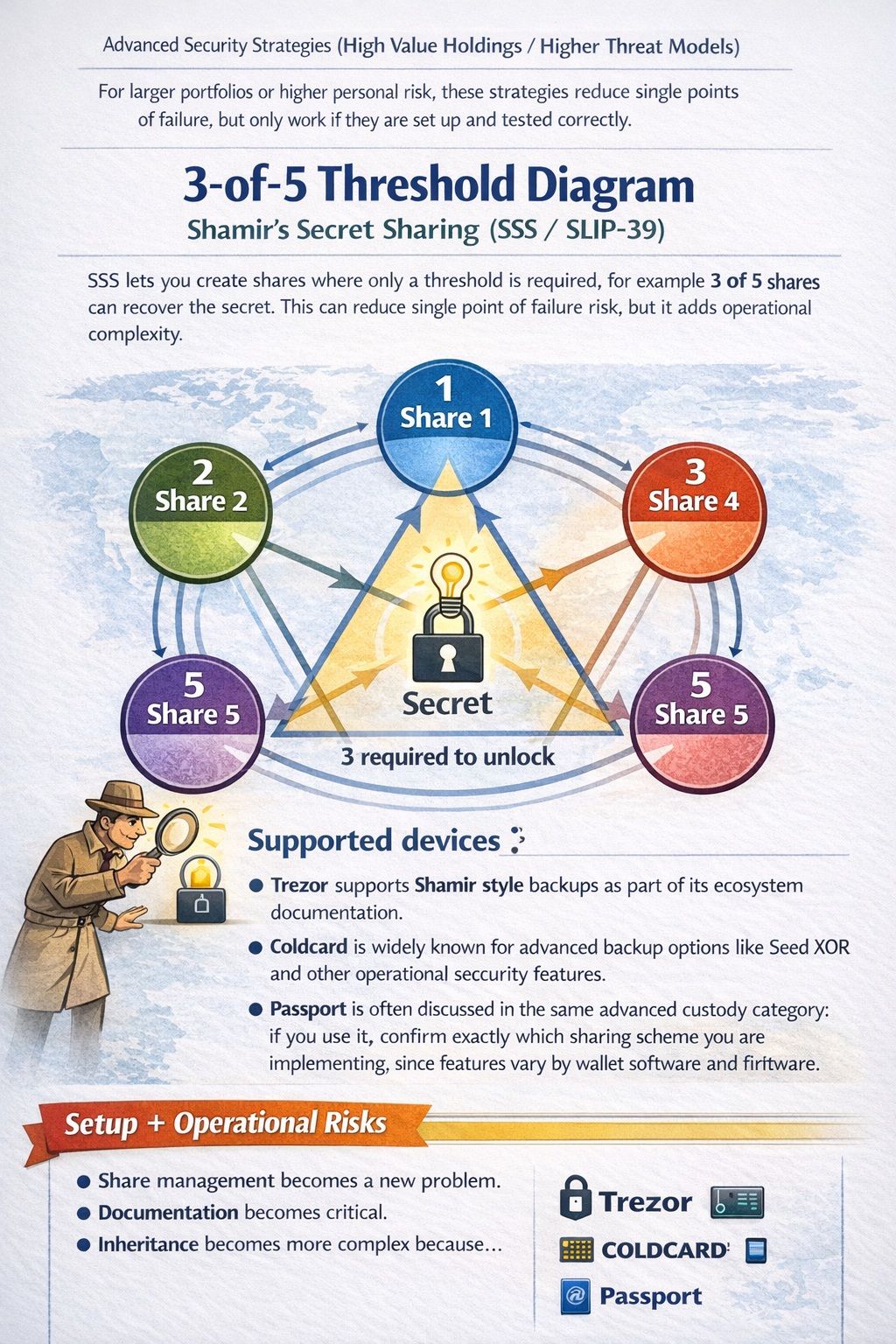 Splitting Can Reduce Theft Risk, But It Can Also Increase The Chance Of Self-inflicted Loss
SSS lets you create shares where only a threshold is required, for example 3 of 5 shares can recover the secret. This can reduce single point of failure risk, but it adds operational complexity.
Supported devices list:
- Trezor supports Shamir style backups as part of its ecosystem documentation.
- Coldcard is widely known for advanced backup options like Seed XOR and other operational security features.
- Passport is often discussed in the same advanced custody category; if you use it, confirm exactly which sharing scheme you are implementing, since features vary by wallet software and firmware.
Check out our reviews of Trezor Safe 5 and Coldcard.
Setup + Operational Risks
- Share management becomes a new problem.
- Documentation becomes critical.
- Inheritance becomes more complex because heirs need both authority and the minimum threshold shares, plus instructions.
Multisig Solutions
Multisig is often better than splitting because it is designed for shared control without reconstructing one master secret. Instead of splitting a seed phrase, you distribute signing power across multiple keys.
| Option | Typical setup | Costs | Supported chains | Complexity | Best-for |
|---|---|---|---|---|---|
| Casa | 2-of-3 or 3-of-5 style setups | Subscription style (varies) | Often Bitcoin-focused plus other support depending on plan | Medium | High value holders who want guided ops |
| Unchained | Collaborative custody model, often 2-of-3 | Service fees may apply | Bitcoin-focused | Medium | People who want assisted custody workflows |
| Nunchuk | Multisig wallet software and services | Mixed (free software + paid services) | Bitcoin-focused | Medium to high | Technical users who want flexibility |
| DIY multisig | Your own keys, your own coordination | Hardware costs only | Depends on toolchain | High | Advanced users with strong testing discipline |
Pros/cons and “when multisig beats splitting”:
- Multisig beats splitting when you want theft resistance plus structured recovery, especially for inheritance, business custody, or shared control.
- The main downside is setup and ongoing operational discipline.
Recovery and inheritance are the whole point. If you implement multisig but do not document recovery and training, you can still create permanent lockout.
Encrypted Digital Storage (For Advanced Users Only)
Encryption key management checklist:
- Where is the key stored?
- Who can access it?
- What happens if you die?
- What happens if your device fails?
- What is the rotation plan?
- Have you tested recovery end-to-end?
Strict constraints:
- Offline device only
- No cloud backups
- Secure key storage
- Rotation plan
- Tested recovery
If you cannot meet every constraint, do not do this.
Hardware Wallet PIN and Passphrase Security
This section covers how to secure the device itself, and when a PIN or passphrase helps, or adds dangerous complexity.
Hardware Wallet PIN Protection
Realistic Attack Scenarios
- Stolen device plus guessing attempts
- Shoulder surfing while you enter the PIN
- Coercion, where you are forced to unlock it
Limitations
- Many devices factory reset after a certain number of failed PIN attempts, which protects against brute forcing but does not protect you if the attacker can coerce you. Ledger devices typically reset after three failed attempts.
- Trezor devices have attempt limits and will factory reset after too many incorrect entries (limits vary by model).
- Coldcard devices can “brick” after many failed attempts and support advanced wrong-PIN behaviors.
- Physical extraction risk varies by model, firmware, and attacker capability. Do not assume hardware is magic.
Best practices
- Use a strong PIN, not personal numbers.
- Never store the PIN with the device.
- Consider a decoy wallet strategy only if you also use passphrases correctly, and you understand the personal safety risks.
The 25th Word (Passphrase Feature)
What it does:
- A passphrase creates a separate hidden wallet derived from the same seed phrase. It can act like a second factor because the seed alone is not enough.
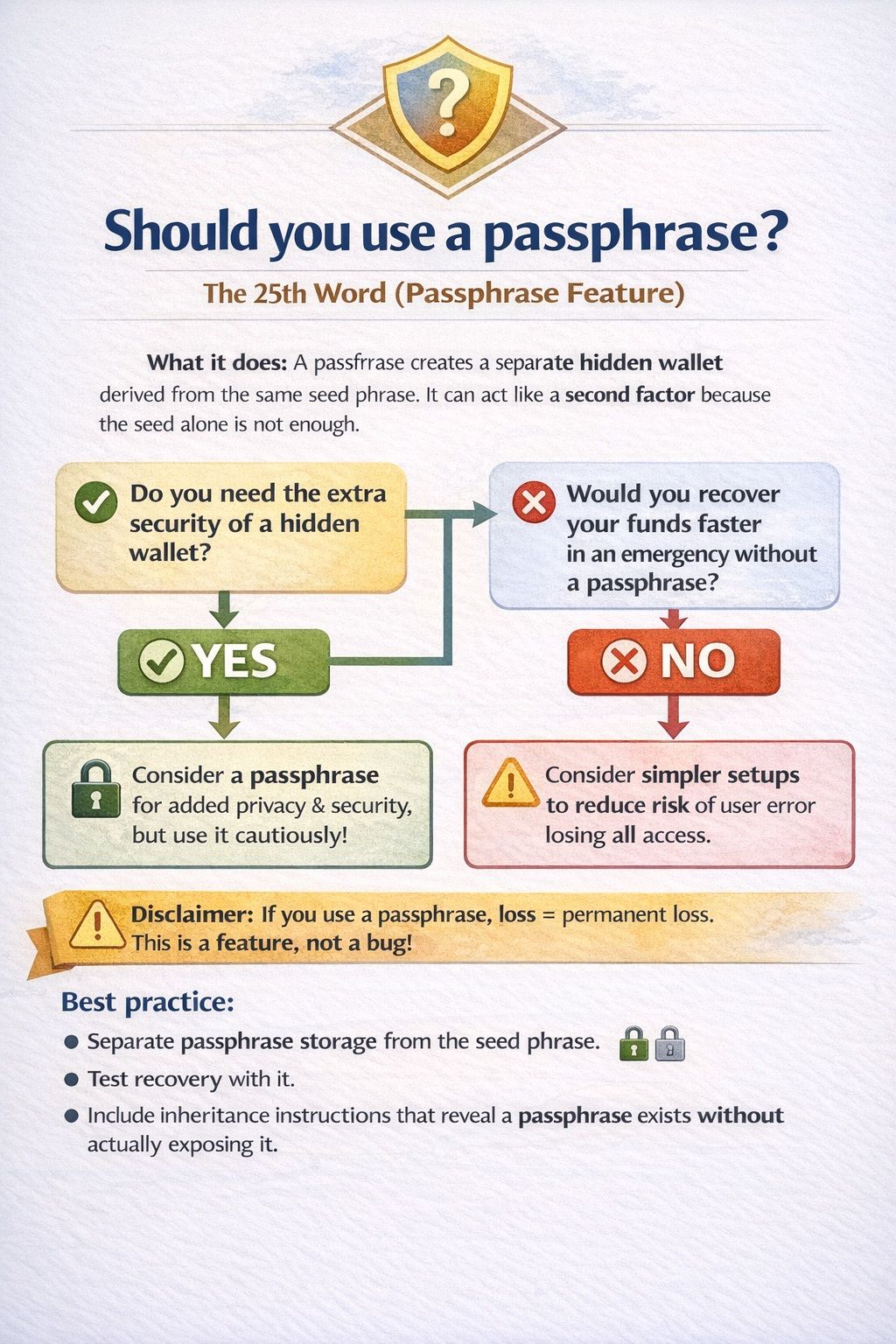 A Passphrase Creates A Separate Hidden Wallet Derived From The Same Seed Phrase
Recovery complexity disclaimer:
- Passphrase loss = permanent loss even with seed phrase. This is a feature, not a bug.
Best practice:
- Store the passphrase separately from the seed phrase.
- Test recovery with it.
- Include inheritance instructions that explain that a passphrase exists, without exposing it in the wrong place.
Inheritance and Estate Planning (Where Most People Fail)
This section explains how to prevent your crypto from becoming inaccessible after death or incapacity, without exposing your seed phrase.
The Inheritance Problem
Crypto creates a unique estate planning failure mode: assets can disappear simply because nobody can access the secret.
Investopedia frames the core reality clearly: without proper planning, crypto may be lost forever if heirs cannot access keys or recovery phrases.
Lost generational wealth framing:
- If you are the only person who knows where the seed phrase is, death or incapacity can turn your wallet into a sealed vault.
Why death/incapacitation breaks most setups:
- Single-holder knowledge
- No written process
- Missing location log
- Fear of sharing leads to zero inheritance plan
Creating an Inheritance Plan
Executor Instructions (Template)
- Purpose: Enable lawful, safe recovery without exposing the seed phrase.
- My crypto holdings exist across: (list exchanges, wallets, chains in general terms).
- Hardware wallets used: (device names, not seed phrases).
- Where to find the location log: (physical location).
- Who to contact for technical assistance: (name and role, not “random crypto friend”).
- Recovery process overview: (high-level steps).
- What not to do: never enter seed phrase into websites, never share via email, never photograph.
Wallet Inventory (Template)
- Wallet type: (hardware, software, multisig)
- Chain(s): (Bitcoin, Ethereum, etc.)
- Purpose: (long-term, spending, business)
- Associated accounts: (public addresses if needed)
Location Log (Template)
- Backup #1 location: (home safe, precise description)
- Backup #2 location: (offsite)
- Backup #3 location: (bank box or trusted person)
- Access requirements: keys, combinations, who holds them
Clear rule: Never put the seed phrase itself in the inheritance doc. If the inheritance document is found, copied, subpoenaed, or mishandled, you just published the master key.
Practice Runs With Heirs
Heir Onboarding Checklist:
- Confirm they understand what a seed phrase is.
- Confirm they understand that sharing it equals full control.
- Explain where the inheritance instructions live.
- Practice reading instructions without exposing secrets.
Dry-run steps, boundaries, safety rules:
- Do a dry run with a test wallet.
- Show process, not the real seed.
- Reinforce that they must never type seeds into websites.
Technical Solutions for Inheritance (Comparison Table)
| Option | What it is | Pros | Cons | Best-for |
|---|---|---|---|---|
| Dead man’s switch | A mechanism that triggers an action if the owner becomes inactive or incapacitated, which can be adapted to release instructions after a set period of inactivity. | Convenient continuity if designed well. | Can become a single point of failure or a target if an attacker can trigger, intercept, or exploit the release mechanism. | Low to medium holdings with careful controls. |
| Social recovery (Vault12) / Social recovery (Coincover) | Recovery model where trusted guardians or a service help restore access, typically using encrypted shares and a defined recovery process. | Usability and guided recovery workflows. | Trust and privacy tradeoffs, plus reliance on third-party processes and availability. | Users who want help and accept third-party involvement. |
| Multisig inheritance | A setup where multiple keys are required to move funds, allowing inheritance plans that distribute keys across parties with a threshold requirement. | Strong security model that avoids a single secret and enables shared continuity. | Setup and ongoing operational complexity, plus documentation requirements. | High value or family/business custody. |
| Ledger Recover | A service that backs up an encrypted version of your recovery phrase split into fragments, with identity verification used for recovery requests. | Easier recovery path for users worried about losing access. | Requires trust in the vendor model, custodians, and identity verification workflow, which changes your threat profile. | Users who prioritize recovery convenience over maximum sovereignty. |
Ledger Recover warnings + model clarity:
- Ledger describes a process involving encryption, identity verification, and recovery workflows.
- The key point for risk modeling is that it changes your threat profile: you are adding an identity-based recovery path. That may be acceptable for some users, but it is not the same model as “only the seed phrase exists, offline, forever.”
Trade-off summary: Convenience vs sovereignty vs privacy vs complexity.
Operational Security Best Practices (Staying Uninteresting)
These habits reduce the chance you become a target and help keep your setup secure over time, not just on day one.
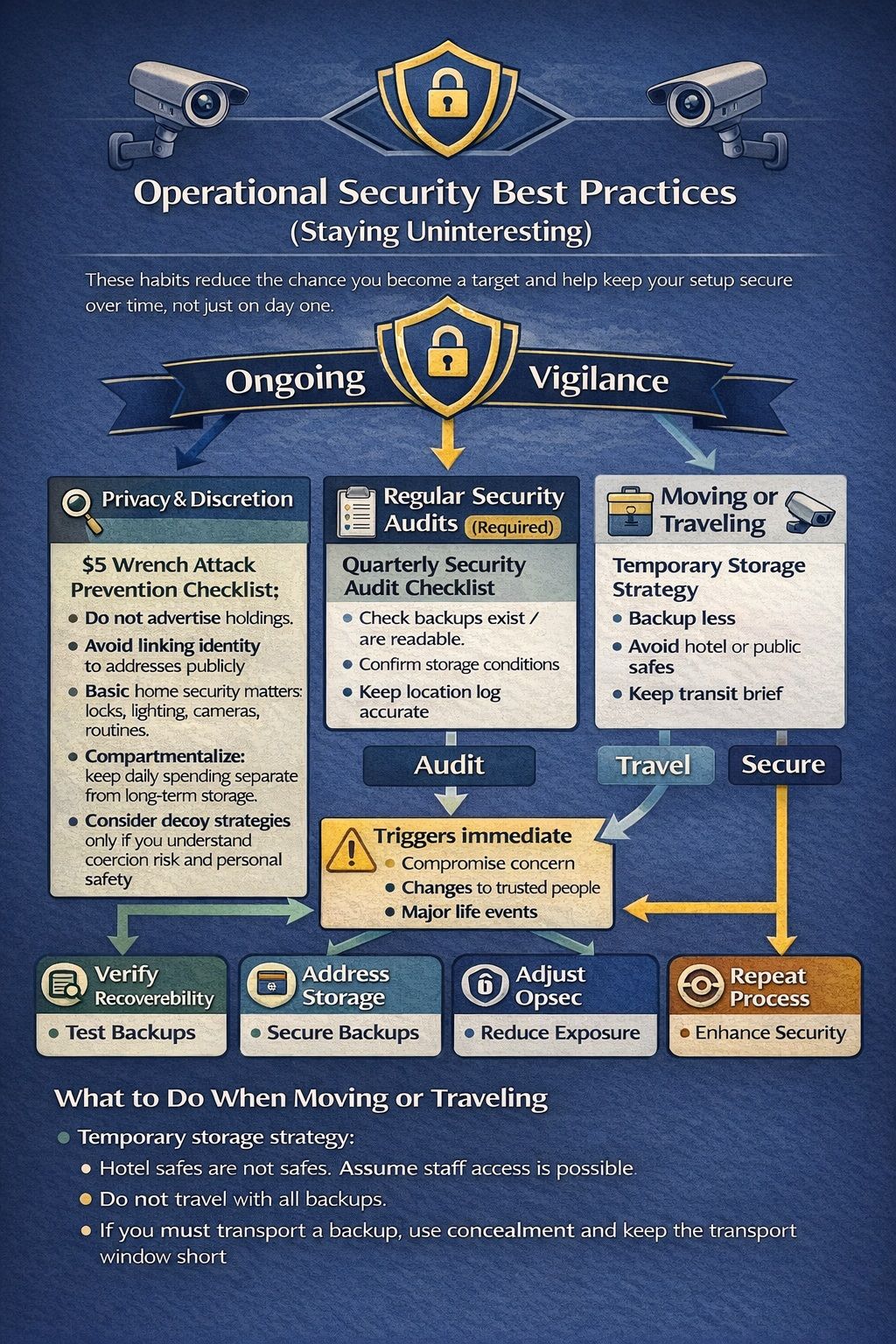 How to Secure Your Seedphrase When Moving or Traveling? There are Several Methods
Privacy and Discretion
$5 Wrench Attack Prevention Checklist:
- Do not advertise holdings.
- Avoid linking identity to addresses publicly.
- Basic home security matters: locks, lighting, cameras, routines.
- Compartmentalize: keep daily spending separate from long-term storage.
- Consider decoy strategies only if you understand coercion risk and personal safety.
Regular Security Audits
- Quarterly Security Audit Checklist (printable):
- Confirm each backup still exists.
- Confirm each backup is readable.
- Confirm storage conditions: humidity control, no corrosion, no fading ink.
- Confirm nobody new has gained access to the storage locations.
- Confirm location log is accurate.
What triggers immediate action:
- Any suspicion of compromise
- Relationship changes that affect trust
- Moving house
- Major life events: marriage, divorce, business partners changing
What to Do When Moving or Traveling
Temporary storage strategy:
- Hotel safes are not safes. Assume staff access is possible.
- Do not travel with all backups.
- If you must transport a backup, use concealment and keep the transport window short.
- Consider temporary offsite storage that does not create new exposure, like a secure location you control.
Protecting Against Cameras and Recording
No-Camera Workspace Checklist:
- Phones powered off or removed
- Smart assistants unplugged
- Avoid rooms with visible CCTV
- Watch reflections: windows, picture frames, glossy appliances
- Avoid printing at public printers; printer logs and spools can persist
Testing and Verification (The Step Everyone Skips)
This section focuses on proving your backup actually works, because an untested backup is often the same as having no backup.
Verifying Your Backup Works
Recovery Dry-Run Checklist:
- Use a spare device or a controlled offline environment.
- Prefer testing with a small “test wallet” first.
- Confirm the restored wallet matches expected addresses.
Best practice: test with a small “test wallet” first or restore on spare device
Warning:
- Do not type seed phrase into random websites. Ever.
Common Backup Errors to Avoid
Common failure modes:
- Messy handwriting that makes words ambiguous
- Mis-ordered words
- Misspellings
First 4 letters misuse cases:
- Assuming 4 letters always works outside BIP39 English
- Recording unclear letters (for example, O vs 0, l vs I)
- Using 4 letters on non-standard wordlists
Remember: first 4 letters uniqueness is a BIP39 list property, not a universal rule for every wallet format.
Regular Backup Checks
Table of degradation factors:
| Factor | Risk | What to do |
|---|---|---|
| Humidity | Paper warps, mold; metal can corrode in extremes | Use sealed bags, silica, periodic checks |
| Salt air | Accelerates corrosion | Prefer 316 for harsh coastal environments |
| Corrosion risk | Rust or oxidation over years | Keep dry, avoid chemical exposure |
| Paper ink fading | Becomes unreadable | Use better ink, protect from light |
| Fire safe limitations | Ratings vary, heat soak after fire | Use UL-rated safes where possible and place backups in protective inner containers |
Creating Your Personal Security Protocol (Make It Fit Your Risk)
Here is a structured way to build a security plan that matches your holdings, lifestyle, and threat model, without overcomplicating recovery.
Assessing Your Risk Profile
Threat model matrix
| Threat | Likelihood | Impact | Recommended mitigation |
|---|---|---|---|
| House fire | Medium | High | Metal backup + rated safe + offsite copy |
| Flood/water damage | Medium (region dependent) | High | Metal backup + sealed storage + offsite |
| Burglary | Medium | High | Anchored safe + concealment + distribution |
| Malware/phishing | High | High | Never store digitally + verify apps + never share seed |
| Coercion | Low to medium | Very high | Privacy, compartmentalization, consider multisig/decoy carefully |
| Inheritance failure | Medium | Very high | Inheritance plan + practice runs + clear instructions |
Persona buckets:
- Beginner
- Typical holder
- High net worth
- Traveler
- Family/shared access
Step-by-Step Security Implementation Plan
4-phase plan: immediate, week 1, month 1, ongoing
Immediate (today)
- Write paper emergency backup.
- Remove any digital copies if they exist.
- Create your do-not-do list.
Week 1
- Buy or build metal backup.
- Set up no-camera transfer.
- Choose 2nd and 3rd location.
- Draft inheritance instructions.
Month 1
- Implement distribution.
- Consider advanced strategy if needed (multisig, SSS).
- Run first recovery dry-run with a test wallet.
Ongoing
- Quarterly audit.
- Annual recovery dry-run.
Cost/time estimates per phase:
- Immediate: 30 to 60 minutes, minimal cost.
- Week 1: 1 to 3 hours total effort, plus metal backup cost and any safe cost.
- Month 1: 2 to 6 hours depending on complexity.
- Ongoing: 15 to 30 minutes quarterly, 1 to 2 hours annually.
Master Security Checklist
Master Security Checklist:
- Seed phrase stored offline only
- Metal backup created and verified
- Copy count: 2 or 3
- Locations documented in a separate location log
- Inheritance document created (no seed phrase inside)
- Quarterly audit scheduled
- Annual recovery dry-run scheduled
Include “last reviewed” fields + next audit date:
- Last reviewed: ________
- Next quarterly audit: ________
- Next annual recovery test: ________
What to Do If Things Go Wrong (Damage Control)
If something is compromised or lost, this section outlines the fastest steps to limit damage and regain a secure setup.
If You Suspect Seed Phrase Compromise
Immediate actions:
- Move funds to a new wallet with a new seed phrase.
- Rebuild storage from scratch using the new seed.
- Assume the old seed is permanently burned.
Do not attempt partial fixes:
- Do not “just change the PIN.”
- Do not “delete the photo and hope.”
- If the seed was exposed, treat it as compromised forever.
If You Lose Your Backup
Recovery decision tree:
- Do you still have device access?
- Do you have the passphrase, if you used one?
- Do you have a second copy?
- Do you have multisig cosigners or other keys?
If truly lost:
- The reality is final. Do not spiral into doom, but accept that the network cannot restore access without the secret.
- Use the experience to implement a resilient backup strategy for future wallets.
Natural Disaster Recovery
Case study example: survivability of metal backups
- Metal backups are popular because they resist common disaster damage like water exposure and high heat, especially compared to paper.
Post-disaster checklist:
- Do not rush into unsafe buildings to retrieve backups.
- Follow local safety guidance first.
- Once safe, retrieve from the highest priority location.
- Verify readability before relying on it.
- If any backup was exposed to unauthorized access, treat it as compromised and rotate to a new seed.

Comparison: Storage Methods Ranked Best to Worst
This final section ranks the major storage approaches from safest to most dangerous, so readers can quickly choose the best path for their situation.
Ranked Table (Best → Worst)
| Rank | Method | Why |
|---|---|---|
| 1 | Metal backup + multisig + geographic distribution | Strong theft resistance and no single point of failure |
| 2 | Metal backup + safe + distribution | Strong durability with simple operations |
| 3 | Paper + fireproof safe (temporary/budget) | Works short-term but has durability risks |
| 4 | Single-location storage (any method) | One event can wipe you out |
| 5 | Digital-only storage | Breach and sync risk, high exposure |
| 6 | Memory-only (never recommended) | Human memory fails, and failure is final |
What We Recommend for Most People
For most people, the standard recommendation path is simple: metal backup + 2–3 locations + inheritance doc + quarterly audit. Use paper only as a short-term bridge, never store the seed digitally, and test recovery at least once a year using a controlled process. This approach balances durability, theft resistance, and human factors without requiring advanced cryptography or complex coordination.