Introduction
“Your hardware wallet isn’t protecting you. Not because it’s faulty, but because one preventable mistake can cost you everything.” We have seen this pattern repeatedly: most consumer crypto losses stem from user-focused attacks like phishing, wallet-drainers, and social engineering, rather than broken cryptography, a trend underscored in Chainalysis’ 2025 crypto-crime research. After reviewing hundreds of real loss reports from 2023 to 2025, one theme stands out: hardware wallets are effective, but only when we follow sound operational hygiene.
Cold wallets surged in popularity after high-profile exchange compromises and failures, pushing users toward self-custody; but today the weak link is our own behavior, not the device. Here, we aim to translate vendor guidance and security standards into practical steps, with clear examples, so we can avoid the easiest ways to get wrecked and build habits that actually stick.
Your brief security checklist
- Buy from official stores or authorized resellers
- Generate the seed on-device per BIP-39
- Write the backup offline per NIST key-management guidance
- Verify addresses on-device before sending
- Keep firmware up to date
Now, let's dive into the most common mistakes one by one. Analyzing these mistakes will help us understand where we overlook things to compromise our own security. Because, remember, just like the customer is always right…security breaches are pretty much user errors most of the time.

Mistake #1: Not Backing Up Your Seed Phrase Properly
Even the best hardware wallet can’t compensate for a weak backup. A seed (recovery) phrase follows the open BIP-39 mnemonic standard, which makes wallets portable, but also means anyone with those words can restore your funds.
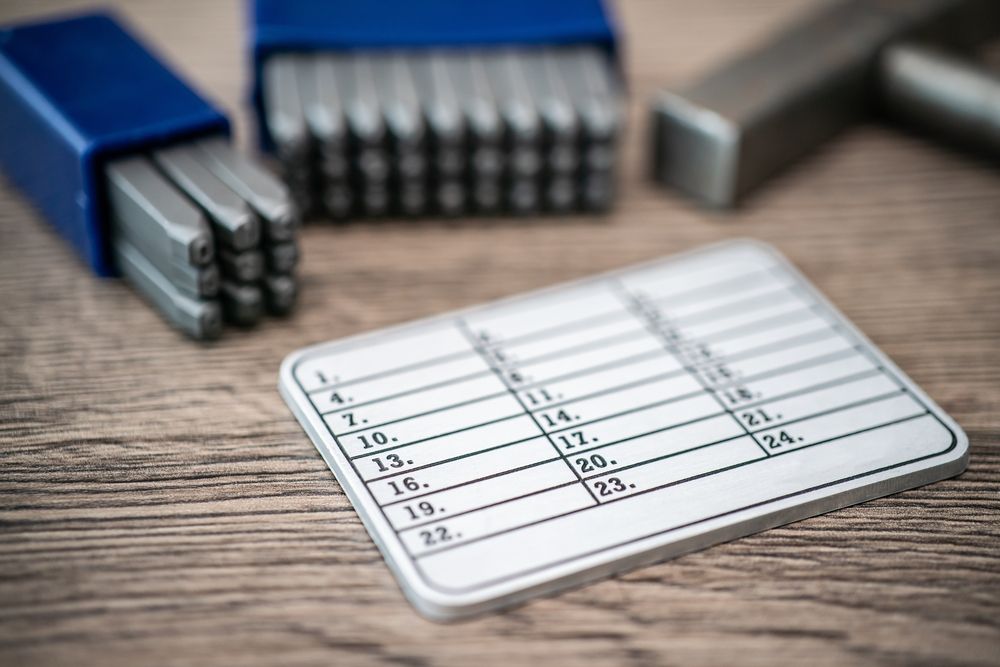 Even the Best Hardware Wallet can’t Compensate for a Weak Backup. Image via Shutterstock
Failing to Write Down Your Recovery Words at All
Relying on memory is classic overconfidence bias. If the device is lost or a PIN is forgotten, the only route back is the phrase generated on the device. Manufacturers explicitly instruct us to write the words down offline and never digitize them. The Ledger’s guidance on keeping the Secret Recovery Phrase safe and Trezor’s backup safety notes are very good resources to understand this. From a standards perspective, NIST SP 800-57 treats secure key backup and availability as core to key management.
Creating Only One Backup Copy
One sheet of paper is a single point of failure (fire, flood, theft, misplacement). Business-continuity principles recommend off-site backups and routine checks, a guidance we can adapt from NIST SP 800-34. A practical rule: keep 2–3 geographically separated copies; Most hardware wallet companies agree to having backups in at least two secure locations.
How many backups for your portfolio size (guideline)
| Portfolio size (USD) | Backups | Notes |
| <$5,000 | 2 | Home + trusted off-site location |
| $5,000–$50,000 | 2–3 | Small home safe + bank box |
| >$50,000 | 3 | Add a metal backup and access logs |
Not Testing Your Backup
A backup isn’t proven until it’s restored. Schedule a quarterly recovery drill: verify a tiny amount using a second hardware wallet, confirm word order, then check the derivation path per BIP-44 so addresses match. Vendors like Ledger and Trezor provide safe ways to test.
Mistake #2: Storing Your Recovery Phrase Insecurely
A recovery phrase is only as safe as the way we store it. The goal is simple: keep it offline, durable, and hard to discover, while still being available if something goes wrong.
 A Recovery Phrase is only as Safe as the Way we Store it. Image via Freepik
Digital Storage Methods (the biggest no-no)
Anything that touches the internet, like screenshots, notes apps, cloud drives, email, or “secure” photo galleries, creates copies we can’t fully control. Wallet makers explicitly warn against digitizing the phrase. Cloud services are designed to sync and backup by default, so iCloud Photos and Google Drive replicate content across devices and servers, which increases exposure if an account is compromised.
Inadequate Physical Storage
Paper is vulnerable to water, fire, mold, and handling wear. Conservation advice from the U.S. National Archives recommends cool, dry storage and protective enclosures as good practices for any paper backup. For higher durability, hardware wallet vendors endorse steel backups like the Trezor Keep Metal that can withstand disaster; see Trezor’s “steel backup” option. To avoid a single point of failure, off-site storage is key, as listed under NIST SP 800-34 that we have mentioned above.
Proper Physical Storage Solutions
Combine two to three geographically separated copies (e.g., home safe + bank deposit box) with tamper-evident envelopes or a metal backup. Keep access limited and documented, and never label envelopes “seed phrase.”
Secure vs. insecure backup methods (quick view)
| Method | Offline? | Durable? | Discovery risk | Verdict |
| Steel backup (in two locations) | Yes | High | Low | Secure |
| Paper in safe + off-site copy | Yes | Medium | Low–Medium | Secure (good) |
| Paper on desk / obvious hide | Yes | Low | High | Insecure |
| Screenshot / notes / email | No | N/A | High | Insecure |
Mistake #3: Sharing or Exposing Your Seed Phrase
A seed phrase is like the master key to a home: anyone who copies it can walk in. That’s why wallet makers repeat a simple rule: never share it with anyone and never type it anywhere online. No wallet support will ever ask for your words as well. However, there are still mistakes made. Let's see some examples.
 Wallet makers Advise keeping the Phrase Offline and out of Sight. Image via Shutterstock
Falling for social engineering scams
Impersonators on Discord, Telegram, or email often pose as “Support” and try to rush us with messages like “urgent verification required” or “wallet recovery needed.” Government and security agencies describe this as social engineering, which is manipulating people rather than systems. In Web3, scammers increasingly use wallet drainers and even impersonate tax authorities to trick victims into signing transactions or revealing recovery words. The FTC also warns that imposters may claim to “protect your funds” to pressure payment or access.
Sharing with “trusted” people
Even well-meaning sharing can go wrong. Treat the seed like a PIN and never disclose it, a principle echoed in national cybersecurity guidance. For family planning, consider multisig, where spending requires multiple approvals.
Accidental exposure
Photos, livestreams, and desk cams can leak words in the background. Wallet makers advise keeping the phrase offline and out of sight. Afterall, the last thing you should want is to accidentally expose passwords or keys to the world. Just basic vigilance can help keep us safe.
Mistake #4: Buying the Wrong Hardware Wallet (Compatibility Errors)
Not every wallet fits every job. Before buying, we should match asset support, device compatibility, and features to how we actually use crypto.
 Before Buying, Match Asset Support, Device Compatibility, and Features. Image via Freepik
Cryptocurrency support mismatches
Wallets differ in which networks and tokens they support natively. It’s best to confirm the supported assets for the wallet you intend to buy, since availability can vary by model and app. If addresses look “different” after a restore, that can be a derivation path issue. Standards like BIP-44 define how wallets derive accounts and addresses, and different paths will surface different address sets.
Device compatibility issues
Think about where you’ll use the wallet. Ledger Nano X connects via Bluetooth to smartphones and via USB-C to desktops; other models may be USB-only. On Trezor, mobile support depends on device and OS; Trezor Suite’s requirements outline which combinations can sign transactions on desktop vs. mobile (with some iOS limitations).
Feature requirements for your use case
DeFi users should ensure clear signing for human-readable prompts (e.g., EIP-712 typed data). Bitcoin-focused users may prefer air-gapped PSBT workflows, or QR-based signing on devices that keep keys offline, like Keystone QR signing.
Feature requirements by use case (quick view)
| Use case | Must-have features | Examples / notes |
| DeFi & DApps | Clear signing (EIP-712), contract data display | Verify approvals/allowances before signing |
| Bitcoin-only | PSBT, air-gapped or microSD/QR workflows | BIP-174 interoperability across tools |
| Mobile-first | Bluetooth or supported USB-C + mobile app | Check model-specific iOS/Android support |
| Multi-chain | Broad asset support + active app ecosystem | Confirm on vendor asset-support pages |
Mistake #5: Purchasing Hardware Wallets from Unsafe Sources
Where we buy a device matters as much as how we use it. Counterfeit or tampered units can look new, but small changes like altered packaging or pre-filled cards can compromise everything.
 Minimize Tampering Risk by Buying from First-Party Stores or Authorized Resellers. Image via Freepik
Third-party marketplace dangers
Scammers have sold devices with a pre-configured recovery card and instructions to use those words; this is a known pre-seed device scam. To reduce risk, confirm authenticity the moment you unbox: Ledger provides a Genuine Check in its app, and Trezor offers model-specific authentication guides.
Supply-chain attack vectors
Tampering can involve modified firmware. Trezor devices verify firmware signatures at boot, and Trezor Suite only accepts officially signed firmware, and a warning appears if anything is off on all current models. Some models are shipped without firmware and will flag any unit that arrives with firmware already installed, so do not use it and contact support immediately.
Safe purchasing practices
We minimize tampering risk by buying from first-party stores or authorized resellers and validating the device in software. For example:
- Ledger maintains an authorized reseller list and performs a built-in Genuine Check in Ledger Live as mentioned above.
- Trezor recommends its shop, official Amazon storefronts, and vetted resellers, with firmware authenticity checks in Trezor Suite.
- Other options like BitBox also directs buyers to its official store and reseller directory, and Keystone provides an official outlets list plus a device verification tool to confirm hardware and firmware integrity before use.
These trends show how the hardware wallet industry is evolving and organizing itself around safe and secure usage of their devices by their users.
“Is this device safe to buy?” (quick checklist)
| Step | What to check | Reference |
| 1 | Official storefront or listed reseller | Ledger / Trezor / BitBox / Keystone |
| 2 | No pre-printed seed words included | Ledger pre-seed scam advisory |
| 3 | App-level authenticity check passes | Ledger Genuine Check / Trezor firmware authenticity / Keystone verification |
These are just examples. Whichever wallet you may go for, just make sure you follow these steps to ensure you don't get scammed.
Mistake #6: Ignoring Firmware and Software Updates
Updates close security gaps, add features, and keep wallets compatible with new protocols. In security terms, firmware is just software for hardware, and patching it follows the same principles outlined in NIST SP 800-40, which are to identify, prioritize, install, and verify updates to reduce risk.
 Wallet Apps and Firmware Occasionally Fix Defects that could be Exploited. Image via Freepik
Why updates matter
Wallet apps and firmware occasionally fix defects that could be exploited. Vendor channels publish update notices and instructions, like Ledger OS updates and Trezor firmware updates explain when and how to install new versions. Other devices provide similar guidance, such as BitBox02 firmware updates and Keystone firmware upgrades.
Update best practices
Only update through official applications and signed packages. For example, Ledger Live and Trezor Suite guide the process end-to-end, while the device confirms actions on-screen. Keep the recovery phrase accessible (offline) in case a restart or recovery is required after an update.
Fake update scams
Attackers mimic prompts or apps to trick users into installing malware. Government guidance stresses applying updates only from trusted sources, for example, CISA’s phishing advice warns against acting on unsolicited “update” messages. Vendors also document red flags such as fraudulent Ledger Live apps and Trezor phishing campaigns.
A simple rule: if an update demand arrives by email, pop-up, or DM, treat it as suspicious and verify inside the official app before taking any action.
Mistake #7: Blind Signing and Transaction Verification Failures
When we blind sign, we approve a transaction we can’t properly read. In DeFi, that can include unlimited token allowances or contract calls. The safer approach is clear signing, which are human-readable prompts defined by EIP-712 typed data, so we see what we’re authorizing before we approve.
 Before Sending, we should Always Match the Address Shown on the Hardware Wallet to the Address in the App. Image via Shutterstock
What is blind signing?
Blind signing means confirming data our device cannot parse or display clearly. Ledger explains that smart-contract prompts may be opaque, and recommend enabling clear, structured messages whenever possible. Some wallets (e.g., Keystone) emphasize showing contract details on the device screen to reduce risk from malicious DApps and phishing.
Not verifying addresses on the device screen
Before sending, we should always match the address shown on the hardware wallet to the address in the app. This prevents clipboard hijacking or man-in-the-middle tampering. Users must verify on-device and reject any mismatch.
Screen vs. screenless workflows
A secure on-device display is critical because the device is the trusted screen. For advanced users, air-gapped QR signing can further reduce USB/BT exposure (e.g., Keystone QR signing), but the core rule doesn’t change: if the device prompt isn’t clear, don’t sign.
Mistake #8: Weak PIN and Passphrase Management
A strong PIN protects the device if it’s lost, while a passphrase (the optional “25th word”) protects the backup itself. Both need careful setup and clear documentation.
 Short or Guessable PINs are easy Targets. Image via Shutterstock
Using predictable PINs
Short or guessable PINs (“1234,” birthdays) are easy targets. Vendors enforce lockouts and wipes to stop brute force: Ledger devices reset after three wrong PIN entries, so you’ll need the recovery phrase to restore afterward as per Ledger support. Trezor implements exponential delays and device reset after a maximum number of failures; Safe 7 wipes after 10 incorrect attempts, while Model One/Model T/Safe 3/5 wipe after 16, per Trezor’s PIN protection details.
Choose a long, non-pattern PIN and keep it private.
Misunderstanding the passphrase feature
A BIP-39 passphrase changes the seed into a separate wallet, so the same 12/24 words with different passphrases produce different accounts. This can hide real funds behind a decoy wallet, but forgetting the passphrase makes recovery impossible. Mainstream devices support it, like Ledger (25th word), Trezor passphrase, and BitBox02 optional passphrase.
Document the existence of a passphrase (not the value) in your recovery notes and practice a dry-run restore on a spare device.
Mistake #9: Using Hardware Wallets on Compromised Devices
A hardware wallet protects private keys, but a malware-infected computer can still trick us into sending funds to an attacker by changing destinations or injecting opaque prompts. Security agencies categorize this as typical malware and phishing risk: the endpoint gets manipulated even if the key is safe. The best countermeasure is to verify every detail on the device screen; vendors emphasize on-device address verification in their guidance for Ledger and Trezor.
 Avoid Shared or Unknown Machines and keep Operating Systems Patched. Image via Shutterstock
Connecting to malware-infected computers
Avoid shared or unknown machines. Keep operating systems patched following NIST patch management guidance and treat any unsolicited “security tool” downloads as suspicious per CISA’s advice linked just above.
Clean environment best practices
Use a dedicated device for transactions. For extra assurance, boot a live OS from read-only media (official guides explain Tails and Ubuntu live USB) and enable platform security features such as UEFI Secure Boot.
Browser and application risks
Malicious extensions can read and change data on visited sites per Chrome extension permissions. Interact with assets only through official apps like Ledger Live or Trezor Suite, and reject any transaction that doesn’t match the device display.
Mistake #10: Overlooking Device-Specific Features and Security Settings
Small switches in settings can make a big difference. Many wallets ship with powerful options we need to turn on, and understand, before moving serious funds.
 Many Wallets Ship with Powerful Options we need to Turn on. Image via Freepik
Unused security features
Enable strong PIN protection and keep entry on the device screen; Trezor’s PIN, mentioned above, safeguards include shuffled keypads and automatic wipes after repeated failures. Consider a passphrase (the optional “25th word”) to create a separate, hidden wallet; this is supported by Ledger, Trezor, and BitBox02, as we mentioned earlier as well. Advanced users may use duress wallets, which is a special PIN that opens a decoy or limited account, and is also documented in COLDCARD’s guidance. The principle is simple: reduce what an attacker can do even if they briefly control the device.
Not understanding multi-account derivation
Your 12/24 words (the BIP-39 seed) can produce many accounts and addresses depending on the derivation path (e.g., m / purpose' / coin_type' / account' / change / index in BIP-44). Different wallets and coins use different coin types per SLIP-44, so restoring the same seed on another wallet can show different addresses if the default path differs. Always record the path you actually use in your recovery notes to avoid confusion later.
Mistake #11: Poor Operational Security (OPSEC) Practices
Good tools can’t fix bad habits. OPSEC is about reducing the clues we leave behind and limiting what an attacker could learn, or coerce, from us.
 OPSEC is about Reducing the Clues we Leave behind and Limiting what an Attacker could Learn. Image via Shutterstock
Announcing crypto holdings publicly
Posting stacks, addresses, or purchase screenshots can attract targeted scams and even coercion. Law-enforcement reporting notes criminals using coercion and physical threats to seize digital assets, especially when victims are identifiable by wealth signals. More details at Europol’s IOCTA. Basic social-media hygiene, like restricting who can see posts, avoiding sensitive disclosures, and minimizing geotags, is recommended in NCSC’s “Social media: how to use it safely”.
Not using advanced security for large holdings
For higher balances, consider multisig, which are transactions that require approvals from multiple keys, reducing single-point-of-failure risk. Where appropriate, timelocks can delay spending until a set time or block height (BIP-65). For estate planning, work with a qualified attorney so instructions exist without exposing secrets; keep technical details separate from legal documents.
Hardware wallet compatibility mistakes
Small oversights (unsupported OS, wrong cable/adapter, outdated drivers) can derail recovery when it matters. Check the Trezor Suite OS requirements and Ledger Live compatibility before you travel or attempt a recovery.
Emergency Response: What To Do If You’ve Already Made a Mistake
Speed matters. If something goes wrong, act in this order: contain, migrate, and verify.
 It is of utmost Importance to Maintain Reliable Backups at all Times. Image via Shutterstock
Seed phrase potentially compromised
Treat a leaked phrase as a house key left on a park bench. Generate a new wallet and seed offline, then move funds immediately. Anyone with the phrase can restore the wallet, so the only safe response is to transfer to a fresh seed. From a key-management standpoint, NIST SP 800-57 classifies this as key compromise: retire the old key and issue a new one.
Lost hardware wallet without backup
The device alone does not hold your money; the recovery phrase does. If the PIN is strong, a finder cannot spend without the phrase. Without a backup though, funds are unrecoverable. So, it is of utmost importance to maintain reliable backups at all times. Replace the device and rebuild your backup process if needed.
Approved a suspicious transaction / clicked a phishing link
Assume session compromise. Disconnect the wallet, revoke token allowances via a trusted tool like Etherscan’s Token Approval Checker, and move assets to a fresh address on a clean device. Report and remediate phishing per CISA’s guidance, and verify software integrity using official apps like Ledger Live or Trezor Suite before proceeding.
Real-World Consequences: What Actually Happens
Crypto losses are usually permanent because blockchain transactions are irreversible; once confirmed, only the recipient can return funds, so errors and thefts tend to stick.
 Crypto Losses are usually Permanent because Blockchain Transactions are Irreversible. Image via Freepik
2025 saw record-setting thefts. Analysts reported a surge in stolen funds, with state-linked actors prominent among offenders. Chainalysis’ mid-year update flagged rising volumes and North Korea’s escalating role, while multiple briefings tied the Bybit breach (~$1.46B) to this trend. TRM Labs and Elliptic detail the outsized impact of that single incident.
Most retail victims don’t lose funds to hardware failure, rather they’re tricked into signing malicious transactions or revealing seed phrases. Security researchers tracked wallet-drainer campaigns impersonating tax authorities to harvest credentials and approvals, a pattern documented in Group-IB’s “Declaration Trap” series. Recovery “services” often extend the harm; the FBI’s IC3 warns of fake firms that target scam victims with new fees.
Takeaway: once funds move to an attacker’s address, recovery is unlikely, so prevention (clear signing, address verification, strong backups) is the only reliable defense.
Creating Your Hardware Wallet Security Checklist
- Buying: Use official stores or authorized resellers and avoid devices that include pre-printed seed words.
- Setup: Generate the phrase on-device per BIP-39 and record it offline following NIST key-management guidance.
- Backup: Keep 2–3 off-site copies; consider steel backups for durability.
- Maintenance: Apply firmware updates via official apps only and verify results in Ledger Live or Trezor Suite.
- Transaction verification: Prefer clear signing (EIP-712) and always verify addresses on-device.
- Long-term storage: Use a safe or bank box; follow archival storage practices for paper backups.
- Annual recovery drill: Restore on a spare hardware wallet and confirm the BIP-44 derivation path with a tiny test amount.

Additional Resources
- Ledger Academy — vendor-run lessons that explain wallet setup, recovery phrases, and transaction safety in clear, beginner-friendly modules we can reference while onboarding.
- Trezor security advisories — official notices and guidance on firmware, phishing campaigns, and device-level protections to help us validate security claims and mitigation steps.
- NIST cryptographic standards — U.S. government best practices for key management, randomness, and algorithm use; useful when we justify backup, storage, and patching policies.
- Hacken — Web3 Security for Founders — a practical primer from a leading audit firm covering threat modeling, secure development lifecycles, and post-incident playbooks, which is useful when translating best-practice guidance into day-to-day processes for teams building in Web3.
- Chainalysis reports — data-driven analyses of hacks, scams, and laundering patterns that let us ground “real-world consequences” with current trends and figures.
- Group-IB security insights — detailed write-ups on phishing and wallet-drainer campaigns that illustrate how social engineering translates into on-chain theft.
Don't forget to check out some of our popular hardware wallet reviews and analyses:
- Trezor Model T
- Trezor One
- Trezor Safe 3
- Trezor Safe 5
- Ledger Nano X
- Ledger Flex
- Ledger Nano S Plus, Stax & Flex Compared
- Trezor and Ledger Compared
- Coldcard
- ELLIPAL Titan
- Cypherock
- NGRAVE ZERO
- GridPlus Lattice1
and more…