


Bitget's spot trading is suitable for eligible beginners who want to buy and sell cryptocurrency without leverage. Futures are better suited to experienced traders familiar with margin, funding payments, and liquidation. Beginners who do not understand leveraged exposure should avoid futures trading.
This guide explains how to trade on Bitget step by step, from funding your account to executing spot and futures orders. It also covers trading costs, stop-loss tools, liquidation risks, and Bitget's security measures.
Editor's Note (Oct. 24, 2026): We fully updated this Bitget trading guide with clearer spot and futures walkthroughs, explanations of Unified Trading Accounts, and revised coverage of fees and BGB discounts. We've added worked trading examples, guidance on stop-loss and advanced orders, and troubleshooting tips, while expanding our assessment of liquidation risks, Proof of Reserves, the Protection Fund, and the September 2026 security breach.
Quick Answer: How to Trade on Bitget
To trade on Bitget, create and verify an eligible account, deposit funds, select a spot or futures market, choose an order type, and place your trade. Beginners should start with unleveraged spot trading, while experienced traders can use futures to take leveraged long or short positions.
How to Trade on Bitget in 5 Steps
-
Create and verify your Bitget account Confirm that Bitget supports trading in your region, complete the required KYC checks, and enable two-factor authentication. Review your Classic or Unified Trading Account (UTA) configuration.
-
Deposit funds into your account Transfer cryptocurrency using a supported blockchain network or purchase crypto through an available fiat payment method. Confirm that your balance is available for trading.
-
Choose spot or futures trading Open Trade → Spot to buy or sell cryptocurrency directly, or select Futures to trade derivatives. Choose a trading pair such as BTC/USDT.
-
Set up and place your order Select Buy or Sell, choose a market or limit order, and enter your amount. For futures, also configure leverage, margin mode, and position direction. Review fees and confirm.
-
Monitor and close your trade Check executed orders, balances, and open positions. Use supported stop-loss or take-profit instructions to manage exits, and review your final fills, fees, and profit or loss.
Spot vs. futures trading: Spot trading lets you buy and sell cryptocurrency without leverage. Futures provide long and short exposure using margin, but introduce funding costs and liquidation risk. Bitget's standard fees are 0.10% maker/taker for spot and 0.02% maker/0.06% taker for futures, before eligible discounts. Check your account-specific rates before trading.
Disclaimer
Cryptocurrency trading involves price volatility, transaction fees, execution risks, and potential financial losses. Leveraged futures trading can result in rapid liquidation and losses of committed collateral. This guide is for educational purposes only and does not constitute financial, investment, tax, or legal advice.
Disclosure
Some links in this guide may be affiliate links. If you choose to use a service through these links, we may earn a commission at no additional cost to you.

How to Set Up Your Bitget Account for Trading
Confirm eligibility and account type before depositing. Account structure determines balance locations and collateral exposure.
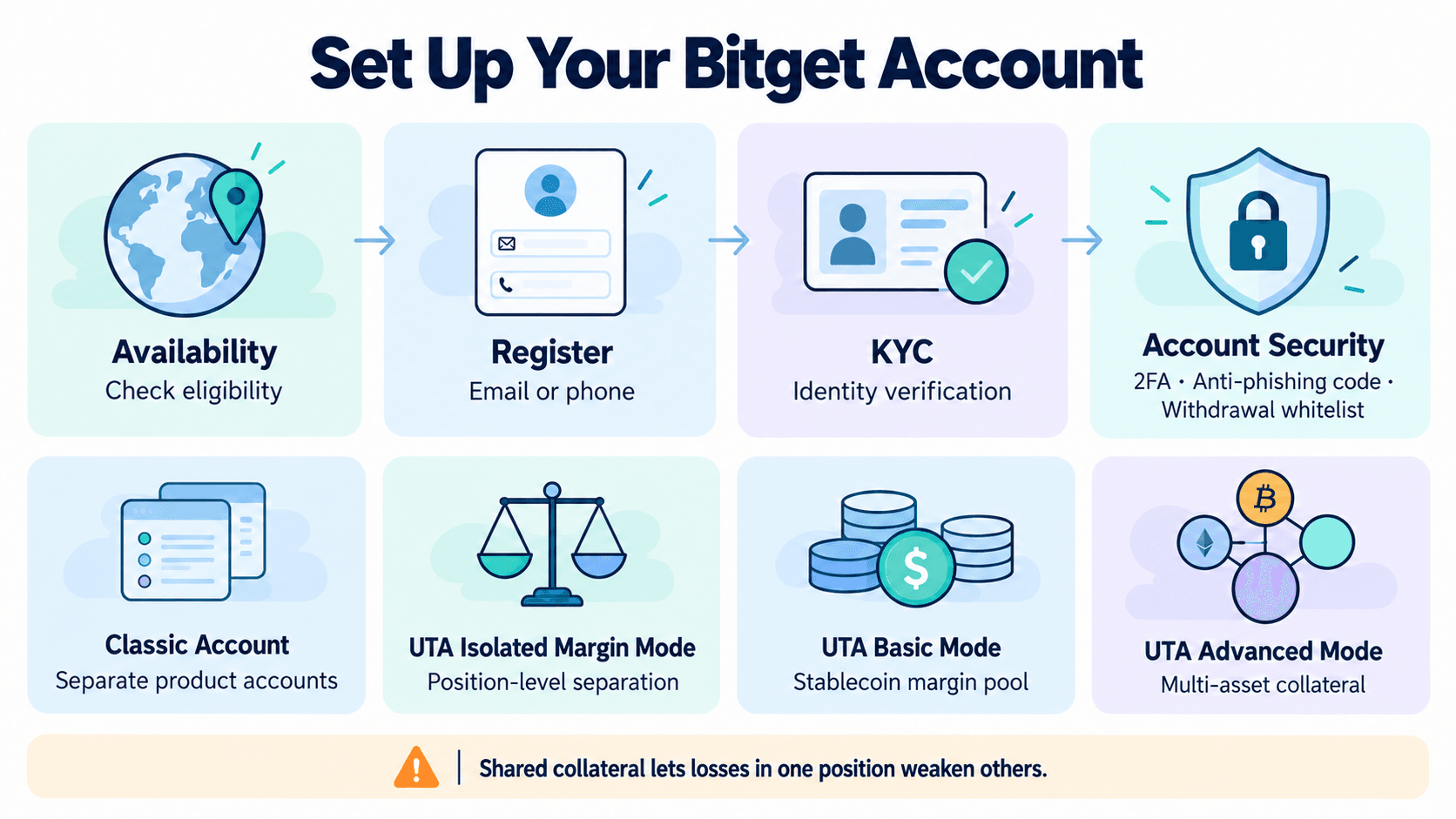 Setting Up A Secure Bitget Account And Preparing It For Spot And Futures Trading
Check Bitget's Availability, KYC Requirements, and Account Security
Bitget's availability and products vary by jurisdiction. Check the current service restrictions for your residence and confirm eligibility for spot or derivatives trading before registering.
Register with an email address or supported phone number and a unique password. Eligible users must complete Know Your Customer, or KYC, verification before trading, through identity verification with an accepted government ID and facial checks. Further checks may apply.
Before depositing, enable two-factor authentication, or 2FA, configure an anti-phishing code, and consider withdrawal address whitelisting. These protect access, identify legitimate messages, and restrict withdrawal destinations. Set them up before exposing funds to account-access risks.
The Coin Bureau Bitget signup guide covers registration. Follow Bitget's current verification and security prompts during setup.
Understand Bitget's Unified Trading Account and Classic Account
The Unified Trading Account, or UTA, combines supported spot, margin, and futures activity. Classic Accounts separate product balances and can require internal transfers.
Eligible Classic Account users began migrating to UTA on Sept. 15, 2026. Automatic migration covered spot-only accounts without open margin or futures positions, liabilities, or linked API keys. Automatically upgraded accounts default to Basic Mode with USDT and USDC enabled as collateral.
| Account or Mode | Balance Structure | Collateral and Product Scope |
|---|---|---|
| Classic Account | Separate product accounts | Transfers may be needed between spot and futures |
| UTA Isolated Margin Mode | Unified account with position-level separation | Spot and isolated USDT-M/USDC-M futures |
| UTA Basic Mode | Stablecoin margin pool | Spot and USDT-M/USDC-M futures; no custom collateral |
| UTA Advanced Mode | Broader multi-asset collateral | Adds spot margin and Coin-M futures; collateral ratios apply |
These UTA account modes differ from a position's cross margin or isolated margin setting. For the isolated-futures walkthrough below, use UTA Isolated Margin Mode or an isolated position in Advanced Mode. Bitget's public descriptions differ on Basic Mode's isolated-position support, so confirm its available controls in your account.
Open Assets to check whether your funds are held in separate Classic product accounts or a Unified Trading Account. For UTA, open the trading page and select Trading Settings → Account Mode to view your current configuration. Switching account modes may require closing incompatible positions, canceling unsupported orders, and repaying outstanding liabilities, depending on the target mode. Shared collateral lets losses in one position weaken others. In Advanced Mode, falling BTC or ETH collateral values can also weaken margin.
How to Fund Your Bitget Trading Account
Transfer existing cryptocurrency or buy it using an available fiat payment method. Check the balance available for your chosen product.
Deposit Cryptocurrency Into Bitget
A crypto deposit transfers existing assets from an external wallet or exchange. To deposit USDT:
- Open Deposit from the account or Assets area and select USDT.
- Choose a supported blockchain network: ERC-20 for Ethereum USDT or TRC-20 for Tron USDT. Match the sending wallet's network.
- Review deposit status, minimum amount, and required confirmations. Select the receiving account if prompted.
- Copy the current wallet address for your deposit or scan its QR code. Check it and any required additional identifier.
- In your wallet, select USDT on the matching network, paste the address, enter the amount, and review fees.
- Submit the transfer. A small test deposit can help confirm the route, provided it exceeds the deposit minimum.
- Track the transaction ID in a blockchain explorer and Bitget's deposit history until credited.
Bitget charges no crypto deposit fee, but the sender pays network costs and any sending-exchange withdrawal fee.
Use the address currently displayed. Similar-looking addresses do not prove network compatibility. Unsupported-network transfers can be permanently lost, with recovery unavailable. Minimums and confirmations vary; use the selected network's displayed requirements.
Buy Crypto Using Fiat or P2P Trading
Buying with fiat currency uses national money to purchase crypto. Regional options may include bank transfers, cards, payment services, and third-party providers. Compare the final crypto amount after exchange-rate spreads, provider fees, and bank charges.
With Bitget P2P trading, you accept another user's offer and pay using the specified method. Bitget reserves the seller's cryptocurrency in escrow while payment is completed. After confirmation, the crypto is released to the buyer.
Escrow supports crypto delivery, but fraud, chargebacks, and disputes remain possible. Check counterparty history, order limits, rate, deadline, and account-name requirements. Keep communication inside the platform. If selling, verify receipt in your payment account before release; screenshots are insufficient.
A zero-fee label can still include spread or payment-provider costs.
Locate Your Balance and Make Funds Available for Trading
Open Assets and select the receiving account. A funding account may hold payment or P2P assets; a trading balance supports the chosen product. Your spot balance holds assets for spot trades. Available balance is usable funds after reservations and margin requirements.
Classic users may need Assets → Transfer, then select source, destination, currency, and amount. USDT in Spot may need transferring to USDT-M Futures. Internal transfers stay within Bitget and require no blockchain transaction.
UTA removes many transfers between supported trading products. Funds can still remain unavailable in a separate funding account, reserved for an order, committed as margin, or awaiting crediting. Check the account, asset, and Available field before depositing again.
How to Place Your First Spot Trade on Bitget
This walkthrough buys 100 USDT worth of Bitcoin (BTC), checks the fill, and sells the resulting holding. Entry assumes a hypothetical 100,000 USDT per BTC.
Choose a Trading Pair and Understand the Spot Trading Screen
On desktop, open Trade → Spot Trading and search for BTC/USDT in the trading-pair selector. On mobile, tap Trade → Spot, search for BTC/USDT, and select the pair to open its trading interface.
BTC is the base asset being bought or sold. USDT is the quote asset expressing price and order value.
Locate the chart, order book, Buy/Sell panel, and Open Orders. Desktop shows more together; mobile uses tabs for some controls and history.
- Price: The USDT price per BTC for a limit order.
- Amount or Quantity: The order quantity in BTC.
- Total: The order value in USDT.
- Available: The asset balance usable for that order.
The bid-ask spread is the gap between the highest buy offer and lowest sell offer. Liquidity describes the quantity available near current prices. Thin liquidity can produce fills at several prices.
Place a Market Order or Limit Order on Bitget
A market order seeks immediate execution. A limit order controls price but may wait for a match.
Market purchase: buy 100 USDT worth of BTC.
- Select BTC/USDT → Buy → Market.
- Enter 100 USDT in Total or the spending-value field.
- Check Available, estimated fees, and any slippage warning or tolerance setting.
- Submit Buy BTC and confirm the details.
- Open Trade History and check the filled quantity, average execution price, fee amount, and fee currency.
- Confirm the BTC credited in Assets.
At the assumed 100,000 USDT execution price, 100 USDT buys 0.001 BTC before fees. Assume a 0.10% fee deducted from received BTC, with BGB payment and other discounts off. The fee is 0.000001 BTC, leaving 0.000999 BTC. Check the fill's actual fee currency.
Alternative limit purchase: use the same 100 USDT budget.
- Select BTC/USDT → Buy → Limit.
- Enter 100,000 USDT as Price.
- Enter 0.001 BTC as Amount, producing a 100 USDT Total.
- Review the balance and fee, then submit Buy BTC.
- Check Open Orders for filled and remaining quantities.
Choose one entry method. A buy limit executes at its price or lower. It remains pending without a match or when orders ahead consume available liquidity.
| Order Type | Execution Speed | Price Control | Fill Uncertainty |
|---|---|---|---|
| Market | Usually immediate | Average price may vary | Liquidity and protection settings can limit completion |
| Limit | Immediate or delayed | Buy at the limit or lower; sell at the limit or higher | Partial execution or no fill is possible |
Bitget's website order controls include market-order slippage protections. A restrictive setting can prevent the full order from completing.
Check, Cancel, or Close a Spot Trade
Open Orders lists outstanding instructions. Order History records completed and canceled orders. Trade History records executed fills, including their prices and fees.
A filled order has completed its quantity; a partial fill leaves a remainder. Select Cancel beside an open order to remove the unfilled portion. Completed fills cannot be reversed.
To sell the example holding:
- Open BTC/USDT → Sell.
- Select Market, or Limit with your chosen minimum price.
- Enter the 0.000999 BTC available after the purchase fee.
- Review and submit the sale.
- Check Trade History and the resulting USDT balance.
Assume the entire sale executes at 110,000 USDT, with a 0.10% fee deducted from USDT proceeds:
| Trade Stage | Calculation | Result |
|---|---|---|
| BTC received after purchase fee | 0.001 − 0.000001 | 0.000999 BTC |
| Gross sale proceeds | 0.000999 × 110,000 | 109.89 USDT |
| Sale fee | 109.89 × 0.10% | 0.10989 USDT |
| Net sale proceeds | 109.89 − 0.10989 | 109.78011 USDT |
| Gain over original 100 USDT | 109.78011 − 100 | About 9.78 USDT |
Deposit, withdrawal, and fiat-conversion costs are excluded. Fills and rounding affect results; partial sales leave remaining BTC exposed.
Selling BTC for USDT leaves USDT on Bitget. Withdrawing crypto or receiving fiat in a bank account is a separate process.
How Do Bitget Stop-Loss, Take-Profit, and Advanced Orders Work?
Once a spot trade is executed, traders can set instructions to sell at a target price or limit potential losses. Bitget supports stop-loss, take-profit, and other conditional orders, but triggering an order does not guarantee that it will execute.
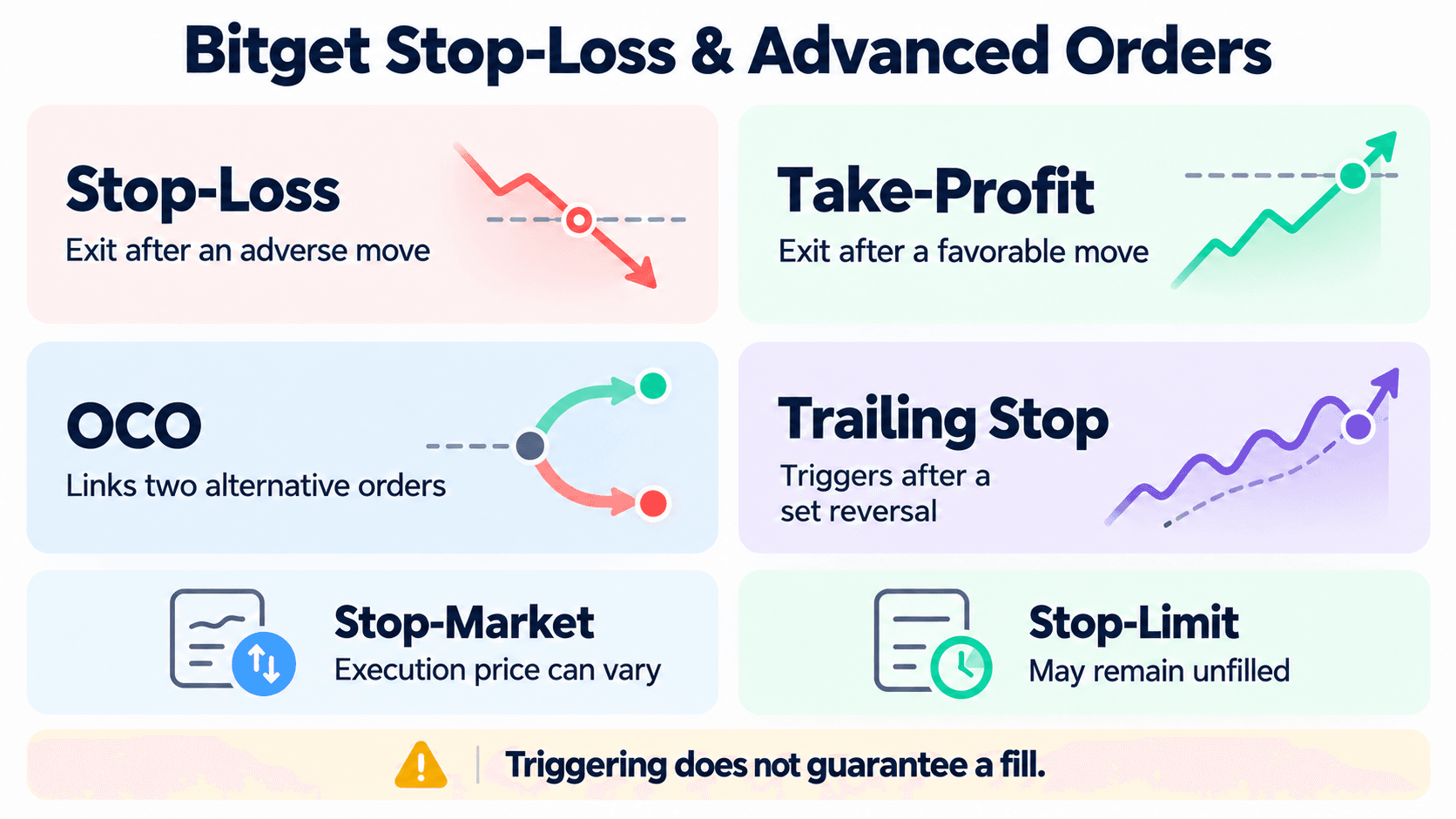 Understanding How Bitget's Order Types Help Control Trade Execution And Risk
Set Stop-Loss and Take-Profit Orders on Bitget
A stop-loss seeks to exit after an adverse move. A take-profit seeks to exit after a favorable move. Before selling manually, the same holding could use a 95,000 USDT stop-loss and 110,000 USDT take-profit.
For a spot exit, open BTC/USDT → Sell, select TP/SL or Trigger from the order-type menu, and enter the holding's available quantity. Enter the trigger and resulting limit price or available Market option.
The trigger price activates the instruction. A limit price sets the acceptable execution boundary. A stop-limit could trigger at 95,000 and submit a sell limit at 94,900 USDT. It will fill only at 94,900 or higher.
A stop-market submits a market order after triggering. Select it when Market execution is available. Fills can differ from the trigger price and remain subject to execution protections. A stop-loss cannot promise a specific sale price.
Review or cancel pending exits in the TP/SL, Trigger, or current-order tab corresponding to the order type. Adjust quantities after a partial sale. OCO links alternative spot exits.
When Should You Use OCO or Trailing Stop Orders?
One-Cancels-the-Other, or OCO, links two alternative orders. Bitget lists OCO support for Classic and UTA spot and margin trading; futures TP/SL uses separate position controls.
For this BTC holding, select Sell → OCO and enter:
- TP limit: 110,000 USDT.
- SL trigger price: 95,000 USDT.
- SL price: 94,900 USDT for a stop-limit, or Market if available.
- Quantity: Your remaining available BTC.
When the stop leg triggers, the profit-taking leg is canceled. Execution of the profit-taking leg cancels the stop leg. Partial execution can also activate cancellation, so inspect the remainder afterward. Manually canceling one leg cancels the other.
| Order | Purpose | Main Limitation |
|---|---|---|
| Stop-loss | Exit after an adverse move | Slippage or an unfilled stop-limit |
| Take-profit | Exit at a favorable target | Target conditions may not produce a complete fill |
| OCO | Link alternative profit and loss exits | Cancellation does not mean the full holding was sold |
| Trailing stop | Follow favorable movement, then trigger on reversal | Tracking and execution settings affect the outcome |
A spot trailing stop uses an activation trigger and callback rate. Once activated, it follows upward movement and triggers after the selected percentage reversal. Its resulting market or limit order still faces execution risk.
Order support differs by product and account configuration. Begin with market, limit, or TP/SL instructions until you understand each field.
Why Might a Stop-Loss or Conditional Order Fail to Execute?
First check whether the order triggered. Its reference price may not have crossed the threshold, even when another chart series has.
If it triggered, inspect the resulting order. A stop-limit can remain unfilled when price moves through its limit too quickly. A stop-market can face slippage, insufficient liquidity, or execution protections that prevent full completion. Insufficient available assets can also block an exit.
Check conditional history, trigger reference, rejection messages, and open quantity. Triggering does not confirm a sale. Conditional orders cannot remove gap risk or guarantee an exit during disrupted trading.
How to Trade Futures on Bitget: Leverage, Margin and Liquidation
Futures require collateral and introduce forced-closure risk. Understand margin before choosing size or leverage.
How Bitget Perpetual Futures Work
Perpetual futures track an underlying market without fixed expiration. A BTC perpetual creates contract exposure rather than delivering spot BTC.
A long position gains from rising prices; a short position gains from falling prices. Notional value is the position's market exposure. Leverage expresses that exposure relative to supporting margin. Initial margin is required to open the position; maintenance margin is the minimum support needed to keep it open.
USDT-M futures use USDT for margin and settlement accounting, subject to UTA's collateral arrangements. USDC-M futures use USDC. Coin-M futures use cryptocurrency-based margin and settlement, exposing collateral value to the coin's price. USDT and USDC also carry stablecoin and depegging risks.
| Feature | Ordinary Unleveraged Spot | Perpetual Futures |
|---|---|---|
| Holding | Purchased crypto balance | Derivatives position |
| Direction | Buy and sell owned assets | Long or short |
| Capital Required | Purchase value and fees | Margin supporting notional exposure |
| Funding | No perpetual funding | Payments may be paid or received |
| Liquidation | No margin liquidation for a standalone funded holding | Forced reduction or closure if margin becomes inadequate |
Place a Futures Trade on Bitget Step by Step
Use a hypothetical BTC/USDT perpetual long: 0.01 BTC at 100,000 USDT, creating 1,000 USDT notional exposure at 5x leverage.
On desktop, select Futures → USDT-M Futures. On mobile, open the Futures trading section, use the contract selector to choose USDT-M Futures, and select BTC/USDT perpetual.
- Confirm Classic or UTA and the account mode. Classic users may need a transfer; UTA users should check available margin.
- Check position mode. One-way mode maintains a net position; hedge mode separates long and short positions.
- Choose isolated margin for this example. Confirm the setting is supported by your account mode. Cross margin can expose additional account balances to losses.
- Set 5x leverage and choose Market or Limit.
- Enter 0.01 BTC, checking the selected quantity unit.
- Review required margin, 1,000 USDT exposure, estimated fees, and estimated liquidation price.
- Set the available TP/SL controls, confirming trigger prices, price references, execution type, and closing quantity.
- Submit the long order and check its filled size under Positions.
The margin calculation is 1,000 ÷ 5 = approximately 200 USDT, before fees and other requirements. The same exposure needs approximately 500 USDT at 2x or 100 USDT at 10x.
Cover the order's full quoted requirements. Higher leverage reduces starting margin for the same exposure, while currency losses from price movements remain unchanged. The futures trading controls show the required margin before submission.
How Liquidation and Margin Risk Work on Bitget
Liquidation is the forced reduction or closure of positions when supporting margin becomes inadequate. Initial margin opens the position; maintenance margin governs whether sufficient support remains.
Cross margin shares eligible collateral across positions. Isolated margin assigns collateral to one position. Adding margin or enabling automatic additions increases the amount exposed beyond the starting allocation.
For equal 1,000 USDT exposure, a BTC decline from 100,000 to 95,000 produces a 50 USDT loss before costs:
- A fully paid spot holding falls to approximately 950 USDT.
- The example 5x futures long loses 50 USDT against approximately 200 USDT initial margin, or 25% of its starting margin.
Bitget uses mark price in position risk assessment. Mark price estimates fair contract value; last traded price records the latest execution. A stop using last price can therefore trigger later than the liquidation process using mark price. A triggered exit may also fail to fill before liquidation.
The liquidation price estimates the price at which forced reduction or closure may begin. It changes with maintenance tiers, funding, fees, other positions, and collateral. Leverage alone cannot determine an exact threshold.
UTA shared margin can expose additional eligible balances. In Advanced Mode, falling collateral prices or changes in the value recognized as collateral can reduce support across positions.
Auto-deleveraging, or ADL, can reduce opposing positions when the normal liquidation and insurance mechanisms cannot adequately absorb losses. A profitable position can be reduced during extreme conditions.
Monitor and Close a Futures Position
Under Positions, monitor size, entry, margin, estimated liquidation price, and unrealized profit and loss. Unrealized PnL changes while exposure remains open. Closing converts its price-based result into realized PnL; fees and funding must also be reconciled.
To close the full example, select Close on the long position, enter its remaining 0.01 BTC, and choose Market or a closing limit. Confirm the fill and that remaining size is zero. To close half, enter 0.005 BTC and monitor the remainder.
In one-way mode, use reduce-only when available so the order can only reduce exposure. In hedge mode, use the correct position's closing controls. Review remaining TP/SL orders after a manual closure.
Assume the full long closes at 110,000 USDT, both executions are standard taker fills, and payments under the applicable funding rate total an illustrative 0.10 USDT:
- Gross realized trading PnL: 0.01 × (110,000 − 100,000) = 100 USDT.
- Opening fee: 1,000 × 0.06% = 0.60 USDT.
- Closing fee: 1,100 × 0.06% = 0.66 USDT.
- Net result: 100 − 0.60 − 0.66 − 0.10 = 98.64 USDT.
Closing fees use closing notional. Beginners can remain in ordinary spot without leveraged exposure.
Bitget Trading Fees: How Much Does a Trade Actually Cost?
Bitget charges trading fees when orders execute, but maker and taker fees are only part of the cost. Spreads, slippage, and perpetual futures funding can also affect how much traders pay and what they ultimately earn.
Bitget Spot and Futures Maker/Taker Fees
A maker adds liquidity by leaving an order on the book. A taker matches existing orders. A limit order that executes immediately against the book can be a taker; classification follows execution.
This Oct. 24, 2026 edition uses published standard rates, cross-checked against the official fee explanation, before discounts:
| Trading Product | Standard Maker Fee | Standard Taker Fee |
|---|---|---|
| Spot | 0.10% | 0.10% |
| Futures | 0.02% | 0.06% |
For eligible spot trades, BGB payment reduces the standard spot trading fee to 0.08%, a 20% discount. Applying 20% to standard futures rates gives 0.016% maker and 0.048% taker for qualifying UTA trades. BGB deduction is off by default. Enable it and maintain sufficient BGB; otherwise the entire fee uses the original fee currency. Classic users should confirm their product's discount eligibility separately.
VIP tiers and eligible promotions can change rates. Qualifying criteria include trading volume, account assets, or BGB holdings. Consult the account-specific fee schedule before ordering. Base rates can vary by account, pair, and date. Holding BGB also introduces token-price risk.
Funding Fees, Spreads, and Other Trading Costs
Perpetual funding passes between long and short holders at settlement. Positive funding generally means longs pay shorts; negative funding reverses the direction. Funding payment = position value at settlement × funding rate.
Check the contract's current rate and countdown. Funding intervals vary by contract; an eight-hour schedule is not universal. Rates can change before settlement.
The spread separates immediately available buying and selling prices. Slippage is the difference between expected and actual execution. Thin liquidity and rapid movement can increase both spot and futures trading costs.
Withdrawal fees apply when sending assets out. Blockchain network costs apply to on-chain transactions, while ordinary order-book trades do not each require an on-chain payment. Perpetual funding applies only when a position is held at the relevant settlement. Repeated entries and exits repeatedly incur trading fees and spread costs.
Worked Examples: Spot and Futures Trading Costs
For this table, we assume equal opening and closing notionals, no VIP discount, and USDT at $1 for arithmetic. Standard futures rows assume BGB deduction is off; funding and execution effects are excluded.
| Example | Opening Fee | Closing Fee | Combined Fees |
|---|---|---|---|
| $1,000 spot each way at 0.10% | $1.00 | $1.00 | $2.00 |
| $1,000 spot each way at 0.08% with BGB | $0.80 equivalent | $0.80 equivalent | $1.60 equivalent |
| $10,000 futures each way at 0.02% maker | $2.00 | $2.00 | $4.00 |
| $10,000 futures each way at 0.06% taker | $6.00 | $6.00 | $12.00 |
For spot and futures trading fees, the calculation is executed transaction notional × fee rate. A $10,000 futures position costs $6 per taker side even if leverage reduces initial margin to $2,000. Buying or selling a different value changes that side's fee. BGB payments use the equivalent token amount at conversion, so no fixed BGB price is assumed.
Eligible UTA users receiving a 20% BGB deduction would instead pay $1.60 per maker side or $4.80 per taker side on $10,000, totaling $3.20 or $9.60 for equal-notional entry and exit. Separately, a hypothetical +0.01% funding rate costs a long $1 per settlement at that position value, or $3 for three identical settlements.
For a complete outcome at standard fees with BGB deduction off, assume 0.1 BTC opens at 100,000 USDT. An exit at 101,000 would produce $100 gross profit. If the actual exit occurs at 100,950, gross profit falls to $95. For a maker exit, assume a sell limit at 100,950 rested in the order book before execution. For a taker exit, assume a market order filled below the anticipated price. The closing notional is $10,095. Combined fees are $4.019 for maker fills or $12.057 for taker fills. After $3 in funding, net profit is approximately $87.98 or $79.94, respectively. The lower execution price is already reflected in realized PnL and should not be deducted twice.
Is Bitget Safe for Trading? Security, Proof of Reserves, and the 2026 Hack
Bitget's account controls and financial disclosures reduce specific risks, but exchange custody remains exposed to infrastructure failures. The September breach is central to assessing that exposure.
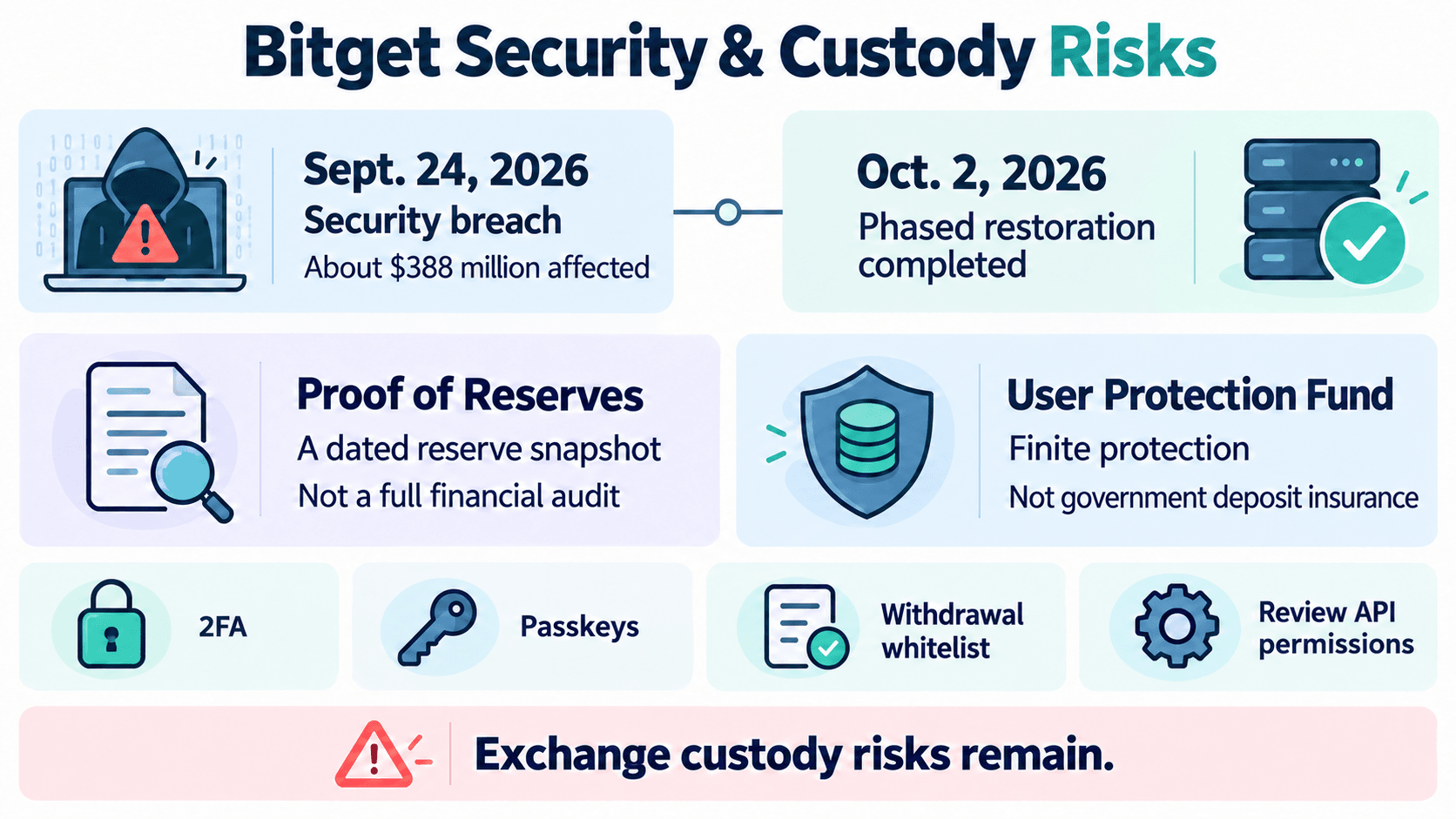 Examining Bitget's Security Measures, Reserve Transparency, And Exchange Vulnerabilities
What Happened During the September 2026 Bitget Hack?
The Sept. 24, 2026 Bitget security breach involved unauthorized transfers from its hot wallet and warm wallet infrastructure, which supports exchange operations. Later reporting placed affected assets at approximately $388 million. Earlier estimates were lower as the scope was still being established.
Independent reporting on SlowMist's investigation described a zero-day vulnerability in third-party security software and a tool that manipulated withdrawal requests. A zero-day vulnerability is exploited before a fix is available.
A preliminary Mandiant report found unauthorized access to third-party security appliances and movement into a wallet server. Bitget published an update linking both investigation reports.
Withdrawals were temporarily suspended. Bitget reported that phased restoration finished on Oct. 2, 2026, following earlier resumptions for BTC, ETH, and USDT. This completed the incident-related rollout; individual assets or networks can still face separate maintenance suspensions. Check the selected network's current status before transferring.
Bitget also stated that cold wallets and private keys were unaffected and customer account balances remained intact. Those assurances about scope and customer balances come from the exchange; investigators' findings address intrusion methods. Restored withdrawals also do not mean all stolen assets were recovered.
Traders temporarily lost withdrawal access even with visible account balances. Personal 2FA cannot prevent this category of exchange-level disruption.
What Protection Do Proof of Reserves and the Protection Fund Provide?
Proof of Reserves, or PoR, compares disclosed reserves with covered customer balances. A Merkle Tree lets users verify inclusion of their balances in the disclosed dataset.
Bitget's Sept. 29, 2026, Proof of Reserves snapshot reported an aggregate reserve ratio of 131% across 19 covered assets. The figures represent reserves at a specific point in time, not a live assessment of the exchange's financial position or a guarantee of withdrawal capacity.
PoR provides evidence within its stated scope. A complete financial audit examines a broader financial picture, including liabilities and other disclosures. A reserve snapshot alone cannot establish continuous solvency or the effectiveness of withdrawal controls.
The User Protection Fund is an additional pool intended to cover certain exceptional losses. Bitget said it designated the fund to absorb the incident's financial impact and replenished it above $300 million on Sept. 30.
That figure records the reported replenishment, not a fixed present-day fund value. The finite fund fluctuates in value; coverage follows its terms. It is not unlimited deposit insurance. Users still rely on Bitget to safeguard assets and meet withdrawals.
How to Protect Your Bitget Trading Account
Apply the available controls before funding and review them periodically:
- Strengthen authentication: Enable authenticator-based two-factor authentication and supported passkey protections. Secure recovery methods and your linked email account.
- Use unique credentials: Keep your Bitget password separate from other services.
- Configure anti-phishing settings: Set a code, then still check message destinations and website domains.
- Restrict withdrawals: Consider a withdrawal whitelist and verify approved addresses and networks.
- Review access: Remove unfamiliar devices and sessions; delete unused API keys and limit retained permissions.
- Reject impersonation: Never provide verification codes, passwords, remote device access, or payments to supposed recovery agents.
The account-security controls cover authentication, withdrawal verification, and phishing protection. Keep active trading funds separate from long-term holdings when appropriate. Compare hardware wallet options if you can securely manage keys, backups, and transaction verification. Self-custody replaces exchange reliance with personal responsibility for recovery and signing.
Common Bitget Trading Problems and How to Fix Them
Orders can remain pending, get rejected, or execute only partially because of price conditions, insufficient available funds, or trading restrictions. Unexpected balance and profit figures can also result from fees, funding payments, or margin requirements. Most issues can be investigated through Bitget's order history and account records.
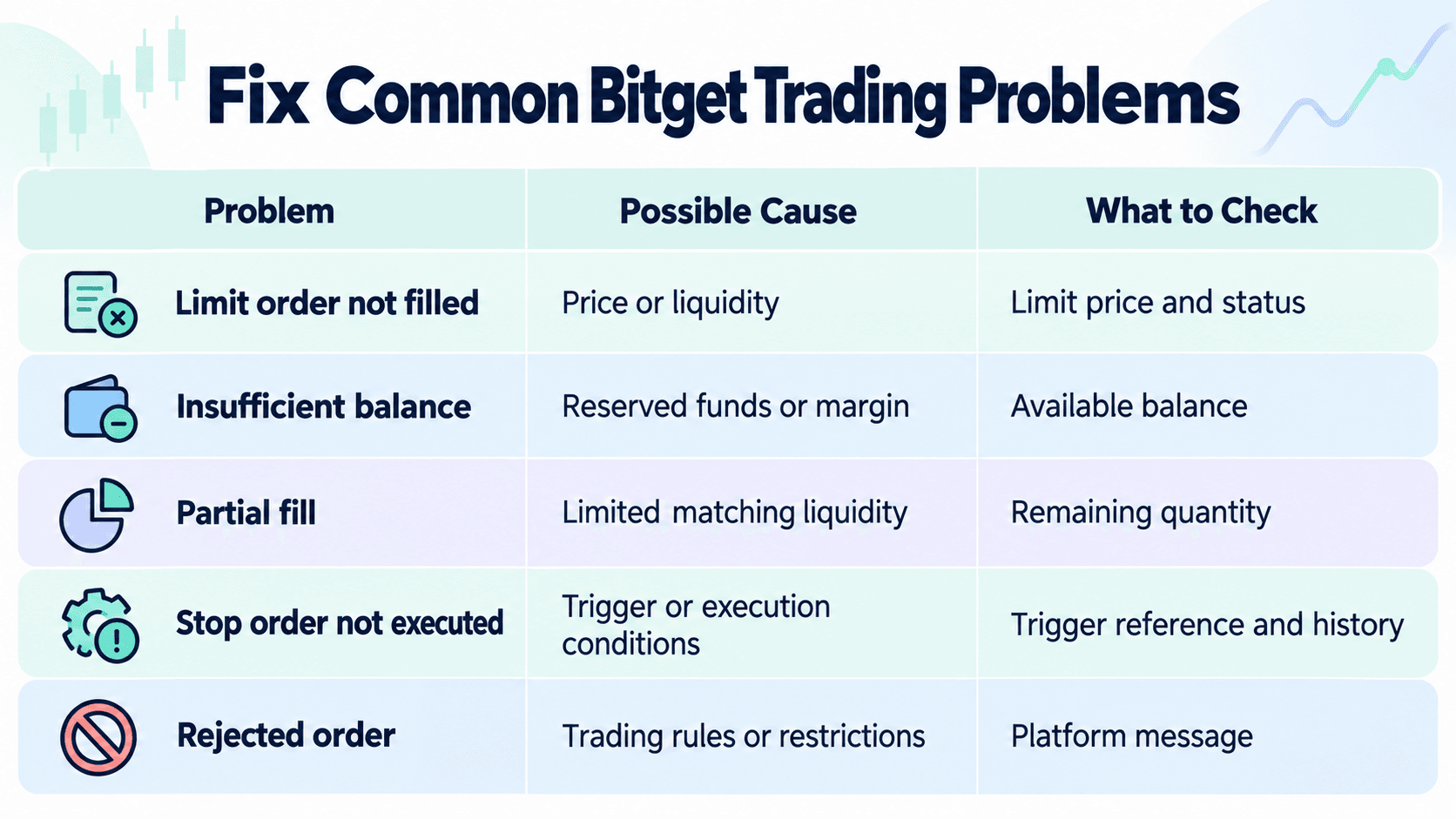 Troubleshoot Failed Orders, Balance Discrepancies, And Margin-Related Issues
Why Is My Bitget Order Pending, Rejected or Partially Filled?
| Problem | Possible Cause | What to Check |
|---|---|---|
| Limit order not filled | Price or liquidity conditions | Limit price, order status, and remaining quantity |
| Insufficient balance | Usable funds do not cover requirements | Available balance, fees, margin, and account mode |
| Partial fill | Insufficient matching liquidity | Filled quantity and outstanding remainder |
| Stop order not executed | Trigger or execution conditions | Trigger reference, conditional history, and resulting order |
| Rejected order | Trading rules or account restrictions | Pair requirements and exact rejection message |
Trading-pair limits include minimum order value, minimum quantity, and permitted decimal precision. Check the spot limits and rules and the selected market's current parameters. A balance large enough to buy a token can still fail an order if the amount uses too many decimal places.
For partial fills, order cancellation affects only the remainder. For conditional orders, distinguish a waiting instruction from an activated order awaiting execution. Close-only status, product restrictions, or account limits can block new positions despite sufficient funds.
Why Are My Bitget Balance or Trading Profits Different From Expected?
Total equity can include committed assets and unrealized PnL. Available balance reflects funds you can use. Open orders can reserve funds without completing trades.
Open-position profits remain unrealized. After closing, reconcile realized PnL, fees, and funding. Summaries can include different costs, so check each field's definition.
UTA shared collateral can also change available margin as other positions move. In Advanced Mode, collateral price changes and valuation ratios can affect borrowing or position capacity.
Reconcile transaction history by account, asset, order ID, quantity, execution price, trading fee currency, and funding. Dollar-valued equity can change even when token quantities stay constant.

What Should You Check Before Placing Your Next Bitget Trade?
- Correct trading pair, product, and account mode.
- Sufficient available balance or margin after existing commitments.
- Intended order type, price, and position quantity.
- Applicable fees, spread, and potential slippage.
- Leverage, collateral scope, and liquidation exposure for futures.
- A planned exit and correctly configured stop instructions, where used.
- Any active trading, account, or regional restrictions.
Begin with a small, unleveraged spot trade and confirm its entire lifecycle: entry, fills, fees, and sale. Move to futures only after you can explain margin requirements and forced liquidation. Understanding execution, costs, and risk controls is more useful than simply knowing where the buttons are.