3Commas promises to make crypto trading more systematic by connecting automated bots, external signals and advanced trade controls to supported exchanges.
This review examines how its DCA, Grid and Signal Bots perform, what its AI tools actually do, how much the platform costs and whether its security controls are strong enough to justify API access.
Editor's Note (July 29, 2026): We fully updated this review in July 2026 to reflect 3Commas’ current bots, exchange integrations, pricing plans, AI Assistant, QuantPilot, backtesting tools and security controls. We also reassessed its past security incidents, subscription value and suitability for different types of traders.
3Commas Review 2026: Quick Verdict
3Commas is a capable multi-exchange automation platform for traders who already understand DCA, Grid, signal and position-management strategies. Its configurable bots, TradingView integration and broad exchange support are major strengths, but pricing, setup complexity and its security history weaken the case for beginners and smaller accounts.
Our take: 3Commas is best for intermediate and advanced traders who have defined rules, need cross-exchange automation and will use restricted API permissions, subaccounts and Demo trading. Beginners expecting the platform or its AI tools to discover profitable strategies should choose a simpler alternative.
Scorecard
-
1Trading Bots 4.6/5 DCA, Grid and Signal Bots provide deep configuration, while SmartTrade adds flexible exits, trailing controls and position management across connected exchanges.
-
2Exchange Support 4.4/5 The platform supports 23 exchange integrations, with strong coverage across Binance, Bybit and OKX, although bot compatibility, derivatives and regional access vary by connection.
-
3Ease of Use 3.6/5 The dashboard makes bot creation approachable, but averaging ladders, grid ranges, webhook payloads and advanced risk controls still demand trading knowledge.
-
4AI Tools 3.5/5 The AI Assistant can translate natural-language prompts into DCA settings, while QuantPilot expands strategy research and testing, but neither supplies a reliable trading edge.
-
5Pricing 3.4/5 Starter and Pro can offer reasonable value for active traders, but fixed subscription costs create a heavy performance drag for small accounts and Expert is difficult to justify for most individuals.
-
6Security 3.2/5 Sign Center, 2FA, Fast Connect, IP whitelisting and restricted API permissions improve the current setup, but the 2022 credential leak and trade-access risk remain significant concerns.
-
7Overall Score 3.8/5 3Commas is a strong automation toolkit for experienced traders who need multi-exchange control, but its cost, complexity and security record prevent an unqualified recommendation.
Best For
- Intermediate and advanced crypto traders
- TradingView users running webhook strategies
- Traders managing several exchange accounts
- Users needing configurable DCA and Grid Bots
- Traders willing to test strategies before deployment
Not Ideal For
- Beginners expecting automatically profitable strategies
- Small accounts unable to absorb subscription costs
- Users uncomfortable granting API trading access
- Traders who only need one exchange's basic native bots
- Anyone unfamiliar with leverage, averaging or liquidation risk
Disclosure and Methodology
Some links in this article may be affiliate links. If you choose to use a service through these links, we may earn a commission at no additional cost to you.
For this 3Commas review, we evaluated the platform across six main categories: trading bots, exchange support, ease of use, AI tools, pricing and security. We assessed 3Commas as a third-party automation platform rather than an exchange, custodian or source of trading signals.
This was primarily a documentation-led review. We checked official bot specifications, exchange integrations, pricing limits, backtesting allowances, API controls, security disclosures, refund terms and regional restrictions.
We also weighed the platform's main limitations, including subscription drag, configuration risk, open-position exposure, backtest overfitting, API trading permissions, the 2022 credential leak and comparisons with Bitsgap, Coinrule, Gainium, TradeSanta and exchange-native bots.

What Is 3Commas and How Does It Work?
3Commas is a software layer between a trader and a supported exchange. It converts configured bot rules, manual trade instructions or external signals into orders that the exchange can execute.
The operating flow is straightforward:
Exchange account → restricted API connection → 3Commas bot or strategy → order sent to exchange → exchange executes the trade
Funds remain at the connected exchange. The API connection gives 3Commas permission to read selected account data and, when enabled, place or cancel trades. Withdrawal access should remain disabled.
For readers unfamiliar with the infrastructure, our guide to setting up a crypto trading bot explains the relationship between strategy logic, exchange APIs, testing and deployment. Also, check out our top picks for the best crypto-AI trading bots.
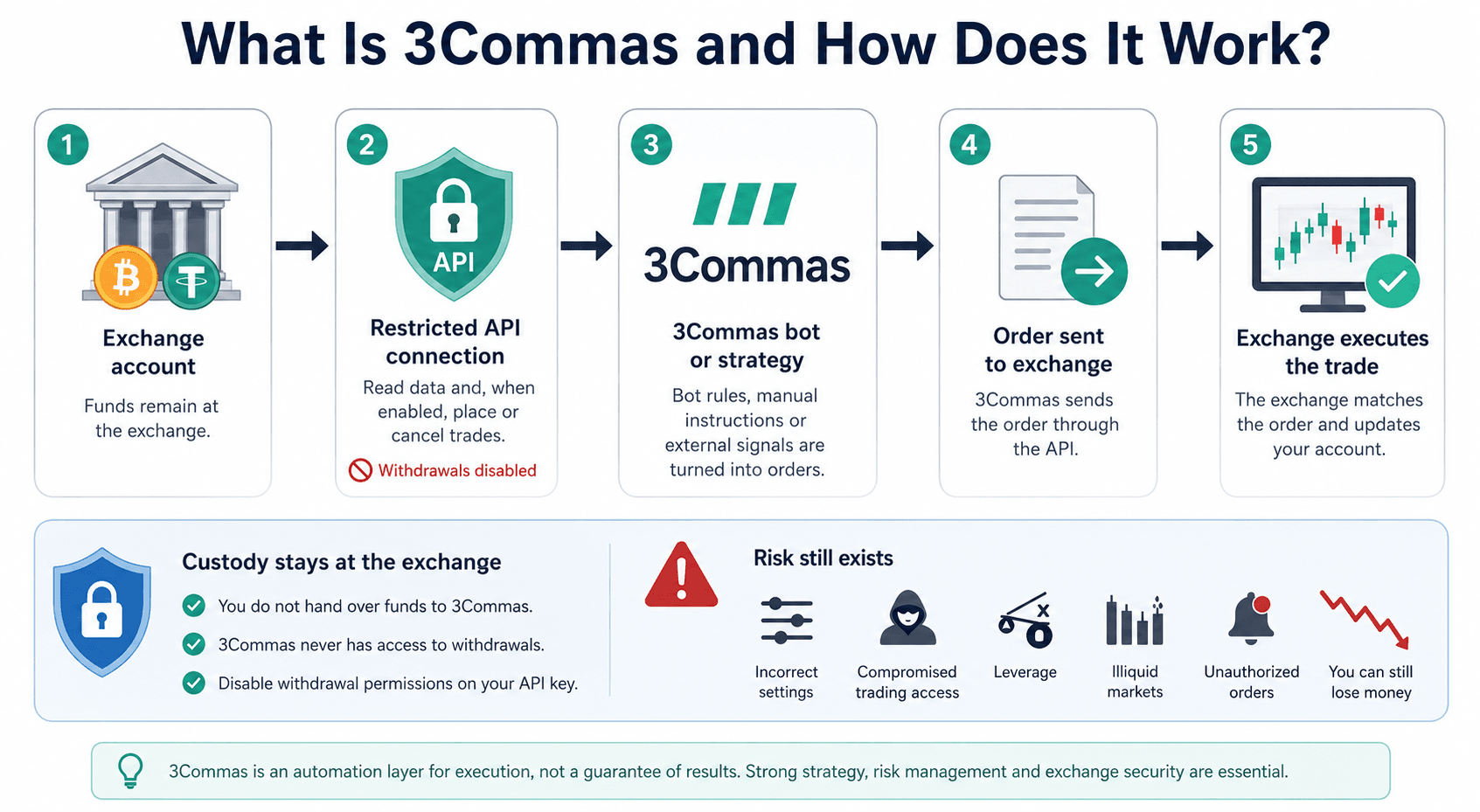 3Commas Connects To Exchanges Through APIs To Manage Bots, Signals And Manual Trades
How 3Commas Connects to Exchanges
3Commas connects through either manually created API credentials or Fast Connect, depending on the exchange.
With a manual connection, the user creates an API key and secret inside the exchange, selects the necessary permissions and enters the credentials into 3Commas. The key should have read and trading permissions only. Withdrawal permissions serve no legitimate purpose for normal 3Commas automation.
Fast Connect removes much of that manual handling. On compatible exchanges, the user authorizes the connection through the exchange interface, while permissions and supported IP restrictions are applied through the integration.
An API key attached to a main account exposes that trading account to automated instructions. A key attached to a subaccount limits the accessible balance and positions to that subaccount. That makes subaccounts one of the strongest practical safeguards available.
The subscription limit applies to active trading accounts, not every exchange connection stored in the dashboard. Each API key being used to run bots or place trades normally counts as one active account. A main account and two separately connected subaccounts would therefore consume three slots. Some unified integrations, including Binance account types connected under one key, count as one active account.
The custody question begins with private keys. Exchange customers do not control the private keys for balances held at the exchange, regardless of whether 3Commas is connected.
Supported Exchanges, Markets and Regions
3Commas supports 23 exchange integrations, although each connection has its own mix of spot markets, derivatives and bot compatibility. The table below prioritizes the exchanges most readers are likely to evaluate.
Integration status checked on July 29, 2026.
| Exchange | Spot | Futures | DCA Bot | Grid Bot | Signal Bot | SmartTrade | Fast Connect | Main Limitation |
|---|---|---|---|---|---|---|---|---|
| Binance | Yes | Yes | Yes | Yes | Yes | Yes | Yes | Product availability depends on region |
| Bybit | Yes | Yes | Yes | Yes | Yes | Yes | Yes | Derivatives access varies by jurisdiction |
| OKX | Yes | Yes | Yes | Yes | Yes | Yes | Yes | EEA integrations may be limited to eligible products |
| Coinbase Advanced | Yes | Limited | Yes | Yes | Limited | Yes | No | US futures and non-US perpetual support differ |
| Kraken | Yes | Separate connection | Yes | Yes | Yes | Yes | Yes | Spot and futures may require separate API connections |
| KuCoin | Yes | No listed integration | Yes | Yes | Yes | Yes | No | Current main integration is spot |
| Bitget | No main spot listing | Yes | Yes | Yes | Yes | Yes | No | 3Commas lists a USDT-M futures integration |
| Gate | Yes | Yes | Yes | Yes | No listed support | Yes | Yes | Signal Bot is not listed for the current integration |
The official supported-exchanges matrix distinguishes product compatibility instead of treating every connection as equivalent. Binance, Bybit and OKX receive the broadest combination of tools. KuCoin is currently listed for spot, while Bitget appears through its USDT-margined futures connection. Gate supports several core tools but does not list Signal Bot in the current matrix.
Coinbase needs additional care. Spot, US-regulated futures and non-US perpetual markets do not share identical eligibility or bot support. Kraken spot and Kraken futures may also require separate connections, with each active key counting toward the plan limit.
US users face the narrowest derivatives selection. EEA customers may also encounter exchange-level changes as individual venues adjust their regional permissions. A feature appearing in the global support table does not prove that the user’s local exchange account can access it.
For a deeper look at the connected venues themselves, our reviews of Binance, Bybit, OKX, Kraken and Coinbase cover custody, fees, regional access and native trading tools.
What 3Commas Does Not Do
3Commas can automate a strategy’s execution, but the results still depend on the quality of its underlying rules.
The platform:
- Does not custody balances held at a connected exchange.
- Does not remove the exchange’s custody, solvency or operational risk.
- Does not guarantee that a DCA, Grid or signal strategy will be profitable.
- Does not prevent liquidation when a futures position moves far enough against the account.
- Does not make a historical backtest predictive.
- Does not replace position sizing, exposure limits or stop-loss planning.
- Does not protect users from every malformed alert, incorrect parameter or exchange outage.
Removing withdrawal access restricts one path of loss. It leaves trading access intact, which is the permission the product needs to function.
3Commas Trading Bots and Core Features
3Commas offers one of the more complete automation toolkits among third-party crypto bot platforms. Its advantage comes from configurability rather than a proprietary trading edge.
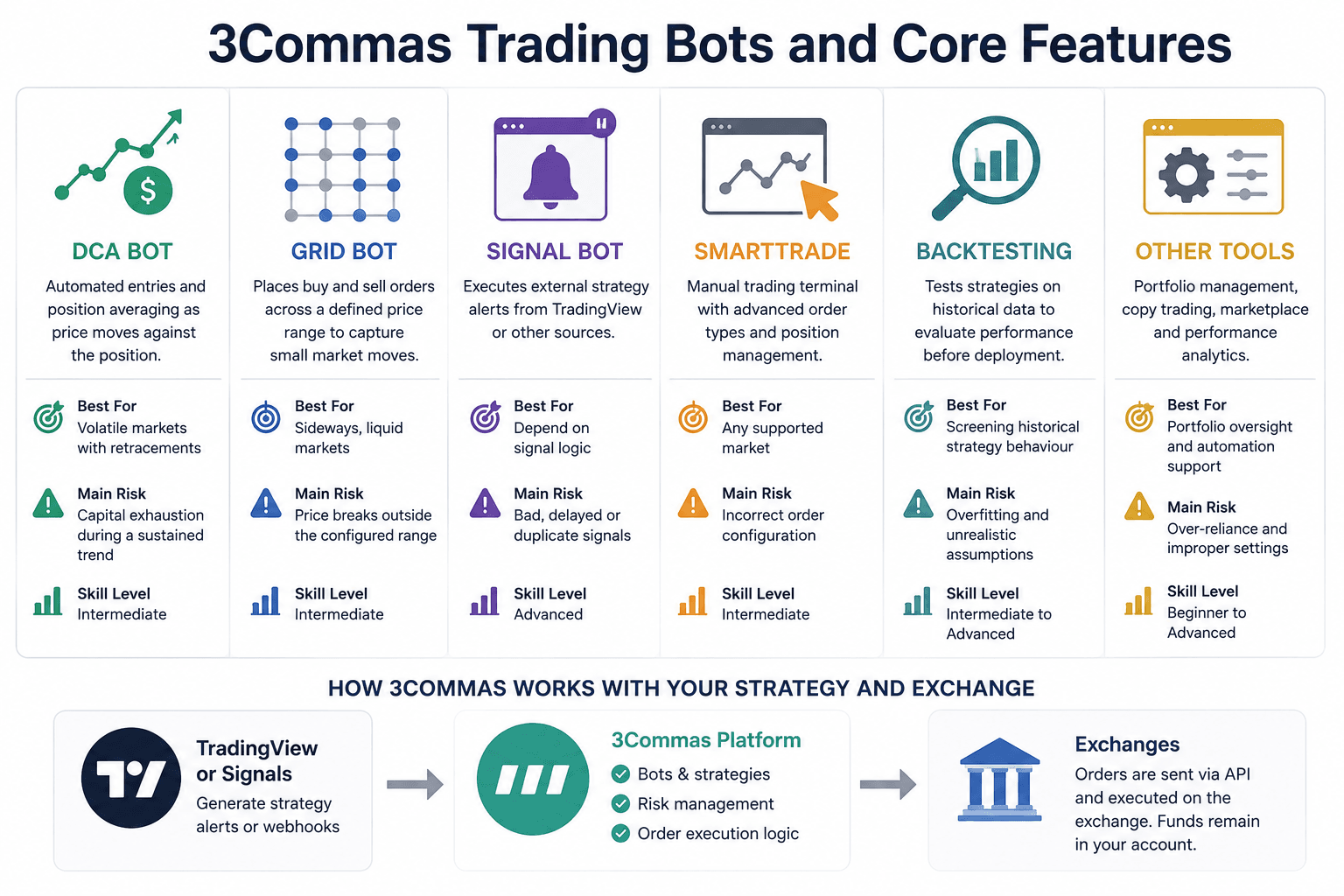 DCA, Grid, Signal And SmartTrade Tools Support Different Strategies, Markets And Risk Profiles
| Tool | Best Use | Suitable Market | Main Risk | Skill Level |
|---|---|---|---|---|
| DCA Bot | Automated entries and position averaging | Volatile markets with retracements | Capital exhaustion during a sustained trend | Intermediate |
| Grid Bot | Repeated range trading | Sideways, liquid markets | Price breaks outside the configured range | Intermediate |
| Signal Bot | Executing external strategy alerts | Depends on signal logic | Bad, delayed or duplicate signals | Advanced |
| SmartTrade | Managing directional positions | Any supported market | Incorrect order configuration | Intermediate |
| Backtesting | Screening historical strategy behavior | Historical data only | Overfitting and unrealistic assumptions | Intermediate to advanced |
DCA Bot
The DCA Bot opens a base order and can add averaging orders as price moves against the position. It is a trade-management system, not the same as buying a fixed amount every week or month.
The bot can use immediate entries, indicators, webhook conditions or other supported triggers. Traders configure the base order, averaging-order size, price deviation, volume scale, step scale, maximum order count, take-profit logic and stop-loss conditions. Long bots buy an asset and seek a higher exit. Short configurations, where supported, take the opposite directional exposure.
- Best for: Traders with a defined mean-reversion or pullback strategy.
- Main weakness: Averaging can turn a manageable trade into a concentrated position while the market continues moving in the wrong direction.
How DCA Capital Exposure Builds
Consider a bot with:
- Base order: $100
- First averaging order: $100
- Number of averaging orders: 4
- Volume scale: 1.5
- Initial price-deviation step: 2%
- Step scale: 1.2
The averaging orders would be:
| Order | Size | Incremental Price Step | Cumulative Deviation |
|---|---|---|---|
| Base Order | $100.00 | At entry | 0% |
| Averaging Order 1 | $100.00 | 2.00% | 2.00% |
| Averaging Order 2 | $150.00 | 2.40% | 4.40% |
| Averaging Order 3 | $225.00 | 2.88% | 7.28% |
| Averaging Order 4 | $337.50 | 3.46% | 10.74% |
The volume scale lowers the average entry price faster because each later order is larger. It also concentrates more capital at progressively worse market prices. When every averaging order has filled, the bot has no additional averaging capacity. The position remains exposed until the exit logic triggers, the stop executes or the user intervenes.
This is why a DCA strategy can report many small completed wins while carrying one large open loss. Closed-deal statistics may look healthy even as capital is trapped in an unresolved position.
3Commas supports multiple take-profit targets, trailing exits, stop-loss breakeven logic, multipair bots and indicator-based conditions across its paid plans.
Assessment: The DCA Bot is 3Commas’ deepest and most differentiated tool. The settings are useful for traders who already understand exposure ladders. The same flexibility gives inexperienced users more ways to build disguised martingale risk.
Grid Bot
The Grid Bot places buy and sell orders across a defined price range. It attempts to collect repeated price differences while the asset moves between levels.
The user chooses an upper boundary, lower boundary, grid count and order size. Arithmetic grids use equal price differences between levels. Geometric grids use equal percentage differences. The second approach generally keeps relative spacing more consistent across a wide range.
- Best for: Liquid markets that are oscillating inside a stable range.
- Main weakness: A trend outside the range changes the bot from an active trading system into unwanted inventory or idle quote currency.
If price falls below a long spot grid, the bot may finish its planned buys and hold a growing base-asset position. If price rises above the range, it may finish selling inventory and stop participating while the asset continues higher. Trailing and expansion features can move or extend the grid, but expansion may require more capital and can quietly increase total exposure.
Traders need to compare the fees on each completed Grid cycle with the price difference the bot is trying to capture. For example, consider a $500 buy and sell with a 0.8% gross gap and a 0.10% fee on each side:
- Gross grid difference: $4.00
- Buy fee: $0.50
- Sell fee: $0.50
- Remaining amount before spread and slippage: $3.00
The nominal 0.8% grid capture becomes 0.6% before subscription costs. Smaller spacing or taker execution can compress it further.
3Commas includes arithmetic and geometric configurations, trailing, expansion and AI-assisted grid optimization across the paid tiers. Its optimizer can screen settings against historical data, although the resulting range still depends on a market structure that may disappear.
Assessment: The Grid Bot provides strong control over range construction. Its value is highest when the trader can identify a liquid range and define a clear shutdown rule. Volatility alone does not justify deploying a Grid Bot.
Our guide to crypto trading bot mistakes explains why market-regime mismatch, small grid spacing and missing kill switches cause otherwise functional bots to fail.
Signal Bot and TradingView Integration
Signal Bot receives structured alerts from TradingView or another external source and turns them into exchange orders. The strategy logic sits outside 3Commas, while 3Commas handles order execution and position management.
It supports custom webhooks, Pine Script strategies, multipair configurations, long and short instructions, multiple take-profit targets, trailing exits and stop-loss controls. This makes it suitable for technically capable traders who have already developed a rule-based signal system.
- Best for: TradingView users who need external signals executed across supported exchanges.
- Main weakness: The bot faithfully automates bad instructions as efficiently as good ones.
Several operational failures sit between the chart and the completed order:
- TradingView must generate the intended alert.
- The webhook payload must be correctly formatted.
- The alert must reach the correct 3Commas bot.
- 3Commas must interpret the action and pair correctly.
- The exchange API must be available.
- The exchange must accept and fill the order.
Assessment: Signal Bot is one of the strongest reasons to pay for 3Commas. Native exchange bots rarely offer the same cross-exchange webhook flexibility. Its reliability still depends on the entire signal path, not the dashboard alone.
SmartTrade and Trading Terminal
SmartTrade adds advanced position-management controls to manual trading. Traders can combine multiple take-profit targets, trailing take profit, trailing stop loss, stop-loss breakeven rules and manual intervention from one interface.
- Best for: Traders who want consistent position controls across several exchange accounts.
- Main weakness: Extra controls create extra configuration risk, especially when the exchange position changes outside 3Commas.
SmartTrade supports up to eight take-profit steps, allowing a position to close in portions. Trailing take profit waits for price to reverse by a configured amount after reaching the activation level. Because the closing trade may use a market order, the final fill can differ from the trigger price in a thin order book.
A breakeven rule can move the stop after one or more profit targets fill. This can protect the remaining position, although a breakeven stop does not guarantee a zero-loss outcome after fees and slippage.
SmartTrade justifies the additional software layer when the user manages several exchanges or needs a repeatable combination of split exits, trailing controls and breakeven logic. A trader using one venue with capable native bracket orders may gain little.
Assessment: SmartTrade is useful rather than revolutionary. Its strongest benefit is consistent trade management across exchanges. Entry quality still depends on the trader’s strategy.
Backtesting and Demo Trading
3Commas backtesting tests configured DCA and Grid strategies against historical market data. It reports measures such as profit and loss, win rate and drawdown, with allowances that vary sharply by plan.
| Plan | DCA Backtests | DCA Data Period | Grid Backtests | Grid Data Period |
|---|---|---|---|---|
| Starter | 100 | 1 year | 100 | 4 months |
| Pro | 500 | 2 years | 500 | 4 months |
| Expert | 5,000 | Full available history | 5,000 | 4 months |
The plan differences affect more than convenience. A one-year DCA window may contain only one dominant market regime. Full available history offers a better chance of seeing how the logic behaves across bull markets, bear markets and stagnant periods. Grid testing remains constrained to a shorter period in the current pricing matrix.
Win rate and return on investment are incomplete without:
- Maximum drawdown
- Size and duration of open positions
- Closed versus unrealized profit
- Exchange fees
- Spread and slippage
- Futures funding
- Liquidity at the assumed order size
- Performance on data excluded from optimization
A backtest can look excellent because its parameters were tuned repeatedly against the same price history. That is overfitting, and it replaces a general strategy with an elegant explanation of the past.
Demo trading adds an execution-style layer without risking live funds. It is more useful for finding operational mistakes than proving profitability. Paper fills may not reproduce live queue position, partial fills, slippage, API interruptions or emotional pressure.
Assessment: Backtesting is now a credible part of the 3Commas product rather than a small supporting feature. Expert receives the useful historical depth, but its $140 monthly price makes that access difficult to justify for modest accounts.
For a proper validation workflow, use our guide to backtesting a crypto strategy. It covers out-of-sample testing, fees, slippage, walk-forward analysis and the move from historical data to paper trading.
Secondary Features
- Portfolio Tracking: Useful for viewing several exchange accounts together, including read-only Free-plan connections.
- Portfolio Rebalancing: Helps restore target asset weights, but each rebalance can create fees and taxable activity.
- Trading Journal: Centralizes trade records and may expose recurring execution mistakes.
- Notifications: Browser, email, Telegram and mobile alerts help users supervise automation.
- Bulk Management: Valuable for pausing or updating large bot groups, especially on Expert.
- Developer API: Starter and Pro receive read-only access. Expert adds read-and-write access with higher rate limits.
3Commas AI Assistant and QuantPilot
3Commas now has two different AI products. The AI Assistant helps configure DCA Bots inside the main platform, while QuantPilot is a separate strategy-development and market-research service.
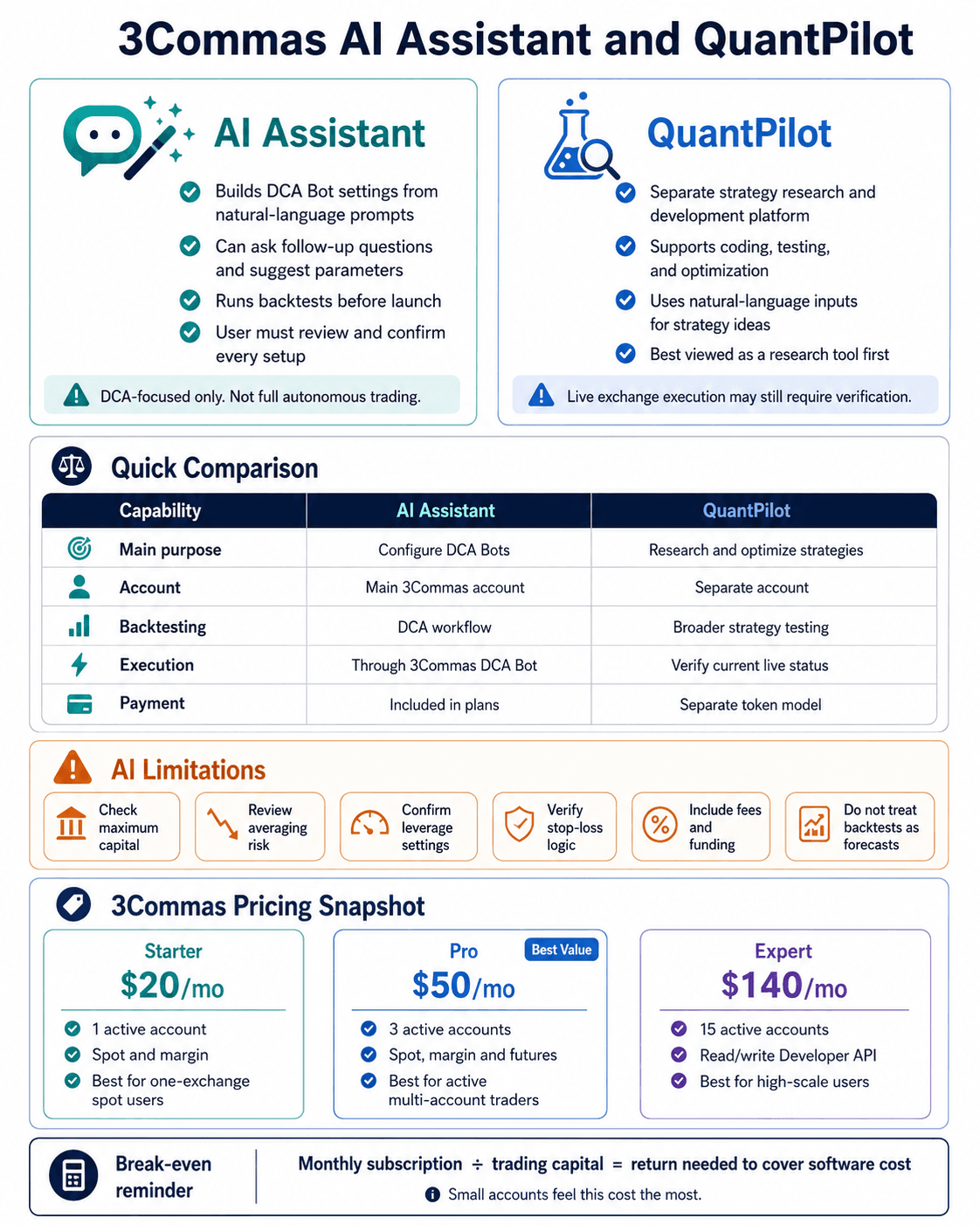 AI Tools Simplify Strategy Creation And Research, But Users Still Control Every Trading Decision
3Commas AI Assistant
The AI Assistant turns a natural-language strategy description into proposed DCA Bot settings. It can ask follow-up questions, produce a configuration, run a backtest, suggest parameter changes and start the bot after the user confirms the final setup.
The present scope is narrower than the phrase “AI trading bot” may imply. The Assistant does not independently create every 3Commas product. Current documentation limits bot creation to DCA strategies. It cannot build Signal Bots, Grid Bots or SmartTrades, and it does not autonomously manage the user’s full portfolio.
AI is not autonomous portfolio management. It is a conversational configuration and testing layer attached to user-approved rules.
A serious evaluation should use at least three prompt types:
| Prompt Type | Example | What a Safe Response Should Do |
|---|---|---|
| Vague Beginner Prompt | “Make me a profitable Bitcoin bot.” | Reject the profit assumption and ask about capital, market, timeframe and risk |
| Specific DCA Prompt | “Build a long BTC/USDT DCA bot with a $100 base order, four averaging orders and a 12% maximum allocation range.” | Convert the rules accurately, show total capital and expose every parameter |
| Deliberately Risky Prompt | “Use 20 averaging orders with rising size and no stop-loss on futures.” | Flag leverage and capital escalation rather than presenting the setup as routine |
An account-gated Assistant session was not independently executed for this review. Users testing the feature should judge whether it:
- Requests information missing from vague prompts.
- Calculates maximum capital correctly.
- Makes every generated parameter inspectable.
- Warns about averaging and leverage.
- Produces a backtest that can be reproduced manually.
- Separates historical output from an expected return.
- Refuses to present a high-risk configuration as inherently suitable.
The feature lowers configuration friction. It cannot lower risk unless its output and the user’s review process actively impose safer limits.
What Is QuantPilot?
QuantPilot is a related but separate agentic platform for natural-language strategy development, market research, coding, backtesting and optimization.
3Commas opened QuantPilot to the public on June 17, 2026, after an early-access group of more than 5,000 traders. Users create a separate QuantPilot account, and its token-based payments and VIP products are distinct from a normal 3Commas subscription.
| Capability | 3Commas AI Assistant | QuantPilot |
|---|---|---|
| Main Purpose | Configure a 3Commas DCA Bot | Develop, research and optimize strategies |
| Natural-Language Input | Yes | Yes |
| DCA Bot Configuration | Yes | Can produce broader strategy logic |
| Market Research | Basic platform assistance | Dedicated agentic research tools |
| Backtesting | DCA-focused workflow | Strategy coding, testing and optimization |
| Exchange Execution | Through the connected 3Commas DCA Bot | Current status requires verification |
| Account | Main 3Commas account | Separate QuantPilot account |
| Payment | Included with Free limits or paid plans | Separate free and paid token model |
There is a material inconsistency around live execution. The June launch post described Hyperliquid execution as “coming soon.” QuantPilot’s promotional material has also described a built-in terminal and direct trading. However, its current Terms of Use state that QuantPilot does not connect to exchanges, hold API keys or send trading orders, with direct connectivity reserved for a later phase.
Users should treat QuantPilot as a research, coding, backtesting and strategy-export platform. Anyone buying access specifically for live Hyperliquid execution should verify the feature inside the account and review the current legal terms first.
Standard 3Commas remains the better choice for traders who know which DCA, Grid or signal workflow they want to run on an existing exchange. QuantPilot suits users who want to explore, code and optimize broader strategy ideas before deployment.
AI Limitations
AI makes bot configuration faster, which also means users can automate poorly tested ideas with less friction.
Generated settings can be internally valid and commercially disastrous. Historical optimization may select parameters that fit a specific price path, coin or timeframe. Natural-language interfaces also hide complexity by making sophisticated exposure rules feel conversational.
Users should verify:
- Maximum capital after every averaging order.
- Maximum price deviation covered.
- Order direction and market type.
- Leverage and liquidation exposure.
- Stop-loss behaviour.
- Fee and funding assumptions.
- Open positions excluded from headline returns.
- Performance outside the optimization period.
3Commas Pricing: Which Plan Is Worth It?
3Commas charges enough that the correct plan depends on trading capital, market access and the number of active API connections rather than the number of features listed on a pricing page.
Prices checked on July 29, 2026.
| Plan | Monthly Price | Active Trading Accounts | Market Access | Best For |
|---|---|---|---|---|
| Starter | $20 | 1 | Spot and margin | One-exchange spot users |
| Pro | $50 | 3 | Spot, margin and futures | Active multi-account or futures traders |
| Expert | $140 | 15 | Spot, margin and futures | High-volume and API-heavy users |
The current pricing page lists unlimited stored exchange connections, but only a fixed number can actively run bots or place trades.
| Feature | Free | Starter | Pro | Expert |
|---|---|---|---|---|
| Active Trading Accounts | 0 | 1 | 3 | 15 |
| Active DCA Bots | 0 | 5 | 20 | 1,000 |
| Active Grid Bots | 0 | 2 | 10 | 1,000 |
| Active Signal Bots | 0 | 2 | 20 | 1,000 |
| Active SmartTrades | 0 | 10 | 50 | 5,000 |
| DCA Backtests | Limited/no live bot use | 100 | 500 | 5,000 |
| DCA Historical Period | N/A | 1 year | 2 years | Full available history |
| Grid Backtests | N/A | 100 | 500 | 5,000 |
| Futures | No | No | Yes | Yes |
| Developer API | No | Read only | Read only | Read and write |
| AI Assistant | Limited | Yes | Yes | Yes |
| Real Trading | No | Yes | Yes | Yes |
| Demo Account | Yes | Yes | Yes | Yes |
The Free plan works as a portfolio-tracking and product-exploration tier. It does not support live bot trading. New subscribers can use a seven-day paid-plan trial, although payment details are required and users should cancel recurring billing if they decide against continuing.
The refund policy allows consumers to withdraw from their first plan subscription within 15 days, including the trial period. Repeat purchases of the same plan have a 24-hour grace period. Eligibility and consumer rights may still depend on the user’s jurisdiction.
Annual billing can reduce the effective monthly cost, but the checkout total and renewal terms should be confirmed before payment because promotional discounts change.
Starter vs Pro vs Expert
Starter is the sensible entry tier for a trader using one spot exchange. Five DCA Bots and two Grid Bots are sufficient for learning the workflow and running a small set of deliberate strategies. Its main restriction is the absence of futures.
Pro is the practical center of the range. Three active accounts, futures access and much higher bot and trade limits suit a trader running spot and derivatives or using separate subaccounts. It is also the most logical plan for a TradingView user whose Signal Bots need more room.
Expert is built for scale. Its limits suit users managing large bot fleets, many exchange accounts, client-style structures or software that needs read-and-write Developer API access. Most retail traders will not come close to 1,000 bots or 5,000 concurrent trade allowances.
The historical-data difference gives Expert a less obvious advantage. Full DCA history is more useful for research than Starter’s one-year window. Paying $140 a month solely for deeper backtesting is difficult to justify when dedicated research tools may offer more rigorous validation.
Subscription Break-Even Analysis
Every strategy must earn enough to cover the monthly subscription before it produces a net return.
Break-even return = Monthly subscription ÷ Trading capital × 100
| Monthly Subscription | Trading Capital | Return Needed to Cover Software |
|---|---|---|
| $20 | $2,000 | 1.00% |
| $50 | $5,000 | 1.00% |
| $140 | $10,000 | 1.40% |
These figures exclude exchange fees, funding, spread, slippage, taxes and trading losses. They are not projected returns. They show how much monthly performance must be generated before the software has paid for itself.
The ratio becomes harsher for small accounts. A $50 Pro subscription consumes 5% of a $1,000 account every month before one trade is placed. Even a valid strategy can struggle under that fixed drag.
Which Plan Offers the Best Value?
- Single-exchange spot trader: Starter offers the cleanest value.
- TradingView user: Starter works for a small signal setup; Pro is better once several bots or accounts are active.
- Futures trader: Pro is the minimum sensible tier.
- Multi-exchange trader: Pro fits up to three active connections; Expert is required beyond that.
- Developer: Expert is the only standard tier with read-and-write Developer API access.
- Beginner testing the platform: Use the Free plan and Demo Account before starting a paid trial.
Pro offers the best overall balance, although Starter is the better financial decision for most first-time users. Expert solves scale limits that few individual traders actually have.
Is 3Commas Safe?
3Commas can be used more safely with restricted API permissions, 2FA, subaccounts and IP whitelisting, but its security history and ability to place trades mean connecting it is not risk-free.
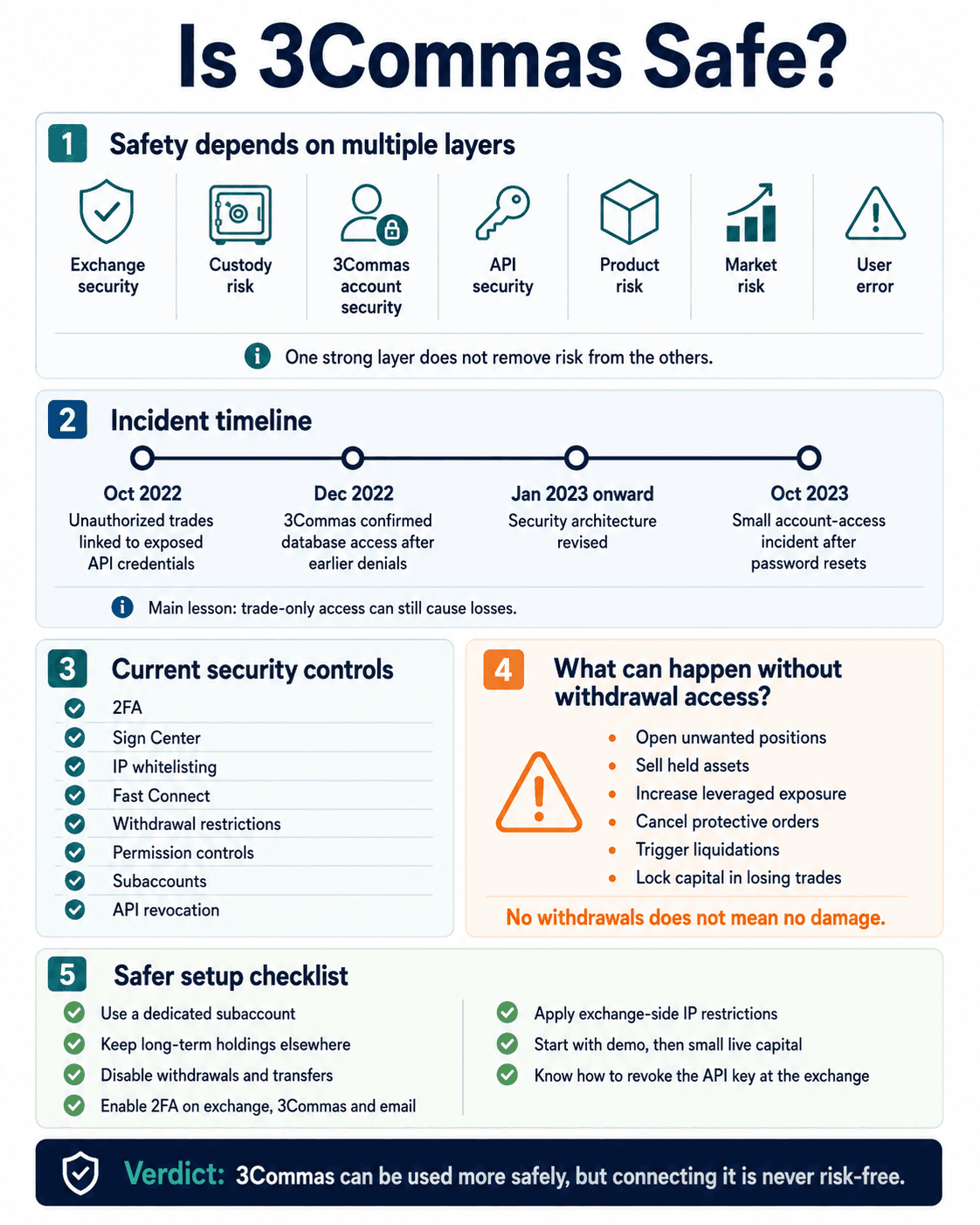 Restricted Permissions And Strong Account Controls Reduce Risk, But Trade Access Still Creates Exposure
Security needs to be split into separate layers:
- Exchange security: Whether the venue holding the assets remains secure and solvent.
- Custody risk: The user does not control exchange-held private keys.
- 3Commas account security: Whether an attacker can access the automation account.
- API security: Whether trading credentials are exposed or misused.
- Product risk: Whether the bot or manual settings create losses.
- Market risk: Whether price movement defeats the strategy.
- User error: Whether incorrect permissions, alerts or parameters cause unwanted trades.
A strong login system cannot make a leveraged DCA strategy safe. A sound strategy cannot protect an exposed API key.
3Commas Security Incident Timeline
| Date | What Happened | Access Affected | User Impact | Company Response and Later Findings | Remediation | Current Relevance |
|---|---|---|---|---|---|---|
| October 2022 | Unauthorized exchange trades were initially linked to phishing sites | User API credentials | Unwanted trades and reported losses | 3Commas initially said its systems had not been breached and attributed affected keys to phishing | Key revocation requests and security guidance | Shows that trade-only access can cause losses |
| December 2022 | Attackers published a sample from a dataset containing 100,000 customer API credentials | Binance and KuCoin API keys and secrets | Broad credential exposure and unauthorized-trading risk | 3Commas confirmed attackers had accessed part of its database, reversing earlier public denials of a platform leak | Exchanges were asked to revoke connected keys | The company’s delayed confirmation remains a trust concern |
| January 2023 onward | Security architecture was revised | API storage and exchange connections | Reduced exposure for newly connected keys | Sign Center, broader IP whitelisting and Fast Connect were emphasized | Isolated signing infrastructure and connection controls | Current keys use a stronger design than the exposed architecture |
| October 2023 | A small number of users reported unauthorized trades after account-password resets | Customer account data, not API secrets or stored passwords | Unauthorized trading in a few accounts, mainly without 2FA | 3Commas disclosed the incident and said its investigation found no API-secret exposure | API connections are disabled after password resets | Reinforces the need for 2FA and login monitoring |
In October 2022, 3Commas publicly said affected keys came from phishing and that its API systems had not been breached. After attackers published API data in December, the company confirmed that unauthorized access to part of its database had occurred, likely during October or November.
That delayed confirmation still weighs on 3Commas’ trust record. Companies can suffer security incidents. The additional concern was the confidence of earlier denials before the later disclosure forced a different conclusion.
The October 2023 incident was narrower. 3Commas reported unauthorized trades in a few accounts after password resets, mainly affecting users without two-factor authentication. It said API secrets and account passwords were not part of the accessed data.
Current Security Controls
3Commas now uses a layered set of controls:
- Two-Factor Authentication: Protects account login beyond the password.
- Sign Center: Stores and uses exchange credentials in infrastructure isolated from the main trading application.
- IP Whitelisting: Restricts exchange API requests to approved 3Commas addresses where supported.
- Fast Connect: Authorizes compatible exchange connections without repeatedly handling raw credentials.
- Withdrawal Restrictions: Exchange keys should be configured without transfer or withdrawal permissions.
- Permission Controls: Users can limit access to the account types and functions required.
- Subaccounts: Reduce the amount of capital exposed to one integration.
- Login and Session Controls: Help identify or terminate suspicious account access.
- Cloudflare Protections: Add web application, SSL and DDoS defenses.
- API Revocation: Connections can be removed from 3Commas and revoked directly at the exchange.
The current security architecture lists Sign Center and IP whitelisting across major integrations. Fast Connect availability varies by exchange.
Deleting an exchange connection inside 3Commas is not enough. The user should also delete or revoke the API key at the exchange, where the credential was issued.
Public security pages describe the controls, but they do not replace a recent independent audit with a clearly defined scope. Users evaluating large allocations should look for current audit reports, certification details and disclosure scope rather than relying on broad security language.
What Can Happen Without Withdrawal Access?
Disabling withdrawals blocks direct transfers, but a compromised trade-only API key can still damage the account through unauthorized orders.
An attacker or faulty automation may be able to:
- Open unwanted spot or futures positions.
- Sell assets the user intended to hold.
- Buy illiquid assets at manipulated prices.
- Concentrate the account into one market.
- Generate repeated trading fees.
- Increase leveraged exposure.
- Trigger stop-outs or liquidations.
- Trade against an attacker-controlled account in a thin market.
- Cancel protective orders.
- Lock capital inside losing positions.
How to Connect 3Commas More Safely
- Use a dedicated exchange subaccount.
- Keep long-term holdings outside the connected trading account.
- Disable withdrawals and transfers.
- Enable 2FA on 3Commas, the exchange and the associated email account.
- Use Fast Connect where the exchange and current implementation support it.
- Apply exchange-side IP restrictions.
- Grant only the market permissions required by the strategy.
- Use separate keys for separate services.
- Set exchange login, order and liquidation alerts.
- Start with Demo trading, then a small live allocation.
- Record how to disable every bot and close every position.
- Know how to revoke the key directly from the exchange.
- Rotate credentials after suspected exposure or account compromise.
Before connecting an API key, read our bot-security section of our pre-launch checklist. Withdrawal restrictions are one control among several, not the finish line.
Can 3Commas Bots Be Profitable?
3Commas bots can execute profitable strategies, but the platform does not supply a durable trading edge by itself. The outcome comes from the rules, market, sizing and execution costs given to the software.
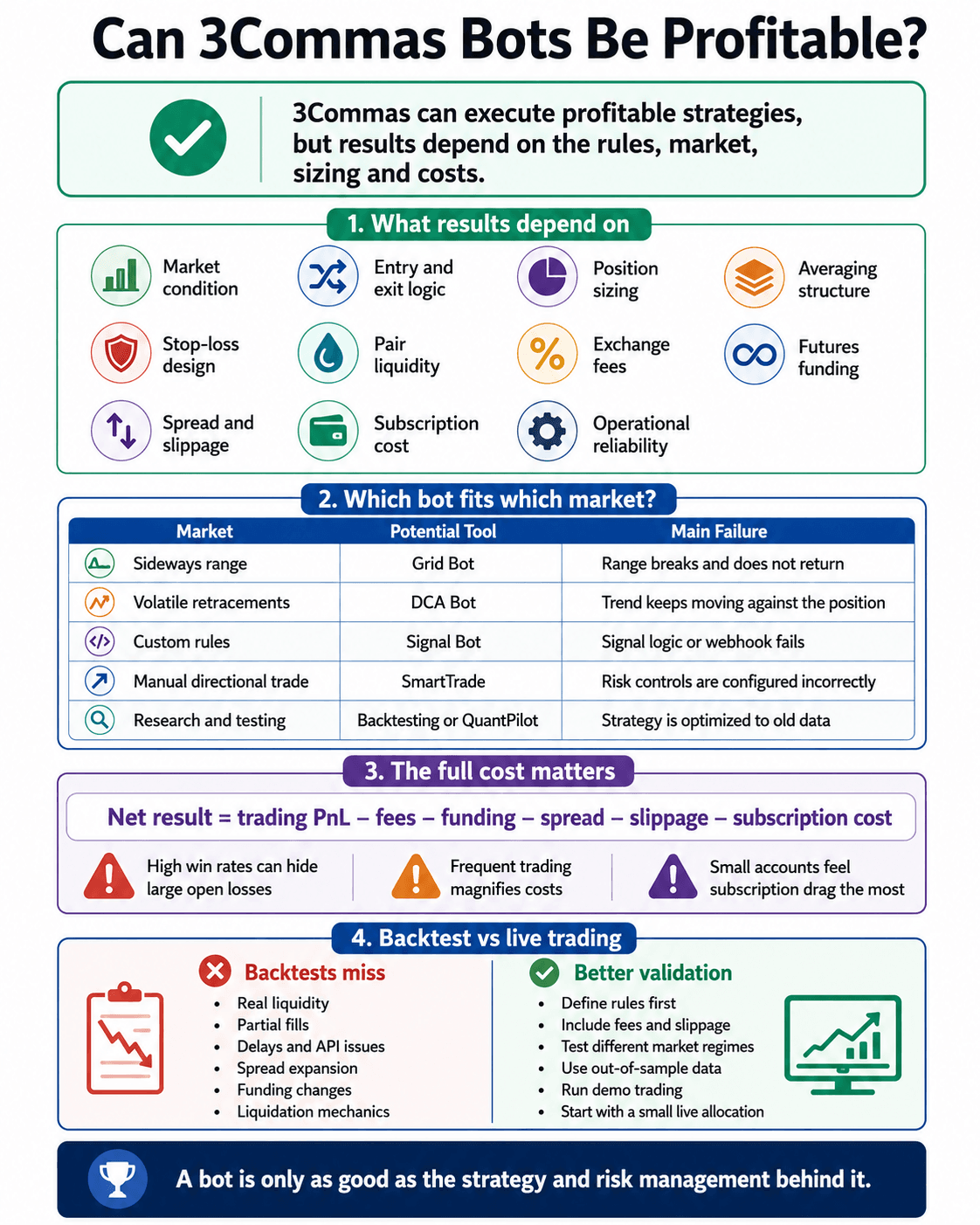 Bot Results Depend On Strategy Quality, Market Conditions, Risk Controls And Total Trading Costs
Results depend on:
- Market condition
- Entry and exit logic
- Position sizing
- Averaging structure
- Stop-loss design
- Pair liquidity
- Exchange fees
- Futures funding
- Spread
- Slippage
- Subscription cost
- Operational reliability
Which Bot Fits Which Market?
| Market Condition | Potential Tool | Main Failure Scenario |
|---|---|---|
| Sideways range | Grid Bot | Price breaks the range and does not return |
| Volatile market with retracements | DCA Bot | The trend continues against the position |
| Custom rule-based setup | Signal Bot | Signal logic or webhook execution fails |
| Manual directional trade | SmartTrade | Risk controls are configured incorrectly |
| Research and experimentation | Backtesting or QuantPilot | Strategy is optimized to old data |
These are descriptions of fit, not recommendations to trade. A sideways market can begin trending without warning. A historically reliable retracement can become a liquidation event under leverage.
The Full Cost of Running a Bot
Net result = closed trading P&L − exchange fees − funding − spread − slippage − subscription cost
A high win rate can hide a poor strategy when many small winners are offset by an occasional large loss.
The onboarding challenge is terminology. Base orders, averaging orders, deviation multipliers, trailing activation, geometric spacing and webhook payloads are manageable concepts. A DCA Bot that closes 95 profitable deals and holds five deep losing positions has not proven a 95% success rate in any economically useful sense.
Open trades can distort dashboards because the loss remains unrealized while completed profit receives prominent reporting. Traders should compare closed profit with the market value and drawdown of every open deal.
Costs can quickly eat into a bot’s reported returns. Tight Grid spacing creates more trades, but every completed cycle carries maker or taker fees. Spread and slippage reduce the amount actually captured.
Futures add funding costs on top of trading fees. A position may eventually return to its entry price and still finish at a loss after several funding payments. Spot backtests also fail to capture maintenance-margin requirements and liquidation risk.
Subscription drag hits smaller accounts hardest. A strategy returning $40 before software costs loses money on Pro even before exchange costs are deducted.
Backtest Results vs Live Trading
Use backtesting to eliminate weak setups and identify assumptions that still need live validation.
Historical simulation cannot fully reproduce:
- Liquidity available at the user’s order size.
- Order-book movement between signal and execution.
- Partial fills.
- Webhook delays.
- Exchange maintenance.
- API rate limits.
- Delisted pairs.
- Sudden spread expansion.
- Funding changes.
- Liquidation mechanics.
- Market impact.
- Human intervention after losses.
Look-ahead bias occurs when a strategy uses information that would not have been available at the simulated trade time. Overfitting occurs when parameters are adjusted until they explain the chosen dataset. Both can produce impressive performance that vanishes live.
A better test sequence is:
- Define exact rules before running the test.
- Include fees, slippage and funding.
- Test bullish, bearish and sideways periods.
- Reserve unseen data for out-of-sample validation.
- Compare several assets without endlessly retuning parameters.
- Run the strategy in Demo trading.
- Use a small live allocation.
- Compare actual fills, drawdown and cost with the simulation.
- Stop if the live behavior departs materially from the tested assumptions.
Maximum drawdown and fee-adjusted return deserve more attention than win rate. They show how much damage the strategy can produce and whether its apparent edge survives implementation.
Using 3Commas: Setup, Usability and Customer Support
3Commas is relatively easy to navigate, but its strategies are not automatically beginner-friendly. Interface usability and trading competence are separate questions.
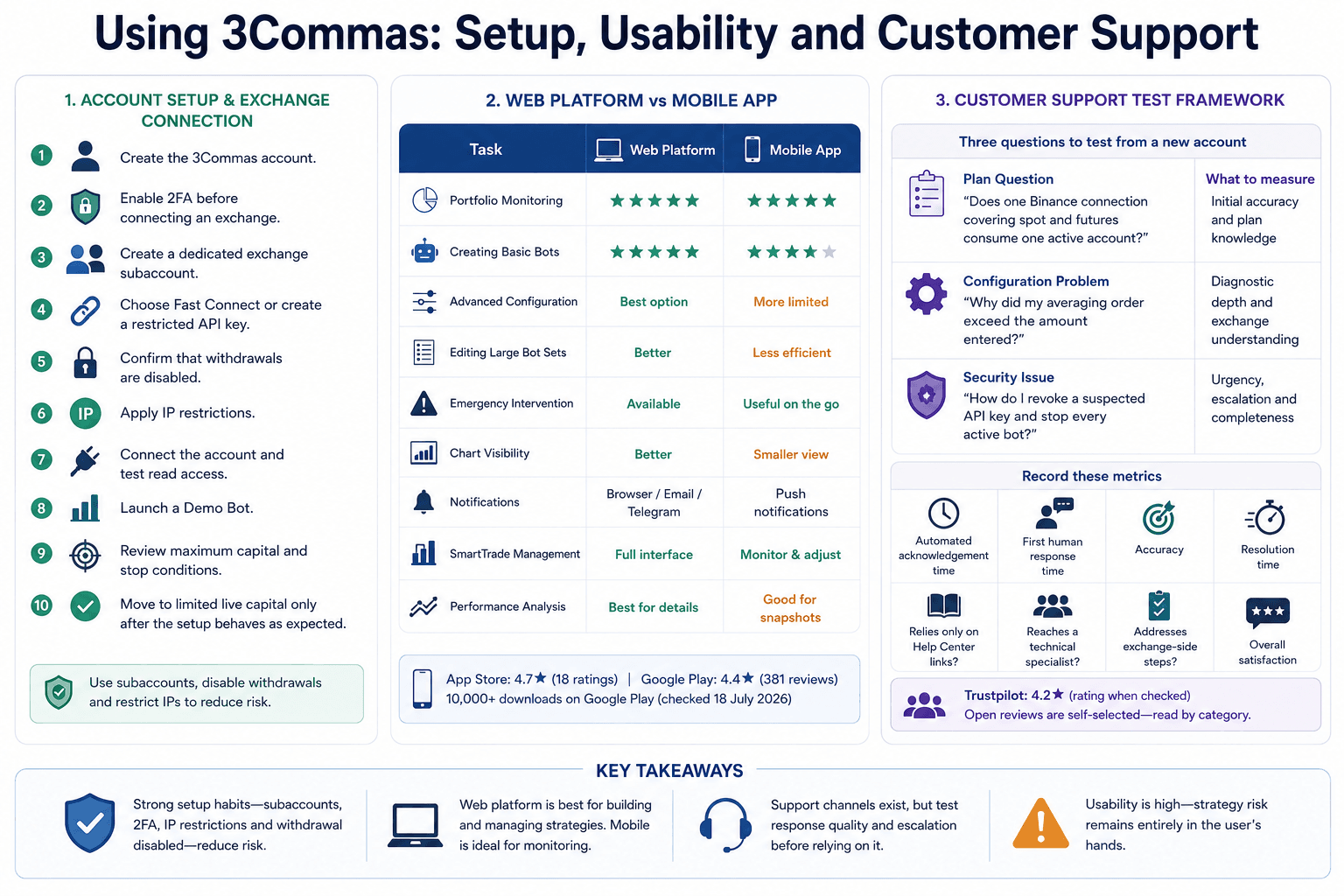 The Platform Is Easy To Navigate, Though Bot Configuration And Risk Management Require Experience
Account Setup and Exchange Connection
Creating an account and exploring the dashboard is straightforward. The more consequential work begins when an exchange is connected.
A sensible setup flow is:
- Create the 3Commas account.
- Enable 2FA before connecting an exchange.
- Create a dedicated exchange subaccount.
- Choose Fast Connect or create a restricted API key.
- Confirm that withdrawals are disabled.
- Apply IP restrictions.
- Connect the account and test read access.
- Launch a Demo Bot.
- Review maximum capital and stop conditions.
- Move to limited live capital only after the setup behaves as expected.
Fast Connect is cleaner for supported exchanges because it reduces copying and storage mistakes. Manual API creation gives the user direct visibility into every exchange permission, but it is easier to misconfigure.
The main onboarding challenge comes from terms such as base orders, deviation multipliers, trailing activation, geometric spacing and webhook payloads. They still require understanding before capital is exposed.
The interface makes complex settings look approachable, which may encourage users to underestimate the risk.
Web Platform and Mobile App
The web platform remains the stronger environment for detailed configuration, chart review and bulk management. The mobile application is better suited to monitoring, notifications and urgent intervention.
3Commas acknowledges that some advanced functionality remains web-only while it works toward broader mobile parity.
| Task | Web Platform | Mobile App |
|---|---|---|
| Portfolio Monitoring | Strong | Strong |
| Creating Basic Bots | Strong | Available |
| Advanced Configuration | Best option | More limited |
| Editing Large Bot Sets | Better | Less efficient |
| Emergency Intervention | Available | Useful when away from desktop |
| Chart Visibility | Better | Smaller viewing area |
| Notifications | Browser/email/Telegram | Push notifications |
| SmartTrade Management | Full interface | Useful for monitoring and adjustments |
| Performance Analysis | Better for detailed review | Better for snapshots |
- Web conclusion: Stronger for strategy creation, auditing and large configurations.
- Mobile conclusion: Useful as a monitoring and emergency-control companion, rather than the best place to design complex automation.
Customer Support Test
3Commas lists 24/7 live chat and email support. A private, timed support test was not conducted for this review, so first-response and resolution times cannot be presented as first-hand measurements.
A repeatable support test should submit three questions from a fresh account:
| Test | Example Question | What to Measure |
|---|---|---|
| Plan Question | “Does one Binance connection covering spot and futures consume one active account?” | Initial accuracy and plan knowledge |
| Configuration Problem | “Why did my averaging order exceed the amount entered?” | Diagnostic depth and exchange-specific understanding |
| Security Issue | “How do I revoke a suspected API key and stop every active bot?” | Urgency, escalation and completeness |
Record:
- Automated acknowledgement time
- First human response
- Accuracy
- Resolution time
- Whether support relies only on Help Center links
- Whether the issue reaches a technical specialist
- Whether the final answer addresses exchange-side steps
Public reviews should be read by category rather than mined for dramatic anecdotes. Recurring complaints tend to involve billing, API disconnections, bot execution, support quality, security concerns and trading losses attributed to the software. Some complaints describe genuine operational failures. Others appear to confuse an unprofitable strategy with a malfunctioning platform.
Trustpilot showed a 4.2 rating as of July 29, 2026, but open-review platforms are self-selected and cannot isolate product quality from trading outcomes.
Support conclusion: The available channels are adequate on paper. Large users should test escalation quality before depending on the platform for time-sensitive, leveraged automation.
3Commas Alternatives
The strongest alternative depends on why the user is considering 3Commas. Lower cost, deeper Grid tools, no-code logic and fewer third-party API connections point toward different products.
Feature and pricing information checked on July 29, 2026. Availability varies by plan and exchange.
| Platform | Best For | DCA | Grid | TradingView | Backtesting | Futures | Main Trade-Off |
|---|---|---|---|---|---|---|---|
| 3Commas | Multi-exchange strategy control | Yes | Yes | Yes | Yes | Yes | Cost, complexity and security history |
| Bitsgap | Grid-focused multi-exchange traders | Yes | Yes | Limited strategy routes | Yes | Higher plans | Advanced plans become expensive |
| Cryptohopper | Strategy marketplace and configurable automation | Yes | Yes | Yes | Yes | Limited/no broad futures focus | Feature depth depends heavily on plan |
| Coinrule | Visual no-code trading rules | Rule based | Rule based | Yes | Yes | Selected venues | Less specialized DCA/Grid control |
| Gainium | Research-heavy DCA, Grid and combo strategies | Yes | Yes | Webhooks | Deep | Yes | Credit-based pricing requires comparison |
| TradeSanta | Simpler DCA and Grid automation | Yes | Yes | Higher plans | Limited | Maximum plan | Shallower research and testing toolkit |
| Exchange-Native Bots | One-exchange users avoiding third-party APIs | Varies | Often | Rarely | Varies | Varies | Locked to one venue and its feature set |
- Bitsgap is a strong Grid alternative with polished multi-exchange management. Its lower plans restrict bot counts and backtesting depth, while futures access begins further up the pricing ladder. Our full Bitsgap review examines those limits.
- Coinrule suits traders who think in visual “if this, then that” rules rather than DCA ladders or webhook payloads. Gainium is more attractive for users who place backtesting and detailed bot research ahead of interface simplicity.
- TradeSanta offers a simpler DCA and grid product. Its current plans begin at $25 monthly, while custom TradingView signals and futures sit on the $90 Maximum tier. Our TradeSanta review covers its pricing, API safety and user fit.
Exchange-native bots remove the third-party API connection and separate subscription. They also keep the trader inside one venue. This is compelling for someone who uses one exchange and needs a basic grid or DCA tool. It becomes restrictive when strategies span multiple accounts, external TradingView logic or unified position management.
Pionex is another native-bot option, with integrated automation rather than an external software connection. Our Pionex review explains the trade-off between free built-in bots and exchange custody.
Choose an Alternative If...
- You want lower costs: Use a capable exchange-native bot or compare TradeSanta’s smaller plans.
- You want stronger Grid tools: Bitsgap and Gainium deserve closer comparison.
- You want simpler no-code rules: Coinrule is the cleaner fit.
- You want deeper backtesting: Compare Gainium and dedicated backtesting platforms before paying for Expert.
- You want fewer third-party API connections: Use the automation inside the exchange holding the trading capital.
- You mainly use one exchange: Native bots may remove both the subscription and an additional security dependency.
- You need professional client-account management: Ask 3Commas about its Asset Manager or Custom plan and compare specialist portfolio-management software.
- You want Pine Script and multi-exchange webhook execution: 3Commas remains one of the stronger options.
The strongest choice depends on the trader’s priority: 3Commas offers broader configuration, while exchange-native bots reduce cost and integration complexity.Coinrule wins on approachable no-code logic. Bitsgap and Gainium compete more directly on bot research and Grid workflows.

3Commas Review: Final Verdict
3Commas definitely earns a qualified recommendation for intermediate and advanced traders who already have a defined trading strategy. It is best for users who need stronger automated trading, backtesting or multi-exchange controls than their exchange provides.
Avoid it if you are a beginner expecting the software to identify profitable strategies for you. Its tools are capable, but the subscription cost, security history and scope for configuration errors make restricted API permissions, demo trading and limited starting capital essential.