Crypto trading bots promise speed, discipline and 24/7 execution, but they do not remove trading risk. TradeSanta sits in that middle ground. It helps users automate DCA, grid, long, short and futures strategies through supported exchanges, without taking custody of funds.
This review breaks down how TradeSanta works, what its plans include, where it can be useful and where beginners should slow down before letting a bot trade with real capital.
Editor's Note (July 6, 2026): We fully updated this TradeSanta review in July 2026 to reflect the platform’s current pricing, supported exchanges, bot types, TradingView signal support, futures access, security model and user fit. We also rewrote the review with a stronger focus on API safety, DCA and grid bot risk, subscription value and whether TradeSanta still makes sense for crypto traders in 2026.
TradeSanta Review 2026: Quick Verdict
TradeSanta is best seen as a no-code bot execution layer, not a profit machine. It connects to supported exchanges through API keys and automates DCA, grid, long, short and futures strategies, while the trading risk stays with the user.
Our take: TradeSanta is worth considering if you already understand basic crypto trading, API permissions, position sizing, fees, spreads and bot risk. It is not the right tool for anyone expecting passive income, one-click profitability or beginner-friendly leveraged futures trading.
Scorecard
-
1Bot Automation 4.1/5 TradeSanta covers the main bot types most retail users look for, including DCA, grid, long, short and futures bots.
-
2Pricing and Plan Value 3.8/5 The Basic plan is useful for testing, but TradingView signals, trailing take profit, custom signals and futures access require higher tiers.
-
3API and Platform Security 4.0/5 TradeSanta is non-custodial and uses API keys, but users must disable withdrawals, enable 2FA and manage exchange permissions carefully.
-
4Exchange Support 3.7/5 TradeSanta supports major exchanges such as Binance, Coinbase, HTX, HitBTC, Bybit and Kraken, but product access can still depend on region, account type, pair support and API rules.
-
5Extra Features 4.0/5 TradingView signals, copy trading, indicators, templates, mobile monitoring, stop loss and trailing stop loss add useful flexibility.
-
6User Experience 4.2/5 TradeSanta is cleaner and easier to understand than many bot platforms, although beginners can still get into trouble by scaling too quickly.
-
7Overall Score 3.97/5 TradeSanta scores well as a simple no-code trading bot platform, with its strongest fit being beginner-to-intermediate users who want controlled DCA or grid automation on supported exchanges.
Best For
- Users who understand basic spot crypto trading
- Traders who want no-code DCA or grid bots
- Users who already trade on a supported exchange
- Traders who can monitor open positions regularly
- Users who want templates, mobile monitoring and simple setup
Not Ideal For
- Users looking for guaranteed passive income
- Beginners who do not understand API keys
- Traders who want leveraged futures before learning liquidation risk
- Users who cannot monitor open positions or drawdowns
- Advanced algo traders who need deep custom strategy tooling
Disclosure and Methodology
Some links in this article may be affiliate links. If you choose to use a service through these links, we may earn a commission at no additional cost to you.
For this TradeSanta review, we evaluated the platform across six main categories: bot automation, pricing and plan value, API and platform security, exchange support, extra features, and user experience.
We also weighed the main limitations carefully, including API permission risk, exchange fees, spreads, slippage, futures liquidation risk and the danger of treating bot automation as passive income.
What Is TradeSanta?
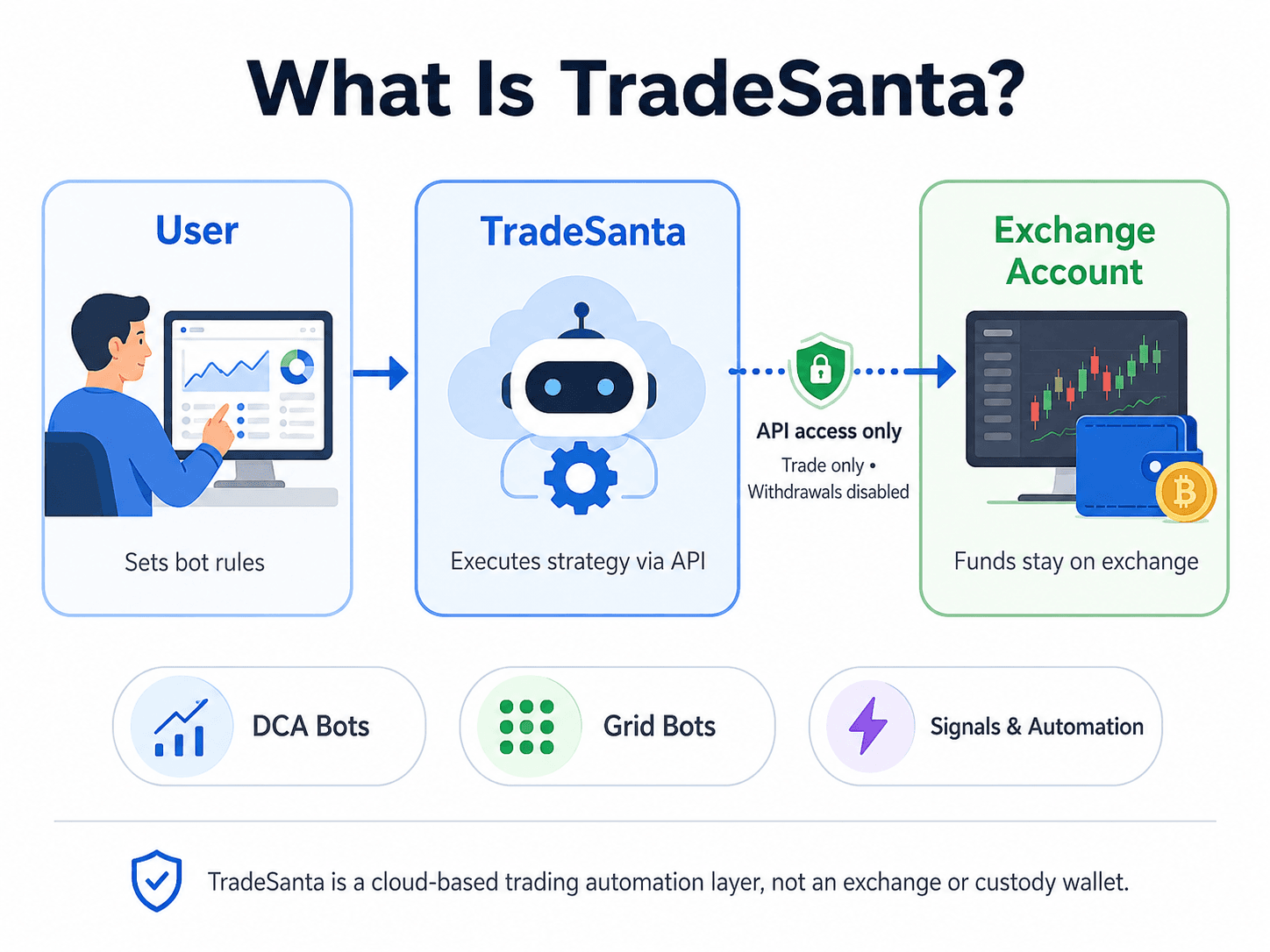
TradeSanta is a cloud-based crypto trading automation platform. It acts as an execution layer between the user and their exchange account. The user creates bot settings, connects an exchange through API keys, and TradeSanta places orders according to those settings.
The main thing to understand is custody. TradeSanta is not a crypto exchange or wallet. It does not require users to deposit funds into its platform. The funds remain on the connected exchange, while the bot receives limited access to read balances and place trades.
TradeSanta is best understood as five things:
| TradeSanta Is | TradeSanta Is Not |
|---|---|
| A no-code bot builder | A guaranteed profit tool |
| A DCA and grid bot platform | A replacement for trading knowledge |
| A way to automate exchange trades | A custody platform |
| A mobile-friendly bot dashboard | A deep institutional algo platform |
| A simple strategy execution layer | A hedge fund in app form |
Before connecting any tool to an exchange account, read our crypto trading bot setup guide. Also check out our top picks for the best crypto AI trading bots.
 A Clear Look At TradeSanta’s Bot Automation Model
How TradeSanta Connects To Exchanges
TradeSanta connects through API keys created inside the user's exchange account. Think of an API key as a controlled access pass. Depending on the permissions selected, it can allow outside software to read balances, place trades, or in the worst setup, withdraw funds.
The safer setup is trade-only access with withdrawals disabled. TradeSanta's own security guidance says users should not enable withdrawal permission and only need access to view account status and place orders.
This custody model is cleaner than sending funds to a bot provider, but it is not risk-free. A restricted API key may stop withdrawals, yet the bot can still place losing trades if the strategy is badly configured.
What TradeSanta Automates
TradeSanta automates the mechanical parts of a trading strategy. That includes opening the first order, placing take-profit orders, adding extra orders, running grid logic, triggering entries from signals, and monitoring active bots. Its homepage lists MACD, RSI, Bollinger Bands, TradingView signals, copy trading, mobile monitoring, spot and futures bots, long and short bots, stop loss, trailing stop loss and templates.
The appeal is speed and consistency. Once configured, the bot does not hesitate, get bored, sleep through a setup or manually second-guess every order. And the trade-off is that it follows instructions even when the market context changes.
How This TradeSanta Review Was Built (Methodology)
This review uses a buyer's lens, not a product brochure lens.
The review checks:
- Pricing and plan features
- Supported exchanges
- DCA, grid, long, short and futures bot logic
- TradingView signal support
- Copy trading features
- API security
- Mobile app usability
- Customer support paths
- Alternatives and competitor fit
- Beginner risk level
What We Focused On
The review prioritizes user safety, plan value, exchange access and bot risk. TradeSanta is easy to describe as simple, but simplicity cuts both ways. It reduces setup friction. It can also make users feel more confident than their strategy deserves.
The product works best when the trader already knows what they want the bot to do. A clean interface is helpful. It is not a substitute for knowing when to pause a strategy, reduce size, or avoid a market entirely.
What This Review Does Not Promise
This review does not test, verify or guarantee profitability. Bot performance depends on market conditions, trading fees, spreads, liquidity, pair selection, order size, stop-loss logic and the user’s own risk controls.
TradeSanta's own terms place trading risk on the user. The platform provides automation. The user still owns the consequences of the strategy.
TradeSanta Pricing And Plans
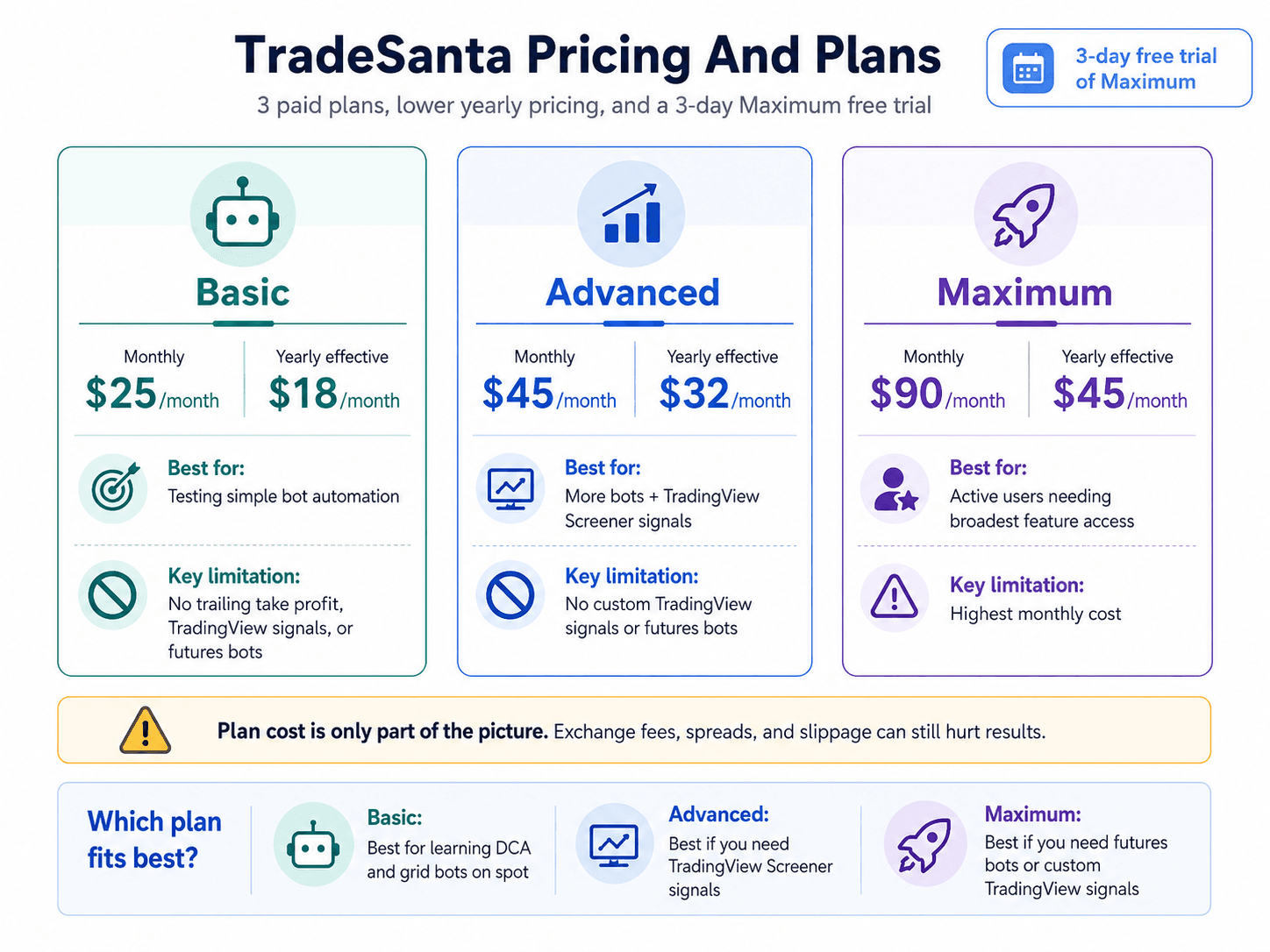
TradeSanta has three paid plans: basic, advanced and maximum. As of July 9, 2026, the TradeSanta pricing page lists monthly prices of $25 for Basic, $45 for Advanced and $90 for Maximum. The annual toggle shows lower effective monthly prices of $18, $32 and $45 respectively. TradeSanta also lists a 3-day free trial of the Maximum package.
| Plan | Monthly Price As of July 9, 2026 | Yearly Effective Monthly Price as of July 9, 2026 | Best For | Key Limitation |
|---|---|---|---|---|
| Basic | $25/month | $18/month | Users testing simple bot automation | No trailing take profit, TradingView signals or futures bots |
| Advanced | $45/month | $32/month | Users who want more bots and TradingView Screener signals | No custom TradingView signals or futures bots |
| Maximum | $90/month | $45/month | Active users who need the broadest feature access | Highest monthly cost |
The subscription is only one cost. Exchange fees, spreads and slippage sit outside TradeSanta's plan table, and they can quietly destroy a strategy that looks profitable on closed trades.
Run through our crypto trading bot mistakes guide. It covers the boring parts that usually decide whether a bot survives its first real market move.
 TradeSanta Plans, Costs And Upgrade Logic Explained Clearly
Basic Plan
The Basic plan suits users who want to test TradeSanta without paying for more complex automation. It includes up to 49 bots, all strategies and the trading terminal. It does not include trailing take profit, TradingView Screener signals, custom TradingView signals or futures bots.
That makes Basic the sensible entry plan for small spot traders. It gives enough room to test DCA and grid automation without encouraging a beginner to jump straight into futures or custom signal workflows.
Advanced Plan
The Advanced plan raises the bot limit to 99 and adds trailing take profit and TradingView Screener signals. It still excludes custom TradingView signals and futures bots.
This is the more realistic plan for users who want a larger automation setup but still want to avoid leveraged futures. It also suits traders testing multiple pairs or strategy variations, provided they can still monitor what those bots are doing.
Maximum Plan
The Maximum plan adds unlimited bots, custom TradingView signals and futures bots. Active traders will look here first if futures automation or custom alerts are the reason they are considering TradeSanta.
The catch is that Maximum can give users too much room too early. More bots, futures access and custom signals are only useful after the strategy is already disciplined. Without that, the plan simply increases the number of ways to overtrade.
Which TradeSanta Plan Is Best?
Most users should start with the cheapest plan that supports the feature they actually need. If the goal is to learn DCA or grid automation on spot markets, Basic is enough for early testing. If TradingView Screener signals are the reason for using TradeSanta, Advanced becomes the minimum practical plan. If futures bots or custom TradingView signals are non-negotiable, Maximum is the relevant tier.
The better path is dull but effective: test in demo mode or with tiny live size first, then upgrade only after the bot’s account-level results make sense.
TradeSanta Bot Types Explained
TradeSanta's bot types should be judged by market fit. A DCA bot and a grid bot can both look simple inside the interface, but they behave differently when price trends hard in one direction.
| Bot Type | Works Best When | Main Risk |
|---|---|---|
| DCA bot | Price moves against the first entry but later recovers | Losses can grow if price keeps trending against the bot |
| Grid bot | Price moves sideways inside a range | The bot can get trapped if price breaks the range |
| Long bot | Trader expects price to rise | Losses if price falls |
| Short bot | Trader expects price to fall | Losses if price rises |
| Futures bot | Experienced users want leveraged automation | Liquidation and amplified losses |
TradeSanta’s documentation says its DCA bot places a first order, then extra orders if price moves against the chosen strategy. The take-profit price and volume are recalculated as extra orders change the average entry. Its grid bot also uses extra orders, but places sell orders separately for each order rather than one combined sell order for all purchases.
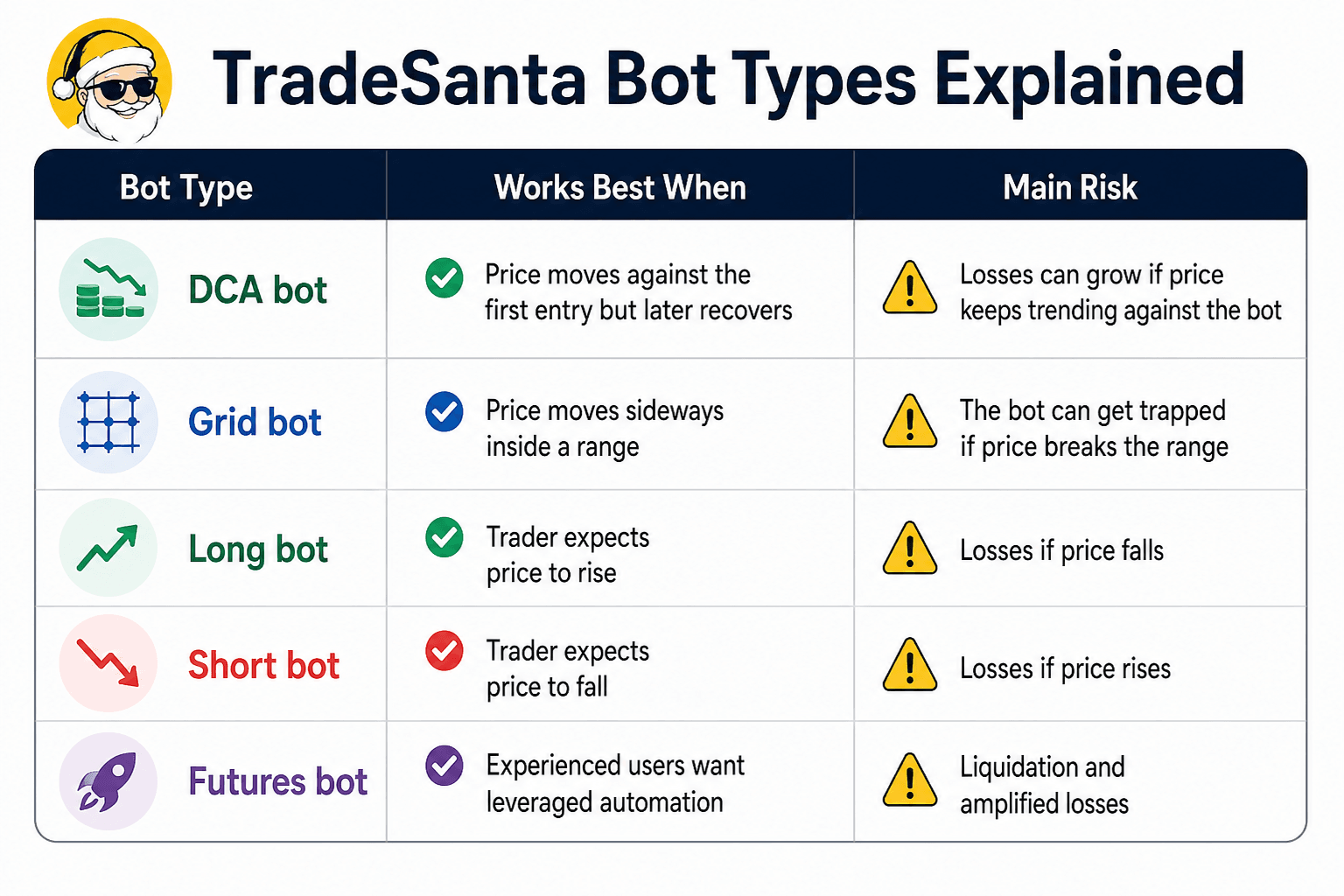 DCA, Grid, Long, Short And Futures Bots Compared
DCA Bots
A DCA bot starts with a base order. If the price moves against that entry, the bot can place extra orders at lower levels for a long strategy, or higher levels for a short strategy. This changes the average entry price and can make a smaller recovery enough to close at the target take profit.
A DCA trading bot borrows the averaging concept, but the execution is more active and the downside can build faster if the bot keeps adding orders into a strong trend.
DCA bots work best in choppy markets where price dips, rebounds and stays liquid. They become dangerous in sustained downtrends. The bot keeps averaging into weakness, which can increase exposure to a losing asset. Without strict order limits and stop-loss logic, DCA automation can turn into a slow bleed strategy.
Grid Bots
A grid bot tries to profit from movement inside a range. It places buy and sell orders around selected price levels, aiming to capture repeated swings. In a sideways market, that can be efficient because the bot keeps harvesting small moves.
Problems start when price leaves the range. If price breaks down, the bot may accumulate an asset that keeps falling. If price breaks up strongly, the bot may sell too early and miss the trend.
Long And Short Bots
A long bot starts from a bullish assumption. It buys first, then aims to sell higher. A short bot starts from a bearish assumption and aims to profit if price falls.
These bots are directional. They are not neutral machines extracting free money from volatility. The user is still making a market call, even if TradeSanta handles the execution.
Futures Bots
Futures bots should be treated as advanced tools. TradeSanta says futures bots can use DCA or grid strategies and can trade with leverage. Its futures setup guide explains that users choose a futures access point, pair and direction, then set leverage as part of the bot configuration.
This is where beginners should slow down. Leverage turns a wrong bot setting into a faster account problem. A spot bot can leave the user holding a losing coin. A leveraged futures bot can trigger liquidation.
If collateral, leverage and liquidation still feel hazy, pause here and read our primer on crypto margin trading.
How To Set Up TradeSanta Without Taking Dumb Risks
TradeSanta setup is not hard. The risk comes from moving too quickly from connected to live capital. Treat setup like risk control, not app onboarding.
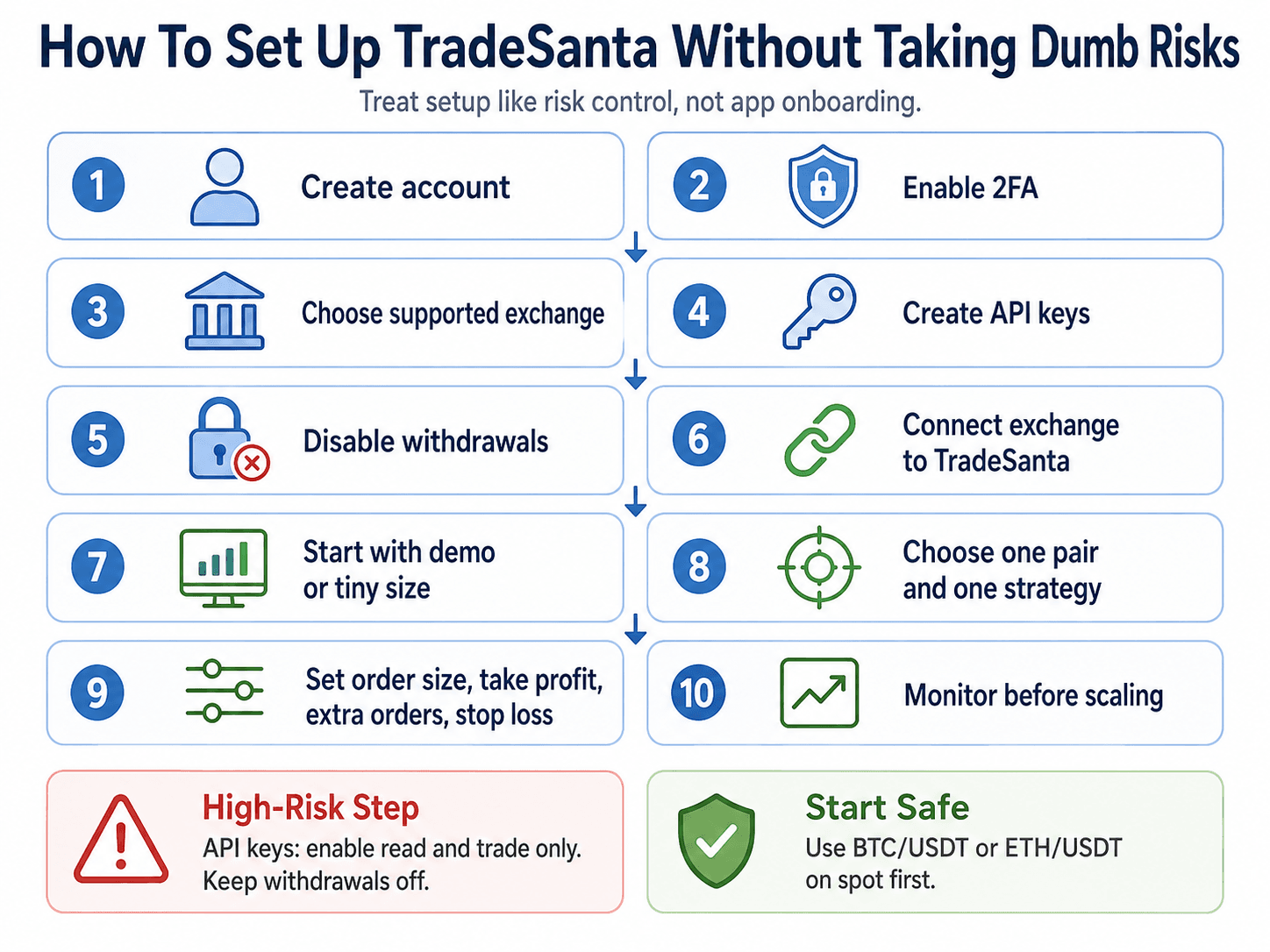 Safer TradeSanta Setup Steps Before Using Live Capital
A safer setup flow looks like this:
- Create a TradeSanta account.
- Enable 2FA.
- Choose a supported exchange.
- Create API keys on the exchange.
- Disable withdrawal permissions.
- Connect the exchange to TradeSanta.
- Start with demo mode or tiny live size.
- Choose one pair and one strategy.
- Set order size, take profit, extra orders and stop loss.
- Monitor account-level performance before scaling.
TradeSanta’s homepage says users can connect an exchange account with API keys and create a bot instantly. It also says users can try the bot through demo trading without putting funds on the line.
API Key Setup
The API key is the highest-risk setup step. Users should create a fresh key inside the exchange account, grant read and trade permissions only, and keep withdrawals disabled.
TradeSanta's Binance API guide shows the basic flow: create API keys on Binance, check and edit permissions, then paste the keys into TradeSanta’s access point setup.
Bot Setup Basics
The first bot should use one liquid trading pair and one strategy. Testing BTC/USDT or ETH/USDT on spot markets gives a cleaner learning environment than running several thin altcoin bots from day one.
The key settings are:
- Trading pair
- Strategy type
- Long or short direction
- Base order size
- Extra order size
- Take-profit percentage
- Stop-loss settings
- Grid range, if using grid logic
- Signal source, if using indicators or TradingView
The early goal is not maximum profit. It is to understand how the bot behaves when price moves against the first entry.
Reading The Dashboard
The dashboard can make bot performance look cleaner than account performance. TradeSanta’s mobile app page says the dashboard can show all-time profit, today’s profit, total balance, active bots and plan type.
Closed bot profit is only one number. Users should also track total account equity, open positions, unrealized losses, fees and how much capital is trapped inside active deals. A bot can show many profitable closed trades while one large open position carries the real loss.
Is TradeSanta Safe?
TradeSanta safety has three separate layers: platform safety, API safety and trading safety. Platform safety is about TradeSanta as software. API safety is about the permissions users grant. Trading safety is about whether the bot strategy can lose money.
TradeSanta says its bots work through restricted API keys and that users should not enable withdrawal access. If permissions are configured correctly, TradeSanta should not be able to withdraw crypto from the exchange account.
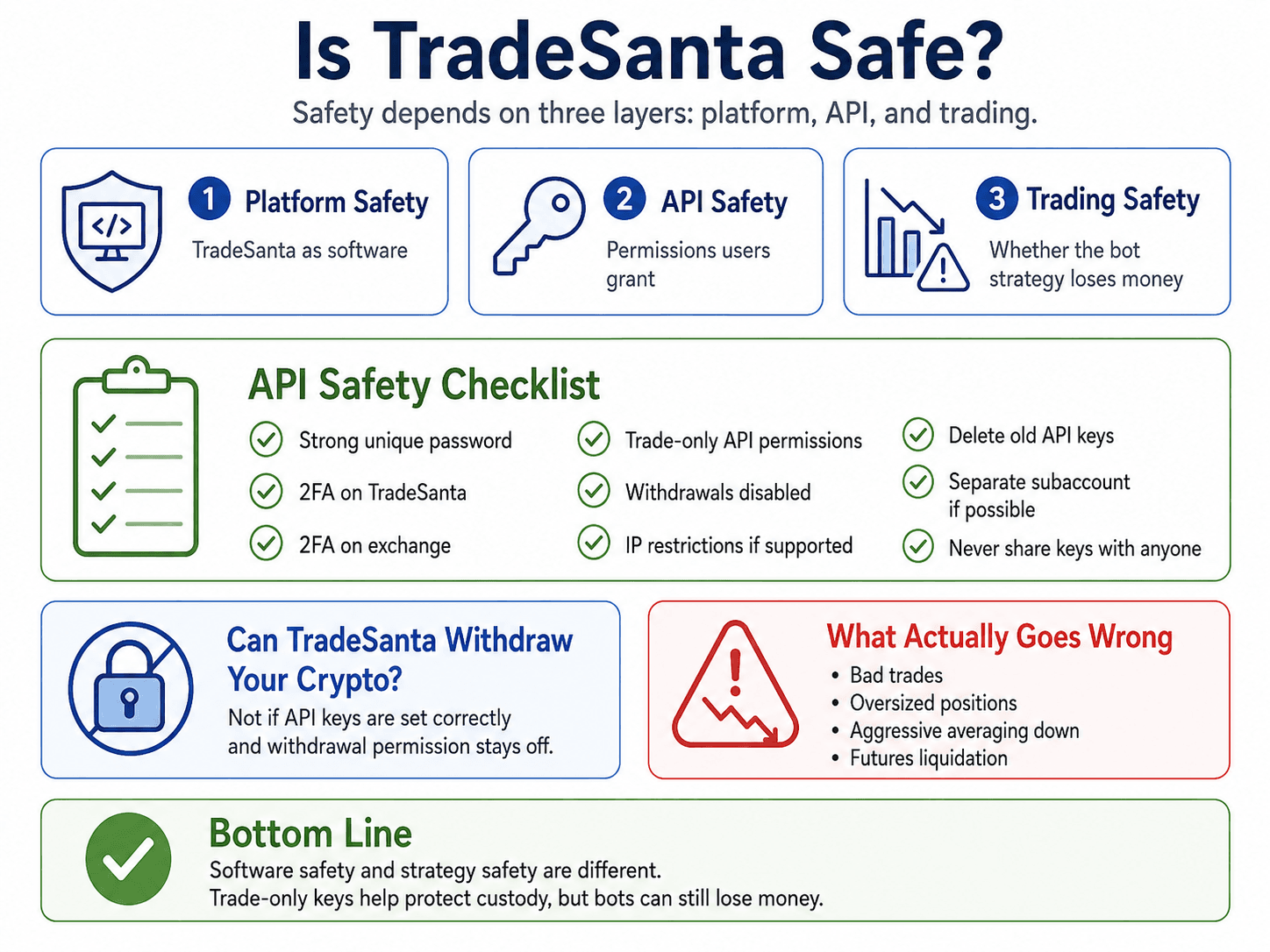 API Permissions, Platform Security And Trading Risk Explained
API Safety Checklist
A safer TradeSanta setup should include:
- Use a strong, unique password.
- Enable 2FA on TradeSanta.
- Enable 2FA on the connected exchange.
- Use trade-only API permissions.
- Disable withdrawal access.
- Consider IP restrictions if the exchange supports them.
- Delete old API keys.
- Use a separate exchange subaccount if available.
- Never share keys with Telegram accounts, Discord users or anyone claiming to be support.
TradeSanta's security page also says staff do not have access to user passwords and will not ask for them.
Can TradeSanta Withdraw Your Crypto?
TradeSanta should not be able to withdraw crypto if the user creates API keys correctly and disables withdrawal permission. The user must verify that inside the exchange API settings, not assume the bot platform handles it automatically.
Scam And Fake Support Risk
TradeSanta lists email and Telegram as support paths on its contact page. That makes link hygiene and impersonation awareness more relevant, not less.
The rule is simple: anyone asking for an API secret, password, seed phrase or withdrawal permission is not support.
Market Risk Is Still Real
Market risk is the part users underestimate. TradeSanta can follow instructions correctly and still lose money if the instructions are bad.
A DCA bot can keep buying into a falling market. A grid bot can sit outside the range. A short bot can get squeezed. A futures bot can be liquidated. Software safety and strategy safety are two different things.
Can You Make Money With TradeSanta?
A trader can make money with TradeSanta if the underlying strategy works, costs are controlled and risk is managed. TradeSanta does not create profits by itself. It automates rules.
Crypto trading bots can improve execution, reduce emotional trading and keep a strategy running 24/7. They cannot know the future, fix poor position sizing or make an illiquid pair liquid.
Automation should come after the basics, not before them. If entries, exits, order types and risk are still shaky, start with crypto trading basics, then return to bots with a rule set that actually exists.
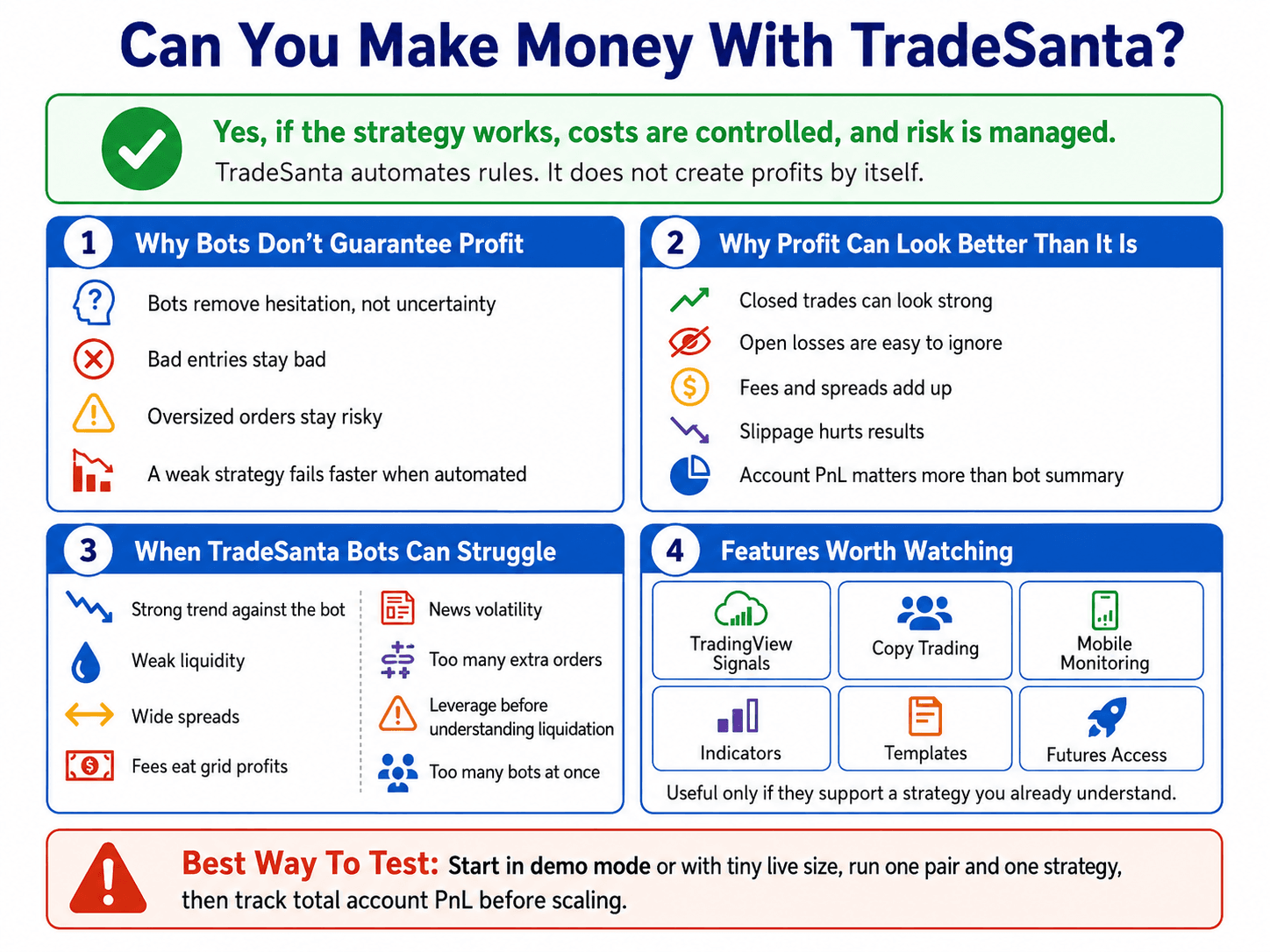 Profit Limits, Bot Risk And Realistic Trading Expectations
Why Bots Do Not Guarantee Profit
Bots remove hesitation, not uncertainty. If a strategy has a weak entry, no stop, oversized orders and poor market fit, automation only makes the strategy fail more consistently.
A good bot setup starts with written rules. The user should know when to enter, when to stop, how much to risk, when to pause, and what market conditions invalidate the strategy.
Why Bot Profit Can Be Misleading
Bot-level profit can look better than the full account picture. Closed profitable trades are easy to count. Unrealized losses, trapped inventory, fees, spreads and slippage are easier to ignore.
This is especially relevant for DCA and grid bots. They can close many small wins while one open position absorbs a large drawdown. The account balance tells a more honest story than the bot’s closed-trade summary.
When TradeSanta Bots Can Struggle
TradeSanta bots can struggle when:
- Price trends strongly against the bot.
- The pair has weak liquidity.
- Spreads are wide.
- Fees eat small grid profits.
- News creates violent volatility.
- Too many extra orders increase exposure.
- Leverage is used before the user understands liquidation.
- The user runs too many bots at once.
The danger is rarely one dramatic mistake. More often, it is a cluster of small weak choices that compound.
How To Test TradeSanta Before Scaling
Start in demo mode or with tiny live positions. Run one pair, one bot type and one strategy long enough to see how it behaves across different market conditions.
Track account-level PnL, not just bot-level closed trades. If the account only looks good when open losses are ignored, the setup is not ready to scale.
TradeSanta Features Worth Paying Attention To
TradeSanta has plenty of features, but only a few should affect the buying decision: TradingView signals, copy trading, mobile monitoring, indicators, templates and futures access. Everything else is useful only if it supports a strategy the user already understands.
TradeSanta’s homepage lists MACD, RSI, Bollinger Bands, TradingView Signals, copy trading, mobile app access, bot templates and risk-management tools such as stop loss and trailing stop loss.
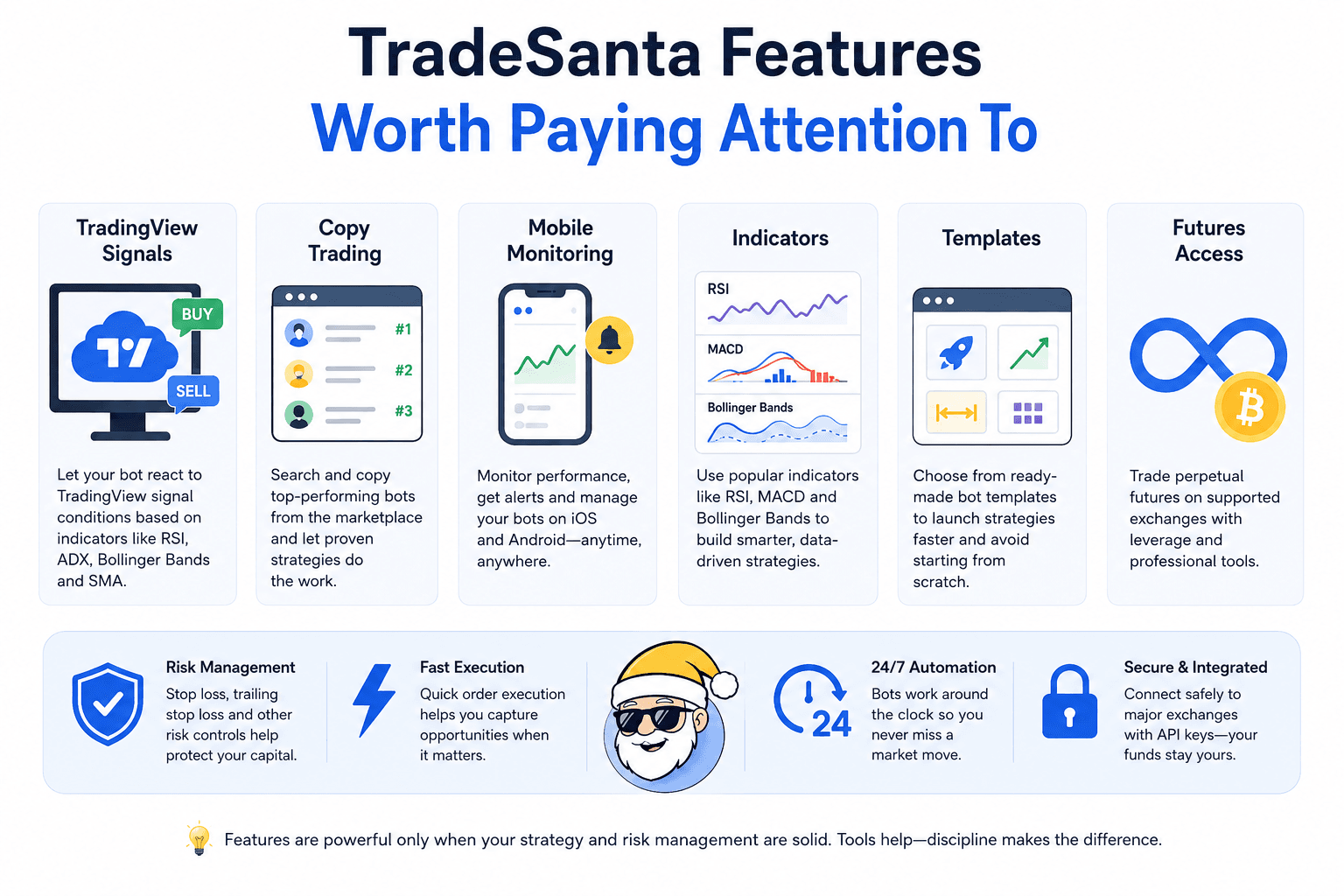 The TradeSanta Features That Actually Affect User Decisions
TradingView Signals
TradeSanta's TradingView signal support is useful for traders who already have rules. It lets the bot react to signal conditions rather than opening immediately.
TradeSanta says its TradingView signal is based on oscillators and trend-following indicators, including RSI, ADX, Bollinger Bands and SMA. Its TradingView setup page also says the feature requires an Advanced or Maximum plan and may be unavailable for some pairs, with TradingView signals not available on BinanceUS.
Signal support is only as good as the logic behind it. A weak signal fired automatically is still weak.
Copy Trading
Copy trading is appealing because it lowers the effort needed to choose settings. TradeSanta says users can search and copy top-performing bots through its marketplace.
The due diligence should be stricter. Before copying any bot, check runtime, maximum drawdown, trading pair, market type, exchange, order size, number of closed trades and whether the results came from one favorable market phase.
A bot that performed well during a range can fail badly when the same pair starts trending.
Mobile App
The mobile app is useful for monitoring, alerts and emergency changes. It should not be the reason to run riskier bots casually.
TradeSanta says its iOS and Android apps let users monitor bot performance, view dashboards and manage bots without a laptop.
That helps because crypto trades 24/7. It also creates a temptation to constantly tweak settings. For many users, the better workflow is to set rules on desktop, monitor on mobile and intervene only when the original risk plan says to.
Indicators And Templates
Indicators and templates reduce setup friction. RSI, MACD, Bollinger Bands and ready-made templates can help users avoid starting from a blank screen.
Advanced traders may still want more flexibility than TradeSanta offers. TradeSanta is stronger as a no-code strategy execution tool than as a custom research environment.
TradeSanta Supported Exchanges
As of July 9, 2026, TradeSanta lists Binance, Coinbase, HTX, HitBTC, Bybit and Kraken as supported exchanges.
The exchange list is only the first filter. Liquidity, fees, API controls and regional access still decide whether a venue is suitable for bot trading.
To compare venues before adding automation, use our best crypto exchanges guide as the exchange-level screen.
Why Exchange Support Is Not Enough
Exchange support does not automatically mean every pair, product or region is supported. A bot may work on one account but not for futures, not for a specific pair, or not for a user’s jurisdiction.
This is especially relevant for U.S. users and futures traders. Bot platform support, exchange rules and regional restrictions all need to line up.
What To Check Before Subscribing
Before paying, confirm:
- The exact exchange is supported.
- The account region is eligible.
- The desired trading pairs are available.
- Futures support exists if needed.
- API permissions can be restricted safely.
- The required feature is included in the selected plan.
- The exchange has enough liquidity for the bot size.
This check takes a few minutes and can save a wasted subscription.
TradeSanta Vs Other Crypto Trading Bots
TradeSanta competes best on simplicity. It is easier to understand than many bot platforms, but it is not the deepest option for users who want advanced strategy tooling, large marketplaces or exchange-native bot execution.
| Platform | Better Fit Than TradeSanta If... |
|---|---|
| 3Commas | You want broader smart trading tools and a larger automation ecosystem |
| Bitsgap | You want stronger grid-bot tooling and portfolio-style exchange management |
| Cryptohopper | You want a larger marketplace and more strategy customization |
| Coinrule | You want rule-based automation with a beginner-friendly builder |
| Pionex | You prefer exchange-native bots with no separate bot subscription |
| WunderTrading | You want more signal, copy trading or social automation tools |
TradeSanta is a cleaner tool for users who want DCA, grid and signals without much setup weight. Its competitors become more compelling when users want deeper customization, exchange-native bots or a larger marketplace.
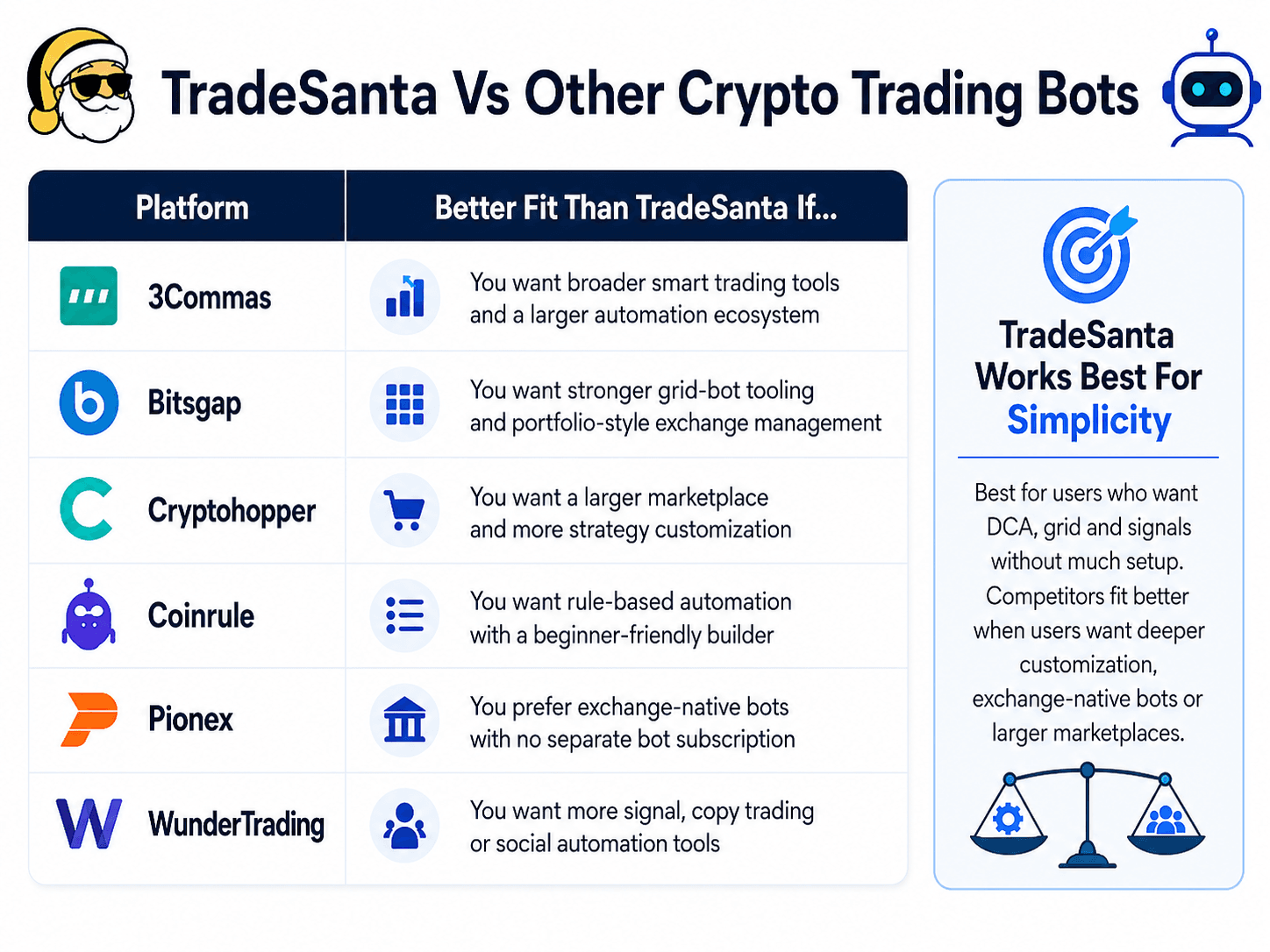 How TradeSanta Compares With Leading Bot Platforms
TradeSanta Vs 3Commas
TradeSanta is simpler. 3Commas is broader.
3Commas offers a larger automation environment, including trading terminal functionality, bot building, backtesting and exchange account linking. Its homepage describes a flow where users link exchanges, build and backtest strategies, then let bots trade.
Choose TradeSanta if you want something easier to understand. Choose 3Commas if you want a broader trading toolkit and are willing to manage more complexity.
Read our full 3Commas review.
TradeSanta Vs Bitsgap
TradeSanta is easier. Bitsgap is stronger for users who want deeper grid and portfolio-style tooling.
Bitsgap’s official site emphasizes grid bots for sideways markets and DCA bots for averaging positions, while its broader platform also focuses on managing trading across exchanges.
Choose TradeSanta for simpler DCA and grid automation. Choose Bitsgap if grid trading and multi-exchange tooling are central to your workflow.
Read our full Bitsgap review.
TradeSanta Vs Cryptohopper
TradeSanta is cleaner. Cryptohopper gives users more marketplace and strategy options.
Cryptohopper’s official site highlights DCA, trailing features, AI, copy trading and support across major exchanges. Its pricing page also shows broader plan tiers and add-ons, including copy bot pricing.
Choose TradeSanta if you want fewer moving parts. Choose Cryptohopper if you want more strategy marketplace depth and customization.
Read our full Cryptohopper review.
TradeSanta Vs Pionex
TradeSanta connects to external exchanges. Pionex is exchange-native.
Pionex describes itself as an exchange with built-in crypto trading bots, and its app listing says it provides 16 trading bots, including grid trading bots. That changes the trade-off. TradeSanta lets users automate accounts on supported external exchanges. Pionex keeps the bot experience inside its own exchange environment.
Choose TradeSanta if you already use a supported exchange and want an overlay. Choose Pionex if you prefer built-in exchange bots and do not want a separate bot subscription.
Who Should Use TradeSanta?
TradeSanta is best for traders who understand the basics and want automation without building code. It is risky for users who are trying to outsource judgment.
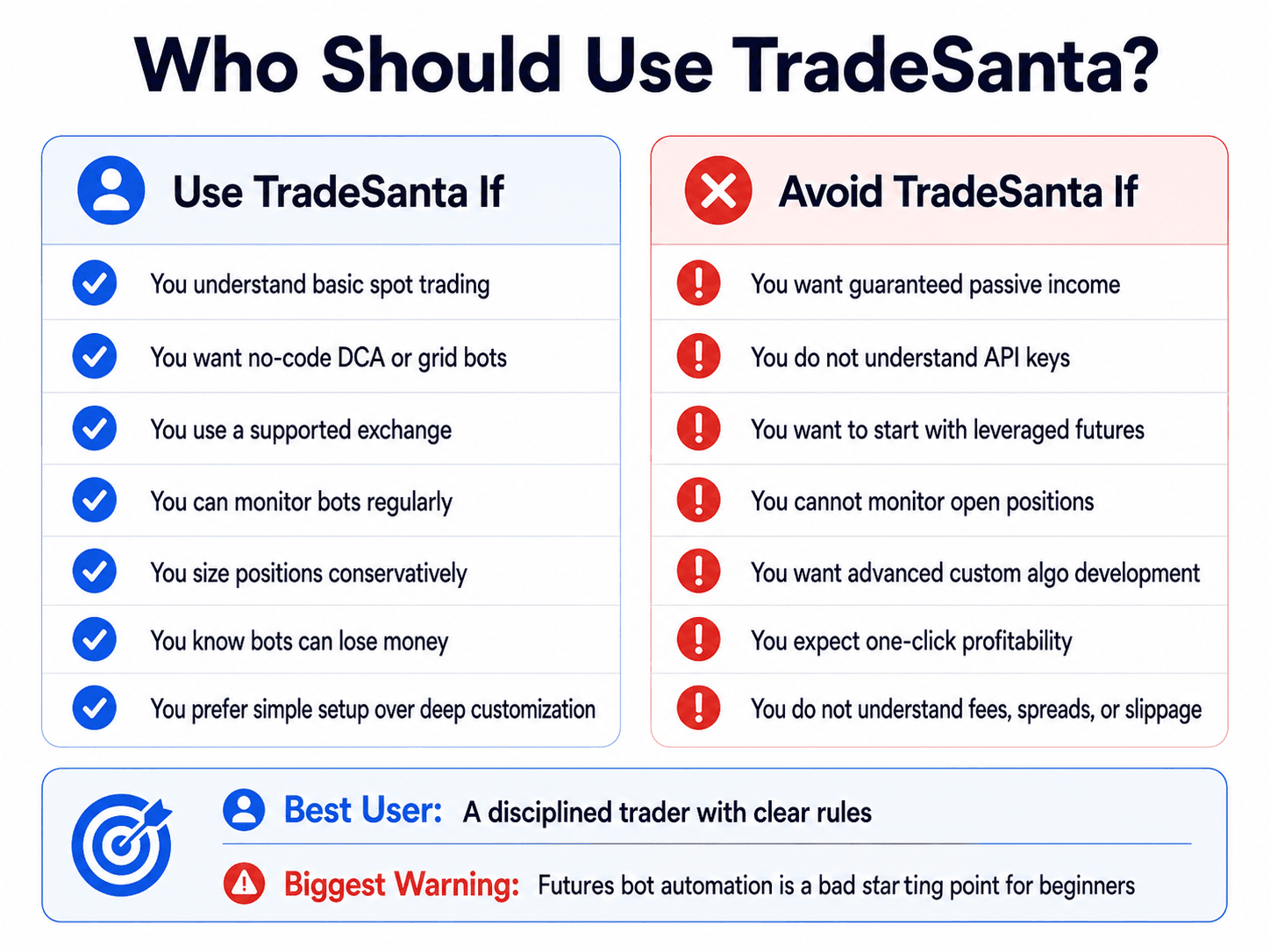 The Right And Wrong Users For TradeSanta
Use TradeSanta If
TradeSanta makes sense if you:
- Understand basic spot crypto trading.
- Want no-code DCA or grid automation.
- Use a supported exchange.
- Can monitor bots regularly.
- Know how to size positions conservatively.
- Understand that bots can lose money.
- Want mobile access for monitoring.
- Prefer templates and simple setup over deep customization.
The best user is not necessarily a professional trader. It is a disciplined user with clear rules.
Avoid TradeSanta If
TradeSanta is a poor fit if you:
- Want guaranteed passive income.
- Do not understand API keys.
- Want to trade leveraged futures as a beginner.
- Cannot monitor open positions.
- Want advanced custom algo development.
- Expect one-click profitability.
- Do not understand fees, spreads or slippage.
- Panic when positions go into drawdown.

Final Verdict: Is TradeSanta A Good Crypto Trading Bot?
TradeSanta is a good crypto trading bot platform for users who want simple, no-code automation across supported exchanges and understand the risks of DCA, grid and futures strategies.
Its strengths are ease of use, mobile access, templates, TradingView-related features and simple bot deployment. Its weaknesses are strategy risk, subscription cost, limited advanced customization and the risk of users treating automation as passive income. The best overall user is a beginner-to-intermediate trader who already understands spot trading and wants to automate a defined DCA or grid strategy with small size first.
The best plan logic is to start with the lowest plan that supports the exact feature needed, then upgrade only after testing.