

The best Android crypto wallets in 2026 include Trust Wallet for everyday use, MetaMask for Web3, Rabby for DeFi, Phantom for Solana, Zengo for seedless recovery, and Tangem for hardware-backed security.
This guide compares eight Android wallets based on security, supported cryptocurrencies, DApp functionality, fees, and recovery options. We also examine Android-specific features and limitations to help you choose a wallet that fits your needs.
Editor's Note (Oct. 23, 2026): We've comprehensively revised this guide with eight Android wallet picks, adding Rabby, Phantom, Zengo, and Tangem and removing Atomic Wallet from our recommendations. We've updated network support, DApp functionality, recovery methods, and Android hardware compatibility. The guide now includes a transparent evaluation methodology, illustrative fee comparisons, expanded security coverage, and practical setup and recovery guidance.
Best Android Crypto Wallets: Quick Verdict
Trust Wallet is our best overall Android crypto wallet for everyday multichain use in 2026. MetaMask stands out for Web3 and DApp connectivity, Rabby specializes in EVM DeFi, and Phantom is our Solana-focused pick. Coinbase Wallet suits Coinbase users, Exodus offers cross-device portfolio management, Zengo provides seedless recovery, and Tangem delivers NFC hardware-backed signing.
Best Android Crypto Wallets by Use Case
-
Trust Wallet: Best overall for Android Supports Bitcoin, Ethereum, Solana and numerous other networks, with straightforward mobile transfers, swaps, staking and a built-in DApp browser.
-
MetaMask: Best for Web3 and DApps Combines extensive Ethereum and EVM compatibility with custom network support, mobile DApp access and native Bitcoin and Solana functionality.
-
Rabby Wallet: Best for advanced EVM DeFi Offers transaction simulations, automatic EVM network handling, token-approval visibility and portfolio tracking for active DeFi users.
-
Phantom: Best for Solana Provides SOL staking, token swaps, NFT management and Solana DApp connectivity alongside native Bitcoin and selected EVM support.
-
Coinbase Wallet: Best for Coinbase users Integrates Coinbase funding with supported self-custody accounts, Base applications and mobile Web3 functionality, although network access varies by account type.
-
Exodus: Best for cross-device management Offers Android and desktop portfolio management, integrated swaps and selected hardware-wallet connections, but no longer supports mobile DApp connections.
-
Zengo: Best for seedless recovery Uses MPC signing and identity-assisted recovery instead of a conventional seed phrase, with mobile crypto management and optional Pro security features.
-
Tangem: Best for NFC hardware security Stores signing keys on physical cards or rings and authorizes transactions through an NFC-compatible Android phone, with optional seedless hardware backups.
Security and Compatibility Note
Android crypto wallets differ in private-key protection, recovery methods, supported blockchains and DApp functionality. Download wallets only through verified official sources, protect recovery credentials and confirm network compatibility before transferring funds. Hardware and MPC wallets can reduce certain risks but cannot prevent every phishing attempt or malicious transaction approval.
Disclosure
Some links in this guide may be affiliate links. If you sign up for or purchase a product through these links, we may earn a commission at no additional cost to you.
Best Android Crypto Wallets in 2026 At A Glance
| Wallet | Best For | Wallet Type | Key Supported Networks | Recovery Method | Android-Specific Strength | Main Limitation |
|---|---|---|---|---|---|---|
| Trust Wallet | Everyday multichain use | Self-custody software | Bitcoin, Ethereum, Solana, BNB Chain | Recovery phrase; optional encrypted backup | Mobile transfers, staking, DApp browser | Features differ by chain |
| MetaMask | Web3 and multichain DApps | Self-custody software | Ethereum/EVM, Bitcoin, Solana | Secret Recovery Phrase; setup-specific credentials | DApp browser and custom EVM networks | Restricted Bitcoin imports |
| Rabby Wallet | Advanced EVM DeFi | Self-custody software | Ethereum and EVM networks | Phrase/private key; hardware backup for connected accounts | EVM portfolio and DApp workflows | No native BTC or SOL |
| Phantom | Solana-focused activity | Self-custody software | Solana, Ethereum, Bitcoin, Base, Polygon | Phrase or account-based recovery | SOL staking, tokens, NFTs, DApps | No Arbitrum or Optimism |
| Coinbase Wallet | Coinbase ecosystem | Software or smart wallet | Ethereum/EVM; Bitcoin and Solana by account type | Phrase, email/social credentials, or passkey | Coinbase transfers and Base access | Account-dependent networks |
| Exodus | Cross-device management | Self-custody software² | Bitcoin, Ethereum, Solana, selected others | Recovery phrase; separate hardware backup | Desktop syncing and selected hardware connections | Mobile DApp connections ended |
| Zengo | Seedless recovery | MPC wallet | Bitcoin, Ethereum, Solana, selected L2s | Email, recovery file; FaceLock where configured | Recovery without a conventional seed phrase | Service dependencies; paid extras³ |
| Tangem | NFC hardware custody | External hardware and Android app⁴ | Bitcoin, Ethereum, Solana, selected others | Backup devices or optional seed phrase | Tap a card or ring to sign | Hardware purchase; no device screen |
How We Evaluated the Best Android Crypto Wallets (Methodology)
We compared official documentation, Android availability, security disclosures, and independent incident research. Recommendations prioritize documented functionality.
Security, Custody and Recovery
We assess key control, protection, and recovery through phrases, MPC, passkeys, or hardware backups. We also examine transaction warnings, incidents, remediation, and audit scope.
Android Compatibility and Everyday Usability
We checked official Android download routes and instructions for onboarding, transfers, DApps, approvals, and hardware pairing. Desktop features require separate mobile verification.
Interface and troubleshooting assessments use documentation, without measured usability, reliability, or support-response scores.
Supported Networks, Fees and Features
We compare native blockchains, Layer 2 networks, signing workflows, full transaction costs, and support documentation.
| Criterion | Evidence Required | Importance |
|---|---|---|
| Custody and recovery | Key architecture, backup requirements, incident disclosures | Critical |
| Android functionality | Official app route and mobile-specific instructions | Critical |
| Network compatibility | Named chains, assets, account restrictions | High |
| Costs | Published fees, provider charges, transaction assumptions | High |
| Usability and support | Setup guidance, troubleshooting, available support routes | High |
Google Play Protect adds screening; store availability does not prove wallet security.
Best Android Crypto Wallets Reviewed
These eight wallets offer different approaches to Android self-custody, from everyday multichain management and DeFi access to seedless recovery and hardware-backed signing. We compare their Android functionality, supported networks, recovery methods, costs and limitations.
Pricing checked Oct. 23, 2026. Published wallet fees exclude variable network charges unless stated otherwise.
1
Trust Wallet: Best Overall for Multichain Android Users
Everyday multichain management, mobile DApps and straightforward self-custody
Trust Wallet: Best Overall for Multichain Android Users
Trust Wallet is a self-custodial software wallet designed for everyday multichain asset management. It combines native blockchain support with an accessible interface for transfers, swaps, staking and decentralized applications.
- Send and receive cryptocurrencies across supported networks.
- Access integrated swaps and selected staking services.
- Connect to compatible DApps through its mobile browser.
- Manage supported NFTs and token holdings.
- Inspect and revoke supported token approvals through the mobile approval manager.
Private keys are encrypted locally, with conventional recovery phrases used for wallet restoration. Optional encrypted cloud backups require separate password and account protection. Biometrics, app locks and transaction scanning provide additional safeguards but cannot prevent every malicious signature. Trust Wallet's December 2025 browser-extension compromise did not directly affect its mobile app, although exposed credentials remain unsafe across devices.
Native support includes Bitcoin, Ethereum, Solana, BNB Chain and numerous EVM networks. Trust Wallet lists a standard 0.7% swap fee and no wallet charge for ordinary transfers. Network gas remains separate. Eligible same-chain stablecoin swaps on selected networks have a 0% Trust Wallet swap fee, excluding Ethereum. Fiat provider charges and execution spreads vary.
Pros
- Broad native blockchain support.
- Beginner-friendly Android interface.
- Integrated DApps, swaps and staking.
- Mobile token-approval management.
Cons
- Features differ by network.
- Recovery credentials require protection.
- Swap and provider costs can accumulate.
- No external hardware signing in the standard mobile workflow.
- Beginners managing several cryptocurrencies.
- Everyday Android transfers and swaps.
- Users accessing supported mobile DApps.
- Users prioritizing hardware-isolated signing.
- Advanced traders requiring specialized transaction simulation.
- People seeking seedless recovery.
2
MetaMask: Best for Web3 and Multichain DApps
Configurable EVM networks, native BTC and SOL support, and mobile DApp access
MetaMask: Best for Web3 and Multichain DApps
Developed by Consensys, MetaMask is a self-custodial wallet combining Ethereum and EVM connectivity with native Bitcoin and Solana support. Its strength lies in configurable networks and established decentralized application integrations.
- Browse and connect to supported DApps directly on Android.
- Add and manage custom EVM networks.
- Inspect transaction requests and token approvals.
- Manage supported NFTs, swaps and cross-chain bridges.
- Access native Solana and Bitcoin functionality, subject to account restrictions.
Conventional MetaMask accounts use a Secret Recovery Phrase, while alternative onboarding methods have their own recovery credentials. Separately imported accounts may require independent backups. Transaction warnings provide risk information, but malicious approvals remain possible. Android hardware integration depends on the specific device and supported mobile workflow.
MetaMask supports Ethereum, Base, Arbitrum, Optimism, Polygon, Solana and Bitcoin, alongside additional configurable EVM networks. Bitcoin recovery supports documented Native SegWit paths, with restrictions on other imports. The standard MetaMask Swaps fee is 0.875%, excluding applicable network gas and route-dependent bridge or provider charges.
Pros
- Strong Web3 and DApp compatibility.
- Custom EVM network support.
- Native Bitcoin and Solana.
- Integrated swaps and bridges.
Cons
- Complex for absolute beginners.
- Restricted Bitcoin recovery paths.
- Percentage-based swap fees.
- Mobile hardware support varies.
- Frequent Web3 and DApp users.
- Traders using custom EVM networks.
- Users combining EVM activity with native BTC and SOL.
- Beginners seeking minimal configuration.
- Users requiring unrestricted Bitcoin imports.
- Investors prioritizing dedicated cold storage.
3
Rabby Wallet: Best for Advanced EVM DeFi
Transaction simulation, EVM portfolio visibility and mobile risk checks
Rabby Wallet: Best for Advanced EVM DeFi
Developed by the team behind DeBank, Rabby is a self-custodial wallet focused on Ethereum-compatible networks. Its interface prioritizes portfolio tracking, DApp interactions and transaction transparency rather than broad non-EVM asset support.
- Track assets across supported EVM networks.
- Connect to compatible mobile DApps.
- Review simulated transaction outcomes and expected balance changes.
- Inspect contract risk warnings and token approvals.
- Access supported GasAccount functions for gas management.
Rabby software accounts use recovery phrases or imported private keys. Hardware-connected accounts require separate device backups. Its transaction simulation helps users understand expected signing outcomes, but unsupported simulations or malicious contracts can still create risk. Open-source availability supports inspection without guaranteeing every distributed build is secure.
Rabby supports Ethereum and compatible EVM networks, including major Layer 2 ecosystems. Native Bitcoin and Solana are unsupported. Its published mobile fee information lists a standard 0.25% swap charge, subject to promotions. Network gas, aggregator costs and cross-chain bridge fees may apply separately.
Pros
- Detailed transaction simulations.
- Automatic EVM chain handling.
- Portfolio and approval visibility.
- Android-specific DeFi tools.
Cons
- No native Bitcoin or Solana.
- Simulation coverage varies.
- Mobile features can differ from the extension.
- Focused on EVM users.
- Experienced EVM DeFi traders.
- Users frequently approving smart contracts.
- Investors monitoring multiple EVM networks.
- Native Bitcoin and Solana holders.
- Users wanting one wallet for non-EVM ecosystems.
- Beginners unfamiliar with smart-contract risks.
4
Phantom: Best for Solana-Focused Users
SOL staking, tokens, NFTs and selected multichain functionality
Phantom: Best for Solana-Focused Users
Phantom is a self-custodial wallet built around the Solana ecosystem, with additional support for Bitcoin and selected EVM networks. Its interface emphasizes convenient mobile trading and token management.
- Manage SOL and supported Solana tokens.
- Stake SOL through compatible validators.
- View and manage supported NFTs.
- Connect to compatible Solana and multichain DApps.
- Use integrated swaps and transaction risk warnings.
Phantom supports recovery-phrase accounts and eligible Google or Apple account-based onboarding. Recovery requirements depend on the setup method, and separately imported accounts may need individual backups. Transaction previews, scam warnings and spam-token controls offer additional protections. Biometrics alone cannot restore a lost wallet.
Phantom supports Solana, Ethereum, Bitcoin, Base, Polygon, BNB Chain, HyperEVM and selected additional networks. Bitcoin support includes Native SegWit and Taproot. Arbitrum, Optimism and Avalanche are unsupported, and custom EVM networks cannot be added. Most integrated swaps carry a standard 0.85% Phantom fee, plus applicable network and bridge costs.
Pros
- Strong Solana Android experience.
- Integrated SOL staking.
- NFT and token management.
- Native Bitcoin support.
Cons
- No arbitrary custom EVM networks.
- Selective blockchain support.
- Some chain-specific limitations.
- Swap fees add to network costs.
- Solana token traders.
- SOL stakers and NFT collectors.
- Users holding BTC alongside Solana assets.
- Users needing arbitrary custom EVM networks.
- Arbitrum and Optimism DApp users.
- People requiring identical features on every chain.
5
Coinbase Wallet: Best for the Coinbase Ecosystem
Coinbase transfers, Base network access and account-dependent recovery
Coinbase Wallet: Best for the Coinbase Ecosystem
Coinbase Wallet combines self-custody with Coinbase ecosystem connectivity. Its supported networks and recovery options depend on whether the user has a recovery-phrase wallet, an eligible email/social account or a passkey-based smart wallet.
- Transfer supported assets between Coinbase and self-custody accounts.
- Access compatible DApps and Base network services.
- Send, receive and swap supported cryptocurrencies.
- Use eligible email, social or passkey onboarding.
- Manage supported assets through an integrated mobile interface.
Self-custodial wallet funds are separate from assets held on the Coinbase exchange. Conventional accounts use recovery phrases, while supported login-based and passkey wallets have different signing and recovery procedures. A fingerprint is not a complete backup. Users must retain the credentials required by their specific account type.
EVM smart-wallet accounts have different capabilities from mnemonic and eligible login-based accounts, which may also support Bitcoin and Solana. The August 2026 transition removed support for networks including Litecoin and zkSync Era. Documented DEX swap charges can reach 1%, excluding aggregator, execution and network costs. Solana swap availability should be confirmed in the application.
Pros
- Coinbase funding integration.
- Convenient Base ecosystem access.
- Multiple onboarding methods.
- Mobile DApp and swap functionality.
Cons
- Account-dependent networks.
- Discontinued legacy chains.
- Variable DEX and provider costs.
- Recovery differs by account type.
- Existing Coinbase customers.
- Users exploring Base applications.
- Beginners wanting convenient exchange-to-wallet transfers.
- Holders of discontinued network assets.
- Users needing unrestricted custom networks.
- People expecting identical capabilities across account types.
6
Exodus: Best for Cross-Device Management
Android and desktop portfolio management with selected hardware integrations
Exodus: Best for Cross-Device Management
Exodus is a self-custodial software wallet emphasizing portfolio visibility, transfers, integrated swaps and selected staking services. It supports cross-device wallet access, with separate compatibility requirements for hardware-connected accounts.
- Send and receive supported cryptocurrencies.
- View portfolio balances and transaction histories.
- Sync supported software-wallet accounts with desktop.
- Swap assets through integrated third-party providers.
- Connect supported Ledger and Trezor hardware configurations.
Exodus software wallets use locally managed encrypted keys and recovery phrases. Hardware-connected accounts retain separate private keys and recovery backups. Supported hardware integrations can provide external signing, but pairing and asset compatibility vary. Exodus Mobile has removed WalletConnect and its Web3 browser, so external mobile DApp approvals are unavailable.
Exodus supports Bitcoin, Ethereum, Solana and selected additional blockchains. Ordinary sends and receives carry no Exodus wallet fee, although network transaction fees apply. Integrated swaps use variable provider spreads with no universal fixed percentage. Fiat purchase fees depend on the payment provider and displayed quote.
Pros
- Accessible Android interface.
- Cross-device software-wallet syncing.
- Broad portfolio management.
- Selected hardware-wallet integrations.
Cons
- No mobile WalletConnect or DApp browser.
- Variable swap spreads.
- Hardware portfolio restrictions.
- Recovery phrases require secure storage.
- Users managing assets across Android and desktop.
- Longer-term holders making occasional transfers.
- People wanting straightforward portfolio visibility.
- Frequent mobile DeFi users.
- Traders needing WalletConnect approvals.
- Users expecting every hardware portfolio to sync identically.
7
Zengo: Best for Seedless Wallet Recovery
MPC signing, identity-assisted recovery and no conventional recovery phrase
Zengo: Best for Seedless Wallet Recovery
Zengo uses Multi-Party Computation to distribute transaction-signing responsibility instead of relying on one conventional private key or user-managed recovery phrase. Its mobile-first interface combines asset management with identity-assisted recovery.
- Send and receive supported cryptocurrencies.
- Buy and swap assets through integrated providers.
- Connect to eligible DApps using WalletConnect.
- Restore access through supported identity and recovery credentials.
- Access optional Pro withdrawal and recovery protections.
MPC distributes signing operations between participating components. Recovery requires the registered email and recovery file, with FaceLock requirements depending on configuration and subscribed features. This removes conventional seed-phrase management but introduces reliance on supported authentication methods and Zengo's service infrastructure. Harmful authorized transactions remain possible.
Zengo supports Bitcoin, Ethereum, Solana and selected EVM ecosystems, including Base, Arbitrum and Optimism. Functionality varies by chain. Zengo Essentials includes basic wallet and recovery functionality without a subscription. U.S. Pro pricing is listed at $19.99 monthly or $89.99 annually, with regional variations possible. Network and third-party service charges remain separate.
Pros
- No traditional recovery phrase.
- MPC signing architecture.
- Identity-assisted account recovery.
- Accessible Android experience.
Cons
- Recovery depends on supported services.
- No conventional private-key export.
- Some protections require Pro.
- DApp access differs by network.
- Users uncomfortable managing seed phrases.
- Mobile-first crypto holders.
- People preferring identity-assisted recovery.
- Users requiring mnemonic portability.
- People seeking independent offline recovery.
- Advanced users relying on unsupported DApps.
8
Tangem: Best for NFC Hardware-Backed Custody
Card and ring signing, NFC Android pairing and external private-key storage
Tangem: Best for NFC Hardware-Backed Custody
Tangem combines secure-element hardware with an Android application. Signing credentials remain on the card or ring rather than being managed as ordinary phone-based software keys. Its portability comes with different backup and transaction-verification trade-offs from display-equipped hardware wallets.
- Pair supported cards and rings using Android NFC.
- Authorize transactions through physical tap-to-sign interactions.
- Send, receive and manage supported cryptocurrencies.
- Access integrated swaps and compatible DApp connections.
- Configure and use additional hardware backup devices.
Tangem hardware stores signing credentials in a Secure Element and authorizes transactions after NFC communication with the phone. Seedless configurations rely on additional backup cards or devices, while supported models offer optional recovery phrases. Losing every device in a seedless set can permanently prevent access. Tangem has no independent display, so transaction review depends on the phone interface.
Tangem supports Bitcoin, Ethereum, Solana and selected additional networks. Listed U.S. hardware prices include $54.90 for two cards, $69.90 for three cards and $160 for a ring with two backup cards. Taxes and shipping may apply. The application has no subscription fee. Network fees and third-party swap charges depend on the transaction and provider.
Pros
- Hardware-isolated signing keys.
- Portable NFC cards and rings.
- No charging or USB connection required.
- Optional seedless backup model.
Cons
- Requires compatible hardware.
- No independent signing display.
- Loss of all seedless backups is critical.
- Less suited to desktop-heavy workflows.
- Android users seeking external signing.
- Long-term holders preferring portable hardware.
- Users comfortable maintaining physical backups.
- Users requiring a hardware transaction screen.
- People unwilling to purchase hardware.
- Users unable to maintain separate backup devices.
Are Android Crypto Wallets Safe? Security Risks Compared
Android wallets provide self-custody with protection determined by signing architecture, recovery, and device condition. Malicious approvals and lost credentials remain risks.
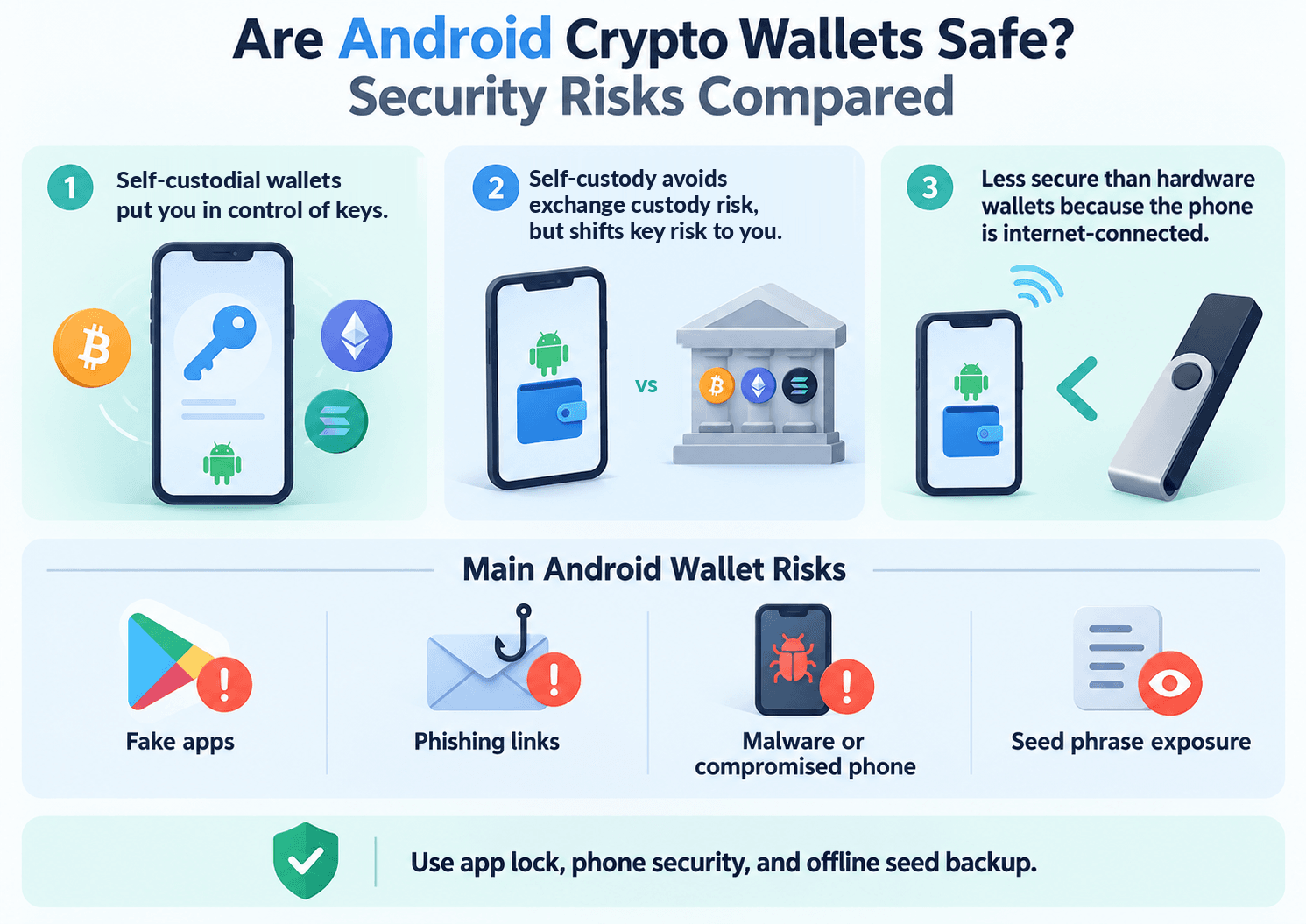 Comparing Self-Custody, Exchange Risks, Hardware Wallets, and Common Threats to Android Crypto Wallet Security
How Android Crypto Wallets Protect Private Keys
Self-custody gives users control through keys or an equivalent signing arrangement. Software wallets commonly encrypt local keys; protection also depends on access controls and how unlocked keys are handled.
Android Keystore can protect cryptographic keys using a Trusted Execution Environment (TEE) or, on supported devices, StrongBox. StrongBox offers stronger isolation for supported operations. A wallet may use hardware protection for an encryption key while processing blockchain signing material elsewhere; do not assume every wallet's private key remains inside StrongBox.
| Mechanism | Protection | Residual Risk |
|---|---|---|
| Biometric login | Restricts app access | Authorized users can approve scams |
| Local key encryption | Protects stored key data | Compromise during use remains possible |
| Hardware-backed storage | Isolates supported keys | Device and wallet implementation vary |
| MPC | Distributes signing responsibility | Endpoints and recovery services remain targets |
| External hardware wallet | Separates signing keys from Android | Harmful signatures remain possible |
| Transaction simulation | Previews expected effects | Incomplete analysis or changing execution conditions |
What Security Threats Are Specific to Android?
Android exposes users to fake wallet apps, malicious APK downloads, abusive accessibility services, and compromised keyboards or screen overlays. Clipboard hijacking can replace a copied wallet address; a keylogger or screen capture can expose sensitive input.
Android installation and permission systems shape exposure to threats also found elsewhere. Researchers documented SparkKitty malware in Android and iOS apps stealing images, illustrating why seed-phrase screenshots create exposure outside the wallet itself.
| Attack | Useful Protection | Remaining Exposure |
|---|---|---|
| Impersonation app or malicious APK | Official download route; publisher checks; Play Protect | Store screening can miss malware |
| Clipboard replacement | Compare the complete destination address | Familiar prefixes can mislead |
| Accessibility or screen abuse | Restrict permissions; install security patches | Compromised interfaces can deceive |
| Phishing or malicious DApp | Verify domain, contract, and spending allowance | Warnings may miss new attacks |
| Recovery-phrase theft | Protected offline backup | Anyone obtaining the phrase can sign |
Avoid rooted or unsupported phones for significant holdings. An outdated device can remain vulnerable even when the wallet app itself is current.
Do Wallet Security Incidents Change Which App You Should Choose?
Yes. Examine key generation, software distribution, and remediation. Distinguish provider compromise, device malware, and malicious approvals.
Trust Wallet's December 2025 extension incident involved a malicious Chrome release. The company stated that its mobile app was unaffected and reported replacing the release and restricting publishing access. However, credentials exposed through an extension remain compromised when the same wallet is opened on Android. Switching interfaces does not repair exposed keys.
Atomic Wallet's 2023 compromise produced losses exceeding $100 million in Elliptic's analysis.
Trust Wallet's published security reviews cover distinct components, including extension code, smart accounts, and contracts. Their scope does not certify every Android release.
For holdings you rarely move, consider a hardware wallet with independently generated keys to reduce exposure to phone-based key theft. Keep a separate, smaller wallet for routine DApp activity.
Which Coins, Networks and DApps Do Android Wallets Support?
Choose by blockchain and workflow. Displaying an asset does not guarantee DApp compatibility.
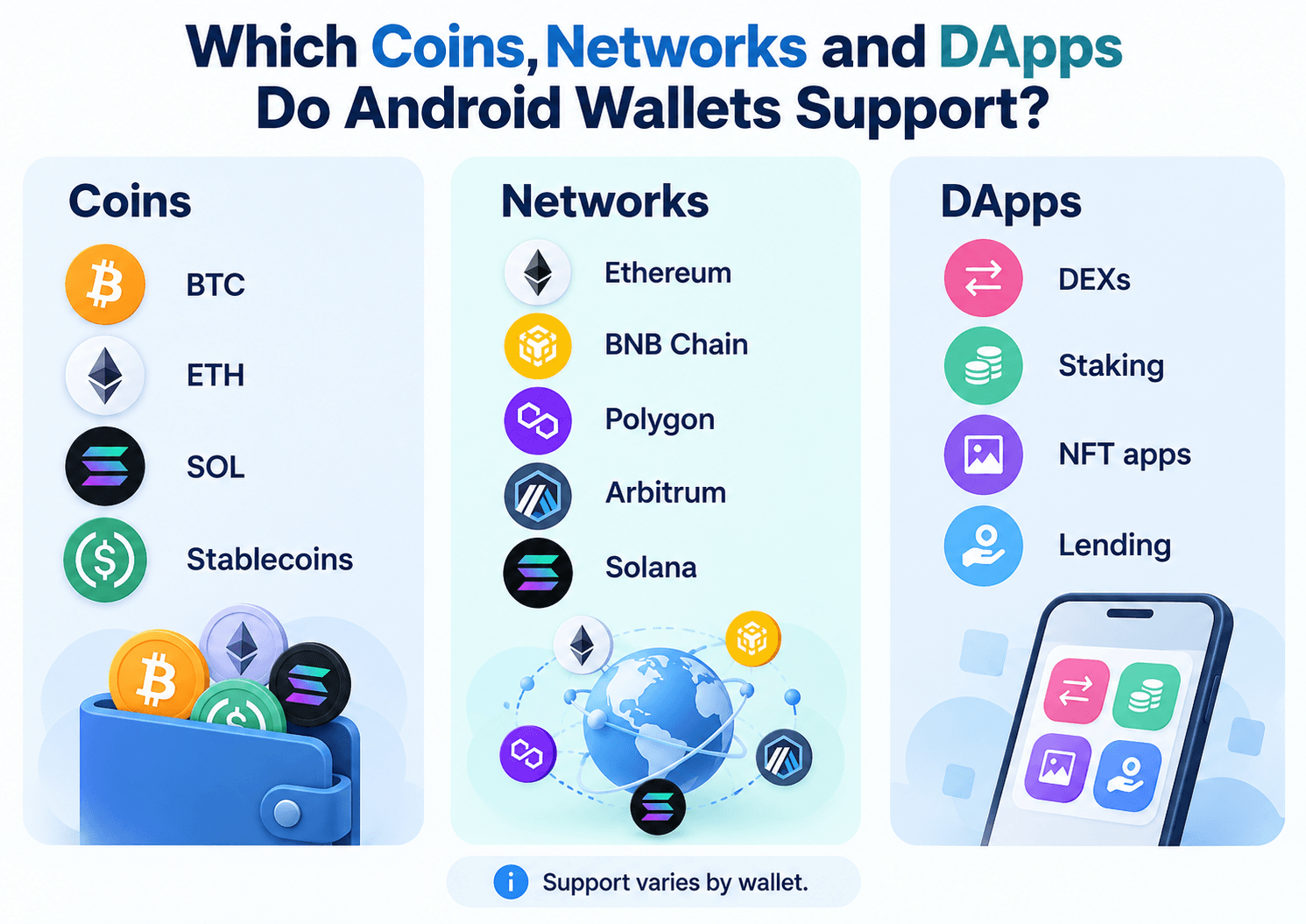 An Overview of Supported Cryptocurrencies, Blockchain Networks, and Decentralized Applications Available Through Android Wallets
Bitcoin, Ethereum, Solana and Stablecoin Compatibility
Native BTC runs on Bitcoin, ETH on Ethereum, and SOL on Solana. Wrapped versions on other chains introduce different contracts and potentially bridge or custodian exposure.
USDT and USDC exist through multiple network-specific implementations. The token standard also differs: an ERC-20 token on Ethereum and an SPL token on Solana require different network support.
| Wallet | Native BTC | Ethereum/EVM | Native SOL | Relevant L2s | USDT/USDC Network Support |
|---|---|---|---|---|---|
| Trust Wallet | Yes | Broad selection | Yes | Base, Arbitrum; others by app listing | Ethereum and Solana; additional supported implementations |
| MetaMask | Yes; Native SegWit imports | Custom EVM networks | Yes | Base, Arbitrum, Optimism | ERC-20 and SPL implementations on supported chains |
| Rabby | No | EVM-focused | No | Supported EVM L2s | EVM implementations; no Solana SPL |
| Phantom | Yes; SegWit/Taproot | Selected chains | Yes | Base; excludes Arbitrum/Optimism | Ethereum, Solana, and other supported chains |
| Coinbase Wallet | Mnemonic/email accounts | Selected chains | Mnemonic/email accounts | Base, Arbitrum, Optimism | EVM; Solana depends on account type |
| Exodus | Yes | Selected networks | Yes | Base, Arbitrum, Optimism | Supported ERC-20/SPL tokens; custom assets may need adding |
| Zengo | Yes | Selected networks | Yes | Base, Arbitrum, Optimism | Supported ERC-20/Solana assets; display limits apply |
| Tangem hardware | Yes | Selected networks | Yes | Base, Arbitrum, Optimism | Exact network/token must be supported |
The matrix covers selected networks. Exodus supports custom mobile tokens on named networks, while Tangem's asset directory lists supported chains. Polygon PoS and BNB Chain are EVM-compatible networks, but should not be grouped indiscriminately with Ethereum rollup L2s.
For stablecoins, verify the network and token contract before funding. USDT-labeled bridged tokens on Base, for example, should not automatically be treated as issuer-native USDT. Wallet support also does not remove stablecoin depeg or issuer-freezing risk.
DApp Access, Wallet Connections and Transaction Approval
A DApp browser opens applications inside the wallet. WalletConnect, deep links, and native integrations route requests from other browsers or devices.
For an EVM lending deposit, open the verified DApp, select the intended network, and connect the wallet. Review the contract, spending allowance, and any balance-change preview before approving the token permission. Then inspect and sign the deposit transaction. Connecting alone usually exposes an address; the later approval grants spending authority.
Desktop DApps may use WalletConnect QR codes; phone browsers use deep links. Both require compatible wallets, chains, and DApps. Zengo's documented App Connect networks illustrate why asset support cannot be substituted for connection compatibility.
Mobile simulations and warnings vary by transaction. Rabby includes mobile previews; Exodus no longer supports these external DApp connections. Hardware and extension integrations still require separate Android checks. Disconnecting a session also does not revoke an existing onchain token allowance.
How Much Do Android Crypto Wallets Cost?
Most software wallets are free to install. Total costs can include network fees, swap charges, provider spreads, optional subscriptions, and hardware purchases.
Wallet Fees vs. Network Fees vs. Third-Party Charges
A gas fee, or blockchain transaction fee, pays for network processing. A wallet can charge $0 for an ordinary transfer while the blockchain still charges a transaction fee.
An integrated swap can include a wallet fee, aggregator or liquidity-provider charges, and an execution price affected by spreads and price impact. These costs may already be included in the quoted output, so avoid counting them twice. Slippage is the difference between expected and executed prices; the tolerance setting is a limit, not an automatic charge.
Cross-chain routes can add bridge charges and source- and destination-network fees, alongside bridge-contract risk. An on-ramp buys crypto with fiat, while an off-ramp converts it back. Payment processors may impose card-processing fees, exchange-rate markups, identity checks, and country restrictions.
Comparing Real-World Android Wallet Costs
These are illustrative calculations using published fee structures checked Oct. 23, 2026, not executed transactions or captured quotes. Swap rows assume $1,000 of ETH on Ethereum mainnet, USDC at $1, and the stated wallet percentage deducted from the input value. Gas is paid separately. Approval gas, provider charges, spreads, price impact, and slippage are excluded from the calculated outputs.
| Scenario | Input / Amount | Wallet or Provider Fee | Network Fee | Spread / Execution Effect | Illustrative Amount Received |
|---|---|---|---|---|---|
| Send USDC on Base | 100 USDC, assumed $100 | $0 wallet fee assumed | Variable Base gas, paid separately in ETH | No conversion involved | 100 USDC |
| Trust Wallet: ETH to USDC | $1,000 input | Standard 0.7% = $7.00 | Variable Ethereum gas | Excluded | 993 USDC before other costs |
| MetaMask: ETH to USDC | $1,000 input | 0.875% = $8.75 | Variable Ethereum gas | Excluded | 991.25 USDC before other costs |
| Rabby: ETH to USDC | $1,000 input | Standard 0.25% = $2.50 | Variable Ethereum gas | Excluded | 997.50 USDC before other costs |
| Phantom: ETH to USDC | $1,000 input | Standard 0.85% = $8.50 | Variable Ethereum gas | Excluded | 991.50 USDC before other costs |
| Coinbase Wallet: ETH to USDC | $1,000 input | Up to 1%; $10 at maximum | Variable Ethereum gas | Aggregator charges and execution effects excluded | 990 USDC at maximum wallet fee, before other costs |
| Card purchase through MoonPay | $100 total budget; USDC assumed at $1 | Illustrative 4.5% = $4.50 | Excluded; delivery charge may apply | Exchange-rate markup excluded | 95.50 USDC before delivery and execution costs |
These calculations isolate wallet fees; they do not rank final execution prices. A more favorable liquidity route can outweigh a lower headline fee. Gasless flows may include network costs within the quote rather than charging them separately.
The purchase example applies MoonPay's published 4.5% rate for select credit-card purchases to a hypothetical $100 budget. It assumes the fee is deducted from that budget.
Can You Use a Hardware Wallet With an Android Phone?
Yes. Compatible combinations use Bluetooth, USB, or NFC, but support is specific to the hardware model and app.
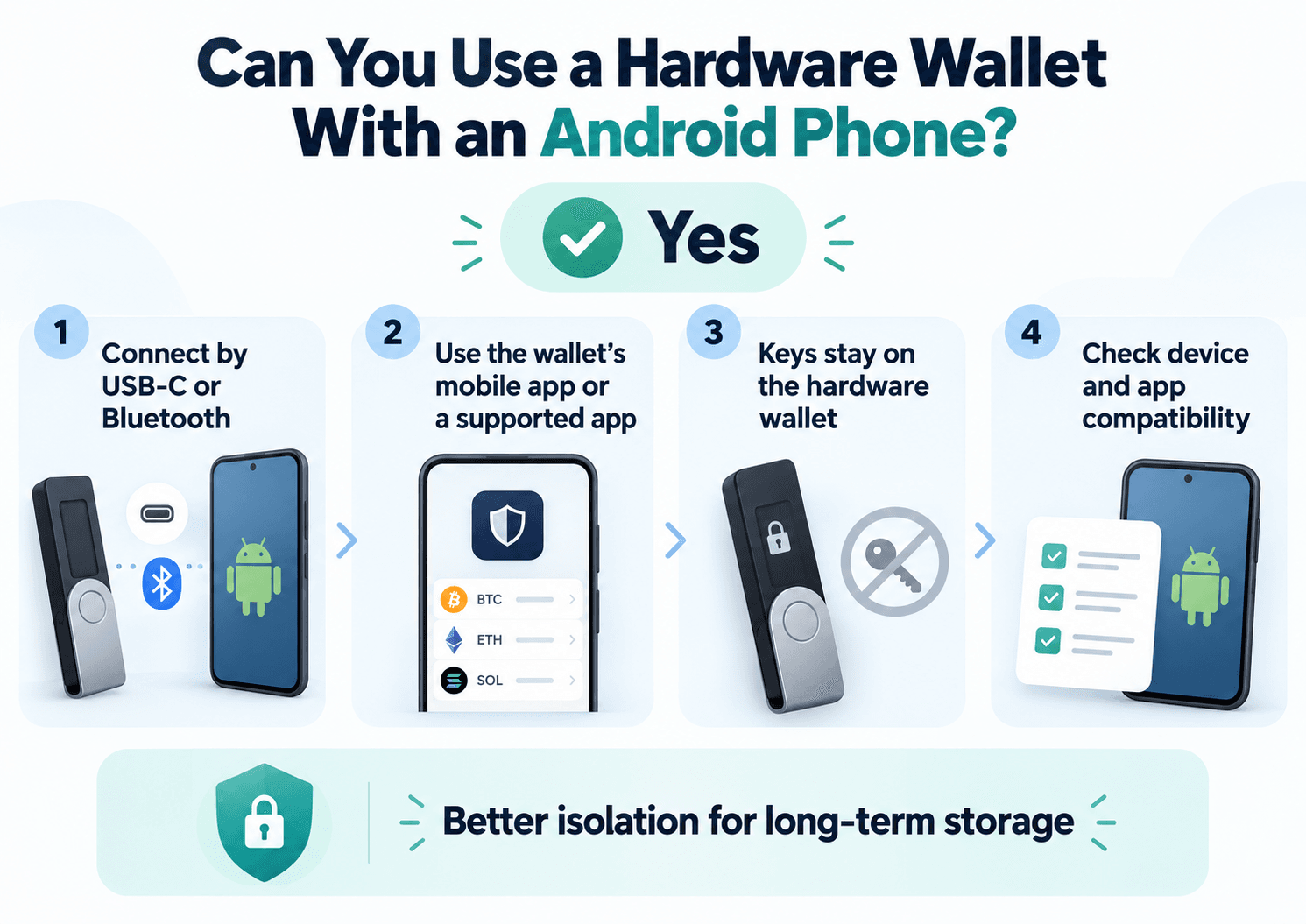 How Android Phones Connect to Hardware Wallets While Keeping Private Keys Isolated From Internet-Connected Devices
Hot Wallets vs. Hardware-Backed Wallets on Android
A hot wallet processes signing credentials on an internet-connected phone. A hardware wallet keeps its signing key on a separate device while Android prepares and broadcasts transactions.
External signing reduces exposure to phone malware attempting to extract keys. It cannot prevent every phishing attempt or malicious approval. A hardware display offers an independent place to check transaction details; screenless devices rely more heavily on the phone interface.
For separate spending and cold-storage needs, use a modest daily DApp balance alongside a hardware wallet with independently generated keys. Importing the same hot-wallet phrase into hardware leaves previously exposed credentials exposed.
Ledger, Trezor and Tangem: Android Compatibility Compared
These combinations support Android signing, subject to setup, firmware and asset restrictions.
| Hardware Option | Android Connection | Compatible App | Transaction Signing on Android | Important Restriction |
|---|---|---|---|---|
| Ledger Nano X | Bluetooth | Exodus Mobile | Yes | Set up in Ledger Wallet first; selected networks |
| Ledger Flex | Bluetooth | Exodus Mobile | Yes | Same integration limits; portfolio stays mobile-only |
| Trezor Safe 7 | Bluetooth | Exodus Mobile | Yes | Set up in Trezor Suite first; selected assets; no Bitcoin-only firmware |
| Trezor Safe 7 | Bluetooth or USB-C | Trezor Suite | Yes | Supported asset and firmware required |
| Trezor Safe 5 / Safe 3 / Model T / Model One | USB with appropriate cable/adapter | Trezor Suite | Yes | These models' Exodus Mobile portfolios are view-only |
| Tangem cards and rings | NFC | Tangem App | Yes | Compatible NFC phone; backup devices; no hardware display |
Follow the manufacturer's setup instructions; some maintenance workflows may require a desktop. Choose software for convenience or a verified hardware/app combination for external signing.
How to Set Up, Back Up and Restore a Crypto Wallet on Android
Verify the installation source and recovery method before funding a wallet.
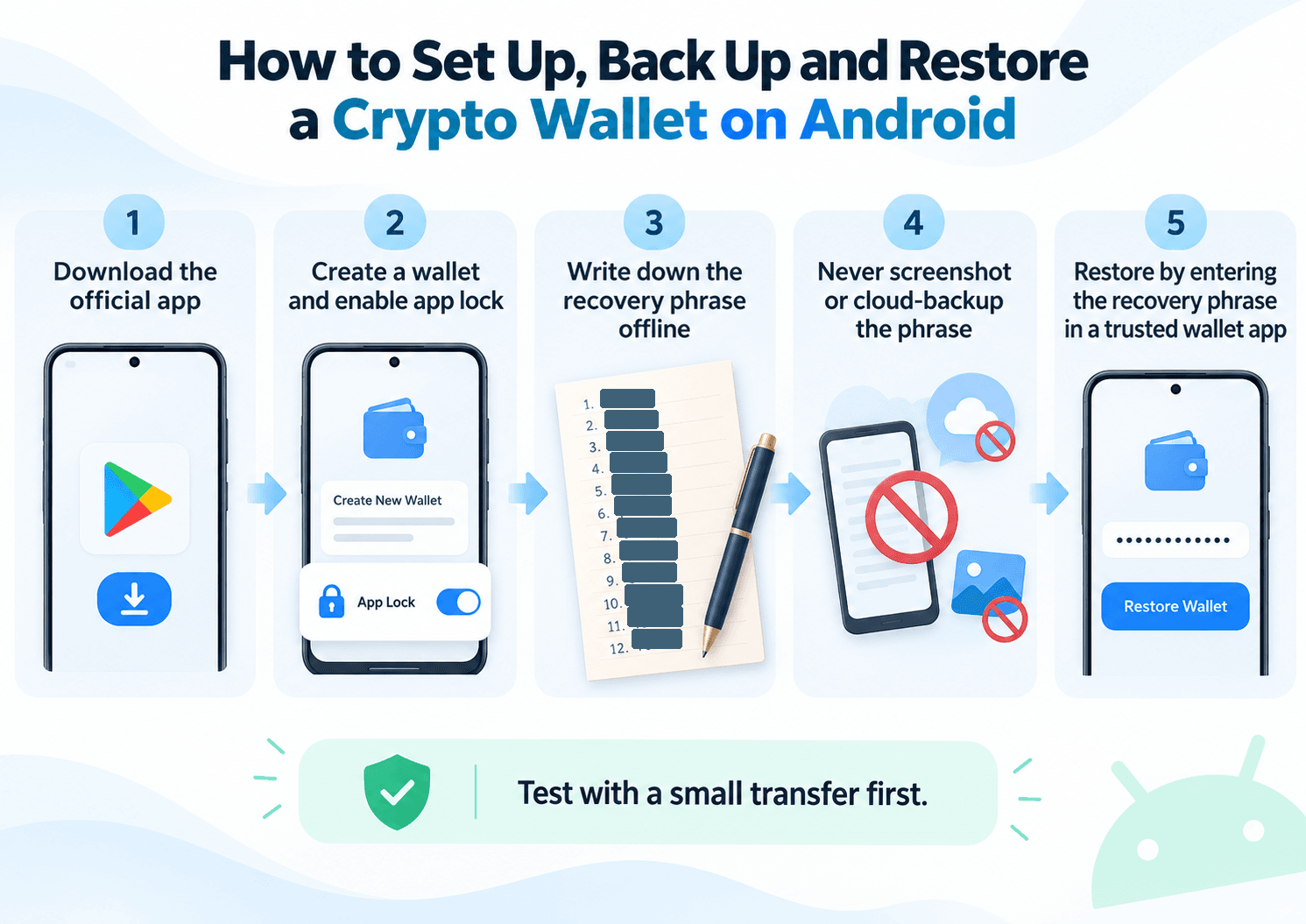 A Step-by-Step Guide to Creating, Securing, Backing Up, and Restoring a Cryptocurrency Wallet on Android
How to Install and Set Up an Android Crypto Wallet Safely
- Visit the providers' verified website and follow its Google Play Store link.
- Compare the publisher and app identity. Avoid advertisements, unsolicited APK links, and impersonation apps.
- Confirm Android version, device compatibility, and any NFC, Bluetooth, or USB requirements.
- Create a wallet, or import an existing one only into the verified application.
- Complete its specific backup process before depositing meaningful funds.
- Enable a strong device lock, supported biometric authentication, and wallet-level protection.
- Match the receiving asset, blockchain network, and wallet address.
- Send a small test amount before transferring a larger balance.
A recovery phrase grants transaction authority. Never enter it into unsolicited support forms or websites promising verification, rewards, or recovery assistance.
How to Back Up and Restore Different Types of Android Wallets
Many conventional wallets use a BIP-39 mnemonic phrase to derive keys. Keep it protected offline rather than in an unencrypted screenshot, email, or note. Wallet-specific encrypted backups require their own password and account protections.
| Recovery Method | What the User Needs | Main Risk or Limitation |
|---|---|---|
| Seed phrase | Correct phrase, compatible derivation, any optional passphrase | Lost/exposed phrase or wrong account discovery |
| MPC recovery | Required credentials and recovery file; biometrics where configured | Recovery-factor and service dependencies |
| Passkey/smart wallet | Compatible credential provider and configured recovery | Lost credentials or unsupported account recovery |
| Hardware backup | Compatible recovery material or configured backup devices | Loss of every usable backup |
Zengo recovery needs the registered email and cloud recovery file, plus FaceLock when configured; Google account access alone is insufficient. Passkey wallets require the correct credential and wallet-specific recovery configuration, which can differ across Android and iPhone.
Tangem hardware backups differ from Tangem Mobile Wallet's password-protected cloud backup. Cross-platform restoration requires its phrase. Restore hardware credentials through the manufacturer's supported recovery process; entering them into a software wallet exposes them to that device.
A standard Android phone backup should never be assumed to contain usable wallet recovery credentials. Coin Bureau's crypto wallet recovery guide explains the main recovery scenarios.

What Happens If You Lose Your Phone or Restore an Empty Wallet?
Crypto remains onchain after phone loss. Recovery restores control of its addresses.
Install the genuine app on a secure replacement device and use the appropriate phrase, MPC, passkey, or hardware recovery flow. Confirm the original address and balances before retiring the old device. If credentials may have been exposed, move funds to a newly generated wallet after restoring access.
An apparently empty restored wallet can result from:
- Wrong network: Assets sit on Base while the app displays Ethereum.
- Different account: The app selects another account derived from the phrase.
- Imported keys: Separately imported accounts are absent from the main phrase backup.
- Derivation path or passphrase: Different settings generate different addresses.
- Unsupported assets: The replacement wallet cannot display the original network or token.
Check the original public address on a suitable blockchain explorer. Official support can diagnose account discovery and app problems, but cannot reconstruct missing private keys or reverse a confirmed transfer. Never share recovery secrets with a supposed recovery professional.