Hardware wallets are among the safest ways to store crypto, but they are not invincible. They protect private keys from online threats, while phishing, malicious transactions, counterfeit devices and poor recovery practices can still lead to losses.
This guide explains the biggest hardware wallet security threats and the practical steps users can take to reduce them.
Editor's Note (July 26, 2026): We fully updated this article in July 2026 to reflect the latest hardware wallet threats, scam patterns and security practices. The revised guide adds clearer coverage of malicious transaction signing, blind signing, token approvals, address poisoning, recovery failures, supply-chain risks, advanced physical attacks and scenario-specific emergency responses.
Top Security Threats of Hardware Wallets
Hardware wallets provide strong private-key protection, but they cannot prevent every form of crypto loss. The most common threats involve stolen recovery phrases, unsafe transaction approvals and failed backup procedures rather than advanced attacks on the device itself.
Key Hardware Wallet Security Threats
-
Recovery phrase phishing Fake support agents, websites, apps and verification portals try to obtain the seed phrase, allowing an attacker to restore the wallet elsewhere.
-
Malicious transaction signing A hardware wallet can securely sign a harmful request when the user approves an unexpected transfer, contract call or token permission.
-
Blind signing Unreadable hashes or incomplete transaction details can prevent users from understanding what they are authorizing on the device.
-
Unlimited token approvals A malicious or compromised smart contract may later drain approved tokens without requiring the private key to be extracted.
-
Address manipulation Clipboard malware and address poisoning can replace or imitate a recipient address before the transfer is confirmed.
-
Fake or tampered devices Counterfeit, preconfigured or modified wallets can compromise the recovery process before the owner deposits any crypto.
-
Malicious firmware or companion software Compromised software may prepare deceptive transactions, alter displayed information or interfere with the signing process.
-
Lost or stolen devices Physical possession becomes more dangerous when the PIN is weak, observed or stored near the recovery phrase.
-
Backup and recovery failure Destroyed, unreadable or incorrectly documented backups can permanently lock the owner out without any attacker being involved.
-
Passphrase mistakes Incorrect spelling, spacing or capitalization can open a different wallet and make the original accounts appear empty.
-
Physical extraction attacks Fault injection, side-channel analysis and chip probing can threaten high-value targets, but usually require specialist tools and prolonged access.
-
Poor operational security Keeping the wallet and seed together, exposing holdings publicly or using a vault for routine DApp activity can create avoidable losses.
Disclaimer
This guide is for educational purposes only and is not financial, legal or security advice. Self-custody carries the risk of theft and permanent loss of access.
Disclosure
Some links in this guide may be affiliate links. If you choose to purchase a product through these links, we may earn a commission at no additional cost to you.

Are Hardware Wallets Safe?
Hardware wallets are generally safe when purchased from a trusted source, initialized correctly and used with disciplined transaction verification. They isolate private keys well, though users remain responsible for recovery, software selection and every action approved on the device.
What a Hardware Wallet Protects
A hardware wallet creates or stores the private keys needed to authorize blockchain transactions while keeping them away from the connected computer or phone. The device provides a dedicated environment for signing.
When a transaction is prepared in a companion app, the unsigned request moves to the wallet. The wallet signs it internally and returns the signature. The private key should never leave the device.
The main protections include:
- Private-key isolation: Ordinary computer malware cannot directly read the key from the wallet.
- On-device signing: Cryptographic operations take place inside the hardware wallet.
- PIN protection: A PIN restricts access when someone obtains the physical device.
- Trusted display: Transaction details shown on the wallet provide an independent verification surface.
- Secure boot: The device checks whether authorized firmware is running before normal operation begins.
- Secure Element: Some models use a hardened chip designed to resist extraction, probing and fault injection.
- Offline recovery generation: The recovery phrase is created inside the device rather than on a website or computer.
- Failed-attempt controls: Lockouts, delays or device wipes make repeated PIN guessing harder.
These controls reduce the chance that malware on an infected laptop can extract a private key.
Private-key isolation does not make every signed transaction safe. A hardware wallet can protect the key and still approve an instruction that sends assets to an attacker.
Check out our top picks for the best hardware wallets. Want more? Read how hardware wallets work.
What a Hardware Wallet Cannot Protect
A hardware wallet cannot stop an owner from entering a seed phrase into a fake website, approving an unlimited token allowance or confirming an unchecked recipient address.
Its protection has limited reach when the loss involves:
- A recovery phrase entered into a fraudulent app
- A malicious transaction deliberately approved by the owner
- An unlimited token approval later abused by a contract
- An incorrect recipient, asset or network
- A recovery backup stored in the cloud
- A wallet and seed phrase kept in the same location
- Physical coercion
- An inheritance plan that heirs cannot execute
- A compromised companion app or transaction parser
- A device display that cannot decode the requested action
These incidents fall into separate failure categories. Calling all of them hardware-wallet hacks hides the procedure or control that failed.
| Failure Type | What Happens | Typical Example |
|---|---|---|
| Key compromise | The attacker obtains the seed phrase or private key | Seed phrase entered into a phishing site |
| Authorization deception | The owner signs a harmful action without understanding it | Unlimited approval granted to a wallet drainer |
| Recovery failure | The owner loses the only valid route back into the wallet | Backup is destroyed and the device stops working |
| Device compromise | The wallet, firmware or signing process is manipulated | Counterfeit device generates known recovery words |
| Operational failure | Poor procedures create a preventable loss | Wrong address copied from poisoned transaction history |
Self-custody places these responsibilities on the owner. The device supplies a protected signer. Recovery, transaction intent, software selection and physical storage remain operational decisions.
Hardware Wallet Security Threats Ranked by Likelihood and Impact
Phishing and deceptive transaction signing pose the greatest practical risk to ordinary users. Advanced chip attacks can cause severe losses, though they demand far more access, skill and targeting.
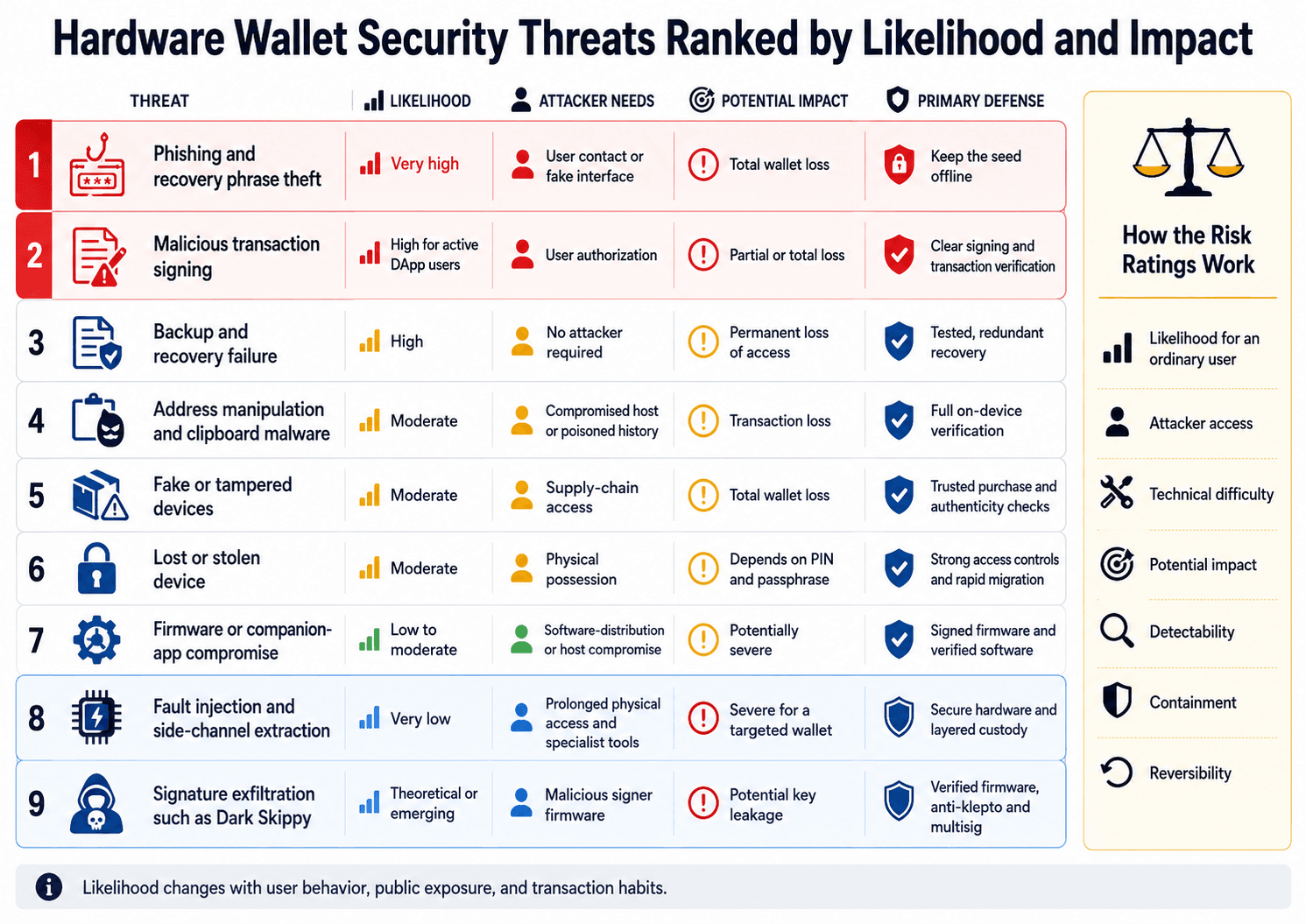 Ranking Hardware Wallet Threats by Likelihood, Access and Impact
How the Risk Ratings Work
A useful threat rating describes the conditions required for an attack. Technical novelty alone says little about the danger facing an ordinary holder.
The rankings consider:
- Likelihood for an ordinary user: How often typical holders encounter the attack path.
- Attacker access: Whether the attacker needs remote contact, temporary possession or prolonged physical control.
- Technical difficulty: The tools and knowledge required to execute the attack.
- Potential impact: Whether the incident could drain one token, one account or the entire wallet.
- Detectability: Whether the owner can identify the attack before approving a loss.
- Containment: Whether remaining funds can be moved before further damage occurs.
- Reversibility: Whether the action can realistically be undone after blockchain confirmation.
A personal crypto risk-management framework helps users adjust these ratings around their holdings, transaction habits and public exposure.
Hardware Wallet Threat Ranking
| Threat | Likelihood | Attacker Needs | Potential Impact | Primary Defense |
|---|---|---|---|---|
| Phishing and recovery phrase theft | Very high | User contact or fake interface | Total wallet loss | Keep the seed offline |
| Malicious transaction signing | High for active DApp users | User authorization | Partial or total loss | Clear signing and transaction verification |
| Backup and recovery failure | High | No attacker required | Permanent loss of access | Tested, redundant recovery |
| Address manipulation and clipboard malware | Moderate | Compromised host or poisoned history | Transaction loss | Full on-device verification |
| Fake or tampered devices | Moderate | Supply-chain access | Total wallet loss | Trusted purchase and authenticity checks |
| Lost or stolen device | Moderate | Physical possession | Depends on PIN and passphrase | Strong access controls and rapid migration |
| Firmware or companion-app compromise | Low to moderate | Software-distribution or host compromise | Potentially severe | Signed firmware and verified software |
| Fault injection and side-channel extraction | Very low | Prolonged physical access and specialist tools | Severe for a targeted wallet | Secure hardware and layered custody |
| Signature exfiltration such as Dark Skippy | Theoretical or emerging | Malicious signer firmware | Potential key leakage | Verified firmware, anti-klepto and multisig |
Likelihood changes with user behavior. An active DeFi user signs more contract calls and faces greater authorization risk. A long-term holder who rarely transacts has less DApp exposure, but backup deterioration, inheritance and device failure become more relevant.
Public exposure also changes the calculation. An attacker may spend more time and money targeting someone known to control a valuable wallet.
Threat 1: Phishing, Fake Support and Recovery Phrase Theft
Recovery phrase phishing provides the most likely route to complete wallet compromise. Once an attacker obtains the phrase, the physical device, PIN and Secure Element may no longer protect the funds.
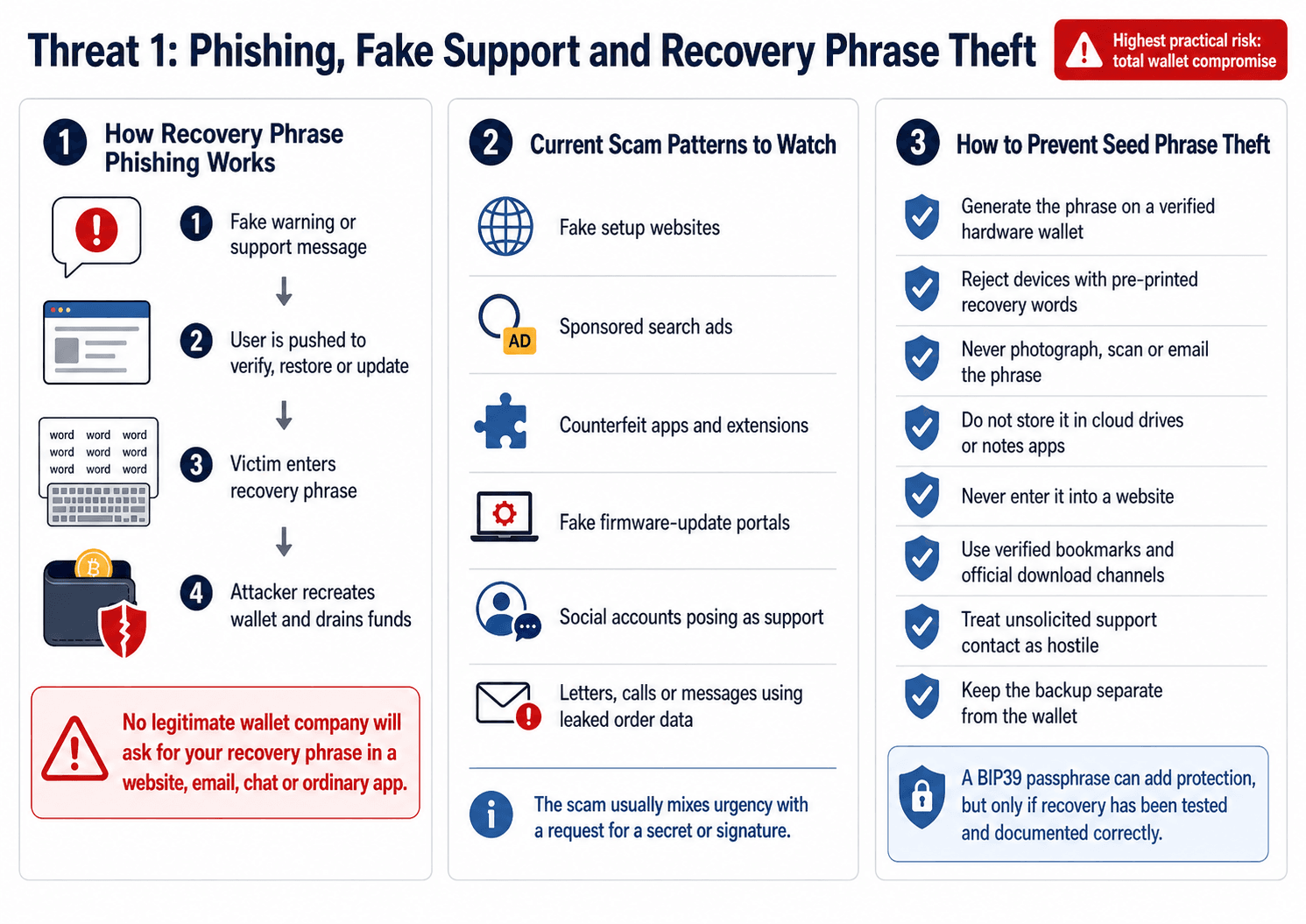 Recovery Phrase Scams Remain the Fastest Route to Theft
How Recovery Phrase Phishing Works
The attacker creates a convincing reason for the owner to reveal the wallet backup. The message may claim that the device needs verification, a security update failed or funds are already at risk.
Common routes include:
- Fake wallet setup websites
- Sponsored search advertisements impersonating official pages
- Fraudulent browser extensions
- Counterfeit companion apps
- Fake firmware-update portals
- Social media accounts posing as wallet support
- Messages claiming that an account must be restored
- Calls from supposed security employees
- Fake replacement or warranty processes
- Pre-printed recovery phrases included with counterfeit devices
A legitimate wallet company, support representative or firmware update should never require the user to enter a seed phrase into a website, email, chat message or ordinary computer application. Those words can recreate the wallet on another device.
The BIP39 recovery standard converts wallet entropy into a portable mnemonic, making recovery easier while turning the words into a complete bearer secret.
Current Scam Patterns to Watch
Physical letters can feel more credible than email because they appear expensive, targeted and official. Ledger has warned about letters containing QR codes and urgent security instructions that direct recipients toward fake verification processes. Ledger’s phishing page includes ongoing campaign examples and was current when checked in July 2026.
Other patterns include:
- AI-generated support: Scammers can imitate support agents through increasingly convincing text, audio and video.
- Wallet synchronization tools: A fake utility claims that the wallet must be synchronized, validated or migrated.
- Counterfeit packaging: Instructions, inserts and screens imitate the manufacturer’s visual design.
- Leaked customer information: Order data can help criminals personalize emails, calls and physical mail. Ledger's notice on the January 2026 Global-e incident confirmed unauthorized access to customer order data handled by the e-commerce provider.
- Fake firmware emergencies: The user receives a deadline and is told that failure to act will restrict the wallet or expose the funds.
- Wallet verification portals: A fake service asks users to connect a wallet or enter recovery words to confirm ownership.
The scam usually combines urgency with a request for a secret or signature. The delivery method may change, but the attacker still needs the recovery phrase or a harmful authorization.
How to Prevent Seed Phrase Theft
Use the following controls:
- Generate the recovery phrase on a verified hardware wallet.
- Reject any device that arrives with recovery words already printed.
- Never photograph, scan or email the phrase.
- Do not store it in cloud drives or notes apps.
- Never enter it into a website.
- Use verified bookmarks for wallet software.
- Treat unsolicited support contact as hostile.
- Confirm the app publisher and download channel.
- Keep the backup separate from the wallet.
- Verify unexpected notices through a manually opened official website.
- Consider a BIP39 passphrase after testing and documenting recovery correctly.
A passphrase creates accounts beyond the base seed. It also adds another secret that must be reproduced exactly. Users who cannot document and test the process may create a larger recovery risk than the protection solves.
Threat 2: Malicious Transactions, Blind Signing and Address Manipulation
A hardware wallet can perform its cryptographic function correctly while signing a request that steals funds. The private key remains protected, but the user authorizes the harmful action.
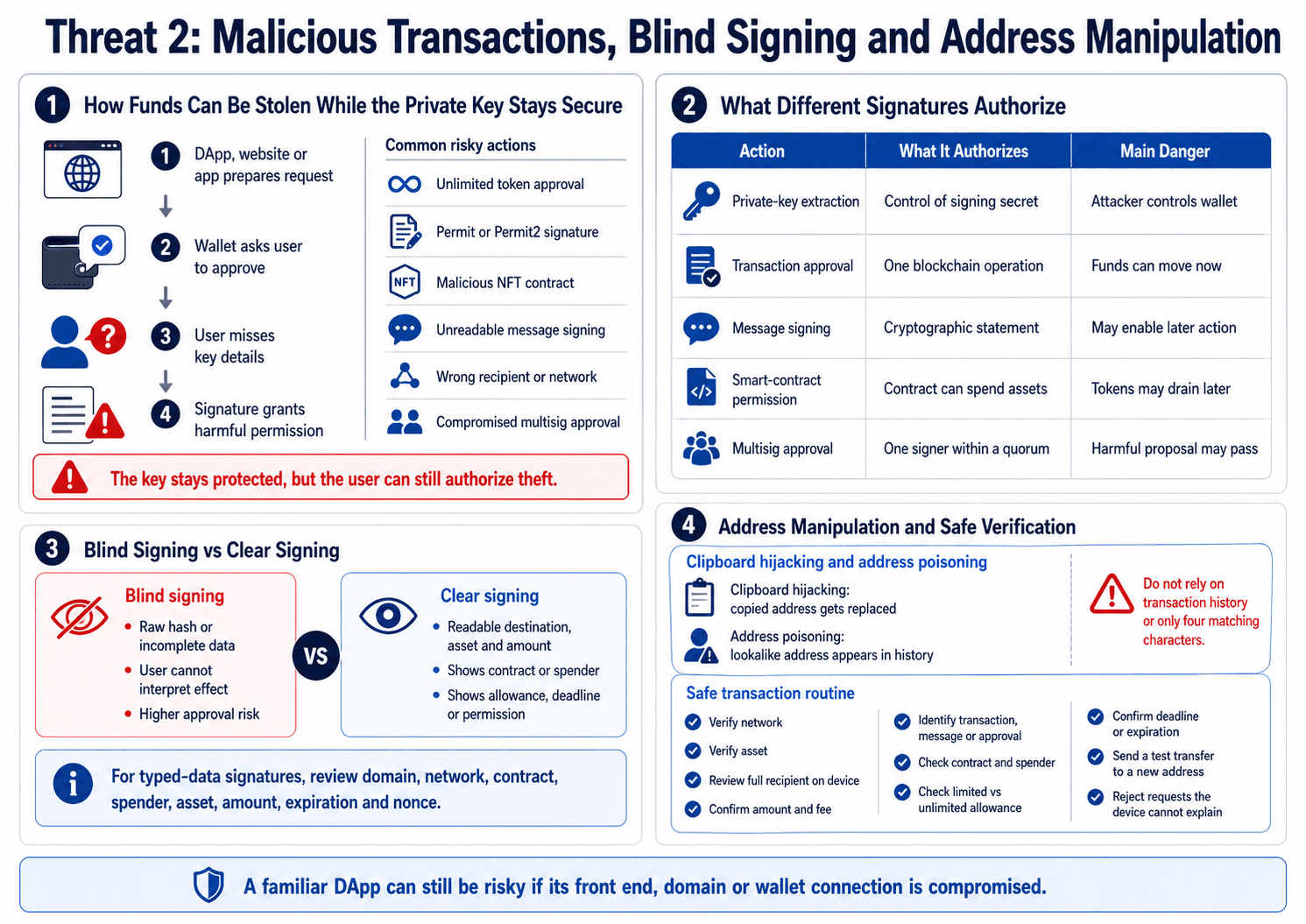 Secure Keys Still Cannot Prevent Dangerous Transaction Approvals
How Funds Can Be Stolen While the Private Key Remains Secure
A DApp, website or compromised companion app prepares the transaction. The hardware wallet asks the user to approve it. An incomplete display or rushed review can turn the signature into permission for theft.
Examples include:
- Approving an unlimited token allowance
- Signing a Permit or Permit2 authorization
- Approving a malicious NFT contract
- Signing an unreadable message
- Authorizing a compromised multisig transaction
- Confirming the wrong recipient or network
- Connecting a long-term vault directly to an unfamiliar DApp
- Signing a transaction that calls an unexpected contract function
These actions create different security outcomes:
| Action | What the User Authorizes | Main Danger |
|---|---|---|
| Private-key extraction | Control of the signing secret | Attacker can independently control the wallet |
| Transaction approval | One blockchain operation | Funds may move immediately |
| Message signing | A cryptographic statement | The signature may authorize a later action |
| Smart-contract permission | A contract’s right to spend assets | Tokens may be drained later |
| Multisig approval | One signer’s consent within a quorum | A harmful proposal may pass after enough signatures |
Smart contracts can automate permissions and asset transfers without revealing the underlying private key. The risk comes from the authority granted through the signed contract call.
A wallet drainer often abuses authorization rather than extracting a key. Disconnecting the wallet from a website may remove the visible session while leaving an on-chain approval active.
Blind Signing vs Clear Signing
Blind signing occurs when a wallet displays raw hashes, hexadecimal data or incomplete transaction information. The user can approve the request without being able to interpret its effect.
Clear signing presents readable details such as the destination, asset, amount, contract and permission.
A larger screen improves readability when the software can decode the operation. Some contract calls contain nested or dynamic instructions that remain difficult to summarize.
The EIP-712 typed-data standard gives structure to off-chain signatures, though users still need to review:
- The signing domain
- The network
- The verifying contract
- The spender
- The asset
- The amount
- The permission
- The expiration
- The nonce
| Request Type | What the Device Should Display |
|---|---|
| Native coin transfer | Network, asset, full recipient, amount and fee |
| Token transfer | Network, token contract or verified token, recipient and amount |
| Token approval | Token, spender, allowance, expiration and whether approval is unlimited |
| Message signature | Domain, contract, network, requested action, deadline and nonce |
| Multisig transaction | Safe address, destination, value, operation and SafeTxHash |
| DApp interaction | Contract, function, assets transferred, approvals and minimum output |
Transaction simulation can provide another warning by estimating balance and permission changes before signing. Its accuracy depends on the provider, the current blockchain state and the transaction path.
Clipboard Hijacking and Address Poisoning
Clipboard hijacking changes an address after the user copies it. Malware replaces the intended recipient before the address is pasted.
Address poisoning inserts a similar-looking address into the victim’s transaction history. The attacker may send a negligible transfer or create a misleading token event, hoping the victim copies the address during a later transaction.
Checking four characters at each end offers limited assurance. Attackers can generate addresses with several matching visible characters. Users should verify the critical address details on the trusted device display.
Saved address books can reduce repeated copying. A new entry should still be confirmed with a test transfer and an independent communication channel.
A Safe Transaction Verification Routine
Use the same process for every meaningful transaction:
- Verify the network.
- Verify the asset.
- Review the full recipient address on the hardware wallet.
- Confirm the amount.
- Check the fee for obvious anomalies.
- Identify whether the request is a transaction, message or approval.
- Review the contract and spender.
- Check whether the allowance is limited or unlimited.
- Confirm the expiration or deadline.
- Send a test transaction to a new destination.
- Verify high-value transfers through a second communication channel.
- Reject requests the device cannot explain.
A familiar DApp can still carry smart contract risk. Its front end, domain records, dependencies or wallet connection may be compromised while the underlying protocol remains unchanged.
Threat 3: Fake Devices, Supply-Chain Tampering and Malicious Firmware
A counterfeit or preconfigured hardware wallet can compromise recovery before the owner deposits crypto. Purchase source, clean initialization and cryptographic authenticity checks provide stronger assurance than packaging alone.
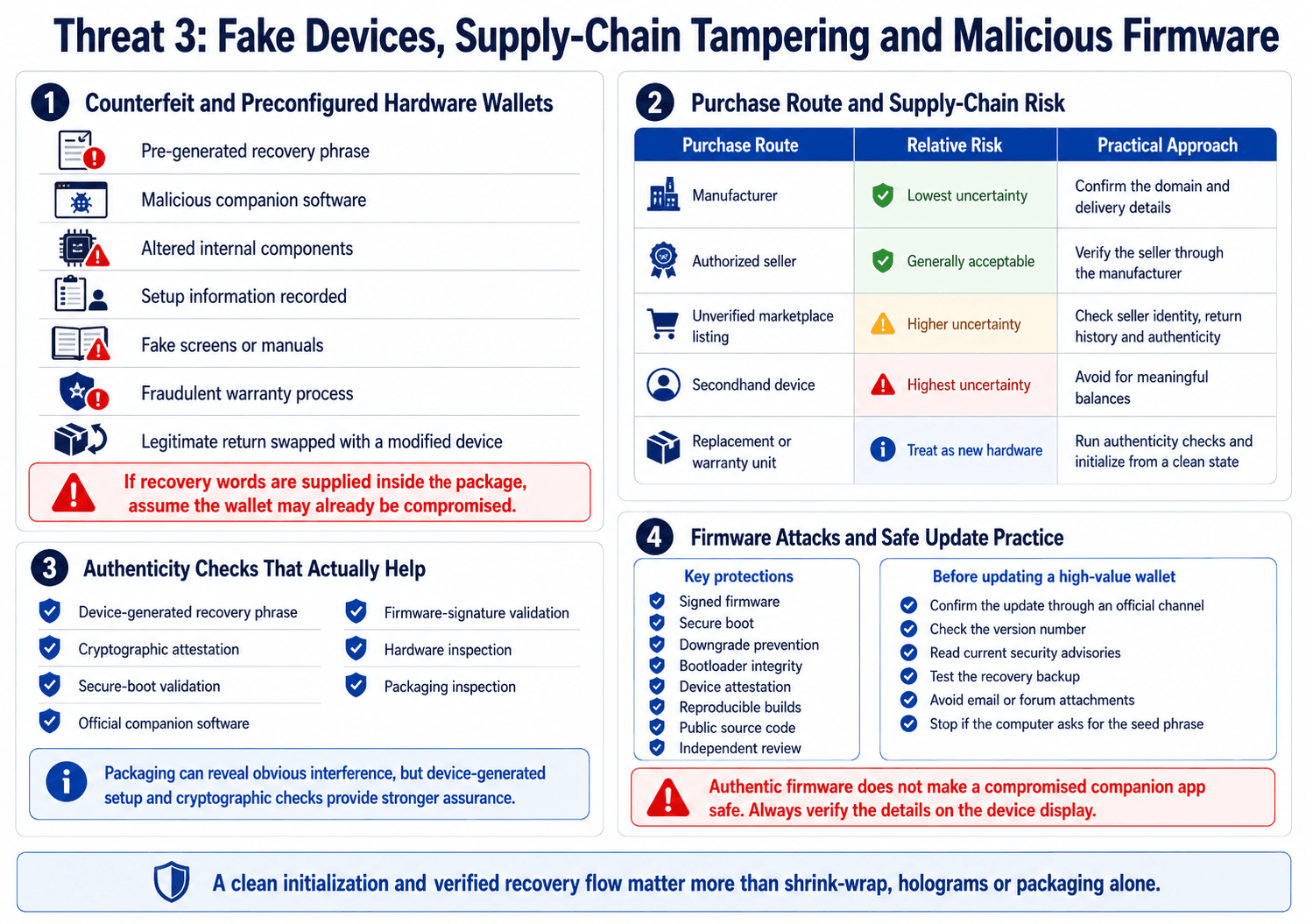 Counterfeit Devices Can Compromise Security Before Initial Setup
Counterfeit and Preconfigured Hardware Wallets
A fake or modified device may:
- Arrive with a pre-generated recovery phrase
- Direct the buyer to malicious companion software
- Contain altered internal components
- Record setup information
- Imitate official screens and manuals
- Use a fraudulent warranty process
- Replace a legitimate returned device with a modified unit
Counterfeit packaging has become more convincing. Holograms, shrink-wrap and printed instructions can all be copied.
| Purchase Route | Relative Risk | Practical Approach |
|---|---|---|
| Manufacturer | Lowest supply-chain uncertainty | Confirm the domain and delivery details |
| Authorized seller | Generally acceptable | Verify the seller through the manufacturer |
| Unverified marketplace listing | Higher uncertainty | Confirm seller identity, return history and device authenticity |
| Secondhand device | Highest uncertainty | Avoid for meaningful balances |
| Replacement or warranty unit | Treat as a new device | Run authenticity checks and initialize from a clean state |
A marketplace purchase is not automatically compromised. The uncertainty comes from weaker visibility into seller identity, handling and previous returns.
Authenticity Checks That Actually Help
Packaging checks may reveal obvious interference. Cryptographic and procedural controls provide stronger evidence.
Prioritize the following:
- Device-generated recovery phrase: The device should create new recovery words during initialization.
- Cryptographic attestation: A genuine-device check verifies manufacturer-issued credentials.
- Secure-boot validation: The boot process should reject or warn about unauthorized firmware.
- Official companion software: Download the app from a manually verified source.
- Firmware-signature validation: Updates should carry a valid manufacturer signature.
- Hardware inspection: Confirm the model, screen, buttons, ports and casing.
- Packaging inspection: Look for unexpected seals, spelling errors, opened components or added instructions.
Shrink-wrap and tamper stickers can flag possible interference. They cannot prove that the internal components or installed firmware are authentic.
Treat a replacement device as new hardware. Run the genuine check, initialize it from a clean state and inspect the recovery flow before restoring valuable accounts.
Firmware Attacks and Unsafe Updates
Firmware controls signing, screen output and communication with the host. Malicious firmware could change recipient details, leak signing information or misrepresent a transaction.
Relevant protections include:
- Signed firmware
- Secure boot
- Firmware downgrade prevention
- Bootloader integrity
- Device attestation
- Reproducible builds
- Public source code
- Independent review
Reproducible builds allow independent parties to compile public source code and compare the output with the distributed binary. The Reproducible Builds project explains this verification process, though matching builds do not prove that the source code itself contains no vulnerabilities.
Public source code and reproducible binaries answer separate questions. Source access permits inspection. Reproducibility helps confirm that a binary corresponds to the published code.
Before updating a wallet that controls a large balance:
- Confirm the update through an official channel.
- Check the version number.
- Read current security advisories.
- Test the recovery backup.
- Avoid updates delivered through email or forum attachments.
- Understand the exposure before delaying a critical patch.
- Stop if the process asks for the seed phrase on the computer.
A tested recovery process makes a failed update manageable. An untested backup can turn device failure into permanent loss.
Threat 4: Lost, Stolen or Physically Accessed Hardware Wallets
Possession of the device does not automatically provide access to the funds. The outcome depends on the PIN, device architecture, passphrase setup, backup location and the time available to the attacker.
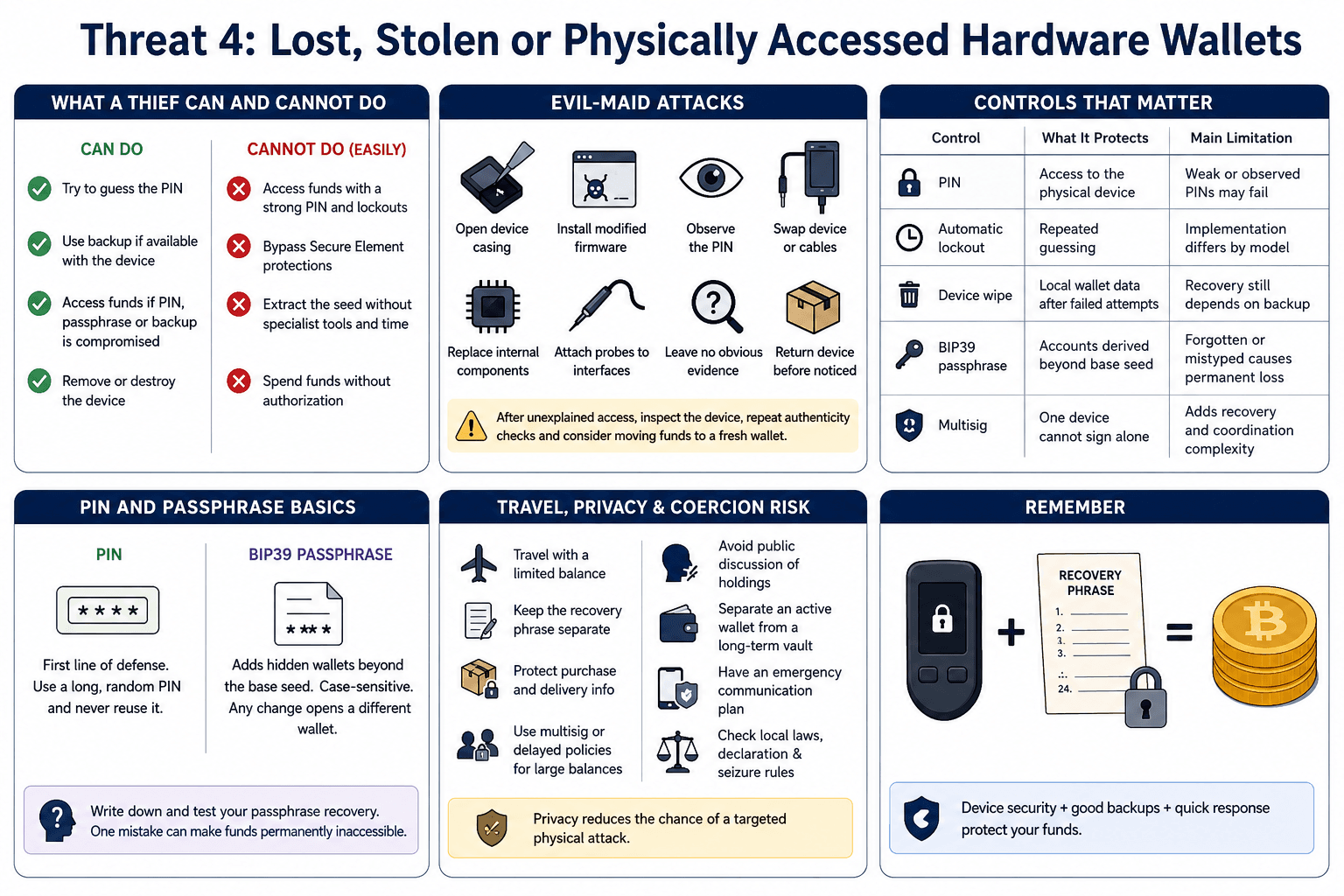 Physical Theft Tests PIN Strength, Privacy and Response Speed
What a Thief Can and Cannot Do With the Device
Crypto remains recorded on the blockchain. The device stores or controls the credentials used to authorize transactions.
A thief has a better chance of gaining access when:
- The PIN is weak
- The PIN was observed
- Failed-attempt limits are ineffective
- The recovery phrase is stored with the wallet
- The passphrase is written nearby
- The owner delays responding
- The wallet holds enough value to justify specialist extraction
A strong PIN and device wipe policy can stop casual access. A specialist with physical possession, time and a valuable target presents a harder problem.
Privacy affects the likelihood of such targeting. Publicly revealing wallet ownership, balances or delivery information gives an attacker more reason to pursue the device.
Temporary Access and Evil-Maid Attacks
An evil-maid attack occurs when someone gains unauthorized access to a device, modifies or replaces it, and returns it before the owner notices.
Possible actions include:
- Opening the casing
- Replacing internal components
- Installing modified firmware
- Observing the PIN
- Swapping the cable
- Replacing the wallet with a counterfeit copy
- Attaching probes to accessible interfaces
- Altering stored accessories or setup instructions
Tamper-evident storage can reveal interference. A capable attacker may still copy, replace or bypass a seal.
After unexplained access, inspect the device, repeat authenticity checks and verify its firmware. Moving the funds to a fresh wallet may be sensible when the signer’s integrity cannot be confirmed.
PINs, Passphrases and Lockout Policies
Each control addresses a different form of access.
| Control | What It Protects | Main Limitation |
|---|---|---|
| PIN | Access to the physical device | Weak or observed PINs may fail |
| Automatic lockout | Repeated guessing | Implementation differs by model |
| Device wipe | Removes local wallet data after failed attempts | Recovery still depends on the backup |
| BIP39 passphrase | Protects accounts derived beyond the base seed | A forgotten or mistyped passphrase causes permanent loss |
| Multisig | Prevents one device from authorizing alone | Adds recovery and coordination complexity |
A passphrase is often described as a “25th word,” though it can contain a broader range of characters.
Every different passphrase derives another wallet. A change in spelling, spacing or capitalization can open a valid but unrelated account, making the original funds appear missing.
For larger Bitcoin holdings, multisignature wallets can remove the single-device failure point by requiring approval from several signers.
Travel, Privacy and Coercion Risk
Travel introduces loss, theft, searches and unauthorized access in hotels, airports and shared accommodation.
Practical controls include:
- Travel with a limited balance.
- Keep the recovery phrase away from the wallet.
- Avoid public discussion of holdings.
- Protect purchase and delivery information.
- Separate an active wallet from a long-term vault.
- Use multisig or delayed policies for very large balances.
- Establish an emergency communication plan.
- Review local border, declaration and seizure rules before traveling.
Some passphrase users maintain a low-value decoy or duress wallet. The arrangement may reduce exposure in limited situations, but it adds another recovery procedure and cannot guarantee safety during coercion.
Keeping wallet ownership and balances private reduces the chance of a targeted physical attack.
Threat 5: Backup, Recovery and Long-Term Storage Failures
Recovery failure counts as a security incident even when no attacker is involved. An exposed or unreadable backup can render the device’s security irrelevant.
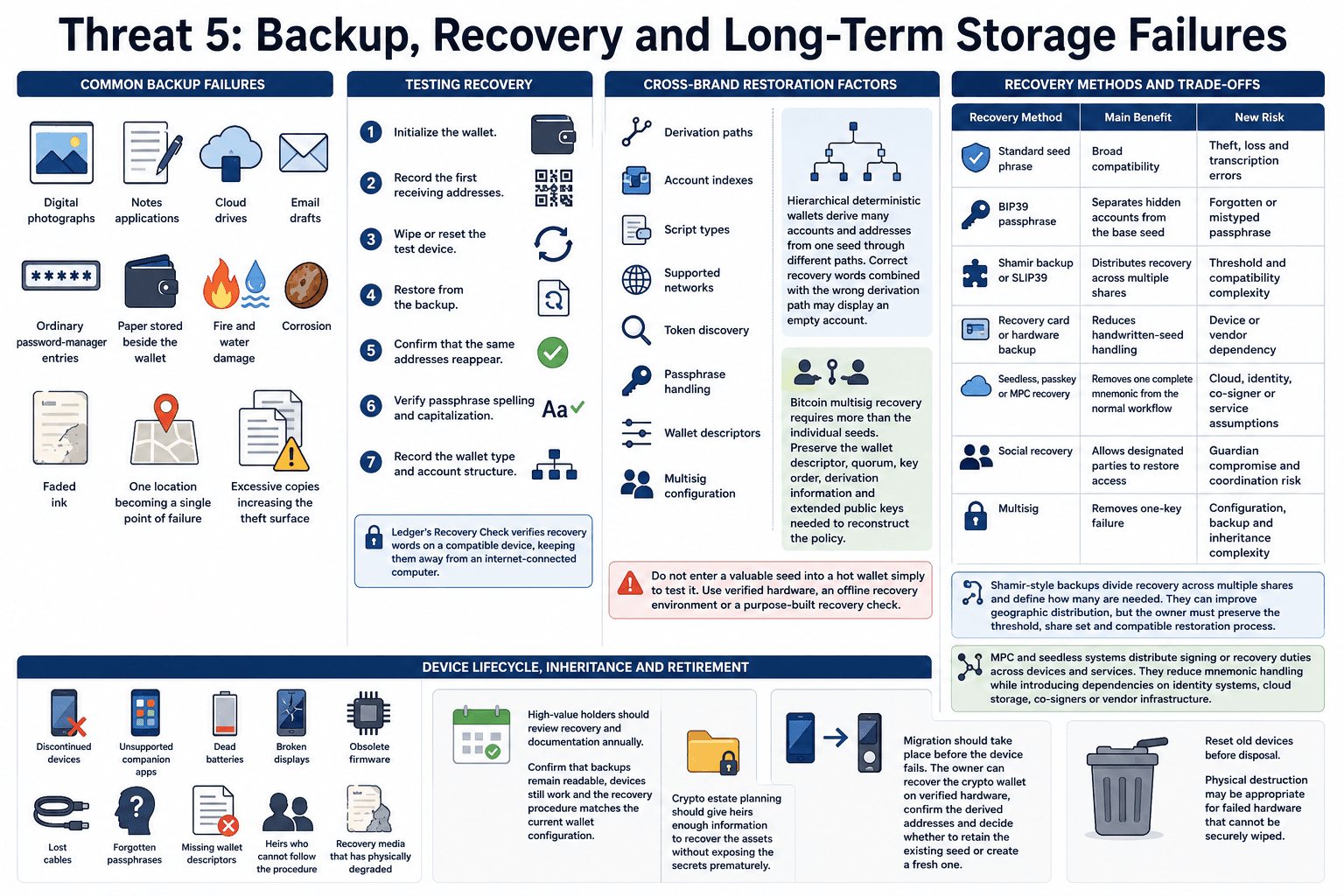 Poor Recovery Planning Can Turn Storage Into Permanent Loss
Why the Backup Is Often the Weakest Link
Common backup failures include:
- Digital photographs
- Notes applications
- Cloud drives
- Email drafts
- Ordinary password-manager entries
- Paper stored beside the wallet
- Fire and water damage
- Corrosion
- Faded ink
- One location becoming a single point of failure
- Excessive copies increasing the theft surface
A metal backup improves resistance to fire, water and physical deterioration. The stored words or values still provide control of the wallet to anyone who finds them.
Copy quantity requires judgment. One copy can be lost. Numerous copies create more locations for theft.
Backups should remain separate from the wallet and spread across carefully selected locations. The owner must still be able to monitor and recover them.
Testing Recovery and Cross-Brand Restoration
Test the recovery plan before depositing a significant balance.
A safe test includes:
- Initialize the wallet.
- Record the first receiving addresses.
- Wipe or reset the test device.
- Restore from the backup.
- Confirm that the same addresses reappear.
- Verify passphrase spelling and capitalization.
- Record the wallet type and account structure.
BIP39 compatibility improves portability, though every asset and account may not appear automatically on another wallet brand. Differences may include:
- Derivation paths
- Account indexes
- Script types
- Supported networks
- Token discovery
- Passphrase handling
- Wallet descriptors
- Multisig configuration
Hierarchical deterministic wallets derive many accounts and addresses from one seed through different paths. Correct recovery words combined with the wrong derivation path may display an empty account.
Bitcoin multisig recovery requires more than the individual seeds. Preserve the wallet descriptor, quorum, key order, derivation information and extended public keys needed to reconstruct the policy.
Do not enter a valuable seed into a hot wallet simply to test it. Use verified hardware, an offline recovery environment or a purpose-built recovery check.
Recovery Methods and Their Trade-Offs
Every recovery model introduces its own assumptions.
| Recovery Method | Main Benefit | New Risk |
|---|---|---|
| Standard seed phrase | Broad compatibility | Theft, loss and transcription errors |
| BIP39 passphrase | Separates hidden accounts from the base seed | Forgotten or mistyped passphrase |
| Shamir backup or SLIP39 | Distributes recovery across multiple shares | Threshold and compatibility complexity |
| Recovery card or hardware backup | Reduces handwritten-seed handling | Device or vendor dependency |
| Seedless, passkey or MPC recovery | Removes one complete mnemonic from the normal workflow | Cloud, identity, co-signer or service assumptions |
| Social recovery | Allows designated parties to restore access | Guardian compromise and coordination risk |
| Multisig | Removes one-key failure | Configuration, backup and inheritance complexity |
Shamir-style backups divide recovery across multiple shares and define how many are needed. They can improve geographic distribution, but the owner must preserve the threshold, share set and compatible restoration process.
MPC and seedless systems distribute signing or recovery duties across devices and services. They reduce mnemonic handling while introducing dependencies on identity systems, cloud storage, co-signers or vendor infrastructure.
Device Lifecycle, Inheritance and Retirement
Long-term storage creates problems that may emerge years after setup:
- Discontinued devices
- Unsupported companion apps
- Dead batteries
- Broken displays
- Obsolete firmware
- Lost cables
- Forgotten passphrases
- Missing wallet descriptors
- Heirs who cannot follow the procedure
- Recovery media that has physically degraded
High-value holders should review recovery and documentation annually. Confirm that backups remain readable, devices still work and the recovery procedure matches the current wallet configuration.
Crypto estate planning should give heirs enough information to recover the assets without exposing the secrets prematurely.
Migration should take place before the device fails. The owner can recover the crypto wallet on verified hardware, confirm the derived addresses and decide whether to retain the existing seed or create a fresh one.
Reset old devices before disposal. Physical destruction may be appropriate for failed hardware that cannot be securely wiped.
Threat 6: Fault Injection, Side Channels and Other Advanced Hardware Attacks
Advanced hardware attacks remain rare for ordinary holders. They generally require physical possession, specialist knowledge, laboratory equipment and a target valuable enough to justify repeated testing.
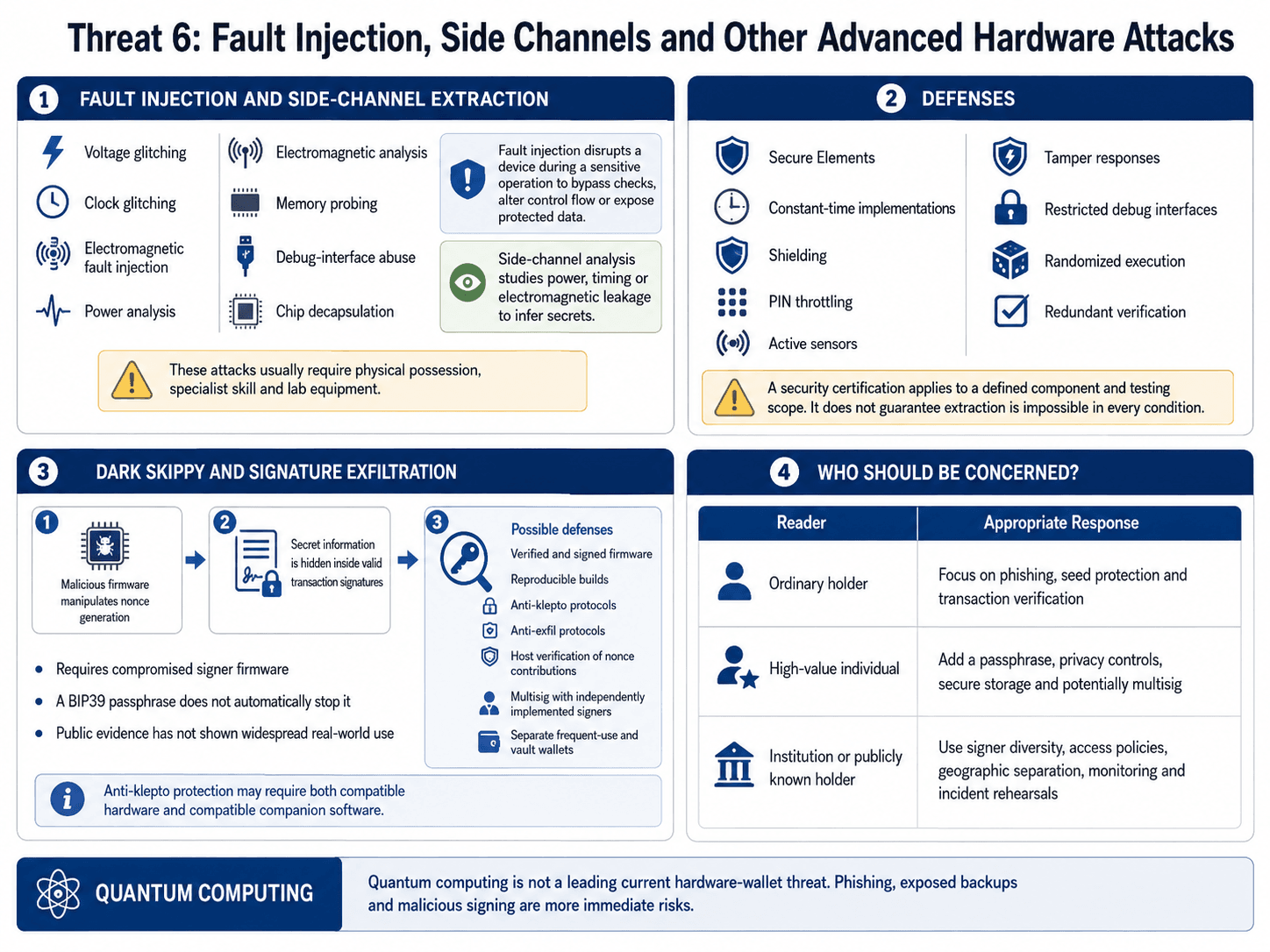 Laboratory Attacks Matter Most for High-Value Targeted Wallets
Fault Injection and Side-Channel Extraction
Relevant techniques include:
- Voltage glitching
- Clock glitching
- Electromagnetic fault injection
- Power analysis
- Electromagnetic analysis
- Memory probing
- Debug-interface abuse
- Chip decapsulation
Fault injection deliberately disrupts a device during a sensitive operation. The attacker may try to bypass a PIN check, change control flow or expose protected data.
Side-channel analysis studies information leaked through power use, timing or electromagnetic emissions. The attacker attempts to infer secrets from the device’s physical behavior.
Defenses may include:
- Secure Elements
- Constant-time implementations
- Shielding
- PIN throttling
- Active sensors
- Tamper responses
- Restricted debug interfaces
- Randomized execution
- Redundant verification
A security certification applies to a defined component, target and testing scope. It does not prove that key extraction is impossible under every condition.
Dark Skippy and Signature Exfiltration
Dark Skippy describes malicious signer firmware that hides secret information inside transaction signatures. The key does not appear as an obvious export.
The technique can manipulate nonce generation and leak enough information for an observer to reconstruct the signing key. The resulting transaction signature may still appear valid.
Dark Skippy is a general research technique rather than a confirmed exploit of a named wallet. The Dark Skippy research explains the malicious-firmware requirement, while public evidence has not shown widespread real-world use.
A BIP39 passphrase does not automatically block the attack. Once the wallet derives and uses the passphrase-protected key, compromised firmware can target that key.
Possible defenses include:
- Verified and signed firmware
- Reproducible builds
- Anti-klepto protocols
- Anti-exfil protocols
- Host verification of nonce contributions
- Multisig with independently implemented signers
- Separate frequent-use and vault wallets
Anti-klepto protection may require compatible hardware and companion software. Firmware support alone may be insufficient when the host application does not complete the protocol.
Who Should Be Concerned About Advanced Attacks?
| Reader | Appropriate Response |
|---|---|
| Ordinary holder | Focus on phishing, seed protection and transaction verification |
| High-value individual | Add a passphrase, privacy controls, secure storage and potentially multisig |
| Institution or publicly known holder | Use signer diversity, access policies, geographic separation, monitoring and incident rehearsals |
Quantum Computing Is Not a Leading Current Wallet Threat
Quantum computing is not among the main current causes of hardware-wallet loss. Phishing, exposed backups and malicious signing present more immediate risks.
A "quantum-ready" claim may refer to device authentication, secure boot or firmware infrastructure. It does not necessarily describe the blockchain signature protecting funds already held at an address.
How to Reduce Hardware Wallet Security Risk
Each security control should address a defined threat. Trusted purchasing reduces supply-chain exposure, careful signing limits authorization risk and tested backups reduce permanent lockout.
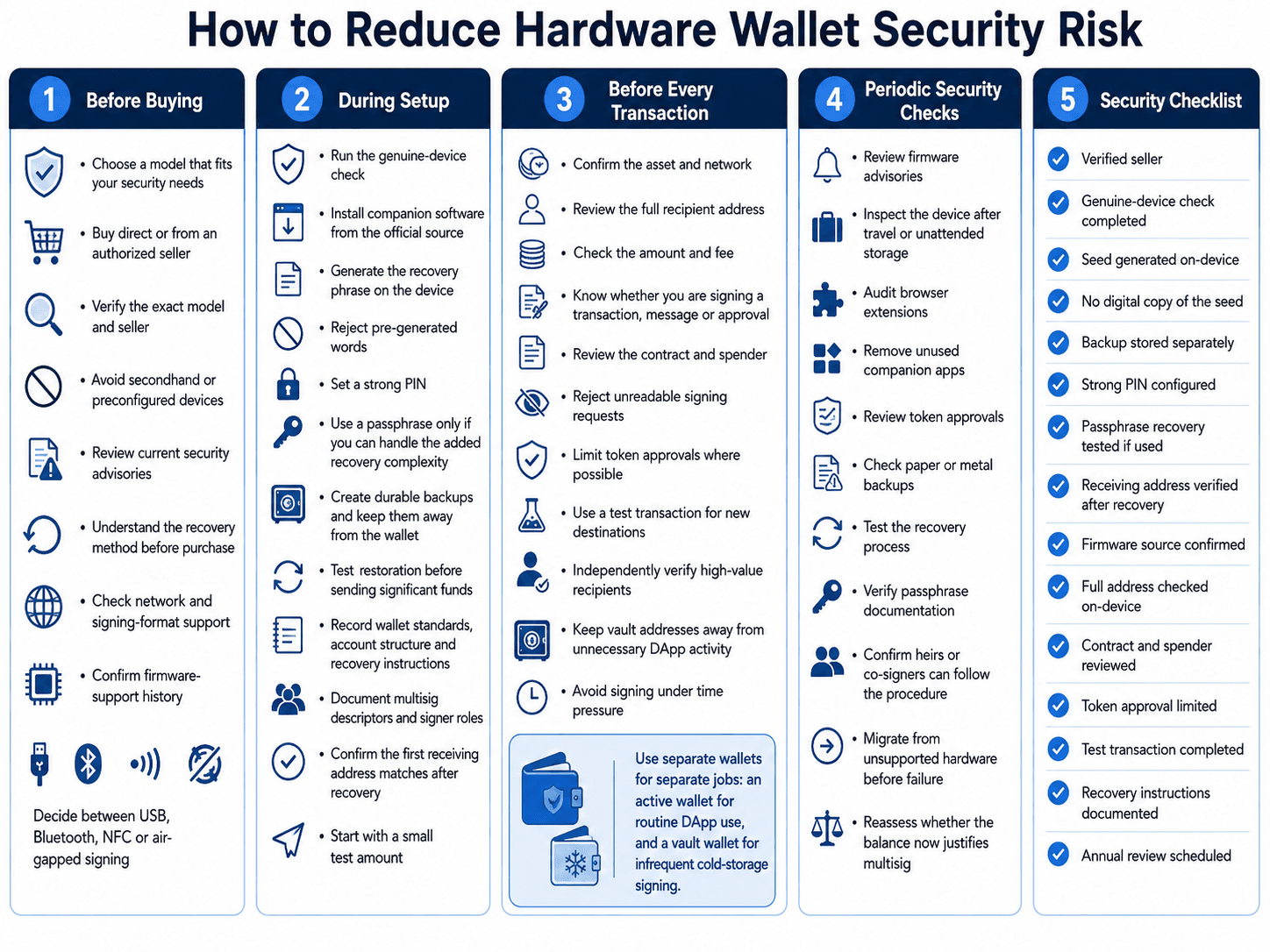 A Practical Security Routine for Buying, Signing and Recovery
Before Buying
- Select a model whose security architecture fits the intended use.
- Buy directly or from an authorized seller.
- Verify the exact model and seller.
- Avoid secondhand and preconfigured devices.
- Review current security advisories.
- Understand the recovery method before purchase.
- Check whether the wallet supports the networks and signing formats you use.
- Confirm its firmware-support history.
- Decide whether USB, Bluetooth, NFC or air-gapped signing fits your environment.
During Setup
- Run the manufacturer’s genuine-device check where available.
- Install companion software from the official source.
- Generate the recovery phrase on the device.
- Reject pre-generated words.
- Set a strong PIN.
- Decide whether a passphrase justifies the added recovery complexity.
- Create durable recovery backups.
- Keep backups away from the device.
- Test restoration before transferring significant funds.
- Record wallet standards, account structure and recovery instructions.
- Document multisig descriptors and signer roles.
- Confirm that the first receiving address matches after recovery.
Begin with a small test amount. This confirms the receiving, signing and restoration process before a larger balance depends on it.
Before Every Transaction
- Confirm the asset.
- Confirm the network.
- Review the full recipient address.
- Check the amount and fee.
- Identify whether the request is a transaction, message or approval.
- Review the contract and spender.
- Reject unreadable signing requests.
- Limit token approvals where possible.
- Use a test transaction for new destinations.
- Independently verify high-value recipients.
- Keep vault addresses away from unnecessary DApp activity.
- Avoid signing under time pressure.
An active wallet and a cold-storage vault should serve different purposes. The active wallet handles routine DApp activity. The vault signs infrequently and interacts with fewer contracts.
Periodic Security Checks
- Review firmware advisories.
- Inspect the device after travel or unattended storage.
- Audit browser extensions.
- Remove unused companion apps.
- Review token approvals.
- Check the condition of paper or metal backups.
- Test the recovery process.
- Verify passphrase documentation.
- Confirm that heirs or co-signers can follow the documented procedure.
- Migrate from unsupported hardware before failure.
- Reassess whether the balance now justifies multisig.
Hardware Wallet Security Checklist
Use this checklist before depositing or moving a meaningful balance:
- Device bought from a verified seller
- Genuine-device check completed
- Recovery phrase generated on the device
- No digital copy of the seed exists
- Backup stored separately from the wallet
- Strong PIN configured
- Passphrase recovery tested, if used
- Receiving address restored and verified
- Firmware source confirmed
- Full address checked on the device
- Contract and spender reviewed
- Token approval limited
- Test transaction completed
- Recovery instructions documented
- Annual review scheduled
What to Do If You Suspect Your Hardware Wallet Is Compromised
The response depends on what was exposed. A leaked recovery phrase requires a fresh seed. A malicious token approval may be contained by revoking permissions and moving affected assets.
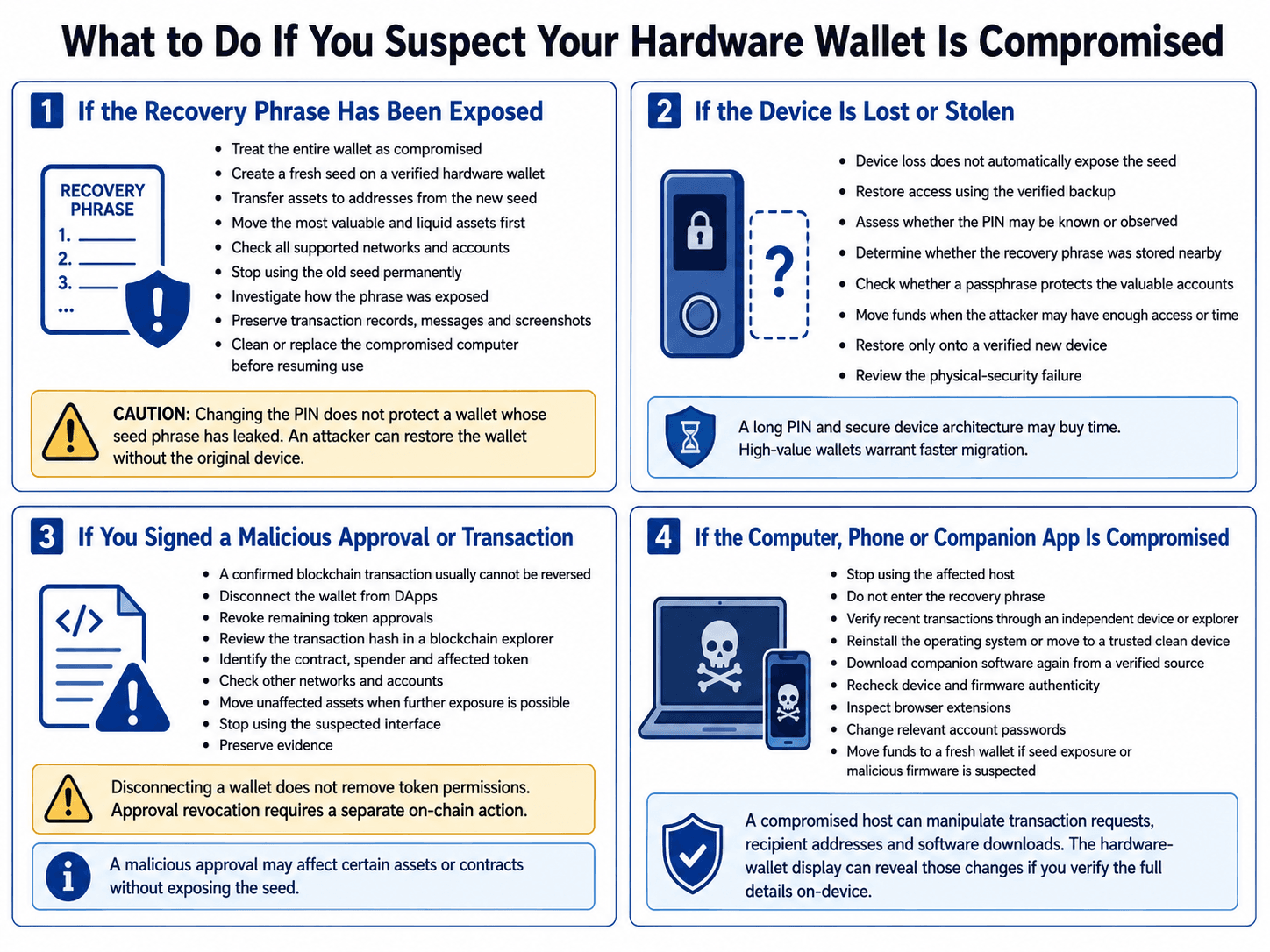 Fast, Scenario-Specific Actions Can Limit Further Wallet Losses
If the Recovery Phrase Has Been Exposed
Treat the entire wallet as compromised.
- Create a fresh seed on a verified hardware wallet.
- Transfer assets to addresses derived from the new seed.
- Move the most valuable and liquid assets first.
- Check all supported networks and accounts.
- Stop using the old seed permanently.
- Investigate how the phrase was exposed.
- Preserve transaction records, messages and screenshots.
- Clean or replace the compromised computer before resuming normal use.
Changing the PIN does not protect a wallet whose seed phrase has leaked. The attacker can restore the wallet without the original device.
If the Device Is Lost or Stolen
Device loss does not automatically expose the seed.
- Restore access using the verified backup.
- Assess whether the PIN may be known or observed.
- Determine whether the recovery phrase was stored nearby.
- Check whether a passphrase protects the valuable accounts.
- Move funds when the attacker may have sufficient access or time.
- Restore only onto a verified new device.
- Review the physical-security failure.
A long PIN and secure device architecture may provide time to respond. A high-value wallet warrants faster migration because it gives the attacker more reason to pursue specialist extraction.
If You Signed a Malicious Approval or Transaction
A confirmed blockchain transaction generally cannot be reversed. The next steps should contain the remaining exposure.
- Disconnect the wallet from DApps.
- Revoke remaining token approvals.
- Review the transaction hash in a blockchain explorer.
- Identify the contract, spender and affected token.
- Check other networks and accounts.
- Move unaffected assets when further exposure is possible.
- Stop using the suspected interface.
- Preserve evidence.
The Etherscan Token Approval Checker displays Ethereum allowances for the connected address. Verify the domain carefully before connecting the wallet.
A malicious approval may affect particular assets or contracts without revealing the seed. Treat the seed as compromised when there is evidence that the recovery phrase or private key was exposed.
If the Computer, Phone or Companion App Is Compromised
Stop using the affected host.
- Do not enter the recovery phrase.
- Verify recent transactions through an independent device or explorer.
- Reinstall the operating system or move to a trusted clean device.
- Download companion software again from a verified source.
- Recheck device and firmware authenticity.
- Inspect browser extensions.
- Change relevant account passwords.
- Move funds to a fresh wallet if seed exposure or malicious firmware is suspected.
A compromised host can manipulate transaction requests, recipient addresses and software downloads. The hardware-wallet display can expose those changes when it presents the complete transaction details.
Which Hardware Wallet Security Features Actually Help?
Useful security features address a defined risk and remain manageable during setup, signing and recovery. A Secure Element can raise the difficulty of physical key extraction, while a trusted display and clear signing reduce the chance of approving the wrong transaction. An exposed recovery phrase can bypass all three.
The exact model matters because manufacturers often use different hardware, firmware and recovery designs across their product ranges. Compare the device itself rather than applying one security judgment to an entire brand.
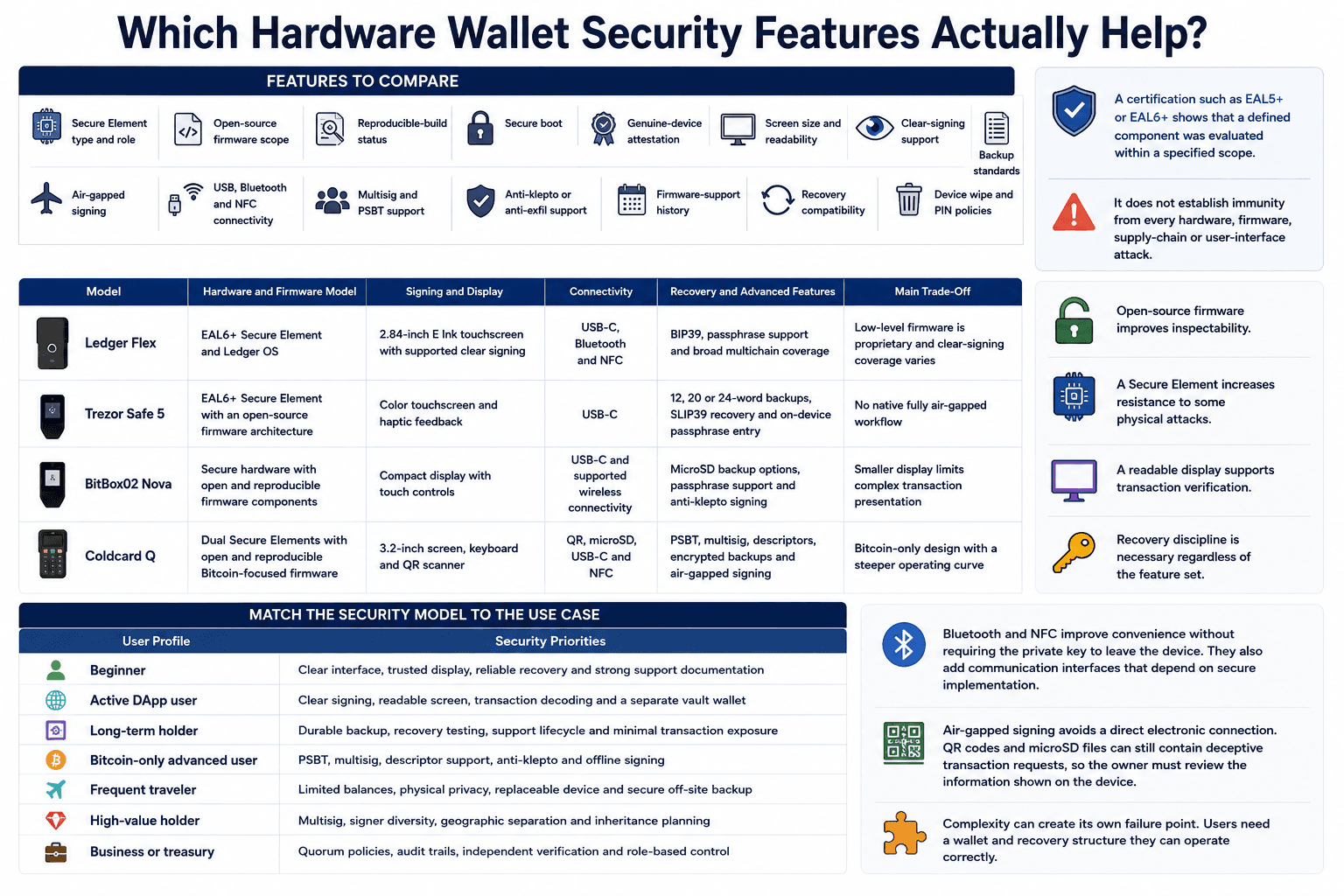 Useful Security Features Depend on the Holder’s Threat Model
Features to Compare
| Security Feature | What It Helps With | What to Verify | Main Limitation |
|---|---|---|---|
| Secure Element | Makes physical probing and private-key extraction harder | Chip type, where keys are stored and how the chip interacts with the main processor | Does not prevent phishing, seed theft or malicious signing |
| Open-source firmware | Allows researchers to inspect more of the wallet’s code | Which firmware components are public and which remain proprietary | Public code can still contain vulnerabilities |
| Reproducible builds | Helps confirm that distributed firmware matches published source code | Whether current releases are reproducible and independently verified | Matching source and binaries does not prove the code is secure |
| Secure boot | Restricts the device from loading unauthorized firmware | How firmware signatures are checked and what happens after validation fails | Protection depends on the integrity of the boot chain |
| Genuine-device attestation | Helps identify counterfeit or unauthorized hardware | Whether the manufacturer provides a cryptographic genuine-device check | The check may depend on manufacturer-operated infrastructure |
| Trusted display | Provides an independent surface for reviewing transaction details | Screen size, address visibility, scrolling behavior and readability | A readable screen cannot help when the device lacks the necessary transaction data |
| Clear signing | Converts supported transaction data into readable details | Supported networks, DApps, contract functions and message formats | Coverage varies, and some smart-contract actions remain difficult to decode |
| Passphrase entry method | Keeps the passphrase away from the connected computer | Whether entry happens fully on-device and how mistakes are handled | A forgotten or mistyped passphrase causes permanent loss of access |
| Backup standards | Affects recovery portability and long-term access | BIP39, SLIP39, Shamir backup, wallet descriptors and supported recovery formats | Compatibility between brands may still differ by asset or derivation path |
| Recovery compatibility | Determines whether the wallet can be restored elsewhere | Cross-brand restoration, derivation-path support and account discovery | The correct seed may still display an empty wallet under the wrong account settings |
| Air-gapped signing | Removes a direct USB or wireless connection during signing | QR code, camera and microSD transaction workflows | Malicious transaction data can still enter through a QR code or storage card |
| USB, Bluetooth and NFC | Affect convenience and the device’s communication surface | Whether connections are encrypted, authenticated and optional | More interfaces create additional code and communication paths to secure |
| Multisig and PSBT support | Prevents one signer from controlling a Bitcoin wallet alone | Descriptor support, PSBT compatibility, quorum setup and signer interoperability | Recovery and coordination become more complex |
| Anti-klepto or anti-exfil support | Restricts malicious firmware from leaking keys through signatures | Support from both the hardware wallet and companion software | Limited adoption and implementation differences reduce portability |
| Firmware-support history | Shows whether the device receives fixes and compatibility updates | Update frequency, security advisories and support for older models | A long history does not guarantee future support |
| PIN and device-wipe policies | Slow repeated guessing after theft | PIN length, retry limits, delays and wipe behavior | Device access controls do not protect an exposed recovery phrase |
EAL5+ and EAL6+ refer to Common Criteria evaluation levels. They indicate the depth and rigor applied when assessing a defined component, configuration and security target. The “+” means the evaluation included additional requirements beyond the base level.
These certifications provide useful evidence about the evaluated scope. They do not establish that the entire wallet resists every firmware, supply-chain, signing or recovery attack.
A larger screen also needs the right transaction parser behind it. Clear signing works only when the device and companion software understand the transaction format. Unsupported contract calls may still appear as raw data, even on a premium touchscreen.
Match the Security Model to the Use Case
The strongest feature set depends on how often the wallet signs, which networks it uses and how much value it protects.
| User Profile | Security Priorities |
|---|---|
| Beginner | Clear interface, trusted display, reliable recovery and detailed support documentation |
| Active DApp user | Clear signing, readable screen, transaction decoding and a separate vault wallet |
| Long-term holder | Durable backup, tested recovery, long firmware support and minimal signing exposure |
| Bitcoin-only advanced user | PSBT, multisig, descriptor support, anti-klepto and offline signing |
| Frequent traveler | Limited balances, physical privacy, replaceable hardware and a secure off-site backup |
| High-value holder | Multisig, signer diversity, geographic separation and inheritance planning |
| Business or treasury | Quorum policies, audit trails, independent verification and role-based access |
An active DeFi user receives more practical protection from clear signing and transaction decoding than from advanced resistance to laboratory attacks. A long-term holder should prioritize recovery compatibility, backup durability and device-support history.
Bitcoin users building multisig setups need reliable PSBT and wallet-descriptor support across independently implemented signers. Businesses need another layer of operational controls, including approval policies, signer separation and documented incident procedures.

Final Verdict: Are Hardware Wallets Worth Using?
Hardware wallets remain one of the strongest consumer tools for crypto self-custody. They isolate private keys, provide a separate signing surface and reduce direct exposure to computer malware.
Most losses involve recovery phrase theft, unsafe signatures or failed recovery procedures. These threats deserve more attention than laboratory chip extraction.
Users need a setup they can operate, verify and recover correctly. Large or shared holdings may require multisig, signer diversity and documented operating procedures. The right security features depend on the owner’s threat model, transaction habits and recovery ability.