Buying Solana is much easier than it looks once you know the right route.
You can buy SOL through a major exchange, purchase it directly inside a wallet like Phantom, or swap existing crypto into SOL through Jupiter. The best option depends on where you live, how you want to pay, and whether you want your SOL kept on an exchange or moved into self-custody.
This guide breaks down the safest, cheapest, and most practical ways to buy Solana in 2026, plus what to do after buying, including wallet storage, fees, and staking.
Editor's Note (May 15, 2026): We fully updated this guide in May 2026 to reflect the current ways readers can buy Solana, including centralized exchanges, Phantom Wallet, Solflare, and Jupiter swaps. We also expanded the guide with regional buying options, updated fee examples, wallet storage guidance, staking steps, safety tips and clearer risk disclosures so beginners can choose the right route before buying SOL.
Quick Answer: How Do You Buy Solana in 2026?
To buy Solana, choose a buying route, create an exchange account or self-custody wallet, add funds, buy SOL, then decide whether to keep it on the platform, move it to a wallet, or stake it. Most beginners will find a centralized exchange easiest, while wallet-first users may prefer Phantom or Solflare. Existing crypto users can also swap into SOL through Jupiter.
Key Takeaways for Buying Solana
-
Pick the right route first Use an exchange if you are starting with cash, Phantom or Solflare if you want SOL straight in self-custody, or Jupiter if you already hold crypto on Solana.
-
Expect KYC on most fiat purchases Centralized exchanges usually require identity checks before fiat deposits, card buys, bank transfers, and withdrawals are fully available.
-
Bank transfers are usually cheaper Debit cards, credit cards, and in-wallet on-ramps are often faster, but they can add higher fees, spreads, or provider charges.
-
Use the right wallet after buying Phantom, Solflare, and Backpack are useful for everyday Solana access, while Ledger and Trezor are better for larger long-term holdings.
-
Leave SOL for network fees Solana fees are low, but you still need a small SOL balance to send transactions, swap tokens, use apps, or manage staking.
-
Staking is optional You can stake SOL after buying by delegating to a validator, but you should check commission, uptime, reputation, and unstaking times first.
The Solana Buying Workflow
- Step 1: Choose your route using a centralized exchange, Phantom, Solflare, or Jupiter depending on whether you are starting with cash or crypto.
- Step 2: Create an account or wallet and complete identity checks where required for fiat purchases.
- Step 3: Add funds through bank transfer, debit card, credit card, PayPal where supported, P2P, or an existing crypto deposit.
- Step 4: Buy SOL by selecting Solana and entering the amount you want to purchase or swap.
- Step 5: Move SOL to self-custody if you want more control over your coins and plan to use wallets, staking, or Solana apps.
- Step 6: Secure your setup with 2FA, official wallet downloads, test transactions, offline seed phrase storage, and phishing checks.
Risk Disclaimer
This guide is educational only and is not financial advice. SOL is a volatile crypto asset, and buying it involves market risk, platform risk, wallet risk, smart contract risk, and regional access restrictions. Always check fees before confirming a purchase, use official websites and wallet apps, make a small test transaction before moving larger amounts, and never invest more than you can afford to lose.
Disclosure
Some links in this guide may be affiliate links. If you choose to use a service through these links, we may earn a commission at no additional cost to you.
What Is Solana?
Solana is a high-throughput Layer 1 blockchain built for fast, low-cost digital transactions and applications. Its native asset, SOL, is used to pay transaction fees and to participate in staking. The network supports a wide range of use cases, including payments, DeFi, NFTs, and other DApps.
 SOL, is Used to Pay Transaction Fees and to Participate in Staking. Image via Solana
Under the hood, Solana combines Proof of Stake and Proof of History, with Proof of History acting like a cryptographic clock that helps the network order events efficiently. In simple terms, it is designed to move data quickly without making the user experience feel slow or expensive.
The project grew out of the work of Solana Labs, while the Solana Foundation supports decentralization, adoption, and network security across the ecosystem. Over time, Solana has grown from a smart contract platform into a broader network of wallets, onchain apps, and financial tools.
Read our full Solana review, our top picks for the best Solana DApps, and our analysis on whether Solana is a good investment.
Best Ways to Buy Solana in 2026
There are three main ways to buy SOL in 2026:
Method | Best For | KYC Needed? | Main Trade-Off |
|---|---|---|---|
| Centralized exchange | Beginners, fiat purchases, high liquidity | Usually yes | Custodial until withdrawn |
| Phantom or Solflare wallet | Wallet-first Solana users | Depends on on-ramp | Higher card/on-ramp fees |
| Jupiter DEX swap | Existing crypto users | No platform KYC | Requires crypto already in wallet |
For most beginners, a centralized exchange route is the easiest. Wallet purchases are more direct, but often cost more.
A wallet-first route like Phantom or Solflare makes more sense if you want SOL to land directly in self-custody. However, pricing is often less competitive than a bank-transfer purchase on an exchange.
A Jupiter DEX swap is best for users who already hold crypto in a Solana-compatible wallet.
A simple way to think about it is this: exchanges are best for starting with cash, wallets are best for buying straight into self-custody, and Jupiter is best for users who already hold crypto on Solana.
Best Exchanges to Buy Solana
Exchange | Best For | Typical Spot Fee | US Available? | Card Purchases? | Good For Beginners? |
|---|---|---|---|---|---|
Coinbase | US beginners | Volume-based on Advanced | Yes | Yes | Yes |
Kraken | Security-focused buyers | Volume-based maker/taker | Yes | Yes, where supported | Yes |
Binance | Low-fee global trading | Low, tiered spot fees | Binance.US only for US users | Yes | Yes |
Bybit | Advanced global users | 0.10% / 0.10% spot crypto-crypto at VIP 0 | No | Yes, region-dependent | Moderate |
OKX | Exchange + Web3 users | Tiered fees | Limited by region | Yes, region-dependent | Moderate |
If you want to buy SOL through an exchange, the best choice depends less on hype and more on fit. Some platforms are built for simplicity, some for lower fees, and some for users who want trading tools and Web3 access in the same place. For a beginner, it helps to think of an exchange like a bank app crossed with a marketplace: the easier it is to use, the less control and fee precision you may get at the start.
Coinbase — Best for US Beginners
Coinbase is the easiest starting point for many US readers because it supports familiar funding methods like bank account, debit card, and wire transfer. Its interface is simple, and Coinbase Advanced offers lower volume-based maker and taker fees for users who want more control later. The trade-off is that convenience can cost more than using a lower-fee trading screen from day one.
Check out all details about Coinbase in our exclusive review.
Kraken — Best for Security-Focused Buyers
Kraken has been operating since 2011, which gives it one of the longer track records in the sector. It supports SOL purchases with ACH, bank wire, debit card, credit card, and PayPal in supported regions, and it uses a maker/taker fee model that rewards more price-conscious orders. It is a strong fit for buyers who care about security reputation and a more deliberate trading setup.
Don't miss our Kraken review for more details.
Binance — Best for Low-Fee Global Trading
Binance is attractive for its payment flexibility, large liquidity, and generally low spot fees. But Binance.com is not the same as Binance.US, so availability and features depend heavily on jurisdiction. For non-US users who want deep SOL/USDT or SOL/USDC markets, it is often one of the most cost-efficient routes.
Our detailed Binance review has a lot more information.
Bybit — Best for Advanced Global Users
Bybit is better suited to users who want more than a basic buy button. It combines spot trading with copy trading and other advanced features, while its spot crypto-crypto fee at VIP 0 is 0.10% maker / 0.10% taker for example. That said, Bybit does not offer services to users in the United States, and regional rules also matter in places such as Dubai, where the VARA framework shapes market access.
We have a lot more on Bybit in our exclusive review.
OKX — Best for Exchange + Web3 Users
OKX stands out because it bridges standard exchange buying with a broader OKX Wallet and DeFi ecosystem. You can buy SOL with card or bank transfer where supported, and then move into wallet-based activity more smoothly than on many rivals. It is a good option for users who want both a fiat gateway and a Web3 path, but regional restrictions still apply.
Our OKX review has a lot more information. Don't miss it.
How to Buy Solana on an Exchange: Step by Step
Buying SOL on an exchange is usually the easiest route for beginners because the process is familiar: open an account, add funds, place an order, and then decide whether to keep the coins on the platform or move them to your own wallet.
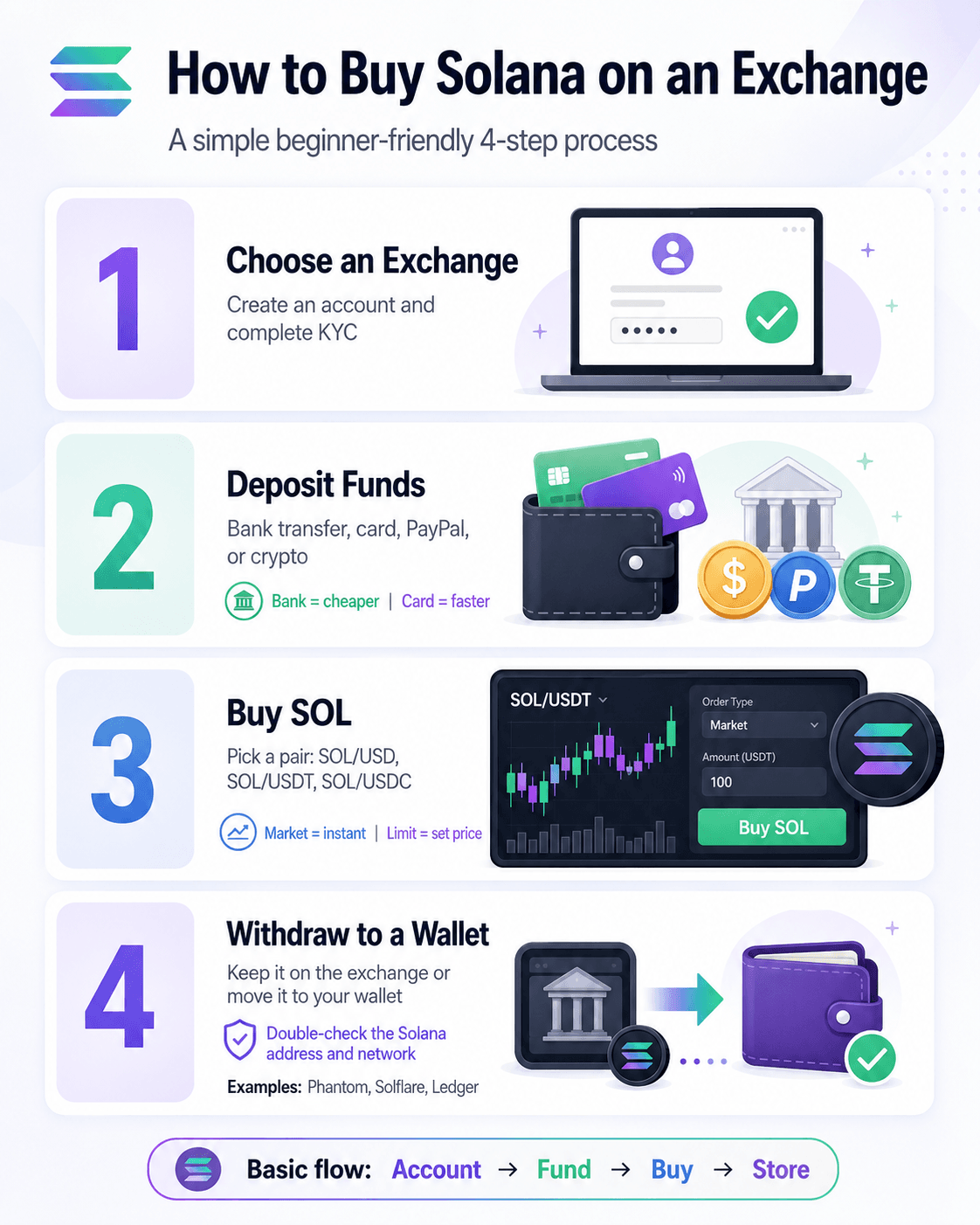 Buying SOL on an Exchange is usually the Easiest Route for Beginners
Step 1 — Choose an Exchange and Create an Account
Start by picking an exchange that supports SOL in your region. Most major platforms require identity verification before you can use full account features, especially for fiat payments and withdrawals. This step normally involves an email or phone sign-up, followed by KYC checks.
Step 2 — Deposit Money or Crypto
Next, fund the account using a bank transfer, debit or credit card, PayPal where available, P2P options, or an existing crypto deposit. As a rule of thumb, bank transfers are usually cheaper, while cards are faster but often come with higher fees.
Step 3 — Buy SOL
Once your funds arrive, search for a SOL trading pair such as SOL/USD, SOL/USDT, or SOL/USDC. A market order buys immediately at the current available price, while a limit order lets you set the price you are willing to pay.
Step 4 — Withdraw SOL to a Wallet
After buying, you can leave SOL on the exchange for convenience or withdraw it to a wallet like Phantom, Solflare, or Ledger for more control. Just make sure the Solana address and network match before sending.
How to Buy Solana Using Phantom Wallet
If you want to buy SOL straight into your own wallet, Phantom offers a simple route. You can buy Solana directly in Phantom Wallet without first using a centralized exchange, although the purchase is usually handled by a third-party fiat on-ramp. In practice, Phantom acts like the wallet interface, while the payment provider handles the card or bank transaction.
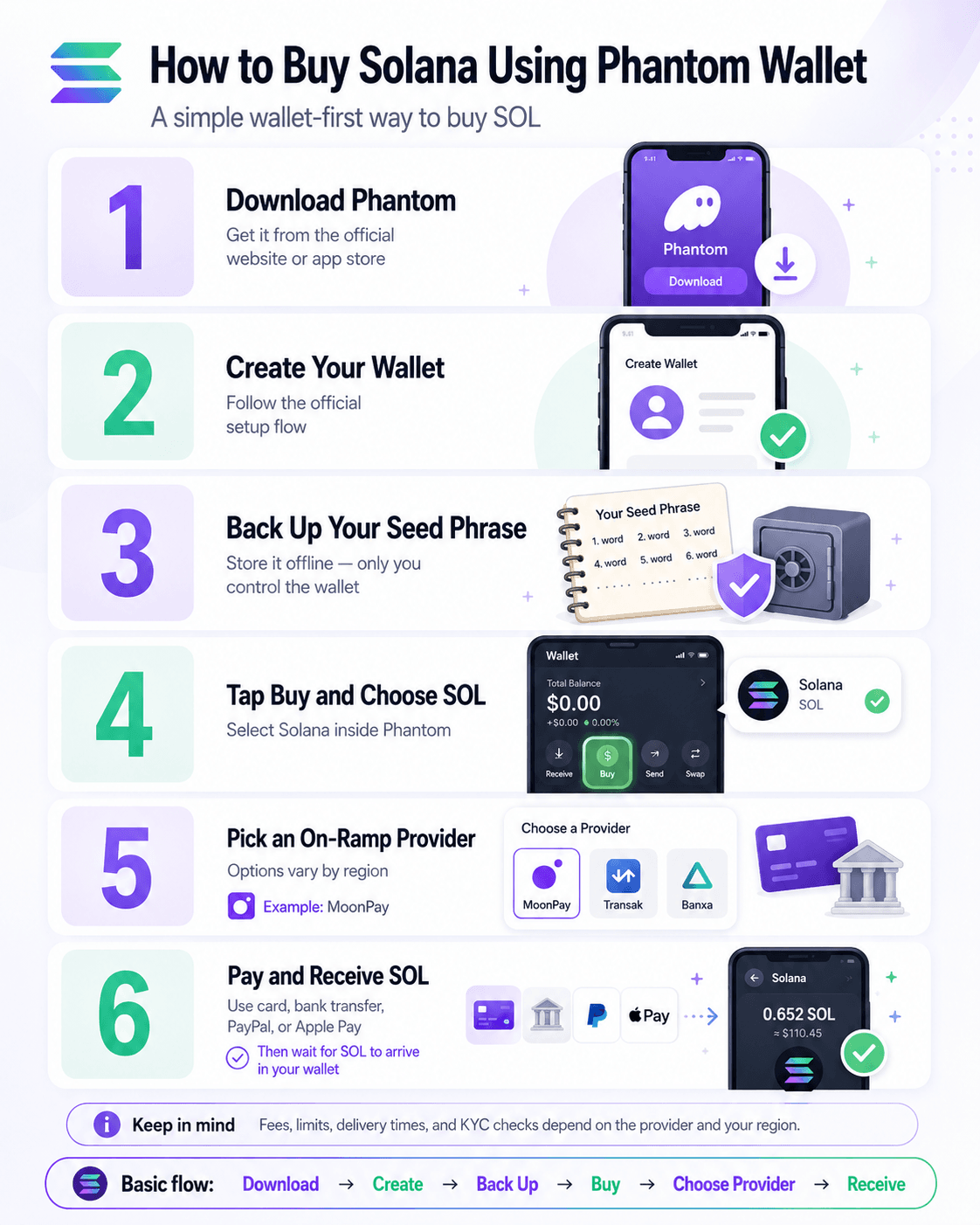 You can Buy Solana directly in Phantom Wallet without first using a Centralized Exchange
- Download Phantom from the official website or your device’s app store.
- Create a wallet using Phantom’s official setup flow.
- Back up your seed phrase offline. Phantom says the wallet is self-custodial, which means only you control it, so losing the recovery phrase is like losing the spare key to a safe.
- Tap Buy on the home screen.
- Choose SOL as the asset you want to purchase.
- Select an available on-ramp provider. Phantom’s official provider list shows that options vary by region and can include names like MoonPay.
- Pay using a supported method such as debit card, bank transfer, PayPal, or Apple Pay, depending on the provider and your location, as explained in Phantom’s buy guide.
- Confirm the purchase and wait for the provider to deliver the SOL to your wallet balance.
This route is fast and convenient for wallet-first users, but fees, limits, delivery times, and KYC checks can all vary by provider and region.
We recommend you go through our detailed Phantom Wallet review for more information.
How to Buy Solana Without KYC
It is possible to buy or get into SOL without going through full exchange-style verification, but this section needs a careful caveat: no KYC does not always mean anonymous. Your wallet address, balances, and transactions can still be viewed on Solana Explorer and through Solana’s own documentation on reading on-chain data.
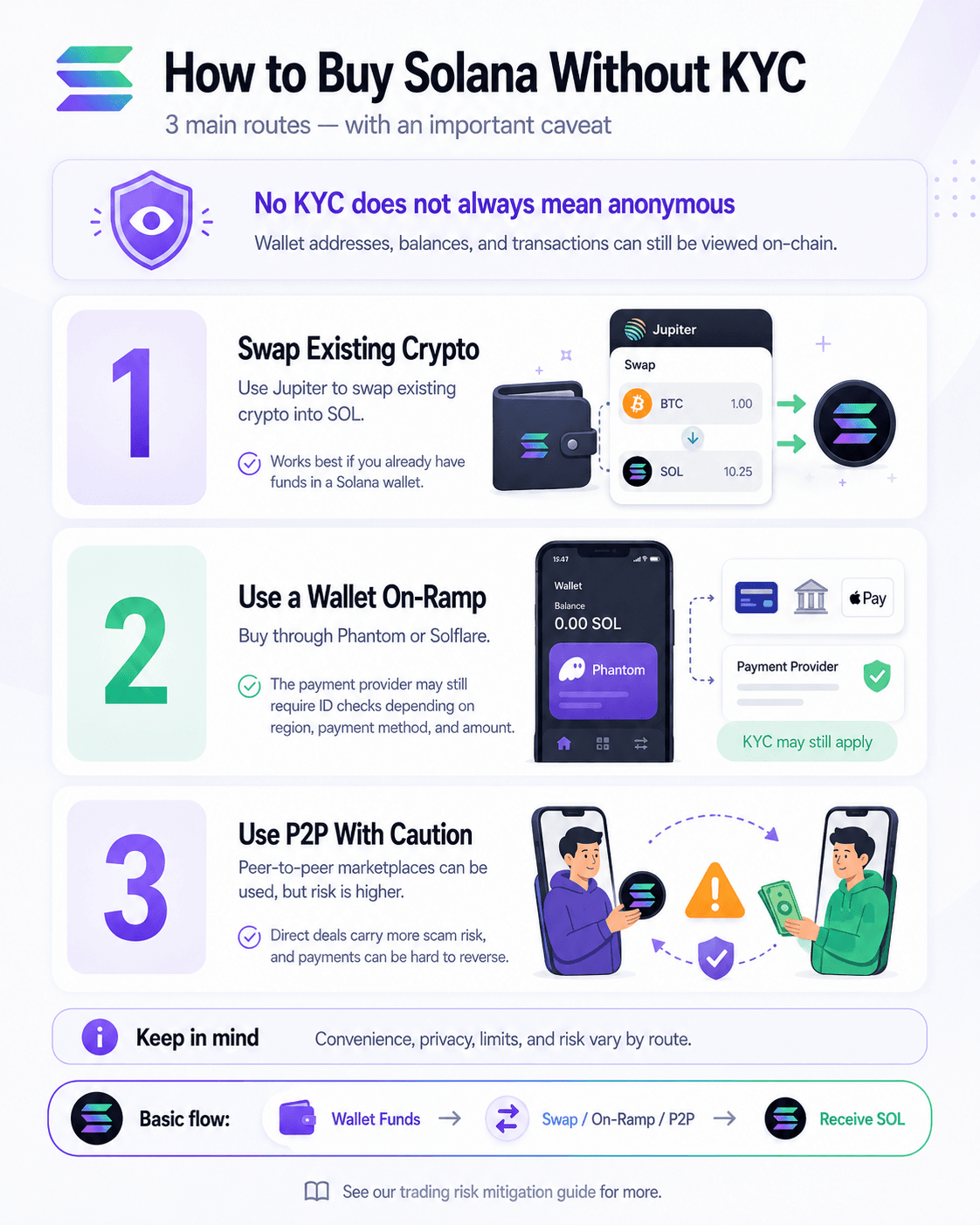 Remember, No KYC does not always mean Anonymous
Here are the three main routes:
- Use Jupiter’s swap interface to swap existing crypto into SOL. This is usually the cleanest no-platform-KYC path, but it only works if you already have funds in a Solana wallet.
- Buy through Phantom’s on-ramp flow or Solflare’s fiat purchase flow. These can feel wallet-native, but the payment providers may still require identity checks depending on your region, payment method, and amount.
- Use a P2P marketplace only with caution. Direct crypto deals carry more scam risk, and payments are often hard to reverse.
Read more about trading risk mitigation in our guide.
How to Buy Solana in the US, UK, EU and Asia
Where you can buy SOL depends heavily on where you live. A platform that works well in one country may be limited, unavailable, or offer different payment methods in another. The easiest way to think about it is like streaming services: the app may be the same, but the local catalog changes by region.
Region | Good Starting Options | Notes |
|---|---|---|
United States | Binance.com and Bybit are not standard US options | |
United Kingdom | Check FCA-related crypto promotion rules and payment availability | |
European Union | MiCA brings a more unified framework, but product access can still vary | |
Asia | Availability depends heavily on country |
In short, US users will usually start with Coinbase, Kraken, while EU users often have a broader menu. In Asia, exchange access is especially country-specific, so it is worth checking local eligibility before opening an account.
Solana Fees Explained: Exchange Costs, On-Ramp Fees, and Network Fees
When people say “Solana is cheap,” they usually mean the network fee, not the full cost of buying SOL. In practice, your total cost normally comes from four separate buckets:
- Trading fees: On Coinbase Advanced, published spot fees go up to 0.4% maker and 0.6% taker. On Kraken Pro, spot fees start at 0.25% maker and 0.40% taker. On Binance, regular spot trading starts at 0.10% maker / 0.10% taker, or 0.075% / 0.075% if you pay fees in BNB.
- Deposit or instant-buy fees: Bank transfers are often the cheapest route, while card purchases usually cost more. For example, Kraken Instant Buy charges a fixed 1% trading fee, and card buys can also include a spread.
- On-ramp fees: In wallet purchases, the provider matters more than the wallet itself. Simplex says card fees generally range from 3.5% to 5%, with a $10 minimum, while Mercuryo lists buying fees of up to 5.5%, with a €1 minimum. In Phantom, available providers vary by region.
- Solana network fees: According to Solana’s fee docs, the base fee is 5,000 lamports per signature, or 0.000005 SOL, plus any optional priority fee.
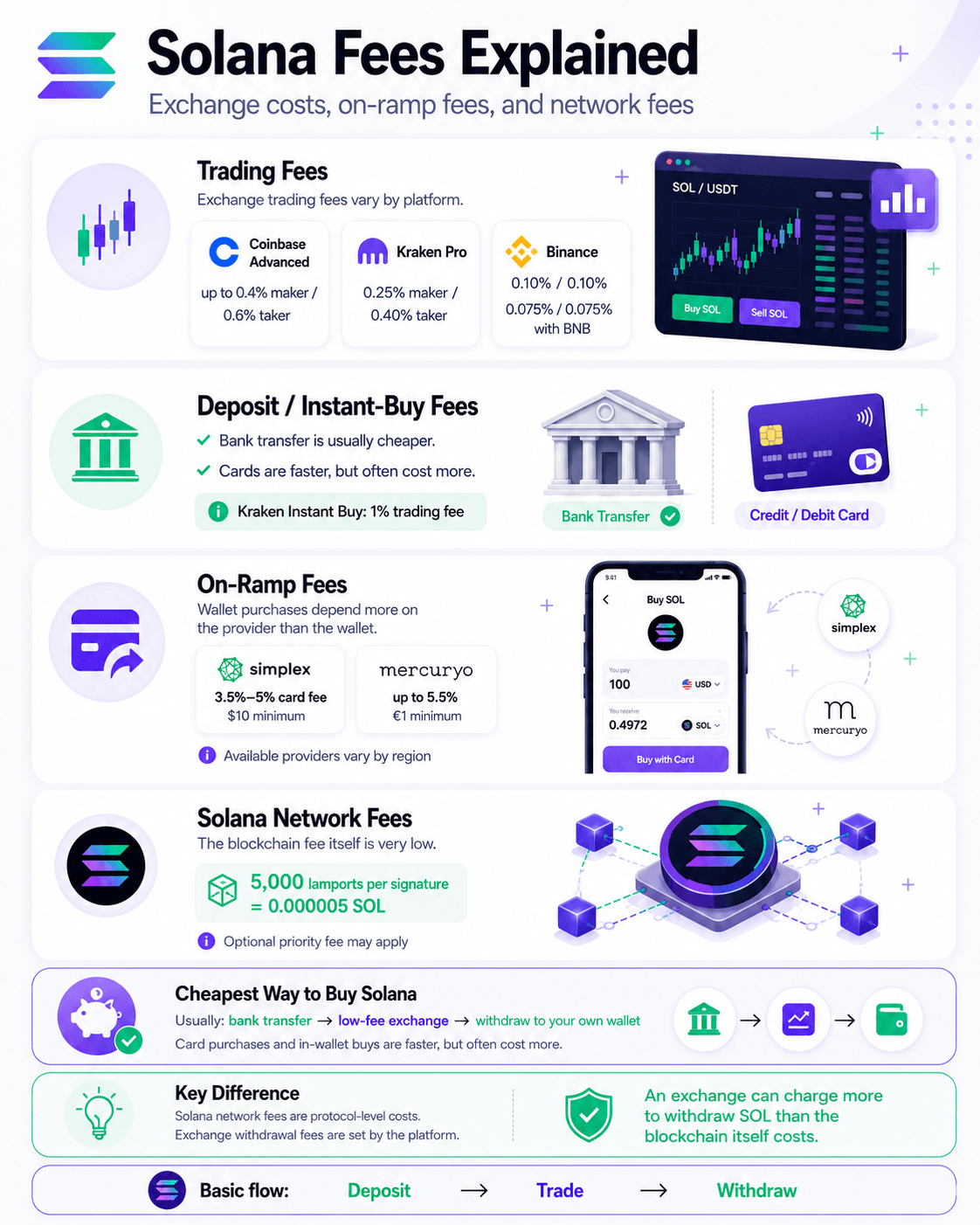 Usually, the Cheapest Route is a Bank Transfer to a Low-Fee Exchange
Cheapest Way to Buy Solana
Usually, the cheapest route is a bank transfer to a low-fee exchange, then a withdrawal to your own wallet. Card purchases and in-wallet buys are faster, but they often add spreads, processing fees, or both.
Solana Network Fees vs Exchange Withdrawal Fees
This is the key difference: Solana network fees are protocol-level costs, while exchange withdrawal fees are set by the platform. That means an exchange can charge more to withdraw SOL than the blockchain itself actually costs to process.
Best Wallets to Store Solana After Buying
Once you buy SOL, the next decision is where to store it. A good rule of thumb is simple: use a software wallet for everyday access and a hardware wallet for larger or longer-term holdings. It is a bit like keeping spending money in your pocket and savings in a safe.
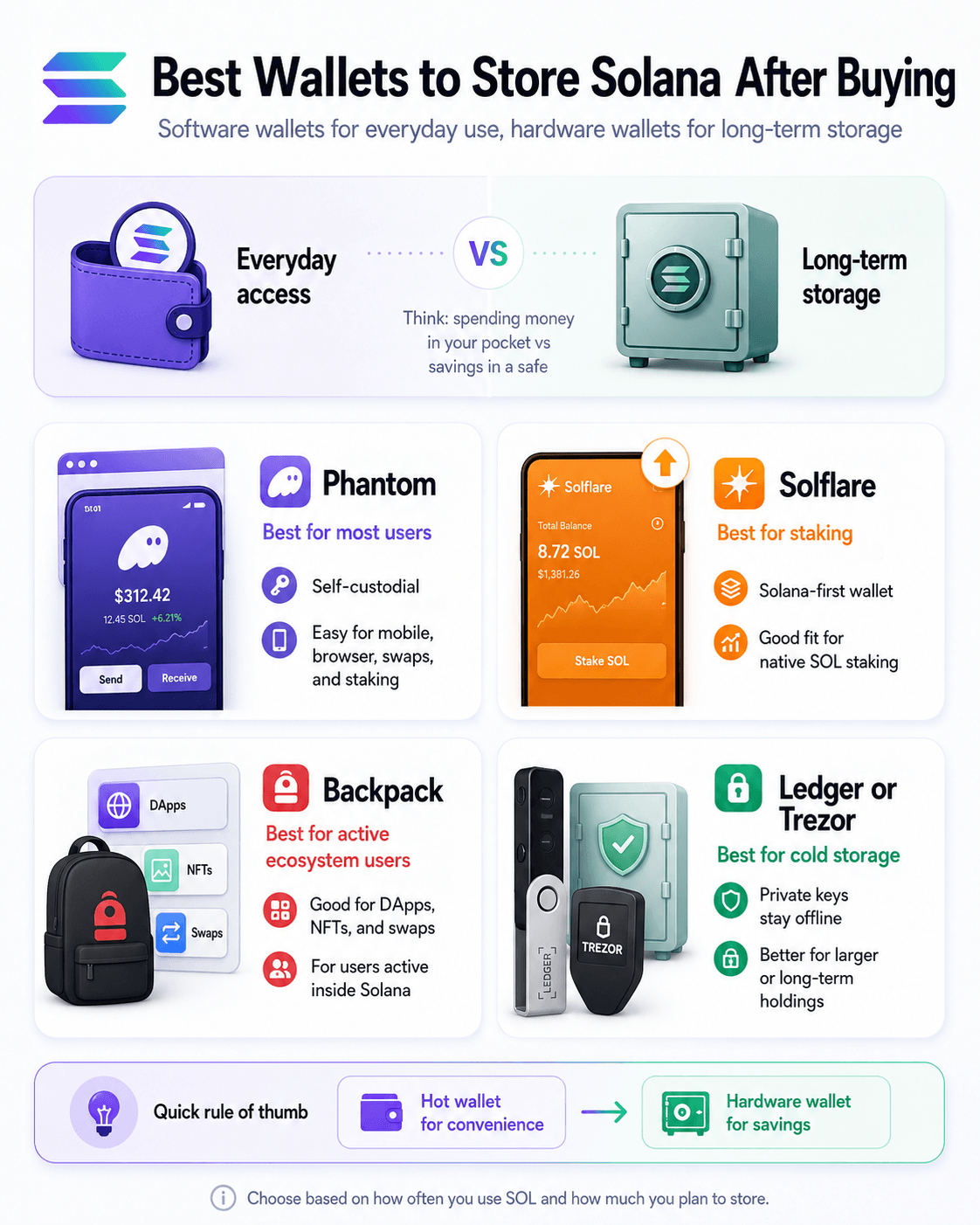 Use a Software Wallet for Everyday Access and a Hardware Wallet for Larger or Longer-Term Holdings
For most buyers, these are the main options:
- Phantom for most Solana-native users
- Solflare for staking-focused users
- Backpack for active ecosystem users
- Ledger or Trezor for long-term cold storage
Phantom Wallet — Best Solana-Native Wallet for Most Users
Phantom is a strong default choice because it is self-custodial, supports mobile and browser use, and lets users manage SOL, swaps, staking, and wallet security features in one place. The Solana wallet directory also lists Phantom as a multi-chain self-custody wallet for swaps, staking, and NFTs. For most beginners, it offers the smoothest balance between ease of use and Solana-native features.
Solflare — Best for Native SOL Staking
Solflare is especially useful for users who want a Solana-first wallet with built-in staking tools. On Solana’s official staking page, Solflare is named as one user-friendly wallet that supports staking, and Solana’s wallet directory describes it as a Solana-native wallet for staking, swaps, NFTs, and hardware wallet use. That makes it a natural fit for users planning to delegate SOL to validators.
You can get more details in our exclusive Solflare review.
Backpack — Best for Active Solana Ecosystem Users
Backpack is a good fit for more active users who want a wallet that works across mobile, browser, and broader Web3 activity. Its official download page highlights support for DApps, NFTs, and swaps, which makes it useful for people who spend time inside the Solana ecosystem rather than just holding SOL.
Ledger and Trezor — Best for Long-Term SOL Storage
For long-term storage, Ledger and Trezor are the safer choice because they keep private keys offline. Don't forget; if a hot wallet is like your everyday wallet, a hardware wallet is your home safe.
Look for Solana wallet options? Check out our top picks for the best Solana wallets.
How to Stake Solana After Buying
After buying SOL, you can stake it to help support the network and earn rewards. In Solana’s official staking documentation, staking means delegating your SOL to a validator. That does not give the validator ownership of your coins. A simple way to think about it is like assigning your vote to a trusted operator while still keeping ownership of the asset.
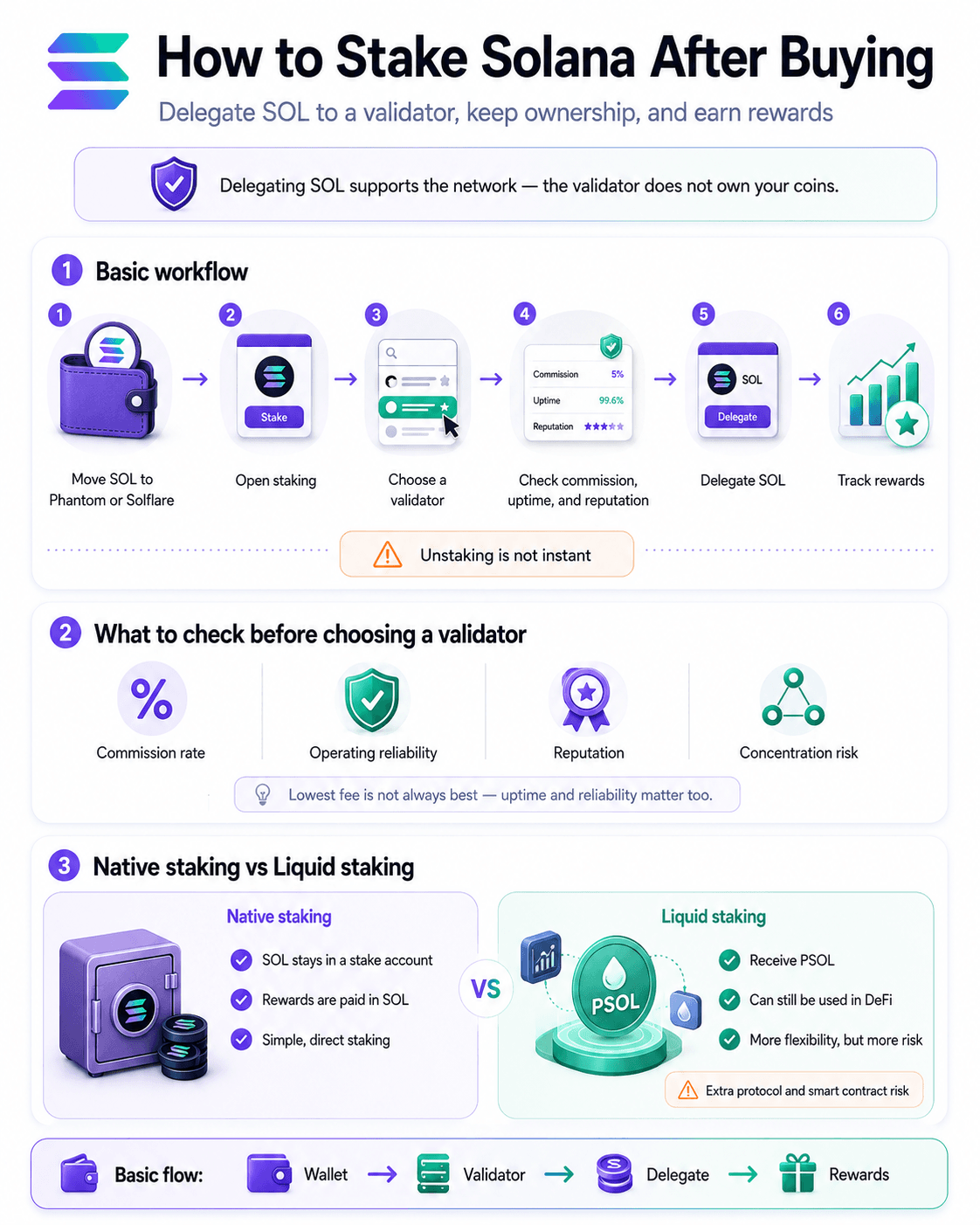 After Buying SOL, You can Stake it to Help Support the Network and Earn Rewards
Here is the basic workflow:
- Move SOL to a wallet that supports staking, such as Phantom or Solflare.
- Open the wallet’s staking section.
- Choose a validator.
- Review its commission, uptime, and reputation.
- Delegate your SOL.
- Track rewards in the wallet.
- Remember that unstaking is not instant.
What to Check Before Choosing a Validator
Focus on a few basics:
Commission rate
Operating reliability
Reputation
Concentration risk
Solana’s staking docs explain that rewards depend in part on a validator’s uptime and commission, so the lowest-fee option is not always the best one. It is also sensible not to concentrate too heavily in the biggest validators if decentralization matters to you.
Native Staking vs Liquid Staking
With native staking, your SOL stays in a stake account and rewards are paid in SOL, as described in Phantom’s native staking guide. With liquid staking, Phantom explains that you receive PSOL, which can be used in DeFi while your position remains staked. That added flexibility can be useful, but it also introduces extra protocol and smart contract risk.
Safest Way to Buy and Store Solana
The safest way to buy SOL is to separate buying convenience from long-term storage. In plain English, an exchange is useful for the purchase, but it should not automatically be treated as your permanent vault. Why? Because the CFTC’s case against FTX is a reminder that exchange access and true control are not the same thing.
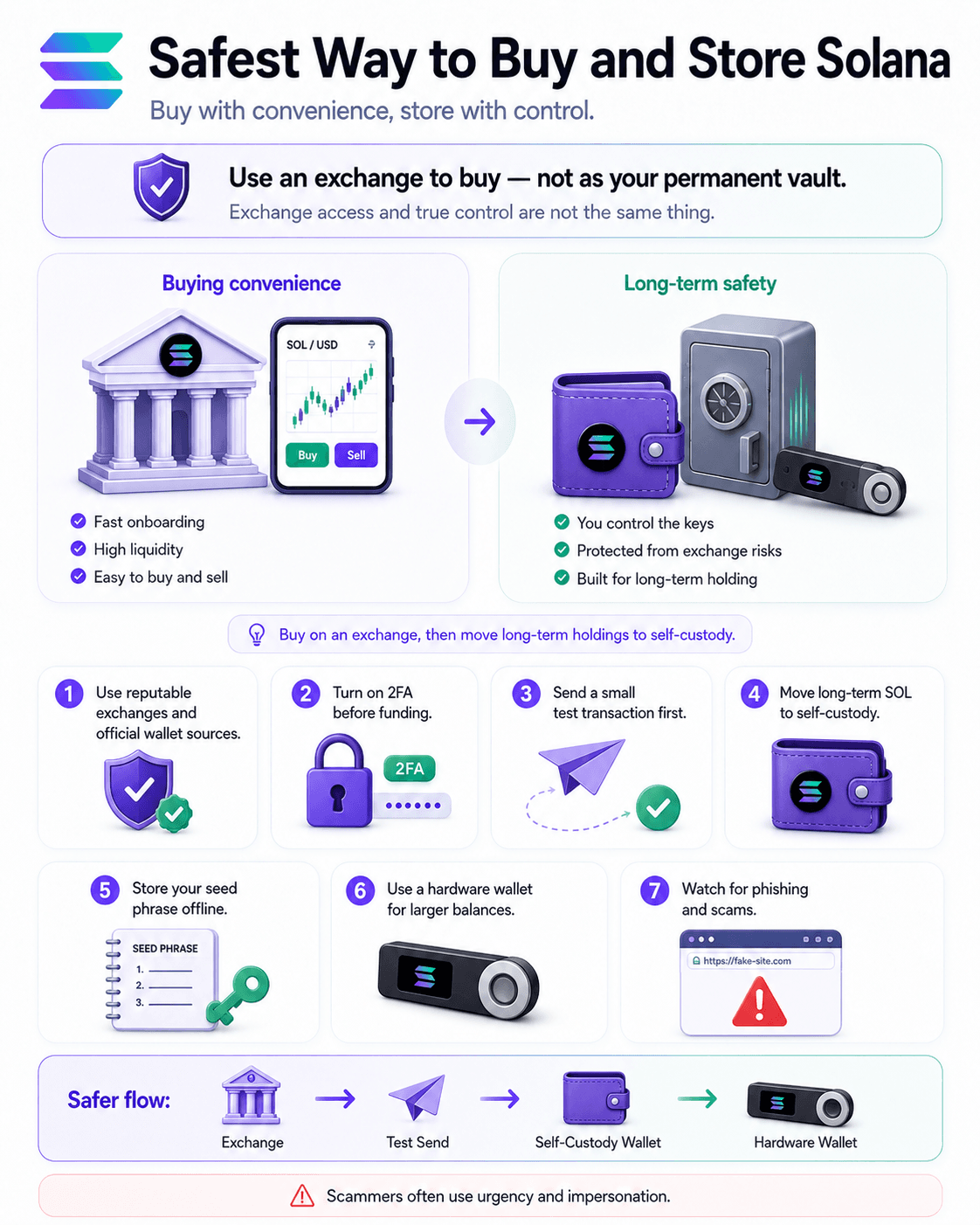 The Safest Way to Buy SOL is to Separate Buying Convenience from Long-Term Storage
Here is a list of what users should do to stay safe with Solana:
- Use a reputable exchange and download wallets only from official sources.
- Turn on 2-step verification or 2FA before funding your account.
- Make a small test transaction first to confirm the wallet address and network are correct.
- Move long-term holdings into self-custody.
- Store your seed phrase safely offline as it is like a key to your assets.
- Use a hardware wallet for larger balances.
- Watch for phishing websites and crypto scams, which the FTC says often rely on urgency and impersonation.
How Much Solana Should You Buy?
You do not need to buy one full SOL. Solana is divisible into smaller units called lamports, so fractional SOL is normal, much like buying part of a stock instead of a whole share.
Kraken’s Solana buy page says users can start from $10, but the true minimum purchase depends on the exchange or on-ramp you use. Solana’s own fee documentation also shows that transactions require a small amount of SOL, so if you plan to use a self-custody wallet, it is smart to leave a little behind for network fees.
However, the amount of SOL you buy primarily depends on your investment threshold, your risk tolerance, and your trading strategies and preferences.
Closing Thoughts
Buying SOL is not complicated once you match the method to your starting point and region.
- Beginners will usually find it easiest to buy through Coinbase, Kraken, Binance, Bybit, OKX, or eToro, depending on local availability.
- Wallet-first users can buy directly through Phantom or Solflare using fiat on-ramp partners.
- Existing crypto users can often swap into SOL through Jupiter without using a traditional exchange.
- Bank transfers are usually cheaper than card purchases, even if they take longer.
- Solana’s network fees are low, but exchange withdrawal fees and on-ramp charges are separate costs.
- Phantom, Solflare, Backpack, Ledger, and Trezor are the main storage options after purchase.
- If you plan to hold SOL, you can also stake it by delegating to a validator.