Losing access to a crypto wallet feels different from losing access to a normal app. There may be no support desk, no password reset button, and no central company that can “unlock” the funds. The recovery path depends on one thing first: what kind of wallet was lost and what backup still exists.
A lost crypto wallet can often be recovered if the seed phrase, private key, wallet file, hardware wallet recovery phrase, or exchange account access path is still available. Once those backups are gone, especially in a self-custody wallet, the answer becomes much harsher.
This guide explains how to recover a lost crypto wallet, when recovery is realistic, when it is unlikely, and what to avoid before panic leads to a costly mistake.
Editor's Note (May 23, 2026): We fully updated this guide in May 2026 to reflect current crypto wallet recovery methods, including seed phrase recovery, hardware wallet restoration, wallet.dat recovery, exchange account recovery, stolen fund response steps, and recovery scam warnings. We also added clearer recovery scenarios, step-by-step guidance for MetaMask, Trust Wallet, Ledger and Trezor, plus updated backup practices to help readers avoid permanent wallet loss.
Quick Answer: Can You Recover a Lost Crypto Wallet?
Yes, you can often recover a lost crypto wallet if you still have the seed phrase, private key, wallet backup, or access to a custodial exchange recovery process. Recovery becomes much harder when key backups are missing.
Lost Crypto Wallet Recovery Scenarios
-
Yes, if a full backup exists You can usually recover wallet access with the seed phrase, private key, wallet file, hardware wallet recovery phrase, or exchange account verification.
-
Maybe, if partial data exists A partial seed phrase, forgotten password, damaged device, old wallet file, or encrypted wallet backup may be recoverable with careful reconstruction.
-
Usually no, if all self-custody backups are gone If you lost the seed phrase and private key for a self-custody wallet, there is usually no company, miner, validator, or wallet developer that can restore access.
-
Stolen crypto is different Stolen crypto is rarely recoverable after it leaves the wallet, but transactions can sometimes be traced through blockchain analytics and reported to exchanges or law enforcement.
What To Check Before Assuming The Wallet Is Lost
- Check for a seed phrase, including any 12-word seed phrase, 24-word seed phrase, metal backup, paper backup, or recovery card.
- Look for a private key only in places you control, such as old encrypted backups, wallet exports, or secure offline records.
- Search for wallet files, including wallet.dat files, keystore files, JSON backups, encrypted wallet files, and old app backups.
- Check old devices, including phones, laptops, hardware wallets, USB drives, password managers, and external drives.
- Confirm whether it was custodial, since exchange wallets may be recovered through password reset, 2FA reset, KYC, and official support.
- Use blockchain explorers to confirm whether the wallet still holds funds or whether assets were moved to another address.
Wallet Recovery Warning
Never enter your seed phrase, private key, or wallet backup into random recovery websites, Telegram bots, Discord DMs, Google forms, browser pop-ups, or “wallet validation” portals. Anyone with your seed phrase or private key can take the funds. Use only official wallet software, verified hardware wallet recovery flows, or trusted specialist help for password and file recovery cases.
Disclosure
Some links in this guide may be affiliate links. If you choose to use a service through these links, we may earn a commission at no additional cost to you.

Check out our top picks for the most secure crypto wallets for your assets.
Find Your Recovery Scenario First
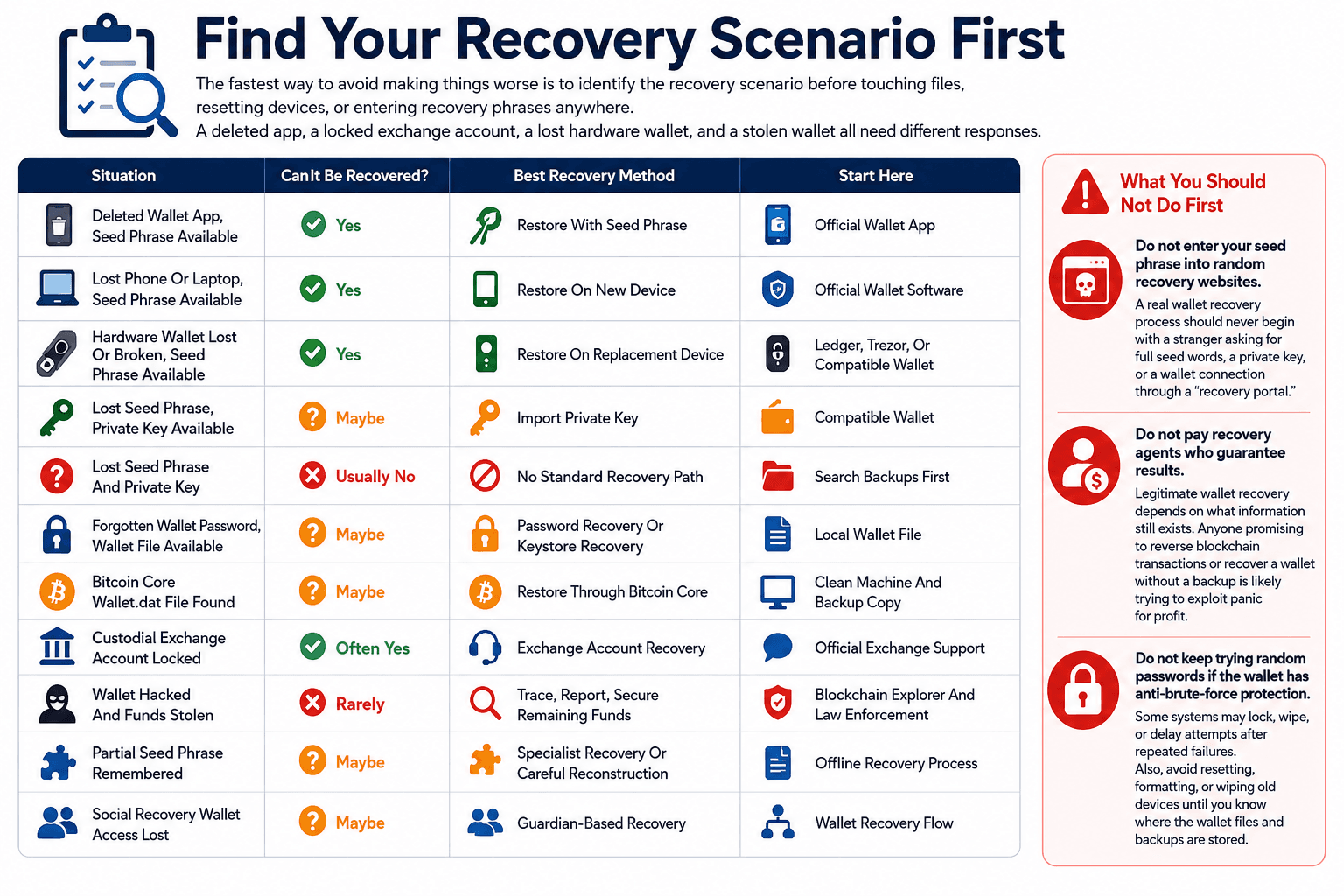 Different Wallet Losses Need Different Recovery Paths
The fastest way to avoid making things worse is to identify the recovery scenario before touching files, resetting devices, or entering recovery phrases anywhere. A deleted app, a locked exchange account, a lost hardware wallet, and a stolen wallet all need different responses.
| Situation | Can It Be Recovered? | Best Recovery Method | Start Here |
|---|---|---|---|
| Deleted Wallet App, Seed Phrase Available | Yes | Restore With Seed Phrase | Official Wallet App |
| Lost Phone Or Laptop, Seed Phrase Available | Yes | Restore On New Device | Official Wallet Software |
| Hardware Wallet Lost Or Broken, Seed Phrase Available | Yes | Restore On Replacement Device | Ledger, Trezor, Or Compatible Wallet |
| Lost Seed Phrase, Private Key Available | Maybe | Import Private Key | Compatible Wallet |
| Lost Seed Phrase And Private Key | Usually No | No Standard Recovery Path | Search Backups First |
| Forgotten Wallet Password, Wallet File Available | Maybe | Password Recovery Or Keystore Recovery | Local Wallet File |
| Bitcoin Core Wallet.dat File Found | Maybe | Restore Through Bitcoin Core | Clean Machine And Backup Copy |
| Custodial Exchange Account Locked | Often Yes | Exchange Account Recovery | Official Exchange Support |
| Wallet Hacked And Funds Stolen | Rarely | Trace, Report, Secure Remaining Funds | Blockchain Explorer And Law Enforcement |
| Partial Seed Phrase Remembered | Maybe | Specialist Recovery Or Careful Reconstruction | Offline Recovery Process |
| Social Recovery Wallet Access Lost | Maybe | Guardian-Based Recovery | Wallet Recovery Flow |
What You Should Not Do First
Do not enter your seed phrase into random recovery websites. A real wallet recovery process should never begin with a stranger asking for full seed words, a private key, or a wallet connection through a “recovery portal.”
Do not pay recovery agents who guarantee results. Legitimate wallet recovery depends on what information still exists. Anyone promising to reverse blockchain transactions or recover a wallet without a backup is likely trying to exploit panic for profit.
Do not keep trying random passwords if the wallet has anti-brute-force protection. Some systems may lock, wipe, or delay attempts after repeated failures. Also, avoid resetting, formatting, or wiping old devices until you know where the wallet files and backups are stored.
How To Recover A Crypto Wallet With A Seed Phrase
A seed phrase is the most common successful recovery path because it can regenerate the wallet’s private keys. Most modern wallets use the BIP-39 standard, which turns a mnemonic phrase into the seed used to derive wallet addresses.
The original wallet app is often not required if the phrase follows a standard format. A 12-word or 24-word recovery phrase may restore the same wallet inside another compatible app or hardware device, although derivation paths, networks, and passphrases can affect what appears.
Only enter the seed phrase into official wallet software or a verified hardware wallet. If a site asks for the phrase to “scan for funds” or “validate recovery,” treat it as hostile.
 Seed Phrase Recovery Restores Access Through Private Keys
Step-By-Step Seed Phrase Recovery
Seed phrase recovery should be done slowly because one wrong app, fake download, or incorrect network can create a new problem. The phrase is enough to control the wallet, so the recovery environment matters.
- Download The Official Wallet App
Reinstall the original wallet or download a compatible wallet from the official project website or verified app store listing. Avoid ads, Telegram links, Discord links, and search results that may point to phishing pages. - Choose The Restore Option
Select “Import wallet,” “Restore wallet,” or “I already have a wallet.” The wording varies by wallet, but the goal is the same: to restore an existing wallet rather than create a new one. - Enter The Seed Phrase In Exact Order
Type the 12-word or 24-word seed phrase exactly as written. Word order matters. A valid phrase in the wrong order will not restore the same wallet. - Set A New Password Or PIN
Create a new local password, PIN, or device lock. This protects the wallet app or device, but it does not replace the seed phrase as the true backup. - Check Old Wallet Addresses Before Moving Funds
Compare the restored receiving address with old transaction records, screenshots, exchange withdrawal records, or blockchain explorer history. - Add The Right Network If Balances Do Not Show
Enable networks such as Ethereum, BNB Smart Chain, Polygon, Arbitrum, Optimism, Base, Solana, or any chain where the funds were held. - Import Missing Tokens Manually
If the wallet address is correct but assets do not appear, add custom tokens using the official token contract address from a trusted source or explorer. - Confirm Assets On A Blockchain Explorer
Use Etherscan, Solscan, BscScan, PolygonScan, or the relevant explorer to confirm whether the funds are still on the recovered address.
Why Your Balance May Not Show After Recovery
A restored wallet can look empty even when the seed phrase is correct. The most common reason is that the wrong network is selected. An Ethereum wallet may show no funds if the assets sit on BNB Smart Chain, Polygon, Arbitrum, Optimism, Base, or another EVM network.
Missing token imports can also hide balances inside the app. The token may still sit on-chain, but the wallet interface may not display it until the contract is added manually.
Derivation paths create another common problem. A seed phrase can generate many accounts, and different wallets may search different account indexes by default. A missing passphrase, sometimes called the “25th word,” can also open a completely different wallet.
Seed Phrase Recovery Checklist
Before assuming the wallet is empty, check the basics carefully:
- Correct word order
- Correct spelling
- Correct wallet type
- Correct network
- Correct derivation path
- Correct account index
- Correct token import
- Correct passphrase, if one was used
- Correct the wallet address on a blockchain explorer
MetaMask Wallet Recovery: Step-By-Step
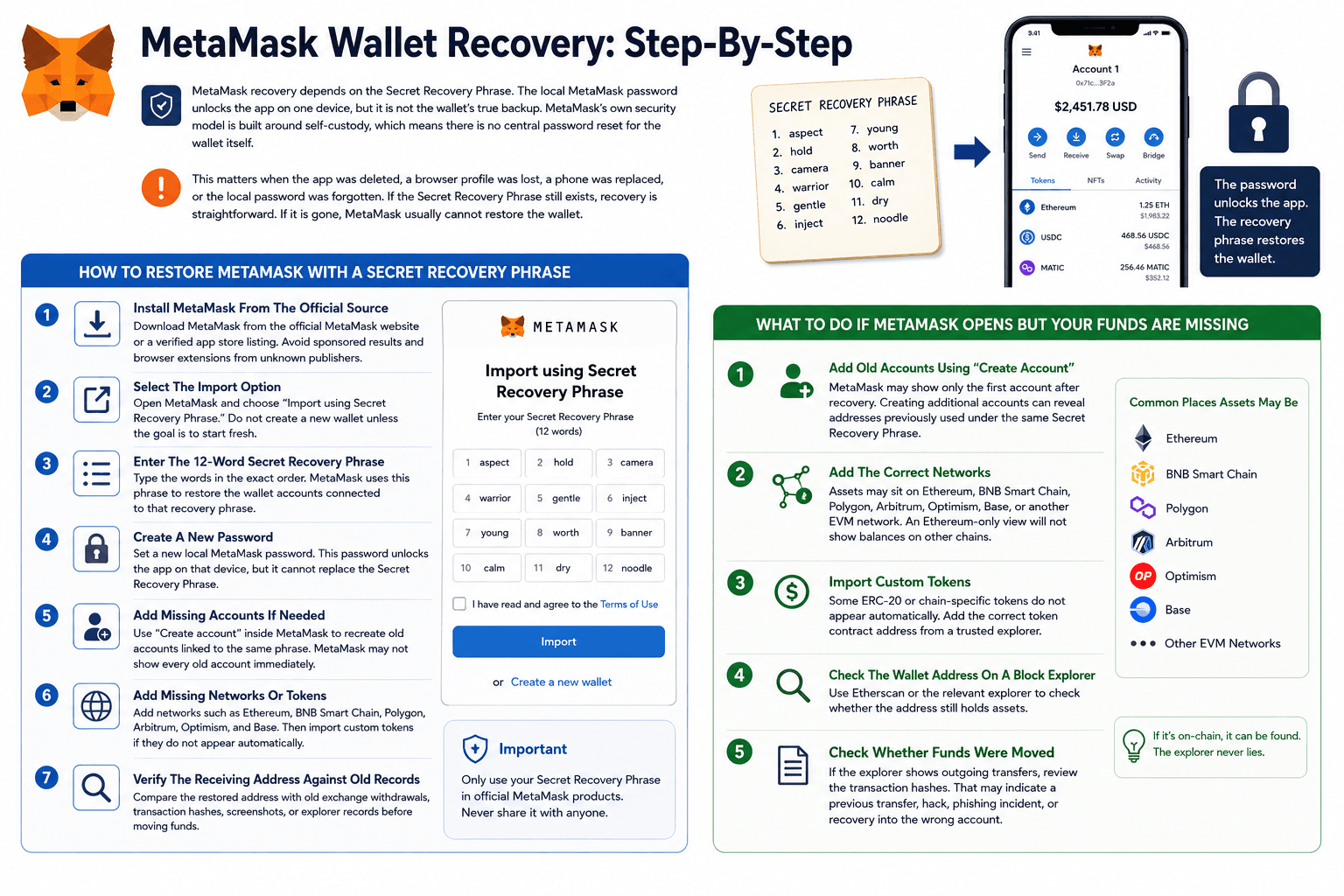
MetaMask recovery depends on the Secret Recovery Phrase. The local MetaMask password unlocks the app on one device, but it is not the wallet’s true backup. MetaMask’s own security model is built around self-custody, which means there is no central password reset for the wallet itself.
If the Secret Recovery Phrase still exists, recovery is straightforward. If it is gone, MetaMask usually cannot restore the wallet.
Read our full MetaMask review to see its features, fees, security, pros and cons, and whether it is still the best Ethereum wallet for Web3.
 MetaMask Recovery Depends On The Secret Recovery Phrase
How To Restore MetaMask With A Secret Recovery Phrase
MetaMask restoration is simple when the phrase is available, but users should avoid rushing through the setup. The right phrase can still show missing funds if old accounts, networks, or tokens are not added after recovery.
- Install MetaMask From The Official Source
Download MetaMask from the official MetaMask website or a verified app store listing. Avoid sponsored results and browser extensions from unknown publishers. - Select The Import Option
Open MetaMask and choose “Import using Secret Recovery Phrase.” Do not create a new wallet unless the goal is to start fresh. - Enter The 12-Word Secret Recovery Phrase
Type the words in the exact order. MetaMask uses this phrase to restore the wallet accounts connected to that recovery phrase. - Create A New Password
Set a new local MetaMask password. This password unlocks the app on that device, but it cannot replace the Secret Recovery Phrase. - Add Missing Accounts If Needed
Use “Create account” inside MetaMask to recreate old accounts linked to the same phrase. MetaMask may not show every old account immediately. - Add Missing Networks Or Tokens
Add networks such as Ethereum, BNB Smart Chain, Polygon, Arbitrum, Optimism, and Base. Then import custom tokens if they do not appear automatically. - Verify The Receiving Address Against Old Records
Compare the restored address with old exchange withdrawals, transaction hashes, screenshots, or explorer records before moving funds.
What To Do If MetaMask Opens But Your Funds Are Missing
If MetaMask opens but the funds are not visible, do not panic. The funds may still be on-chain even if the wallet interface looks empty.
- Add Old Accounts Using “Create Account”
MetaMask may show only the first account after recovery. Creating additional accounts can reveal addresses previously used under the same Secret Recovery Phrase. - Add The Correct Networks
Assets may sit on Ethereum, BNB Smart Chain, Polygon, Arbitrum, Optimism, Base, or another EVM network. An Ethereum-only view will not show balances on other chains. - Import Custom Tokens
Some ERC-20 or chain-specific tokens do not appear automatically. Add the correct token contract address from a trusted explorer. - Check The Wallet Address On A Block Explorer
Use Etherscan or the relevant explorer to check whether the address still holds assets. - Check Whether Funds Were Moved
If the explorer shows outgoing transfers, review the transaction hashes. That may indicate a previous transfer, hack, phishing incident, scam, or just recovery into the wrong account.
Trust Wallet Recovery: Mobile Wallet Recovery Steps
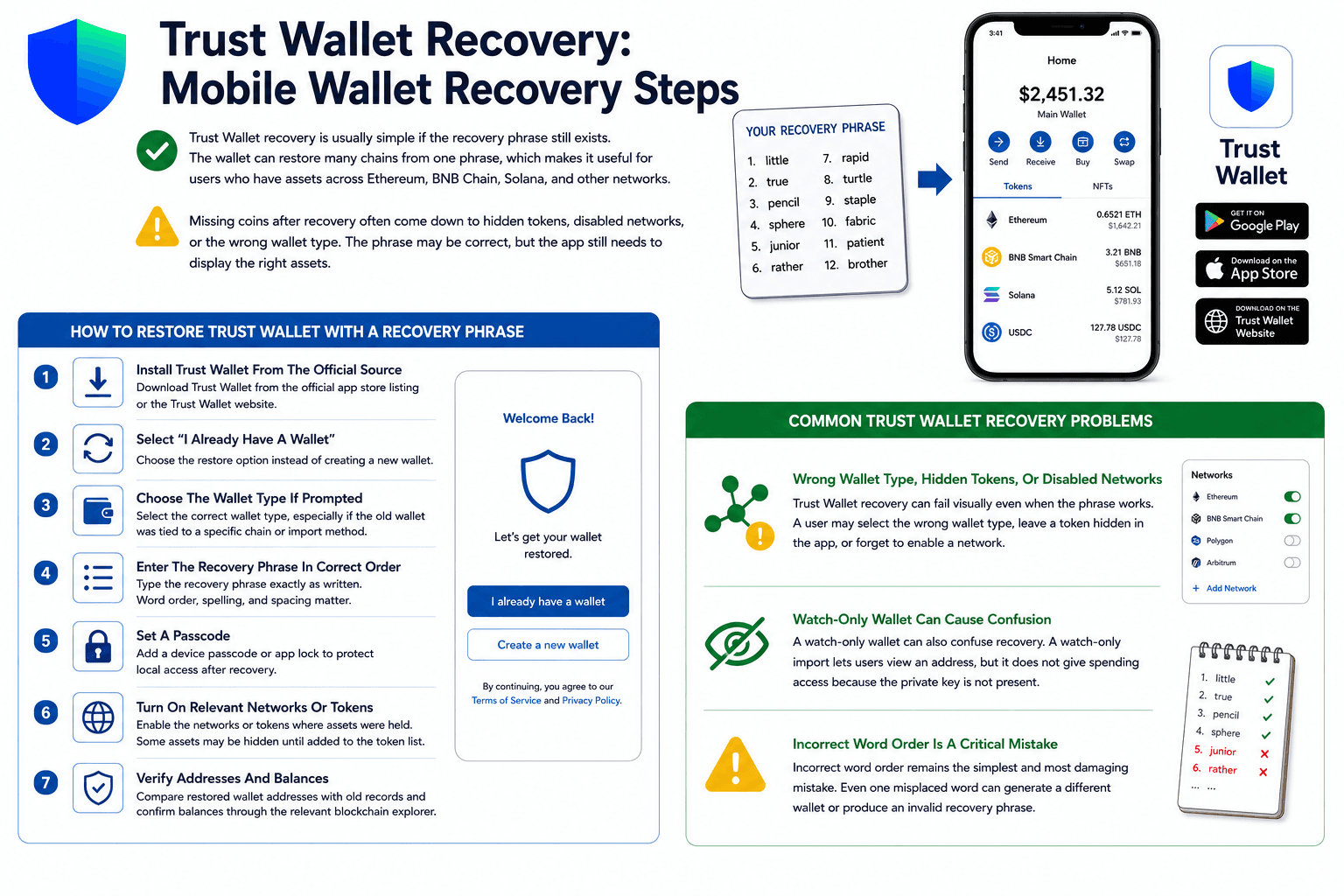
Trust Wallet recovery is usually simple if the recovery phrase still exists. The wallet can restore many chains from one phrase, which makes it useful for users who have assets across Ethereum, BNB Chain, Solana, and other networks.
Missing coins after recovery often come down to hidden tokens, disabled networks, or the wrong wallet type. The phrase may be correct, but the app still needs to display the right assets.
Read our full Trust Wallet review to see how it works, how safe it is, what fees to expect, and whether it is the right self-custody wallet for you.
 Trust Wallet Restores Multi-Chain Access Through Recovery Phrases
How To Restore Trust Wallet With A Recovery Phrase
Trust Wallet recovery works best when users restore the original wallet type and then enable the right coins or networks. The phrase restores access, but the app display may still need cleanup.
- Install Trust Wallet From The Official Source
Download Trust Wallet from the official app store listing or the Trust Wallet website. - Select “I Already Have A Wallet”
Choose the restore option instead of creating a new wallet. - Choose The Wallet Type If Prompted
Select the correct wallet type, especially if the old wallet was tied to a specific chain or import method. - Enter The Recovery Phrase In Correct Order
Type the recovery phrase exactly as written. Word order, spelling, and spacing matter. - Set A Passcode
Add a device passcode or app lock to protect local access after recovery. - Turn On Relevant Networks Or Tokens
Enable the networks or tokens where assets were held. Some assets may be hidden until added to the token list. - Verify Addresses And Balances
Compare restored wallet addresses with old records and confirm balances through the relevant blockchain explorer.
Common Trust Wallet Recovery Problems
Trust Wallet recovery can fail visually even when the phrase works. A user may select the wrong wallet type, leave a token hidden in the app, or forget to enable a network.
A watch-only wallet can also confuse recovery. A watch-only import lets users view an address, but it does not give spending access because the private key is not present.
Incorrect word order remains the simplest and most damaging mistake. Even one misplaced word can generate a different wallet or produce an invalid recovery phrase.
Can You Recover A Crypto Wallet Without A Seed Phrase?
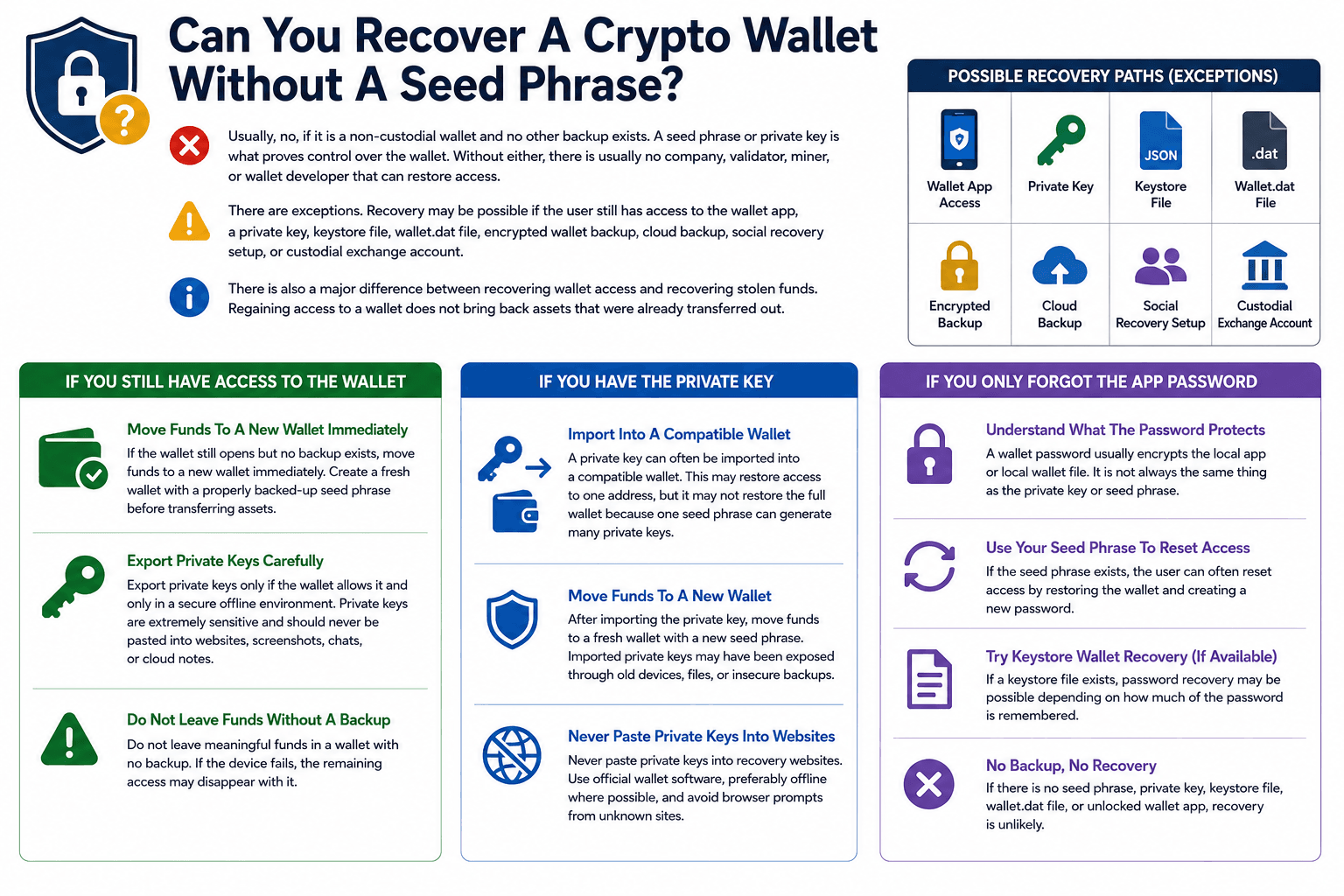
Usually, no, if it is a non-custodial wallet and no other backup exists. A seed phrase or private key is what proves control over the wallet. Without either, there is usually no company, validator, miner, or wallet developer that can restore access.
There are exceptions. Recovery may be possible if the user still has access to the wallet app, a private key, keystore file, wallet.dat file, encrypted wallet backup, cloud backup, social recovery setup, or custodial exchange account.
There is also a major difference between recovering wallet access and recovering stolen funds. Regaining access to a wallet does not bring back assets that were already transferred out.
 Recovery Without A Seed Phrase Has Strict Limits
If You Still Have Access To The Wallet
If the wallet still opens but no backup exists, move funds to a new wallet immediately. Create a fresh wallet with a properly backed-up seed phrase before transferring assets.
Export private keys only if the wallet allows it and only in a secure offline environment. Private keys are extremely sensitive and should never be pasted into websites, screenshots, chats, or cloud notes.
Do not leave meaningful funds in a wallet with no backup. If the device fails, the remaining access may disappear with it.
If You Have The Private Key
A private key can often be imported into a compatible wallet. This may restore access to one address, but it may not restore the full wallet because one seed phrase can generate many private keys.
After importing the private key, move funds to a fresh wallet with a new seed phrase. Imported private keys may have been exposed through old devices, files, or insecure backups.
Never paste private keys into recovery websites. Use official wallet software, preferably offline where possible, and avoid browser prompts from unknown sites.
If You Only Forgot The App Password
A wallet password usually encrypts the local app or local wallet file. It is not always the same thing as the private key or seed phrase.
If the seed phrase exists, the user can often reset access by restoring the wallet and creating a new password. If a keystore file exists, password recovery may be possible depending on how much of the password is remembered.
If there is no seed phrase, private key, keystore file, wallet.dat file, or unlocked wallet app, recovery is unlikely.
How To Recover A Hardware Wallet Step By Step
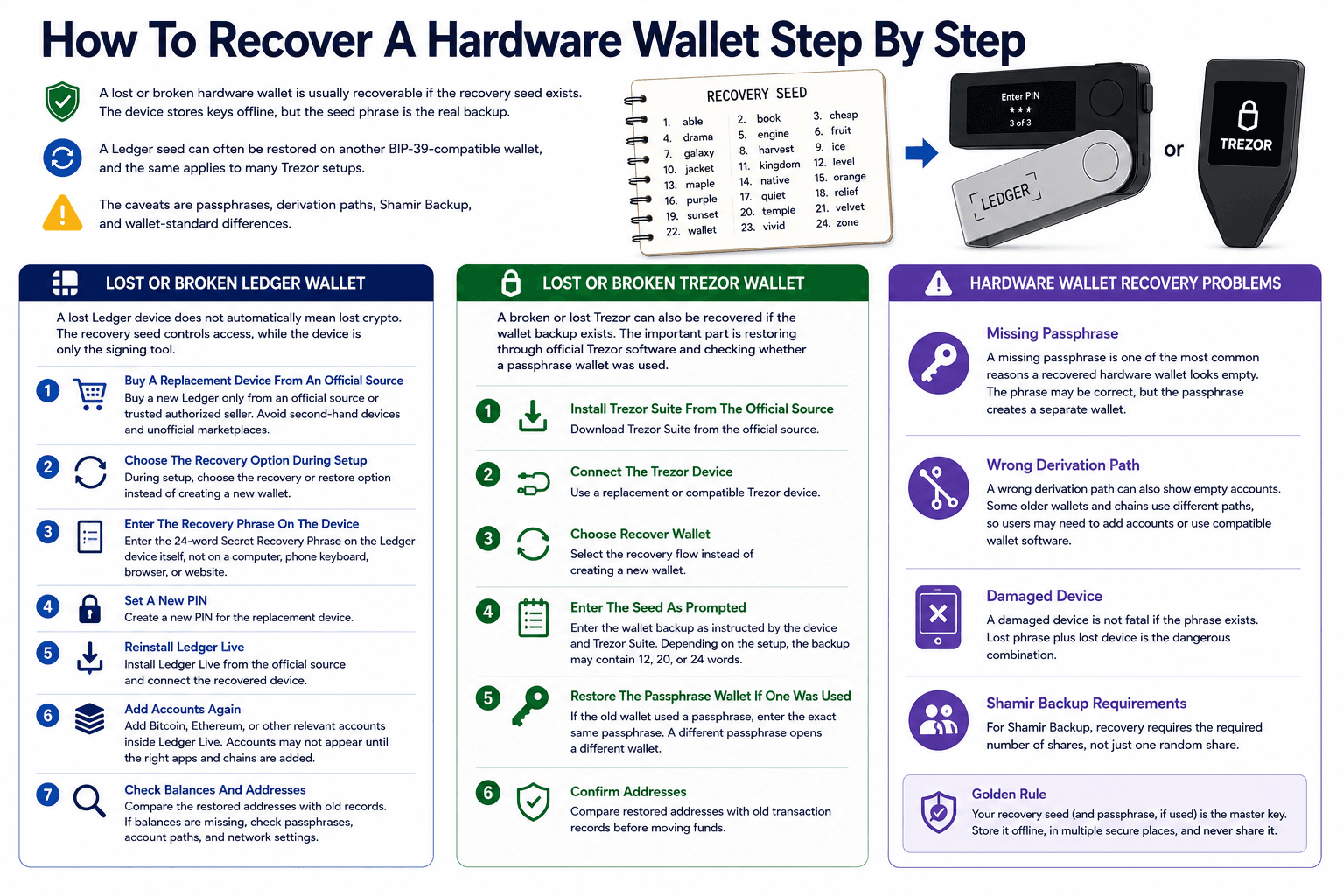
A lost or broken hardware wallet is usually recoverable if the recovery seed exists. The device stores keys offline, but the seed phrase is the real backup. And a Ledger seed can often be restored on another BIP-39-compatible wallet, and the same applies to many Trezor setups. The caveats are passphrases, derivation paths, Shamir Backup, and wallet-standard differences.
Check out our full guides comparing the top hardware wallets and the best budget-friendly options under $100 to find the right cold storage solution for your crypto.
Hardware Wallet Recovery Depends On The Backup PhraseLost Or Broken Ledger Wallet
A lost Ledger device does not automatically mean lost crypto. The recovery seed controls access, while the device is only the signing tool.
- Buy A Replacement Device From An Official Source
Buy a new Ledger only from an official source or a trusted authorized seller. Avoid second-hand devices and unofficial marketplaces. - Choose The Recovery Option During Setup
During setup, choose the recovery or restore option instead of creating a new wallet. - Enter The Recovery Phrase On The Device
Enter the 24-word Secret Recovery Phrase on the Ledger device itself, not on a computer, phone keyboard, browser, or website. Ledger’s recovery process is designed around device-side phrase entry. - Set A New PIN
Create a new PIN for the replacement device. - Reinstall Ledger Live
Install Ledger Live from the official source and connect the recovered device. - Add Accounts Again
Add Bitcoin, Ethereum, or other relevant accounts inside Ledger Live. Accounts may not appear until the right apps and chains are added. - Check Balances And Addresses
Compare the restored addresses with old records. If balances are missing, check passphrases, account paths, and network settings.
Read our full reviews of Ledger Nano X, Nano S Plus, Stax and Flex, as well as our comparison of Ledger Stax and Flex.
Lost Or Broken Trezor Wallet
A broken or lost Trezor can also be recovered if the wallet backup exists. The important part is restoring through the official Trezor software and checking whether a passphrase wallet was used.
- Install Trezor Suite From The Official Source
Download Trezor Suite from the official source. - Connect The Trezor Device
Use a replacement or compatible Trezor device. - Choose Recover Wallet
Select the recovery flow instead of creating a new wallet. - Enter The Seed As Prompted
Enter the wallet backup as instructed by the device and Trezor Suite. Depending on the setup, the backup may contain 12, 20, or 24 words. - Restore The Passphrase Wallet If One Was Used
If the old wallet used a passphrase, enter the same passphrase. A different passphrase opens a different wallet. - Confirm Addresses
Compare restored addresses with old transaction records before moving funds.
Read our full reviews of Trezor Safe 5 and Safe 3.
Hardware Wallet Recovery Problems
A missing passphrase is one of the most common reasons a recovered hardware wallet looks empty. The phrase may be correct, but the passphrase creates a separate wallet.
Wrong derivation paths can also show empty accounts. Some older wallets and chains use different paths, so users may need to add accounts or use compatible wallet software.
A damaged device is not fatal if the phrase exists. Lost phrase plus lost device is a dangerous combination. For Shamir Backup, recovery requires the required number of shares, not just one random share.
Wallet.Dat File Recovery For Bitcoin Core And Legacy Wallets
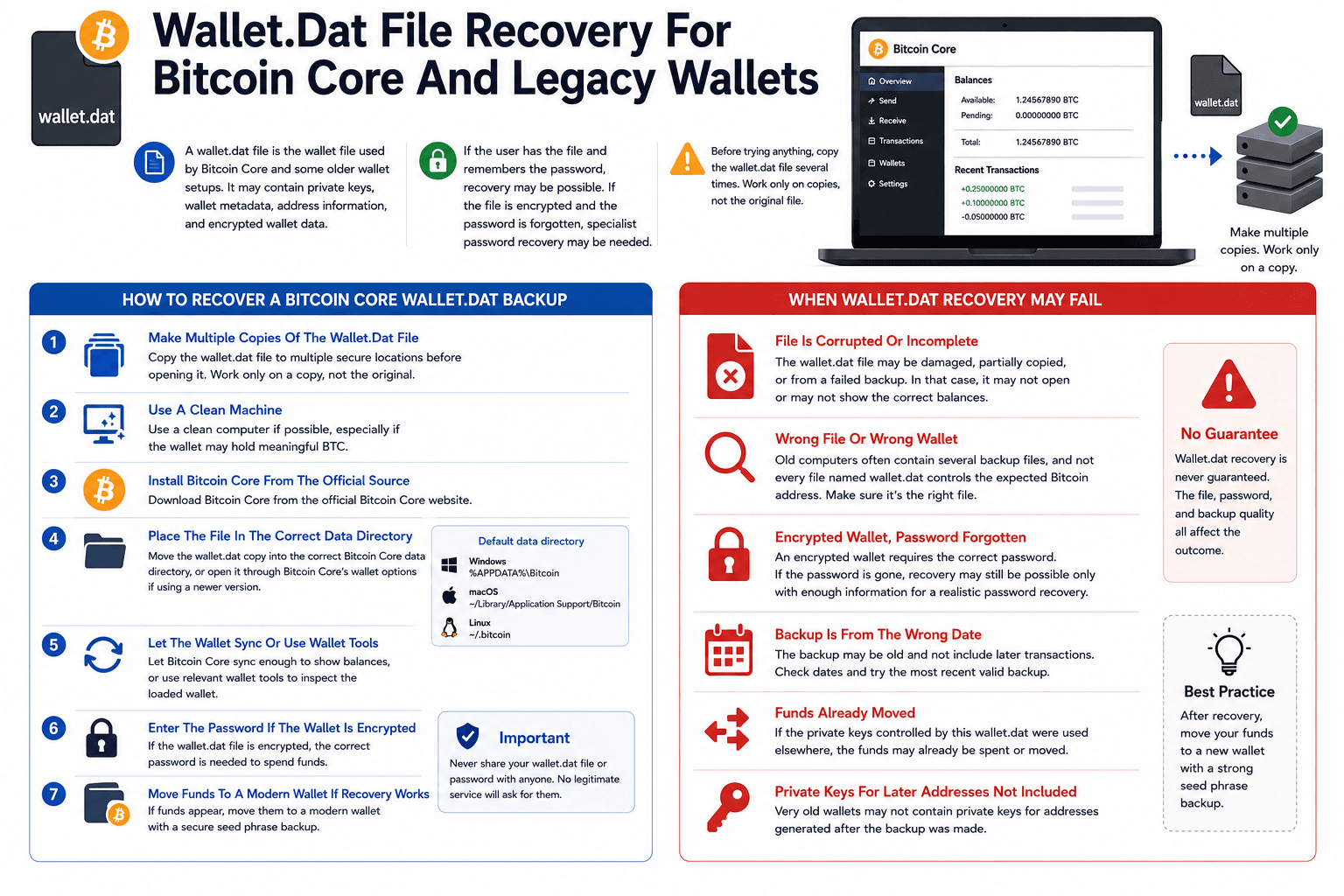
A wallet.dat file is the wallet file used by Bitcoin Core and some older wallet setups. It may contain private keys, wallet metadata, address information, and encrypted wallet data.
If the user has the file and remembers the password, recovery may be possible. If the file is encrypted and the password is forgotten, specialist password recovery may be needed.
Before trying anything, copy the wallet.dat file several times. Work only on copies, not the original file.
 Legacy Bitcoin Wallet Recovery Starts With Wallet.Dat Files
How To Recover A Bitcoin Core Wallet.Dat Backup
Wallet.dat recovery should be handled carefully because overwriting, corrupting, or testing directly on the only copy can destroy the best recovery path.
- Make Multiple Copies Of The Wallet.Dat File
Copy the wallet.dat file to multiple secure locations before opening it. Work only on a copy, not the original. - Use A Clean Machine
Use a clean computer if possible, especially if the wallet may hold meaningful BTC. - Install Bitcoin Core From The Official Source
Download Bitcoin Core from the official Bitcoin Core website. - Place The File In The Correct Data Directory
Move the wallet.dat copy into the correct Bitcoin Core data directory, or open it through Bitcoin Core’s wallet options if using a newer version. - Let The Wallet Sync Or Use Wallet Tools
Let Bitcoin Core sync enough to show balances, or use relevant wallet tools to inspect the loaded wallet. - Enter The Password If The Wallet Is Encrypted
If the wallet.dat file is encrypted, the correct password is needed to spend funds. - Move Funds To A Modern Wallet If Recovery Works
If funds appear, move them to a modern wallet with a secure seed phrase backup.
When Wallet.Dat Recovery May Fail
Wallet.dat recovery can fail if the file is corrupted, incomplete, or not actually the right wallet file. Old computers often contain several backup files, and not every file named wallet.dat controls the expected Bitcoin address.
An encrypted wallet also needs the correct password. If the password is gone, recovery may still be possible only if the user remembers enough of it for a realistic password-recovery attempt.
Recovery may also fail because the funds were already moved, the backup is from the wrong date, or the private keys for later addresses were not included in that specific backup.
How To Recover A Custodial Wallet Or Exchange Account
Custodial wallet recovery is different from self-custody recovery. Exchanges control the account infrastructure, so users recover access through the platform’s password reset, 2FA reset, ID verification, KYC checks, and support process.
Coinbase, Binance, Kraken, Bybit, OKX, and other exchanges each have their own account recovery policies. Recovery speed depends on the exchange, security flags, verification quality, and whether withdrawals are temporarily restricted after access is restored.
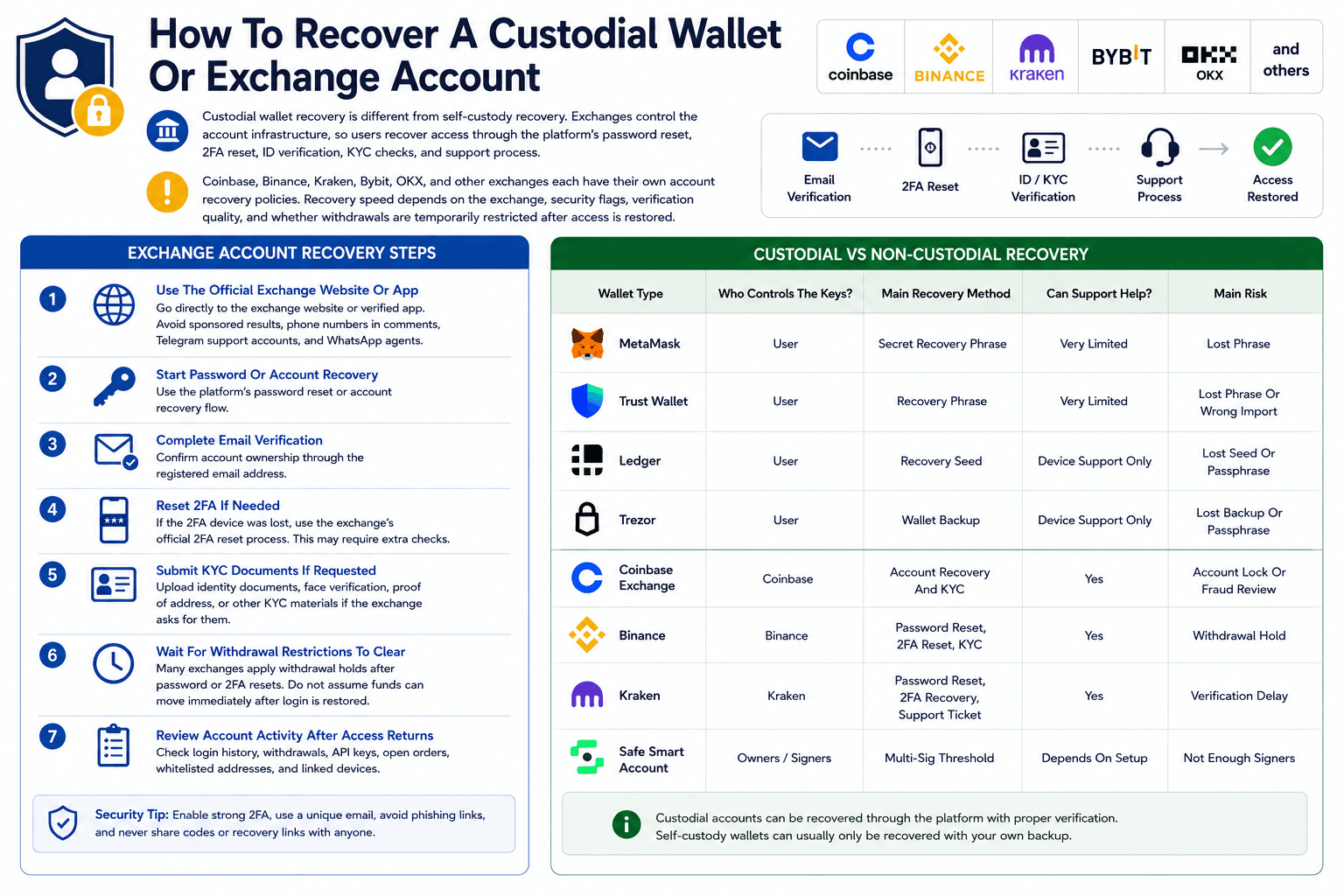 Exchange Recovery Runs Through Verification And Support
Exchange Account Recovery Steps
Exchange recovery should happen only through the official exchange website or app. Fake support numbers and Telegram agents are common during account-lock situations.
- Use The Official Exchange Website Or App
Go directly to the exchange website or verified app. Avoid sponsored results, phone numbers in comments, Telegram support accounts, and WhatsApp agents. - Start Password Or Account Recovery
Use the platform’s password reset or account recovery flow. - Complete Email Verification
Confirm account ownership through the registered email address. - Reset 2FA If Needed
If the 2FA device was lost, use the exchange’s official 2FA reset process. This may require extra checks. - Submit KYC Documents If Requested
Upload identity documents, face verification, proof of address, or other KYC materials if the exchange asks for them. - Wait For Withdrawal Restrictions To Clear
Many exchanges apply withdrawal holds after password or 2FA resets. Do not assume funds can move immediately after login is restored. - Review Account Activity After Access Returns
Check login history, withdrawals, API keys, open orders, whitelisted addresses, and linked devices.
Custodial Vs Non-Custodial Recovery Table
| Wallet Type | Who Controls The Keys? | Main Recovery Method | Can Support Help? | Main Risk |
|---|---|---|---|---|
| MetaMask | User | Secret Recovery Phrase | Very Limited | Lost Phrase |
| Trust Wallet | User | Recovery Phrase | Very Limited | Lost Phrase Or Wrong Import |
| Ledger | User | Recovery Seed | Device Support Only | Lost Seed Or Passphrase |
| Trezor | User | Wallet Backup | Device Support Only | Lost Backup Or Passphrase |
| Coinbase Exchange | Coinbase | Account Recovery And KYC | Yes | Account Lock Or Fraud Review |
| Binance | Binance | Password Reset, 2FA Reset, KYC | Yes | Withdrawal Hold |
| Kraken | Kraken | Password Reset, 2FA Recovery, Support Ticket | Yes | Verification Delay |
| Safe Smart Account | Owners / Signers | Multi-Sig Threshold | Depends On Setup | Not Enough Signers |
Can Stolen Crypto Be Recovered?
Stolen crypto is rarely recoverable once funds leave the wallet. Blockchain transactions are irreversible, so restoring the original wallet does not bring back assets that were already transferred out.
Some stolen funds can be traced through blockchain explorers or analytics firms. Recovery becomes more realistic only if the funds hit a regulated exchange, a freeze is possible, or law enforcement gets involved.
The priority after a hack is not hope. It is damage control.
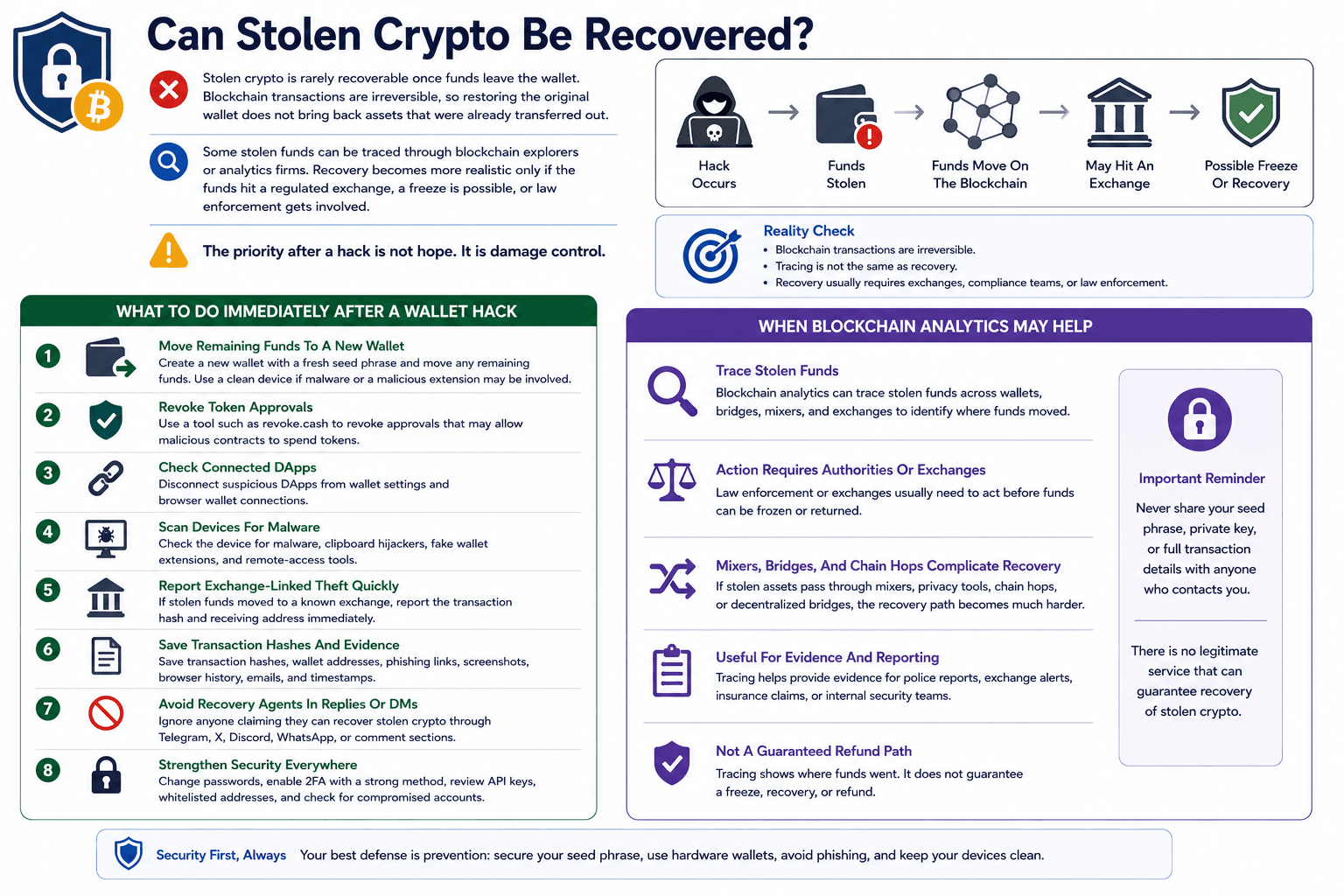 Stolen Crypto Recovery Depends On Tracing And Reporting
What To Do Immediately After A Wallet Hack
A wallet hack needs a fast containment plan. The goal is to protect anything left, preserve evidence, and reduce further exposure.
- Move Remaining Funds To A New Wallet
Create a new wallet with a fresh seed phrase and move any remaining funds. Use a clean device if malware or a malicious extension may be involved. - Revoke Token Approvals
Use a tool such as revoke.cash to revoke approvals that may allow malicious contracts to spend tokens. - Check Connected DApps
Disconnect suspicious dApps from wallet settings and browser wallet connections. - Scan Devices For Malware
Check the device for malware, clipboard hijackers, fake wallet extensions, and remote-access tools. - Report Exchange-Linked Theft Quickly
If stolen funds moved to a known exchange, report the transaction hash and receiving address immediately. - Save Transaction Hashes And Evidence
Save transaction hashes, wallet addresses, phishing links, screenshots, browser history, emails, and timestamps. - Avoid Recovery Agents In Replies Or DMs
Ignore anyone claiming they can recover stolen crypto through Telegram, X, Discord, WhatsApp, or comment sections.
When Blockchain Analytics May Help
Blockchain analytics can sometimes trace stolen funds across wallets, bridges, mixers, and exchanges. Tracing helps identify where funds moved, but it is not the same as recovery.
Law enforcement or exchanges usually need to act before funds can be frozen or returned. If stolen assets pass through mixers, privacy tools, chain hops, or decentralized bridges, the recovery path becomes much harder.
For most users, blockchain tracing is useful for evidence, reporting, and exchange alerts. It should not be confused with a guaranteed refund path.
Crypto Wallet Recovery Services: What To Know And What To Avoid
Legitimate recovery services may help with forgotten wallet passwords, corrupted wallet files, partial seed phrase reconstruction, or wallet.dat recovery. They cannot magically recover a self-custody wallet if no useful backup exists.
A real recovery service should not need your full seed phrase or full private key. Any service that asks for those upfront can steal the funds if recovery succeeds.
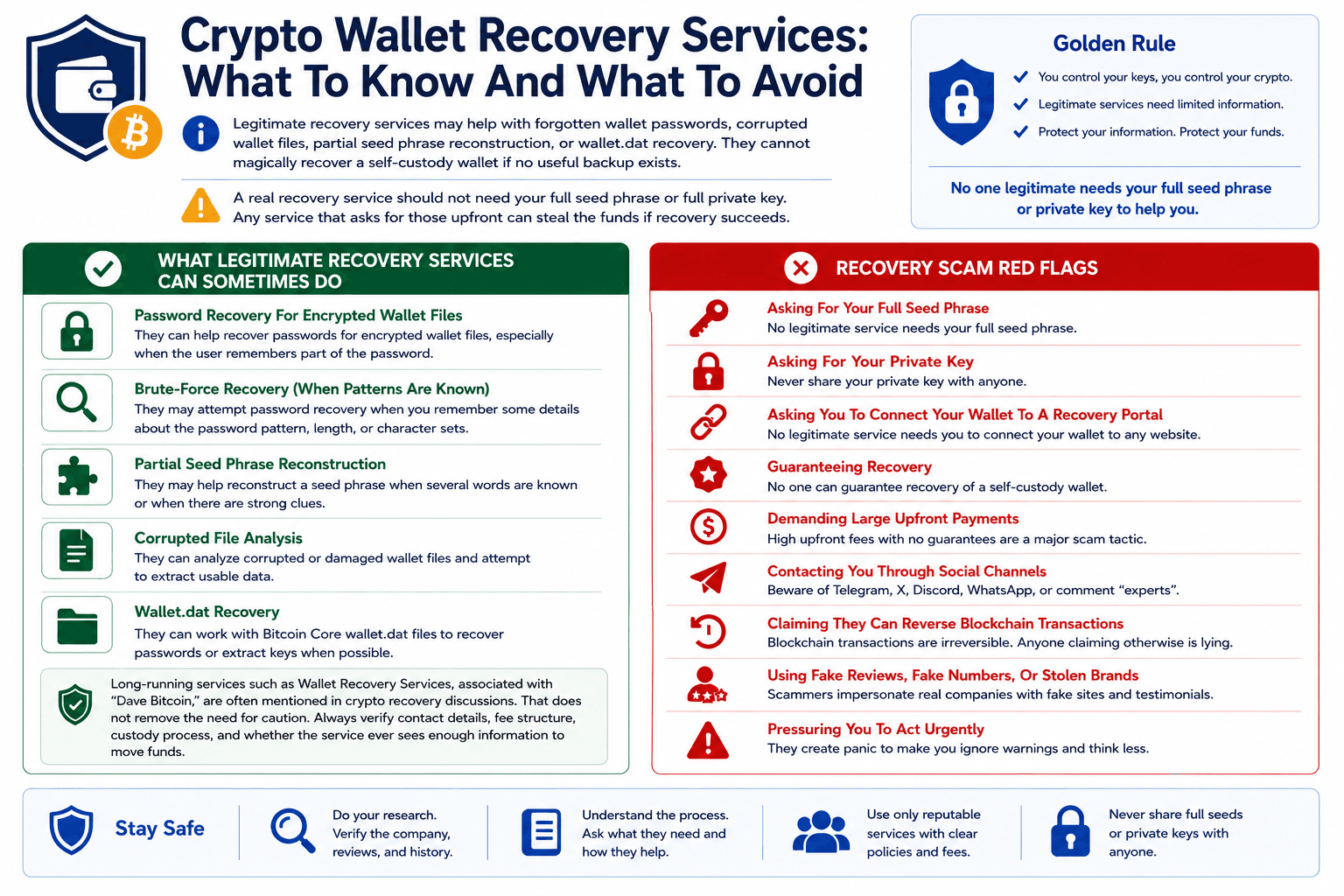 Recovery Services Can Help, But Scams Are Everywhere
What Legitimate Recovery Services Can Sometimes Do
Some wallet recovery services can help with password recovery for encrypted wallet files, especially when the user remembers part of the password.
They may also help with brute-force recovery when the password pattern is partly known, partial seed phrase reconstruction when several words are known, corrupted file analysis, and wallet.dat recovery.
Users should verify contact details, fee structure, custody process, and whether the service ever sees enough information to move funds.
Recovery Scam Red Flags
Recovery scams usually prey on urgency. These are major warning signs:
- Asking for your full seed phrase
- Asking for your private key
- Asking you to connect your wallet to a recovery portal
- Guaranteeing recovery
- Demanding large upfront payments
- Contacting you through Telegram, X, Discord, WhatsApp, or comments
- Claiming they can reverse blockchain transactions
- Using fake reviews, fake support numbers, or stolen brand names
- Pressuring you to act before “funds disappear forever.
Social Recovery And Multi-Sig Wallet Recovery
Some smart contract wallets do not rely only on one seed phrase. Social recovery and multi-sig wallets can reduce single-key failure, but they only help if configured before access is lost.
A better wallet design can make losses less catastrophic, but setup quality decides the outcome.
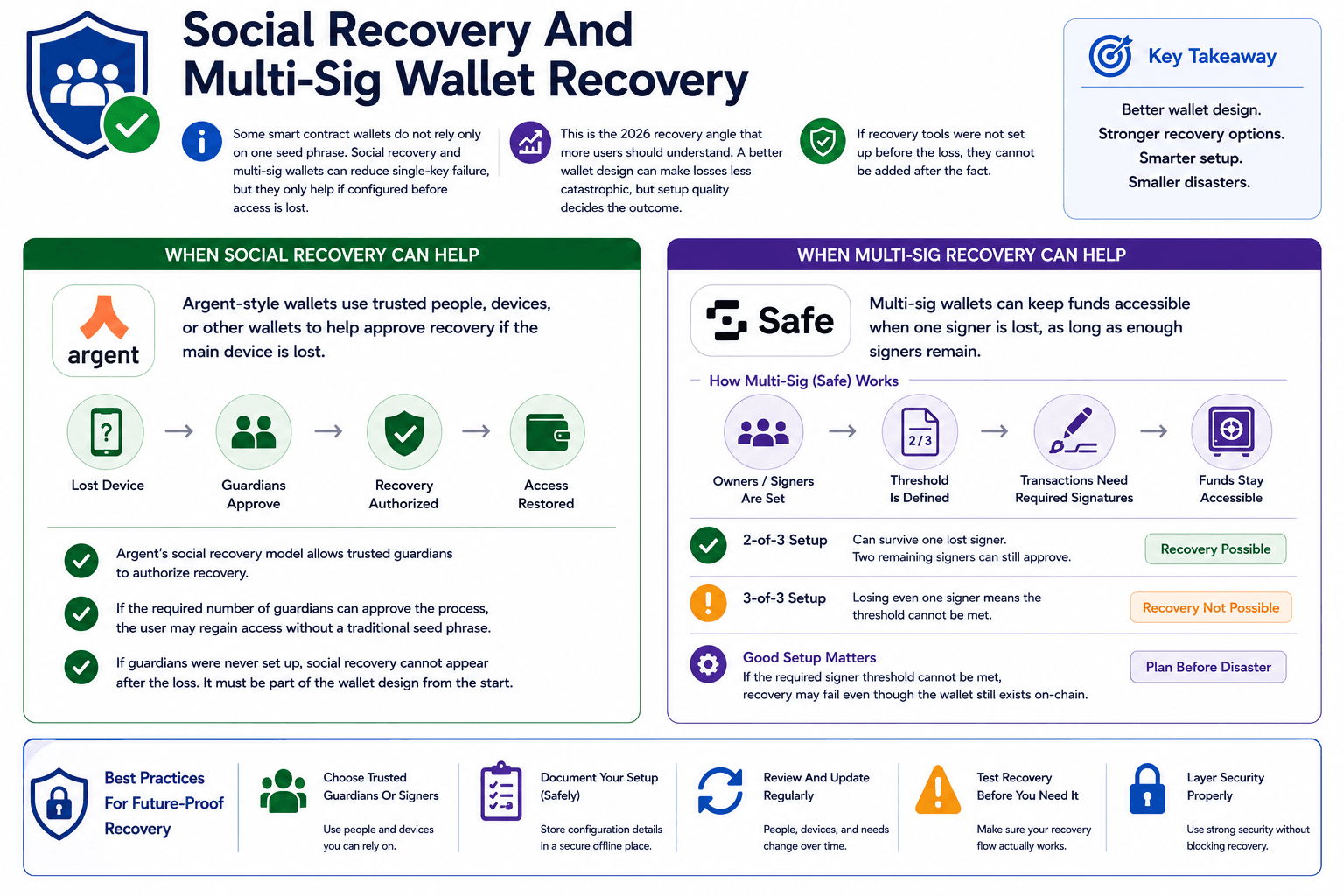 Smart Wallet Recovery Depends On Guardians And Signers
When Social Recovery Can Help
Social recovery can help when the wallet is already set up with guardians. Argent-style wallets use trusted people, devices, or other wallets to help approve recovery if the main device is lost.
Argent’s social recovery model allows trusted guardians to authorize recovery. If the required number of guardians can approve the process, the user may regain access without a traditional seed phrase.
If guardians were never set up, social recovery cannot appear after the loss. It must be part of the wallet design from the start.
When Multi-Sig Recovery Can Help
Multi-sig wallets can keep funds accessible when one signer is lost, as long as enough signers remain. A Safe wallet, for example, can require a threshold number of owners to approve transactions.
Safe’s smart account model allows users to define owners and a signing threshold. A 2-of-3 setup can survive one lost signer. A 3-of-3 setup cannot.
Good setup matters before disaster. If the required signer threshold cannot be met, recovery may fail even though the wallet still exists on-chain.
How To Back Up Your Crypto Wallet So You Never Lose Access Again
Wallet recovery is easier when the backup plan exists before the loss. Seed phrases, passphrases, wallet files, hardware devices, and emergency instructions need a storage plan, not a last-minute search through screenshots.
The safest setup depends on the value stored, the user’s habits, and whether heirs or business partners need emergency access.
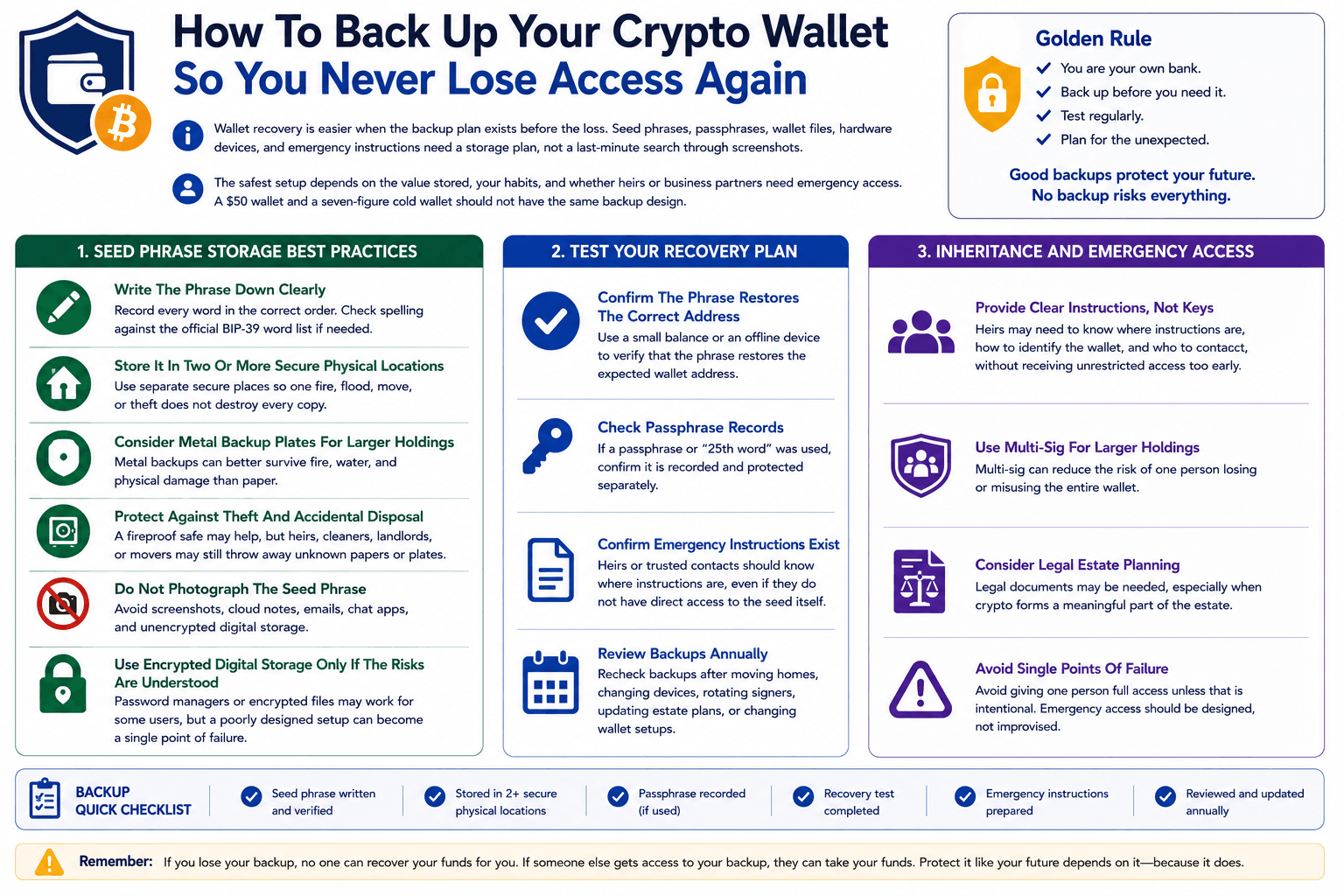 Strong Wallet Backups Prevent Permanent Crypto Access Loss
Seed Phrase Storage Best Practices
Seed phrase storage should protect against device failure, fire, water, theft, and accidental disposal. A screenshot is easy, but it is also one of the weakest backup methods.
- Write The Phrase Down Clearly
Record every word in the correct order. Check spelling against the official BIP-39 word list if needed. - Store It In Two Or More Secure Physical Locations
Use separate secure places so one fire, flood, move, or theft does not destroy every copy. - Consider Metal Backup Plates For Larger Holdings
Metal backups can better survive fire, water, and physical damage than paper. - Protect Against Theft And Accidental Disposal
A fireproof safe may help, but heirs, cleaners, landlords, or movers may still throw away unknown papers or plates. - Do Not Photograph The Seed Phrase
Avoid screenshots, cloud notes, emails, chat apps, and unencrypted digital storage. - Use Encrypted Digital Storage Only If The Risks Are Understood
Password managers or encrypted files may work for some users, but a poorly designed setup can become a single point of failure.
Test Your Recovery Plan
A backup is not proven until it restores the right wallet. Testing should happen before large balances depend on the phrase.
- Confirm The Phrase Restores The Correct Address
Use a small balance or an offline device to verify that the phrase restores the expected wallet address. - Check Passphrase Records
If a passphrase or “25th word” was used, confirm it is recorded and protected separately. - Confirm Emergency Instructions Exist
Heirs or trusted contacts should know where instructions are, even if they do not have direct access to the seed itself. - Review Backups Annually
Recheck backups after moving homes, changing devices, rotating signers, updating estate plans, or changing wallet setups.
Inheritance And Emergency Access
Crypto inheritance needs instructions without careless key exposure. Heirs may need to know where instructions are, how to identify the wallet, and who to contact, without receiving unrestricted access too early.
For larger holdings, multi-sig can reduce the risk of one person losing or misusing the entire wallet. Legal estate planning may also be needed, especially when crypto forms a meaningful part of the estate.
Avoid giving one person full access unless that is intentional. Emergency access should be designed, not improvised.

Final Verdict: What Recovery Path Should You Use?
The right crypto wallet recovery path depends on what still exists.
- If the seed phrase is available, restore the wallet through official software or a verified hardware device.
- If a private key exists, import it into a compatible wallet and move funds to a new wallet with a fresh backup.
- If a wallet.dat file exists, recover it through Bitcoin Core or specialist tools. If the issue is an exchange account, use the platform’s official recovery flow, KYC checks, and 2FA reset process.
- If the funds were stolen, focus on tracing, reporting, revoking approvals, and securing remaining assets. Wallet recovery will not reverse a completed blockchain transaction.
- If all non-custodial backups are gone, recovery is usually impossible.
That is the uncomfortable truth behind self-custody, the backup is not a formality. It is the wallet’s lifeline.