


MetaMask has evolved far beyond its roots as an Ethereum wallet. In 2026, it supports multiple blockchain ecosystems and a growing range of on-chain financial services.
This MetaMask review looks at how the wallet works today, how safe it is, what it costs, where it performs best and which users may be better served by alternatives.
Editor's Note (Aug. 26, 2026): We fully updated this MetaMask review in August 2026 to reflect how much the wallet has expanded beyond its earlier Ethereum-first role. The refresh adds native Bitcoin, Solana and TRON support, updated social-login recovery, EIP-7702 Smart Accounts and programmable permissions, Transaction Shield, current security protections, swaps and staking fees, MetaMask Money Account, perps, prediction markets, tokenized real-world assets, Card and Rewards features, and the new Agent Wallet. We also reworked the network, security, fees, user experience and wallet-comparison sections to reflect MetaMask's broader multichain product and its growing complexity for active onchain users.
MetaMask Review 2026: Quick Verdict
MetaMask remains one of the strongest self-custody wallets for active Web3 users, combining extensive DApp compatibility with native EVM, Bitcoin, Solana and TRON support. Its security warnings, hardware-wallet connectivity and Smart Accounts strengthen the experience, but hot-wallet exposure, growing product complexity and a 0.875% swap fee make it less suitable for cold storage or cost-sensitive high-volume trading.
Our take: MetaMask is best for users who regularly interact with DApps and want one wallet for several blockchain ecosystems. Its biggest advantage is the combination of mature EVM support, native BTC, SOL and TRX accounts, hardware signing and programmable Smart Accounts. The trade-off is a much denser product than the MetaMask of old, with swaps, staking, perps, predictions, RWAs, payments and other services each carrying their own fees and risks.
Scorecard
-
1Security 4.5/5 Self-custody, transaction simulation, scam warnings, address-poisoning detection, hardware-wallet support and optional Transaction Shield create a strong security toolkit. MetaMask is still a hot wallet, and users remain responsible for protecting keys, recovery credentials and approvals.
-
2Ease of Use 4.4/5 Browser and mobile apps make ordinary transfers, DApp connections and multichain asset management accessible, while social-login onboarding provides an alternative to traditional seed-first setup. The expanding collection of trading and financial services makes the interface less minimal than simpler wallets.
-
3Network & Assets 4.8/5 MetaMask combines deep Ethereum and EVM support with native Bitcoin, Solana and TRON accounts. Custom RPCs extend EVM coverage further, while Snaps can add ecosystems such as XRP Ledger, Cosmos, Polkadot and Sui.
-
4DeFi & Web3 4.9/5 DApp compatibility remains one of MetaMask's biggest strengths. Swaps, cross-chain routes, staking, hardware signing, EIP-7702 Smart Accounts and scoped permissions create one of the broadest Web3 toolsets available in a mainstream self-custody wallet.
-
5Fees 3.7/5 The wallet itself is free, but integrated services can be expensive. MetaMask charges 0.875% on swaps and tokenized RWA trades, while staking, predictions, perps and Card services have separate fee structures. Direct protocol access can be cheaper for frequent or large transactions.
-
6Privacy and Transparency 4.3/5 MetaMask is self-custodial and does not require Consensys to hold ordinary wallet funds or signing authority. Users should still consider RPC infrastructure, third-party integrations and the inherent transparency of public blockchains when evaluating privacy.
-
7Overall Score 4.6/5 MetaMask combines outstanding DApp compatibility, broad multichain support, mature EVM tooling, hardware-wallet connectivity and increasingly capable Smart Account features. Its main weaknesses are hot-wallet exposure, relatively high integrated service fees and an increasingly complex interface.
Best For
- Active Ethereum and EVM users
- Users who regularly connect to DApps
- Multichain users holding BTC, SOL and TRX
- Users pairing MetaMask with Ledger or Trezor
- Power users exploring Smart Accounts and advanced permissions
Not Ideal For
- Users seeking dedicated cold storage
- High-volume traders focused on minimizing fees
- Users who want a very simple send-and-receive wallet
- Users uncomfortable managing onchain permissions and approvals
- Users who do not need self-custody or regular DApp access
Disclosure and Methodology
Some links in this article may be affiliate links. If you choose to use a service through these links, we may earn a commission at no additional cost to you.
For this MetaMask review, we evaluated the wallet across six main categories: security, ease of use, network and asset support, DeFi and Web3 functionality, fees, and privacy and transparency.
Research was conducted in August 2026 using MetaMask's current website, support documentation, developer resources, security materials and documentation for its browser extension, mobile app, Smart Accounts, Snaps, swaps, staking, Card, Rewards and other supported services.
We assessed wallet setup and recovery, native EVM, Bitcoin, Solana and TRON support, custom RPC functionality, Snaps, DApp connectivity, swaps, cross-chain routing, staking, hardware-wallet integration, transaction warnings, Smart Accounts and integrated financial products.
We also considered MetaMask's principal risks and limitations, including hot-wallet exposure, phishing, Secret Recovery Phrase theft, malicious approvals, harmful EIP-7702 permissions, third-party Snap and protocol risk, percentage-based service fees, geographic restrictions and the growing complexity of its product suite.
MetaMask At A Glance
MetaMask is best suited to active self-custody users who regularly connect to DApps or manage crypto across several networks. Its main disadvantages are hot-wallet exposure, a growing number of features to manage and percentage-based service fees that can become expensive with frequent use.
| Field | Details |
|---|---|
| Wallet type | Software hot wallet |
| Custody | Self-custody |
| Developer | Consensys |
| Platforms | Browser extension, iOS, Android |
| Account setup/recovery | Secret Recovery Phrase (SRP), supported social-login route |
| Native ecosystems | EVM, Bitcoin, Solana, TRON |
| Additional chains | MetaMask Snaps |
| DApp support | Yes |
| Hardware wallets | Yes |
| Swaps | Yes |
| Cross-chain swaps | Yes |
| Staking | Yes |
| Perps | Yes |
| Tokenized RWAs | Yes, supported regions only |
| Card | Yes, supported regions only |
| Smart Accounts | Yes |
| Main swap fee | 0.875% as of Aug. 26 ,2026 |
| Best for | Active self-custody and DApp users |
| Main drawback | Cost and increasing complexity |
MetaMask's current network support spans Ethereum and numerous EVM networks alongside native Bitcoin, Solana and TRON. Preconfigured EVM options include Base, Polygon, BNB Chain, Arbitrum, Optimism, Linea, Avalanche and several newer networks, while custom RPC support can extend EVM access further.
What Is MetaMask and What Is It Used For?
MetaMask is a self-custodial Web3 wallet used to manage blockchain accounts, hold crypto, sign transactions and connect directly to DApps. Consensys launched MetaMask in 2016, initially establishing it around Ethereum and browser-based Web3 before expanding into mobile and multiple blockchain ecosystems.
The wallet can now handle ordinary transfers, token swaps, cross-chain transactions, staking and selected trading and payment services. Ethereum remains its most established DApp environment, but native support for BTC, SOL and TRX means the current product is broader than a conventional Ethereum wallet.
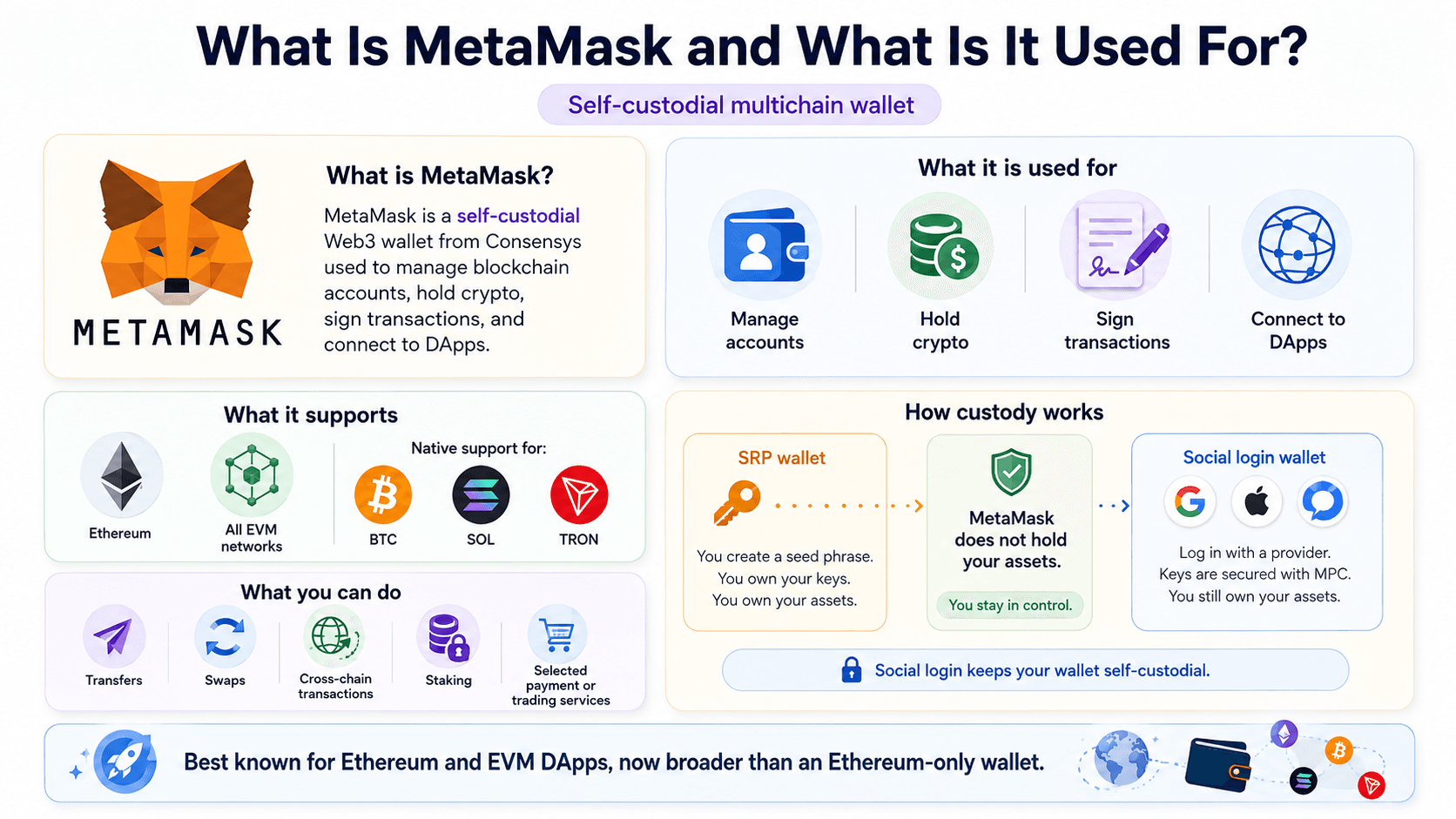 MetaMask Combines Self-Custody With Multichain Support, DApp Access, Transfers, Swaps, Staking, and Other Wallet Services
How MetaMask Custody Works
MetaMask is self-custodial, so Consensys does not hold user assets or possess the signing authority needed to move funds from an ordinary wallet. Transactions are authorized through the key infrastructure associated with each wallet address.
Traditional wallets can still use a Secret Recovery Phrase, or SRP, as their main backup and recovery mechanism. MetaMask also offers social-login wallet creation using Google, Apple or Telegram together with a separate MetaMask password. The SRP remains encrypted, while MetaMask's architecture uses distributed key-management techniques including Shamir Secret Sharing.
Social login changes how setup and recovery work, but it does not turn MetaMask into a custodial exchange account. A complete recovery phrase is reconstructed on the user's device after successful authentication, and MetaMask cannot simply reset the wallet if the credentials required by the selected recovery method are lost.
Readers comparing wallet custody models can also see our custodial vs non-custodial wallets guide for a broader breakdown of control, recovery and counterparty risk.
Which Networks and Crypto Assets Does MetaMask Support?
| Network Type | Examples | Native or Extended? | Main Capabilities |
|---|---|---|---|
| EVM | Ethereum, Arbitrum, Base, Optimism, Polygon, BNB Smart Chain | Native EVM support | Tokens, NFTs, DApps, smart contracts |
| Bitcoin | Bitcoin | Native | BTC accounts, send, receive, buy and swaps |
| Solana | Solana | Native | SOL, SPL tokens, DApps and swaps |
| TRON | TRON | Native | TRX, TRC-20 assets, swaps and staking |
| Snap networks | XRP Ledger, Cosmos, Polkadot, Sui and others | Extended | Capabilities depend on the Snap |
Ethereum and EVM Networks
Ethereum remains MetaMask's strongest ecosystem. The wallet works with ETH, ERC-20 tokens and NFT standards including ERC-721 and ERC-1155, while its long-standing EVM integration gives it extensive compatibility with smart contracts and DApps.
Major Layer 2 networks and EVM-compatible chains such as Arbitrum, Base, Optimism, Polygon and BNB Smart Chain fit within the same EVM-oriented account environment. MetaMask also supports custom RPC endpoints, allowing compatible networks to be added even when they are not prominently displayed among the preconfigured choices.
An RPC, or remote procedure call endpoint, connects the wallet interface with blockchain infrastructure. Custom RPCs increase flexibility for advanced EVM users, although replacing MetaMask's default infrastructure can affect features such as Smart Transactions and associated MEV protection.
Native Bitcoin, Solana and TRON Support
Bitcoin: MetaMask now creates a native Bitcoin account and address, so standard BTC use no longer requires a Bitcoin Snap. Users can send, receive, buy and swap Bitcoin through supported routes. Current Bitcoin support uses Native SegWit, and imported Bitcoin accounts must use the supported Native SegWit address structure.
Solana: MetaMask also supports Solana natively rather than through a Snap. Each multichain account receives a separate Solana address and can manage SOL and SPL tokens, interact with supported Solana DApps and use available swap or cross-chain routes. MetaMask's Solana implementation currently uses Infura infrastructure and does not support custom Solana RPC endpoints.
TRON: Native TRON support covers TRX, USDT and other TRC-20 assets, transfers and supported swaps. TRX staking is available through MetaMask Mobile, while unstaking normally carries an approximately 14-day TRON unlocking period. Direct TRON DApp connectivity is not currently available, so native asset support does not yet provide complete parity with Ethereum or Solana DApp workflows.
MetaMask's multichain account model manages several fundamentally different blockchain address types. An EVM address, Bitcoin address and Solana address remain technically distinct even when MetaMask groups them within one account experience.
MetaMask Snaps and Other Networks
MetaMask Snaps are third-party modules that extend the browser wallet with additional networks or functions. Current interoperability options include Snap-based access for ecosystems such as XRP Ledger, Cosmos, Polkadot and Sui, along with networks including Algorand, NEAR, Filecoin, Hedera and Tezos.
Snaps operate with requested permissions and are generally developed by third parties rather than MetaMask itself. Their sandboxed architecture limits certain forms of access, but installing a Snap still introduces an additional software and permission trust surface. Bitcoin, Solana and TRON should no longer be grouped under Snaps when discussing ordinary MetaMask network support because those ecosystems now have native integrations.
Is MetaMask Safe?
MetaMask is a legitimate self-custodial wallet, but safe use depends heavily on protecting recovery credentials and understanding what each transaction, signature or permission authorizes. Its security stack can block or flag many suspicious interactions, but it cannot guarantee that every transaction a user approves is harmless.
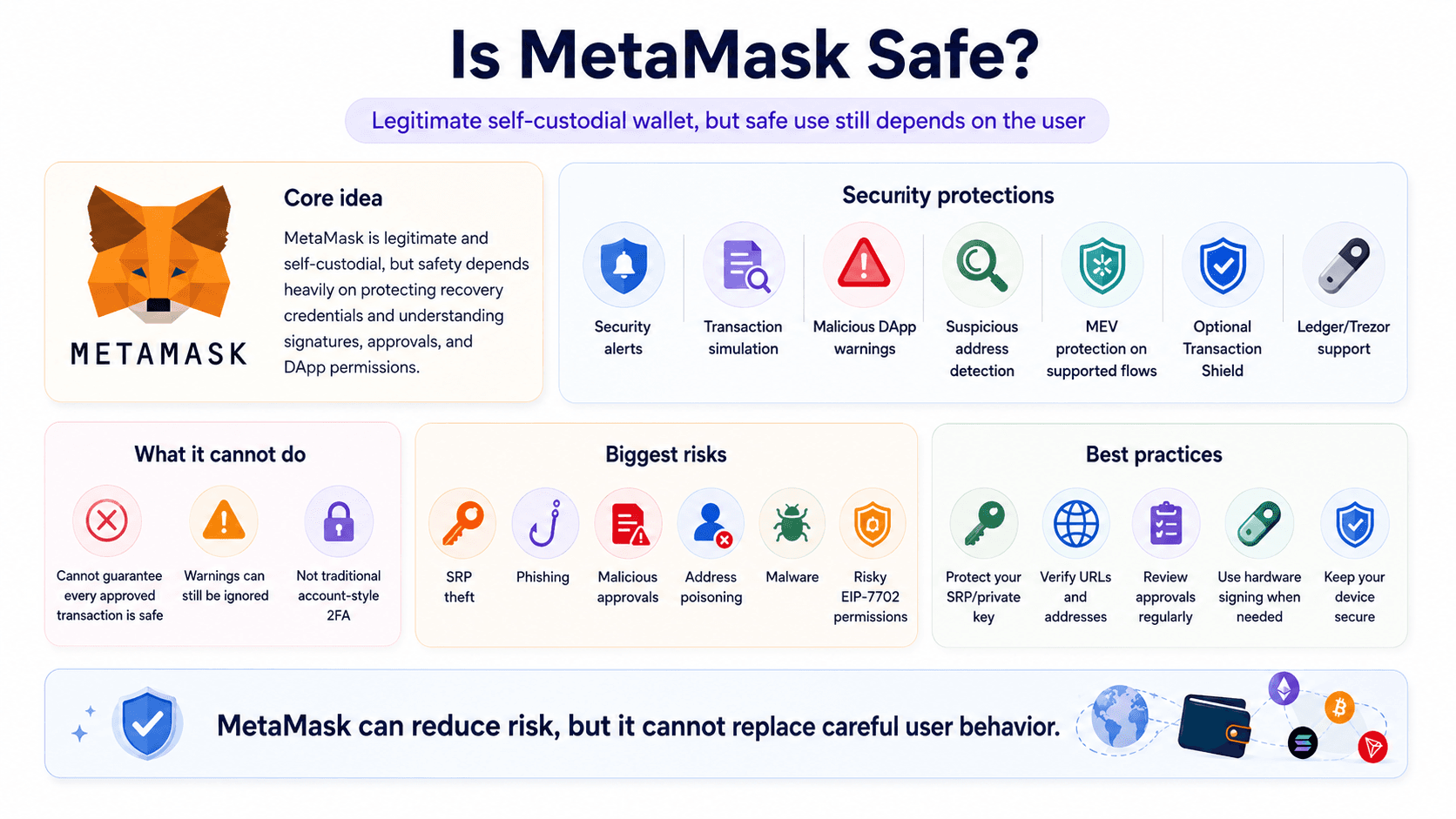 MetaMask Uses Security Tools and Transaction Warnings While Users Remain Responsible for Keys, Approvals, and Recovery Credentials
Private Keys, Passwords and Recovery
A private key authorizes transactions from a blockchain account, while a Secret Recovery Phrase can restore the accounts derived from a traditional MetaMask wallet. The ordinary MetaMask password protects access to locally encrypted wallet data on a device and should not be confused with the underlying private keys.
Social-login wallets change that relationship. Google, Apple or Telegram authentication works with the MetaMask password and MetaMask's distributed recovery architecture, so the password becomes an important component of wallet restoration. Biometrics can simplify device access, but they do not remove the underlying key and recovery requirements.
MetaMask cannot recover a conventional SRP merely because a local wallet password is known. Exposing an SRP or private key is more serious than losing a device password because anyone possessing the relevant key material can potentially recreate the account elsewhere.
Transaction Warnings and Scam Protection
MetaMask's security alerts are enabled by default and use transaction analysis, security intelligence and partners including Blockaid. The system can warn about malicious DApps, suspicious addresses, harmful signatures and dangerous token approvals, while supported transactions can be simulated before signing.
Protection also extends to address poisoning, where an attacker attempts to place a visually similar wallet address into transaction history and relies on the victim copying it later. MetaMask can identify suspicious address patterns and display a blocking warning before a transfer proceeds.
Smart Transactions provide additional execution tooling on supported EVM networks, including transaction monitoring and MEV protection under compatible configurations. These controls reduce several common wallet risks, but warnings can still be ignored and sophisticated malicious contracts may evade automated detection.
MetaMask Transaction Shield
MetaMask Transaction Shield is an optional paid protection product available through MetaMask Extension. As of Aug. 26, 2026, the subscription costs $9.99 per month or $99 per year, includes a 14-day trial and can reimburse up to $10,000 of eligible asset losses per month across up to 100 covered transactions.
Qualifying protection can apply to supported DApp interactions, DeFi activity, NFT transactions, airdrop claims, signatures and batched transactions on eligible EVM networks. Coverage depends on the transaction being classified as protected under the service terms.
Transaction Shield is not general crypto insurance. Losses linked to exposed SRPs or private keys, malware, market movements and unsupported transactions can fall outside reimbursement, as can losses involving certain protocol failures. The protection boundary should be checked before treating a transaction as covered.
Hardware Wallets and the Lack of Traditional 2FA
MetaMask can connect to supported hardware wallets including Ledger and Trezor. Hardware signing keeps the relevant private key on a dedicated device and requires physical confirmation before an authorized transaction leaves the wallet.
Traditional account-style two-factor authentication, or 2FA, does not translate neatly to a standard self-custodial wallet because there is no central account operator that can demand a second server-side credential before a blockchain accepts a valid signature. A hardware wallet adds physical signing separation, but it should not be described as conventional 2FA.
Hardware wallets also do not eliminate malicious transaction risk. If a harmful approval is presented and confirmed on the device, a valid Ledger or Trezor signature can still authorize the contract.
Hardware signing reduces online key exposure, but it does not remove phishing or malicious-transaction risk. Our guide to hardware wallet security threats covers blind signing, recovery-phrase theft, address manipulation and compromised devices in more detail.
The Biggest MetaMask Security Risks
| Risk | Can MetaMask Help? | User Action |
|---|---|---|
| SRP theft | Limited | Move funds to a new wallet |
| Phishing | Warnings can help | Verify URL |
| Malicious approval | Simulation/warnings can help | Inspect and revoke |
| Address poisoning | Detection can help | Verify full address |
| Malware | Limited | Secure device |
| Malicious EIP-7702 permission | Permission controls can help | Inspect and revoke |
Token allowances and programmable permissions should be reviewed periodically, especially after interacting with unfamiliar DApps.
Anyone assessing wallet security in more depth should also read our MetaMask safety guide, which examines phishing, wallet drainers, compromised credentials and other attack paths in greater detail.
How Do MetaMask Smart Accounts Work?
MetaMask Smart Accounts add programmable functions without changing the wallet address, transferring existing funds or replacing the underlying private keys. EIP-7702 allows a standard account to delegate execution to compatible smart-contract code while keeping the same account identity.
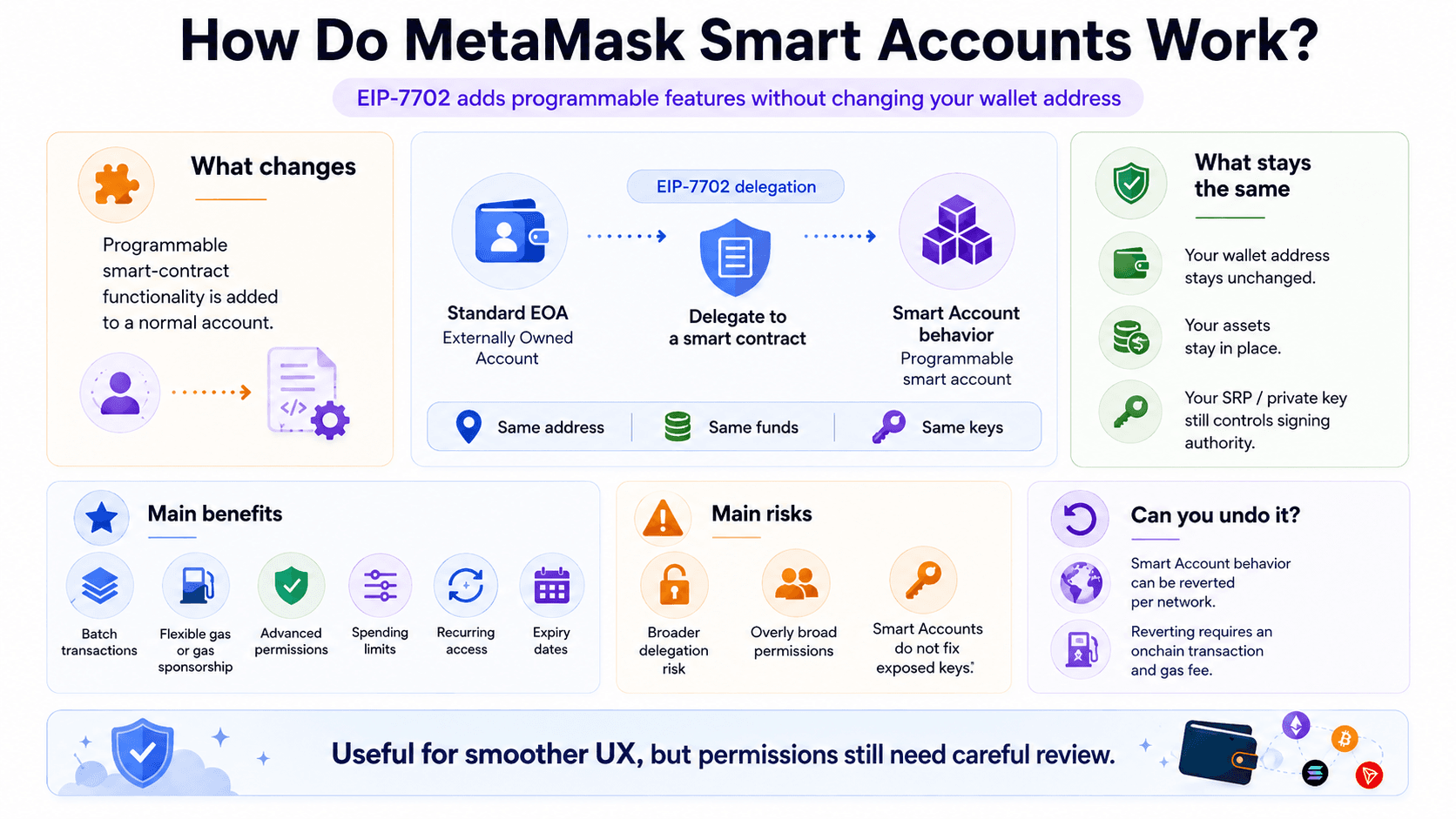 MetaMask Smart Accounts Use EIP-7702 to Add Batching, Flexible Gas, and Programmable Permissions Without Changing Wallet Addresses
EIP-7702 Without Changing Your Wallet Address
A conventional externally owned account, or EOA, is controlled directly by its private key. MetaMask's Smart Account implementation uses EIP-7702 together with the MetaMask Delegation Framework and Delegator contract architecture to add smart-contract behavior to an EOA.
The wallet address remains unchanged, funds stay where they are and the same underlying SRP or private key continues to control signing authority. MetaMask automatically enables Smart Account functionality for new users where the feature is supported, while existing accounts can enable it separately by network.
Batching, Gas Sponsorship and Advanced Permissions
Smart Accounts can combine actions into a batch transaction. A user can, for example, approve a token and execute a swap as part of a coordinated flow rather than confirming each operation independently.
Supported transactions can also use flexible gas arrangements, including sponsored network fees where available. MetaMask's advanced permissions use standards including ERC-7715 to let compatible DApps request scoped authority with spending limits, recurring access or expiration dates.
A permission can therefore authorize a defined amount of a particular token for a specified period rather than granting unrestricted authority. Support depends on the DApp and network, and permission requests still require careful review before approval.
Smart Account Risks and How to Revert
EIP-7702 expands what an account can authorize, so compromised or overly broad delegations create another attack surface. Smart Accounts do not replace private-key security and do not protect an account whose SRP or private key has already been exposed.
MetaMask allows users to revert a Smart Account to standard EOA behavior on supported networks. Reverting happens separately for each network and requires an onchain transaction, which means a gas fee applies. Enabling Smart Account behavior again also requires an onchain action.
Programmable permissions can improve usability and reduce repetitive signing, but Smart Accounts should not automatically be treated as safer than standard accounts. Their risk profile includes the underlying keys, delegated permissions and the smart-contract framework providing the additional functions.
What Can You Do With MetaMask?
MetaMask now covers a much larger portion of an onchain financial workflow than ordinary storage and DApp signing. Several newer services involve third-party protocols, geographic restrictions or additional financial risk, so availability and custody boundaries vary by feature.
| Feature | Available? | Main Caveat |
|---|---|---|
| DApps | Yes | Self-custody risks remain |
| Swaps | Yes | MetaMask service fee |
| Cross-chain swaps | Yes | Route and network dependent |
| ETH staking | Yes | Fees vary by product |
| Perps | Yes | Leveraged trading risk |
| RWAs | Yes | Jurisdiction restrictions |
| Card | Yes | Region restrictions and fees |
| Money Account | Yes | Yield and product risks |
| Rewards | Program available | No live campaign as of Aug. 26, 2026 |
Swaps and Cross-Chain Swaps
MetaMask Swaps aggregates quotes from decentralized exchanges and liquidity providers rather than maintaining a single liquidity pool. Its swap service supports same-chain and cross-chain transactions, with bridge routing sourced through aggregators including LI.FI and Socket and providers such as Across, Stargate, CCTP and others.
MetaMask charges a 0.875% service fee on swaps as of Aug. 26, 2026. The fee is separate from blockchain gas, pool charges, price impact and slippage. Some supported transactions can include gas in the quoted route or use gasless flows, but those options depend on the network and transaction.
Keeping discovery, quoting and execution within the wallet is convenient, particularly for smaller or occasional transactions. Direct DEX and aggregator access can carry a lower interface cost for larger swaps, so the amount ultimately received deserves comparison before confirming a trade.
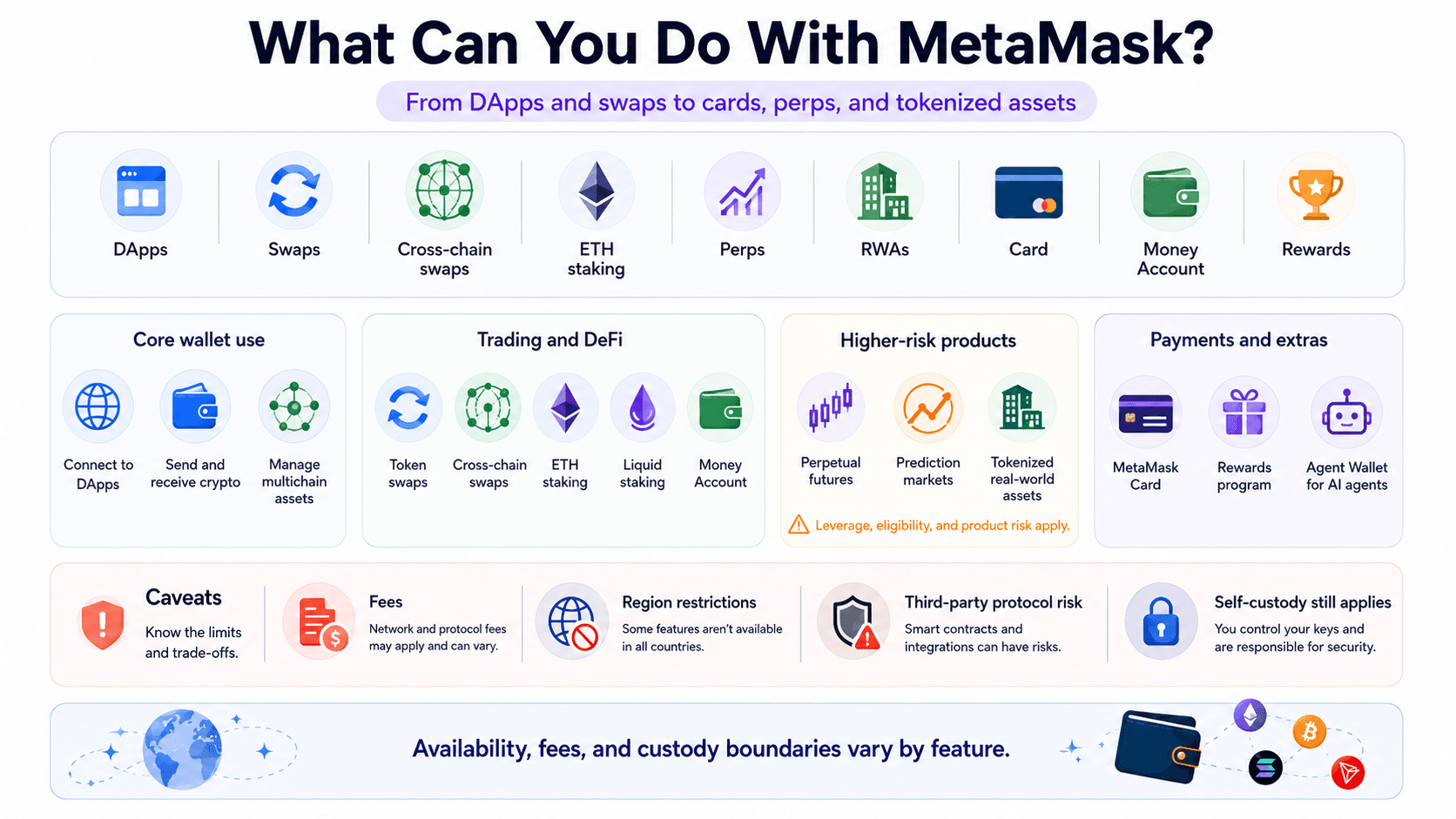 MetaMask Supports DApps, Swaps, Staking, Perps, Tokenized Assets, Payments, Rewards, and Other Onchain Financial Tools
Staking and MetaMask Money Account
MetaMask provides pooled ETH staking, validator staking and access to liquid staking through providers including Lido and Rocket Pool.
As og Aug. 26, 2026, MetaMask pooled staking charges 15% of staking rewards, leaving users with 85% of the Ethereum rewards attributed to their stake after MetaMask's fee. Validator staking uses 32 ETH per validator and carries a 10% fee on validator rewards. Liquid-staking providers have their own protocol economics and smart-contract risks, which should be assessed separately from MetaMask's fees.
MetaMask Money Account uses mUSD on Monad to provide a self-custodial yield product through MetaMask Mobile 8.0 and above. The Money Account advertises an ordinary variable rate of up to 4% APY, as of Aug. 26, 2026, with a promotional rate of approximately 6% APY through Sept. 30, 2026. MetaMask states that the account has no lockup, withdrawal penalty or account fee.
Availability excludes the UK and US-sanctioned jurisdictions. Yield is variable and not guaranteed.
Perps, Prediction Markets and Tokenized Real-World Assets
Perpetual futures: MetaMask's perps interface is powered by Hyperliquid.
As of Aug. 26, 2026, MetaMask offers more than 150 contracts through Extension and Mobile, with leverage varying by market and reaching up to 40x on BTC. Baseline Rewards Levels 1 to 3 pay 0.1432% taker fees and 0.1144% maker fees, plus a $1 withdrawal fee, according to the current MetaMask perps schedule. Access excludes jurisdictions including the US, UK, Ontario and Belgium.
Perpetual futures can liquidate a leveraged position when collateral becomes insufficient. Funding rates, execution conditions and rapid market moves can therefore produce losses far larger than an ordinary unleveraged spot trade.
Prediction markets: MetaMask Mobile provides access to markets powered by Polymarket.
As of Aug. 26, 2026, MetaMask charges a 4% fixed transaction fee, while Polymarket can add a taker fee between 0% and 7%, depending on the market and order. Prediction-market access is unavailable in several jurisdictions, including the US, UK, France, Canada, Germany and Australia.
Tokenized real-world assets: MetaMask provides eligible users with access to tokenized stocks, ETFs and other RWAs through Ondo Stocks, formerly Ondo Global Markets. Ondo's broader catalog now includes 470+ tokenized assets spanning stocks, ETFs, commodities, treasuries and other exposures, according to MetaMask's Ondo Stocks overview.
As of Aug. 26, 2026, MetaMask's RWA trading service has a $5 minimum transaction and charges a 0.875% MetaMask fee, with geographic restrictions covering the US, UK, EEA and several other markets. Quoted trading generally follows a 24/5 schedule.
MetaMask Card and Rewards
MetaMask Card is a Mastercard debit product that lets eligible users designate supported crypto for everyday spending. Funds remain in the self-custodial wallet until a transaction settles, when the selected crypto is converted for payment to the merchant.
The Free tier costs $0 per year, while the Metal tier costs $199 annually. Current MetaMask Card fees and limits set Free-tier limits at $10,000 per transaction and $15,000 per day, while Metal lists $20,000 per transaction and $30,000 per day. Free ATM withdrawals carry a 2% MetaMask fee; Metal waives that fee for the first $1,200 of ATM withdrawals per month, after which 2% applies. The published cross-border fee is 1% for Free and 0% for Metal, subject to the stated fair-use terms.
Conversion costs vary by asset. Certain supported stablecoin spending can avoid an additional conversion fee under specified conditions, while assets such as wETH carry a 0.875% conversion fee. Card networks currently include Linea, Solana, Base and Monad.
New Card sign-ups are temporarily paused in the US and UK, while existing cards remain usable. New Metal card orders are also temporarily paused.
MetaMask Rewards is an opt-in loyalty program built around levels, ongoing benefits and time-limited campaigns. As of Aug. 26, 2026, MetaMask has no live Rewards campaign, while Money Sweepstakes is listed as upcoming on its campaign page. Previous activity types have included swaps, perps, predictions and RWA trading, but eligibility changes between campaigns.
Rewards points or benefits should only be assumed when the current program terms confirm them. Speculation around a MetaMask token or airdrop is not a confirmed Rewards feature.
MetaMask Agent Wallet
MetaMask Agent Wallet is a separate self-custodial product designed for AI agents that can perform autonomous blockchain transactions within defined controls. Spending limits, protocol allowlists, transaction simulation and permission policies can restrict what an agent is authorized to do.
Consensys launched MetaMask Agent Wallet on Aug. 6, 2026, although current access remains Early Access and CLI-first rather than part of the ordinary retail wallet flow. Agentic transactions introduce separate risks around prompt injection, faulty automation and excessively broad permissions.
How Much Does MetaMask Cost?
MetaMask is free to install, but several integrated services have separate charges on top of network or protocol costs. The percentage-based Swaps fee is particularly important because its dollar cost rises directly with transaction size.
| Service | Cost as of Aug. 26, 2026 |
|---|---|
| Wallet installation | $0 |
| MetaMask Swaps | 0.875% |
| Pooled ETH staking | 15% of staking rewards |
| Validator staking | 10% of staking rewards |
| Transaction Shield | $9.99/month or $99/year |
| Card Free tier | $0/year |
| Card Metal tier | $199/year |
| Tokenized RWA trades | 0.875% MetaMask fee |
| Perps | 0.1144% maker / 0.1432% taker at baseline levels |
| Predictions | 4% fixed fee plus variable taker fee |
MetaMask Swap Fees
A MetaMask swap can contain several separate costs. MetaMask charges its own 0.875% service fee, while the blockchain can charge gas and the execution route can include DEX or pool fees, slippage and price impact.
MetaMask Staking Fees
MetaMask Pooled Staking takes 15% of generated staking rewards, while validator staking carries a 10% fee on validator rewards. The validator charge is deducted when rewards are claimed, and MetaMask's displayed validator reward figures are shown after the service fee.
What Does MetaMask Actually Cost at Different Transaction Sizes?
The 0.875% Swaps fee produces a simple cost curve before gas and execution effects are added.
| Swap Size | MetaMask 0.875% Fee |
|---|---|
| $100 | $0.88 |
| $1,000 | $8.75 |
| $5,000 | $43.75 |
| $10,000 | $87.50 |
An occasional $100 swap costs less than $1 in MetaMask service fees, which can be reasonable when convenience carries more weight than minimizing every charge. Frequent DeFi users pay the percentage repeatedly, while larger traders can incur tens of dollars on a single swap before gas, pool costs and slippage are counted.
At $10,000, MetaMask's own charge reaches $87.50. Traders operating at those sizes should compare direct DEX and aggregator quotes rather than treating an in-wallet route as the default.
What MetaMask Is Like to Use?
MetaMask Extension and Mobile cover many of the same wallet functions, but the feature sets are not identical. Desktop remains particularly suited to browser DApps and advanced EVM workflows, while several newer consumer financial services are centered on Mobile.
| Area | Browser Extension | Mobile App |
|---|---|---|
| DApp workflows | Strong for desktop DApps | Integrated mobile DApp access |
| Desktop signing | Strong | Not the primary workflow |
| Portfolio views | Yes | Yes |
| NFTs | Yes | Yes |
| Advanced EVM settings | Strong | Available |
| Native BTC and SOL | Yes | Yes |
| Snaps | Yes | No |
| TRX staking | No | Yes |
| Money Account | No | Yes |
| MetaMask Card | Via Portfolio/web dashboard | Native signup and funding |
| Hardware-wallet workflow | Broader support | Device-dependent |
Browser Extension vs Mobile App
MetaMask Extension is available for major browsers including Chrome, Firefox, Brave and Edge. It remains the more flexible environment for desktop DApp sessions, custom RPC configuration, Snaps and hardware-wallet interaction.
The iOS and Android apps cover ordinary asset management, NFTs and mobile DApp workflows while hosting newer products such as Money Account and TRX staking. Native multichain functionality has reduced the gap between Extension and Mobile for basic Bitcoin, Solana and EVM asset management, but platform-specific features remain.
The interface now contains considerably more functionality than a wallet designed only around balances, sends and receives. Active users gain more services without leaving MetaMask, while users seeking a sparse wallet may find the additional trading, Rewards and financial menus unnecessary.
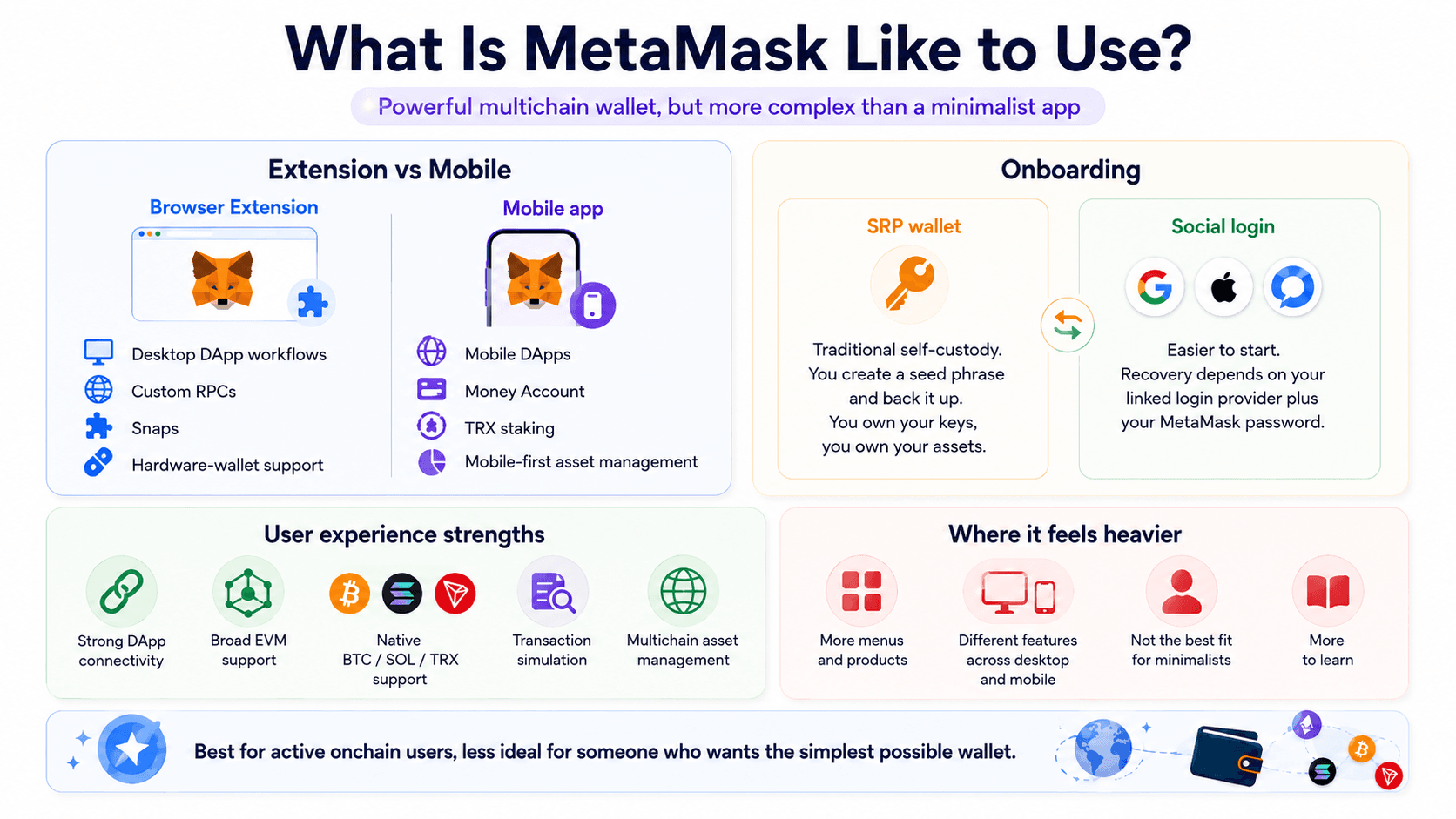 MetaMask Offers Different Browser and Mobile Experiences With Strong DApp Connectivity and an Increasingly Feature-Rich Interface
Setting Up MetaMask: SRP vs Social Login
MetaMask supports two distinct onboarding routes for a new wallet.
| Setup Method | Recovery Dependency | Best Fit |
|---|---|---|
| Secret Recovery Phrase | SRP | Traditional self-custody users |
| Google/Apple/Telegram login | Linked login + MetaMask password | Users prioritizing simpler onboarding |
A traditional SRP wallet relies on the recovery phrase as the critical backup. Anyone obtaining that phrase can potentially restore the wallet, so offline protection against both theft and loss remains essential.
The social-login route avoids requiring a manual seed-phrase backup during initial setup. The underlying SRP still exists in encrypted form, while the linked login and MetaMask password are needed to reconstruct the required recovery material on the user's device.
Existing wallets retain the recovery model associated with how they were created or imported. Social login therefore improves seed-light onboarding without converting every older MetaMask account into a conventional online account with a password-reset process.
DApp Connectivity and Multichain UX
DApp connectivity remains one of MetaMask's strongest areas. Ethereum and EVM applications widely support MetaMask connections, while network switching and custom RPCs give advanced users considerable flexibility across Layer 1 and Layer 2 environments.
The multichain account model also reduces the need to keep a separate wallet simply to hold BTC, SOL or TRX. Those networks still have different addresses, gas systems and DApp capabilities, so one interface does not remove the underlying technical differences.
Transaction simulation, security alerts and improved approval screens have increased the amount of information available before signing. Rabby still places stronger emphasis on EVM transaction previews and balance-change information, which can be useful for users who value transaction clarity more than MetaMask's wider product range.
Readers comparing MetaMask with other wallets built for onchain activity can also see our best DeFi wallets guide.
MetaMask vs Other Crypto Wallets
MetaMask now competes with specialized EVM wallets, broad multichain wallets, Solana-focused products and hardware devices. The strongest alternative changes according to whether the priority is transaction analysis, chain coverage, simple onboarding or offline private-key storage.
| Wallet | Best For | Where It Beats MetaMask | Where MetaMask Is Stronger |
|---|---|---|---|
| Rabby | EVM power users | Transaction UX and risk previews | Ecosystem compatibility and product breadth |
| Phantom | Solana-first users | Solana-native UX | EVM heritage and Smart Account ecosystem |
| Trust Wallet | Broad multichain simplicity | Chain breadth and simple mobile use | DApp and EVM tooling |
| Base App | Coinbase/Base ecosystem | Onboarding and ecosystem integration | Advanced EVM flexibility |
| Ledger / Trezor | Long-term storage | Offline key protection | Daily DApp usability |
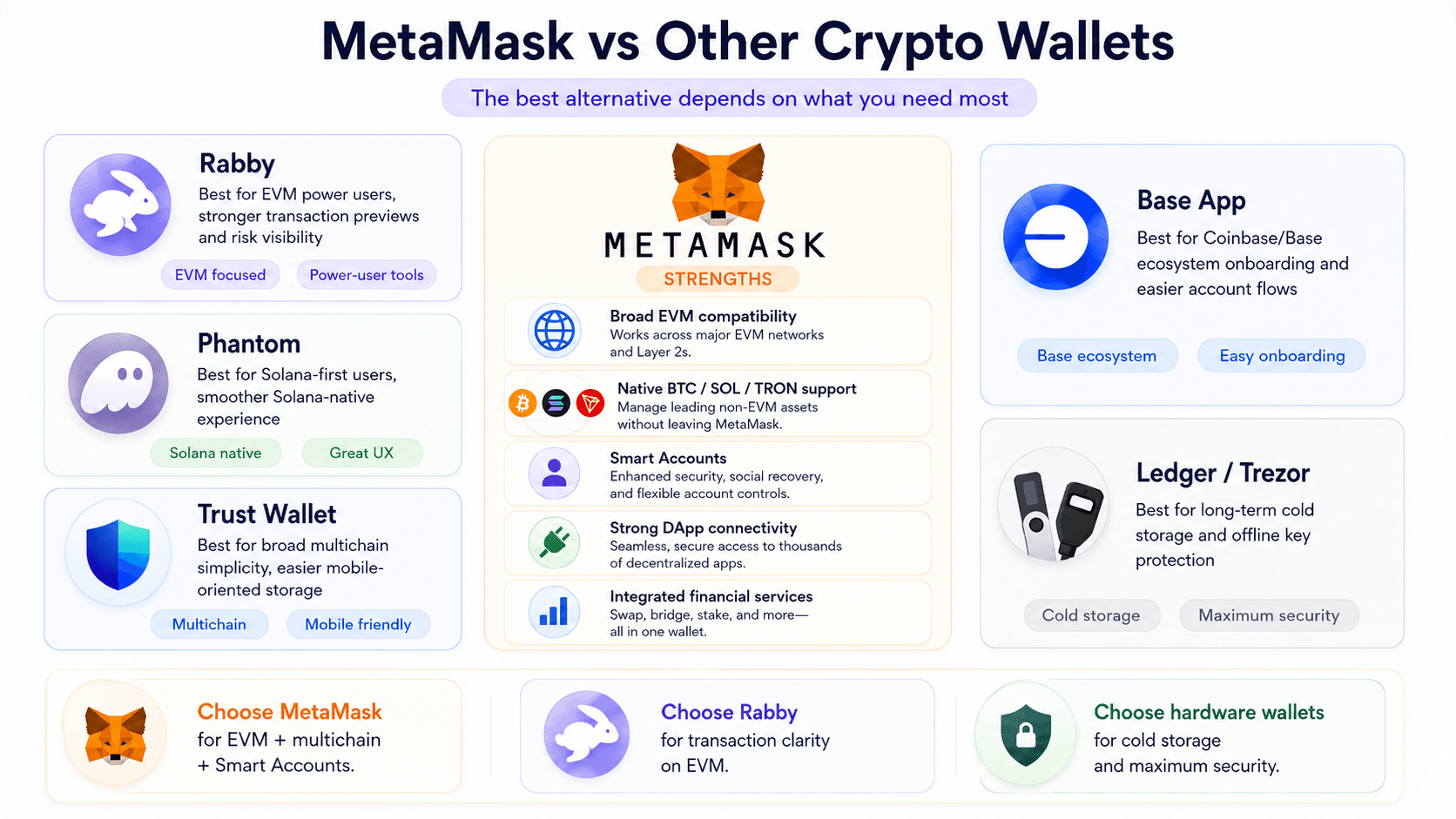 MetaMask Competes With Rabby, Phantom, Trust Wallet, Base App, and Hardware Wallets Across Security and Usability
MetaMask vs Rabby
Rabby is one of MetaMask's strongest direct alternatives for active EVM users. Both wallets connect to Ethereum and EVM DApps, support swaps and work with hardware-wallet setups, but their interfaces emphasize different parts of the transaction process.
Rabby places transaction simulation, balance-change previews, automatic chain handling and pre-signing warnings prominently in the EVM workflow. MetaMask also simulates transactions and provides risk warnings, although its current interface carries a broader set of products and network types.
Network breadth increasingly separates the two. Rabby remains centered on Ethereum and EVM-compatible networks, while MetaMask now manages native Bitcoin, Solana and TRON accounts alongside EVM chains. MetaMask also exposes first-party EIP-7702 Smart Account functionality and ERC-7715 advanced permissions through its Delegation Framework.
Hardware-wallet users can operate either wallet with compatible devices, and both are viable interfaces for regular EVM DeFi. Rabby's narrower focus produces a transaction-oriented experience, while MetaMask covers a much larger collection of networks and financial services.
Choose MetaMask if native Bitcoin, Solana and TRON support, broad EVM compatibility, Smart Accounts and integrated financial services are useful within one wallet.
Choose Rabby if most activity stays on EVM networks and transaction simulation, balance-change previews and a focused DeFi signing workflow carry more weight than native non-EVM support.
Other MetaMask Alternatives at a Glance
Phantom remains particularly well suited to Solana-first users. although it has also expanded into Bitcoin and several EVM networks. MetaMask offers broader custom EVM flexibility and a more developed Smart Account strategy.
Trust Wallet suits users who want broad multichain storage and a mobile-oriented interface. Its coverage spans more than 100 blockchain networks through supported products, while MetaMask offers deeper custom EVM configuration and more advanced account-permission tooling.
Base App, the current Coinbase consumer wallet product, favors Coinbase-linked onboarding and the Base ecosystem. MetaMask offers more flexibility across unrelated EVM networks and a wider range of established DApp connections.
Ledger and Trezor address a different priority: cold storage. Keeping private keys on dedicated hardware reduces exposure to ordinary browser and mobile compromise. Either can complement MetaMask for hardware-backed signing.
Is MetaMask Worth Using in 2026?
MetaMask remains one of the strongest choices for active self-custody users who need broad DApp compatibility and increasingly broad multichain support. It is less compelling for users primarily seeking cold storage, the lowest possible trading costs or an ultra-simple wallet.
Native Bitcoin, Solana and TRON accounts have removed several important network gaps, while transaction warnings and Smart Accounts have improved how permissions and complex transactions can be handled. Those improvements arrive alongside a larger collection of trading and financial services that users need to evaluate separately rather than assuming every feature carries the same risk.
MetaMask Is Best For
- Active Ethereum and EVM users: Ethereum, Layer 2 networks, custom RPCs and EVM smart contracts remain among MetaMask's strongest areas.
- Users interacting frequently with DApps: DeFi, NFT, governance and other onchain applications have extensive MetaMask compatibility.
- Multichain users holding BTC, SOL and TRON: Native non-EVM support reduces the need for separate wallets for basic asset management.
- Users pairing software with hardware signing: Ledger and Trezor can keep keys on dedicated hardware while MetaMask provides the DApp interface.
- Power users exploring Smart Accounts: EIP-7702 batching and scoped permissions provide programmable account functions without changing the underlying address.
MetaMask Is Not Ideal For
- Users seeking long-term cold storage only: A dedicated hardware wallet keeps private keys separated from an internet-connected hot-wallet environment.
- Frequent traders minimizing service fees: MetaMask's 0.875% swap charge reaches $87.50 on a $10,000 transaction before gas and execution costs.
- Users who want a minimal wallet: Perps, predictions, staking, RWAs, Card, Rewards and Smart Accounts create a much denser product than a basic send-and-receive wallet.
- Users who do not need self-custody or onchain applications: A centralized exchange can provide account-based custody and recovery, although that replaces self-custody risk with exchange counterparty and withdrawal risk.

Closing Thoughts
MetaMask's 2026 proposition combines broad DApp compatibility, self-custody, native multichain support and increasingly integrated financial tools. Ethereum remains its deepest ecosystem, while Bitcoin, Solana and TRON have expanded the wallet far beyond its original EVM-centered role.
The trade-offs are increasing complexity, meaningful service fees and a larger set of permissions and financial products to understand. MetaMask remains highly capable for active onchain users, while cold storage, minimal wallet management and cost-sensitive high-volume trading are better served by more specialized alternatives.