You do not need to spend hundreds of dollars to get a capable hardware wallet. Several strong options cost less than $100, including the SafePal S1, Trezor Safe 3 and Ledger Nano S Plus, while Tangem suits mobile-first users and Blockstream Jade is geared toward Bitcoin holders.
Budget hardware wallets vary in screen design, connectivity, recovery methods, open-source components, mobile support and transaction verification.
Editor's Note (Sept. 22, 2026): We fully updated this article in September 2026 to reflect the current budget hardware wallet market. The refresh includes new wallet picks, updated pricing and availability, expanded security and recovery comparisons, clearer guidance on connectivity and transaction verification, and a revised methodology focused on hardware wallets priced at $100 or less.
Best Cheap Hardware Wallets (Under $100): Quick Answer
SafePal S1 is our lowest-cost hardware wallet pick for 2026 at $49.99. Trezor Safe 3 is a stronger fit for users prioritizing open-source design and flexible recovery, Ledger Nano S Plus suits broad multichain portfolios, Tangem is built around mobile and NFC convenience, and Blockstream Jade Core is our Bitcoin-focused choice.
Best Cheap Hardware Wallets by Use Case
-
SafePal S1: Best for the lowest price Costs $49.99 and combines a color screen, QR-based transaction signing, a CC EAL6+ Secure Element and broad multichain support.
-
Trezor Safe 3: Best for open-source security and recovery Combines an EAL6+ Secure Element with open-source architecture, on-device confirmation and flexible BIP39 and SLIP39 recovery options.
-
Ledger Nano S Plus: Best for broad crypto support A strong choice for multichain portfolios thanks to Ledger's extensive blockchain support and wide range of third-party wallet integrations.
-
Tangem Wallet: Best for mobile and NFC users Uses credit-card-sized NFC hardware with no battery or cable and works with compatible iPhone and Android devices.
-
Blockstream Jade Core: Best for Bitcoin A $99 Bitcoin-focused wallet with a fully open-source design, 1.9-inch color display, USB-C and Bluetooth connectivity.
-
Price should not be the only deciding factor Recovery design, transaction verification, device compatibility and connectivity usually create bigger practical differences than the headline price.
Disclaimer
Hardware wallets reduce private-key exposure but cannot eliminate every security risk. Users remain responsible for protecting recovery credentials, verifying transaction details and avoiding phishing, malicious applications and compromised recovery workflows.
Disclosure
Some links in this guide may be affiliate links. If you purchase a hardware wallet through these links, we may earn a commission at no additional cost to you.
Best Cheap Hardware Wallets (Under $100) At a Glance
The best cheap hardware wallets now cover several very different approaches to self-custody, from QR-based signing and USB devices to NFC cards.
- SafePal S1 is the cheapest option
- Trezor Safe 3 is the strongest fit for buyers prioritizing open-source design and flexible recovery
- Ledger Nano S Plus suits broad multichain use
- Tangem is our mobile/NFC pick
- Blockstream Jade Core is our Bitcoin-focused choice
| Wallet | Price* | Best For | Screen | Connection | Backup | Secure Element / Key Protection | Mobile | Main Trade-Off |
|---|---|---|---|---|---|---|---|---|
| SafePal S1 | $49.99 | Lowest-cost all-round pick | 1.3-inch color screen | QR codes | Recovery phrase | CC EAL6+ Secure Element, PIN, passphrase and anti-tampering protections | iOS and Android through SafePal App | Small screen and QR-based workflow may feel slower than USB or NFC alternatives |
| Trezor Safe 3 | $59 | Open-source design and flexible recovery | 0.96-inch monochrome OLED | USB-C | BIP39-compatible and SLIP39 backups | EAL6+ Secure Element combined with Trezor's open-source architecture | Android support, limited iPhone device management | No Bluetooth or NFC, and the display is relatively small |
| Ledger Nano S Plus | €40.83 | Broad multichain support | 128 × 64 monochrome OLED | USB-C | Recovery phrase | CC EAL6+ Secure Element with Ledger OS and on-device confirmation | Android, but not iPhone | No Bluetooth and no iPhone support |
| Tangem Wallet | $59.90 for 2 cards | Mobile and NFC users | None | NFC | Additional Tangem cards, with optional seed-phrase setup | Secure chip keeps private keys on the card | iOS and Android | No dedicated screen for independently checking transaction details |
| Blockstream Jade Core | $99 | Bitcoin-focused users | 1.9-inch color display | USB-C and Bluetooth | Recovery phrase | Open-source architecture with Blockstream's Jade security model | iOS and Android via Bluetooth, Android via USB | Bitcoin-focused, with much less multichain utility than the other picks |
*Prices checked Sept. 22, 2026. Manufacturer prices are shown before applicable tax, duty or shipping unless otherwise stated. SafePal lists the S1 at $49.99 and explicitly excludes VAT and duty, while Tangem lists its two-card pack at $59.90 and notes that taxes and duties are not included.
How We Chose the Best Cheap Hardware Wallets (Methodology)
Price alone does not make a good budget hardware wallet. We focused on devices that stay affordable without compromising the core requirements of self-custody: secure key storage, reliable recovery and clear transaction signing.
Our Definition of a Cheap Hardware Wallet
For this guide, a cheap hardware wallet must cost $100 or less at regular manufacturer pricing. Temporary discounts do not qualify a normally $150-$200 device.
Shipping, VAT, import duties and optional accessories are excluded from the headline price. We also only include hardware wallets that are available to buy as of Sept. 22, 2026, rather than discontinued models that remain supported for existing owners.
What We Evaluate
We compare each wallet across six areas:
- Security architecture: Where private keys are generated and stored, Secure Element design, firmware approach, PIN and passphrase protection, and physical transaction confirmation.
- Recovery: BIP39, SLIP39 or card-based backups, recovery redundancy and what happens if the device or backup is lost.
- Transaction verification: Whether the wallet has a screen, what users can verify before signing and whether blind signing is required in some workflows.
- Compatibility: Desktop, iPhone, Android, third-party wallet support and relevant blockchain networks.
- Usability: Setup, screen and button design, and whether transactions use USB, QR codes, NFC or Bluetooth.
- Price and long-term value: Device cost, backup requirements, support lifecycle and whether lower pricing creates meaningful compromises.
This article focuses on hardware wallets under $100. But if money isn't an issue, head over to our best hardware wallets piece.
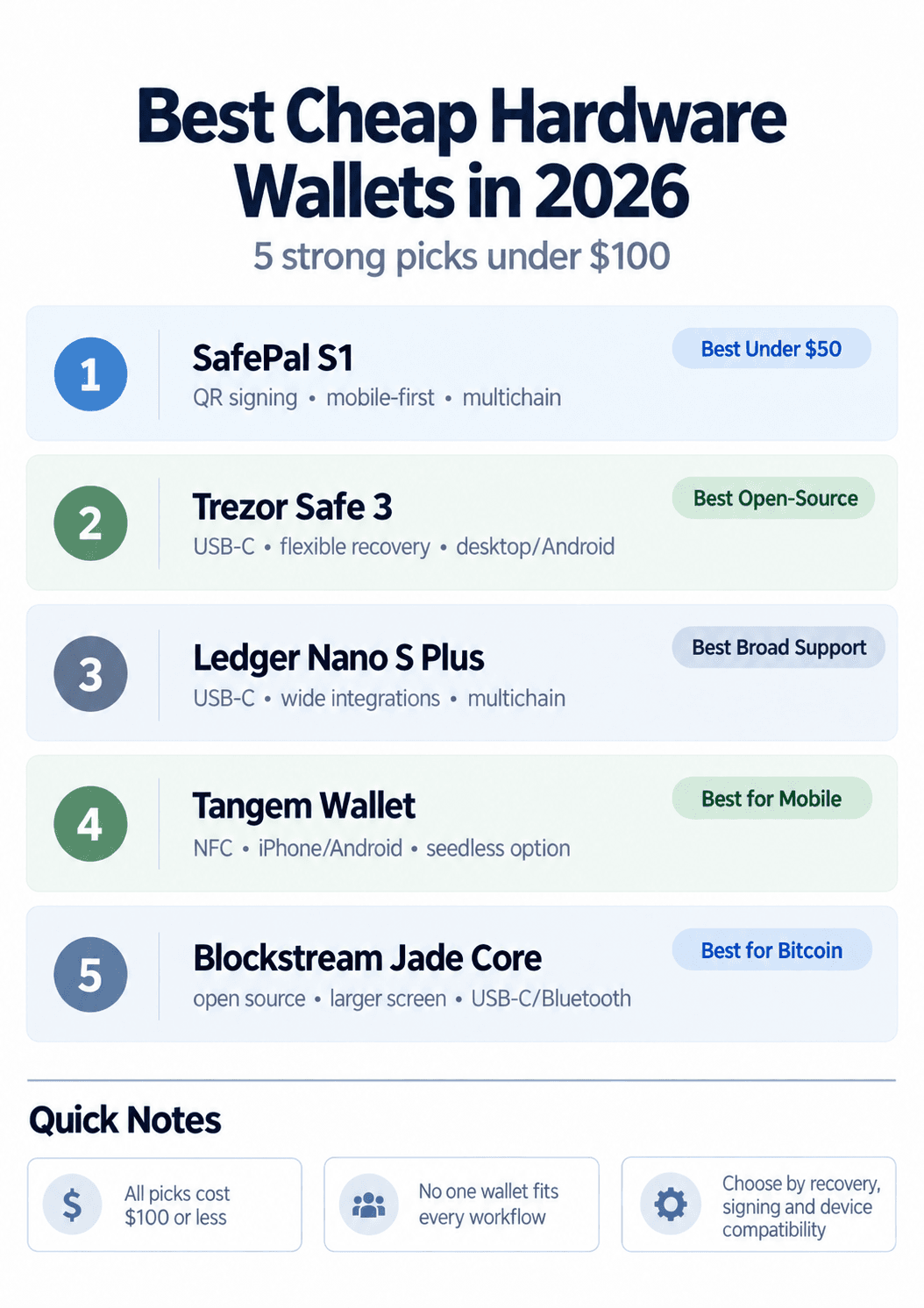 Five Budget Hardware Wallets Offering Different Approaches To Security, Connectivity And Crypto Support
Best Cheap Hardware Wallets in 2026
The best budget hardware wallets take different approaches to security, recovery and connectivity. Our picks below cost $100 or less while still offering credible self-custody security and a practical everyday workflow.
1
SafePal S1: Best Cheap Hardware Wallet Under $50
Price: $49.99 ·
Best for: Budget multichain users who want QR-based signing
⌄
SafePal S1: Best Cheap Hardware Wallet Under $50
- Transaction data moves between the S1 and SafePal App through QR codes, with no Bluetooth, Wi-Fi or NFC used for routine signing.
- The USB connection is primarily used for charging rather than normal transaction communication.
- The CC EAL6+ rating applies to the evaluated Secure Element, not the complete wallet as a universal security score.
- The SafePal App and browser extension provide access to swaps, staking, NFTs and DApps while private keys remain on the hardware wallet.
- The S1 suits users who want a mobile-first multichain wallet without paying for a premium display or touchscreen.
- SafePal X1 is the alternative for users who prefer Bluetooth connectivity and a larger display with a physical keyboard-style button layout.
- Budget-conscious buyers.
- QR-based transaction signing.
- Mobile-first multichain users.
- Users who regularly access DApps.
- Users who want a large touchscreen.
- Anyone who prefers USB transaction signing.
- Desktop-first users.
- Users who want extensive third-party wallet integrations.
Pros
- $49.99 entry price.
- QR-based transaction signing.
- CC EAL6+ Secure Element.
- Broad multichain and DApp support.
- BIP39 recovery phrase.
Cons
- Small 1.3-inch display.
- No dedicated desktop app.
- No Bluetooth, Wi-Fi or NFC.
- Less premium build than higher-priced wallets.
2
Trezor Safe 3: Best for Open-Source Security and Recovery
Price: Around $59 ·
Best for: Open-source security and flexible recovery
⌄
Trezor Safe 3: Best for Open-Source Security and Recovery
- The Secure Element helps protect against physical attacks, enforce PIN security and authenticate the device.
- Trezor also uses the Secure Element as one source of entropy during wallet-backup generation rather than treating the chip as a simple storage component.
- SLIP39 Single-share uses one 20-word backup, while Multi-share can split recovery across several shares to reduce reliance on one backup location.
- Trezor's firmware and wider security design are open source, allowing the implementation to be independently inspected.
- A Bitcoin-only Safe 3 version is available for users who prefer firmware focused exclusively on Bitcoin.
- iPhone users can use Trezor Suite on iOS for limited functionality, but setup, sending and full device management require another supported device.
- Users who prioritize open-source security.
- Buyers who want flexible recovery options.
- Desktop and Android users.
- Bitcoin users who want a Bitcoin-only option.
- iPhone-only users.
- Anyone who wants Bluetooth or NFC.
- Users who prefer a large touchscreen.
- Buyers wanting a completely wireless workflow.
Pros
- Open-source security design.
- EAL6+ Secure Element.
- SLIP39 Single-share and Multi-share backups.
- PIN and passphrase protection.
- Bitcoin-only option available.
Cons
- Small monochrome screen.
- No Bluetooth or NFC.
- No touchscreen.
- Limited iPhone functionality.
3
Ledger Nano S Plus: Best for Broad Crypto Support
Price: €40.83 ·
Best for: Multichain users and broad wallet integrations
⌄
Ledger Nano S Plus: Best for Broad Crypto Support
- Private keys and cryptographic operations are protected by Ledger's Secure Element architecture, with transactions approved using the physical device.
- Ledger Wallet, formerly Ledger Live, provides the main interface for portfolio management, sending, receiving and supported staking functions.
- The wider Ledger ecosystem supports Bitcoin, Ethereum, Solana, XRP, stablecoins and many other assets, with additional support available through third-party wallets.
- Raw asset counts should not determine the purchase alone, since network functionality can differ between Ledger Wallet and third-party interfaces.
- The battery-free design removes battery aging as a long-term consideration, but requires a wired connection whenever the device is used.
- Ledger's security approach relies more heavily on its Secure Element and proprietary Ledger OS than fully open-source alternatives such as Trezor or Blockstream.
- Multichain portfolios.
- Desktop and Android users.
- Users who value third-party wallet compatibility.
- Buyers wanting a conventional screen-based wallet.
- iPhone-only users.
- Anyone who wants Bluetooth or NFC.
- Users wanting a large touchscreen.
- Buyers prioritizing a fully open-source stack.
Pros
- Broad multichain ecosystem.
- CC EAL6+ Secure Element.
- Wide third-party wallet support.
- Trusted on-device display.
- Battery-free USB-C design.
Cons
- No iPhone compatibility.
- No Bluetooth or NFC.
- Small monochrome display.
- Ledger OS is not fully open source.
4
Tangem Wallet: Best Cheap Hardware Wallet for Mobile Users
Price: $59.90 for 2 cards ·
Best for: Mobile users who want simple NFC signing
⌄
Tangem Wallet: Best Cheap Hardware Wallet for Mobile Users
- The card has no battery or charging requirement and communicates with the Tangem app using short-range NFC.
- A two-card pack provides one backup card, while the three-card set adds another physical copy for additional redundancy.
- With the default seedless approach, private keys are generated in the card's Secure Element and copied securely to backup cards during setup.
- Users who prefer traditional recovery can choose a seed-phrase setup instead, creating a different backup and failure model.
- Seedless is not automatically safer than a recovery phrase. It removes the need to protect written seed words but makes preservation of the backup cards especially important.
- The Tangem app supports portfolio management, swaps, staking and DApp access while the physical card remains required for signing.
- iPhone and Android users.
- Travel and everyday portability.
- Users who prefer NFC over cables.
- People interested in seedless recovery.
- Users who require an onboard screen.
- Desktop-first workflows.
- Anyone uncomfortable relying on a phone display.
- Users who prefer traditional buttons-and-screen hardware.
Pros
- Compact credit-card design.
- No battery or charging required.
- NFC support for iPhone and Android.
- EAL6+ Secure Element.
- Seedless or seed-phrase setup options.
Cons
- No onboard screen.
- Phone-centric workflow.
- Backup-card loss requires careful planning.
- No conventional USB desktop workflow.
5
Blockstream Jade Core: Best Cheap Hardware Wallet for Bitcoin
Price: $99 ·
Best for: Bitcoin-focused self-custody
⌄
Blockstream Jade Core: Best Cheap Hardware Wallet for Bitcoin
- Jade Core is fully open source and focuses specifically on Bitcoin self-custody rather than maximizing the number of supported blockchains.
- Its 1.9-inch color display provides more room for transaction confirmation than many similarly priced USB-stick-style wallets.
- USB-C and Bluetooth provide both wired and mobile connectivity across supported Bitcoin wallet applications.
- Unlike Jade Plus, Jade Core does not include a camera, SD card slot or QR-based air-gapped transaction workflow.
- The wallet supports Bitcoin and Blockstream's Liquid ecosystem rather than Ethereum, Solana and the broader altcoin market.
- Users who want a Bitcoin-focused Trezor alternative can also consider the Bitcoin-only edition of Trezor Safe 3, which uses a different security and recovery architecture.
- Bitcoin-focused investors.
- Users who prefer open-source hardware.
- Desktop and mobile Bitcoin users.
- Buyers wanting a larger color screen below $100.
- Large multichain portfolios.
- Ethereum or Solana users.
- Users who need DApp support.
- Anyone specifically wanting QR air-gapped signing.
Pros
- Fully open-source design.
- Bitcoin-focused security model.
- 1.9-inch color display.
- USB-C and Bluetooth.
- Desktop, iOS and Android support.
Cons
- No broad altcoin support.
- No camera on Jade Core.
- No QR air-gapped signing on Jade Core.
- Sits at the top of the $100 budget limit.
What Do You Give Up With a Cheap Hardware Wallet?
Spending more does not automatically buy proportionally stronger private-key protection. Premium hardware wallets usually charge more for larger secure displays, touch input, wireless connectivity, premium materials and more convenient transaction verification or recovery features.
Security Does Not Scale Directly With Price
A cheap hardware wallet is not inherently less secure, and an expensive one is not automatically safer. Security depends on the full design, including how private keys are generated and stored, how transactions are verified, how firmware is handled and how securely the user manages recovery.
An EAL6+ component does not, by itself, prove that one complete hardware wallet is safer than another.
Where Premium Wallets Usually Improve
| Area | Budget Wallet | Premium Wallet |
|---|---|---|
| Secure key storage | Often strong | Often strong |
| Screen | Small or absent | Usually larger |
| Touch input | Rare | More common |
| Transaction readability | More limited | Usually better |
| Wireless connectivity | Mixed | More common |
| Materials | Basic | More premium |
| Recovery options | Varies | Often broader |
| Convenience | Main compromise | Usually better |
The biggest difference is often usability rather than core key storage. A larger trusted display, touchscreen, Bluetooth or NFC support, and more flexible recovery features can make a premium wallet easier to use correctly, especially for frequent transactions.
How Security Differs Between Cheap Hardware Wallets
Two budget hardware wallets at a similar price can use very different security models. The biggest differences are usually how private keys are protected, how the device communicates, whether transactions can be checked on a separate screen, and how firmware and seed generation are handled.
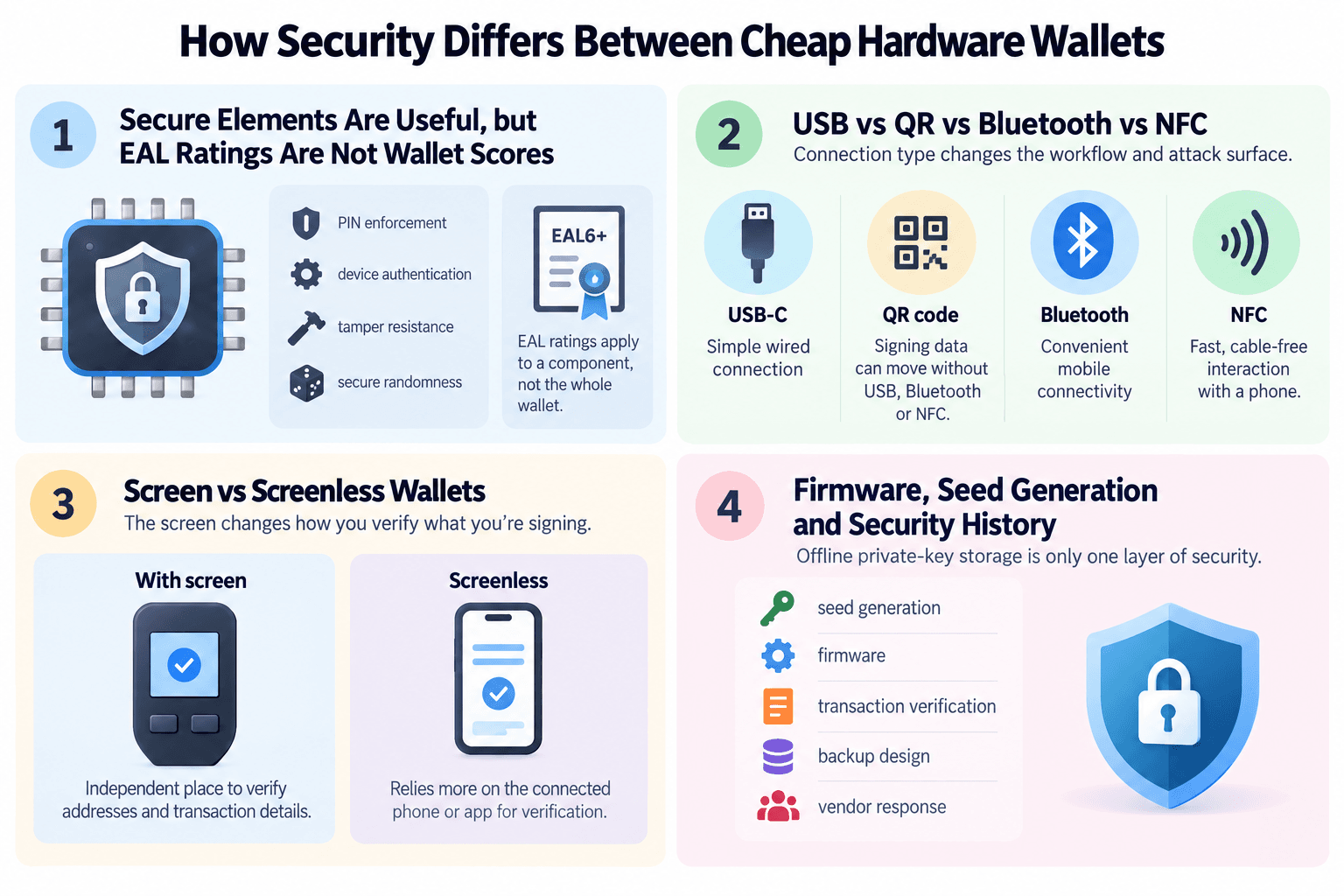 Hardware Wallet Security Depends On Chip Design, Connectivity, Transaction Verification And Recovery Architecture
Secure Elements Are Useful, but EAL Ratings Are Not Wallet Scores
A Secure Element is a tamper-resistant chip designed to protect sensitive data and enforce security controls. Depending on the wallet, it can help with PIN enforcement, device authentication, physical-attack resistance and secure randomness used during seed generation.
However, an EAL6+ rating does not mean the entire wallet is automatically safer than one using an EAL5+ component. Common Criteria certification applies to a defined component and security target. Firmware, backup design, transaction verification and the wider security architecture still need to be assessed separately.
USB vs QR vs Bluetooth vs NFC
Connection type changes the workflow and attack surface, but none is automatically the safest in every situation.
| Connection | Wallet Example | Main Benefit | Main Trade-Off |
|---|---|---|---|
| USB-C | Trezor Safe 3, Ledger Nano S Plus | Simple wired connection and no wireless pairing | Requires a physical cable and host-device connection |
| QR code | SafePal S1 | Signing data can move without USB, Bluetooth or NFC | More steps and camera scanning |
| Bluetooth | Blockstream Jade Core | Convenient mobile connectivity | Adds a wireless communication layer |
| NFC | Tangem | Fast, cable-free interaction with a phone | Heavily centered on the mobile-app workflow |
An air-gapped QR workflow reduces reliance on direct electronic communication, but that alone does not guarantee stronger overall security. A poorly designed air-gapped wallet can still have weak firmware, recovery or transaction-verification controls.
Screen vs Screenless Wallets
A hardware-wallet screen gives users an independent place to check addresses and transaction details before signing. Trezor Safe 3, for example, uses its own display and physical buttons so transaction information can be reviewed without relying entirely on the connected computer.
Screenless wallets such as Tangem instead rely more heavily on the connected phone and app to display transaction information. That does not automatically make them unsafe, but it changes what the user is trusting during verification.
A screen is not a magic shield either. If someone approves a malicious transaction or ignores incorrect details, the hardware wallet can still sign it.
Firmware, Seed Generation and Security History
Offline private-key storage is only one layer of hardware-wallet security. A proper assessment should also consider how the seed is generated, whether firmware is trustworthy, how transactions are confirmed, how backups work and how the manufacturer responds when vulnerabilities are discovered.
The 2026 Coldcard seed-generation incident comes to mind. Coinkite disclosed that affected firmware could create weakened seeds and later warned that simply updating the firmware did not repair an already affected seed. Users had to migrate to a new one.
That is why seed generation, firmware integrity, private-key protection, transaction signing, recovery design and the vendor's security response all contribute to the final risk profile.
Backup and Recovery Can Be More Important Than the Device
A hardware wallet does not physically hold your crypto. It protects the private keys used to access it. If the device is lost, damaged or replaced, recovery depends on the backup method you chose during setup.
That makes recovery design one of the most important differences between budget hardware wallets.
Traditional Seed Phrase Recovery
Many hardware wallets use a BIP39 recovery phrase, usually 12 or 24 words. That phrase can restore access if the original device fails or disappears.
Cross-wallet recovery is possible when both wallets support compatible standards and derivation paths, but it should not be assumed to work universally across every brand, asset and account type. Users should verify compatibility before relying on another wallet as a recovery option.
Multi-Share Recovery
Trezor Safe 3 supports SLIP39 recovery, including Single-share and Multi-share backups. Multi-share setups split recovery across several shares, allowing users to store them in different locations and reduce reliance on one physical backup.
Losing too many required shares or misunderstanding the recovery threshold can make restoration harder than a traditional seed phrase.
Card-Based and Seedless Recovery
Tangem takes a different approach. Users can create multiple physical backup cards so another card can restore access if the primary one is lost or damaged.
Tangem also allows users to create or import a traditional seed phrase during setup, while its seedless configuration relies on the backup cards themselves. Neither approach is automatically safer. They simply shift the failure point.
With seedless recovery, users need to understand one crucial rule: if every valid backup card is lost or destroyed, there may be no recovery phrase waiting in reserve.
Test Recovery Before Depositing a Large Balance
Whatever backup model you choose, verify it before relying on the wallet with a significant balance:
- Complete the wallet setup.
- Record or create the backup securely.
- Use the manufacturer's supported process to verify that the backup works.
- Send a small test transaction.
- Move larger holdings only after you are comfortable with both signing and recovery.
A hardware wallet is only as dependable as the recovery process behind it.
Which Cheap Hardware Wallet Is Right for You?
The right budget hardware wallet depends less on headline price and more on how you plan to use it.
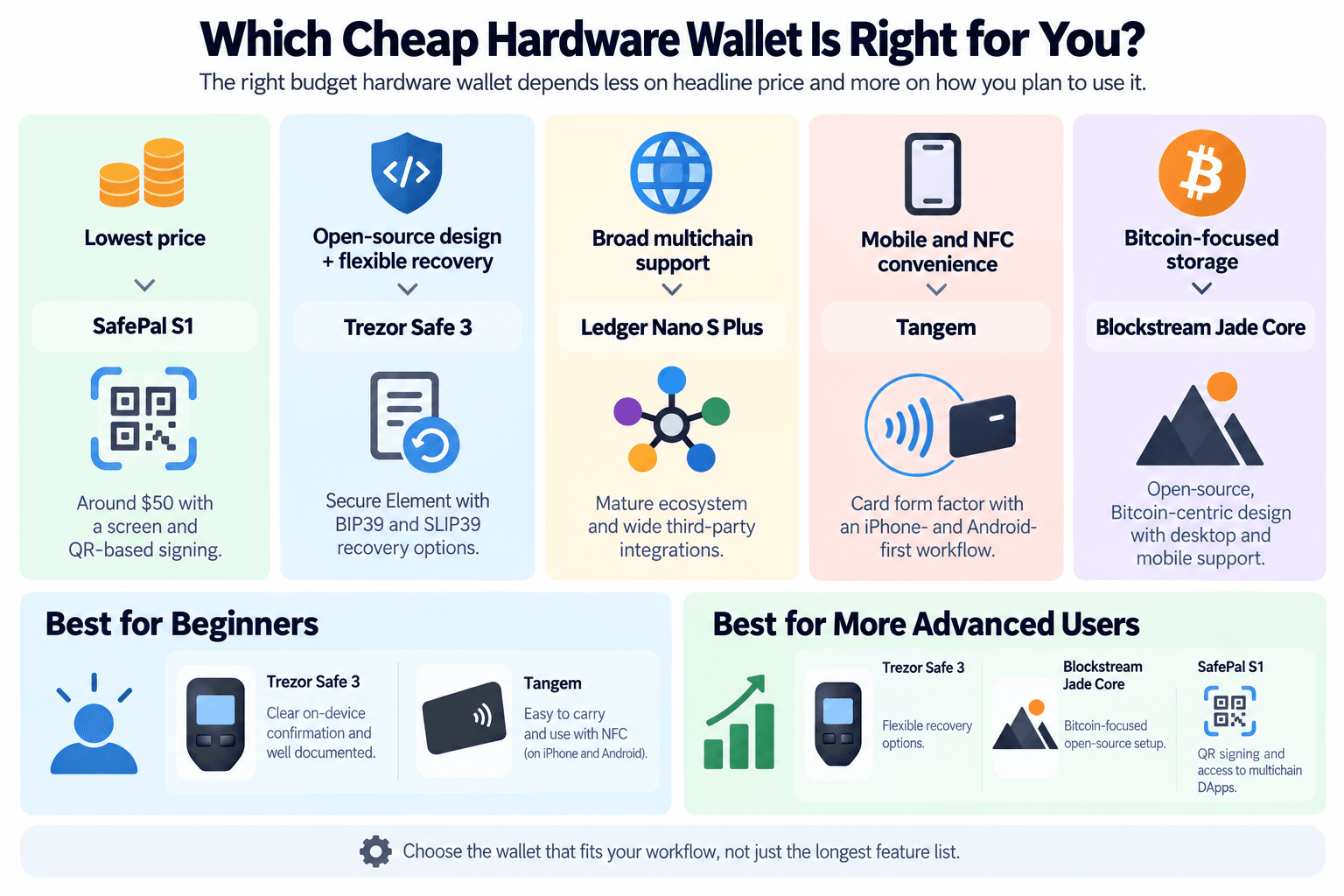 The Right Budget Hardware Wallet Depends On Your Preferred Workflow, Recovery Method And Device Compatibility
| If You Want... | Pick | Why |
|---|---|---|
| Lowest price | SafePal S1 | Around $50 with a screen and QR-based signing |
| Open-source design + flexible recovery | Trezor Safe 3 | Secure Element with BIP39 and SLIP39 recovery options |
| Broad multichain support | Ledger Nano S Plus | Mature ecosystem and wide third-party integrations |
| Mobile and NFC convenience | Tangem | Card form factor with an iPhone- and Android-first workflow |
| Bitcoin-focused storage | Blockstream Jade Core | Open-source, Bitcoin-centric design with desktop and mobile support |
Best for Beginners
- For beginners who want a familiar screen-and-button workflow, Trezor Safe 3 is one of the clearest options because transactions are confirmed on-device and recovery choices are well documented.
- For mobile-first users, Tangem is easier to carry and use through NFC, but beginners should understand its card-based recovery model and lack of an onboard screen before choosing it.
Best for More Advanced Users
- More experienced users may prefer Trezor Safe 3 for its flexible recovery options.
- Blockstream Jade Core is suitable for a Bitcoin-focused open-source setup.
- SafePal S1 is better for QR signing and access to multichain DApps.
The deciding factor should be the workflow you understand best, not simply which device has the longest feature list.
How Much Does a Cheap Hardware Wallet Really Cost?
As we've mentioned, the advertised price is not always the final price. A $50 hardware wallet can cost more once shipping, VAT, import duties and currency conversion are added.
Device Price vs Delivered Price
When comparing hardware wallet prices, separate the manufacturer price from the delivered cost.
That means checking:
- Regular MSRP versus temporary sale price
- Shipping charges
- VAT or sales tax
- Import duties
- Currency conversion fees
SafePal and Tangem both note that taxes or duties can be added on top of their listed prices, so the cheapest wallet on paper may not be the cheapest once it reaches your door.
Do You Need to Buy Anything Else?
Usually, no. The wallet itself should provide the core functionality needed for self-custody.
Optional extras include:
- Metal seed backup: Useful for protecting a recovery phrase against fire or water, but not required for the wallet to function.
- Extra backup card or device: Relevant for products such as Tangem or for users who want hardware redundancy.
Cables, cases and other accessories are convenience purchases rather than essential security requirements.
Should You Buy a Used Hardware Wallet?
No. Never.
A used device introduces unnecessary uncertainty around previous handling, tampering and supply-chain risk. Buying directly from the manufacturer or an authorized reseller gives you a cleaner chain of custody and access to device-authentication checks where supported.
Never use a hardware wallet that arrives with a recovery phrase already written down or preconfigured. A legitimate wallet should generate the recovery credentials during your own setup.
Are Cheap Hardware Wallets Secure Enough for Long-Term Storage?
Yes. A reputable sub-$100 hardware wallet can be suitable for long-term self-custody if its security architecture, recovery system and supported assets fit the user, but price alone does not determine whether a setup is safe.
The Device Is Only One Part of the Setup
Long-term security also depends on:
- How securely the recovery phrase or backup cards are stored
- Whether a passphrase is used and managed correctly
- Physical protection of the device and backups
- Keeping firmware current where appropriate
- Checking transaction details before signing
- Avoiding phishing, fake wallet apps and social-engineering attacks
A well-designed hardware wallet cannot compensate for an exposed recovery phrase or a malicious transaction that the user approves.
When Spending More Makes Sense
A premium wallet can be worth the extra cost when you want:
- A larger secure touchscreen
- Better transaction readability
- More convenient mobile connectivity
- More advanced recovery options
- A specific higher-end security architecture
- A smoother workflow for frequent DApp use
The reason to spend more should be a feature or security requirement you actually need, not simply the value of the portfolio.
When a Cheap Wallet Is Enough
A budget hardware wallet can be a strong fit for:
- Long-term Bitcoin storage
- Basic multichain portfolios
- Users who transact infrequently
- Buyers who understand their recovery process
- Anyone comfortable with a smaller screen or simpler connection method
For long-term cold storage, a simple wallet used correctly can be more appropriate than a feature-heavy device whose recovery or transaction workflow the owner does not fully understand.

Final Verdict: The Best Cheap Hardware Wallet Depends on the Workflow
There is no single best cheap hardware wallet for every user.
- SafePal S1 keeps the entry price lowest
- Trezor Safe 3 stands out for open-source design and flexible recovery
- Ledger Nano S Plus suits broad multichain use
- Tangem Wallet is built around mobile and NFC convenience
- Blockstream Jade Core is the strongest fit for Bitcoin-focused self-custody.
Budget hardware wallets can still provide strong private-key protection. The bigger differences under $100 are usually recovery, screen design, connectivity and transaction signing. The better choice is the wallet whose recovery model you understand and whose workflow you can use correctly.