


You can buy Bitcoin (BTC) on Binance through its website or mobile app, provided the exchange and your chosen payment method are available in your country. Buy Crypto is the simplest starting point for a direct purchase. If you already have funds on Binance, Convert offers a straightforward exchange, while Spot lets you choose the price and order type.
Binance suits buyers who want several ways to purchase BTC and are comfortable with an exchange holding their coins initially. It is less suitable for U.S. residents or buyers seeking direct self-custody. This guide covers payment methods, fees, troubleshooting, and storage.
Editor's Note (Nov. 14, 2026): We fully updated this guide in November 2026 to reflect Binance's latest Bitcoin buying methods, fees, and regional restrictions. The refresh adds detailed website and mobile walkthroughs for Binance Lite and Pro, alongside updated instructions for card purchases, bank transfers, Convert, Spot, and P2P. We have also expanded fee comparisons, added practical transaction-cost examples, and improved troubleshooting for failed payments and pending orders. The update strengthens wallet and withdrawal guidance and addresses Binance's October 2026 security incident and its implications for exchange custody.
Quick Answer: How to Buy Bitcoin on Binance
To buy Bitcoin on Binance, create and verify your account, open Buy Crypto, select BTC, enter your purchase amount, choose a supported payment method, and confirm the transaction. You can also buy BTC using Binance Convert or Spot if you already hold eligible cryptocurrencies such as USDT or USDC.
Seven Steps to Buy Bitcoin on Binance
-
Create and verify your Binance account Register through the official Binance website or app and complete the required identity verification before purchasing Bitcoin.
-
Open the Bitcoin buying interface Select Buy Crypto on the Binance website or Add Funds → Buy with in the mobile app.
-
Choose BTC and enter your amount Select Bitcoin (BTC), choose your supported fiat currency, and enter how much you want to spend.
-
Select an available payment method Choose a supported option, such as an eligible debit card, credit card, or existing fiat balance. Availability depends on your country and account.
-
Review the final Bitcoin purchase quote Check the BTC amount you will receive, quoted exchange rate, applicable fees, and total payment before confirming.
-
Confirm and authenticate the payment Approve the purchase and complete any bank authentication, 3-D Secure verification, or one-time-code request.
-
Check your Bitcoin balance and order history Open your Binance assets and transaction history to confirm the purchase. If the order is still processing, check its status before trying again.
Best Way to Buy BTC on Binance
| Buying Method | Best For |
|---|---|
| Debit or credit card | Beginners prioritizing convenience |
| Bank transfer or fiat balance | Buyers with supported bank funding |
| Apple Pay or Google Pay | Eligible mobile users |
| Binance Convert | Exchanging an existing crypto balance simply |
| Binance Spot | Buyers seeking price and order control |
| Binance P2P | Users relying on supported local payment methods |
Already Have Cryptocurrency?
If you already hold USDT, USDC, or another eligible asset, you can use Binance Convert for a straightforward exchange or Binance Spot for greater control over pricing and order execution. Available trading pairs and payment methods vary by region. Binance.com is not available to U.S. residents.
Disclaimer
Cryptocurrency is a speculative and highly volatile investment. Prices can decline sharply, and you may lose your entire investment. The information in this guide is for educational purposes only and does not constitute personalized financial, investment, legal, or tax advice.
Disclosure
Some links in this guide may be affiliate links. If you choose to use a service through these links, we may earn a commission at no additional cost to you.
What Do You Need Before Buying Bitcoin on Binance?
Check your country, identity-verification status, and payment options before sending money. A Binance account alone does not guarantee that every buying feature is enabled.
Is Binance Available in Your Country?
Binance.com is not available to U.S. residents. Binance.US is a separate platform with different state restrictions, payment routes, and fee schedules. The instructions in this guide are for Binance.com.
Elsewhere, registration does not guarantee access to local fiat deposits, cards, P2P, or every BTC pair.
European Economic Area (EEA) customers face additional restrictions under the Markets in Crypto-Assets Regulation (MiCA). Binance's EEA trading restrictions removed noncompliant stablecoin Spot pairs, including USDT pairs, for affected users. Eligible USDC and EUR markets may offer alternatives. Do not assume BTC/USDT is available simply because it appears in a tutorial.
To check your account, sign in and inspect Buy Crypto → Pay With, Deposit Fiat, and the accessible Spot trading pairs. Use the products presented to your verified account rather than attempting to work around regional restrictions.
Create and Verify Your Binance Account
Binance generally requires Know Your Customer (KYC) identity verification for normal buying and trading services.
- Register using the official Binance website or app with an eligible email, phone number, or supported sign-in method.
- Open Account → Identification, or use Get Verified if it appears on your account homepage.
- Enter your personal information and submit an accepted government-issued document, such as a passport, national ID, or driver's license.
- Complete any selfie, facial verification, address, or source-of-funds review requested. Begin purchasing only after your account is approved.
- Enable two-factor authentication (2FA) with a passkey or authenticator app. Consider an anti-phishing code and withdrawal-address allowlisting before holding a substantial balance.
Requirements and approval times vary. Coin Bureau's Binance account setup guide provides a more detailed registration walkthrough.
How Much Bitcoin Can You Buy on Binance?
You can buy a fraction of a Bitcoin. One BTC equals 100 million satoshis, so purchasing BTC does not require enough money to buy a whole coin.
Three limits may affect your order:
- Order minimum: Buy Crypto sets checkout minimums, Convert sets asset-specific conversion limits, and Spot pairs have minimum notional values and quantity increments.
- Payment maximum: Your card issuer or bank may impose per-transaction, daily, or other limits even when Binance would allow a larger trade.
- Account limit: KYC status, residency, security reviews, and the selected product can affect buying, depositing, and withdrawal capacity.
Check the Buy Crypto or Convert amount field for product limits. Spot minimums and increments appear under Trading Parameters and in the Spot trading limits. No universal BTC minimum applies.
How to Buy Bitcoin on Binance: Step-by-Step Instructions
Start with Buy Crypto. This card-payment example applies only where supported; button names may vary.
How to Buy Bitcoin on the Binance Website
- Open Buy Crypto. Sign in through Binance's official site and select Buy Crypto from the main navigation.
- Choose what to spend and receive. Select an available fiat currency, such as EUR, in the Spend field. Choose Bitcoin (BTC) under Receive. Verify that the asset is BTC, not USDC or a BTC-linked token.
- Enter your purchase amount. Type the fiat total you want to spend. Binance displays an estimated BTC quantity based on its current quote.
- Choose your payment method. Under Pay With, select Card (Visa/Mastercard) if the option is enabled for your account.
- Select or add a card. Choose an existing supported card or select Add New Card. Enter the requested card and billing details. A mismatched name, expired card, or unsupported issuer can prevent payment.
- Check the final quote. Confirm the BTC quantity, exchange rate, processing charges, and total fiat to be debited. Quoted prices can change before confirmation.
- Pay and authenticate. Confirm the order and complete any 3-D Secure, banking-app, or one-time-code check required by the card issuer.
- Verify the result. Open the transaction confirmation and check your BTC balance and Buy Crypto/Fiat Order History. If the order is processing, inspect its status before starting another purchase.
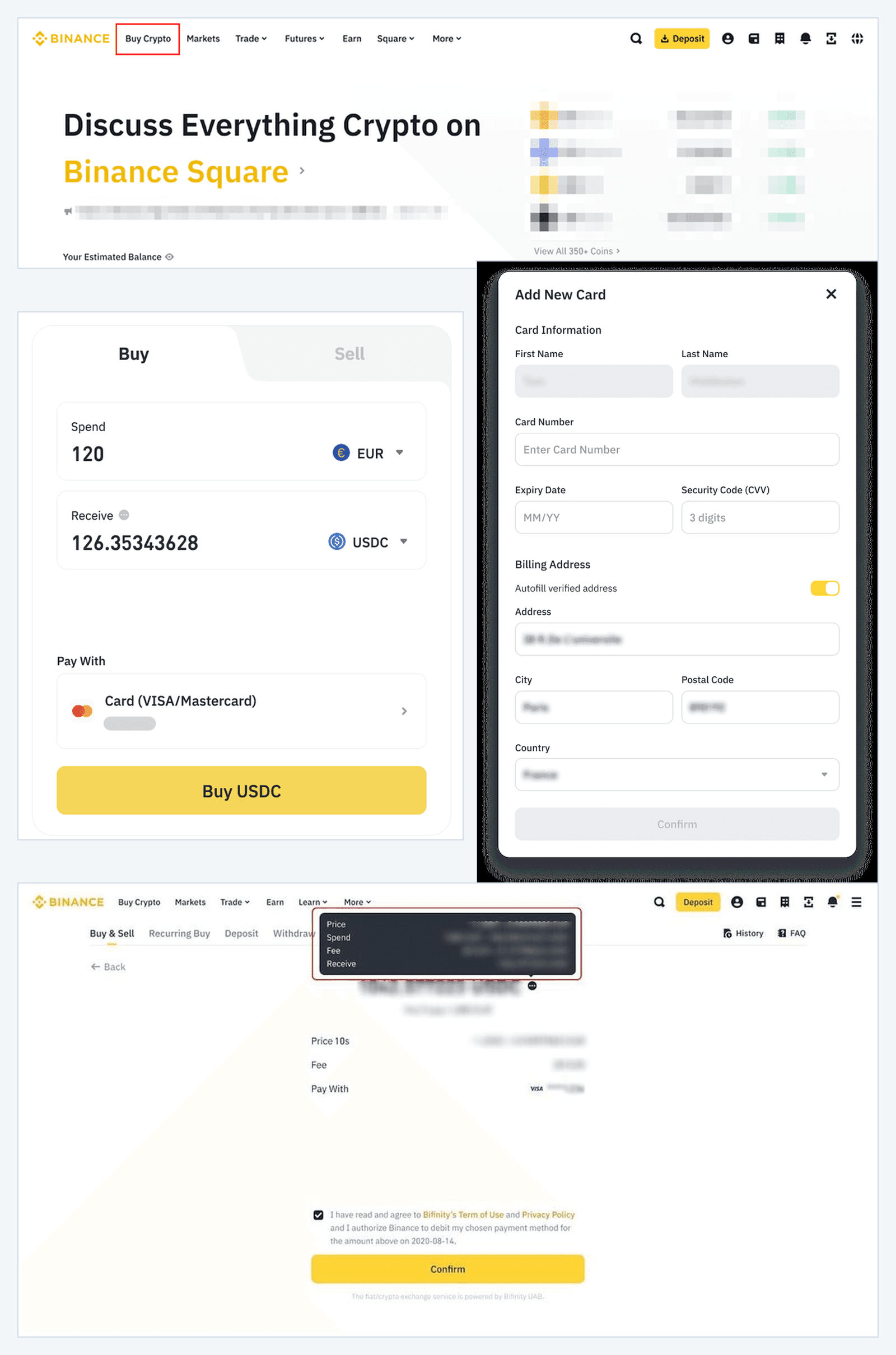 Step-by-Step Guide to Buying Cryptocurrency on the Binance Website Using a Payment Card
How to Buy Bitcoin on the Binance Mobile App
On supported iOS and Android versions, Lite simplifies purchases while Pro includes trading controls. Switch through the Binance icon or profile menu where available.
Binance Pro
- Open the app and tap Add Funds → Buy with, or the equivalent Buy Crypto entry.
- Choose your supported fiat currency and BTC as the asset to receive.
- Enter the amount and select an available card, fiat balance, or other payment option under Pay With.
- Add your card if needed. On Preview Order, inspect the BTC received, final charge, and quoted rate.
- Authenticate and confirm. Open View History, Orders, or the asset balance to confirm completion.
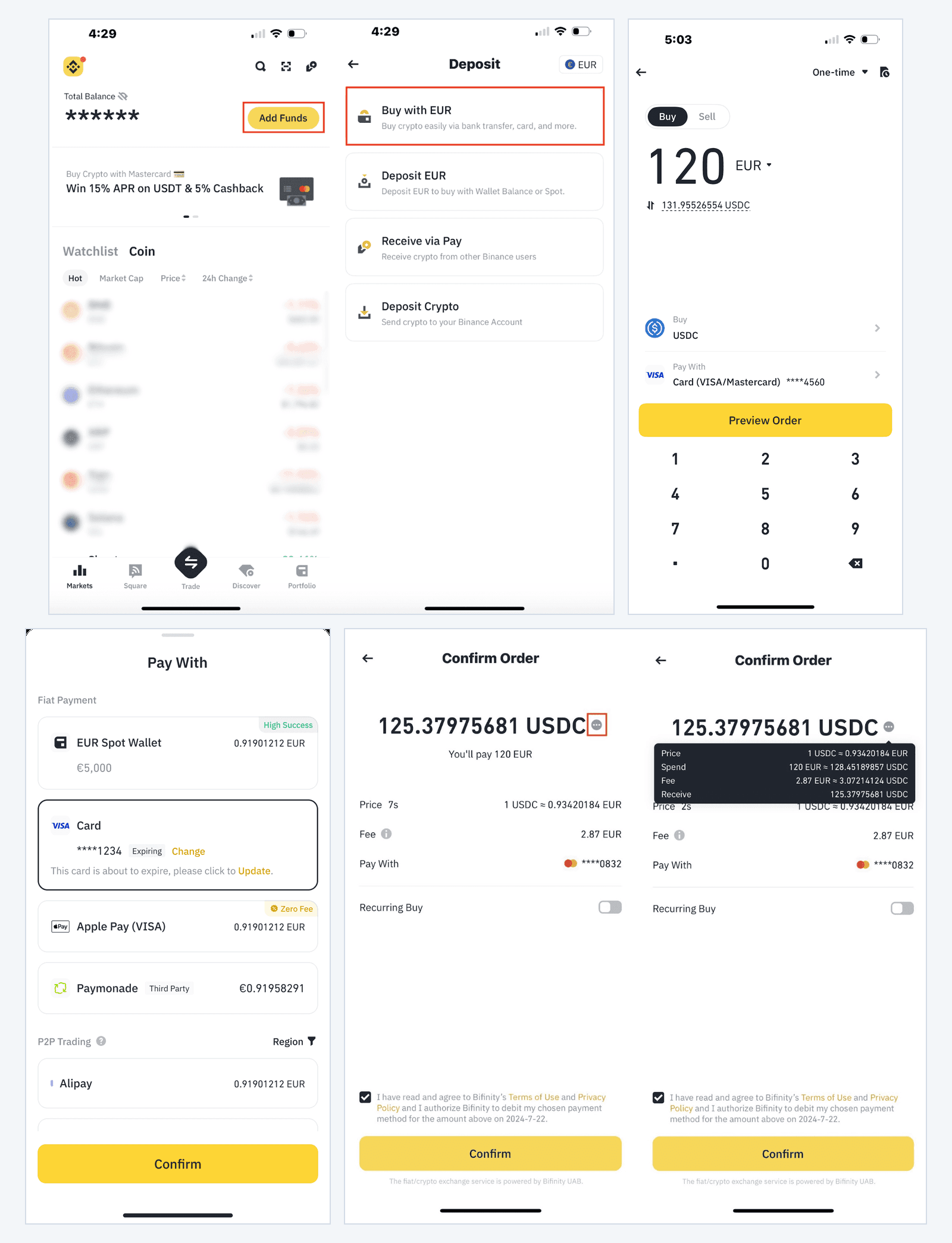 How to Buy Cryptocurrency on Binance Pro, From Entering the Purchase Amount to Confirming Payment
Binance Lite
- Tap the main Buy control, followed by Buy with where prompted.
- Select BTC, choose the fiat currency, and enter your amount
- Choose an available payment method and examine the confirmation quote.
- Confirm payment, then check your balance or purchase history.
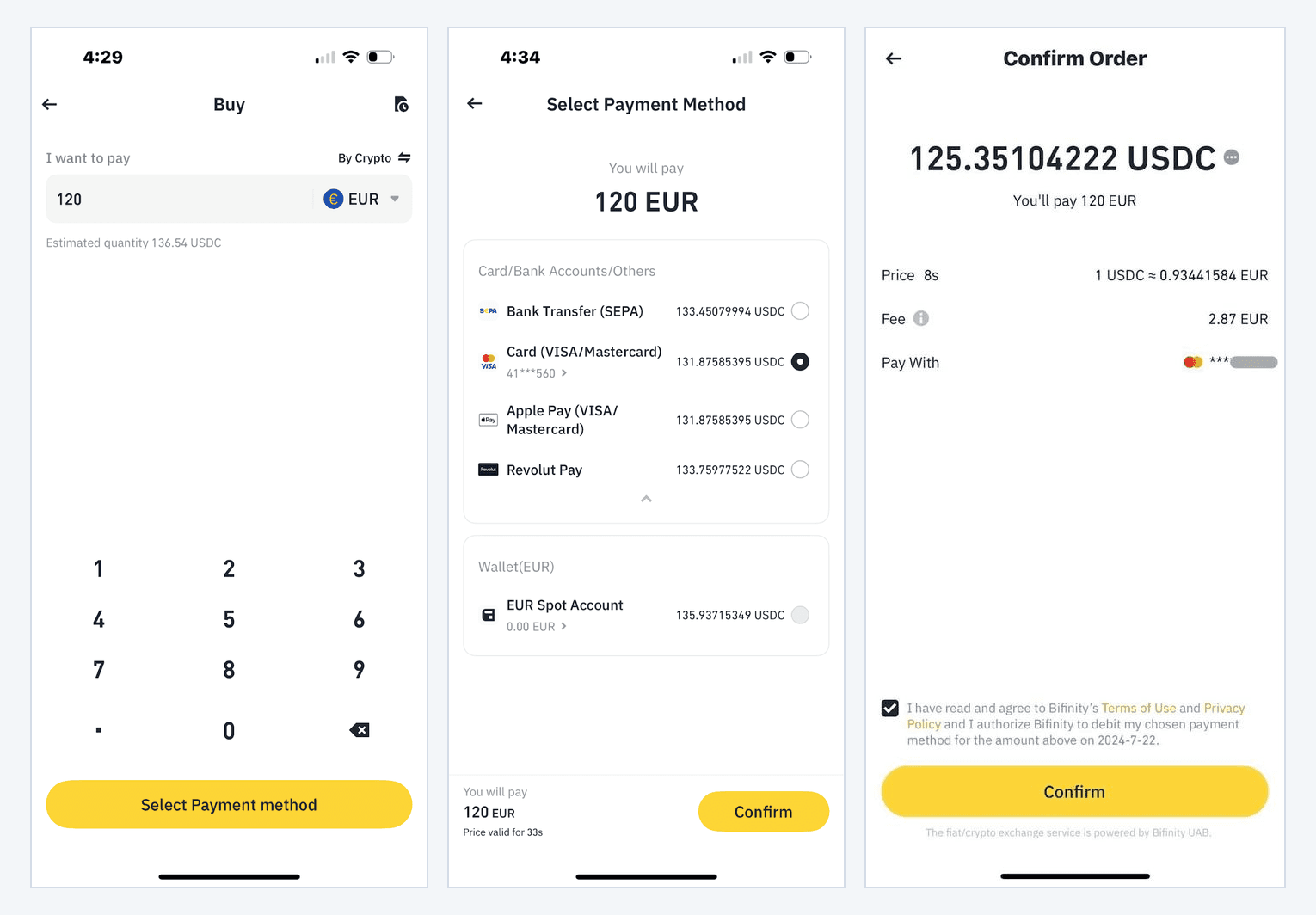 Step-by-Step Cryptocurrency Purchase Guide Using Binance Lite, From Selecting the Amount to Confirming the Order
Ways to Buy Bitcoin on Binance: Which Method Should You Choose?
Compare net BTC received, funding time, and risk before choosing a purchase route.
| Method | Best For | Main Cost | Processing | Availability | Main Trade-Off |
|---|---|---|---|---|---|
| Card | Straightforward first buy | Checkout quote and issuer charges | Often fast | Card/region-specific | Declines and potentially higher costs |
| Bank/fiat balance | Bank-funded purchases | Deposit charge plus buying cost | Bank rail-dependent | Region-specific | Settlement delays or holds |
| Apple Pay/Google Pay | Mobile checkout | Wallet-linked quote and issuer charges | Often fast | Device/region-specific | Not every issuer is supported |
| Convert | Existing crypto balances | Quoted conversion rate | Usually quick | Asset/account-specific | Less execution control |
| Spot | Price control | Trading fee, spread, slippage | Market fill or pending limit | Pair-specific | More involved interface |
| P2P | Local payment methods | Advertiser rate and bank costs | Counterparty-dependent | Market-specific | Fraud and settlement risks |
Buy Bitcoin Using a Bank Transfer or Fiat Balance
Eligible users can deposit fiat before buying BTC or use a supported direct bank-funded checkout.
- Open Add Funds → Deposit Fiat or Deposit and choose your supported currency.
- Select an available transfer method, such as SEPA or SEPA Instant for eligible EUR users. Review fees, minimums, arrival estimates, and any required activation.
- Copy the beneficiary and payment reference displayed in Binance. Send the money from a bank account held in your verified name, following the exact transfer instructions.
- Check Deposit History until the fiat balance is credited. If required, complete any additional source-of-funds checks.
- Use Buy Crypto with the eligible balance or open an available BTC fiat/Spot pair, review the quote, and confirm the buy.
Do not send a SWIFT transfer to SEPA-only bank details. Use the instructions assigned to your account. Deposits can take time, during which BTC prices can move.
Buy Bitcoin With Apple Pay or Google Pay
Eligible customers can use a digital wallet at Binance checkout rather than entering their card information manually. Apple Pay is available through supported iOS flows, and Google Pay through supported Android flows. Binance does not support Apple Pay in its Android app or Google Pay in its iOS app.
- Open Add Funds → Buy with in the app and choose BTC.
- Enter the fiat purchase amount and select Apple Pay or Google Pay, if displayed under Pay With.
- Review the BTC quantity, exchange rate, final cost, and any quoted payment fees.
- Confirm using the phone's supported payment authentication and inspect the resulting order status.
The available Apple Pay and Google Pay checkout flows depend on the device, country, issuer, card, and account. Any applicable charges appear in the live quote.
Buy Bitcoin Using Binance Convert
Binance Convert exchanges existing USDT, USDC, or another eligible balance for BTC using a quote rather than an order book.
- On desktop, open Trade → Convert & Block Trade. In Binance Pro, look for Trade → Convert.
- Select the asset to spend under From and BTC under To.
- Choose Instant, enter the amount, and request the quote.
- Review the BTC you will receive and the conversion rate. Confirm before the quote expires.
- Check the selected receiving balance and Convert History after completion.
Some accounts also offer Limit Convert, which can wait for a specified conversion price and may never execute. Supported Convert Recurring plans let users choose the assets and a frequency, such as daily, weekly, or monthly, subject to available funds and future rates. Set the plan on the Recurring interface and review or cancel it through the same area. The Convert order types differ in how they execute. The separate recurring conversion rules explain schedules and pricing.
Convert may show no separate commission, but the quote still determines the effective cost. Compare net BTC with Spot for the same amount and time. Stablecoins can also deviate from $1.
Buy Bitcoin Through Binance P2P
Binance P2P connects buyers with advertisers using local payment methods. Depending on the market, you may buy BTC directly or purchase an eligible intermediary asset first.
- Open Trade → P2P, choose Buy, and select the desired asset and local currency.
- Filter offers by payment method. Compare the advertised exchange rate, order limits, seller completion rate, and recent transaction history.
- Select an offer, enter the amount, and read the seller's payment instructions and order terms.
- Transfer the exact payment to the verified account specified in the order. Mark Transferred, Notify Seller only after sending the funds.
- Wait for the seller to confirm receipt and release the crypto from escrow. Check your Funding Account.
- If payment has been made but the seller fails to release the asset, keep the order evidence and open an Appeal within Binance.
Escrow holds the seller's crypto, not your outside bank payment. It cannot prevent every fraud. Compare the advertiser's effective rate with the BTC ultimately received.
Warning: Never cancel a P2P order after paying unless the refund has reached your payment account. Keep discussions and proof inside the Binance order process. Do not mark an unpaid order as paid or trust payment screenshots as proof that money has arrived. Follow Binance's P2P buying rules and appeal process when a dispute occurs.
How to Buy Bitcoin on Binance Spot With USDT or USDC
Spot trading buys BTC using an eligible balance without leverage or a futures position.
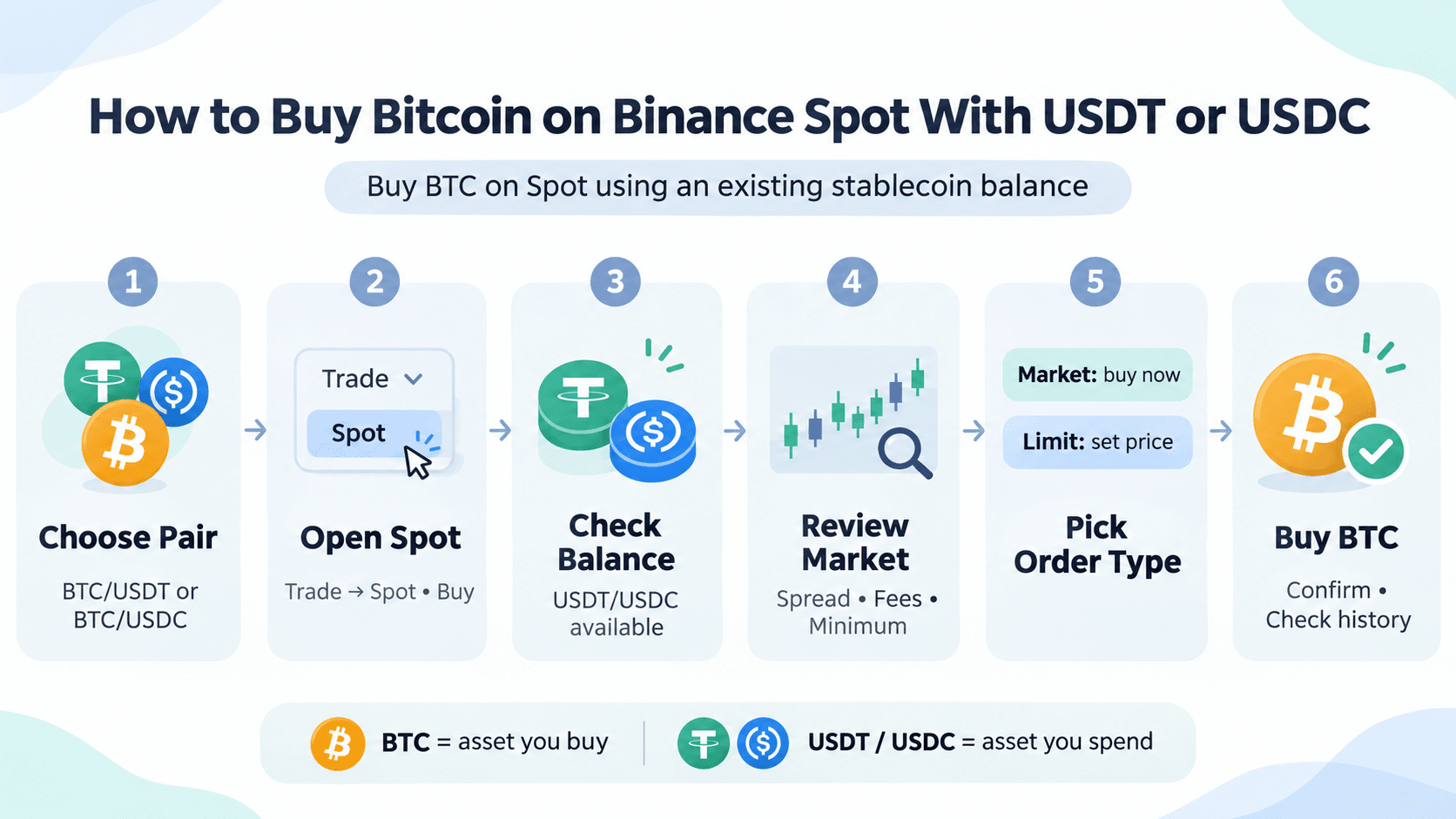 Step-by-Step Guide to Buying Bitcoin on Binance Spot Using USDT or USDC, From Selecting Trading Pairs to Confirming Orders Successfully
Choose a Bitcoin Trading Pair and Fund Your Spot Account
In BTC/USDT, BTC is the base asset being bought and USDT is the quote asset being spent. BTC/USDC uses USDC as the quote asset. These are distinct markets with potentially different spreads, liquidity, fees, and country restrictions.
- Open Trade → Spot and search for BTC/USDT, if the pair is available in your account. Otherwise choose an eligible option such as BTC/USDC or a supported fiat pair.
- Confirm that the order panel is set to Spot, not Margin or a perpetual futures product, and select Buy.
- Check the Available amount of the quote currency. If your funds are in Funding, transfer them to an eligible trading balance where required, or select an available funding source using Avbl.
- Review the order book, bid-ask spread, displayed fee tier, and pair-specific minimum before placing the order.
The Binance Spot interface guide shows the trading panel. EEA users should check eligible USDC or EUR markets.
Place a Market Order or Limit Order to Buy BTC
A market order seeks immediate execution; a limit order sets a maximum price and may not fill. BTC arrives only after execution.
Market order
- Choose the eligible BTC pair and select Market in the Buy panel.
- Enter the amount to spend in the quote currency, or the BTC quantity if that is the field offered.
- Inspect the displayed estimate and available balance. The final fill can differ because of the spread and slippage, which is movement between the expected and execution price.
- Select Buy BTC and check Trade History for the filled quantity, average price, and fee.
Limit order
- Choose Limit and enter your maximum price per BTC.
- Enter the BTC quantity or total spending amount, as prompted.
- Select Buy BTC. If no matching seller is available at your price or better, the order appears under Open Orders.
- Monitor fills. You may cancel the unfilled remainder; any completed portion remains purchased.
If BTC trades near 70,000 USDT, a limit buy at 69,000 USDT waits for sellers at 69,000 or less. That price appearing on a chart does not guarantee a fill.
| Feature | Market Order | Limit Order |
|---|---|---|
| Objective | Buy promptly at available prices | Buy at a chosen price or better |
| Price control | Limited | Greater |
| Likelihood of fill | Generally higher in liquid markets | Not guaranteed |
| Primary risk | Spread and slippage | Nonexecution or partial fill |
A limit order is not automatically a maker order. An immediately matched limit can incur taker fees. For more order controls, compare market and limit orders with Coin Bureau's Binance trading tutorial.
How Much Does It Cost to Buy Bitcoin on Binance?
Compare net BTC per total amount spent, including funding charges, spreads, and slippage.
Card, Bank Transfer, Convert, and P2P Costs Compared
| Route | Cost Components | Check Before Confirming |
|---|---|---|
| Card | Processing fee, quoted rate, possible issuer charge | Total card debit and net BTC |
| Bank-funded balance | Bank/deposit fee, plus purchase or trading cost | Funding charge, processing time, BTC execution |
| Apple Pay/Google Pay | Wallet-linked checkout rate and issuer charges | Final charge and eligible funding card |
| Convert | Effective conversion rate, sometimes no itemized commission | Net BTC against an equivalent Spot quote |
| Spot | Maker/taker fee, bid-ask spread, slippage | Pair schedule and estimated execution |
| P2P | Advertiser price, outside-payment fees, possible later conversion | Effective fiat-per-BTC rate and payment risk |
Card purchases offer faster access to Bitcoin but may include higher processing charges and a less favorable exchange rate. Bank-funded purchases can cost less when deposit fees are low, although settlement delays and subsequent trading fees can reduce the savings. Binance Convert includes its effective transaction cost in the quoted rate, while P2P advertisers may charge a premium through their offer prices. Banks and payment processors can also impose separate charges.
Binance Spot Trading Fees and BNB Discounts
Binance's published standard Spot schedule, checked Nov. 14, 2026, lists 0.10% maker and 0.10% taker for regular users on standard pairs such as BTC/USDT. Eligible users paying those trading fees with BNB receive a 25% discount, bringing each rate to 0.075%.
Maker orders add resting liquidity; taker orders remove it. Order type alone does not determine the fee.
| Regular-User Fee Schedule | Maker | Taker | With Eligible BNB Discount |
|---|---|---|---|
| Standard Spot, BTC/USDT example | 0.10% | 0.10% | 0.075% / 0.075% |
| Separate fiat Spot pairs | 0.10% | 0.20% | 0.075% / 0.15% |
The fiat-pair schedule differs. USDC pairs, VIP levels, and promotions may also vary. BNB discounts require a balance and introduce token-price exposure; withdrawal and deposit fees are separate.
Example: How Much Bitcoin Do You Receive for $100 or $1,000?
Assume an illustrative price of 70,000 USDT per BTC, with 1 USDT treated as $1 solely for calculation. A buyer places a fully filled BTC/USDT taker order charged the standard 0.10% fee, deducted from the BTC purchased. This excludes deposit charges, price movement, spread, slippage, and BNB discounts.
| Starting Balance | Gross BTC at 70,000 USDT | Fee Equivalent | Net BTC Received |
|---|---|---|---|
| 100 USDT | 0.00142857 BTC | 0.10 USDT | 0.00142714 BTC |
| 1,000 USDT | 0.01428571 BTC | 1.00 USDT | 0.01427143 BTC |
The BTC fee deduction is approximately 0.00000143 BTC for the smaller order and 0.00001429 BTC for the larger one. If Binance deducts a trading fee in another asset, the credited BTC and remaining account balances will differ. The execution record gives the actual figures.
These are hypothetical calculations. USDT can deviate from $1. Compare live quotes for the same amount using total spent ÷ net BTC acquired.
Why Can't I Buy Bitcoin on Binance? Common Problems and Fixes
Check payment eligibility, verification, balances, and order status before retrying.
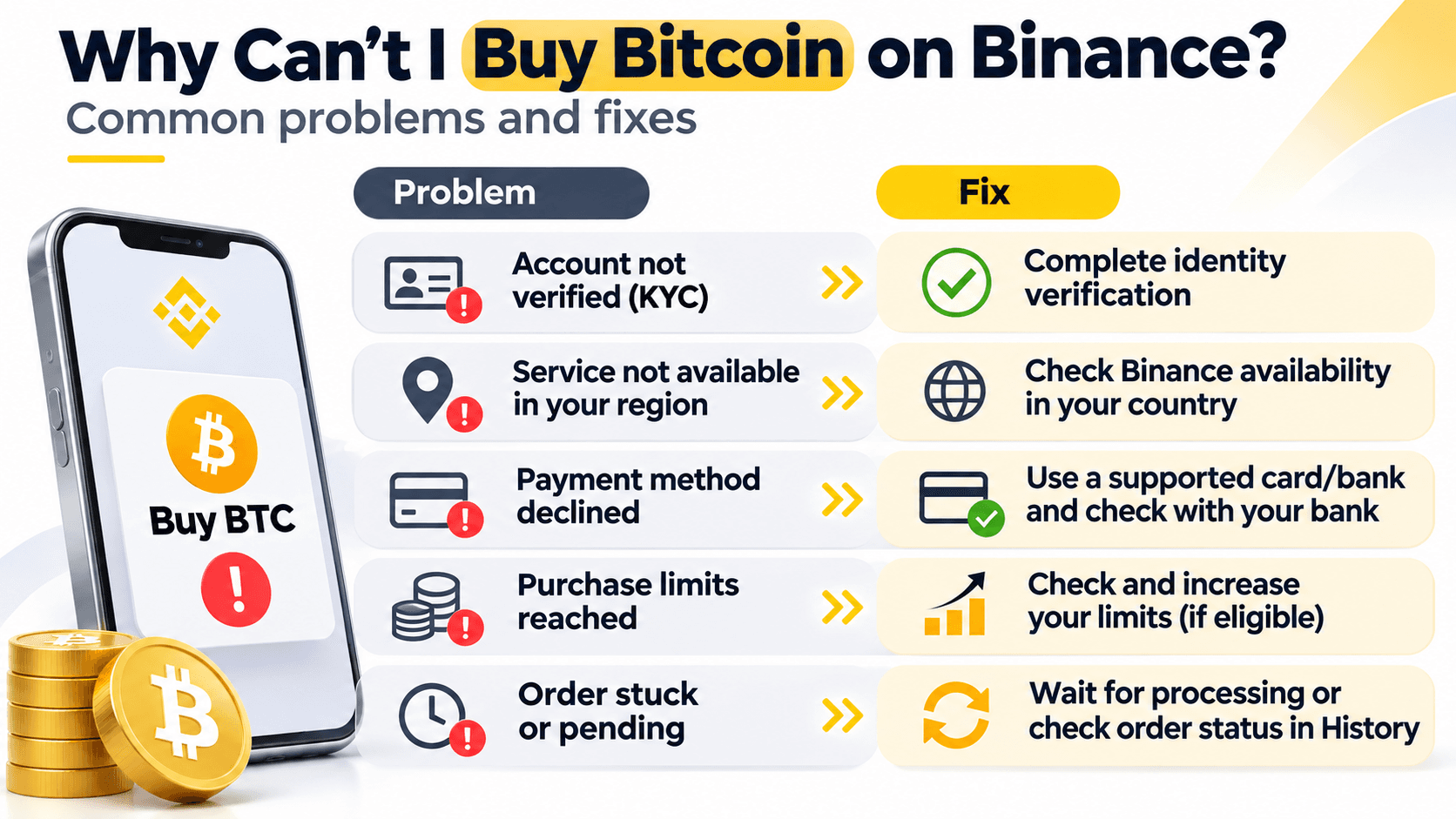 Common Binance Bitcoin Purchase Problems and How to Fix Payment Failures, Account Restrictions, and Pending Orders
| Problem | Likely Cause | What to Check |
|---|---|---|
| Card payment declined | Issuer block, unsupported card, insufficient funds | Card status, billing details, issuer policy |
| Bank deposit pending | Bank settlement or account review | Deposit status, transfer reference |
| Payment method unavailable | Country, KYC, or account restriction | Available methods and limits |
| Insufficient Spot balance | Wrong quote asset, locked or differently located funds | Pair and Available balance |
| BTC order not filled | Limit price has not matched | Open Orders and partial fills |
| Payment completed but BTC missing | Processing, hold, or different credited account | Buy Crypto history and BTC balances |
| P2P seller has not released crypto | Payment confirmation delay or dispute | Order evidence and Appeal |
Card Declines, Bank Deposit Delays, and Unavailable Payment Methods
Card issuers can block crypto purchases, 3-D Secure authentication, or transactions above a limit. Check billing details, funds, and issuer restrictions.
Missing methods may reflect KYC, region, currency, device, or issuer restrictions.
For a pending bank deposit, inspect Deposit History and compare its reference with your bank's payment record. A compliance review can delay crediting beyond the bank's usual settlement time. Contact the bank for transfer problems or Binance Support for an exchange-side issue, supplying the transaction reference and date. Do not submit repeated payments while the first attempt remains pending, as this can create multiple charges or authorization holds.
Bitcoin Not Showing, Insufficient Balance, or Unfilled Orders
A Spot limit order remains under Open Orders until it fills or is canceled. If it fills partially, you will own the executed BTC while the unfilled portion remains outstanding. Check Order History and Trade History, not just your order submission confirmation.
If the order succeeded but BTC is missing from the balance you expected, search Spot, Funding, and any other relevant account view. A P2P purchase commonly credits Funding. A Buy Crypto or Convert transaction may use a different source or destination balance depending on the chosen product. Funds committed to open orders, pending settlement, or subject to an account hold may appear in a total balance without being marked Available for trading.
For unresolved cases, send support the order ID, amount, time, method, and screenshots. Never share passwords, recovery phrases, or 2FA codes. For unreleased P2P payments, follow the P2P buying and appeal steps in the original order instead of starting a new transaction.
What Happens After You Buy Bitcoin on Binance?
Purchased BTC remains under Binance custody unless you withdraw it.
Where to Find Your Purchased Bitcoin
On desktop, open Assets or Wallet → Overview/Spot, then search for BTC. You can find the amount received, applicable fees, and completed status in the relevant Orders, Buy Crypto History, Convert History, or Trade History view.
On mobile, open Assets or Portfolio and search for BTC. Check the Spot and Funding balances as applicable, then open the transaction history for the purchase method you used. The exact location changes with app mode and product.
A Binance balance is custodial. Retain purchase dates, quantities, and costs for tax records.
Keep Bitcoin on Binance or Transfer It to a Personal Wallet?
Binance controls exchange-held BTC keys and withdrawals. A self-custody wallet gives you control and responsibility for backups.
The custody risk is concrete. On Oct. 29, 2026, Binance suffered a major hot-wallet security incident involving approximately $6.34 billion in affected digital assets, according to its incident disclosure. Binance said it would absorb the losses and reported substantial asset replenishment. Withdrawals were temporarily suspended and then reopened in phases from Nov. 1, with native BTC among the first announced networks. That experience demonstrates why an exchange balance is not equivalent to uninterrupted access.
Check the live BTC withdrawal status for your account before transferring; Coin Bureau's Binance security review examines the wider incident and custody safeguards.
To withdraw BTC to a personal wallet:
- Open Assets → Withdraw/Send, select BTC, and choose the eligible account balance.
- Copy the receiving Bitcoin address from your wallet and paste it carefully into Binance.
- Select the Bitcoin network (BTC) supported by that destination. Other networks can carry BTC-labeled tokens that are not compatible with a native Bitcoin receiving address.
- Review the address, BTC amount, network and exchange withdrawal charge, and expected net receipt. Complete any passkey or 2FA checks.
- Submit the withdrawal and monitor its blockchain confirmation. For a first transfer, consider a small test amount if fees and withdrawal minimums permit.
Wrong addresses or networks can cause irreversible loss. Withdrawal fees are separate and variable. Check the withdrawal network instructions before sending BTC. Coin Bureau's Bitcoin-compatible desktop wallets guide compares Electrum, Sparrow, hardware signing, and other storage setups.

Closing Thoughts: What Is the Best Way to Buy Bitcoin on Binance?
For eligible first-time buyers, Buy Crypto provides the most direct route. A supported bank transfer may be worth using when funding charges are lower than card checkout. Binance Convert is simpler for exchanging an existing crypto balance, while Binance Spot provides the most control over the price and order type. Binance P2P can help with local payment methods but introduces additional counterparty and payment risk.
Binance.com does not serve U.S. residents, and no single method is universally available or cheapest. Before committing, check the final BTC received, the total transaction fee and exchange rate, your account limits, and whether you intend to leave the Bitcoin with Binance or withdraw it to a personal wallet.