



CoinTracking, Koinly and CoinLedger all import crypto transaction histories, calculate gains and losses, and generate tax reports. Their differences become more important when records span several exchanges, self-custody wallets, DeFi protocols or tax years.
CoinTracking is geared toward complicated, high-volume and multi-year records that need deeper reconciliation, detailed reporting and portfolio analytics. Koinly is our general-purpose choice for users who want a clean workflow, automated reconciliation and broad international tax support. CoinLedger is particularly well suited to U.S. taxpayers who want a guided path through Form 8949, Schedule D, 1099-DA reconciliation and mainstream tax software.
This comparison uses current official documentation from CoinTracking, Koinly and CoinLedger, along with current pricing, product and support information available as of Sept. 30, 2026.
Quick Verdict: CoinTracking, Koinly or CoinLedger?
Koinly is our general-purpose choice, CoinTracking is best suited to complex and multi-year histories, while CoinLedger is particularly strong for U.S. tax workflows.
The right platform depends heavily on the size and age of your transaction history. Koinly combines a clean workflow with automated reconciliation and broad international coverage. CoinTracking offers deeper record keeping, portfolio analytics, diagnostic tools and more favorable multi-year pricing for larger histories. CoinLedger provides a guided filing experience with dedicated 1099-DA tools and hands-on professional cleanup services.
Who Should Choose Which?
Choose CoinTracking if you want:
- Detailed tools for large, messy or multi-year transaction histories
- Deeper portfolio analytics with more than 25 reports
- Higher transaction allowances for active or high-volume traders
- One paid licence that can generate reports across multiple tax years
- U.S. reports including Form 8949, Schedule D, FBAR and Form 8938, with wallet-by-wallet cost basis under Rev. Proc. 2024-28
- 22 country-specific tax reports plus a configurable General Tax Report
Choose Koinly if you want:
- A clean and accessible crypto tax workflow
- Automated transfer matching and visible transaction warnings
- Broad international coverage across major tax jurisdictions
- Wallet-based cost tracking and Specific Identification
- A good balance between automation and manual reconciliation tools
Choose CoinLedger if you want:
- A guided Import, Review and Tax Reports workflow
- Dedicated tools for U.S. Form 1099-DA reconciliation
- Free portfolio tracking and gains previews before paying
- Broad tax-software export support
- Expert Review or Done For You reconciliation services
CoinTracking vs Koinly vs CoinLedger by Category
| Category | Best Fit | Why |
|---|---|---|
| General-purpose crypto tax use | Koinly | Koinly combines automated reconciliation, accessible reporting and broad international support in a relatively clean workflow. |
| Complex transaction histories | CoinTracking | Its validation, transaction tracing, duplicate detection and bulk-editing tools provide more control over difficult historical records. |
| Multi-year tax filing | CoinTracking | A paid licence can generate reports across historical tax years within the account's transaction allowance. |
| High-volume trading | CoinTracking | Expert tiers scale through 20,000, 50,000 and 100,000 transactions before the Unlimited plan. |
| Portfolio analytics | CoinTracking | CoinTracking provides more than 25 reports covering balances, performance, realized and unrealized gains, fees and historical data. |
| Ease of reconciliation | Koinly | Smart transfer matching, balance verification, negative-balance warnings and transaction rules make common cleanup tasks easier to manage. |
| International users | Koinly | Koinly operates across 140+ countries and provides specialized tax handling for several major jurisdictions. |
| U.S. 1099-DA workflows | CoinLedger | Its dedicated 1099-DA Dashboard compares broker-reported proceeds and basis with the user's imported transaction history. |
| Guided U.S. tax filing | CoinLedger | CoinLedger emphasizes a linear Import, Review and Tax Reports workflow alongside broad U.S. tax-software export support. |
| DeFi and onchain activity | Koinly / CoinLedger | Both provide broad onchain support and relatively accessible review workflows for DeFi, staking and NFT activity. |
| Professional reconciliation help | CoinTracking / CoinLedger | CoinTracking's Full-Service starts at $1,099 for smaller portfolios and $2,799 for complex ones, and U.S. filers can have their return prepared and filed through U.S.-based CPA partners. CoinLedger's Done For You starts at $3,500 and delivers finished tax reports rather than a filed return. |
| Lowest multi-year cost | CoinTracking | Its account-based licensing can be substantially cheaper when several historical tax years need reports at once. |
Pricing, transaction allowances, tax forms, integrations and professional-service fees can change. Check current product documentation before purchasing a plan or generating tax reports.
Disclosure
Some links in this guide may be affiliate links. If you choose to use a service through these links, we may earn a commission at no additional cost to you.
Disclaimer
This guide is educational only and is not tax, legal or financial advice. Tax treatment depends on jurisdiction and individual circumstances. The comparison is based on official product documentation, pricing pages, support materials, tax-reporting information and security documentation available at the time of review.

CoinTracking vs Koinly vs CoinLedger at a Glance
CoinTracking emphasizes long-term record keeping, reconciliation and portfolio analysis.
Koinly combines automation with international filing support.
CoinLedger puts more emphasis on guided tax preparation and U.S. filing workflows.
| Feature | CoinTracking | Koinly | CoinLedger |
|---|---|---|---|
| Best for | Complex, high-volume and multi-year histories | Balanced automation and international filing | Streamlined U.S. tax filing |
| Free plan | 7-day trial with unlimited imports, then free imports incl. exchange API, portfolio tracking and 25+ reports for up to 200 transactions | Up to 10,000 transactions; reports require payment | Free imports, portfolio tracking and gains preview |
| Starting paid price | $49/year | $49/tax year | $49/tax report |
| Transaction allowance | 200 to unlimited, depending on plan | 100 to 10,000+, with add-ons | 100 to 3,000+, with extra capacity available |
| Pricing model | Account-wide transaction count; 1-year, 2-year or lifetime licences; an active licence covers every tax year in the account | Per tax year, with yearly and account-wide limits | One-time report purchase per tax year |
| Integrations (provider's own count)* | 400+ dedicated integrations plus custom importing | 1,000+ advertised integrations | 1,000+ advertised integrations |
| Automatic/API imports | API imports starting from the Free plan; daily Auto-Sync starting from Pro | API sync; daily auto-sync as a paid add-on | Only manual sync |
| Blockchain imports | Yes | Yes | Yes |
| DeFi | Yes | Yes | Yes |
| NFTs | Yes | Yes | Yes |
| Portfolio tracking | Extensive, with 25+ reports | Yes | Yes |
| Tax methods | FIFO, LIFO, HIFO, ACB, AVCO, HMRC, OPTI, MULTI and others | FIFO, LIFO, Average Cost, wallet-based tracking and others | FIFO, LIFO, HIFO, Adjusted Cost and others |
| International reports | 22 dedicated country reports plus General Tax Report | Specialized reports and broad international coverage | International reports available |
| 1099-DA tools | Flagging and Form 8949 section assignment | 1099-DA upload workflow | Dedicated 1099-DA Dashboard |
| FBAR and Form 8938 | FBAR (FinCEN 114) and Form 8938 reports | Not listed | Not listed |
| Tax software exports | TurboTax, TaxACT, Drake, WISO Steuer, CSV, PDF, Excel | TurboTax, TaxAct | TurboTax Online/Desktop, TaxAct, H&R Block Desktop, TaxSlayer |
| Accountant access | Corporate accounts, Data API and professional workflows | Accountant platform and sharing | Tax-professional workflows |
| Professional help | Full-Service plus partner-led tax-return services | Expert Review and accountant ecosystem | Expert Review and Done For You |
* Each provider publishes its own integration count and defines it differently, for example, whether generic file importers, individual blockchains or DeFi protocols are included. The figures are therefore not directly comparable.
CoinTracking GmbH was founded in Germany in 2012 and reports more than 2.2 million active users, 400+ dedicated integrations across exchanges, wallets and blockchains, and country-specific tax reports for 22 countries.
Koinly, founded in 2019, reports more than 2 million users, 1,000+ integrations and operations across 140+ countries.
CoinLedger is U.S.-based and was founded in 2018. It reports more than 700,000 users.
The shared $49 entry price hides a major licensing difference. CoinTracking's paid licences cover tax reports across years within the account's transaction allowance. Koinly requires a plan for each tax year that needs downloadable reports, while CoinLedger sells reports separately by tax year.
How We Compared CoinTracking, Koinly and CoinLedger (Methodology)
This comparison uses official product, pricing, support and security documentation published by CoinTracking, Koinly and CoinLedger.
The comparison covers:
- Import coverage and methods
- Historical record management
- Transfer matching and reconciliation
- Missing cost-basis detection
- Error handling and manual corrections
- Tax and accounting methods
- Wallet-based cost basis
- Form 1099-DA handling
- Tax forms and software exports
- DeFi, staking, NFTs and derivatives
- Portfolio analytics
- Pricing and multi-year costs
- Accountant tools and professional services
- Security, privacy and data portability
Integration availability alone does not establish historical completeness. Exchange APIs may expose spot transactions while older futures, staking, Earn or discontinued products require file imports.
Ease of Use and Initial Setup
Fast onboarding does not mean a complicated transaction history will be quick to reconcile. Missing acquisitions, old accounts and duplicate files can add substantial cleanup work.
 How Cointracking, Koinly and Coinledger Compare on Setup, Reconciliation and the Overall Crypto Tax Onboarding Experience
CoinTracking
CoinTracking has the densest interface of the three. Its larger collection of reports, checks and configuration options gives users more granular control, with a steeper initial learning curve.
Imports include exchange integrations, CSV/XLS files, blockchain addresses and manual entries.
New and reactivated accounts receive a seven-day trial with unlimited imports. After the trial, the Free plan keeps portfolio tracking and imports, including exchange API imports, for up to 200 transactions.
Starter costs $49 per year for 200 transactions and adds tax reports and backups. Pro costs $169 per year for 3,500 transactions and adds daily Auto-Sync.
CoinTracking's documented Auto-Sync allowances are 10 wallets or exchanges on Pro, 30 on Expert and 100 on Unlimited.
Backup allowances scale with the plans as well:
- Starter: 2 backups
- Pro: 5 backups
- Expert: 10 backups
- Unlimited: 20 backups
Read Coin Bureau's detailed review of CoinTracking.
Koinly
Koinly organizes imported data around wallets. A wallet can represent a centralized exchange, public blockchain address or another source of transaction history.
Its workflow includes smart transfer matching, spam detection, labels, automatic balance verification, negative-balance warnings, advanced filters, bulk editing and rules.
Koinly's data guidance emphasizes complete historical records because a disposal in the current tax year may rely on an acquisition from several years earlier.
Check Coin Bureau's full review of Koinly.
CoinLedger
CoinLedger uses a guided Import, Review and Tax Reports workflow.
Users can connect accounts, review holdings and capital gains, identify missing cost basis and correct transaction data before purchasing downloadable reports.
Its free portfolio plan allows unlimited transaction tracking and unlimited exchange and wallet connections. Paid report pricing is based on reportable transaction volume.
CoinLedger does not use a separate timed trial. Users can import records, track the portfolio and preview gains before buying a tax report.
For a wider comparison, read Coin Bureau's best crypto tax software guide.
Ease-of-Use Comparison
| Task | Best Fit | Why It Stands Out |
|---|---|---|
| Most guided onboarding | CoinLedger | Linear import, review and reporting workflow |
| Deepest diagnostic toolkit | CoinTracking | Account Check, ValiCheck, Missing Transactions and Transaction Flow |
| Cleanest reconciliation workflow | Koinly | Transfer matching, balance verification and visible error warnings |
Exchange, Wallet and Blockchain Integrations
Integration counts are useful for checking compatibility. Historical coverage, transaction types and fallback import options are more important for reconstructing a full tax history.
Centralized Exchange Imports
All three support API and file-based imports for major exchanges such as Coinbase, Binance and Kraken.
CoinTracking supports dedicated exchange integrations, CSV/XLS files and its Custom Exchange Importer. Koinly supports exchange API sync and CSV imports. CoinLedger supports read-only exchange APIs, native exchange files and custom CSVs.
An exchange connection may not contain every historical product. Futures, Earn, staking, delisted assets or discontinued account types can require additional files.
Crypto tax records also need to include exchanges the taxpayer no longer uses.
Blockchain and Wallet Imports
Bitcoin records can be imported through supported addresses and extended public keys. Ethereum and other EVM networks generally use public wallet addresses.
Koinly lists EVM auto-sync, Solana, Cardano and Bitcoin xPub/yPub/zPub imports. CoinTracking and CoinLedger also support direct blockchain imports alongside files and manual entries.
Crypto tax software only needs public transaction information. A seed phrase or private key should never be entered into a tax platform.
Integration Quality vs Integration Count
| Source | CoinTracking | Koinly | CoinLedger |
|---|---|---|---|
| Automatic/API | Dedicated connections; API and Auto-Sync from Pro | Exchange API sync | Read-only API sync |
| Blockchain address | Yes | Yes | Yes |
| Native CSV | Yes | Yes | Yes |
| Custom CSV | Custom Exchange Importer | Custom-file import | Custom CSV |
| Manual entry | Yes | Yes | Yes |
CoinTracking lists 400+ dedicated integrations. Its figure counts maintained platform-specific importers and excludes its generic importer.
Koinly advertises 1,000+ integrations, while CoinLedger also lists 1,000+ on its pricing page.
CoinTracking's Custom Exchange Importer maps arbitrary CSV or Excel columns into its transaction fields. Mappings can be saved as reusable .dat files, while Excel bulk imports are available for larger one-off datasets.
Which Handles Large and Messy Histories Better?
CoinTracking documents the broadest collection of specialist cleanup tools for old accounts, duplicates, non-standard files and long transaction histories.
Koinly combines custom imports with automatic transfer matching, balance checks, spam filtering and transaction-level warnings.
CoinLedger combines API and custom-file imports with missing-cost-basis and reconciliation tools.
Transaction Reconciliation, Accuracy and Error Handling
Reconciliation can have a larger effect on the final gain calculation than the number of advertised integrations. Missing acquisitions, duplicate transactions and unmatched transfers can all change cost basis.
Reconciliation Tools Compared
| Area | CoinTracking | Koinly | CoinLedger |
|---|---|---|---|
| Transfer handling | Transaction Flow and validation tools | Smart transfer matching | Transfer and transaction review |
| Missing basis | Missing Transactions and validation tools | Missing-purchase and negative-balance warnings | Missing-cost-basis detection |
| Balance checks | Account Check and ValiCheck | Automatic balance verification | Reconciliation tools |
| Duplicate cleanup | Duplicate detection and grouping | Filters, spam tools and editing | Review workflow |
| Bulk corrections | Extensive bulk editing | Bulk editing and rules | Classification and manual corrections |
| Calculation evidence | Detailed reports and Source of Funds | Transaction-level calculations and audit report | Audit Trail |
Different results can arise from incomplete history, tax methods, lot selection, transfer matching, historical prices, fees and transaction classifications.
CoinTracking Reconciliation Tools
CoinTracking provides Account Check, ValiCheck, Missing Transactions, Transaction Flow, duplicate detection, transaction grouping and bulk editing. Transaction Flow helps trace assets through the ledger. Account Check and ValiCheck provide separate ways to identify inconsistent records and balances.
Koinly Error Detection
Koinly combines smart transfer matching with negative-balance warnings, missing-purchase warnings and automatic balance verification. Its double-entry ledger tracks asset movements across accounts. Advanced filters, gain sorting, rules and bulk editing help with repetitive cleanup.
CoinLedger Error Handling
CoinLedger flags missing cost basis and provides reconciliation tools for transactions that need additional review.
Paid reports include unlimited revisions, so corrected transaction data can be used to regenerate a report without buying the same report again unless the transaction count exceeds the purchased tier.
Can You Trace How Each Platform Calculated a Gain?
A useful audit trail shows the acquisition, disposal, cost basis, matched lot and relevant transaction history.
CoinTracking provides Transaction Flow, detailed ledger reports and Source of Funds reporting. Koinly provides transaction-level calculations and a comprehensive audit report on paid plans. CoinLedger's Audit Trail records the acquisition, disposal, gains, losses and income calculations behind its tax output.
When figures differ, the acquisition, disposal and matched tax lot usually reveal where the calculations diverged.
Tax Methods, Wallet-Based Cost Basis and 1099-DA
Tax methods determine how acquisition lots are matched to disposals. U.S. filers also have to reconcile their transaction history with broker-reported digital-asset data.
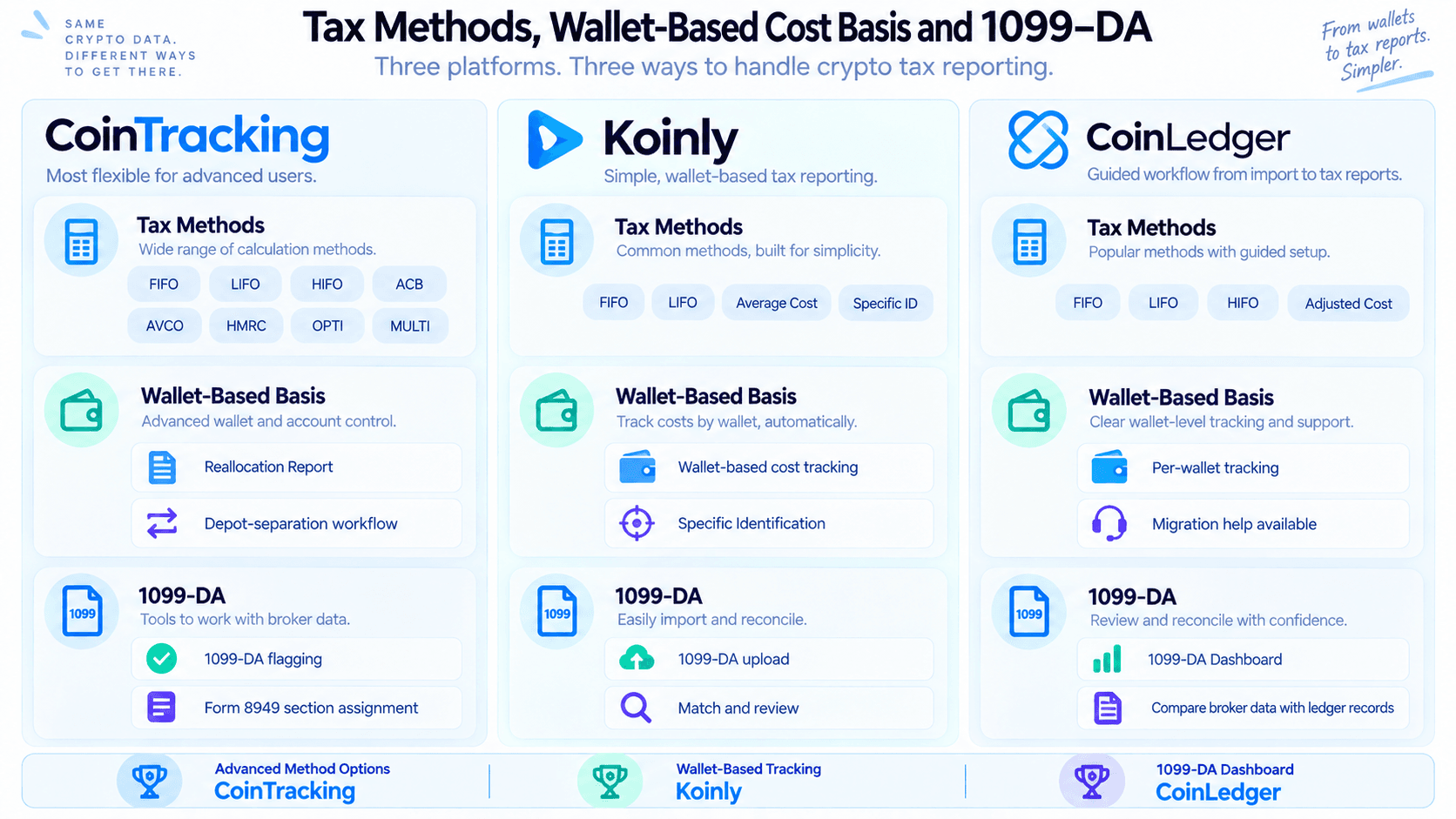 Tax Methods, Wallet-based Cost Basis and 1099-da Tools Across Cointracking, Koinly and Coinledger for Digital Asset Reporting
Supported Tax and Accounting Methods
CoinTracking supports FIFO, LIFO, HIFO, ACB, AVCO and HMRC calculations, plus OPTI and MULTI functionality for more advanced configurations.
Koinly's pricing page lists FIFO, LIFO, Average Cost and additional methods, along with wallet-based cost tracking and Specific Identification.
CoinLedger lists FIFO, LIFO, HIFO, Adjusted Cost and other supported methods.
Wallet-Based Cost Basis and Specific Identification
Wallet-based cost basis tracks lots inside individual wallets or accounts rather than pooling an asset across the entire portfolio. For U.S. taxpayers, IRS digital-asset guidance and Revenue Procedure 2024-28 address wallet-by-wallet cost-basis tracking.
CoinTracking supports its transition through the Reallocation Report and depot-separation workflow, using a fixed snapshot as the basis for subsequent calculations.
Koinly supports wallet-based cost tracking and Specific Identification.
CoinLedger also supports per-wallet tracking and offers a professional migration service for users who need help restructuring historical basis records.
Transfers between a taxpayer's own wallets do not create a new acquisition cost. The original lot history remains relevant after the transfer.
Form 1099-DA in 2026
Form 1099-DA is now part of the U.S. digital-asset reporting regime. Under the IRS Form 1099-DA instructions, broker reporting is being introduced in stages. Transferred-in assets and other noncovered assets can still arrive without complete cost basis.
CoinTracking uses 1099-DA flagging and assigns transactions to the relevant Form 8949 sections. Its documented workflow includes short-term A/B/C/G/H/I and long-term D/E/F/J/K/L classifications. This lets U.S. filers match their Form 8949 to the boxes reported on broker-issued Forms 1099-DA, for tax reports from 2025 onward.
Koinly has a 1099-DA upload workflow. Uploaded forms are incorporated into Form 8949 preparation and discrepancies can be reviewed against the imported ledger.
CoinLedger's 1099-DA Dashboard compares broker-reported proceeds and basis with CoinLedger's own records.
Several exchanges can produce several forms. Self-custody transaction history may still be needed to establish basis for assets transferred into a broker.
Tax Reports and Filing Workflows
Once the ledger is reconciled, the platform has to generate usable forms or exports for the taxpayer's jurisdiction and filing software.
CoinTracking Tax Reports
CoinTracking produces capital-gains, income and ledger reports alongside multiple accounting-method calculations.
As of Sept. 30, 2026, its product data lists 22 dedicated country-specific reports for Austria, Australia, Belgium, Canada, Czechia, Denmark, Finland, France, Germany, India, Ireland, Italy, the Netherlands, New Zealand, Norway, Poland, Portugal, Spain, Sweden, Switzerland, the United Kingdom and the United States.
France and Czechia were added on August 20, 2026. Other jurisdictions can use the configurable General Tax Report.
U.S. reporting includes Form 8949 CSV data, Schedule D in the full PDF report, FBAR/FinCEN 114 information and Form 8938/FATCA-related reporting.
Exports include TurboTax, TaxACT, Drake, WISO Steuer, CSV, PDF and Excel.
Koinly Tax Reports
Koinly generates Form 8949, Schedule D, international tax reports, TurboTax and TaxAct exports and a comprehensive audit report.
Its current company information lists operations across 140+ countries, while its pricing documentation identifies specialized reports for markets including the U.S., Canada, Australia, the UK, Germany, Norway, Denmark and Sweden.
CoinLedger Tax Reports
CoinLedger provides Form 8949, Schedule D, capital-gains reports, income reports, international reports and an Audit Trail, as per official documentation.
Tax-software exports include TurboTax Online, TurboTax Desktop, TaxAct, H&R Block Desktop and TaxSlayer.
TurboTax and Tax Software Handoff
CoinTracking supports TurboTax alongside TaxACT, Drake, WISO Steuer, CSV, PDF and Excel exports.
Koinly generates TurboTax and TaxAct-compatible reports.
CoinLedger supports TurboTax Online and Desktop, TaxAct, H&R Block Desktop and TaxSlayer. Its documentation also covers cases where TurboTax's own import process requires manual adjustments.
Which Works Best Outside the U.S.?
Koinly has broad international reach, with operations across 140+ countries. Its pricing page lists specialized reports for eight markets (the U.S., Canada, Australia, the UK, Germany, Norway, Denmark and Sweden) and supports other countries that use Average Cost, FIFO, LIFO or HIFO.
CoinTracking provides 22 dedicated country reports plus its General Tax Report and jurisdiction-specific methods such as ACB and HMRC calculations.
CoinLedger supports international reports and publishes country-specific resources, although its Form 1099-DA tools and much of its filing documentation are particularly U.S.-focused.
DeFi, Staking, NFTs and Complex Crypto Activity
Onchain transactions add classification problems beyond ordinary spot trades. LP tokens, bridges and yield strategies can require additional review even after the underlying blockchain transactions have been imported.
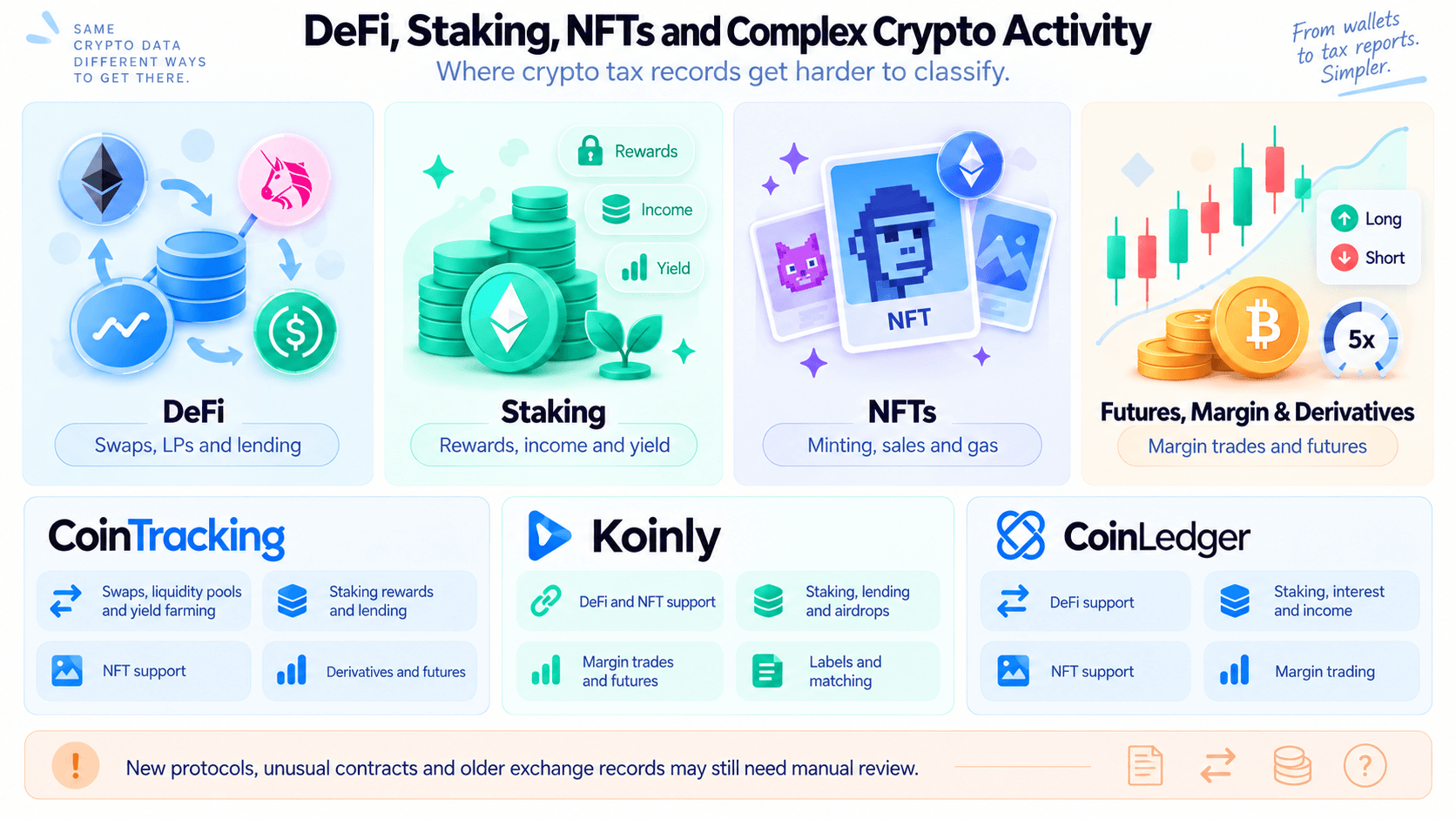 Defi, Staking, NFTs and Derivatives Support Across CoinTracking, Koinly and CoinLedger for More Complex Crypto Tax Activity
DeFi
CoinTracking supports swaps, liquidity pools, lending, yield farming and other DeFi activity.
Koinly supports DeFi, NFTs and margin activity alongside automated matching and transaction labels.
CoinLedger supports DeFi and automatically imports transactions from supported blockchains and protocols.
Unusual contracts, newer protocols and complicated liquidity positions can still require manual classification. DeFi also introduces smart-contract, bridge, oracle, stablecoin and liquidity risks that tax software cannot remove.
Staking and Crypto Income
CoinTracking supports staking rewards, lending and yield-related transactions.
Koinly lists mining, staking, lending and airdrops among its supported categories.
CoinLedger supports staking, interest and smaller wallet payouts, while its Income Report covers taxable crypto-income categories.
Editable transaction classifications remain important for liquid staking, restaking and less common yield structures.
Coin Bureau's crypto staking guide covers staking mechanics separately.
NFTs
All three platforms support NFT activity. NFT histories can include purchases, sales, minting, marketplace activity and gas fees. Missing historical prices and unusual marketplace contracts can complicate classification.
Futures, Margin and Derivatives
CoinTracking supports derivatives and futures through applicable importers.
Koinly includes margin trades and futures among the activity covered by its upper plans and integrations.
CoinLedger includes margin trading among its current product features.
Historical futures and settlement records remain exchange-specific and may require additional files. Leverage introduces liquidation and market-volatility risk independently of the tax software used to record it.
Portfolio Tracking and Tax Analytics
CoinTracking provides the deepest portfolio analytics. It tracks balances, realized and unrealized gains, historical balances, exchange balances, fees and performance through 25+ reports. Mobile portfolio access is also available.
Koinly includes portfolio tracking, capital-gains previews, cost basis and tax-optimization features.
CoinLedger provides free portfolio tracking, unlimited exchange and wallet connections and a capital-gains overview before users purchase a report.
Coin Bureau's best crypto portfolio trackers guide covers products focused more heavily on portfolio monitoring.
Accountant Access and Professional Tax Help
Professional services range from sharing the ledger with an accountant to paying a specialist to rebuild and reconcile the transaction history.
CoinTracking
CoinTracking supports firms through Corporate Accounts and a Data API. Accountants and tax professionals can manage multiple portfolios from one environment, while the API exposes transaction, balance, historical-value, gains and ledger information.
CoinTracking's Full-Service currently covers 30+ countries.
Basic starts at $1,099 and is designed for portfolios with fewer than 2,000 transactions and fewer than three exchanges or wallets. Advanced starts at $2,799, removes the transaction limit and includes unlimited exchanges and wallets, DeFi, NFTs, bots, derivatives and futures.
The service handles imports, corrections, validation and tax-report preparation.
The Basic and Advanced prices are starting points. Scope and effort are discussed in a free intake call, and the quote is based on that. Users can file the return themselves or with their own tax advisor, and in the U.S. CoinTracking also works with U.S.-based CPA partners who can prepare and file it.
Koinly
Koinly supports portfolio sharing and a dedicated accountant platform for professionals managing crypto-tax clients.
Its Expert Review service checks prepared crypto-tax data. It is a review service rather than full tax-return preparation.
CoinLedger
CoinLedger's Expert Review costs $699. The expedited version costs $1,199.
Expert Review evaluates data already imported into the account and provides personalized recommendations. The reviewer does not import or change transactions on the user's behalf.
CoinLedger's Done For You service starts at $3,500. A dedicated specialist handles imports, reconciliation, classifications, missing cost basis and completed tax reports.
Done For You delivers tax-reporting output rather than filing the complete income-tax return.
CoinLedger also offers Done For You Pro for ongoing, year-round reconciliation.
Professional help becomes more relevant when years of records are missing, large basis discrepancies remain unexplained, complicated DeFi history cannot be reconstructed cleanly, amended returns are involved or the crypto activity belongs to a business or other legal entity.
CoinTracking vs Koinly vs CoinLedger Pricing
All three start around $49, but their licensing structures produce very different costs as transaction counts and reporting years increase.
| Use case | CoinTracking | Koinly | CoinLedger |
|---|---|---|---|
| Free | 7-day trial with unlimited imports, then free imports incl. exchange API, portfolio tracking and 25+ reports for up to 200 transactions | Up to 10,000 transactions; no downloadable tax reports | Free portfolio tracking, imports and gains preview |
| ~100 transactions | $49 Starter | $49 Newbie | $49 Hobbyist |
| ~200 transactions | $49 Starter | $99 once above 100 | $99 once above 100 |
| ~1,000 transactions | $169 Pro | $99 Hodler | $99 Investor |
| ~3,000 transactions | $169 Pro | From $199 Trader | From $199 Pro |
| 10,000+ | From $259 Expert | Trader/Pro configuration plus extra transactions | Pro plus additional transaction capacity |
| 50,000+ | $349/year Expert M | Pro plus transaction add-ons | Higher-volume capacity through Pro |
| Tax reports included | Paid plans | Paid tax-year plan | Paid tax-year report |
| Multiple tax years | All report years within the active account allowance | Separate plan for each report year | Separate report purchase for each year |
| ~1,000 transactions per year, three tax years | $169 Pro (one licence) | $297 (3 × $99 Hodler) | $297 (3 × $99 Investor) |
| Portfolio tracking | Yes | Yes | Yes |
CoinTracking prices by the total transaction history in the account rather than by tax year, so one active licence covers reports for every tax year in the account, including past years.
Koinly uses both annual and account-wide limits. All Koinly plans combined need to cover the transactions in the account, with a free margin of 1,000 transactions. Earlier years can be covered by buying a larger plan for the current year, but reports for those earlier years are then not included. Its pricing rules count deposits, withdrawals and trades, while some grouped trades, spam transactions and small rewards are excluded. Regular accounts can scale to 100,000 transactions through the upper plan and additional transaction packages.
CoinLedger's current pricing charges by report transaction capacity and allows additional transactions above the 3,000+ Pro tier. Unlimited wallet and exchange connections are included across the product.
CoinTracking Plan Structure
CoinTracking offers one-year, two-year and lifetime licenses rather than monthly plans.
| Plan | Transactions | 1 Year | 2 Years | Lifetime |
|---|---|---|---|---|
| Starter | 200 | $49 | $79 | $249 |
| Pro | 3,500 | $169 | $259 | $749 |
| Expert S | 20,000 | $259 | $399 | $1,199 |
| Expert M | 50,000 | $349 | $539 | $1,599 |
| Expert L | 100,000 | $459 | $729 | $2,499 |
| Unlimited | Unlimited | $899 | $1,399 | $7,199 |
The current public pricing page lists Starter at $49/year, Pro at $169/year, Expert from $259/year and Unlimited at $899/year. Two-year and lifetime licenses are also available.
Which Is Cheapest for Light Users?
At about 100 transactions for one tax year, all three start at $49.
CoinTracking Starter covers 200 transactions. Koinly Newbie and CoinLedger Hobbyist cover 100 transactions, so users slightly above the 100-transaction threshold move into a higher competitor tier.
For one small tax year, the cost difference is limited.
Which Offers Better Value for Active Traders?
For active traders processing thousands of transactions a year, particularly those with large historical datasets, CoinTracking offers the stronger pricing structure.
At around 3,000 transactions, CoinTracking Pro costs $169/year and supports up to 3,500 transactions. Koinly Trader and CoinLedger Pro both start at $199.
The difference becomes more pronounced at higher volumes. CoinTracking Expert S supports 20,000 transactions for $259/year, Expert M covers 50,000 for $349/year, and Expert L covers 100,000 for $459/year.
Koinly and CoinLedger can also accommodate larger histories, but pricing increases through higher tiers or additional transaction capacity.
What Do Three or Five Years Actually Cost?
Multi-year filing is where the pricing models diverge most sharply.
If you have around 1,000 transactions per year across three tax years, CoinTracking would hold roughly 3,000 transactions in total. That fits within Pro at $169 for a one-year licence, with tax reports available across the historical years in the account.
Koinly would cost about $297 for three $99 tax-year plans, assuming the account-wide transaction limit is sufficient. Three $99 CoinLedger Investor reports would also total $297.
The gap widens when catching up on more years. At around 500 transactions per year across four tax years, CoinTracking would contain roughly 2,000 transactions and still fit within Pro at $169. Four $99 Koinly plans or CoinLedger reports would cost $396.
For a heavier history of around 2,000 transactions per year across five tax years, CoinTracking would hold roughly 10,000 transactions. Expert S covers up to 20,000 transactions for $259.
Five Koinly Trader plans at $199 each would start at $995, although account-wide transaction limits could increase the final cost. CoinLedger Pro also starts at $199 per tax year, with additional capacity required when a report exceeds the included transaction allowance.
CoinTracking prices primarily around the size of your total account history, while Koinly and CoinLedger add a new tax-year cost each time you need another year's report. That can make CoinTracking substantially cheaper for users filing several years at once.
For very large long-term histories, CoinTracking Expert M covers 50,000 transactions and costs $349 for one year, $539 for two years or $1,599 for a lifetime licence.
Payments and Refunds
CoinTracking accepts Visa, Mastercard, Amex, PayPal, Bitcoin and 160+ other cryptocurrencies, Crypto.com and Klarna. Direct bank transfer is not listed.
Crypto payments are available through providers including NOWPayments and Crypto.com. CoinTracking gives a 5% discount for Bitcoin payments.
Its pricing terms provide a 14-day refund period. Upgrades are prorated against unused plan time, so users moving to a higher tier pay the remaining difference. Corporate purchases are non-refundable.
Koinly accepts credit and debit cards plus BTC, ETH, DAI and USDC.
Its refund policy permits qualifying refund requests within seven days when an unresolved product issue remains and no tax reports have been generated. Crypto-payment refunds are issued in USDC.
CoinLedger uses card payments and offers a 14-day money-back guarantee.
Security, Privacy and Data Portability
Crypto tax platforms can hold a detailed map of a user's financial activity. API permissions, authentication, hosting and data-export options deserve close attention.
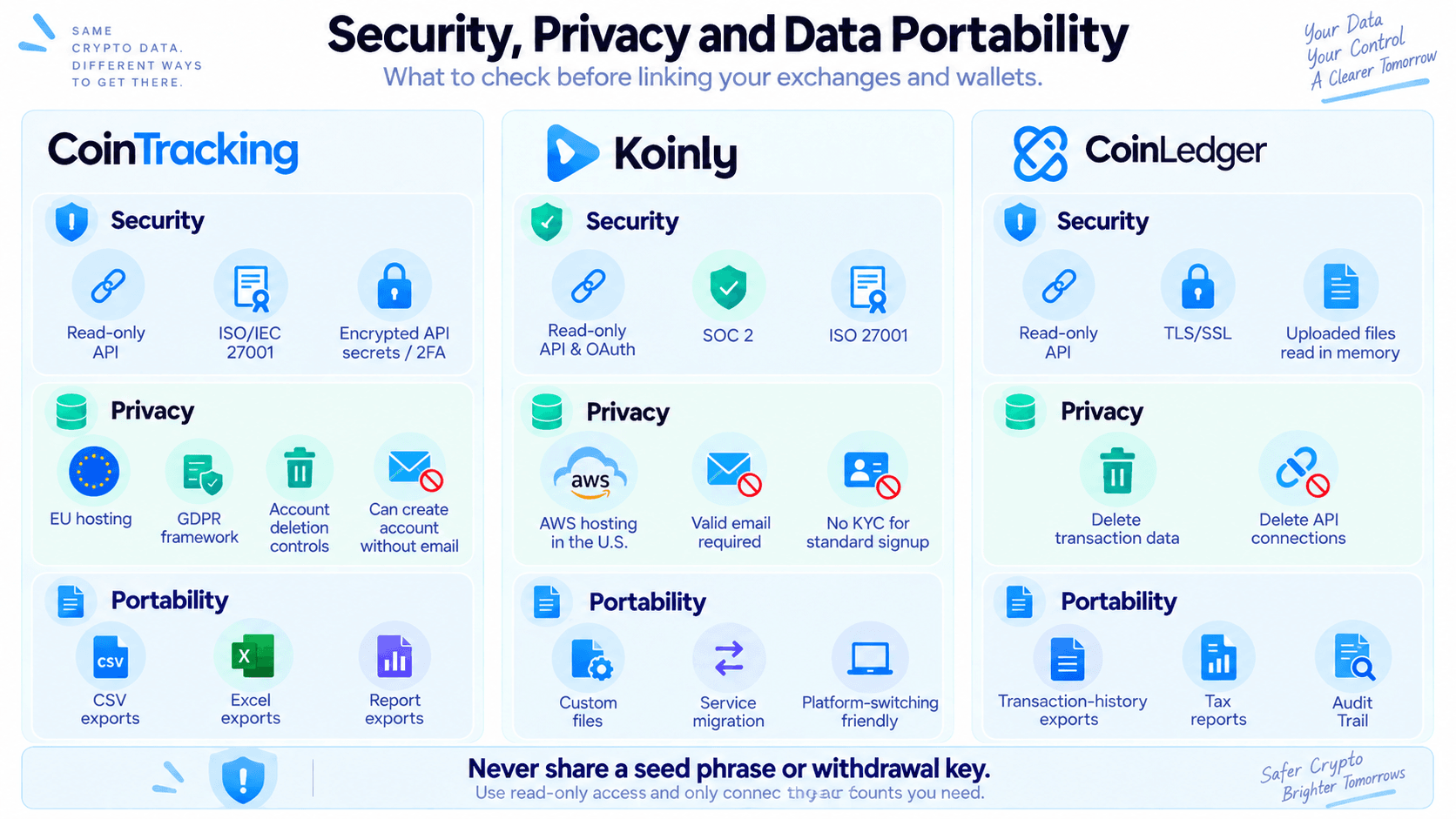 Security, Privacy and Data Portability Features Across CoinTracking, Koinly and CoinLedger for Safer Crypto Tax Data Management
Security and API Permissions
Crypto tax software does not need trading or withdrawal permission.
CoinTracking's security documentation lists read-only connections, encrypted API secrets, native 2FA, backups and account-deletion controls. CoinTracking is ISO/IEC 27001 certified, stores data on servers in the EU and operates under GDPR requirements.
Accounts can also be created without supplying an email address.
Koinly's security documentation states that API and OAuth connections are read-only and that most services and data are hosted in AWS facilities in the United States. Koinly also publishes SOC 2 and ISO 27001 certification.
CoinLedger's security documentation states that exchange integrations use read-only permissions and that application traffic is protected using TLS/SSL encryption. CoinLedger says uploaded transaction files are read into memory and then discarded after import.
A tax platform should never require a wallet seed phrase, private key or exchange withdrawal permission.
What Data Do the Platforms Store?
Crypto-tax accounts can contain exchange transaction histories, public wallet addresses, calculated gains and tax information. Linking multiple public addresses in one account can create a detailed financial profile even without private keys.
CoinTracking provides account-deletion controls. Koinly does not require KYC for ordinary account creation beyond a valid email address. CoinLedger says users can delete transaction data and exchange API connections from their account.
Can You Export Your Data and Switch Later?
Basic transaction history is more portable than reconciliation work.
CoinTracking provides extensive CSV, Excel and report exports. Koinly supports custom files and migration from other crypto-tax services. CoinLedger provides transaction-history exports alongside tax reports and Audit Trail data.
Transfer matches, manual tags, custom classifications, rules and lot-selection decisions may not map cleanly between platforms.
Keeping original exchange files, wallet lists, transaction exports, audit records and final tax reports reduces the amount of reconstruction required after switching.
CoinTracking vs Koinly vs CoinLedger by User Type
Different transaction histories favor different products.
| User | Best Fit | Why |
|---|---|---|
| Beginner | Koinly | Clean workflow with automated matching and visible error checks |
| Long crypto history | CoinTracking | Detailed validation, flexible import tools and a track record since 2012 |
| Active trader | CoinTracking | Reporting depth and 3,500-transaction Pro allowance |
| High-volume trader | CoinTracking | Expert tiers scale through 20,000, 50,000 and 100,000 transactions |
| DeFi user | Koinly / CoinLedger | Broad onchain support and accessible review workflows |
| International user | Koinly | Broad country coverage and specialized tax reports |
| U.S. 1099-DA filer | CoinLedger | Dedicated 1099-DA Dashboard |
| Multiple tax years | CoinTracking | One paid licence can cover reports across tax years |
| Portfolio analytics user | CoinTracking | 25+ reports and deeper historical analytics |
| User needing professional help | CoinTracking / CoinLedger | Both offer hands-on reconciliation with different filing scopes |

CoinTracking vs Koinly vs CoinLedger: Final Verdict
Koinly is our general-purpose choice for users who want a clean crypto-tax workflow, automated reconciliation and broad international support. CoinTracking is geared toward deep record keeping, complicated histories, portfolio analytics, high transaction volumes and multiple tax years. CoinLedger is particularly well suited to U.S. taxpayers who want dedicated 1099-DA reconciliation, broad integrations, guided filing and access to professional cleanup services.
Pricing becomes more important as historical records grow. CoinTracking's multi-year licence structure can reduce the cost of producing several historical reports, Koinly combines strong reconciliation features with broad international coverage, and CoinLedger provides a particularly clear U.S.-oriented reporting workflow.