Arculus sits in a growing category of card-based hardware wallets designed to make cold storage feel closer to using a contactless bank card than a traditional hardware device. It uses NFC and a smartphone app rather than relying on buttons, cables or a built-in display.
I have been using Arculus for the past two weeks to see how that design works in practice. During testing, I went through the setup process, sent and received crypto, used the tap-to-sign system, navigated the mobile app and assessed its recovery, asset support and DApp functionality.
The appeal is straightforward. Arculus pairs its metal NFC card with a CC EAL6+ secure element, PIN authentication, optional biometrics and a 12- or 24-word BIP39 recovery phrase. It also extends beyond basic cold storage with multi-chain asset support, WalletConnect and staking.
Its biggest trade-off is also common to this style of wallet: there is no display on the card itself. Transaction details are shown on the smartphone before the card signs them. That makes Arculus convenient to use, but it also means its security model differs in an important way from hardware wallets that let users independently verify transaction details on the device itself.
After two weeks of use, this review looks at whether Arculus gets that balance right, where it stands against other card wallets, and who should consider using it.
Arculus Wallet Review 2026: Quick Verdict
After two weeks of testing, I found Arculus Wallet's setup, sending, receiving and tap-to-sign consistently straightforward. Its CC EAL6+ secure element, BIP39 recovery, broad network support and WalletConnect functionality give it a capable feature set, but the lack of a hardware display means transaction details must be trusted and verified on the phone.
Our take: Arculus is best for users who want hardware-backed self-custody without carrying a traditional hardware device or dealing with cables, buttons and charging. The tap-to-sign experience is excellent, and the app is easy to navigate. The main compromise is architectural: the card protects and uses the private key, but it cannot independently display the transaction being signed.
Scorecard
-
1Security 4.4/5 Private keys are generated and used inside a CC EAL6+ secure element, with the physical card, six-digit PIN and optional biometrics protecting access. The main limitation is the screenless design, which leaves transaction presentation and verification to the smartphone.
-
2Ease of Use 4.8/5 Setup is fast, the mobile app is easy to navigate and NFC signing worked on the first attempt throughout our two-week testing period. There are no cables, batteries or hardware buttons, although users still need to understand recovery phrases, blockchain addresses and NFC positioning.
-
3Networks & Assets 4.6/5 Arculus supports dozens of major networks, including Bitcoin, Ethereum, Solana, Cardano, XRP Ledger, BNB Smart Chain, Base, Arbitrum, Avalanche, Polygon, Cosmos, Sui, TON and Tron. Custom-token support is also broad, although functionality varies by network and older Arculus cards have more limited asset support.
-
4DApps & Staking 4.3/5 WalletConnect is available across multiple major networks, while the app also supports NFTs and native, liquid and third-party staking options. DApp connectivity is less immediately visible than the wallet's core functions, and availability varies significantly by network and region.
-
5Cost & Fees 4.2/5 The Arculus Card costs $99, while Arculus does not charge its own fee for ordinary sending or receiving. Buying, swapping and selling can involve blockchain fees, third-party provider charges, spreads and payment-processing costs, so the effective price depends on the transaction route.
-
6Custody & Transparency 4.1/5 Arculus is self-custodial and uses standard 12- or 24-word BIP39 recovery phrases, allowing compatible external recovery when derivation paths match. However, the wallet is not fully open source, and WalletScrutiny currently cannot reproduce the distributed app from publicly available source code.
-
7Overall Score 4.5/5 Arculus delivers one of the simpler hardware-wallet experiences for mobile-first users. Its secure element, reliable NFC signing, broad asset support and BIP39 recovery are strong points. Its main drawbacks are smartphone dependence, limited advanced Bitcoin functionality, incomplete open-source transparency and the absence of independent hardware transaction verification.
Best For
- Beginners who want simple hardware-backed self-custody
- Mobile-first crypto users
- Multi-chain holders
- Users who want portable tap-to-sign cold storage
- DApp users who want WalletConnect with hardware-protected keys
Not Ideal For
- Users who want transaction details verified on a hardware screen
- Open-source purists
- Desktop-first users
- Advanced Bitcoin users needing coin control, PSBT or Lightning
- Users who want to minimize smartphone dependence
Disclosure and Methodology
Some links in this article may be affiliate links. If you choose to use a product or service through these links, we may earn a commission at no additional cost to you.
For this Arculus Wallet review, we evaluated the wallet across six main categories: security, ease of use, network and asset support, DApp and staking functionality, cost and fees, and custody and transparency.
Hands-on testing was conducted from Sept. 21 to Oct. 3, 2026, using an Arculus Card Version 2, Arculus app version 3.12.1 and a Samsung Galaxy S24 running Android.
We personally tested wallet setup, receiving crypto, sending Solana, app navigation and NFC tap-to-sign functionality. Swapping and staking were unavailable in our testing region, so those features were assessed using current Arculus documentation rather than presented as first-hand experience.
Our final score considers Arculus's main limitations, including smartphone dependence, lack of independent hardware transaction verification, incomplete open-source transparency and limited advanced Bitcoin tools.
Arculus Wallet at a Glance
| Feature | Arculus Wallet |
|---|---|
| Wallet type | Hardware / cold wallet |
| Form factor | Metal NFC card |
| Price | $99 |
| Secure element | CC EAL6+ secure element |
| Authentication | Physical Arculus Card + 6-digit PIN + optional fingerprint/Face ID |
| Connectivity | NFC |
| Hardware screen | No |
| Battery | No |
| Recovery | 12- or 24-word recovery phrase |
| Mobile support | iOS and Android |
| Desktop support | No dedicated desktop app |
| DApp connectivity | WalletConnect on Arbitrum, Avalanche, Base, BNB, Ethereum, Optimism, Polkadot, Polygon, Sei V2, Solana and Tron |
| NFT support | Yes, including viewing, sending, receiving and buying through connected DApps |
| Staking | Yes, selected assets through native, liquid and third-party staking |
| Buy / swap / sell | Yes, through integrated third-party providers, with availability varying by asset and location |
| Self-custody | Yes |
| Open-source status | Not fully open source; WalletScrutiny says source for the current release is not publicly available for reproducible-build verification |
| Wallets per card | One wallet per Arculus Card; multiple cards/wallets can be managed in the same mobile app |
Note: Data is current as of Oct. 10, 2026.
Arculus currently supports Android 11 or later on NFC-capable Android phones. On Apple devices, it requires iOS 17.5 or later and an iPhone XR or newer.
As of Oct. 10, 2026, the Arculus Card sells for $99, excluding applicable sales tax. However, Arculus is currently running a promotion so you can snap the metal card for as low as $59.76 or $76.26 for two cards. The card has no battery, which means it does away with the hassle of charging and changing batteries. It stores private keys inside a CC EAL6+ secure element and uses NFC to communicate with the mobile app.
Arculus also supports WalletConnect across a defined set of networks, NFT management and multiple forms of staking. Each physical card, however, can hold the private keys for only one wallet at a time, although the mobile app can manage several separate cards and wallets.
What Is Arculus Wallet and How Does It Work?
Arculus is a self-custody hardware wallet that combines a physical metal card with the Arculus mobile app. The card stores and uses the private keys needed to sign cryptocurrency transactions, while the smartphone provides the interface for checking balances, creating transactions, managing assets and connecting to DApps.
The wallet was developed by CompoSecure, a U.S.-based company that also manufactures metal payment cards and develops secure authentication technology. Arculus launched in 2021 as the company's consumer-focused cold-storage product.
With a normal software wallet, the keys are stored and used on the phone or computer running the wallet application. With Arculus, the private keys are generated and stored inside the secure element embedded in the Arculus Card and, according to Arculus, never leave the card. The mobile app can prepare transactions and communicate with blockchain networks, but the physical card is responsible for cryptographic signing.
That separation allows Arculus to use an internet-connected smartphone without storing the wallet's private keys on it. The phone and card work as two parts of the same system rather than the app functioning as a standalone crypto wallet.
For more options, see our guide to the best hardware wallets, where we compare security, usability, recovery and asset support. Looking for hardware wallets that do not break the bank? Our cheap hardware wallets guide highlights top picks for under $100.
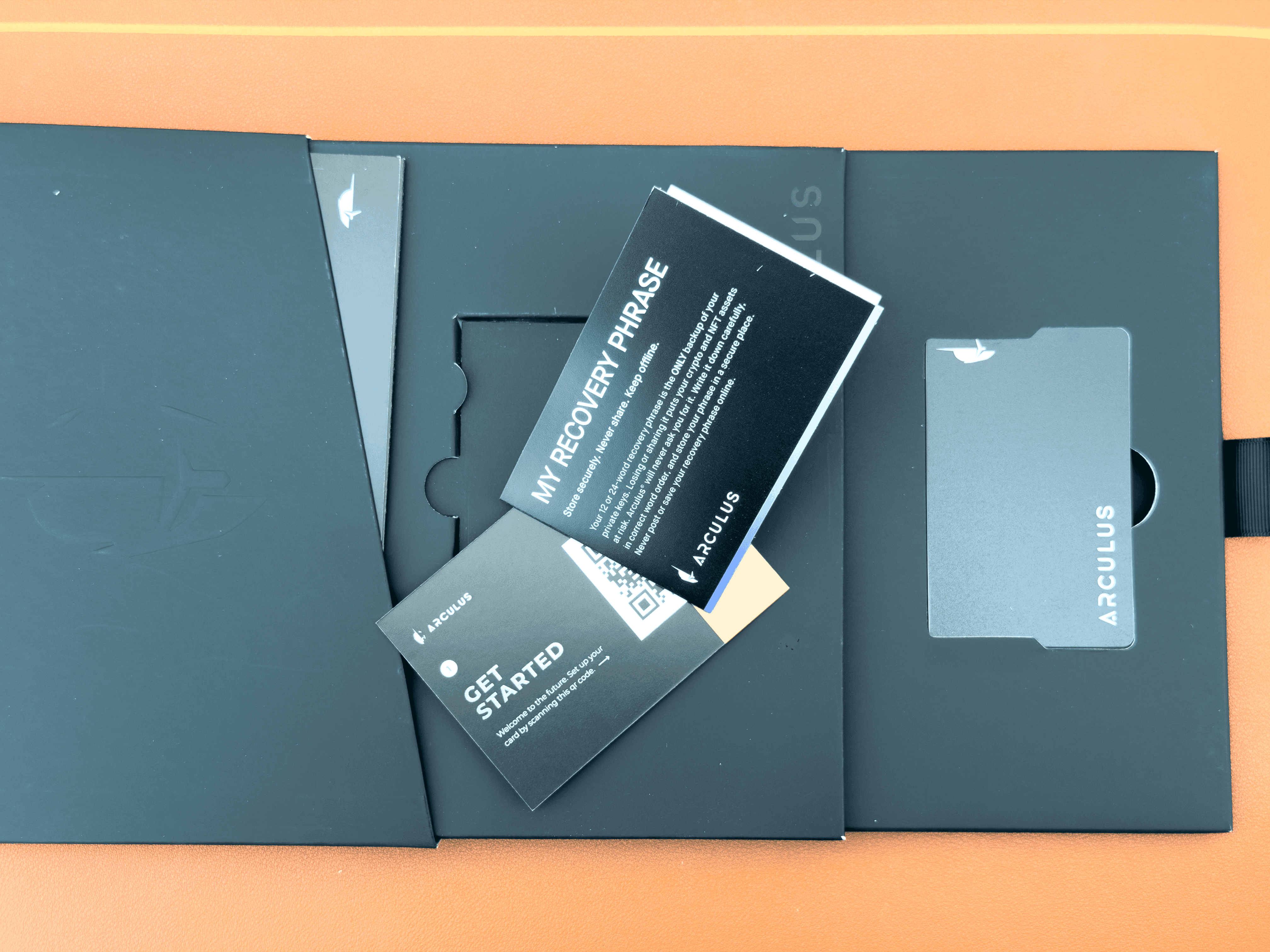 Arculus Wallet Combines a Metal NFC Card With a Mobile App
How Does Tap-to-Sign Work?
A typical Arculus transaction follows this sequence:
Create transaction on phone → review transaction details → authenticate with PIN and optional biometrics → tap Arculus Card to phone → card signs transaction → phone broadcasts it to the blockchain
Each component has a different role:
- Arculus app: Creates the transaction, displays the recipient, amount and other transaction information, and communicates with the relevant blockchain network.
- PIN and biometrics: Authenticate the user before signing. Arculus uses a six-digit PIN, while biometric authentication can be enabled as an additional factor.
- Arculus Card: Receives the signing request over NFC and uses the private key held inside its secure element to produce the cryptographic signature.
- Smartphone: Receives the signed transaction and submits it to the blockchain network.
The NFC communication between the phone and card is encrypted using changing keypairs. This NFC exchange does not contain the destination address or transaction amount.
How Is Arculus Different From a Traditional Hardware Wallet?
Arculus performs the same basic job as other hardware wallets, keeping private-key operations separate from an ordinary internet-connected phone or computer, but it packages that function differently.
| Feature | Arculus | Traditional Hardware Wallet |
|---|---|---|
| Form factor | Metal card | Dedicated electronic device |
| Primary connection | NFC | USB, Bluetooth or QR, depending on device |
| Hardware screen | No | Common, but not universal |
| Battery | No | May be required |
| Main interface | Smartphone app | Device itself, desktop/mobile app, or a combination |
| Transaction signing | Tap card against phone | Confirm through device-specific controls |
| Private-key storage | Secure element inside card | Hardware wallet device |
This makes Arculus heavily phone-centric. Everyday interaction happens inside the mobile app, while the card becomes necessary when the wallet needs access to its private key to authorize a transaction.
That differs from hardware wallets with displays and physical controls, where more of the transaction workflow can take place on the hardware device itself. The security implications of that distinction are more important than the physical format alone, so we will examine them separately in the next section.
If you'd like to know how hardware wallets work, check out our dedicated guide on the topic.
Arculus Wallet Security: Is Arculus Safe?
Arculus combines several security layers rather than relying on a single feature. Private keys are generated and stored on the Arculus Card, the card uses a CC EAL6+ secure element, transactions require the physical card and PIN, and users can optionally add fingerprint or Face ID authentication. The card communicates with the phone over encrypted NFC.
That gives Arculus a strong hardware-based security model, but it is important to separate private-key protection, user authentication, NFC security and transaction verification. They solve different problems. A secure element can help protect the key without independently confirming that the transaction shown on the smartphone is the transaction the user intended to sign.
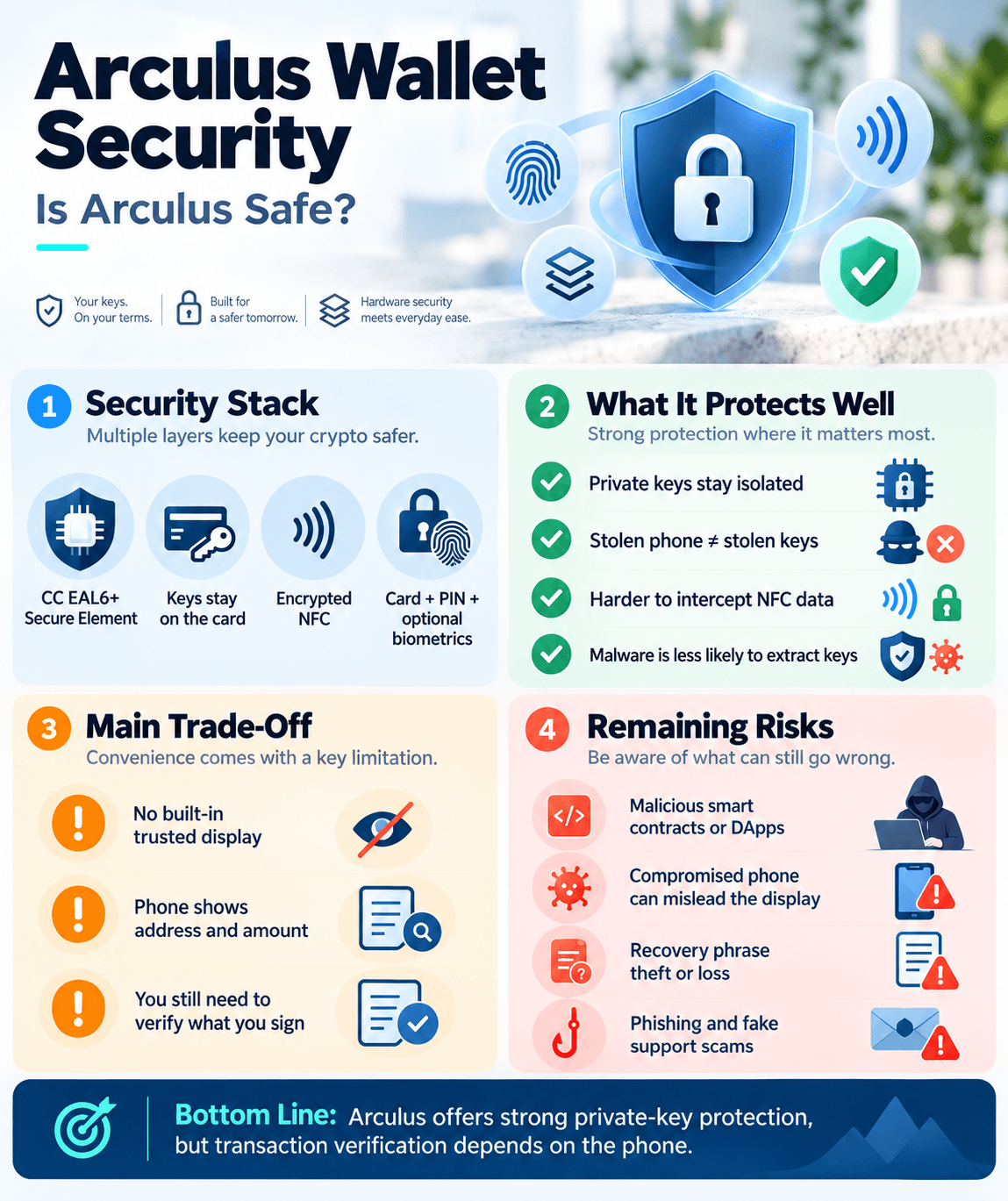 Arculus Uses a CC EAL6+ Secure Element to Protect Private Keys
CC EAL6+ Secure Element
The Arculus Card contains a secure element, a specialized chip designed to perform sensitive cryptographic operations in an isolated environment.
Arculus says the card generates and stores private keys inside this secure element rather than exposing them to the smartphone during normal use. Arculus
Arculus describes the chip as having a CC EAL6+ hardware classification. CC refers to Common Criteria, an international framework for evaluating the security properties of IT products. EAL6 is formally described as "semi-formally verified design and tested" and involves extensive analysis, independent testing and vulnerability assessment of the evaluated target.
The key phrase is evaluated target. An EAL level applies to the specific product or component covered by a certification and its defined security target. It should not be read as a universal score for every layer of the Arculus Wallet.
How Secure Is Arculus NFC?
Arculus uses NFC to communicate between the smartphone and card during operations such as transaction signing. Unlike a basic NFC tag, the card contains a secure element capable of performing cryptographic operations rather than simply exposing stored data when scanned.
Arculus says its NFC protocol uses encrypted proprietary communication with constantly changing keypairs. The company also says the NFC exchange does not contain the recipient address or transaction amount.
NFC itself is designed for very short-range communication, which reduces the physical window for interception compared with longer-range wireless protocols.
There are two separate questions here:
- Can someone intercept or manipulate communication between the phone and card?
- Can the user trust the transaction information displayed by the phone?
Arculus's encrypted NFC implementation addresses the first problem. It does not eliminate the second because the smartphone remains responsible for displaying the transaction that the user is being asked to authorize.
Arculus Three-Factor Authentication Explained
Arculus describes its authentication system in terms of three factors:
- Something you have: The physical Arculus Card.
- Something you know: The six-digit PIN.
- Something you are: A fingerprint or facial biometric.
There is an important qualification, however. Biometric authentication is optional. During setup, users can enable or disable fingerprint or Face ID authentication, and it can later be toggled from the app settings.
The Screenless Security Trade-Off
The absence of a screen is the most important architectural compromise to understand with Arculus.
The Arculus Card stores the private key and performs the cryptographic signing operation, but it does not display the recipient address, transaction amount or smart-contract details. Those are shown on the smartphone.
A hardware wallet with its own trusted display can present transaction details independently of the computer or phone creating the transaction. The user can compare the address and amount on the hardware device before approving the signature.
Arculus does not provide that second display. This does not mean the private key leaves the card or that a screenless wallet is automatically insecure. It means Arculus relies more heavily on the smartphone for transaction presentation.
What Does Arculus Protect Against, and What Doesn't It?
No hardware wallet removes every risk. Arculus is strongest when protecting private keys from direct exposure, but the surrounding phone, recovery phrase and transactions still require care.
| Threat | Protection Arculus Provides | Remaining Risk |
|---|---|---|
| Stolen Arculus Card | Card alone is not intended to provide wallet access. PIN authentication is still required, with optional biometrics adding another factor. | A weak or compromised authentication setup can reduce protection. The recovery phrase should still be treated as the ultimate backup credential. |
| Stolen smartphone | Private keys remain on the Arculus Card rather than the phone. | Personal information or wallet metadata may still be exposed depending on phone and app security. |
| Compromised smartphone | Malware should not gain the private key simply by compromising the phone because signing occurs on the card. | The phone controls transaction presentation, so misleading addresses, amounts or contract details are a separate concern. |
| Malicious DApp | The private key remains isolated on the card during signing. | Hardware isolation cannot determine whether a smart-contract approval or transaction is economically safe. A user can securely sign a malicious request. |
| NFC interception | Arculus says card/app communication is encrypted with changing keypairs and excludes address and amount data. | Security still depends on the implementation of the protocol and surrounding software. Short-range NFC does not make all attacks impossible. |
| Lost recovery phrase | The card may continue to function while the user still has access to it. | If the card later becomes lost, damaged or unusable, recovery may become impossible without the phrase. |
| Fake support or recovery scam | Arculus never needs a third party to hold the user's private keys for self-custody. | Anyone who obtains the 12- or 24-word recovery phrase can potentially reconstruct the wallet. Phishing remains a user-level threat. |
Is Arculus Open Source?
Arculus is not fully open source simply because it uses standards such as BIP39.
BIP39 defines a standardized mnemonic recovery system. Using that standard improves portability, but it says nothing about whether the Arculus mobile app, firmware or other implementation details are publicly auditable.
WalletScrutiny currently lists Arculus as having no source available for the current release that it can use for build verification. As a result, it says it cannot reproduce the wallet software from public source code and compare the resulting build with the distributed application.
That reduces independent verifiability. Researchers cannot use reproducible builds to demonstrate that the publicly distributed application corresponds exactly to a published source-code base.
Using Arculus Wallet: My Two-Week Experience
I used Arculus for two weeks to see how its card-and-phone approach works in everyday use.
For transparency, my testing used:
- Arculus Card: Version 2
- Arculus app: Version 3.12.1
- Phone: Samsung Galaxy S24
- Operating system: Android
- Testing period: Sept. 21, 2026 to Oct. 3, 2026
- Functions tested: Setup, send, receive. Swapping and staking were unsupported in my region
Anything I did not personally test is assessed separately using Arculus documentation rather than presented as first-hand experience.
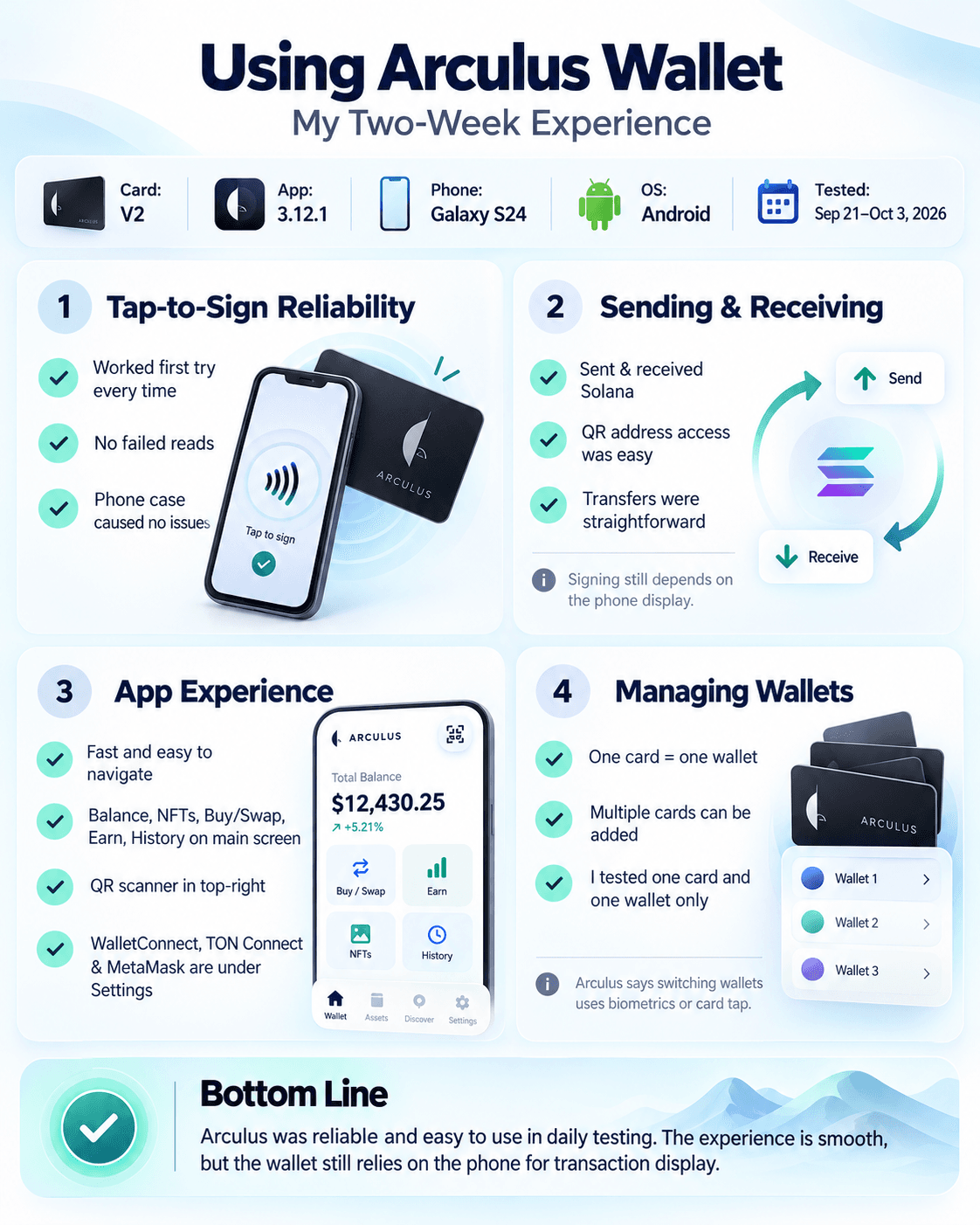 Testing the Arculus Wallet's NFC Tap-to-Sign Functionality
How Reliable Is Tap-to-Sign?
Tap-to-sign is central to the Arculus experience. When a transaction requires the card, the app prompts you to hold it against the phone's NFC reader while the card performs the signing operation.
During my testing, tap-to-sign worked on the first attempt every time. I positioned the Arculus Card against the back of my phone, and the phone case did not interfere with NFC communication. I also did not encounter any failed reads during the two-week testing period.
Sending and Receiving Crypto
Receiving crypto is straightforward. Select an asset, choose Receive, and Arculus displays the wallet address along with a QR code that can be scanned by another wallet or exchange.
When sending, the transaction is constructed through the mobile app before the Arculus Card is tapped to authorize the signature.
In my testing, I sent and received Solana, and the process was straightforward. The wallet address was easy to access, transactions were simple to initiate, and I did not run into any issues during the transfer process.
The app shows transaction information on the smartphone before signing. That keeps the workflow simple, but it also returns us to the screenless trade-off discussed earlier: the Arculus Card itself does not independently display the destination address or amount.
Arculus App Experience
The app acts as the control center for the wallet. It combines the portfolio view, individual assets, transaction history, receiving addresses and additional functions such as buying, swapping, staking and DApp connectivity.
Arculus has continued expanding the app beyond basic cold storage. Current versions include features such as historical charts and transaction-history export, alongside a much broader range of supported networks than earlier versions of the wallet.
Transaction history can be exported from the History tab. Arculus notes that the export includes transactions only for assets currently enabled in the wallet, so users should enable all relevant assets before creating the file.
During my testing, I found the Arculus app fast and easy to navigate. The main wallet screen gives direct access to your balance, NFTs, buy/swap, Earn and transaction history through buttons along the bottom, while a QR code scanner sits in the top-right corner.
The strongest part is how much of the everyday wallet experience is accessible from that main screen without digging through menus.
WalletConnect, TON Connect and MetaMask are less prominent, however. Those integrations are accessed through the settings menu in the top-left corner, so users looking for DApp connectivity may need an extra step to find them.
Managing Multiple Arculus Cards and Wallets
The Arculus app can manage multiple wallets on the same phone, but there is an important distinction:
One Arculus Card corresponds to one wallet, and one wallet is stored on one card at a time.
Users can add a second or third card, with each card controlling its own separate wallet, and switch between them inside the app. Arculus says switching wallets requires biometric authentication or a card tap if biometrics are disabled.
I only tested one Arculus Card and one wallet, so I did not assess the multi-wallet switching experience firsthand.
Arculus Recovery Phrase and Wallet Backup
Arculus uses the BIP39 standard and lets users create either a 12-word or 24-word recovery phrase when setting up a wallet. The phrase can restore access if the Arculus Card is lost or damaged, the phone is replaced, or the card becomes locked after repeated incorrect PIN attempts.
Arculus does not retain or store the recovery phrase for users. If it is lost, Arculus cannot retrieve it. If it is exposed to someone else, that person may be able to restore the wallet elsewhere and access the funds.
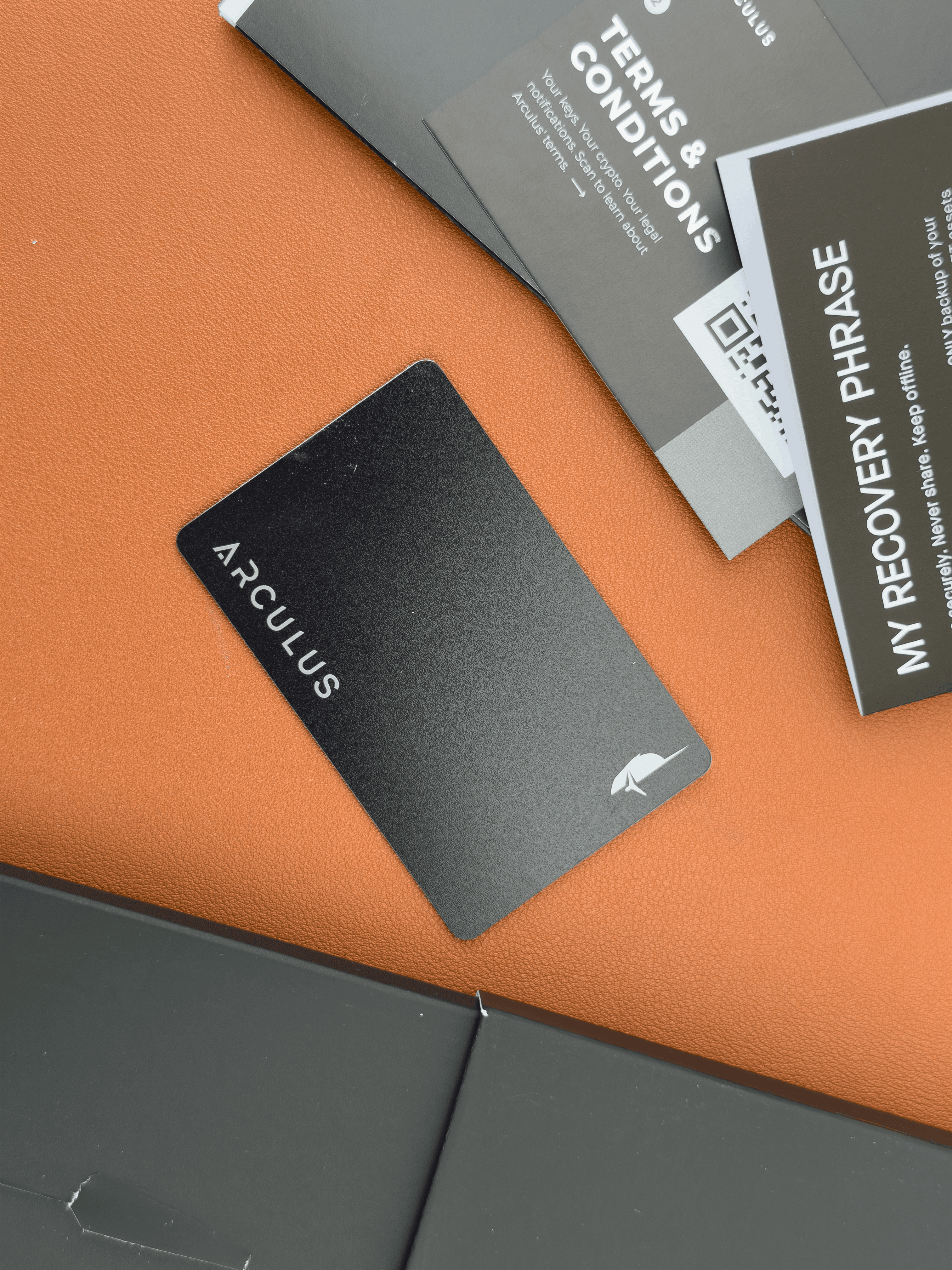 Arculus Supports 12- and 24-Word Recovery Phrases
12-Word vs 24-Word Recovery
When creating a new Arculus Wallet, users can choose either a 12-word or 24-word BIP39 recovery phrase. Arculus displays the phrase once during setup and then asks the user to confirm the words in the correct order.
The phrase acts as the root backup from which the wallet's private keys and addresses can be derived. That makes its security more important than the physical card itself. Someone who steals an Arculus Card still faces the wallet's authentication controls. Someone who obtains the recovery phrase may be able to reconstruct the wallet without the original card.
Arculus recommends keeping the phrase offline and in a secure location. At minimum:
- Write the words down exactly and preserve their order.
- Do not store screenshots or photos of the phrase.
- Do not save it in ordinary cloud notes or email.
- Never enter it into a website or share it with someone claiming to be Arculus support.
- Consider keeping more than one physical backup in separate secure locations.
Restoring Arculus on a New Card or Phone
Losing the phone and losing the Arculus Card are different scenarios.
If the phone is lost or replaced, the private keys are not lost with it because they are associated with the wallet controlled through the card and recovery phrase rather than being stored as an ordinary software-wallet key on the phone. The wallet can be restored through the Arculus app on a replacement compatible phone using the card and recovery phrase.
If the Arculus Card is lost, stolen or damaged, users can purchase another Arculus Card and restore the same wallet using the original 12- or 24-word recovery phrase. The crypto itself does not move during this process. The restoration recreates access to the same blockchain addresses and private keys.
The basic restoration process is:
Install Arculus app → tap replacement/existing card → select Restore Wallet → create PIN → enter recovery phrase → tap card again → wallet is restored
After restoration, balances may take several minutes to appear while the app synchronizes with the relevant blockchains.
Can You Recover Arculus Without Another Arculus Card?
Yes, potentially. An Arculus Card is not necessarily required to recover the underlying wallet.
Because Arculus uses BIP39 recovery phrases, users can restore an Arculus-created wallet in another compatible wallet application or hardware wallet. There is an important qualification, however: the receiving wallet also needs to support the same derivation paths used by Arculus.
A derivation path tells wallet software how to generate specific accounts and addresses from the master seed created by the recovery phrase.
What Happens After Three Incorrect PIN Attempts?
Arculus locks the card after three consecutive incorrect PIN entries during an attempted outgoing transaction. The wallet itself is not destroyed and the crypto does not disappear, but access must be restored using the 12- or 24-word recovery phrase.
Users receive a warning before the final failed attempt. Once the limit is reached, restoration requires the recovery phrase.
Setting Up the Arculus Wallet
Setting up Arculus is straightforward and happens inside the mobile app. The card itself has no buttons or display, so activation, PIN creation, recovery and asset management are all handled through the phone.
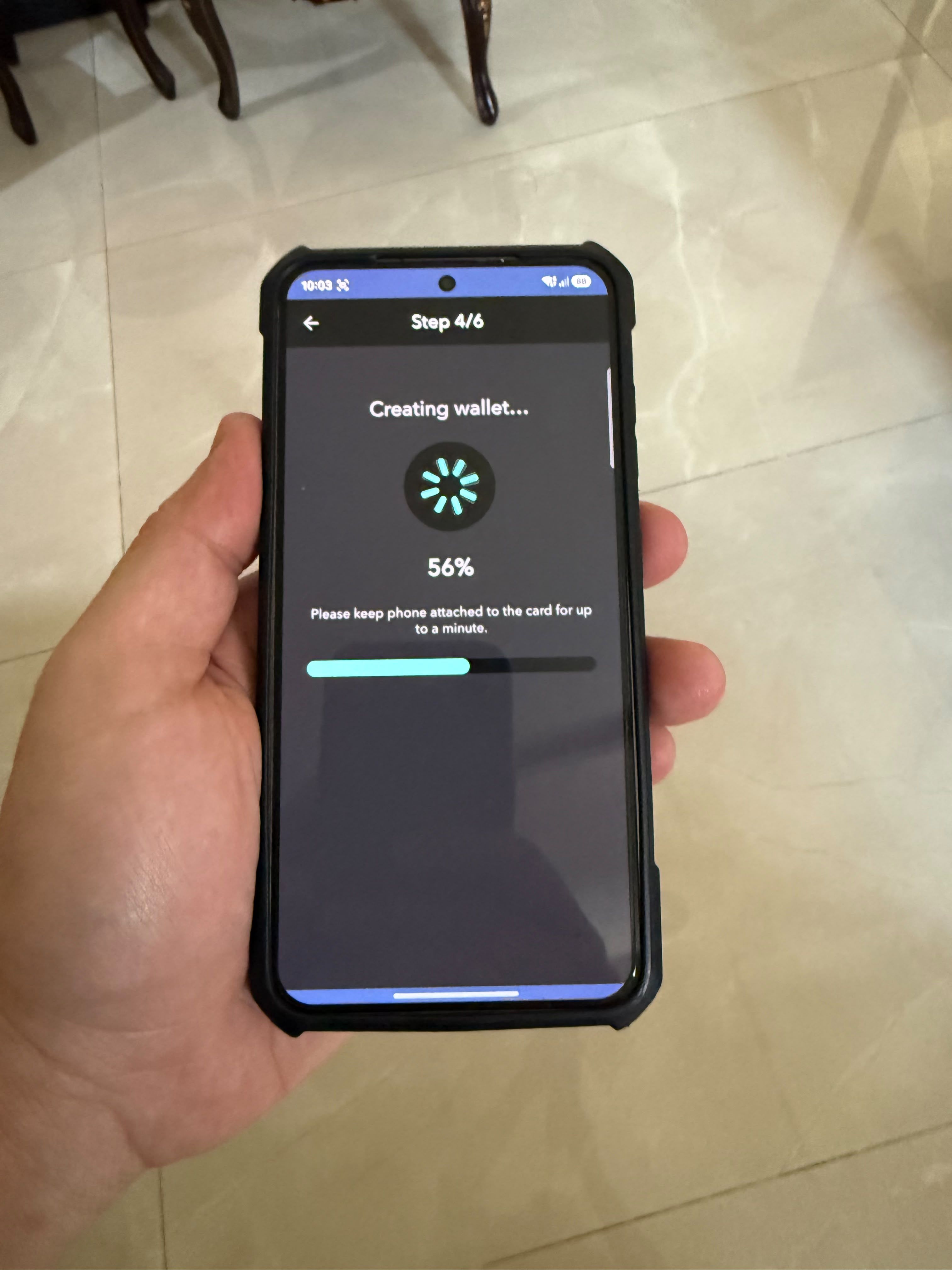 Setting Up Arculus Wallet Using the Mobile App
STEP 1: Download and Verify the Arculus App
Download the official Arculus Wallet app from the QR code in the Arculus box.
Arculus currently requires:
- iOS 17.5 or later on an iPhone XR or newer
- Android 11 or later on an NFC-capable Android phone
NFC must be available because the phone needs to communicate with the Arculus Card during setup and transaction signing.
STEP 2: Pair the Arculus Card
Open the app and follow the prompts to activate the card. Pairing is done by placing the Arculus Card against the phone's NFC reader.
NFC positioning varies by device, so the card may need to be moved slightly before the phone detects it. On iPhones, the NFC antenna is generally near the top of the device, while placement varies more across Android phones.
In my testing, pairing took only a few seconds.
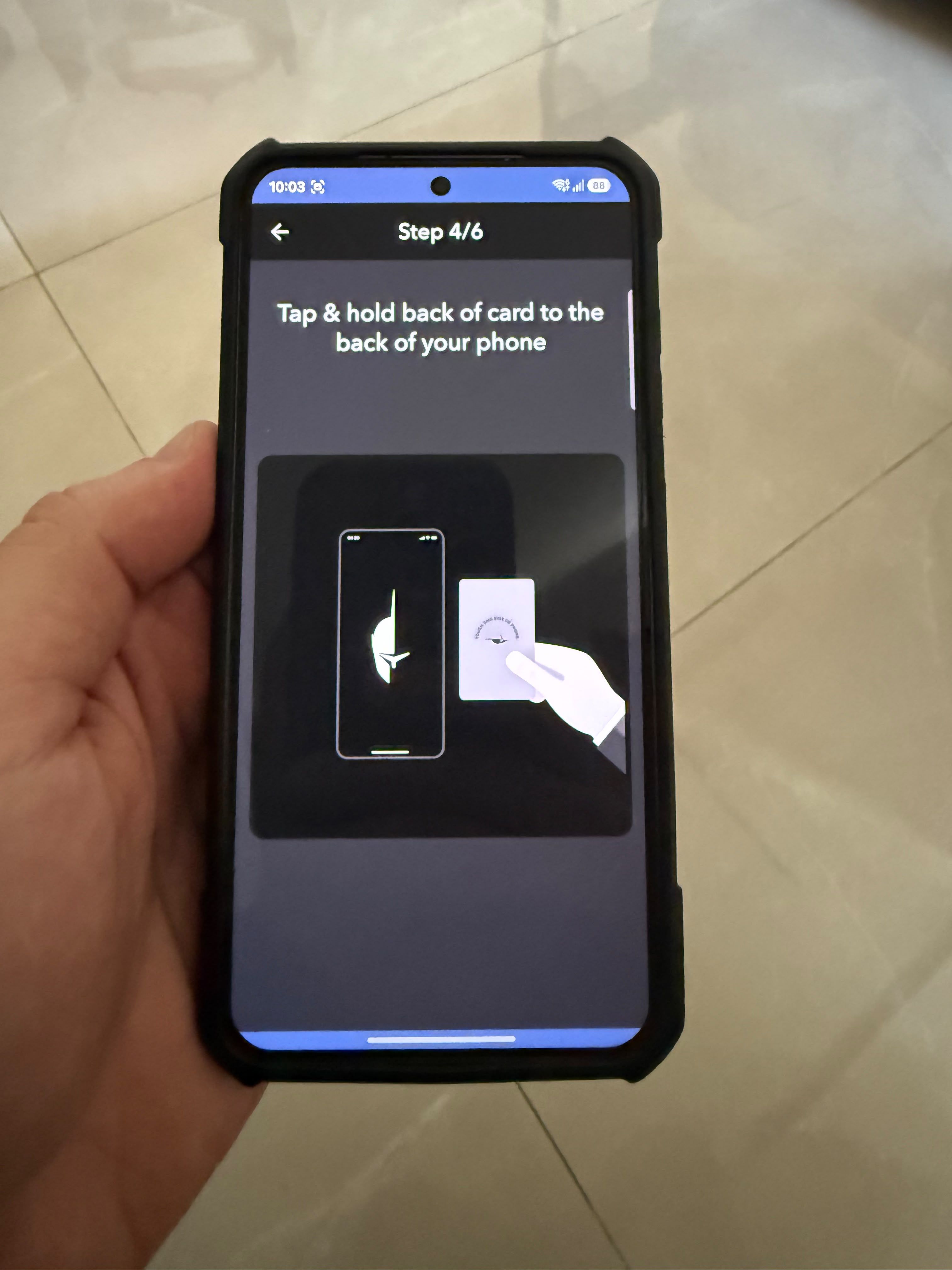 Pairing the Arculus Card With a Smartphone Using NFC
STEP 3: Create a PIN and Enable Biometrics
Arculus requires users to create a six-digit PIN during setup.
The PIN is the knowledge-based authentication factor, while the physical card is the possession factor. Users can also enable Face ID or fingerprint authentication as an additional biometric layer, but biometrics are optional.
STEP 4: Create and Back Up the Recovery Phrase
Users can create either a 12-word or 24-word BIP39 recovery phrase.
Write the words down carefully and verify their order before continuing. Avoid:
- Taking screenshots or photos
- Saving the phrase in cloud notes or email
- Typing it into websites
A mistake here can become a serious problem later because the recovery phrase is what restores the wallet if the card is lost, damaged or locked.
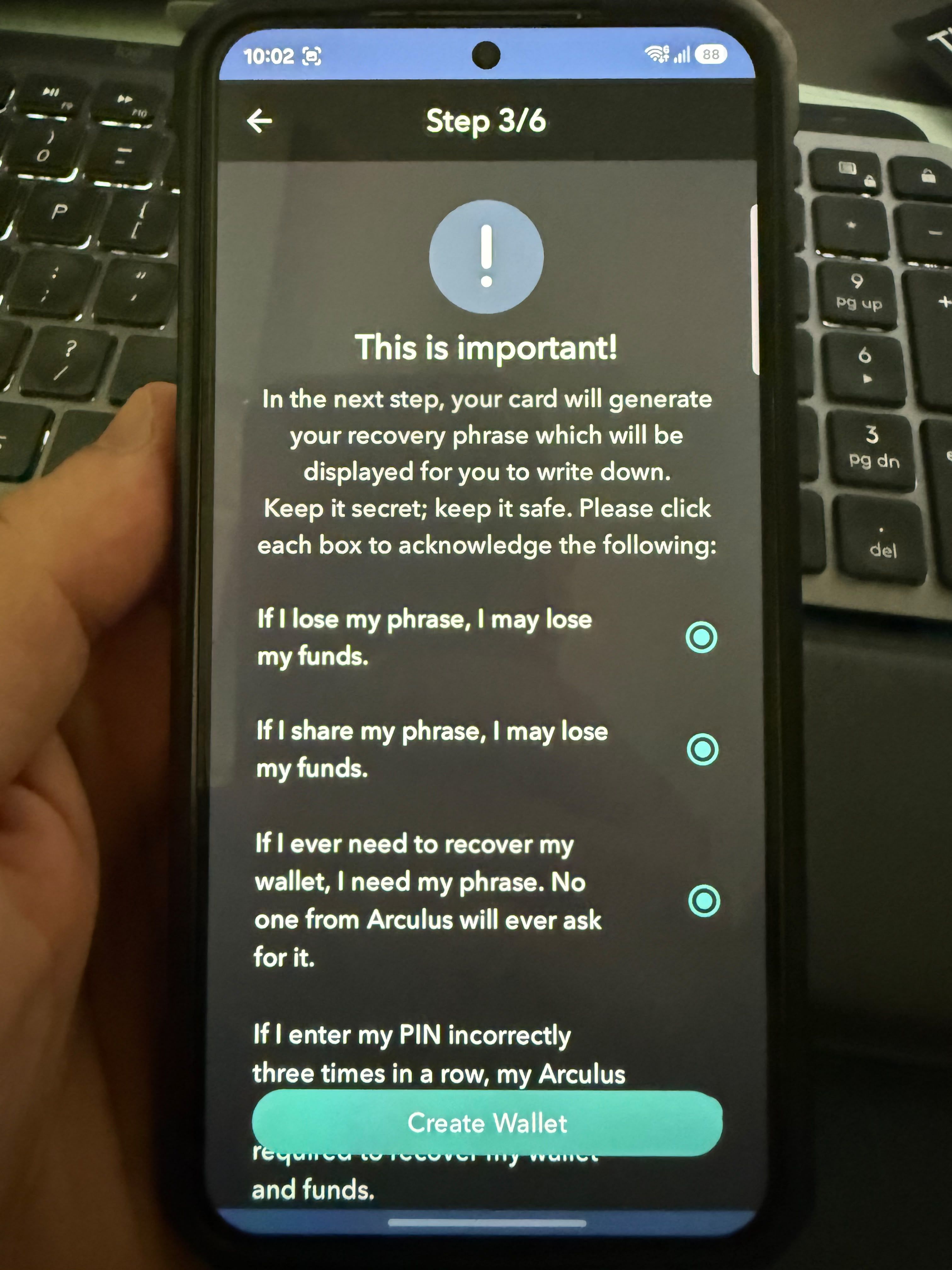 Creating and Backing Up an Arculus Recovery Phrase
STEP 5: Add Your First Crypto Asset
Once setup is complete, assets can be added from inside the Arculus app. Select the cryptocurrency or network you want to use, then open its wallet to view the receiving address or QR code.
From there, crypto can be transferred into Arculus from another wallet or exchange.
After two weeks of use, I found the setup process fast. The phone-led workflow removes much of the hardware-wallet friction, but users still need to understand recovery phrases, NFC positioning and blockchain addresses before treating the process as completely beginner-proof.
Arculus Wallet Supported Coins and Networks
As of Oct. 10, 2026, Arculus lists support across dozens of blockchains, including Bitcoin, Ethereum, Solana, Cardano, XRP Ledger, BNB Smart Chain, Arbitrum, Base, Optimism, Polygon, Avalanche, Cosmos, Polkadot, Sui, TON and Tron. Newer additions include networks such as Aptos, Berachain, Monad, zkSync Era and World Chain.
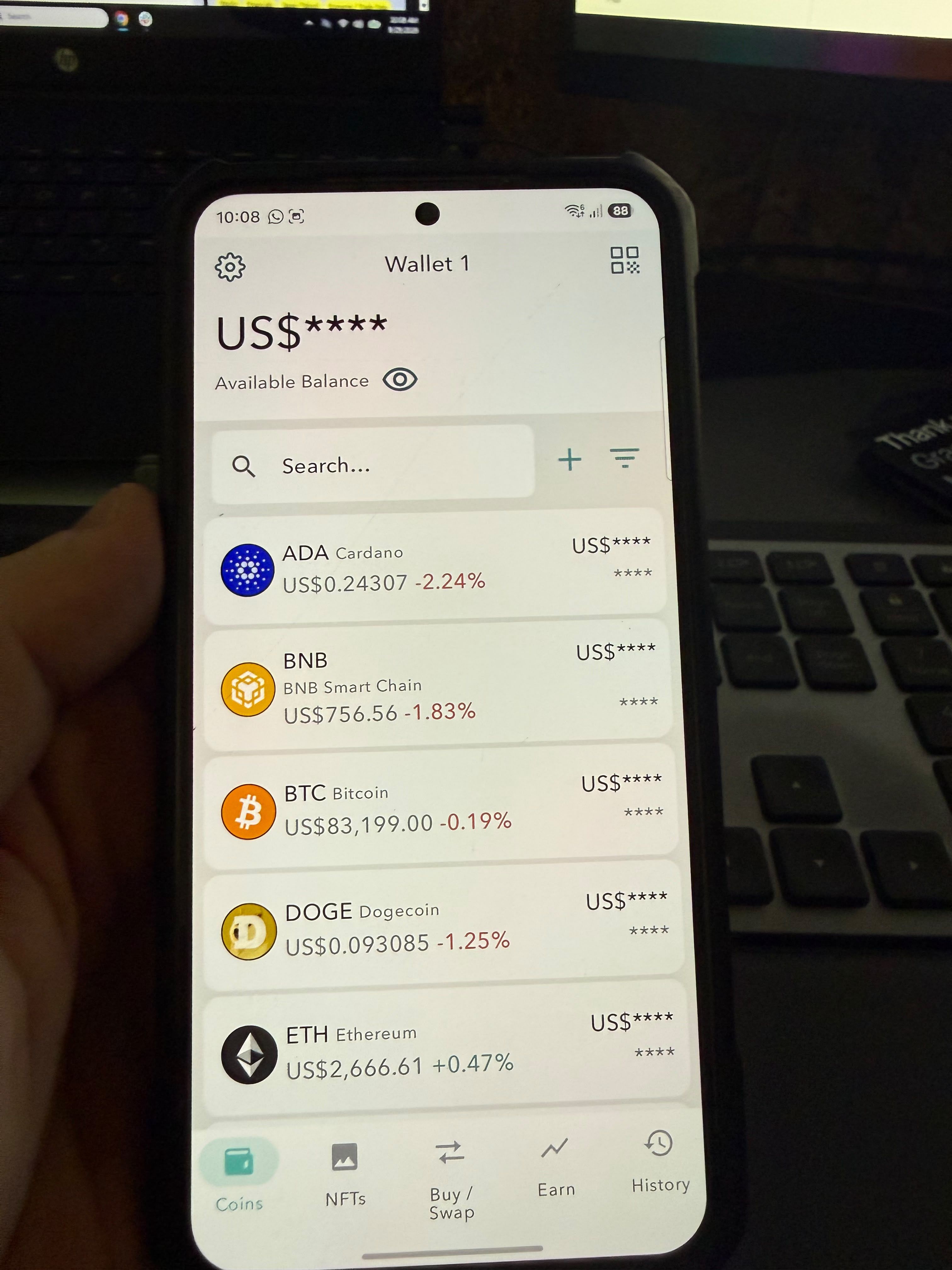 Cryptocurrencies and Blockchain Networks Supported by Arculus Wallet
What Does "Supported by Arculus" Mean?
There are several levels of support to distinguish:
| Capability | What It Means |
|---|---|
| Store / send / receive | Arculus can natively manage and transfer the asset |
| Custom tokens | Tokens can be manually added on supported networks |
| Buy | The asset can be purchased through an integrated third-party provider |
| Swap | The asset can be exchanged through an integrated swap provider |
| Stake | Staking is available through the Arculus app |
| WalletConnect | The wallet can connect to compatible DApps on supported networks |
| NFTs | NFTs can be viewed or used on supported networks |
These capabilities vary significantly. Bitcoin, for example, can be stored, sent, received, bought and swapped, but Arculus does not list BTC staking.
Cardano supports storage, transfers and staking. WalletConnect has its own network list rather than working automatically across every blockchain Arculus supports.
Arculus currently lists WalletConnect support for Arbitrum, Avalanche, Base, BNB Smart Chain, Ethereum, Optimism, Polkadot, Polygon, Sei V2, Solana and Tron. TON uses a separate connection flow.
Custom Tokens
Arculus also allows users to add custom tokens that are not already displayed in the standard asset list.
Custom-token support extends across multiple networks, including Ethereum, Solana, Polygon, Arbitrum, Base, BNB Smart Chain, Avalanche, Optimism, Sui, TON, Tron, Aptos, Algorand, Cosmos Hub and XRP Ledger.
Users can add supported tokens using their smart contract address. That address should always be verified against an authoritative source before interacting with the asset. Different tokens can share similar names and ticker symbols, while the contract address identifies the actual token on a given network.
The fact that a token exists on a supported blockchain also does not guarantee it will automatically appear inside the Arculus app. It may need to be enabled or manually added first.
Older Arculus Cards Have Different Asset Support
One important caveat is that not every Arculus Card supports the same asset list.
Arculus says cards using firmware version 2.0 or later support its current blockchain lineup. Earlier Edition Zero and Edition One cards sold before March 2023 do not support the majority of cryptocurrencies now available through Arculus.
Bitcoin Feature Check
Arculus supports BTC for storage, sending, receiving, buying and swapping. Bitcoin receive addresses also change after each receive transaction rather than remaining static.
For more advanced Bitcoin use, the feature set is more limited:
| Bitcoin Feature | Arculus |
|---|---|
| Store / send / receive BTC | Yes |
| Changing receive addresses | Yes |
| Buy / swap BTC | Yes |
| Coin control | Not documented as supported |
| Replace-by-Fee (RBF) | Not documented as supported |
| PSBT workflow | Not documented as supported |
| Lightning Network | Not documented as supported |
| Advanced multisig | Not documented as a native Bitcoin feature |
| Custom derivation-path management | Not exposed as a normal user feature |
Buying, Swapping, Selling and Fees With Arculus
Buying, swapping and selling inside the app are handled through integrated third-party providers, so availability, KYC requirements and fees can vary depending on the service being used.
Buying Crypto
Arculus currently supports crypto purchases using USD, AUD, CAD, GBP and EUR through Onramper. Users can access the feature from the Buy/Swap button in the app, choose the fiat currency and crypto asset, enter an amount and review the quoted crypto received and transaction fees before continuing.
The purchase itself is completed by Onramper or one of the payment providers available through its interface rather than by Arculus directly.
Depending on the provider, users may need to:
- Complete KYC
- Allow location access
- Choose among available payment methods
- Pay provider or payment-processing charges
- Accept the quoted exchange rate and any spread
- Availability can also vary by country, region, payment method and cryptocurrency
Swapping Crypto
Crypto-to-crypto swaps are built directly into the Arculus app. Users select Buy/Swap, choose the assets they want to exchange and review the quoted output before approving the transaction with their PIN and Arculus Card.
Arculus names Changelly and n.exchange as its swap liquidity partners. Only supported asset pairs appear in the swap interface.
The total cost includes:
- Fees charged by the liquidity provider
- Blockchain network fees
- The exchange rate or spread built into the quote
Buy and swap fees are displayed before the transaction is completed.
Swaps are not instant. Cypto-to-crypto swaps typically take around 30 minutes to two hours, depending on blockchain congestion, the assets involved and the liquidity provider. Changelly or n.exchange may also request KYC or AML information in some cases.
Selling Crypto for Fiat
Arculus also supports selling selected cryptocurrencies for fiat through Onramper.
The process begins through the Swap interface. If fiat selling is available for the selected asset, users can choose the fiat currency they want to receive, enter the amount to sell and continue to Onramper's off-ramp interface.
Users must allow location access before an off-ramp transaction can proceed. Onramper then presents the available off-ramp providers and payment methods. The selected provider handles the required KYC process, which can include identity information and camera access for verification.
How Much Does Arculus Actually Cost to Use?
The upfront cost is straightforward. The Arculus Card costs $99, including shipping and handling but excluding applicable sales tax. The mobile app is free.
After that, the cost depends on what you do:
| Cost | When It Applies |
|---|---|
| Arculus Card | $99 purchase price |
| Arculus send/receive fee | None charged by Arculus |
| Blockchain/network fee | Sending crypto or interacting on-chain |
| Provider fee | Buying, swapping or selling through third parties |
| Spread / exchange rate | Can affect the effective cost of a buy or swap |
| Payment/off-ramp charges | May apply depending on provider and payment method |
Arculus Staking and Yield Features
Arculus supports staking for selected assets directly through the wallet app, but it is not primarily an earn platform.
Which Assets Can You Stake With Arculus?
As of Oct. 10, 2026, Arculus lists the following staking options:
| Asset | Method | Type | Minimum | Unbonding / Withdrawal |
|---|---|---|---|---|
| ADA | Validator/pool staking | Native | 2 ADA per stake, with 5 ADA remaining in wallet | No unbonding, 15-20 day warmup |
| AXL | Validator staking | Native | 0.000001 AXL | 7 days |
| TIA | Validator staking | Native | 0.0001 TIA | 21 days |
| CORE | Validator staking | Native | 0.02 CORE | 7 days, plus 1-day warmup |
| ATOM | Validator staking | Native | 0.000001 ATOM | 21 days |
| CRO | Validator staking | Native | 0.000001 CRO | 28 days |
| DYDX | Validator staking | Native | 1 DYDX | 30 days |
| POL | Validator staking | Native | 1 POL | 2 days |
| INJ | Validator staking | Native | 0.000001 INJ | 21 days, plus 2-4 day warmup |
| KAVA | Validator staking | Native | 0.000001 KAVA | 21 days |
| OSMO | Validator staking | Native | 0.000001 OSMO | 14 days |
| SEI | Validator staking | Native | 0.000001 SEI | 21 days |
| SOL | Validator staking | Native | 0.01 SOL per stake, with 0.005 SOL remaining | 3-day unbonding and 3-day warmup |
| AVAX → sAVAX | Liquid staking | Liquid | 0.000000001 AVAX | 15-day unbonding, 2-day withdrawal |
| ETH → rETH | Liquid staking | Liquid | Not specified by Arculus | No stated unbonding period |
| ETH → stETH | Liquid staking | Liquid | Not specified by Arculus | 2-5 days |
| TON → TSTON | Liquid staking | Liquid | 1 TON | 11-36 hours, plus 1-day warmup |
| TRX → STRX | Liquid staking | Liquid | 0.000001 TRX | 14 days, plus 3-day warmup |
| XRP | Deposit-based staking product | Third party | Not specified | 7-8 days |
Is Arculus Staking Self-Custodial?
That depends on the staking method.
With native staking, users delegate or lock the native asset through a validator or staking pool while continuing to control the wallet that authorized the transaction. Arculus allows users to choose a staking pool for supported native-staking assets. Arculus Support
With liquid staking, the native asset is deposited and the user receives a liquid staking token in return, such as stETH or rETH for ETH. This introduces additional protocol and smart-contract exposure compared with simply holding the native asset.
Arculus also describes third-party staking, where assets are deposited into a predefined pool rather than letting the user choose the validator. XRP currently falls into this category.
What Is Arculus Earn?
Version 3.12.1, the current app generation as of Oct. 10, 2026, has a "Earn" tab to the main wallet screen. Yield, perps and predictions, however, are still tagged as "coming soon."
Arculus vs Tangem vs Traditional Hardware Wallets
Arculus competes most directly with other card-style wallets such as Tangem, but the bigger distinction is architectural. Card wallets prioritize portability and smartphone-based interaction, while many traditional hardware wallets use their own screens and physical controls to verify transactions independently.
| Feature | Arculus | Tangem | Ledger / Trezor-Style Wallets |
|---|---|---|---|
| Form factor | Metal card | Card or ring | Dedicated hardware device |
| Screen | No | No | Common |
| Connectivity | NFC | NFC | USB-C, Bluetooth, NFC or combinations depending on model |
| Battery | N/A | N/A | Model-dependent |
| Secure element | CC EAL6+ | EAL6+ secure element | Varies by model |
| Recovery model | 12- or 24-word BIP39 phrase | Seedless card backup or optional seed phrase | Recovery phrase standard on most models, with some newer backup alternatives |
| Backup philosophy | Recovery phrase restores wallet | Additional cards can act as hardware backups | Recovery phrase, backup cards or multi-share systems depending on model |
| Smartphone dependence | High | High | Lower or variable |
| DApp access | WalletConnect and other integrations | DApp access through Tangem app | Broad DApp support through native and third-party wallets |
| Open-source approach | Not fully open source | Tangem app is open source | Varies, Trezor emphasizes open-source software; Ledger uses a mixed model |
| Transaction verification | Details shown on smartphone | Details shown on smartphone | Hardware screen available on many models |
| Current starting price | $99 | $59.90 for two cards | Varies by model |
Arculus vs Tangem
Arculus and Tangem are very similar in everyday use. Both are screenless, battery-free NFC wallets that rely on a smartphone app.
The main difference is backup design. Arculus uses a 12- or 24-word recovery phrase, while Tangem can use additional cards as backups and makes the seed phrase optional.
Tangem also sells multi-card packs, whereas one Arculus Card corresponds to one wallet. Both rely on the smartphone to display transaction details before signing, so neither provides independent on-card verification.
Tangem's app is open source, while Arculus is not fully open source.
Read our full Tangem wallet review.
Arculus vs Ledger and Trezor-Style Wallets
The bigger difference is between Arculus and screen-based hardware wallets.
Arculus prioritizes portability and simplicity. It has no battery, buttons or hardware display, and transactions are managed through the smartphone.
Many Ledger and Trezor devices instead let users verify transaction details on the hardware screen itself. They may also use USB-C, Bluetooth or other connection methods depending on the model.
Arculus offers a simpler mobile-first experience, while screen-based wallets provide independent hardware-level transaction verification.
Who Should Use Arculus Wallet?
Arculus is best suited to users who want cold storage without the extra hardware complexity of a traditional device. Its NFC card, mobile-first design and broad network support make it especially appealing to people who prioritize convenience alongside self-custody.
Arculus May Suit
- Beginners who want straightforward cold storage without buttons, cables or charging.
- Mobile-first users who are comfortable managing crypto through a smartphone.
- Multi-chain holders who want support across major networks rather than a Bitcoin-only setup.
- DApp users who want WalletConnect alongside hardware-backed self-custody.
- People who value portability, since the card fits easily in a physical wallet.
- Users who prefer simple tap-to-sign transactions over navigating a separate hardware device.
Arculus May Not Suit
- Users who want transaction details verified on the hardware itself, since Arculus has no built-in screen.
- Open-source purists who want fully auditable wallet software and reproducible builds.
- Desktop-first users, because Arculus is centered around its mobile app.
- Advanced Bitcoin users who need features such as coin control, PSBT workflows, Lightning or specialist multisig tools.
- Complex multisig users whose setup requires deeper hardware-wallet integration.
- Anyone trying to minimize smartphone dependence, since the phone is the primary interface for the wallet.

Arculus Review: Final Verdict
After two weeks of use, Arculus proved fast, reliable and easy to live with. NFC signing worked on the first attempt throughout testing, the app is responsive, and everyday features such as balances, NFTs, swaps, Earn and transaction history are easy to reach.
Its security model is also solid where private-key protection is concerned. Arculus uses a CC EAL6+ secure element, supports 12- or 24-word BIP39 recovery and now covers a broad range of networks, WalletConnect integrations and staking options.
Arculus is best viewed as a mobile-first hardware wallet that keeps private-key operations on the card while moving most of the user experience onto the phone.
It suits users who value simple tap-to-sign cold storage and broad multi-chain support, but users who prioritize hardware-level transaction verification or deeper open-source transparency may prefer a different design.