Ledger is one of the biggest names in crypto self-custody, but choosing the right Ledger wallet is not as simple as buying the most expensive model. The Nano S Plus, Nano X, Nano Gen5, Flex and Stax all protect private keys offline, but they serve different users.
This review breaks down how Ledger works, which model makes sense for each type of crypto holder, where Ledger Wallet helps, and where users still need to be careful with recovery phrases, fake apps and transaction approvals.
Ledger Hardware Wallet Review 2026: Quick Verdict
Ledger is worth it for users who want serious self-custody. It has broad asset support, strong desktop and mobile usability, staking, NFTs and DApp compatibility. It is not the best fit for users who want fully open-source firmware, Bitcoin-only minimalism, seedless recovery or a wallet that removes personal responsibility. Ledger protects private keys well, but the user still has to protect the recovery phrase, verify transactions and avoid fake apps.
Best Ledger Picks
| Best Budget Ledger | Ledger Nano S Plus |
|---|---|
| Best Classic Mobile Ledger | Ledger Nano X |
| Best Ledger For Most Modern Users | Ledger Nano Gen5 Or Ledger Flex |
| Best Premium Ledger | Ledger Stax |
| Best For Long-Term Cold Storage | Nano S Plus Or Flex |
| Best For DApp And NFT Users | Nano Gen5, Flex Or Stax |
| Main Tradeoff | Strong ecosystem, but recovery phrases, approvals and fake apps still demand discipline. |
Best For
- Long-term crypto holders moving funds off exchanges
- Users holding BTC, ETH, SOL, XRP, stablecoins and ERC-20 tokens
- NFT users who want hardware approval before marketplace actions
- DApp users pairing Ledger with MetaMask, Rabby, Phantom or Solflare
- Users who want a polished self-custody setup across desktop and mobile
Not Ideal For
- Users who want fully open-source firmware above everything else
- Users who cannot safely store a recovery phrase
- Users who only hold tiny amounts of crypto
- Bitcoin-only users who want a minimal single-chain device
- Teams or treasuries that need multisig or institutional custody controls
Disclosure And Methodology
Some links in this article may be affiliate links. If you choose to use a service through these links, we may earn a commission at no additional cost to you.
For this Ledger review, we assessed the wallet lineup across security design, recovery options, supported assets, Ledger Wallet features, transaction review, mobile and desktop usability, staking access, DApp compatibility, pricing and fit for different user types.
Some Ledger devices and wallet workflows were reviewed hands-on. For models or features we did not test directly, we relied on Ledger’s official product pages, support documentation, pricing pages and publicly available materials, then weighed those claims against practical self-custody risks such as seed phrase storage, fake apps, blind signing, third-party wallet use and recovery failure.
What Is Ledger?
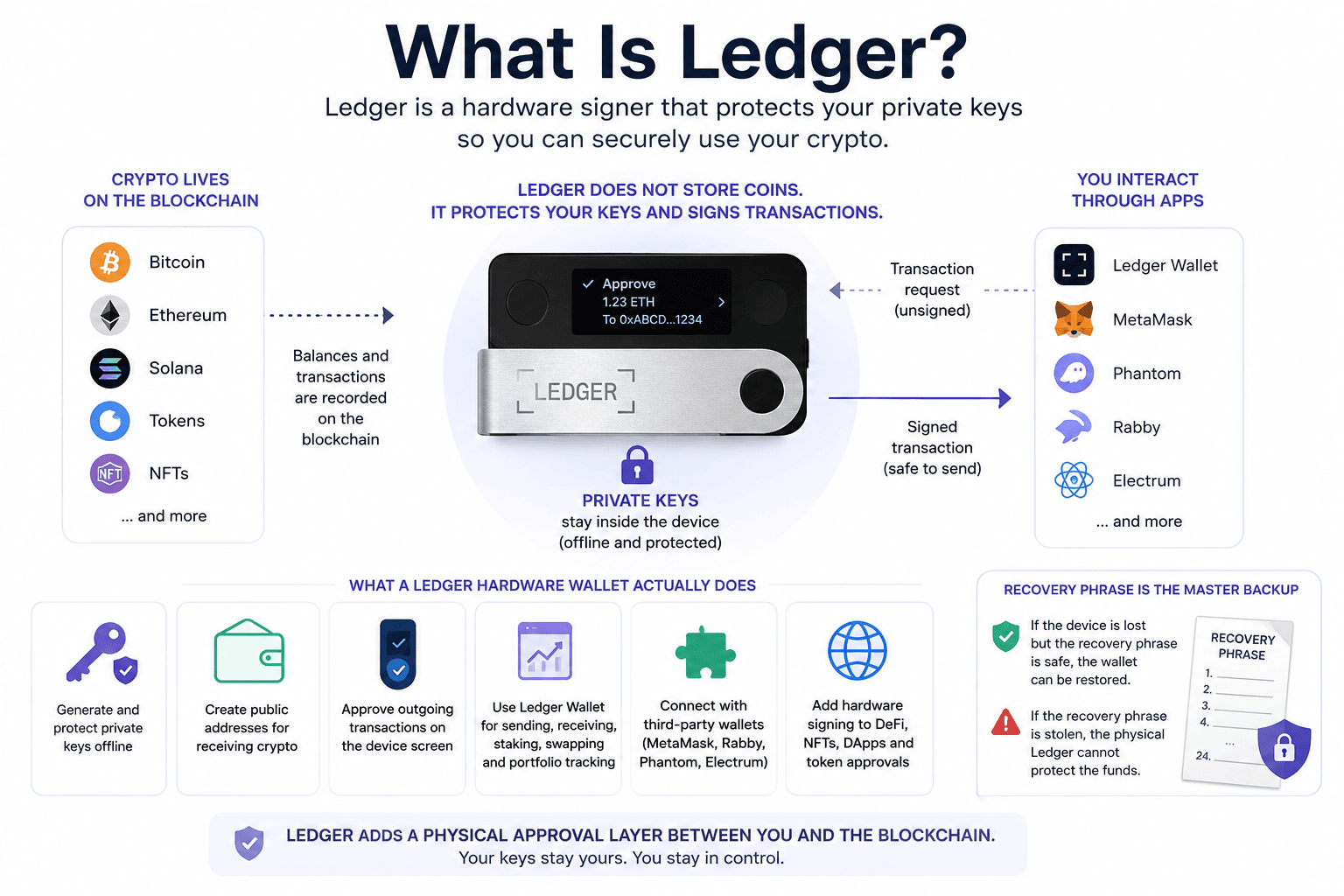
Ledger is best known for hardware wallets, although Ledger now increasingly describes its devices as hardware signers. That wording is makes sense because a Ledger wallet does not store coins inside the device. Bitcoin, Ethereum, Solana, tokens and NFTs live on their respective blockchains. The Ledger device protects the keys that control them.
That is the part beginners often get wrong. A hardware wallet is not a tiny vault full of coins. It is a signing device. The blockchain records balances. Wallet software displays addresses and transactions. Ledger signs instructions without exposing the private key to the internet-connected device preparing the transaction.
This is why private keys sit at the center of self-custody. If someone controls the key, they can move the funds. If they do not, they cannot. Ledger exists to make that key harder to expose during normal crypto use.
For a full breakdown of the best hardware wallets, read our complete hardware wallet comparison guide.
 How Ledger Protects Crypto Without Holding The Coins
What A Ledger Hardware Wallet Actually Does
A Ledger hardware wallet generates and protects private keys offline. When a user sends crypto, stakes assets, connects to a DApp or approves a token interaction, the request may begin in Ledger Wallet, MetaMask, Phantom, Rabby or another interface. The final approval happens on the Ledger device.
That physical approval layer is the main value. Malware can change clipboard addresses. Fake websites can imitate real apps. A malicious DApp can ask for a dangerous approval. A hardware signer creates a separate checkpoint before the transaction leaves the wallet.
In everyday use, Ledger devices help users send, receive, stake and manage crypto while keeping the key offline. The device is also useful for NFTs and DeFi because those activities involve more frequent signing. A long-term holder may use Ledger a few times a year. A DeFi user may rely on it every week.
The recovery phrase remains the master backup. If the device is lost but the recovery phrase is safe, the wallet can be restored. If the recovery phrase is stolen, the physical Ledger cannot protect the funds.
Ledger Models Compared: Nano S Plus, Nano X, Nano Gen5, Flex And Stax
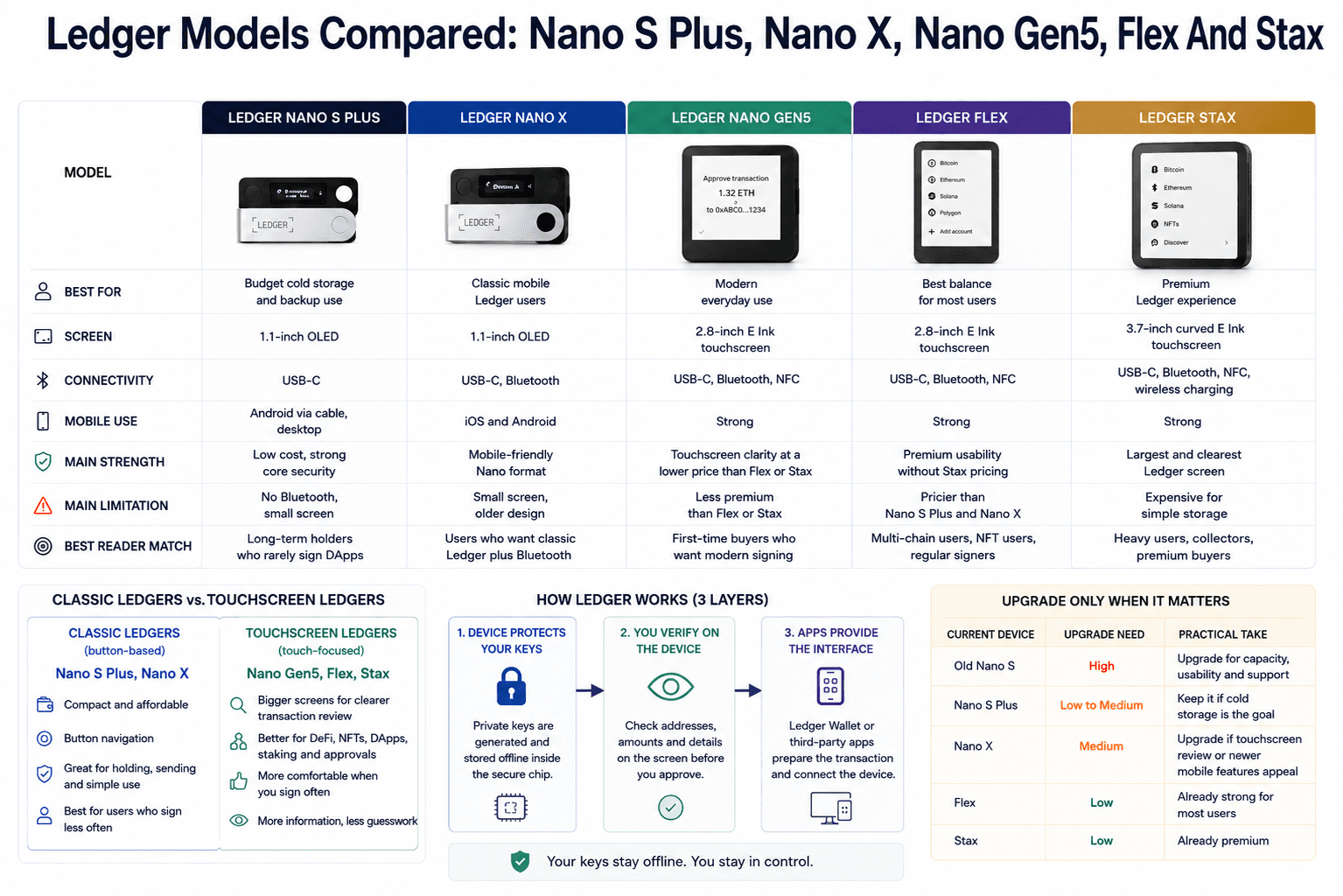 Comparing Ledger Models For Every Type Of Crypto User
Ledger's lineup splits into two clear groups. The classic devices are compact button-based signers. The newer devices are touchscreen signers built for clearer transaction review and a more modern wallet experience.
The Ledger Nano S Plus is the budget cold-storage pick, the Ledger Nano Gen5 is for modern everyday user, Ledger Nano X remains the classic mobile Ledger, Ledger Flex is the balanced touchscreen option, and Ledger Stax is the premium display-focused device.
| Model | Best For | Screen | Connectivity | Mobile Use | Main Strength | Main Limitation | Best Reader Match |
|---|---|---|---|---|---|---|---|
| Ledger Nano S Plus | Budget cold storage and backup use | 1.1-inch OLED | USB-C | Android via cable, desktop | Low cost, strong core security | No Bluetooth, small screen | Long-term holders who rarely sign DApps |
| Ledger Nano X | Classic mobile Ledger users | 1.1-inch OLED | USB-C, Bluetooth | iOS and Android | Mobile-friendly Nano format | Small screen, older design | Users who want classic Ledger plus Bluetooth |
| Ledger Nano Gen5 | Modern everyday use | 2.8-inch E Ink touchscreen | USB-C, Bluetooth, NFC | Strong | Touchscreen clarity at a lower price than Flex or Stax | Less premium than Flex or Stax | First-time buyers who want modern signing |
| Ledger Flex | Best balance for most users | 2.8-inch E Ink touchscreen | USB-C, Bluetooth, NFC | Strong | Premium usability without Stax pricing | Pricier than Nano S Plus and Nano X | Multi-chain users, NFT users, regular signers |
| Ledger Stax | Premium Ledger experience | 3.7-inch curved E Ink touchscreen | USB-C, Bluetooth, NFC, wireless charging | Strong | Largest and clearest Ledger screen | Expensive for simple storage | Heavy users, collectors, premium buyers |
Read Our:
- Ledger Nano S Plus Review
- Ledger Nano X Review
- Ledger Flex Review
- Ledger Stax Review
- Ledger Nano S Plus vs Stax vs Flex Comparison
Classic Ledgers Vs Touchscreen Ledgers
Classic Ledgers are the Nano S Plus and Nano X. They are small, affordable and built around button navigation. They work well for users who mainly hold assets, receive funds, send occasional transactions and want a hardware wallet that does not feel expensive.
Touchscreen Ledgers are Nano Gen5, Flex and Stax. Their advantage is not just aesthetics. More screen space gives users a better chance of reading the transaction before approving it.
A small screen is fine when you're sending BTC to your own address. It is less comfortable when reviewing contract data, marketplace approvals, validator actions or multi-chain wallet prompts. The more often you sign, the more the screen becomes a security feature rather than a design upgrade.
Ledger Nano S Plus
Ledger Nano S Plus is the budget USB-C Ledger for cold storage and backup use. It has no Bluetooth, no battery and no touchscreen. That makes it less flexible for phone-heavy users, but sensible for desktop users who mainly want to secure long-term holdings.
Its strongest use case is simple custody. A user holding BTC, ETH, SOL, XRP, Cardano, Polkadot, BNB, stablecoins and ERC-20 tokens can use the Nano S Plus as a low-cost hardware signer without paying for premium display features.
The limitation is interaction quality. The small OLED screen works for basic address checks, but it is not ideal for users frequently approving DApp transactions, NFT listings, swaps or staking actions. For active on-chain use, a touchscreen Ledger is easier to live with.
Ledger Nano X
Ledger Nano X is the classic mobile Ledger. Its main advantage over Nano S Plus is Bluetooth, which makes it more practical for iPhone and Android users who manage crypto from a phone.
It still makes sense in 2026 for users who want the familiar Nano format with mobile convenience. It is also compact enough for travel, though travel custody has its own risks around device storage, recovery phrase separation and border privacy.
The Nano X now sits in the middle of the lineup. Nano S Plus is cheaper for basic storage. Nano Gen5 and Flex offer better transaction review. Nano X is best for users who specifically want the classic Ledger shape with Bluetooth.
Ledger Nano Gen5
Ledger Nano Gen5 is the modern everyday Ledger for users who want a touchscreen signer without jumping straight to the Stax price tier. Ledger’s official Nano Gen5 page lists a 2.8-inch E Ink touchscreen, USB-C, Bluetooth, NFC and Ledger Recovery Key support.
The main advantage is the screen. Users can see more transaction information before signing, which helps with addresses, token movements, supported clear-signing flows and DApp prompts.
Nano Gen5 is a strong first Ledger for users who expect more than passive storage. It also makes sense for older Nano users who want clearer signing but do not need the most premium device.
Ledger Flex
Ledger Flex is the most sensible premium-leaning Ledger for many users. It has the touchscreen experience, modern connectivity and a more polished feel than the classic Nanos, but it does not push as far into luxury territory as Stax.
Flex suits people who sign transactions often. That includes multi-chain holders, NFT collectors, users staking through Ledger Wallet and people who regularly pair Ledger with MetaMask, Rabby, Phantom or other DApp interfaces.
It is not the cheapest way to secure crypto. It is the model that makes Ledger’s security model feel most practical for normal day-to-day use.
Ledger Stax
Ledger Stax is the premium design-focused Ledger. Ledger’s official Stax page positions it around a curved E Ink touchscreen, NFT display features, wireless charging and a more polished physical experience.
Stax is best for heavy users, collectors and buyers who care about the device experience. The larger screen gives it the best review surface in the lineup, which helps if you sign often or want transaction prompts to feel less cramped.
For simple long-term cold storage, Stax is more device than most users need. The reason to buy it is comfort, screen size and premium design, not because cheaper Ledger models suddenly stop being secure.
Should Existing Ledger Owners Upgrade?
Existing Ledger owners should upgrade only when the current device creates friction or risk. App capacity, current support, screen clarity and mobile workflows are stronger reasons than wanting the newest model.
| Current Device | Upgrade Need | Practical Take |
|---|---|---|
| Old Nano S | High | Consider upgrading for app capacity, usability and current support |
| Nano S Plus | Low To Medium | Keep it if cold storage is the goal |
| Nano X | Medium | Upgrade only if touchscreen review or newer mobile features appeal |
| Flex | Low | Already strong for most users |
| Stax | Low | Already premium |
The clearest upgrade case is an old Nano S. The weakest upgrade case is someone who already owns Flex or Stax and mainly holds assets. For Nano S Plus and Nano X users, the decision depends on signing behavior. If you approve DApps often, the touchscreen upgrade is more practical than cosmetic.
How Ledger Wallets Work
Ledger works through three layers:
- The device protects private keys
- The screen lets users verify what they are signing
- Ledger Wallet or third-party wallet apps provide the interface
The bigger custody choice is crypto exchange vs crypto wallet: convenience with account recovery, or direct control with more personal responsibility.
That distinction becomes real when users move funds from Binance, Coinbase, Kraken or another centralized exchange into self-custody. The exchange account may offer password resets, customer support and fiat rails. Ledger gives users direct key control, but that control comes with finality.
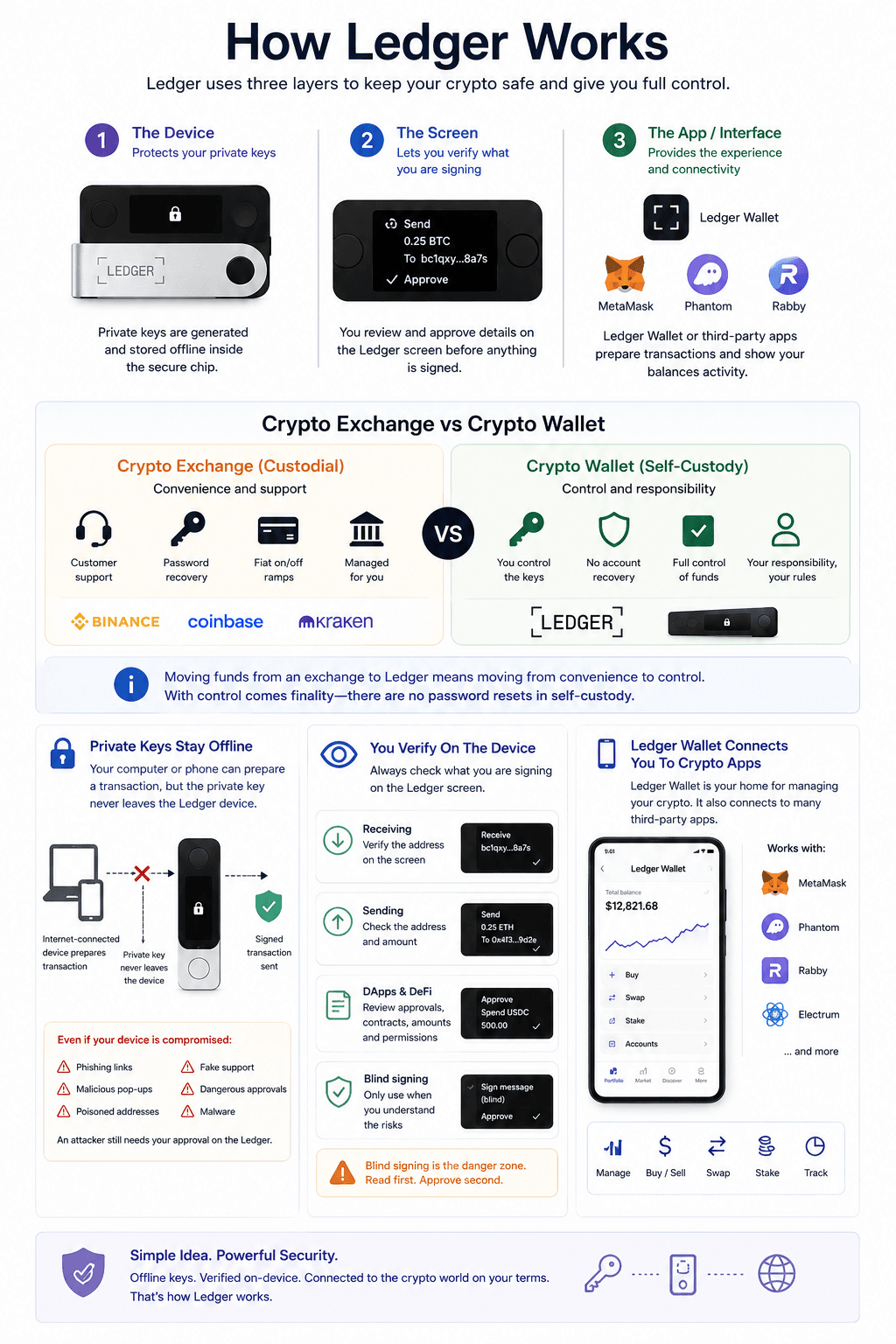 How Ledger Keeps Private Keys Away From Online Risk
Private Keys Stay Offline
Ledger’s central security benefit is offline private-key storage. Your phone or laptop can prepare a transaction, but the private key remains isolated inside the Ledger device.
That separation is valuable because many crypto thefts do not begin with a hacker physically attacking a hardware wallet. They begin with phishing links, malicious wallet pop-ups, fake support accounts, compromised devices, poisoned addresses or dangerous approvals.
If an attacker controls your laptop, they may be able to show a fake destination address or push a malicious transaction request. They should not be able to extract the Ledger private key from the computer. They still need the user to approve the transaction on the hardware wallet.
This is why hardware wallets become more useful once holdings are too meaningful to leave in a browser wallet or exchange account.
You Verify Transactions On The Device
A hardware wallet is safest when the user actually reads what the device shows. That sounds obvious, but most wallet mistakes happen during routine clicks.
When receiving crypto, users should verify the address on the Ledger screen before sending funds. When sending crypto, they should check the destination and amount. When using DApps, they should be more careful with token approvals, NFT listings, delegation requests, staking actions and contract interactions.
Blind signing is the danger zone. It can be necessary for some advanced interactions, but it asks users to approve a transaction without a clear human-readable explanation of what will happen.
A Ledger screen does not help if the user treats every approval like a cookie banner. Hardware signing only works when the user slows down at the final step.
Ledger Wallet Connects The Device To Crypto Apps
Ledger Wallet, formerly Ledger Live, is the companion app for Ledger devices.
Ledger Wallet is the official base layer for setup, firmware updates, device apps, account creation and portfolio management. It also connects users to third-party providers for some buy, swap and staking flows.
Ledger can also work behind third-party wallets. Ethereum users may pair Ledger with MetaMask or Rabby. Solana users may use Phantom or Solflare. Bitcoin users may prefer Electrum-style workflows. In these setups, the software wallet handles the interface and Ledger handles the signing.
Ledger Security Review
Ledger protects private keys from online exposure. It does not protect users from every fake app, malicious approval, unsafe seller, seed phrase mistake or bad DeFi interaction.
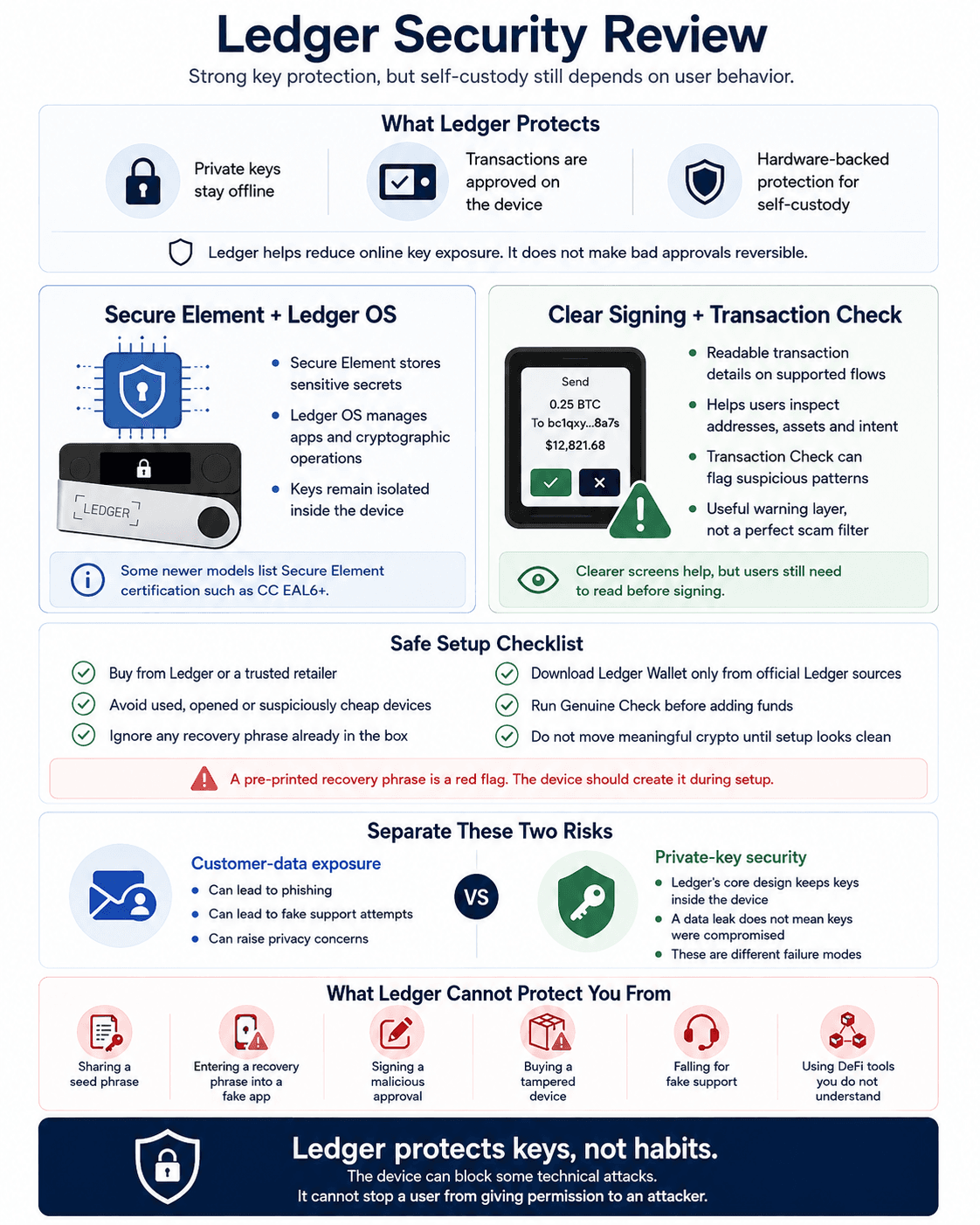 Ledger Security Strengths, Limits And Real User Risks
Secure Element And Ledger OS
Ledger devices use a Secure Element chip and Ledger OS. The simple version is that the Secure Element protects sensitive data, while Ledger OS manages the device environment, apps and cryptographic operations.
Ledger’s security model is built around keeping private keys isolated inside the device. Newer Ledger product pages also list Secure Element certification levels for specific devices, including CC EAL6+ for Nano Gen5.
This model appeals to users who want hardware-backed protection, broad asset support and a polished app ecosystem. Users who prioritize open-source transparency above everything else may prefer Trezor’s philosophy.
Clear Signing And Transaction Check
Many wallet losses happen because users approve the wrong thing. That can mean an unlimited token approval, a malicious NFT listing, a fake airdrop claim, a wallet drainer or a contract interaction that looks harmless in the interface.
Ledger’s Clear Signing push is designed to make supported transaction details more readable before users approve them. The point is to move away from unreadable data blobs and toward prompts that normal users can inspect.
Transaction Check adds another layer on supported touchscreen signers by warning users when suspicious transaction patterns appear. It is useful as a warning system, but it should not be treated like a scam filter that catches everything.
Genuine Check, Counterfeit Devices And Fake Apps
Ledger buyers should treat setup as part of the security model. A fake device or fake Ledger app can compromise users before they send their first transaction.
Safe setup should include the following:
- Buy from Ledger or a trusted retailer
- Avoid used, opened or suspiciously cheap devices
- Ignore any recovery phrase already written inside the box
- Avoid QR-code download links inside packaging
- Download Ledger Wallet only from official Ledger sources
- Run Ledger’s Genuine Check before adding funds
- Do not move meaningful crypto until setup looks clean
A hardware wallet does not remove crypto scams from the equation. It gives users a stronger checkpoint before funds move. Fake Ledger apps, fake support accounts and seed phrase phishing are still common because attackers do not need to break the device if they can trick the user.
Ledger Data Leaks Vs Private-Key Security
Ledger has faced customer data exposure issues in the past, including a 2020 e-commerce and marketing database breach. Ledger said the incident affected e-commerce-related information and had no impact on hardware wallets, the app or user funds.
A contact-data leak does not mean Ledger private keys were compromised. It can still increase phishing, fake support attempts, extortion emails and physical privacy concerns.
What Ledger Cannot Protect You From
Ledger cannot protect users from every self-custody failure. It cannot save funds if the user shares a seed phrase, types a recovery phrase into a fake app, signs a malicious approval, buys a tampered device from an unsafe seller, falls for fake support, loses the recovery phrase with no backup or uses DeFi contracts they do not understand.
This is why a Ledger should be paired with safer behavior, not treated as a permission slip to click anything. Hardware wallet security is strongest when the user verifies addresses, checks approvals, avoids rushed signing and understands that a signed transaction is usually final.
Ledger Wallet App Review
Ledger Wallet is the software layer that makes Ledger hardware usable. Without it, Ledger would be secure but clunky. With it, users get a portfolio dashboard, device manager, app installer, firmware updater and gateway into third-party crypto services.
Ledger’s official Ledger Wallet page lists buying, selling, swapping, staking, provider comparison and portfolio management features. That makes it convenient, but users should understand which actions are handled directly by Ledger Wallet and which rely on third-party services.
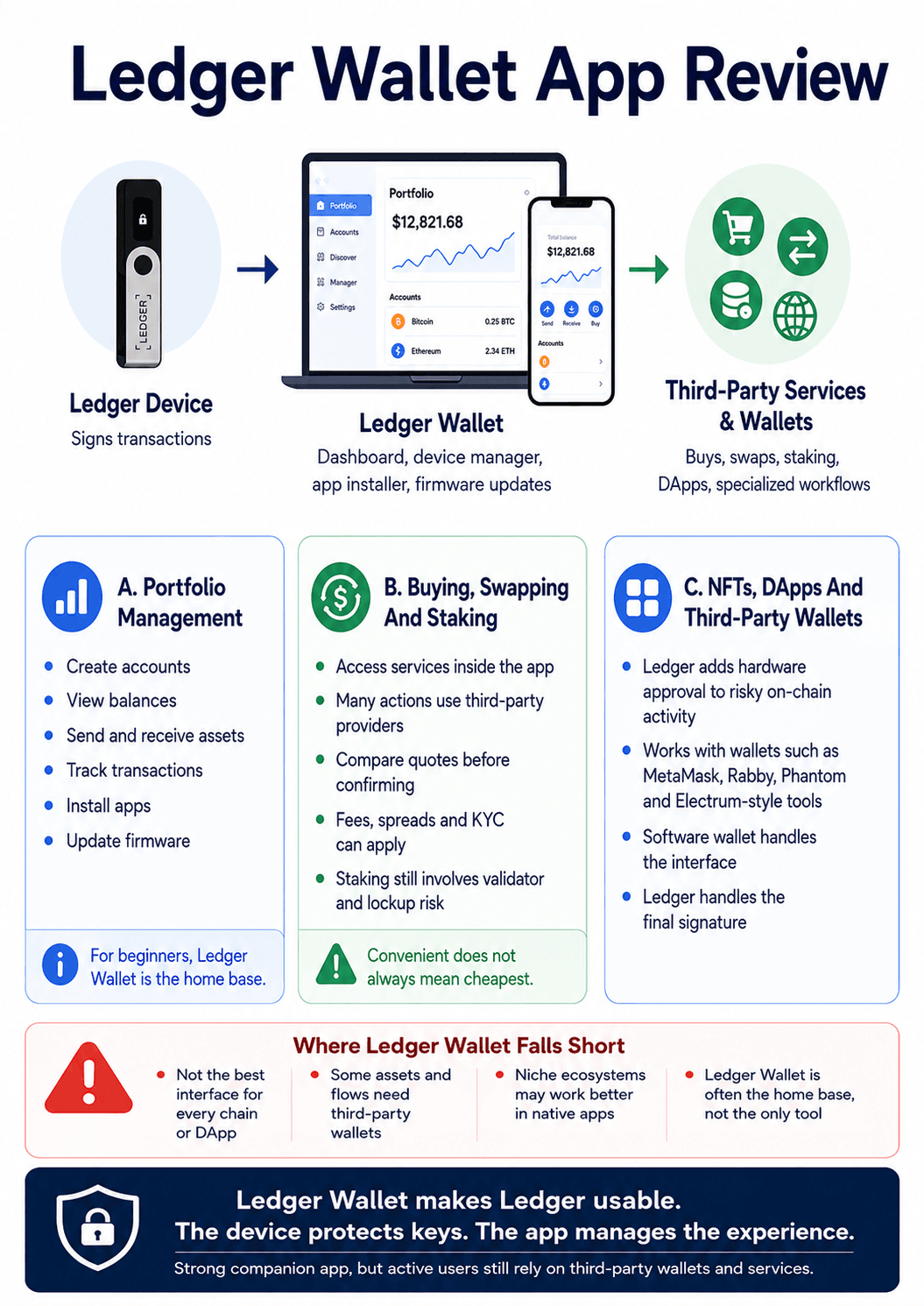 Inside Ledger Wallet’s Portfolio, Staking And DApp Tools
Portfolio Management
Ledger Wallet handles the core tasks users expect: create accounts, view balances, send assets, receive assets, track transactions, install device apps and update firmware.
For beginners, this is helpful because the physical device alone does not show a full portfolio. The Ledger signs transactions. Ledger Wallet shows accounts, balances and activity.
For simple holders, Ledger Wallet may be enough. For active users, it becomes the home base rather than the only interface. A user may still need MetaMask for Ethereum DApps, Phantom for Solana, Electrum for Bitcoin workflows or chain-specific wallets for smaller ecosystems.
Buying, Swapping And Staking
Ledger Wallet connects users to third-party providers for buying, selling, swapping and staking. That means users can do more without sending assets back to an exchange every time.
Third-party providers may charge spreads, commissions, service fees or staking commissions. KYC requirements can apply. Availability can change by country, asset, payment method and provider.
Users should compare the final received amount before confirming a buy or swap. A clean wallet interface can still route through an expensive quote.
For staking, Ledger Wallet can be convenient where assets are supported inside the app. Still, staking involves validator choice, lockups, unbonding periods, reward variability, commissions and sometimes slashing risk.
Check out our top picks for the best DeFi staking platforms.
NFTs, DApps And Third-Party Wallets
Ledger can be valuable for NFT and DApp users because it adds hardware approval to risky on-chain activity. A user can browse marketplaces, DEXs or DeFi apps through a software wallet while Ledger handles the final signature.
On Ethereum and EVM chains, MetaMask and Rabby are common front ends. On Solana, Phantom and Solflare are more natural. For NFT-heavy activity, the wallet interface still shapes the experience because collections, metadata, marketplace approvals and suspicious assets are usually handled through the software layer.
Active traders using decentralized exchanges should treat Ledger as the signer, not the strategy filter. It can help protect the key. It does not know whether the token is a scam, whether the pool is liquid, or whether the approval is sensible.
Where Ledger Wallet Falls Short
Ledger Wallet is strong as an official companion app, but it is not the best interface for every chain, NFT marketplace, DeFi strategy or niche token. Some assets may require third-party wallets. Some staking flows are better handled in ecosystem-native apps. Some DApps are built around wallet interfaces Ledger Wallet does not replace.
That is normal in crypto. A strong Ledger setup often combines Ledger Wallet for device management and core portfolio actions with third-party wallets for specialized activity.
Supported Coins, Tokens And Networks
Ledger supports a broad range of crypto assets. But it can mean native Ledger Wallet management, third-party wallet compatibility, holding without staking, staking inside the app, or support on one network but not another.
Ledger’s official supported crypto assets page should be checked before buying, especially for smaller altcoins, wrapped assets, NFTs and tokens issued across multiple networks.
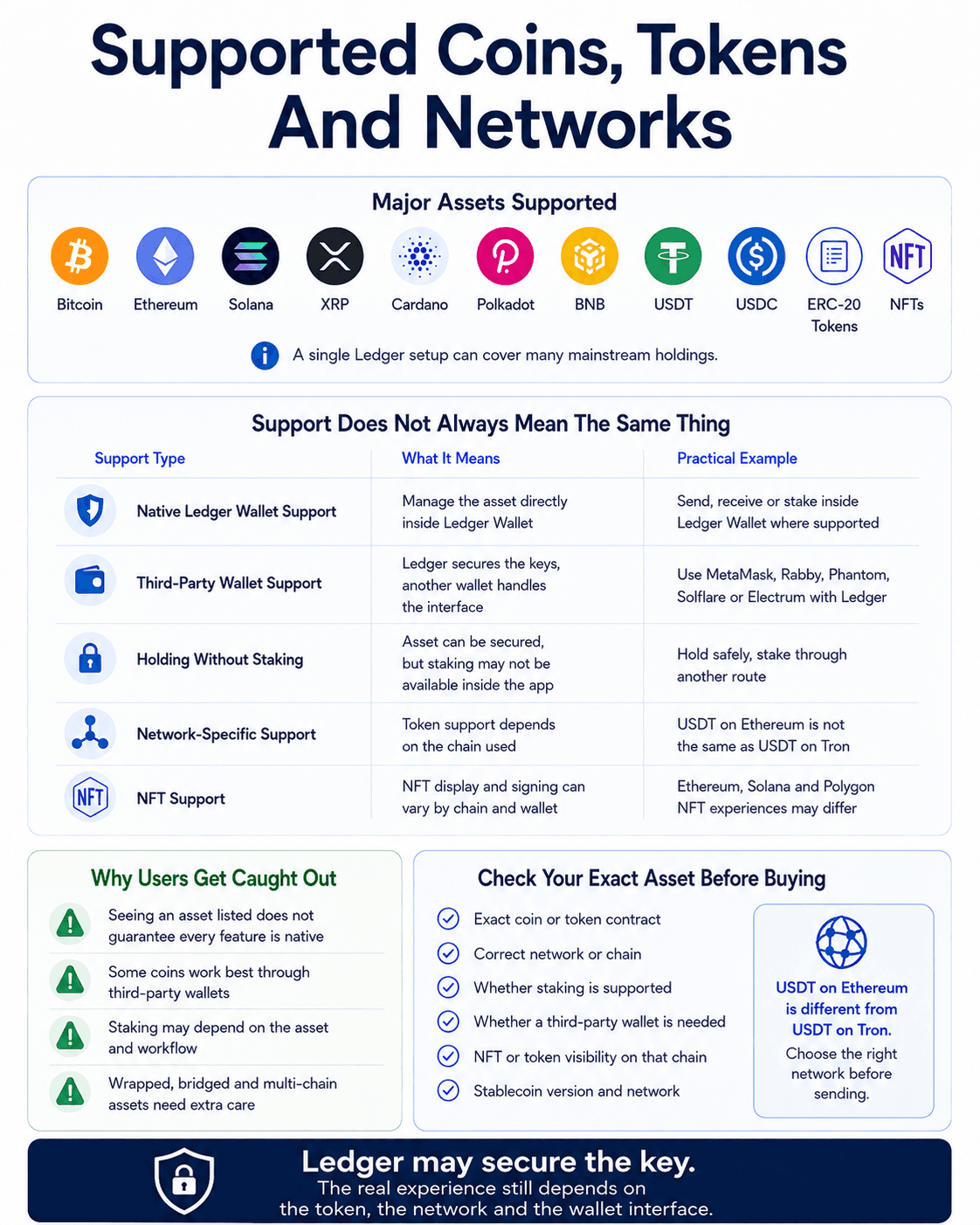 Ledger Asset Support Across Coins, Tokens And Networks
Major Assets Supported
Ledger supports many of the assets users expect from a mainstream hardware wallet, including BTC, ETH, SOL, XRP, Cardano, Polkadot, BNB, USDT, USDC, ERC-20 tokens and NFTs.
For mainstream holders, that breadth is one of Ledger’s biggest advantages. A user with Bitcoin, Ethereum, Solana, XRP, stablecoins and a few ERC-20s can usually build one hardware-wallet setup rather than juggling multiple devices.
Native Ledger Wallet Support Vs Third-Party Wallet Support
“Ledger supports this asset” can mean several things:
| Support Type | What It Means | Practical Example |
|---|---|---|
| Native Ledger Wallet Support | Manage the asset directly inside Ledger Wallet | Send, receive or stake from Ledger Wallet where supported |
| Third-Party Wallet Support | Ledger secures the keys, but another wallet manages the interface | Use MetaMask, Rabby, Phantom, Solflare or Electrum with Ledger |
| Holding Without Staking | Asset can be secured, but staking may not be available inside Ledger Wallet | Hold a token safely, but stake through another route |
| Network-Specific Support | Token support depends on the chain used | USDT on Ethereum is not the same as USDT on Tron or another network |
| NFT Support | NFT visibility and signing may depend on chain and wallet interface | Ethereum NFTs may display differently from Solana NFTs or Polygon NFTs |
Check Your Exact Asset Before Buying
Before buying any hardware wallet, check the exact coin, token contract, network and feature you need. This is especially important for smaller altcoins, new chains, wrapped tokens, NFTs, staking features and tokens issued across multiple networks.
Stablecoins are a good example. They may look simple because the unit price is meant to stay steady, but wallet support depends on the chain and token contract. USDT on Ethereum, USDT on Tron and USDT on another network are not automatically interchangeable from a wallet support perspective.
The same logic applies to ERC-20 tokens, SPL tokens, NFTs and bridged assets. Ledger may secure the key, but users still need to choose the right network.
Ledger Wallet Setup: What The Beginner Experience Is Like
Ledger setup is not difficult, but beginners should treat it as a security ritual rather than a normal gadget setup. The first hour decides whether the wallet begins cleanly or becomes compromised before funds arrive.
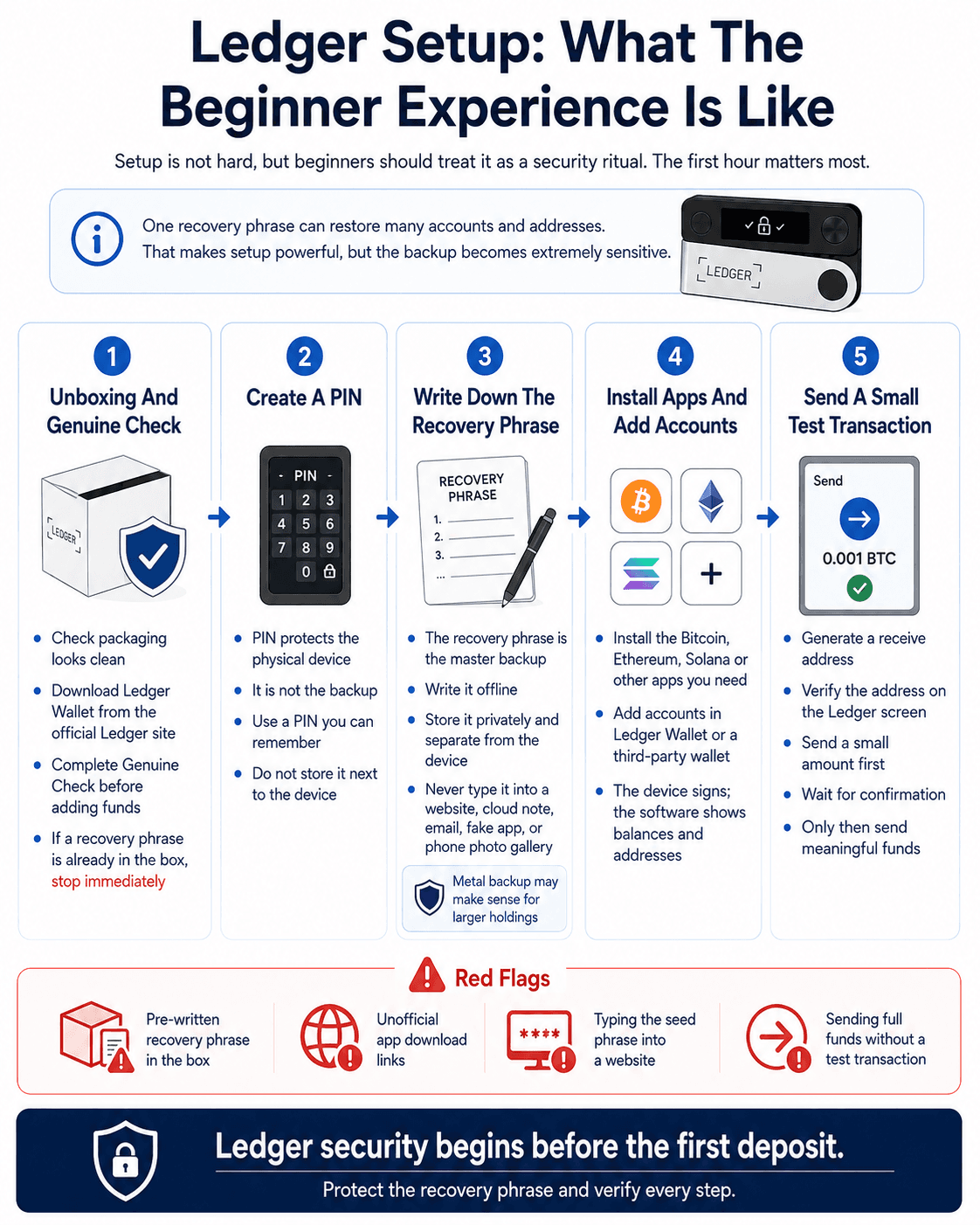 A Safe Ledger Setup From Unboxing To Test Transaction
Unboxing And Genuine Check
A safe Ledger setup starts with clean packaging, official software and a device-generated recovery phrase. Ledger does not need to include a pre-written seed phrase. If the box contains one, do not use it.
The user should download Ledger Wallet from Ledger’s official site, connect the device and complete the Genuine Check. Only after that should funds be moved.
Creating A PIN
The PIN protects access to the physical device. It stops someone who finds or steals the Ledger from casually unlocking it.
The PIN is not the recovery phrase. If the device is lost or wiped, the PIN will not restore funds. The recovery phrase does that.
Use a PIN you can remember without making it obvious. Do not store it next to the device. Do not treat the PIN as the real backup.
Writing Down The Recovery Phrase
The recovery phrase is the master backup. Whoever controls it can restore the wallet and move the funds. That is why seed phrase handling is the most important part of Ledger ownership.
Do not type the recovery phrase into a website, cloud note, email, password manager, phone photo gallery or fake Ledger app. Write it offline. Store it somewhere private. Keep it separate from the device.
For larger holdings, paper may be too fragile. Fire, water, cleaning mistakes, moving house and family confusion are real failure modes. A metal backup can make sense when the portfolio is large enough to justify it.
Installing Apps And Adding Accounts
Ledger devices use blockchain apps. A user installs the Bitcoin app to manage Bitcoin, the Ethereum app to manage Ethereum and ERC-20 assets, the Solana app for Solana, and so on.
After installing the relevant app, the user adds accounts inside Ledger Wallet or a third-party wallet. The account is where balances and addresses become visible.
This can feel strange at first. The device does not automatically show every coin. The software needs accounts to display what the keys control.
Sending A Small Test Transaction
Beginners should send a small test transaction before moving meaningful funds. Generate the receive address, verify it on the Ledger screen, send a small amount, wait for confirmation, then send the larger amount only after the first transaction arrives correctly.
This habit catches wrong networks, copied-address errors and basic workflow mistakes before they become expensive.
It also teaches the user what a normal transaction flow looks like. That baseline helps later, because scams often feel different: rushed, unclear, weirdly urgent or oddly worded.
Ledger Recover And Ledger Recovery Key Explained
Ledger Recover and Ledger Recovery Key are different products. Both deal with recovery, but they use different trust models and serve different users.
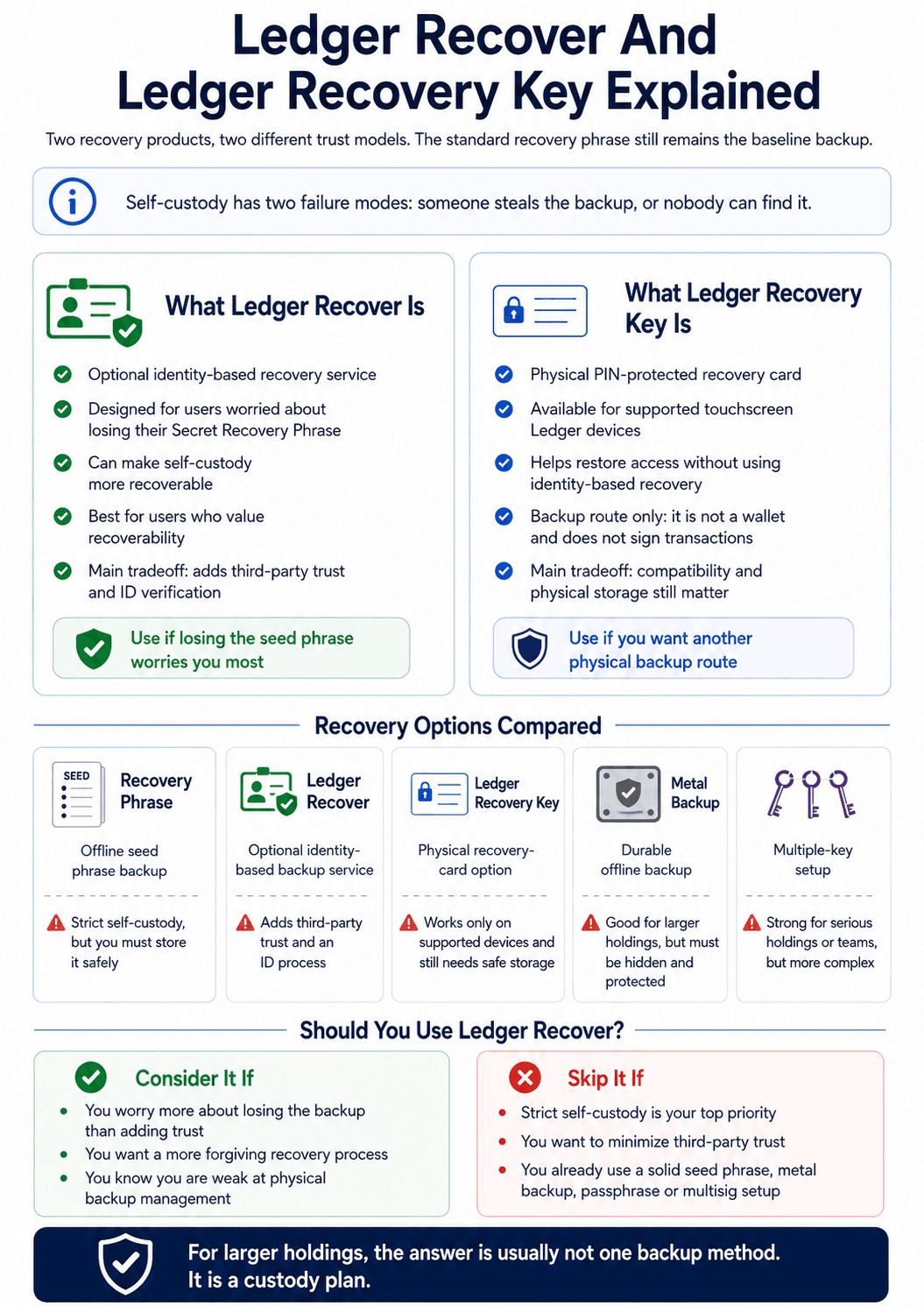 Comparing Ledger Recovery Options For Different Custody Needs
What Ledger Recover Is
Ledger Recover is an optional subscription service for users who want identity-based recovery if they lose access to their Secret Recovery Phrase. Ledger’s official Recover page describes it as an ID-based key recovery service.
The appeal is obvious as many normal users are afraid of losing 24 words and permanently losing access to funds, Ledger Recover tries to make self-custody more forgiving.
The tradeoff is trust. Strict self-custody users may dislike adding identity verification and third-party recovery infrastructure to a wallet setup. That does not make Recover pointless. It means the user has to choose which failure mode worries them more.
What Ledger Recovery Key Is
Ledger Recovery Key is a physical recovery-card option for supported Ledger touchscreen devices. Ledger describes its Recovery Key it as a PIN-protected card that can help restore access.
It is not a wallet and it does not sign transactions. It is a backup route. That means it also becomes a sensitive object that must be stored carefully.
The practical appeal is that it gives supported touchscreen Ledger users another recovery method without using identity-based recovery. The practical limit is compatibility and physical security.
Ledger Recover Vs Recovery Key Vs Seed Phrase
| Recovery Method | What It Is | Best For | Main Tradeoff |
|---|---|---|---|
| Recovery Phrase | Offline seed phrase backup | Strict self-custody | User must store it safely |
| Ledger Recover | Optional identity-based backup service | Users worried about losing the seed phrase | Adds third-party trust and ID process |
| Ledger Recovery Key | Physical recovery-card option | Touchscreen Ledger users wanting a backup route | Device compatibility and safe storage still count |
| Metal Backup | Durable offline backup | Larger holdings | Must be hidden and protected |
| Multisig | Multiple-key setup | Serious holdings or teams | More complex to manage |
Should You Use Ledger Recover?
Use Ledger Recover only if recoverability is more valuable to you than minimizing third-party trust. That may be true for some users, especially those who know they are poor at physical backup management.
Avoid it if strict self-custody is your priority. A recovery phrase, metal backup, passphrase strategy, multisig setup or inheritance plan may be a better fit.
For larger holdings, the answer is usually not one backup method, it is a custody plan.
Ledger Fees And Costs
Ledger costs fall into four buckets: the device, network fees, third-party provider fees and optional extras.
As of June 24, 2026, Ledger's current pricing sits roughly between $79 and $399, depending on the model. Prices can change with promotions, bundles, taxes, shipping and regional storefronts, so buyers should confirm the live checkout price on the official Ledger store before ordering.
| Cost Bucket | What It Covers | Who Charges It | Cost as of June 24, 2026 |
|---|---|---|---|
| Hardware Device | The physical Ledger signer | Ledger or retailer | About $79 to $399 |
| Network Fees | Bitcoin fees, Ethereum gas and other blockchain fees | Blockchain network participants | Variable |
| Buy, Swap And Stake Fees | Spreads, commissions, service fees or validator commissions | Third-party providers or validators | Variable |
| Optional Extras | Recovery products, cases, backup cards and bundles | Ledger or accessory providers | Usually optional |
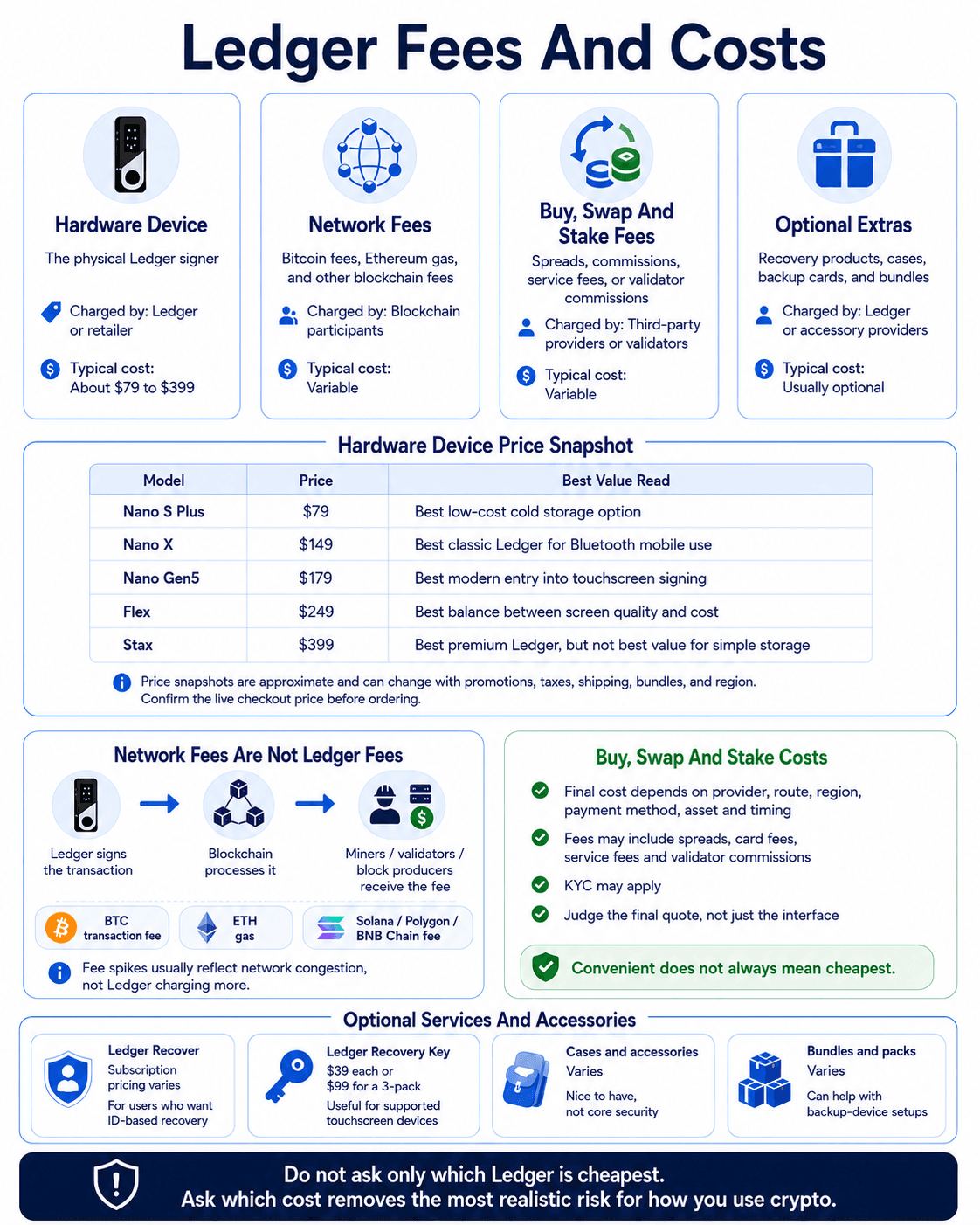 The Real Costs Behind Owning And Using Ledger
Hardware Device Price
| Ledger Model | Price as of June 24, 2026 | Official Link | Best Value Read |
|---|---|---|---|
| Ledger Nano S Plus | $79 | Ledger Nano S Plus | Best low-cost cold-storage option |
| Ledger Nano X | $149 | Ledger Nano X | Best classic Ledger for Bluetooth mobile use |
| Ledger Nano Gen5 | $179 | Ledger Nano Gen5 | Best modern entry into touchscreen signing |
| Ledger Flex | $249 | Ledger Flex | Best balance between screen quality and cost |
| Ledger Stax | $399 | Ledger Stax | Best premium Ledger, but not the best value for simple storage |
- The Nano S Plus is still the cleanest value pick for users who mainly want cold storage.
- The Nano X only makes sense if Bluetooth matters.
- Nano Gen5 and Flex are stronger choices for users who sign transactions often because the touchscreen improves review.
- Stax is the premium option, but its main advantage is comfort and display quality rather than a fundamentally different security model.
Network Fees Are Not Ledger Fees
When users send Bitcoin, they pay a Bitcoin network transaction fee. When they move Ethereum, ERC-20 tokens or NFTs, they pay gas. When they use Solana, Polygon or BNB Chain, they pay that network’s fee model.
Ledger does not receive those network fees. The hardware wallet signs the transaction. The blockchain processes it.
Buy, Swap And Stake Fees
Buy, swap and staking costs inside Ledger Wallet depend on third-party providers, route selection, region, payment method, asset and timing. Ledger Wallet can help users compare providers, but the final cost may include spreads, card fees, service fees, validator commissions or staking provider fees.
Ledger’s Ledger Wallet page says the app lets users compare service providers across buy, swap and stake flows. That is useful, but users should still judge the final quote, not just the interface.
A $1,000 swap with a poor spread can cost more than a visible flat fee. A staking product with a high displayed reward can still be less attractive after validator commission, lockup periods, unbonding delays or slashing risk. For staking, users should compare the asset, validator, expected reward, withdrawal rules and risk before confirming.
If the user wants simple token-to-token trades, comparing crypto swap platforms can help benchmark whether Ledger Wallet’s quote is competitive.
Optional Services And Accessories
Ledger also sells recovery products, accessories and bundles. These are optional, but some can make sense depending on the user’s setup.
| Optional Product Or Service | Price as of June 24, 2026 | Official Link | Practical Take |
|---|---|---|---|
| Ledger Recover | Subscription pricing varies by plan and region | Ledger Recover | Useful only for users who want ID-based recovery |
| Ledger Recovery Key | $39 for one, $99 for three-pack | Ledger Recovery Key | Useful for supported touchscreen Ledger devices |
| Cases, shells and accessories | Varies | Ledger Accessories | Nice-to-have, not core security |
| Bundles and packs | Varies | Ledger Shop | Can be useful for backup-device setups |
For larger holdings, a durable recovery backup or second device may be more useful than a premium case. For active users, paying more for a touchscreen model may make more sense than buying the cheapest Ledger and struggling with small-screen approvals.
The sensible way to think about Ledger pricing is not “Which one is cheapest?” It is “Which cost removes the most realistic failure risk for how I actually use crypto?”
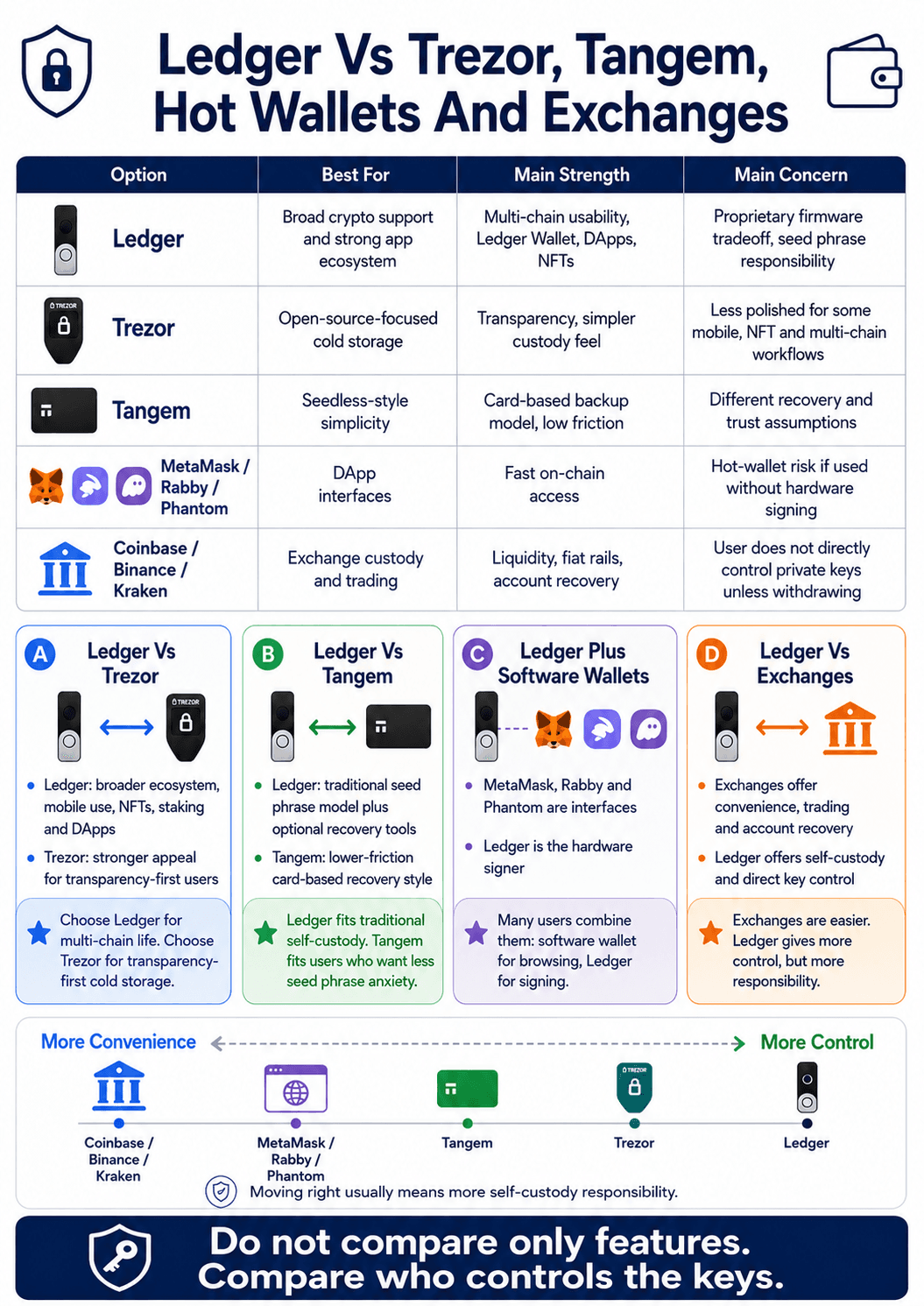
Ledger Vs Trezor, Tangem, Hot Wallets And Exchanges
Ledger's alternatives are not all the same kind of product. Trezor is another hardware wallet but with open-source ethos. Tangem uses a different recovery model. MetaMask, Rabby and Phantom are software wallet interfaces.
| Option | Best For | Main Strength | Main Concern |
|---|---|---|---|
| Ledger | Broad crypto support and strong app ecosystem | Multi-chain usability, Ledger Wallet, DApps, NFTs | Proprietary firmware tradeoff, seed phrase responsibility |
| Trezor | Open-source-focused cold storage | Transparency, simpler custody feel | Less polished for some mobile, NFT and multi-chain workflows |
| Tangem | Seedless-style simplicity | Card-based backup model, low friction | Different recovery and trust assumptions |
| MetaMask/Rabby/Phantom | DApp interfaces | Fast on-chain access | Hot-wallet risk if used without hardware signing |
| Coinbase/Binance/Kraken | Exchange custody and trading | Liquidity, fiat rails, account recovery | User does not directly control private keys unless withdrawing |
 Ledger Compared With Rival Wallets And Exchange Custody
Ledger Vs Trezor
Ledger generally wins on app ecosystem, mobile experience, asset breadth, NFTs, staking and DApp integrations. Trezor appeals more to users who prioritize open-source transparency, simple cold storage and a cleaner security philosophy.
Trezor’s newer Safe lineup has moved closer to Ledger on secure-chip design, while still leaning into open-source positioning. Ledger leans into Secure Element hardware, Ledger OS, Ledger Wallet and broader ecosystem integrations.
Choose Ledger if you want one device for multi-chain crypto life. Choose Trezor if transparency-first cold storage is more important than Ledger’s app layer.
Read our full Ledger vs Trezor comparison.
Ledger Vs Tangem And Seedless Wallets
Tangem is the cleaner comparison for users who like hardware security but dislike the traditional 24-word recovery phrase model.
Tangem and other seedless-style wallets appeal to users who do not want to write down a seed phrase. Ledger keeps closer to the standard recovery phrase model, then adds optional Recover and Recovery Key routes.
Ledger is better for users who want traditional seed phrase compatibility. Tangem is more appealing for users who want a card-based setup with less recovery phrase anxiety.
Read our full Tangem Wallet review. Users comparing seedless designs more broadly should check out our best seedless wallets guide.
Ledger Vs MetaMask, Rabby And Phantom
MetaMask, Rabby and Phantom are wallet interfaces. Ledger is a hardware signer. Many users combine them.
That combination is common because software wallets are better for browsing DApps, while Ledger is better for protecting keys. MetaMask can connect to Ethereum DApps. Rabby can improve EVM transaction context. Phantom can handle Solana, NFTs and multi-chain activity. Ledger can keep the key away from the browser.
Ledger Vs Coinbase Or Binance
Binance, Coinbase, Kraken are exchanges. If assets stay inside an exchange account, the exchange generally controls custody. Ledger gives users self-custody, which means direct control of private keys and direct responsibility for mistakes.
Exchange custody is convenient. Password resets, support processes, fiat rails, order books, trading bots, APIs and account recovery all help normal users. The tradeoff is counterparty risk, withdrawal risk, account restrictions and dependence on platform rules.
Ledger removes the exchange from custody, but it also removes the safety net. If the user loses the recovery phrase, approves a drain or sends funds on the wrong network, there may be nobody who can reverse it.
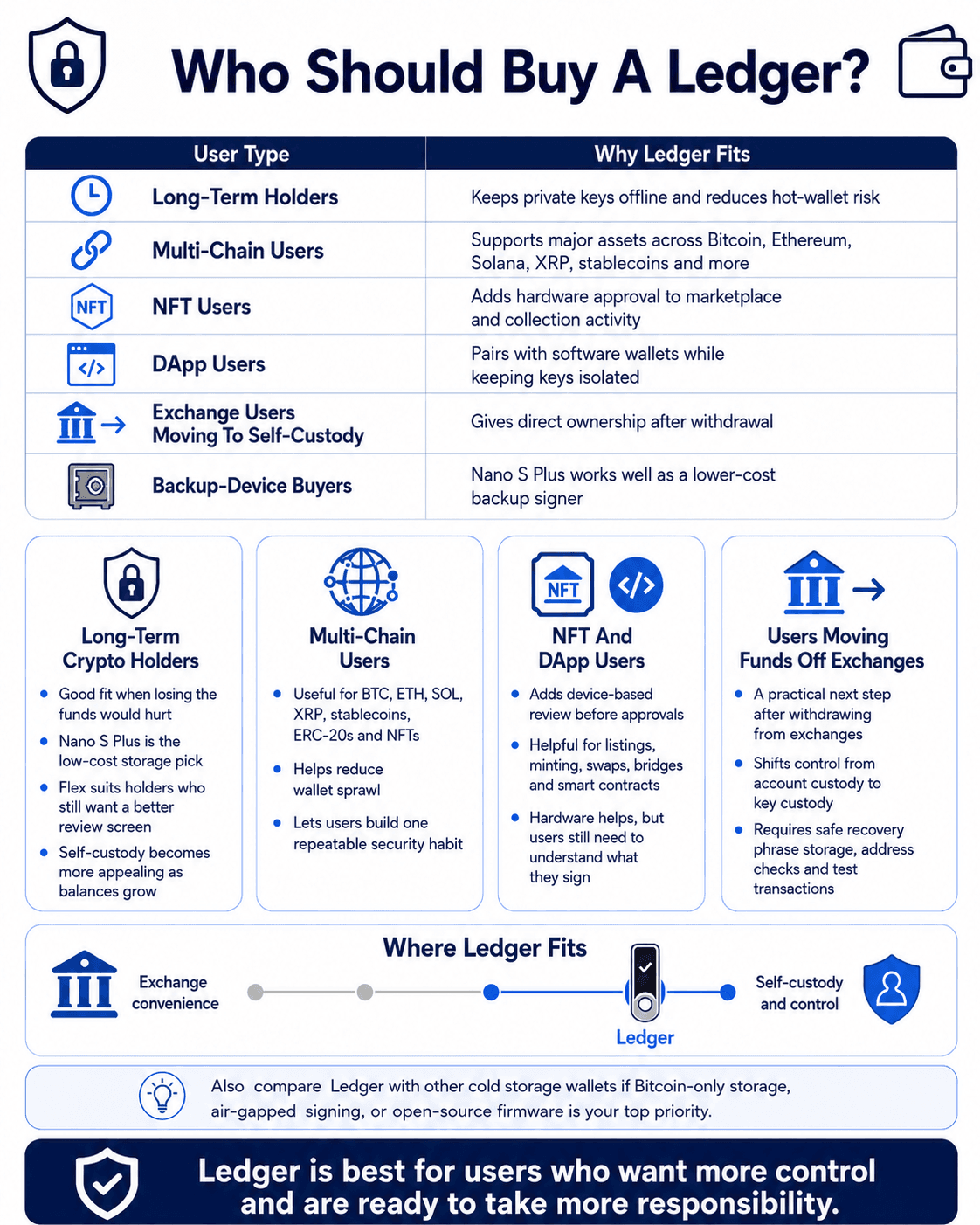
Who Should Buy A Ledger Wallet?
Ledger is a strong fit for users who hold meaningful crypto, want to move funds off exchanges, manage several assets, or interact with NFTs and DApps often enough to justify hardware signing.
| User Type | Why Ledger Fits |
|---|---|
| Long-Term Holders | Keeps private keys offline and reduces hot-wallet risk |
| Multi-Chain Users | Supports major assets across Bitcoin, Ethereum, Solana, XRP, stablecoins and more |
| NFT Users | Adds hardware approval to marketplace and collection activity |
| DApp Users | Pairs with software wallets while keeping keys isolated |
| Exchange Users Moving To Custody | Gives direct ownership after withdrawal |
| Backup-Device Buyers | Nano S Plus works well as a lower-cost backup signer |
 The Crypto Users Who Benefit Most From Ledger
Long-Term Crypto Holders
Ledger suits holders with enough crypto that exchange or hot-wallet risk feels uncomfortable. That does not require whale-level wealth. If losing the funds would hurt, self-custody deserves serious consideration.
For long-term holders, Nano S Plus or Flex usually makes the most sense. Nano S Plus gives low-cost storage. Flex gives better review and a nicer interface for users who still expect occasional activity.
Multi-Chain Users
Ledger is especially strong for users holding assets across several networks. BTC, ETH, SOL, XRP, stablecoins, ERC-20s and NFTs can often sit under one hardware-wallet ecosystem.
That reduces operational mess. Instead of maintaining separate devices or leaving balances scattered across hot wallets, the user can build one repeatable security habit around Ledger.
NFT And DApp Users
NFT and DApp users face more signing risk than simple holders. Listing NFTs, approving marketplaces, minting collections, using cross-chain bridges, swapping tokens and interacting with smart contracts all increase the chance of approving something dangerous.
Ledger helps by adding device-based review. The user still needs to understand what they are signing. Hardware cannot turn a bad contract into a safe one.
Users Moving Funds Off Exchanges
Ledger is a common next step for users withdrawing funds from exchanges. It gives them self-custody without forcing them into a highly technical setup.
The responsibility shift is real. On an exchange, the user manages account security. With Ledger, the user manages key security. That means safe recovery phrase storage, address verification, test transactions and a stronger phishing filter.
Who Should Avoid Ledger Wallets?
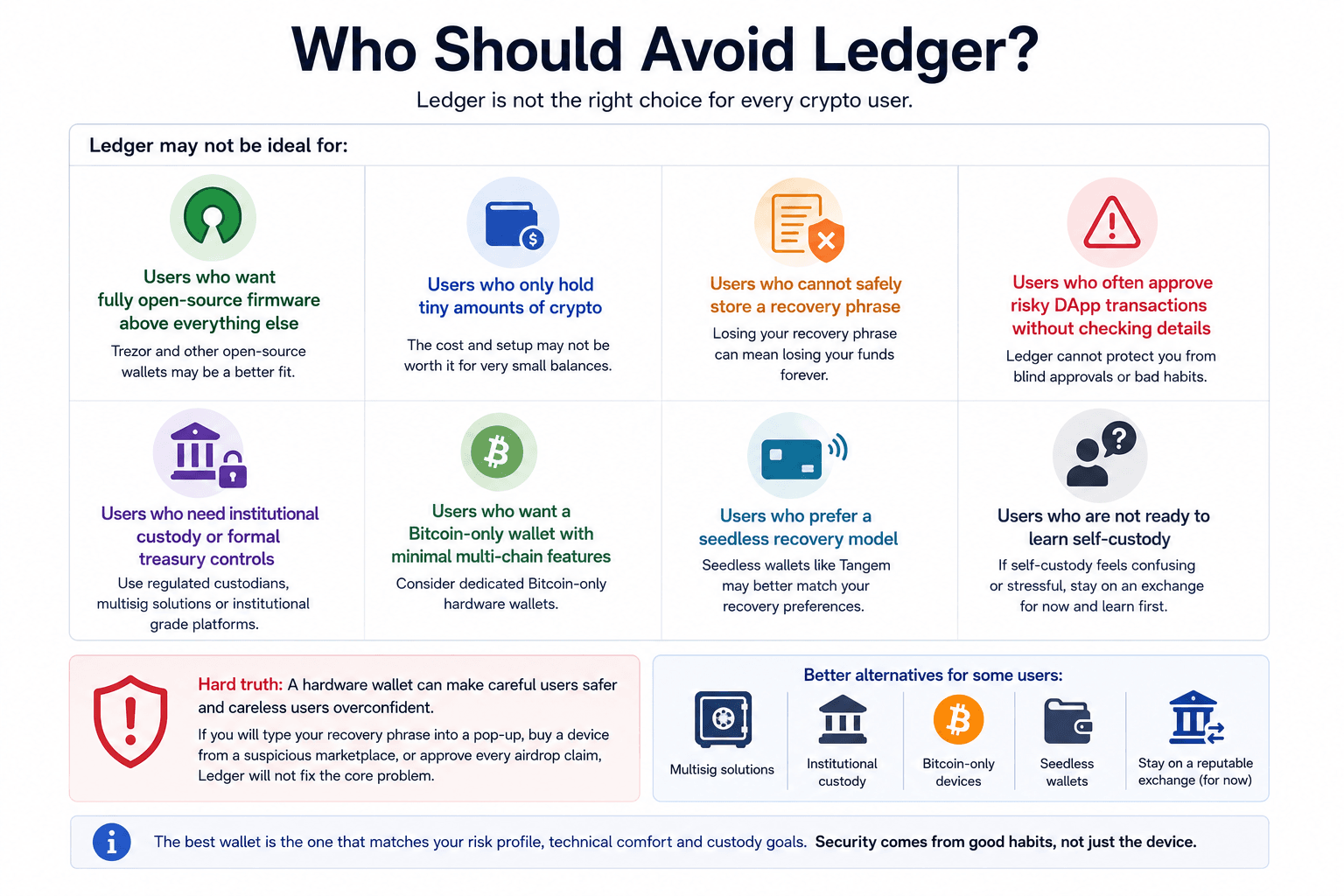
Ledger is not the right choice for every crypto user. Some people should choose another hardware wallet, a seedless wallet, an institutional custodian, a Bitcoin-only device or even stay with a reputable exchange until they understand self-custody properly.
 When Ledger May Be The Wrong Wallet Choice
Ledger may not be ideal for:
- Users who want fully open-source firmware above everything else
- Users who only hold tiny amounts of crypto
- Users who cannot safely store a recovery phrase
- Users who often approve risky DApp transactions without checking details
- Users who need institutional custody or formal treasury controls
- Users who want a Bitcoin-only wallet with minimal multi-chain features
- Users who prefer a seedless recovery model
The hard truth is that a hardware wallet can make careful users safer and careless users overconfident. If someone is likely to type a recovery phrase into a pop-up, buy a device from a suspicious marketplace, or approve every airdrop claim, Ledger will not fix the core problem.
For teams, treasuries and serious shared holdings, multisig and formal custody workflows may be more appropriate than one consumer device.
Best Ledger Wallet By User Type
 Matching Each Ledger Model To The Right User
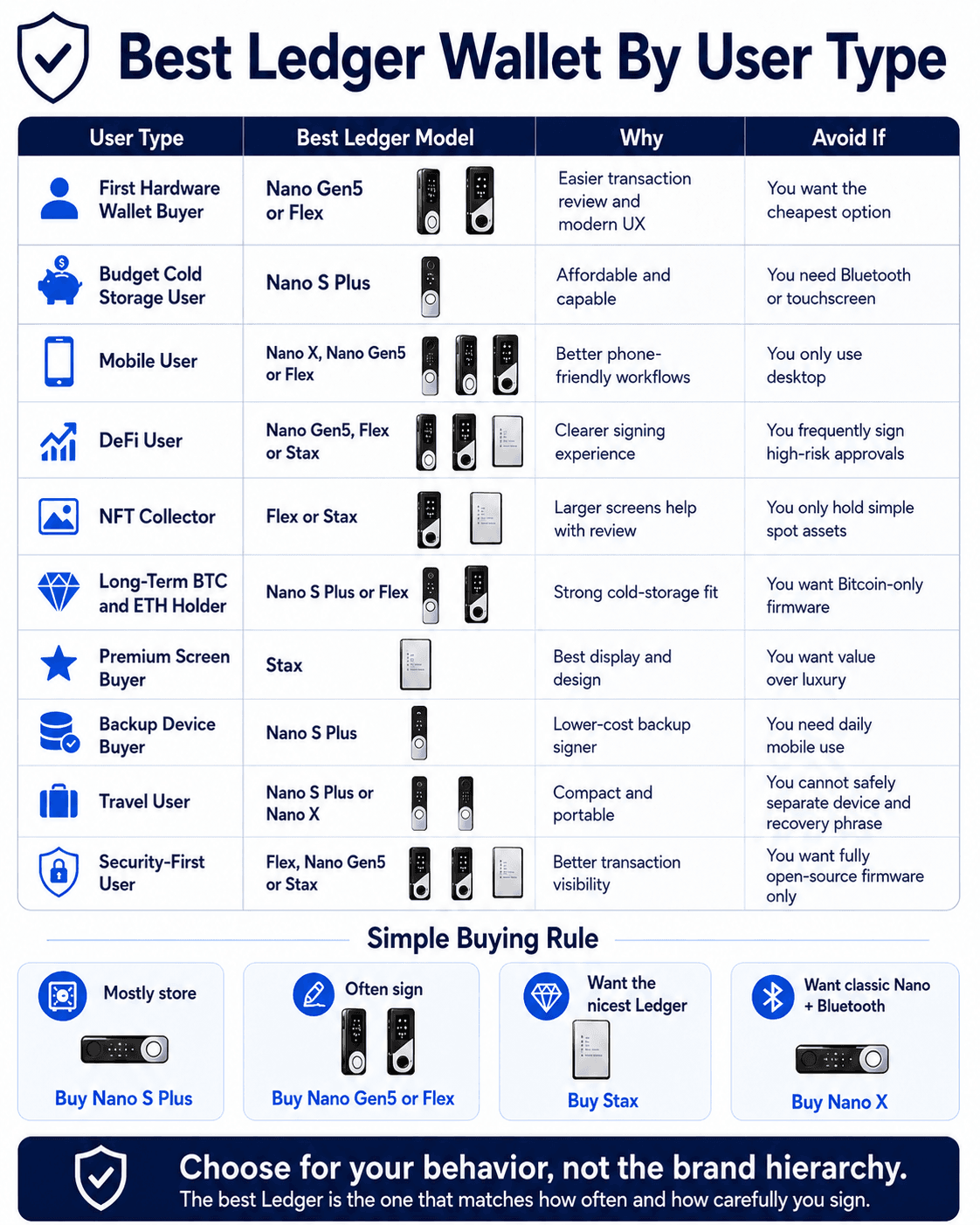
The best Ledger wallet depends less on the model name and more on signing behavior. A storage-only user and a daily DeFi user should not optimize for the same device.
| User Type | Best Ledger Model | Why | Avoid If |
|---|---|---|---|
| First Hardware Wallet Buyer | Nano Gen5 Or Flex | Easier transaction review and modern UX | You want the cheapest option |
| Budget Cold Storage User | Nano S Plus | Affordable and capable | You need Bluetooth or touchscreen |
| Mobile User | Nano X, Nano Gen5 Or Flex | Better phone-friendly workflows | You only use desktop |
| DeFi User | Nano Gen5, Flex Or Stax | Clearer signing experience | You frequently sign high-risk approvals |
| NFT Collector | Flex Or Stax | Larger screens help with review | You only hold simple spot assets |
| Long-Term BTC And ETH Holder | Nano S Plus Or Flex | Strong cold-storage fit | You want Bitcoin-only firmware |
| Premium Screen Buyer | Stax | Best display and design | You want value over luxury |
| Backup Device Buyer | Nano S Plus | Lower-cost backup signer | You need daily mobile use |
| Travel User | Nano S Plus Or Nano X | Compact and portable | You cannot safely separate device and recovery phrase |
| Security-First User | Flex, Nano Gen5 Or Stax | Better transaction visibility | You want fully open-source firmware only |
A simple rule works well. If you mostly store, buy Nano S Plus. If you often sign, buy Nano Gen5 or Flex. If you want the nicest Ledger, buy Stax. If you specifically want the old Nano format with Bluetooth, buy Nano X.
Common Ledger Wallet Problems And What To Do
Most Ledger problems fall into a few buckets: phishing, wrong network, unsupported display, recovery confusion, device authenticity or unclear signing. The solution is usually to stop, verify and avoid rushing the next click.
Unclear DApp prompts often overlap with smart contract attacks, especially when approvals hide what a contract can later do.
| Problem | Likely Cause | What To Do |
|---|---|---|
| Ledger Wallet asks for recovery phrase | Fake app or phishing | Close it, uninstall it and use official Ledger channels |
| Device comes with a pre-written seed phrase | Tampered or fake setup | Do not use it |
| Device fails Genuine Check | Counterfeit, tampering or connection issue | Do not add funds until resolved |
| Token is not showing | Wrong network, unsupported native display or third-party wallet needed | Check asset and network support |
| Lost Ledger device | Normal recovery scenario | Restore using recovery phrase on a trusted wallet |
| Lost recovery phrase but still have device | High-risk situation | Move funds to a new wallet with a new backup |
| DApp approval is unclear | Blind signing or complex contract call | Reject unless you understand it |
| Transaction address looks different | Clipboard malware or wrong destination | Stop and recheck on the device screen |
The worst Ledger mistake is treating urgency as a reason to continue. If a screen, app, address, transaction or support message feels strange, stop. Crypto rarely punishes users for waiting five minutes. It often punishes them for signing in five seconds.
Ledger Wallet Safety Tips Before You Use One
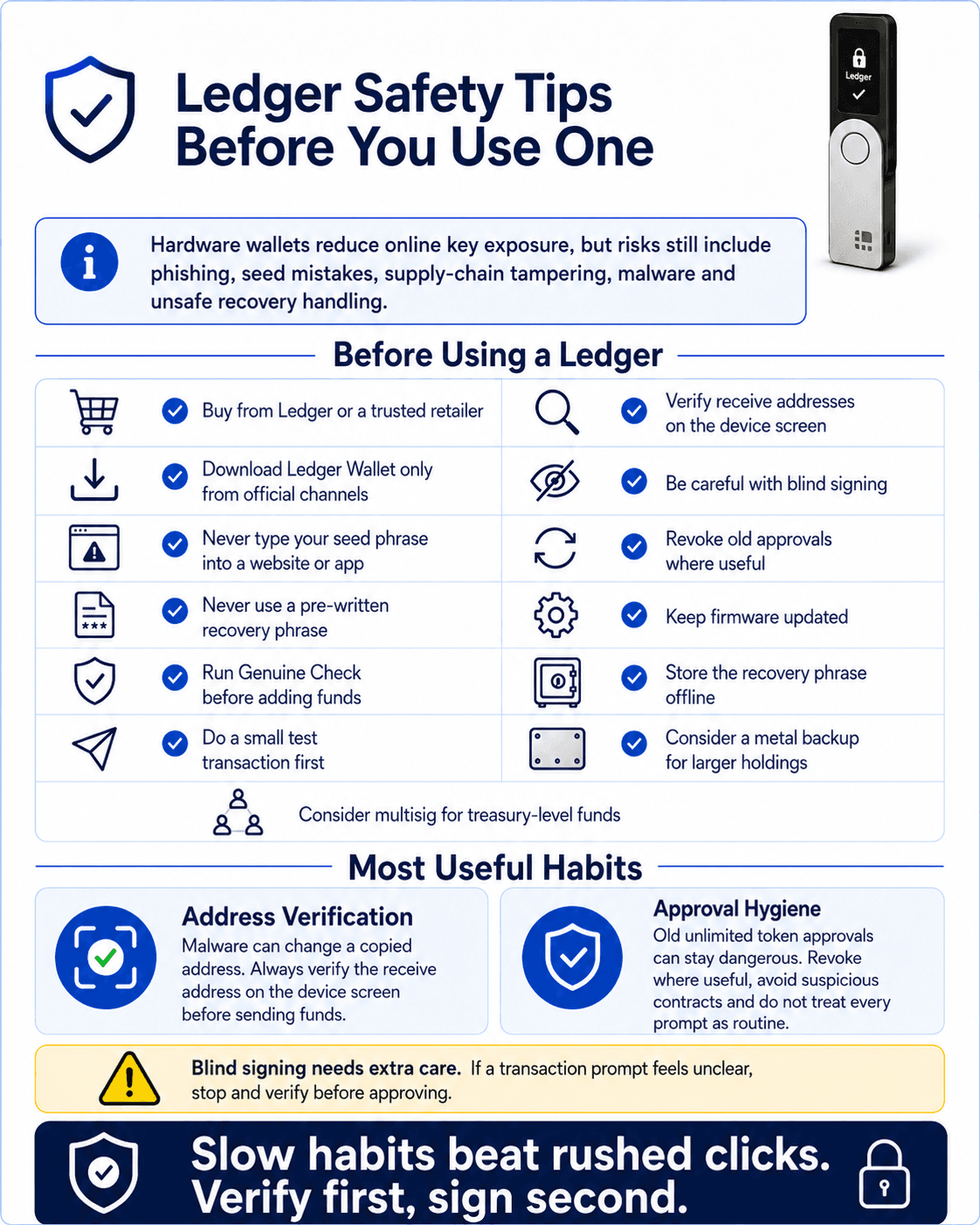 Simple Ledger Safety Habits That Prevent Expensive Mistakes
Ledger works best when the user builds boring, repeatable habits, the goal is not paranoia. The goal is removing avoidable failure.
Hardware wallets reduce online key exposure, but hardware wallet security threats still include phishing, seed mistakes, supply-chain tampering, malware and unsafe recovery handling.
Before using a Ledger:
- Buy from Ledger or a trusted retailer
- Download Ledger Wallet only from official channels
- Never type your seed phrase into a website or app
- Never use a pre-written recovery phrase
- Run Genuine Check before adding funds
- Do a small test transaction first
- Verify receive addresses on the device screen
- Be careful with blind signing
- Revoke old approvals where useful
- Keep firmware updated
- Store the recovery phrase offline
- Consider a metal backup for larger holdings
- Consider multisig for treasury-level funds

Final Verdict: Is Ledger Worth It In 2026?
Ledger is still one of the best hardware wallet choices in 2026 for users who want broad asset support, strong usability, mobile and desktop access, Ledger Wallet integrations, staking, NFTs and DApp compatibility.
Nano S Plus remains the budget pick. Nano X still works for classic mobile use. Nano Gen5 and Flex are the best fit for most modern users. Stax is the premium option for buyers who want the largest screen and best physical experience.
That being said, Ledger is not a magic vault. It improves private-key security, but users still need safe habits around recovery phrase storage, app downloads, transaction approvals, genuine devices and recovery choices.
Buy Ledger if you want a mature hardware-wallet ecosystem for multi-chain self-custody. Avoid it if you want fully open-source firmware, Bitcoin-only minimalism, seedless recovery, institutional controls or a custody setup that removes personal responsibility.