Trezor Safe 3 for affordable cold storage, Safe 5 for most everyday users, and Safe 7 for buyers who want Bluetooth, a larger touchscreen and a more mobile-friendly experience. Each model protects private keys offline, but the real differences show up in usability, security architecture, backup options, asset support and daily workflow.
This review breaks down which Trezor wallet you should buy, how Trezor works, how the Safe 3, Safe 5 and Safe 7 compare, what Trezor Suite can and cannot do and where Trezor still falls short. We will also look at mobile support, setup, DeFi use, alternatives and how Trezor compares with Ledger, so you can decide whether it is the right hardware wallet for your crypto setup.
Trezor Hardware Wallet Review 2026: Quick Verdict
Trezor is worth it for users who want self-custody, open-source transparency and long-term crypto storage. It is best for Bitcoin holders, ETH and major altcoin investors, users moving funds off exchanges and anyone who wants cold storage more than trading convenience. It is not the best fit for users who want exchange-style simplicity, seedless recovery, heavy NFT trading or a wallet that removes backup responsibility.
Best Trezor Picks
| Best Budget Trezor | Trezor Safe 3 |
|---|---|
| Best Trezor For Most Users | Trezor Safe 5 |
| Best Premium Trezor | Trezor Safe 7 |
| Best For Beginners | Trezor Safe 5 |
| Best For Long-Term Cold Storage | Trezor Safe 3 Or Trezor Safe 5 |
| Best For Mobile Users | Trezor Safe 7 |
| Best For DeFi | Trezor Safe 5 Or Trezor Safe 7 With MetaMask Or Rabby |
| Main Tradeoff | Strong self-custody and open-source transparency, but recovery seeds, passphrases, network checks and DApp approvals still demand discipline. |
Best For
- Long-term Bitcoin holders who want cold storage
- ETH, SOL, ADA, XRP and major altcoin holders
- Users moving funds off centralized exchanges
- Open-source security fans who value transparency
- Investors who want storage first and trading convenience second
- People comfortable protecting their own recovery seed
Not Ideal For
- Users who want exchange-level simplicity
- Heavy NFT traders or frequent small traders
- People who do not want recovery seed responsibility
- Users who need niche asset support without checking first
- Mobile-first DApp users who do not want to pay for Safe 7
- Traders focused on fast swaps, memecoins and marketplace activity
Disclosure And Methodology
Some links in this article may be affiliate links. If you choose to use a service through these links, we may earn a commission at no additional cost to you.
For this Trezor review, we assessed the wallet lineup across security design, open-source transparency, Secure Element support, recovery options, supported assets, Trezor Suite features, transaction review, mobile and desktop usability, staking access, DApp compatibility, pricing and fit for different user types.
Some Trezor devices and wallet workflows were reviewed hands-on. For models or features we did not test directly, we relied on Trezor’s official product pages, support documentation, pricing pages and publicly available materials, then weighed those claims against practical self-custody risks such as seed phrase storage, passphrase loss, fake apps, malicious approvals, third-party wallet use and recovery failure.
Which Trezor Wallet Should You Buy?
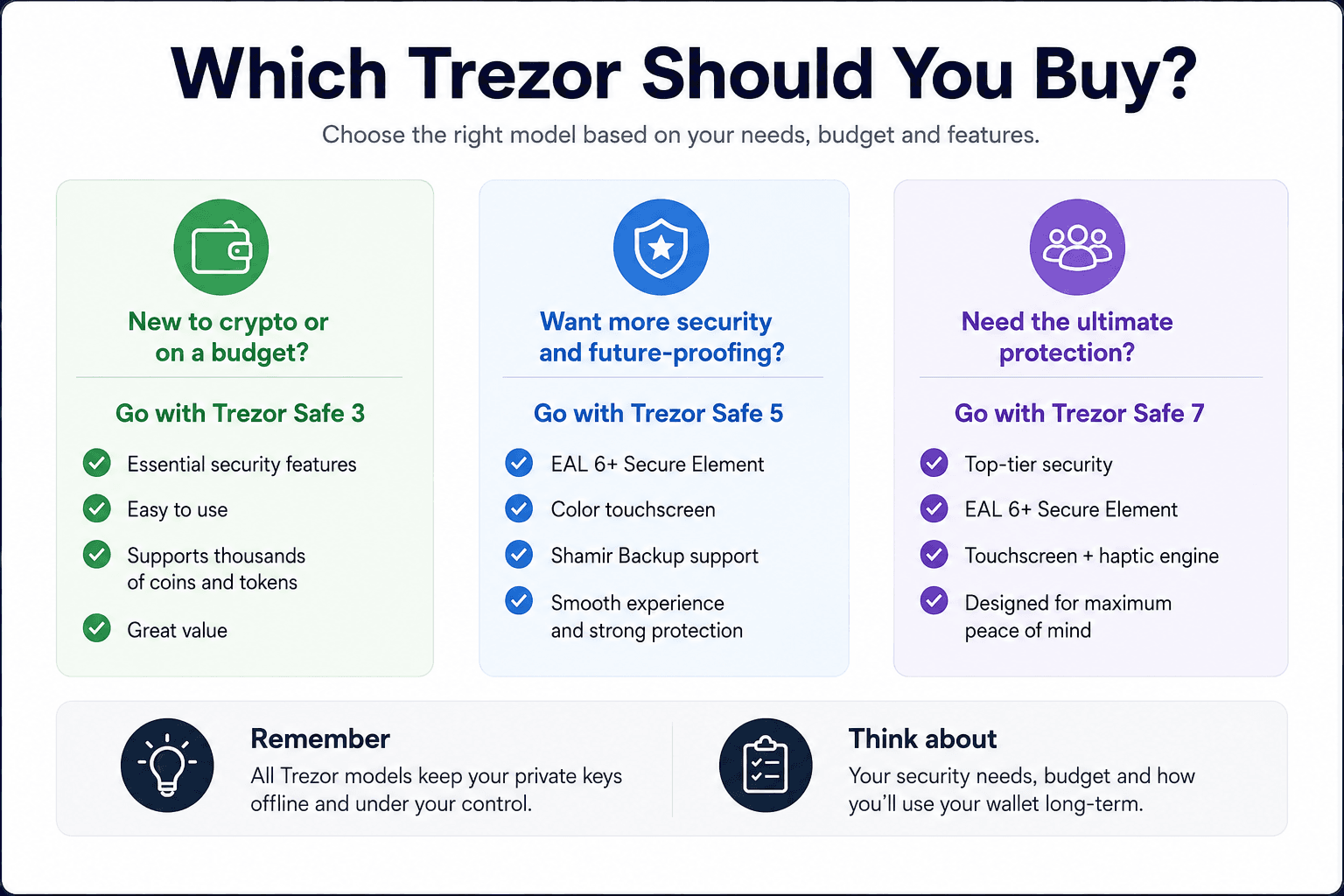
The best Trezor for most users is the Safe 5 because it sits in the clean middle of the lineup. It has better usability than the Safe 3 without pushing buyers into the Safe 7’s premium price. Safe 3 is the better pick for users who mainly want affordable cold storage, while Safe 7 is the right choice for buyers who want the newest Trezor hardware, Bluetooth, a larger screen and a more mobile-friendly experience.
The Trezor Safe 3 is the clean budget pick, while the Trezor Safe 5 is the easier everyday recommendation for users who want touchscreen navigation without jumping straight to the premium model.
 Matching Each Trezor Model To The Right Type Of User
| User Type | Best Trezor | Why | Skip It If |
|---|---|---|---|
| Budget Cold Storage Buyer | Safe 3 | Lowest-cost modern Trezor with Secure Element support | You want a touchscreen |
| Most Everyday Users | Safe 5 | Best balance of usability, security and price | You need wireless or mobile-first use |
| Premium/Mobile-First User | Safe 7 | Larger screen, newest hardware, Bluetooth and mobile convenience | You want the lowest price |
| Bitcoin-Only Holder | Bitcoin-only model or firmware option | Cleaner BTC-focused setup | You hold many altcoins |
| Heavy DeFi/NFT User | Trezor plus MetaMask or Rabby | Hardware signing with DApp access | You want a native NFT dashboard |
The clean buying shortcut is straightforward, Safe 3 for budget storage, Safe 5 for most users, Safe 7 for premium mobile convenience.
Read Our:
Best Trezor For Beginners
Trezor Safe 5 is suitable for beginners because the touchscreen reduces friction during setup, address checks and transaction confirmation. Physical buttons are fine for careful storage, but a touchscreen makes the wallet feel less abstract for someone using a hardware wallet for the first time.
Safe 3 still works well for budget-conscious beginners. It gives users a modern Trezor with Secure Element support, USB-C and the core self-custody flow. The tradeoff is simple: lower cost, slower navigation.
The bigger beginner challenge is not the device itself. It is the recovery seed. Anyone buying Trezor must be ready to write down the wallet backup offline, store it safely and understand that Trezor support cannot reset a lost seed like an exchange password.
Readers still comparing first-wallet options should go through our best crypto wallets for beginners guide. Those comparing hardware wallets should check out our top picks for the best hardware wallets.
Best Trezor For Long-Term Holders
Long-term holders should look at Safe 3 or Safe 5. Safe 3 is enough if the wallet will mostly sit in cold storage and sign occasional transactions, while Safe 5 is better if the user expects to check balances, verify addresses and move funds more often.
Bitcoin-only holders may prefer a Bitcoin-only setup because it reduces distractions and narrows the wallet’s purpose. That does not automatically make it safer for every user, but it can make the custody setup cleaner for people who only care about BTC.
Long-term storage should also change user behavior. A Trezor used for cold storage should not become a daily trading wallet, because frequent signing increases exposure to phishing, bad approvals and operational mistakes.
Best Trezor For Mobile Users
Safe 7 is the most mobile-friendly Trezor because it adds Bluetooth and a larger touchscreen. Bluetooth and USB-C connections are secured through Trezor Host Protocol, while the device can also be used in wired mode if the user prefers USB-C.
Mobile support should still be checked before buying, especially if the user depends on a specific phone, operating system or third-party wallet. Android and iPhone workflows do not always behave the same way across hardware wallets, browser apps and third-party integrations. Trezor’s compare page also distinguishes full iOS compatibility for Safe 7 from more limited iOS compatibility on Safe 5 and Safe 3.
Safe 7 is the right pick if mobile convenience is part of the reason you are buying Trezor. If you mostly use desktop, Safe 5 gives much of the day-to-day usability at a lower price.
What Is Trezor And How Does It Work?
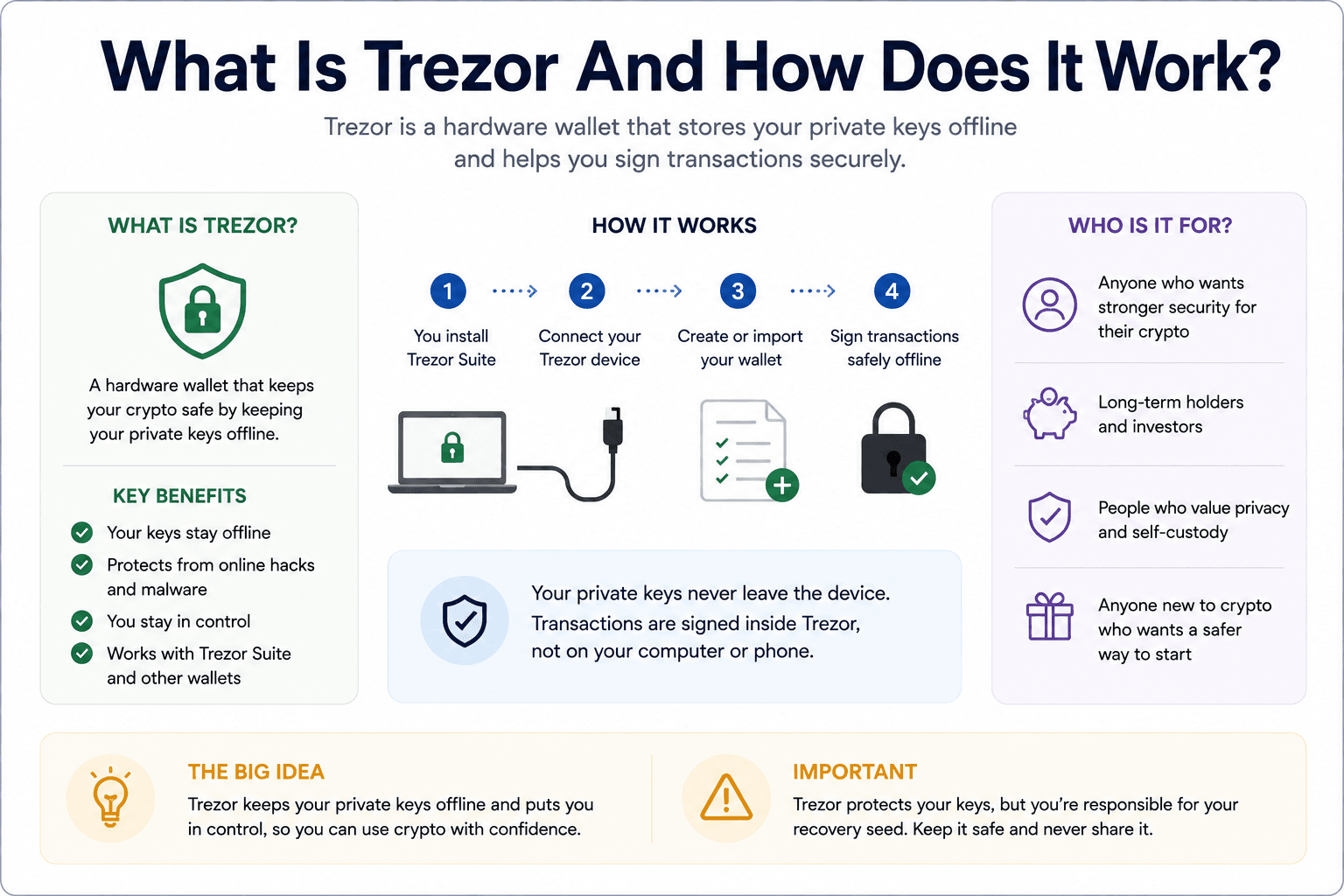 How Trezor Protects Crypto Keys Without Holding The Coins
Trezor is a hardware wallet made by SatoshiLabs. Its job is to keep private keys offline and let users sign transactions only after confirming them on the device. The hardware wallet does not store crypto inside the device, crypto remains on blockchains.
That difference explains why losing the device is different from losing the recovery seed. A lost Trezor can be replaced if the wallet backup is safe. A stolen recovery seed can give someone access to the funds even if the physical device is still sitting in your drawer.
Trezor does not hold your crypto. It holds the keys that let you access crypto on the blockchain. The blockchain records the assets, Trezor protects the private keys, and the device signs transactions after user confirmation.
Trezor leans toward open-source transparency, self-custody discipline and cold storage rather than trying to feel like a crypto exchange in device form.
Private Keys, Public Addresses And Offline Signing
A private key controls funds, while a public address receives them. Trezor keeps the private key offline and lets the user share public addresses without exposing the signing authority behind them.
This is the core security advantage: a computer can prepare a transaction, but Trezor signs it inside the device after the user confirms the details on the hardware screen. That flow reduces the risk that malware, browser compromise or an infected phone can steal private keys directly.
Offline signing does not make every transaction safe. It makes key theft harder. If the user signs a malicious approval, sends funds to the wrong address or uses the wrong network, the blockchain will still process the instruction.
This is why hardware wallet security is partly technical and partly behavioral. Trezor protects the private key, but the user still has to read the screen.
Trezor Vs Exchange Wallets
An exchange wallet is convenient because the platform handles custody infrastructure.
If you keep funds on Binance, Coinbase or Kraken, the exchange account usually sits between you and the assets. You get password resets, customer support, fiat rails and a smoother buying experience whereas the tradeoff is dependence. Account freezes, withdrawal limits, regulatory restrictions, platform failures and security breaches can affect access.
Trezor self-custody removes that exchange custody risk once assets are withdrawn. The user controls the keys, but also takes on the backup burden. If the seed is lost, stolen or exposed, the exchange cannot recover the wallet.
Trezor Models Compared: Safe 3 Vs Safe 5 Vs Safe 7
Trezor’s modern lineup works best when viewed as a ladder. Safe 3 is the budget modern model, Safe 5 is the middle-ground touchscreen model, and Safe 7 is the premium option with wireless features, a larger display and the newest security architecture.
And mind you, the differences go beyond design. Screen size changes how comfortably users can review transactions, connection style shapes accessibility (mobile use), backup options affect recovery planning, and secure element design influences hardware wallet security. Price then decides how much of that extra convenience and security architecture is worth paying for.
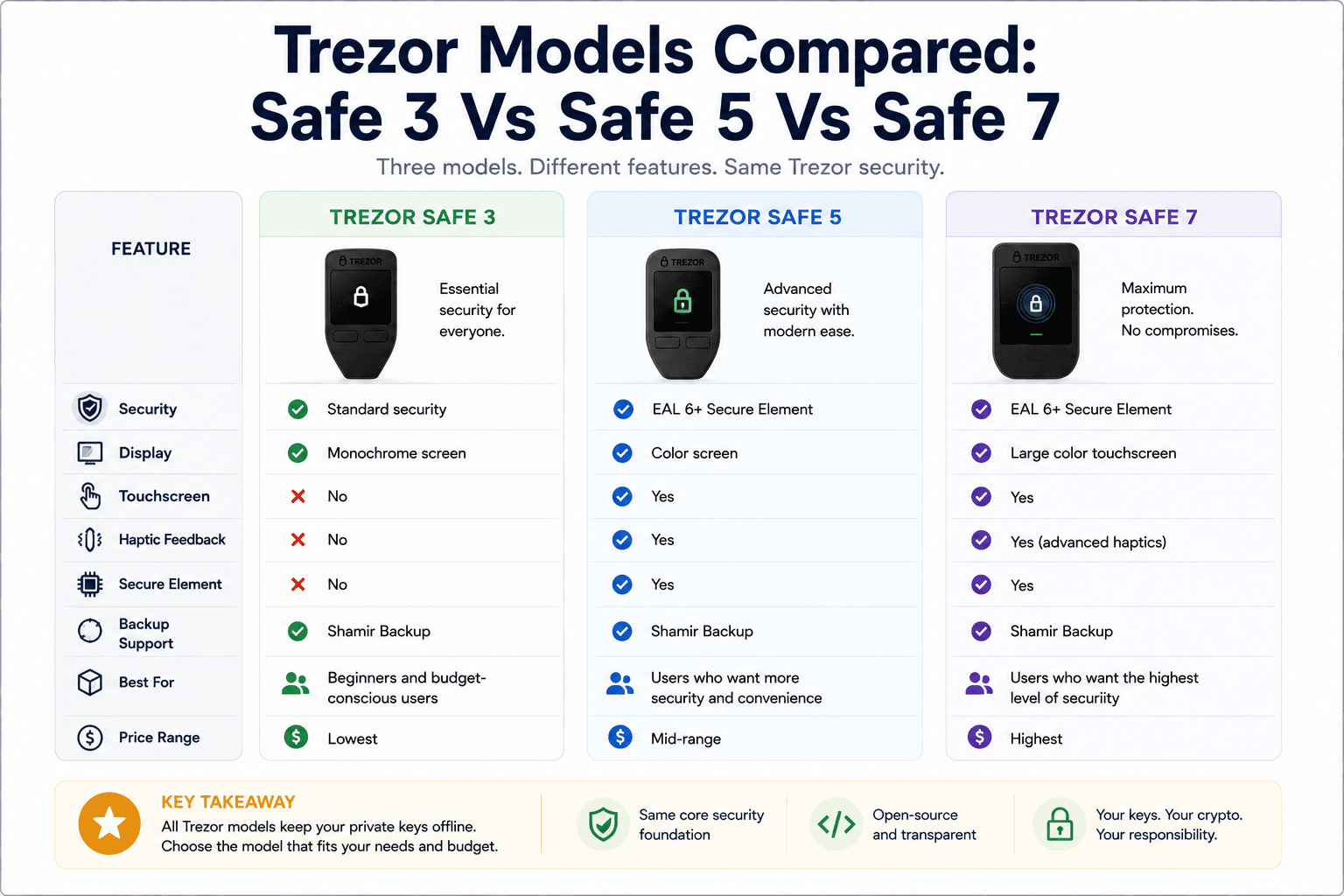 Comparing Trezor Safe 3, Safe 5 And Safe 7 For 2026 Buyers
| Model | Best For | Price as of June 25, 2026 | Screen | Controls | Secure Element | Backup Options | Mobile Support | Main Advantage | Main Limitation |
|---|---|---|---|---|---|---|---|---|---|
| Trezor Safe 3 | Budget cold storage | About $59 to $79 depending on storefront/promos | 0.96-inch monochrome | Two-button pad | EAL6+ Secure Element | 12, 20 or 24-word backup, Multi-share Backup | USB-focused | Cheapest modern Safe model | No touchscreen or Bluetooth |
| Trezor Safe 5 | Most everyday users | About $129 | 1.54-inch color touchscreen | Touchscreen | EAL6+ Secure Element | 12, 20 or 24-word backup, Multi-share Backup | Better UX, still mostly cable-led | Best balance of usability and price | No Bluetooth |
| Trezor Safe 7 | Premium/mobile users | About $249 | 2.5-inch color touchscreen | Touchscreen with haptics | TROPIC01 plus OPTIGA dual Secure Element architecture | 12, 20 or 24-word backup, Multi-share Backup | Best mobile fit with Bluetooth | Premium screen, wireless and newest hardware | Highest price |
Prices can move with promotions and regional taxes, so readers should confirm the checkout price before buying.
Trezor Safe 3: Best Budget Trezor
Trezor Safe 3 is the best-value modern Trezor for users who want secure storage without paying for a touchscreen. It gives users the core Trezor experience: offline signing, PIN protection, passphrase support, Secure Element protection, USB-C and Trezor Suite support.
The Safe 3 is especially clean for long-term holders. It is not trying to be a premium gadget. It is a compact signing device for users who want to move assets off exchanges and store them with better key isolation.
Its limitations are clear without being deal-breakers. The screen is smaller, navigation uses physical buttons, and there is no Bluetooth. That is fine for cold storage, but less comfortable for users who frequently sign DeFi transactions or check multiple accounts.
Trezor Safe 5: Best Trezor For Most Users
Trezor Safe 5 is the easiest recommendation for most users because the touchscreen makes the wallet feel more natural. It does not add Safe 7’s wireless premium, but it removes the main usability friction of Safe 3.
The Safe 5 works well for users who check Trezor Suite more often, send occasional transactions, stake supported assets, or want easier address review. The touchscreen helps because users are less likely to rush through cramped prompts.
The Safe 5 is also a strong open-source security pick. It gives users modern Trezor protection without pushing them into the highest price tier, which makes it the clean middle ground for many buyers.
Trezor Safe 7: Best Premium Trezor
Trezor Safe 7 is the premium Trezor. It has the largest screen, Bluetooth, wireless charging, an aluminum unibody, IP54-rated protection and the newer TROPIC01 security story. Trezor describes the Safe 7 as using dual Secure Elements and a quantum-ready architecture.
That does not mean every user needs Safe 7. A long-term holder who signs twice a year will not extract the same value from Bluetooth and the larger touchscreen as someone who actively uses mobile workflows, DApps or multiple accounts.
Safe 7 is best for users who want the latest Trezor hardware and are comfortable paying for a better device experience. It is not the rational budget choice. It is the premium choice.
Should You Upgrade From Trezor Model One Or Model T?
Trezor Model One and Model T owners do not need to panic-upgrade. A working older Trezor with a safe backup can still do its job for many users.
An upgrade makes more sense if you want Secure Element support, a better screen, smoother navigation, USB-C, mobile convenience, newer backup options or a clearer path into the current Safe lineup. The case is stronger for Model One users than for Model T users because Model T already has a touchscreen.
| Current Device | Upgrade Need | Practical Take |
|---|---|---|
| Trezor Model One | High | Consider upgrading for Secure Element support, USB-C, newer backup options and a better modern Trezor experience. |
| Trezor Model T | Low To Medium | Keep it if the touchscreen still works well and you do not need the newer Safe lineup features. |
| Trezor Safe 3 | Low | Already strong for budget cold storage, upgrade only if you want a touchscreen or mobile convenience. |
| Trezor Safe 5 | Low | Already the best fit for most users, upgrade only if Bluetooth, a larger screen or Safe 7’s newer hardware appeal. |
| Trezor Safe 7 | Very Low | Already the premium Trezor option, no practical upgrade needed within the current lineup. |
Trezor Security: What It Protects From And What It Does Not
Trezor improves private-key security by keeping keys offline, requiring device confirmation and giving users control over their own wallet backup. It also supports PIN protection, passphrases and open-source firmware. Newer Safe models add Secure Element protection, while Safe 7 adds the TROPIC01 chip and a stronger physical security story.
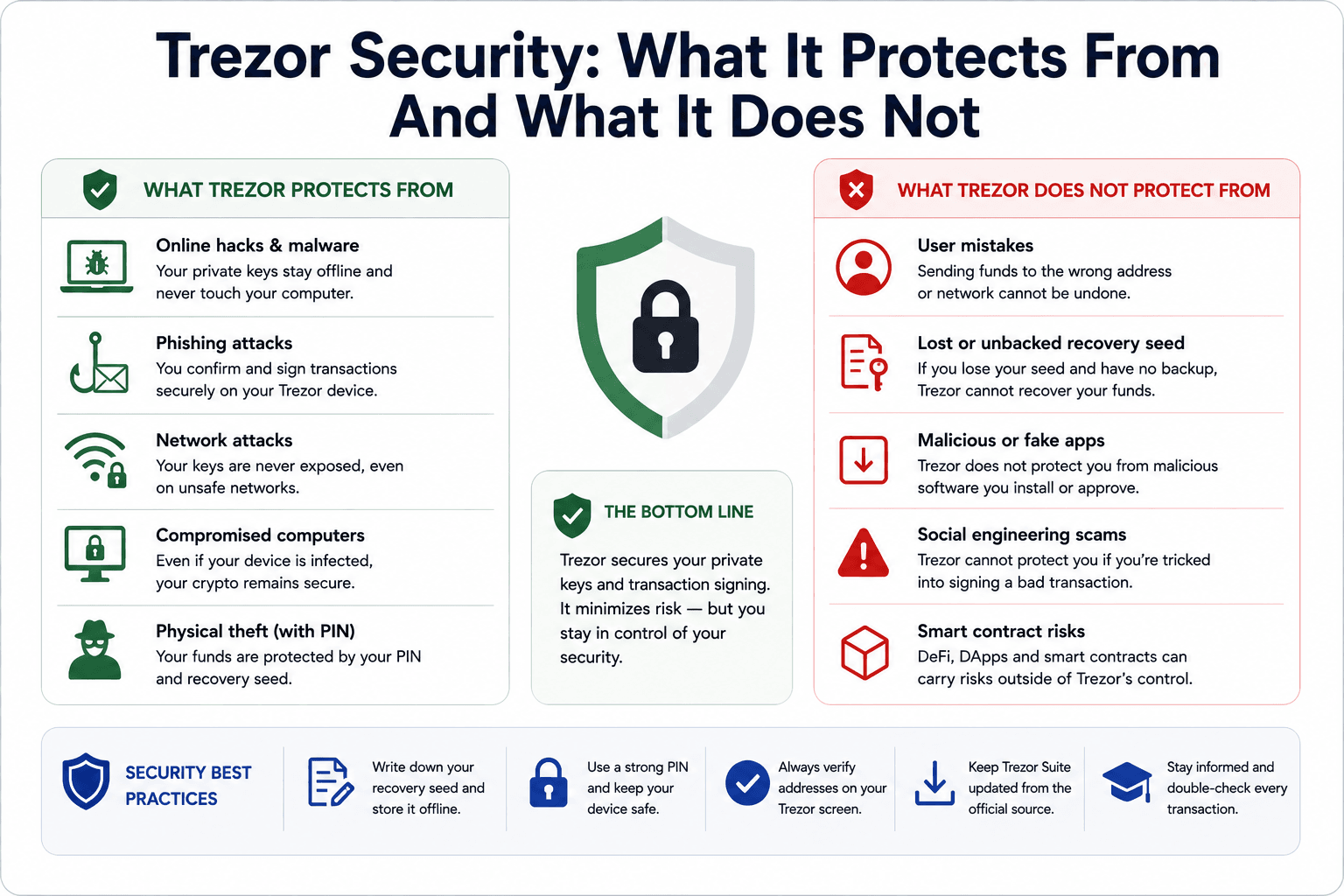 Trezor Security Strengths, Limits And Real-World User Risks
Open-Source Firmware And Transparency
Trezor’s open-source approach is one of its defining traits. Publicly reviewable code can be inspected, audited and challenged by the wider security community, which gives technical users and researchers more visibility into how the wallet works. This appeals to users who dislike black-box security. Open-source firmware does not guarantee safety by itself, but it makes the security model easier to inspect and debate.
Secure Element And Physical Attack Protection
Newer Trezor Safe models include Secure Element protection. The Safe 3 and Safe 5 use a certified EAL6+ Secure Element, while Safe 7 goes further with TROPIC01 and an additional OPTIGA secure element.
Trezor describes TROPIC01 as an independently auditable secure element developed by Tropic Square, a SatoshiLabs company. In Safe 7, it works alongside another secure element and the main microcontroller.
The practical benefit is physical attack resistance. Secure elements can help protect PIN enforcement, authenticity checks and sensitive wallet operations, but physical risk still depends on safe storage, good PIN choices and a protected backup.
Recovery Seed, PIN And Passphrase
The recovery seed is the master backup. Trezor says this backup can restore access if the device is lost, damaged or reset. It may be 12, 20 or 24 words depending on model and setup. The PIN protects the physical device, so someone who steals the hardware wallet cannot casually unlock it. The PIN does not replace the seed. If the device is wiped or lost, the seed is what restores access.
A passphrase is more advanced because it can create hidden wallets by adding another secret on top of the seed. That can be powerful for security and wallet separation, but it can also lock users out permanently if forgotten.
Anyone with the recovery seed can access funds unless a passphrase is also used and kept secret. Anyone who forgets the passphrase may lose access to that hidden wallet even if the seed is safe.
Users should treat seed phrase storage as the foundation of Trezor ownership, not an afterthought.
What Trezor Does Not Protect You From
Trezor protects the private key. It does not protect users from every action they choose to sign.
| Risk | Does Trezor Help? | What Still Depends On You |
|---|---|---|
| Exchange Collapse | Yes, if funds are withdrawn | You must control and back up the seed |
| Malware Stealing Private Keys | Yes | You must verify transactions on-device |
| Phishing Website | Partly | Never type your seed into any site |
| Smart Contract Attacks | Partly | Do not sign approvals you do not understand |
| Wrong-Network Transfer | No | Check the network before sending |
| Physical Seed Theft | No | Store the seed securely |
| Fake Token/Dusting Scam | No | Do not interact with suspicious tokens |
This is where many hardware wallet reviews become too soft. A Trezor can make self-custody safer, but it cannot make reckless signing safe.
Blind signing, malicious token approvals and fake NFT mints remain serious risks because the user can still approve the wrong thing from a hardware wallet.
Safe 7 And Quantum-Ready Security
Trezor describes Safe 7 as quantum-ready. It means Safe 7 is designed with an architecture that can receive quantum-secure updates. It does not mean Bitcoin, Ethereum or every blockchain asset becomes quantum-proof just because the user holds it on Safe 7.
Trezor frames Safe 7 as a future-facing step rather than a reason to panic about quantum computing today. Safe 7’s quantum-ready design is a forward-looking hardware architecture point. It is not a guarantee that every network, signature scheme or user setup is already immune to future quantum threats.
Trezor Suite Review
Trezor Suite is not just the app that comes with the hardware wallet. It is the control room for the Trezor experience. Users create accounts, view balances, verify addresses, update firmware, send and receive crypto, access staking, buy and sell through third-party providers, swap assets and use privacy tools.
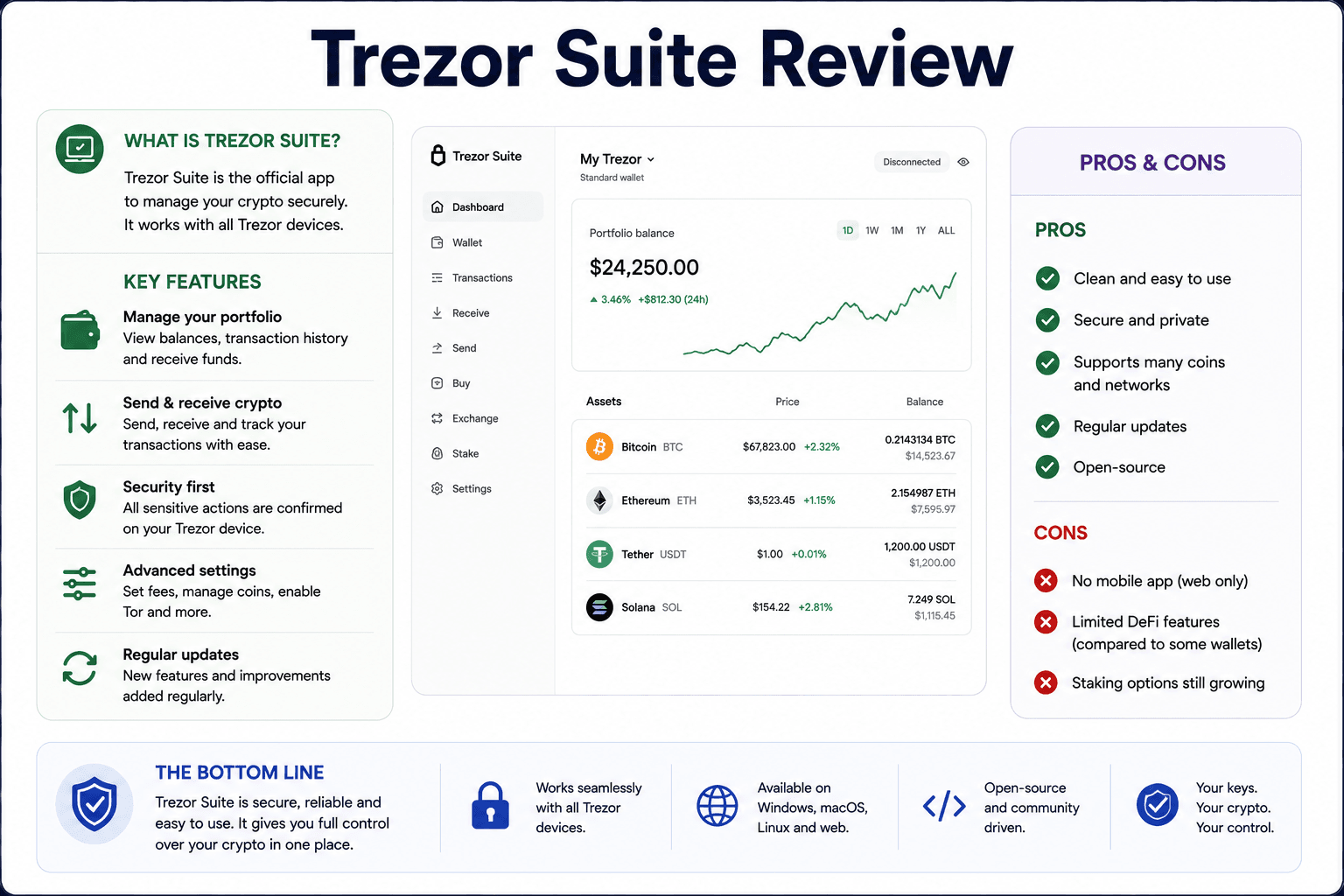 Inside Trezor Suite’s Portfolio, Staking And Privacy Tools
| Trezor Suite Can | Trezor Suite Cannot |
|---|---|
| Manage accounts and balances | Make bad transactions reversible |
| Send and receive crypto | Guarantee every third-party provider has the best price |
| Buy, sell and swap through providers | Remove spreads, network fees or provider fees |
| Stake supported assets | Guarantee staking rewards |
| Update firmware | Protect users who install fake apps |
| Use Tor and coin control | Make Bitcoin fully anonymous |
| Connect to DApps through compatible flows | Make every DApp safe |
Trezor Suite Desktop And Web App
Trezor Suite is available as a desktop and web app. Trezor’s official Suite page describes it as the app for managing, buying, selling, swapping and tracking crypto.
The official app reduces phishing risk because users do not need to rely on random download links, fake app stores or unofficial setup pages. Hardware wallet scams often begin before the user ever signs a transaction, so the software source is part of the security setup.
Suite also handles firmware updates and account management. Firmware updates should be done through official channels only, because a fake firmware prompt or malicious download link can turn a safe device into a user-level disaster.
Buying, Selling And Swapping In Trezor Suite
Trezor Suite includes buy, sell and swap integrations through third-party providers. The benefit is convenience: users can perform common actions without moving assets back to an exchange account.
The tradeoff is execution cost. Third-party providers may include spreads, service fees, payment fees or route differences. Trezor Suite can compare providers, but the user should still look at the final received amount before confirming.
Users who swap often should compare the quote against dedicated crypto swap platforms or decentralized exchanges before assuming the built-in route is the best deal.
Staking In Trezor Suite
Trezor Suite supports staking for Ethereum, Cardano and Solana, according to Trezor’s official Suite page.
Staking still has risk. Rewards are not guaranteed, and provider terms, validator performance, protocol rules, lockups, unstaking delays and slashing rules can affect outcomes.
Privacy Tools: Coin Control And Tor
Trezor Suite includes privacy features such as coin control and Tor support. These are especially useful for Bitcoin users who care about how wallet activity can be analyzed.
Coin control lets users choose which Bitcoin UTXOs to spend, which can reduce accidental address clustering. Tor support can help hide network-level metadata from some observers.
These tools improve privacy hygiene, but they do not make users invisible. On-chain activity remains public, and exchanges, KYC history, reused addresses and careless spending can still reveal patterns.
Supported Coins, Networks And NFTs
Trezor supports many coins and tokens, but support is not the same as identical user experience. Some assets are managed directly in Trezor Suite, while others may require third-party wallets. Some tokens may appear through a supported network but still need careful network selection.
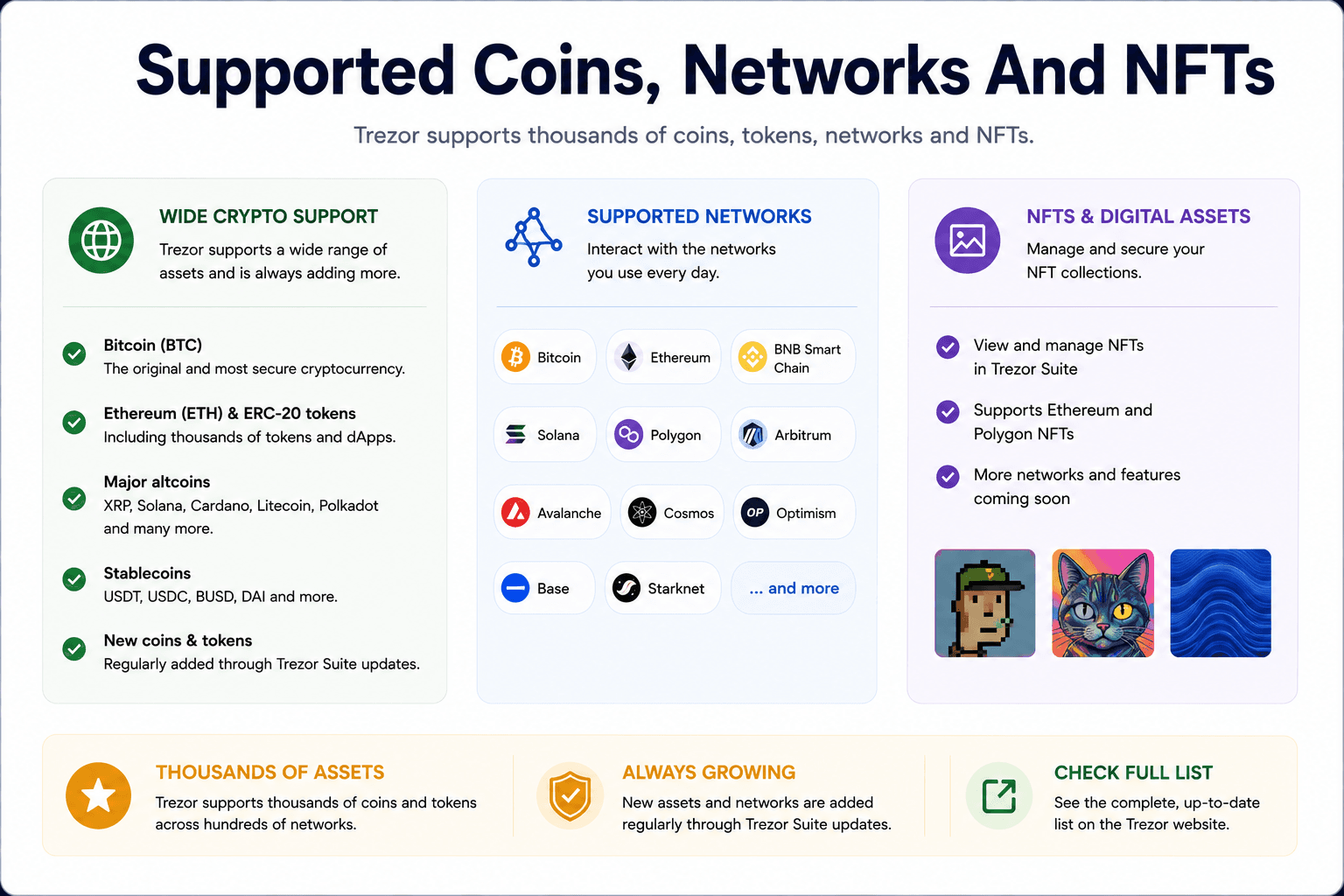 Trezor Asset Support Across Bitcoin, Ethereum, Altcoins And NFTs
Bitcoin Support
Trezor is especially strong for Bitcoin storage. BTC custody is where Trezor’s open-source identity, cold storage positioning and privacy tools make the most sense.
A Bitcoin user can verify receive addresses on the device screen, manage funds through Trezor Suite, use coin control and consider Bitcoin-only firmware where relevant. That makes Trezor a strong fit for long-term Bitcoin holders who want a simpler experience than more advanced Bitcoin-only devices.
Ethereum, ERC-20 Tokens And EVM Networks
Trezor supports Ethereum, ERC-20 tokens and several EVM networks through Trezor Suite and compatible wallets.
ETH is straightforward for most users. ERC-20 tokens require correct contract and network handling. USDT and USDC can exist across multiple chains, and sending them through the wrong network can create serious access problems.
For DApp activity, users commonly pair Trezor with MetaMask or Rabby. Trezor signs, the software wallet gives the user access to DeFi apps, NFT marketplaces and EVM network interfaces.
This makes Trezor a secure signer rather than a native Ethereum super-app.
Solana, Cardano, XRP And Other Altcoins
Trezor has expanded support for major altcoins, including Solana, Cardano, XRP and other large networks. The experience still differs by asset.
Solana support may feel different from Ethereum support. Cardano has its own staking and address model. XRP has account-specific mechanics. Some altcoins may require third-party interfaces or may not support every feature inside Trezor Suite.
NFTs And Unknown Tokens
Trezor can help secure NFT-related keys where supported, especially when paired with compatible third-party wallets. That makes it useful for storing valuable NFTs more safely than leaving everything in a hot wallet.
It is less polished as an active NFT dashboard. Users who mint, list, trade and sweep NFTs frequently may prefer a more NFT-native interface, while keeping high-value assets behind hardware signing.
How To Set Up A Trezor Wallet Safely
Trezor setup is not difficult, but it should be treated like a custody procedure rather than a gadget setup. The goal is to start with a genuine device, official software and a clean wallet backup.
A safe setup follows this sequence:
- Buy from the official Trezor store or an approved reseller.
- Check packaging and device integrity.
- Install or open Trezor Suite from the official source.
- Connect the device.
- Install firmware if required.
- Create a new wallet.
- Write down the recovery seed or wallet backup offline.
- Set a PIN.
- Optional: enable passphrase only if you understand the risk.
- Send a small test transaction.
- Store the seed securely.
Trezor now often uses the term wallet backup instead of recovery seed. The underlying point is the same: those words are the only way to restore funds if the device is lost, damaged or reset.
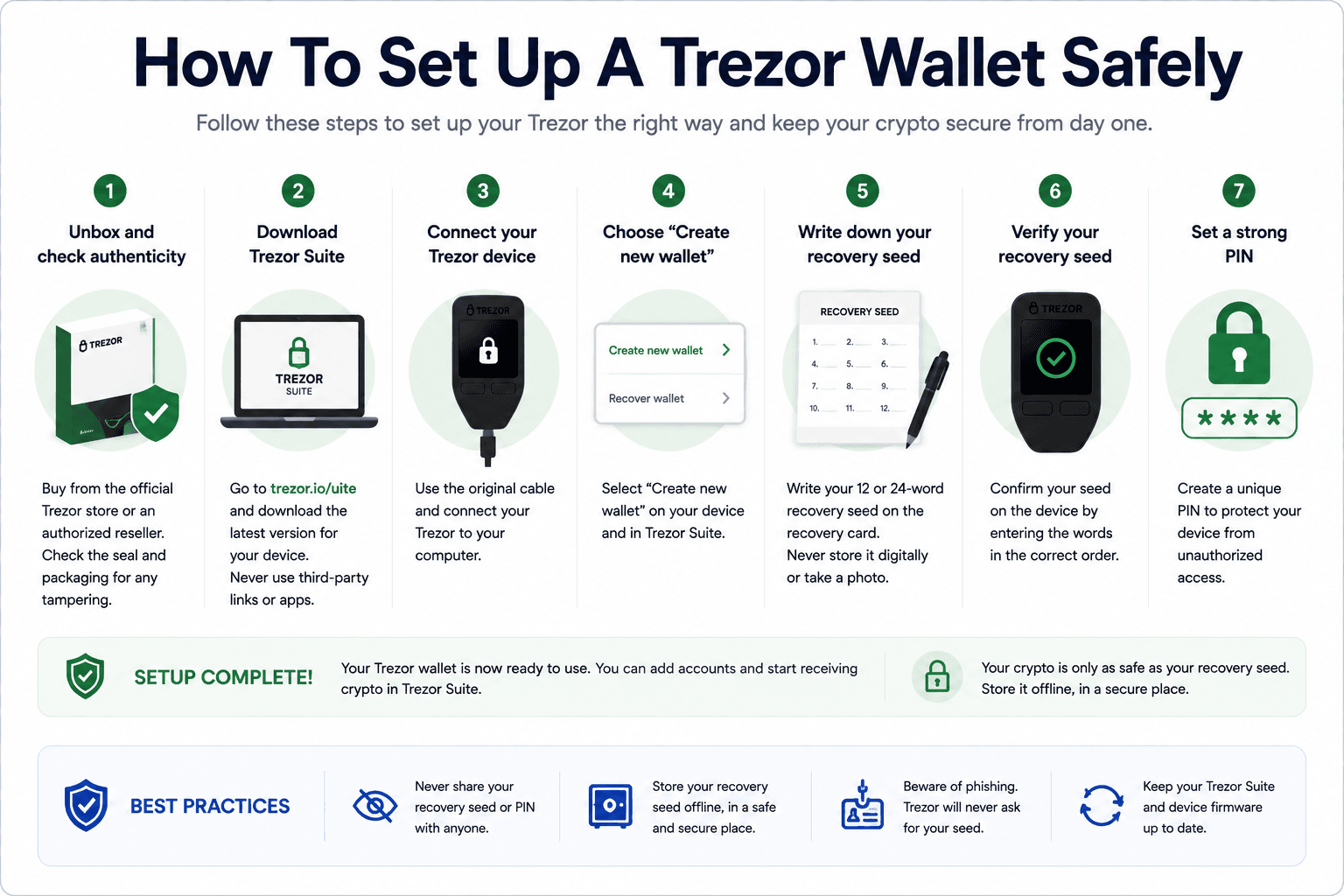 A Safe Trezor Setup From First Connection To Test Transaction
First Transaction Safety Checklist
The first transaction should be small because it teaches the user how the wallet behaves before meaningful funds are moved.
Before sending more:
- Verify the receive address on the Trezor screen
- Send a small test amount first
- Check the asset and network
- Wait for confirmation
- Confirm the funds appear where expected
- Never type the seed phrase into any website
- Never save the seed in screenshots, cloud storage, email or notes apps
This small step prevents large mistakes. It also gives beginners a normal baseline, which helps them spot strange prompts later.
Recovery Seed Storage Tips
Paper backups are simple, but they are vulnerable to fire, water, accidental disposal and poor storage. Metal backups can be better for larger holdings, though they still need to be hidden and protected.
The recovery seed should not be stored with the device. If both are stolen together, the attacker has everything they need. If the device is lost but the seed is safe, funds can be restored.
Trezor support cannot recover a lost seed.
Using Trezor With MetaMask, DeFi And DApps
Trezor can connect to compatible third-party wallets and DApps. That makes it useful for users who want hardware signing without giving up access to Ethereum, EVM chains and DeFi.
Trezor protects private keys, but it does not automatically protect users from every transaction they choose to sign.
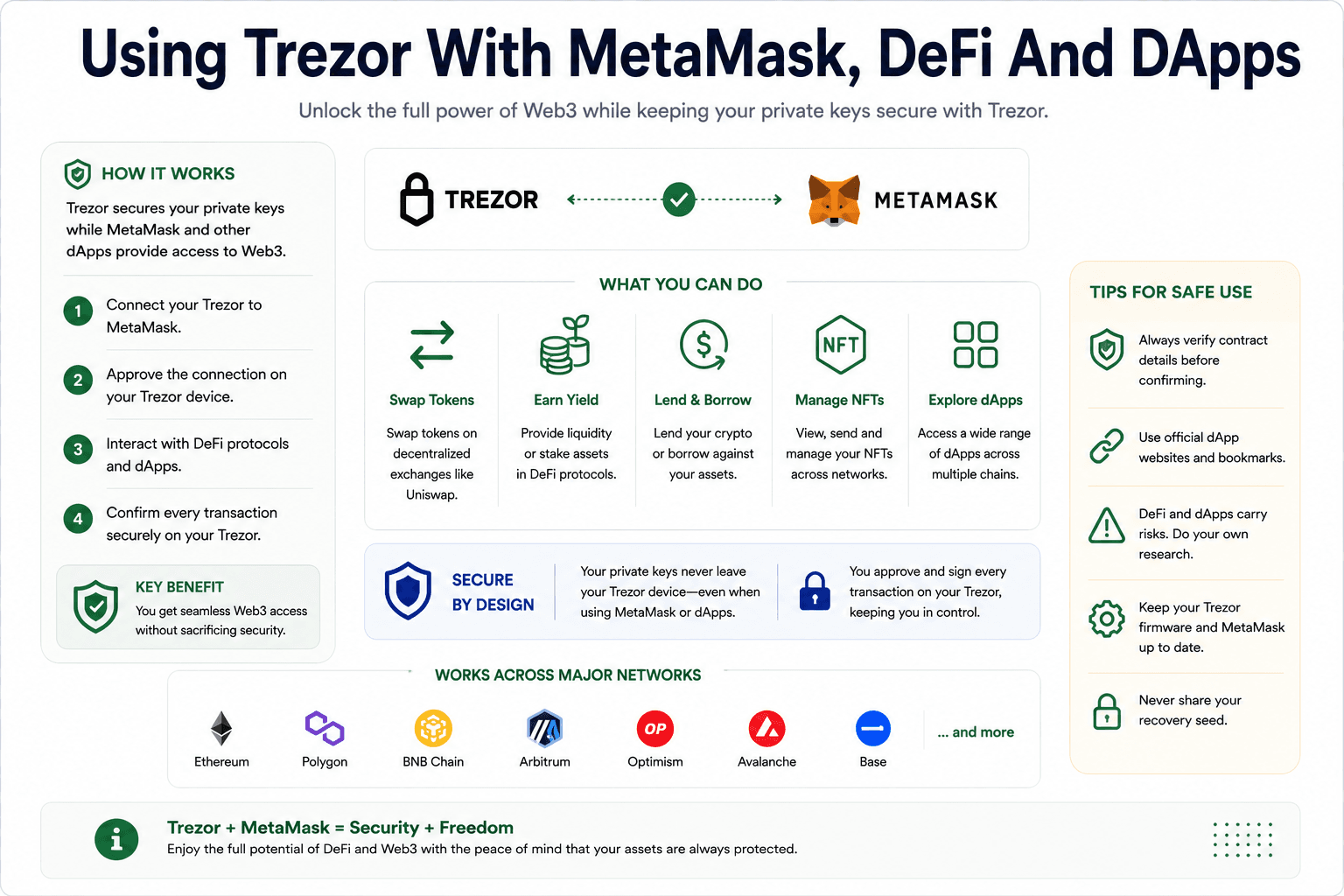 How Trezor Works With MetaMask, DeFi Apps And Hardware Signing
Trezor With MetaMask
MetaMask is the most common example for Ethereum and EVM DApps. The user connects the Trezor hardware wallet, selects an address, and uses MetaMask as the interface while Trezor signs transactions.
This setup gives users access to Ethereum DApps while keeping private keys on the hardware wallet. MetaMask is the interface. Trezor is the signer. Mixing up those roles leads to bad expectations.
Does Trezor Make DeFi Safe?
Trezor makes DeFi safer than using a hot wallet alone for larger balances because it keeps private keys offline. It does not make DeFi safe in the broader sense.
Bad contracts, malicious approvals, fake front ends, rug pulls, bridge risk, oracle risk and liquidity traps still exist. Hardware signing does not turn a risky protocol into a safe one.
Users active across DApps should compare dedicated DeFi wallets and understand how Trezor fits into that workflow. In many cases, a smaller hot wallet for experimental activity and a Trezor-secured vault for larger funds is cleaner than signing everything from one address.
Is Trezor Good For NFTs?
Trezor is good for securing valuable NFTs. It is less ideal as a native NFT trading dashboard.
If the goal is to hold an expensive NFT collection more safely, hardware signing helps. If the goal is fast marketplace activity, collection browsing, minting, listing and active trading, the interface layer matters more.
Always verify marketplace URLs and signatures. Fake NFT marketplace links, malicious mint pages and approval-drainer scams remain common. A Trezor cannot protect an NFT that the user knowingly signs away.
Trezor Wallet Fees, Costs And Value For Money
Trezor costs are best separated into device price, network fees and third-party provider costs. The company does not charge a custody fee for simply holding crypto on a Trezor. The ongoing costs usually come from blockchain transactions, swap providers, buy/sell providers or staking arrangements.
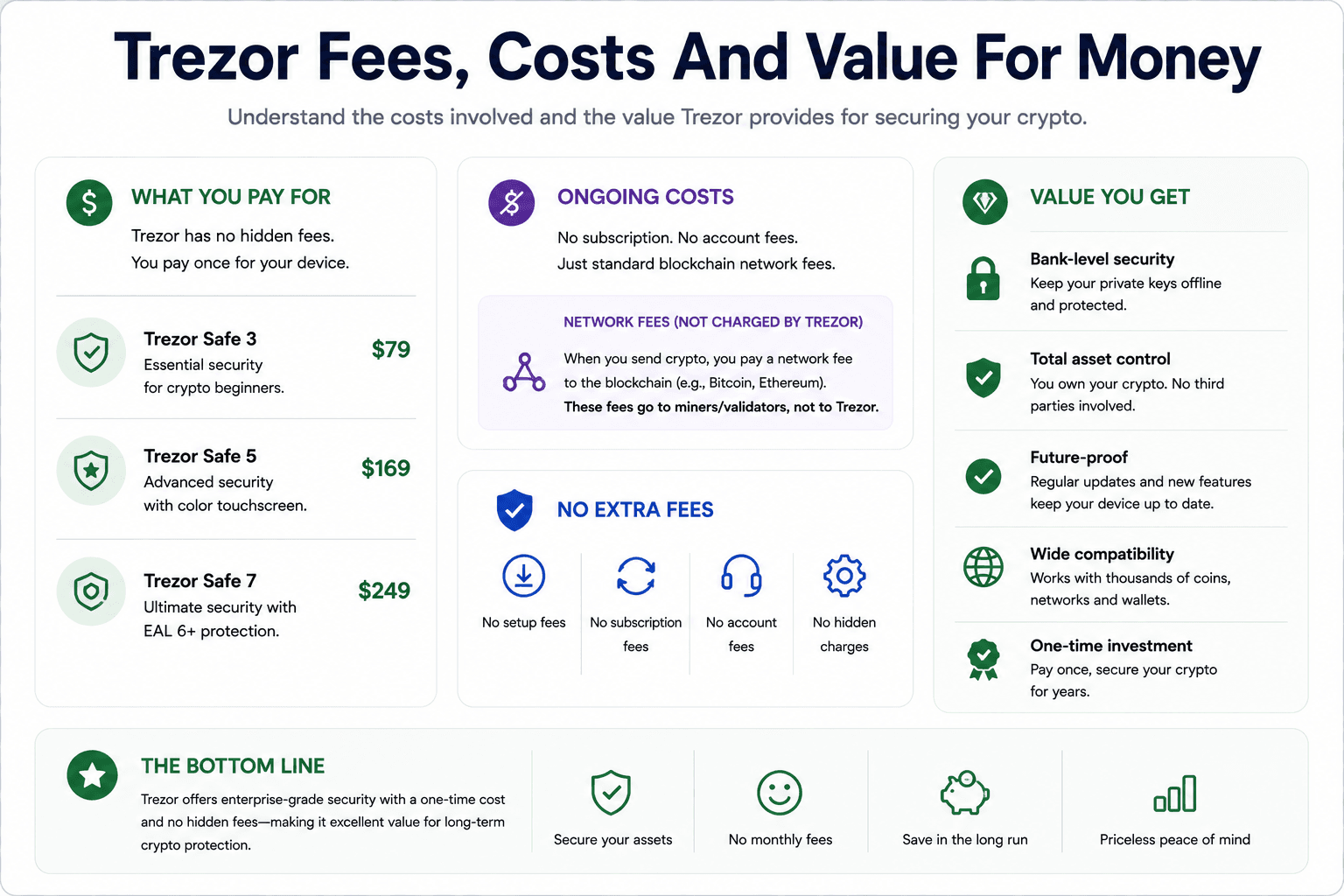 The Real Costs Behind Buying And Using A Trezor Wallet
| Trezor Model | Price as of June 25, 2026 | Official Link | Value Read |
|---|---|---|---|
| Trezor Safe 3 | About $59 to $79 depending on storefront/promos | Trezor Safe 3 | Best budget modern Trezor |
| Trezor Safe 5 | About $129 | Trezor Safe 5 | Best balance for most users |
| Trezor Safe 7 | About $249 | Trezor Safe 7 | Best premium and mobile-friendly Trezor |
Note: Prices can change with region, tax, shipping, bundles and promotions. The official checkout page should be treated as the live source of truth.
What Fees Does Trezor Actually Charge?
Trezor’s main direct cost is the hardware purchase. There is no basic custody subscription required to hold crypto with a Trezor device.
| Fee Type | Paid To | When It Applies |
|---|---|---|
| Device Cost | Trezor or reseller | When buying the hardware wallet |
| Network Fees | Blockchain validators, miners or block producers | When sending crypto or using DApps |
| Gas Fees | Ethereum and EVM networks | When moving ETH, ERC-20s, NFTs or interacting with contracts |
| Swap Fees/Spreads | Third-party swap providers | When swapping through Trezor Suite |
| Buy/Sell Provider Fees | Third-party providers | When buying or selling through Trezor Suite |
| Staking Costs | Validators, protocols or providers | When staking supported assets |
Network fees are not Trezor fees. If Ethereum gas is high or Bitcoin fees spike, that is a blockchain cost. Trezor may display the fee, but it does not receive it.
Is Trezor Worth The Price?
Trezor is worth the price for users holding enough crypto that exchange or hot-wallet risk is uncomfortable. It is less compelling for someone holding a tiny amount that would not justify hardware custody.
For a small casual holder, a beginner wallet or exchange account may be simpler until the portfolio grows. For a long-term BTC or ETH holder, Safe 3 or Safe 5 can be a sensible security upgrade. For a multi-asset investor, Trezor is useful if the exact assets and networks are supported. For a DeFi user, Trezor is valuable as a signer, not as a full strategy dashboard. For an NFT collector, it is better for storing valuable NFTs than trading them all day.
Trezor User Experience And Mobile Support
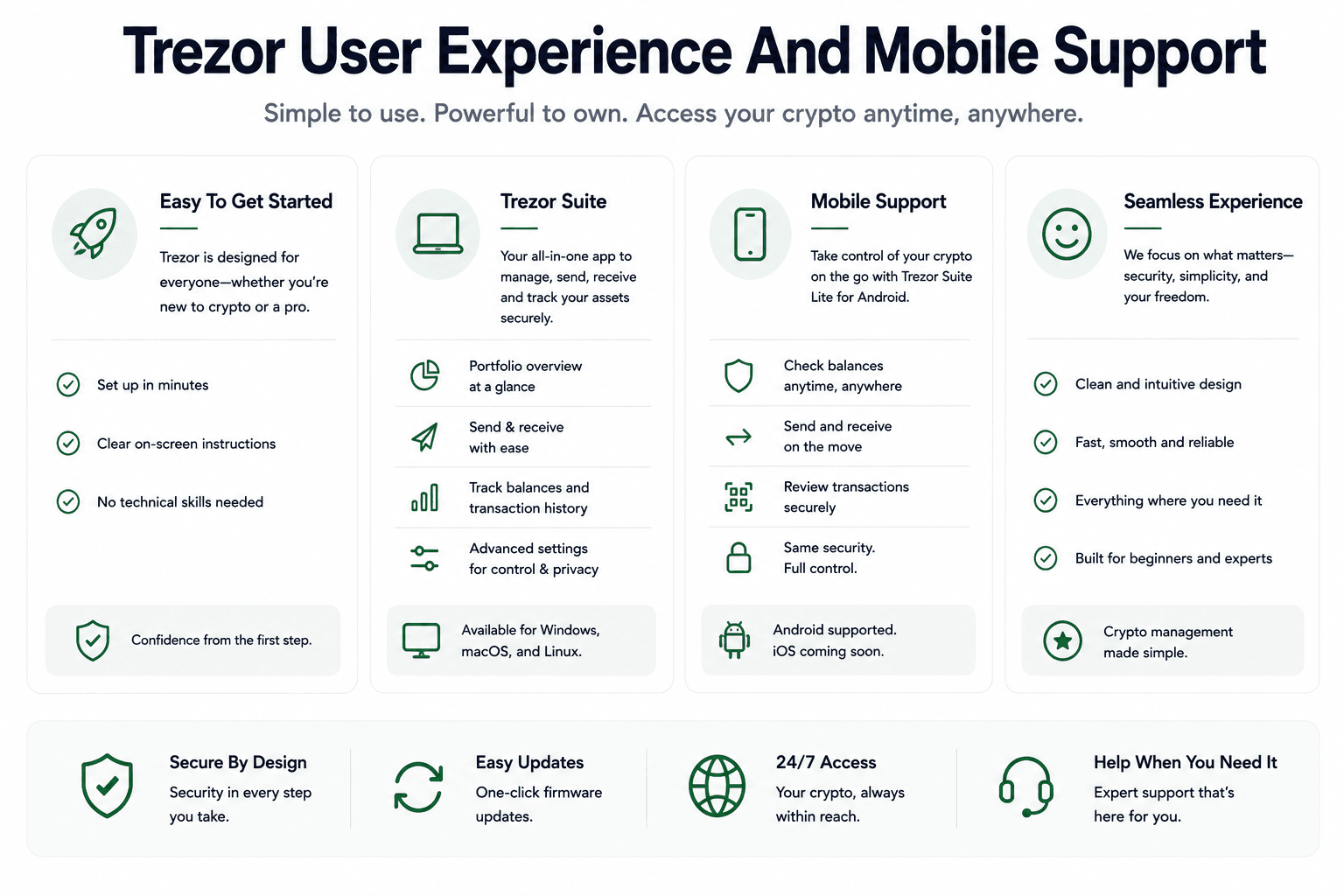
Trezor's user experience is best described as controlled rather than flashy. It is built to make users slow down during important actions: setup, address verification, seed backup, passphrase use and transaction signing.
 How Trezor Feels Across Desktop, Mobile And Daily Wallet Use
Beginner Experience
Safe 5 is easier than Safe 3 for most first-time users because the touchscreen makes navigation clearer. Trezor Suite also makes basic send-and-receive actions understandable without burying users in technical menus.
Test transactions help build confidence. After one or two small sends and receives, the workflow becomes much less abstract.
Advanced User Experience
Advanced users get more from Trezor than simple storage. Coin control, passphrase wallets, Tor, third-party wallet compatibility and DeFi signing give experienced users room to build a more deliberate custody setup.
Mobile Support By Model
Mobile support is now a bigger part of the Trezor buying decision. Older Trezor devices were more desktop-led. Safe 7 moves Trezor closer to mobile-first hardware wallet territory.
| Model | Mobile Fit | Connection Style | Best For |
|---|---|---|---|
| Safe 3 | Limited but practical | USB where supported | Budget holders |
| Safe 5 | Better UX, still cable-focused | USB where supported | Everyday users |
| Safe 7 | Best mobile fit | Bluetooth and USB-C | Premium and mobile-first users |
Trezor Best Fit
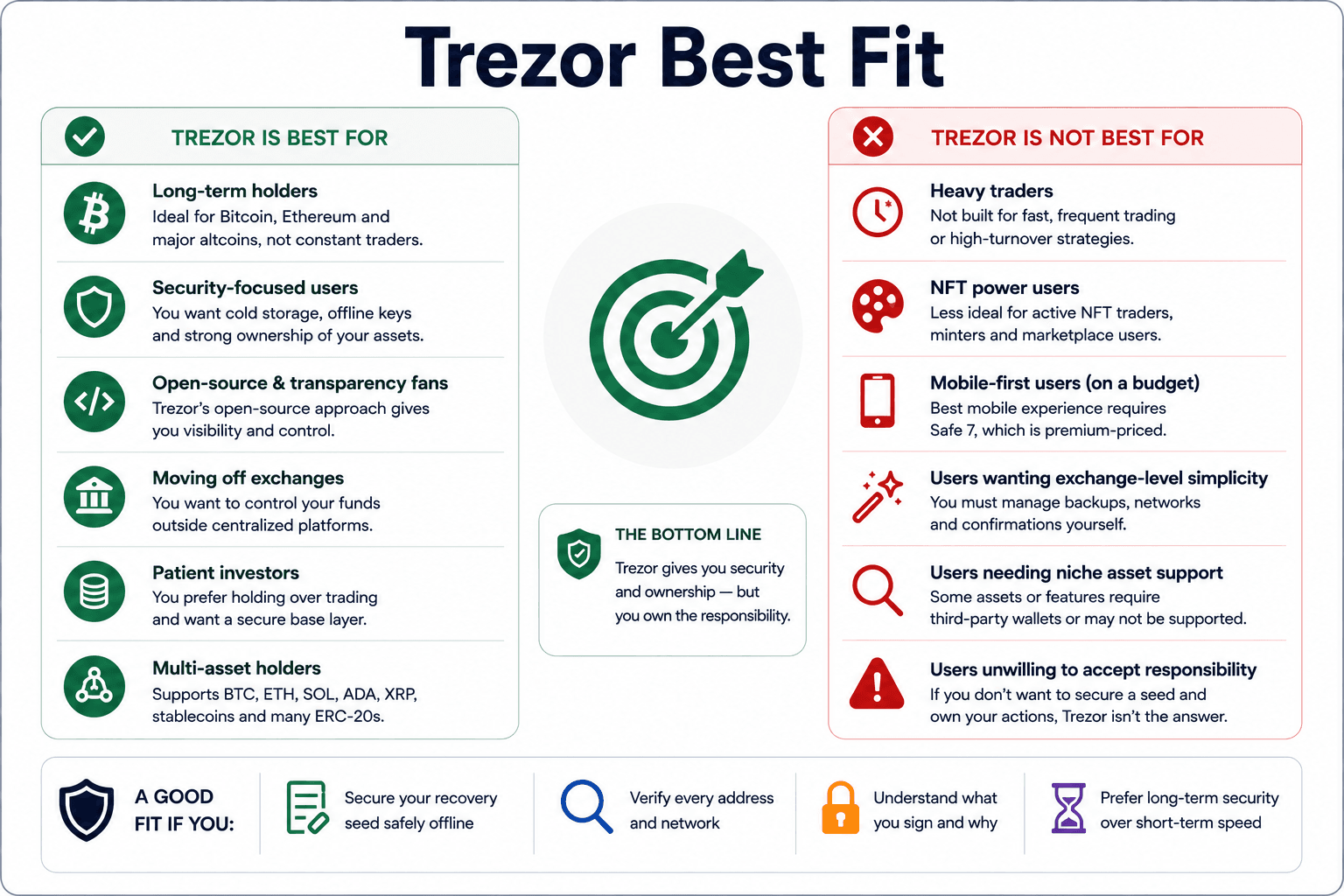
Trezor works best when the buyer wants custody more than convenience. That sounds simple, but it filters the audience quickly.
A Trezor user should be willing to protect a recovery seed, verify addresses, understand network selection and slow down before signing. If that feels unreasonable, self-custody may not be the right next step yet.
 The Crypto Users Who Benefit Most From A Trezor Wallet
Trezor Is Best For
- Long-term Bitcoin holders who want cold storage.
- ETH, SOL, ADA, XRP and major altcoin holders.
- Users moving funds off centralized exchanges.
- Open-source security fans who value transparency.
- Investors who want storage first and trading convenience second.
- People comfortable protecting their own recovery seed.
Trezor Is Not Best For
- Users who want exchange-level simplicity.
- Heavy NFT traders or frequent small traders.
- People who do not want recovery seed responsibility.
- Users who need niche asset support without checking first.
- Mobile-first DApp users who do not want to pay for Safe 7.
- Traders who want fast swaps, memecoins and marketplace activity as their main workflow.
Trezor Alternatives And Trezor Vs Ledger
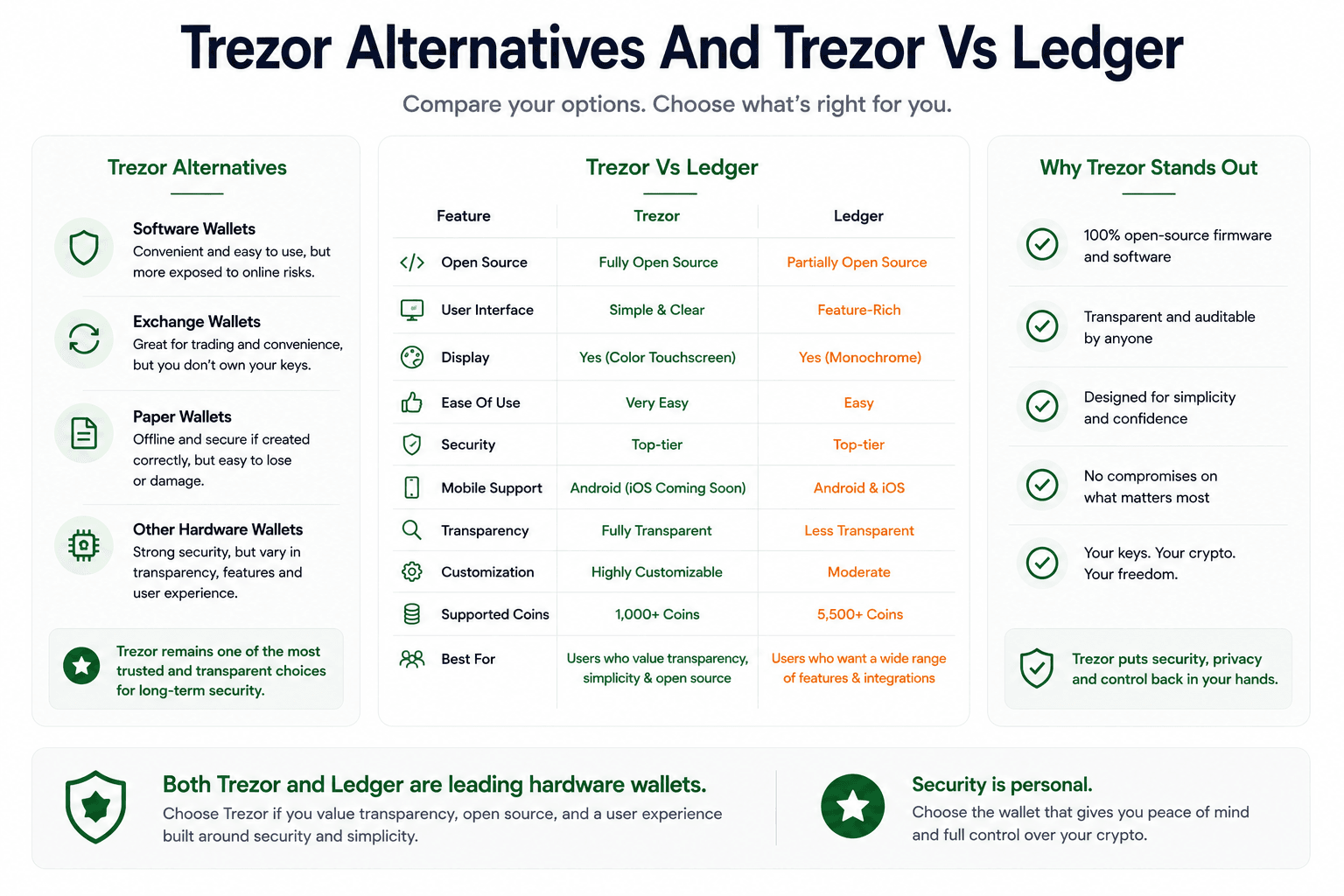
Ledger is the obvious rival, Coldcard is the Bitcoin-only security alternative, Keystone and SafePal push air-gapped workflows, Tangem focuses on card-style simplicity, Safe is for teams and multisig, while MetaMask and Rabby are better as hot-wallet interfaces.
 Comparing Trezor With Ledger, Tangem, Coldcard And Hot Wallets
| Alternative | Best For | Why Consider It |
|---|---|---|
| Ledger | Broad asset support and app ecosystem | Strong native app coverage, mobile use and NFT support |
| Coldcard | Bitcoin-only security users | BTC-focused cold storage and air-gapped workflows |
| Keystone | QR-code or air-gapped preference | Camera-based signing flow |
| Tangem | Card-style simplicity | Seedless-style onboarding and mobile convenience |
| Safe | Teams and multisig | Shared custody and treasury use |
| MetaMask Or Rabby | Hot-wallet convenience | Better for daily DApp use, weaker key isolation |
Readers comparing the full field should read out Trezor alternatives guide before choosing.
Trezor Vs Ledger: Quick Difference
Trezor vs Ledger is the core hardware wallet comparison because both brands serve mainstream self-custody users, but they lean different ways.
Trezor leans open-source and transparent. Ledger leans Secure Element-first and broader native ecosystem coverage. Trezor may appeal more to Bitcoiners, open-source users and people who want a quieter cold-storage setup. Ledger may appeal more to users who want richer native asset support, NFTs, staking, mobile features and app integrations.
When A Hot Wallet May Be Better
A hot wallet may be better for small, frequent DApp activity. Testing new protocols, trading memecoins, claiming low-value airdrops and experimenting with new apps can be cleaner from a separate low-value wallet.
Rabby can be useful for active EVM DeFi, while MetaMask remains the default Ethereum DApp interface. Trezor works best behind them when the funds are too valuable to leave in a hot wallet alone.

Final Verdict: Is Trezor Worth It in 2026?
Trezor is still one of the strongest hardware wallet choices for users who want self-custody, open-source transparency and long-term crypto storage. Safe 3 is the best-value pick, Safe 5 is the best choice for most users, and Safe 7 is the premium option for users who want the newest Trezor hardware and better mobile convenience.
Buy Trezor if you want transparent self-custody and are ready to manage the backup properly. Skip it if you want exchange-style convenience, seedless recovery, or a wallet that hides the responsibility of owning crypto.