Crypto hot wallets make it easy to store, send, swap, and manage cryptocurrencies while connecting to decentralized applications (DApps). But with so many options available, choosing the right wallet comes down to more than supported coins. Security, recovery methods, blockchain compatibility, and transaction fees all play a role.
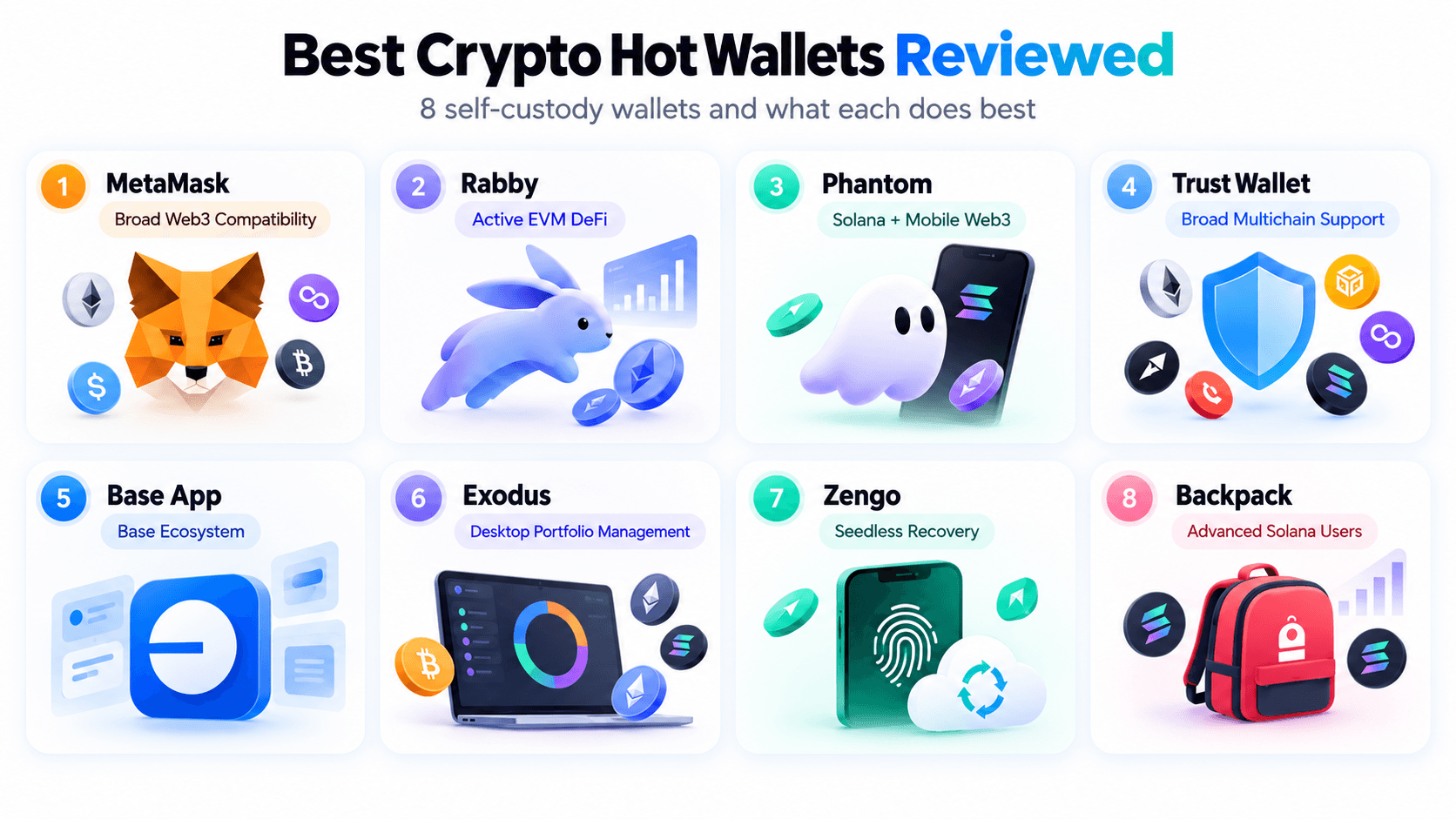
In this guide, we compare the eight best crypto hot wallets in 2026, including MetaMask, Rabby, Phantom, Trust Wallet, Base App, Exodus, Zengo, and Backpack. We break down their features, costs, security protections, and limitations to help you find the best wallet for your needs.
Editor's Note (Oct. 20, 2026): We've fully updated this article in October 2026 to replace outdated recommendations with eight leading options. This update includes expanded wallet reviews, updated blockchain compatibility, security and recovery comparisons, swap fees, and hardware wallet integrations. We've also added a detailed fee comparison, practical wallet selection guidance, and updated security recommendations to help readers make informed decisions.
Best Crypto Hot Wallets in 2026: Quick Answer
MetaMask is our overall pick for the best crypto hot wallet in 2026. Its broad Web3 compatibility, multichain functionality, and hardware wallet integrations make it a versatile choice. Rabby is better suited to active EVM DeFi users, Phantom excels on Solana, and Trust Wallet offers extensive multichain support. Exodus stands out for desktop portfolio management, while Zengo provides an alternative to traditional seed phrase recovery.
Best Crypto Hot Wallets by Use Case
-
MetaMask: Best overall for Web3 access Supports Ethereum, EVM networks, Bitcoin, Solana, and TRON, with hardware wallet integration and security alerts. Its standard swap service fee is 0.875%, and advanced EVM DeFi users may prefer Rabby's specialized tools.
-
Rabby Wallet: Best for active EVM DeFi users Offers transaction simulations, risk warnings, approval visibility, and automatic EVM network recognition. Ideal for frequent DeFi activity across Ethereum and Layer 2 networks, but lacks native Bitcoin and Solana support.
-
Phantom: Best for Solana and mobile Web3 Combines Solana staking, swaps, NFT management, and DApp connectivity with support for Bitcoin and selected EVM networks. Charges 0.85% on most swaps, with some Ethereum Layer 2 networks unsupported.
-
Trust Wallet: Best for broad multichain support Supports Bitcoin, Ethereum, Solana, BNB Chain, and numerous other blockchains through a beginner-friendly mobile interface. Offers a security scanner and eligible zero-fee wallet swaps, although transaction analysis varies by network.
-
Base App: Best for Base ecosystem users Provides access to Base-focused applications and supported multichain functionality through a mobile-first experience. Recovery options, transaction fees, and supported features depend on the account mode and wallet interface.
-
Exodus: Best for desktop portfolio management Offers desktop, mobile, and browser-based portfolio management for Bitcoin, Ethereum, Solana, and other assets. Includes supported hardware wallet integrations, but provides fewer specialized DeFi transaction controls.
-
Zengo: Best for seedless wallet recovery Uses Multi-Party Computation (MPC) and multifactor recovery instead of a conventional seed phrase. Suits users seeking alternative recovery methods, although exchange fees can reach 4% and recovery relies on supported verification systems.
-
Backpack: Best for advanced Solana users Combines Solana-focused trading, NFT functionality, multichain access, and supported hardware wallet integrations. Suitable for experienced users, although its specialized interface may be less approachable for beginners.
Disclaimer
Crypto hot wallets are internet-connected applications and remain exposed to phishing, malware, malicious smart contracts, and compromised recovery credentials. This comparison is based on publicly available documentation rather than independent security audits or live transaction testing. Verify current compatibility and costs directly with each wallet provider before transferring funds.
Disclosure
Some links in this guide may be affiliate links. If you sign up for or use a platform through these links, we may earn a commission at no additional cost to you.
Best Crypto Hot Wallets at a Glance
| Wallet | Best For | Supported Blockchain Ecosystems | Availability | Key Security or Recovery Feature | Built-In Swap Fees | Main Limitation |
|---|---|---|---|---|---|---|
| MetaMask | Overall Web3 access | Ethereum, EVM networks, Bitcoin, Solana, TRON | Mobile, browser | Self-custody, recovery phrase, hardware integration, transaction alerts | Standard 0.875% service fee | Less specialized than Rabby for intensive EVM DeFi |
| Rabby Wallet | Active EVM DeFi users | Ethereum, Base, Arbitrum, Optimism, BNB Chain, other EVM networks | Mobile, browser, desktop | Transaction simulation, risk warnings, hardware integration | 0.25% listed rate | No native Bitcoin or Solana support |
| Phantom | Solana and mobile Web3 | Solana, Ethereum, Base, Bitcoin and selected networks | Mobile, browser | Self-custody, recovery phrase, scam detection, hardware support | 0.85% on most swaps | Not every Ethereum Layer 2 network is supported |
| Trust Wallet | Broad multichain access | Bitcoin, Ethereum, Solana, BNB Chain and numerous others | Mobile, browser | Local private-key control, recovery phrase, security scanner | No additional Trust Wallet swap service fee; provider fees may apply | Advanced signing analysis varies by network and transaction |
| Base App | Base ecosystem users | Base, Ethereum/EVM, Solana, Bitcoin; mode-dependent | Mobile; legacy extension functionality varies | Self-custody, recovery and account options dependent on mode | Variable, displayed before confirmation | Base mode and legacy wallet support differ |
| Exodus | Desktop portfolio management | Bitcoin, Ethereum, Solana and other supported networks | Desktop, mobile, browser extension | Local private keys, recovery phrase, Trezor integration | Variable third-party spreads and network fees | Less specialized for advanced DeFi activity |
| Zengo | Seedless recovery | Bitcoin, Ethereum, Solana, BNB Chain, Polygon and selected assets | Mobile | MPC-based self-custody, multifactor recovery | Exchange fee up to 4%, plus other applicable costs | Recovery depends on its supported authentication and recovery system |
| Backpack | Advanced Solana users | Solana, Ethereum, Base, Arbitrum, Optimism, Polygon, Sonic | Mobile, browser | Self-custody, recovery phrase, supported hardware integration | Route-dependent; verify in-app quote | More specialized and potentially complex for casual users |
Comparison information checked Oct. 20, 2026, using available official wallet documentation and support resources. Fees reflect published information rather than identical live transaction tests. Network fees, third-party charges, swap spreads, and available routes can change. Compatibility may vary by application, operating system, and wallet mode.
How We Evaluated the Best Crypto Hot Wallets (Methodology)
We evaluated eight crypto hot wallets using publicly available information from official wallet documentation, security disclosures, help centers, fee schedules, and other relevant research sources. Our assessment focused on six criteria:
- Security and signing transparency: We examined documented wallet security features, including transaction simulations, phishing alerts, token approval warnings, external security audits, and hardware wallet integrations.
- Recovery options: We compared traditional seed phrase recovery with alternatives such as Multi-Party Computation (MPC), passkeys, and supported account restoration methods, considering their benefits and limitations.
- Blockchain compatibility: We assessed supported native blockchains, token standards, device availability, and network restrictions, distinguishing advertised asset support from actual wallet functionality.
- Fees and transaction costs: We reviewed disclosed wallet swap fees, blockchain network charges, and third-party provider costs. Where pricing varies by transaction, we identified those limitations rather than assuming a fixed fee.
- Usability: We considered documented onboarding processes, mobile and browser availability, interface features, transaction workflows, and accessibility for beginners versus experienced users.
- Transparency and support: We reviewed official documentation, security disclosures, source-code availability, recovery guidance, and customer support resources.
Research methodology and limitations
This comparison is based on documentation and secondary research, not independent hands-on testing. We did not install and test every wallet, execute live transactions, conduct recovery trials, or perform security audits.
 Comparing Eight Hot Wallets And Their Best Use Cases
Best Crypto Hot Wallets Reviewed
The best crypto hot wallets differ in supported blockchains, security protections, recovery options, transaction fees, and everyday usability. Our reviews compare eight self-custody wallets using the same criteria to help you identify the strongest option for your needs.
1. MetaMask: Best for Broad Web3 Compatibility
MetaMask is our pick for broad Web3 compatibility. Developed by Consensys, this self-custody wallet combines extensive DApp connectivity with native support for Ethereum, Bitcoin, Solana, TRON, and numerous Ethereum Virtual Machine (EVM) networks. Available on mobile and as a browser extension, MetaMask is well suited to users navigating multiple blockchain ecosystems. However, active EVM DeFi traders may prefer Rabby's more specialized transaction-review experience.
MetaMask supports Ethereum and EVM-compatible networks, including Arbitrum, Base, Optimism, Polygon, BNB Smart Chain, and Avalanche. Its expanded native support also includes Bitcoin, Solana, and TRON, although available features and integrations differ between ecosystems.
Users can manage ETH, ERC-20 tokens, supported non-EVM assets, and NFTs. Additional EVM networks can be configured where compatible. MetaMask is available on iOS, Android, and supported desktop browsers.
- Broad DApp compatibility: Connects to DeFi protocols, NFT marketplaces, decentralized exchanges, and other Web3 applications.
- Multichain asset management: Supports EVM assets alongside native Bitcoin, Solana, and TRON functionality, with network-specific limits.
- Integrated token swaps: MetaMask Swaps aggregates liquidity from supported providers to offer in-wallet exchanges.
- Network management: Allows users to switch between supported chains and add compatible EVM networks.
- Mobile and browser access: Offers browser extensions and mobile apps, including an integrated mobile DApp browser.
- Self-custody: Users control their wallet credentials and authorize transactions instead of relying on an exchange to hold their assets.
- Recovery options: Traditional wallets use a 12-word Secret Recovery Phrase. Supported newer onboarding methods may introduce other recovery options and dependencies.
- Security alerts: Risk detection informed by services such as Blockaid can flag suspicious contracts, addresses, and potentially harmful transactions.
- Transaction review: Signing interfaces and supported simulations help users assess approvals, although they cannot guarantee protection against malicious contracts.
- Hardware wallet integration: Compatible Ledger and Trezor devices can be connected through supported workflows. Compatibility varies by device, network, and platform.
MetaMask is free to download and use. Its standard MetaMask Swaps service fee is 0.875%, equivalent to $8.75 on a $1,000 swap, excluding applicable network fees and other execution costs.
Sending cryptocurrency incurs blockchain network fees that vary by network and congestion. Swap quotes may also reflect slippage and liquidity conditions. Fee information is current as of Oct. 20, 2026.
- Users seeking broad Web3 and multichain compatibility.
- Ethereum and EVM users regularly connecting to DApps.
- Users combining software convenience with hardware signing.
- Frequent EVM users who prefer Rabby's specialized workflow.
- Users prioritizing the lowest integrated swap charges.
- Beginners uncomfortable managing self-custody credentials.
- Extensive EVM and expanding non-EVM support.
- Broad DApp and hardware wallet integrations.
- Security alerts and mobile/browser availability.
- Standard 0.875% MetaMask Swaps fee.
- Features vary by network, device, and application version.
- Phishing and malicious approvals remain risks.
MetaMask is a versatile hot wallet for users who want extensive Web3 connectivity across supported blockchain ecosystems. Its compatibility, security alerts, and hardware integrations are meaningful advantages. However, its swap fees and less specialized EVM transaction workflow give frequent DeFi users reasons to compare Rabby.
2. Rabby Wallet: Best for Active EVM DeFi Users
Rabby Wallet, developed by the team behind DeBank, is our preferred hot wallet for active Ethereum Virtual Machine (EVM) DeFi users. It emphasizes automatic network recognition, transaction simulation, and risk warnings before signing. These features make it particularly useful for traders regularly interacting with smart contracts across multiple EVM networks. Its main limitation is the lack of native Bitcoin and Solana wallet functionality.
Rabby supports Ethereum and numerous EVM-compatible networks, including Arbitrum, Base, Optimism, Polygon, BNB Smart Chain, and Avalanche. Its interface can identify the network requested by a connected DApp, reducing manual switching.
Rabby is available as a browser extension, mobile app, and desktop wallet. Its support is focused on EVM networks rather than native Bitcoin UTXOs or Solana SPL tokens.
- Automatic network recognition: Detects the EVM network required by a connected DApp, reducing manual configuration.
- Transaction simulation: Estimates potential balance and token changes before a supported transaction is signed.
- Risk warnings: Highlights suspicious contracts, addresses, and other potential transaction hazards.
- DeFi portfolio visibility: Integrates DeBank-related functionality for monitoring assets and positions across networks.
- Wallet migration: Supports importing compatible EVM accounts, allowing MetaMask users to adopt Rabby's interface.
- Self-custody: Users retain control of their private keys rather than depositing assets with DeBank or Rabby.
- Seed phrase recovery: Software accounts can be restored using supported recovery phrases or private keys.
- Pre-signing simulations: Transaction previews help identify unexpected token movements and approval requests.
- Approval visibility: Risk checks and permission-management tools help users review potentially dangerous token allowances.
- Hardware signing: Supports compatible hardware wallets, including Ledger, with device-specific integration requirements.
Rabby is free to install and does not charge a subscription for ordinary wallet access. Sending tokens and interacting with smart contracts incur network gas fees. Integrated swaps can include service or routing charges, which depend on the selected route and displayed quote.
Review the final amount received and all fees before confirming a swap. Fee information is current as of Oct. 20, 2026.
- Frequent Ethereum and EVM DeFi participants.
- Users who prioritize transaction previews and risk warnings.
- Traders operating across several EVM networks.
- Users primarily managing native Bitcoin or Solana assets.
- Beginners who rarely interact with DeFi applications.
- Users needing one wallet for unrelated blockchain ecosystems.
- Transaction simulation and contract-risk warnings.
- Automatic EVM network recognition.
- Strong DeFi workflow and hardware integration options.
- No native Bitcoin or Solana support.
- Advanced features may overwhelm beginners.
- Simulations cannot guarantee transaction safety.
Rabby offers a more focused EVM DeFi experience than general-purpose wallets. Automatic network recognition and detailed signing previews make it especially practical for experienced users. MetaMask remains more versatile across different blockchain ecosystems, but Rabby is a strong choice when EVM transaction analysis is the priority.
3. Phantom Wallet: Best for Solana and Mobile Web3
Phantom is our preferred wallet for Solana users seeking straightforward access to tokens, staking, NFTs, swaps, and decentralized applications. Originally focused on Solana, it has expanded into a multichain wallet supporting selected additional blockchain ecosystems. Its intuitive mobile app and browser extension make it accessible to beginners while retaining useful functionality for active Web3 users.
Phantom supports Solana, Ethereum, Base, Bitcoin, and selected additional networks. Users can manage SOL, SPL tokens, supported ERC-20 assets, Bitcoin, and compatible NFTs.
Phantom is available on iOS, Android, and as a browser extension. Network coverage is selective: supporting Ethereum and Base does not mean every EVM Layer 2 or custom network is available.
- Solana-native experience: Streamlined management of SOL, SPL tokens, Solana transactions, and associated DApps.
- Staking: Supports native SOL staking through eligible validators.
- NFT management: Displays supported collectibles and provides access to compatible NFT marketplaces.
- Built-in swaps: Allows supported token exchanges and cross-chain routes directly in the wallet.
- Mobile Web3 access: Combines token management, DApp connections, and transaction approvals in a mobile interface.
- Self-custody: Users control their wallet accounts and authorize cryptocurrency transactions.
- Recovery: Supports conventional recovery phrases alongside eligible alternative onboarding methods with different recovery requirements.
- Scam detection: Security warnings help flag suspicious websites, tokens, and potentially harmful activity.
- Transaction approvals: Users review transaction requests before signing, although malicious permissions can still result in losses.
- Hardware wallets: Supports compatible Ledger connections for eligible networks and platforms.
Phantom is free to download. It charges a 0.85% fee on most eligible swaps, although certain transaction types and routes have different pricing or fee exemptions. Applicable blockchain and bridge fees are additional.
Sending SOL or other supported assets incurs network charges, which vary by blockchain. Fee information is current as of Oct. 20, 2026.
- Solana token holders, stakers, and NFT users.
- Beginners seeking an approachable mobile Web3 wallet.
- Users managing Solana alongside selected other networks.
- Active DeFi users requiring extensive custom EVM networks.
- Users seeking the lowest integrated swap charges.
- Portfolios spread across many unsupported blockchains.
- Strong Solana functionality and approachable interface.
- Integrated staking, swaps, NFTs, and DApps.
- Mobile/browser access and security warnings.
- 0.85% fee on most eligible swaps.
- Selective support for EVM and other networks.
- Hardware compatibility depends on platform and chain.
Phantom combines Solana functionality with an accessible interface and increasingly useful multichain features. It is a particularly strong choice for Solana users and mobile Web3 activity. Rabby is better suited to intensive EVM DeFi, while Trust Wallet may be preferable for broader native blockchain coverage.
4. Trust Wallet: Best for Broad Multichain Asset Support
Trust Wallet is our choice for users holding cryptocurrencies across many blockchain ecosystems. Originally developed as a mobile wallet and acquired by Binance in 2018, it offers self-custody, extensive token support, staking, swaps, and DApp access. Unlike specialized EVM wallets, Trust Wallet also supports numerous non-EVM assets, making it useful for diversified portfolios.
Trust Wallet supports Bitcoin, Ethereum, Solana, BNB Smart Chain, Polygon, Tron, and numerous other blockchain networks. It accommodates native coins alongside supported ERC-20, BEP-20, SPL, and other token standards.
Available on iOS, Android, and as a browser extension, Trust Wallet is not restricted to mobile devices. However, individual chains and features may differ between applications. A large advertised token count does not mean every network supports the same functionality.
- Extensive asset support: Manages coins and tokens across a broad selection of EVM and non-EVM blockchains.
- In-wallet swaps: Connects users with supported decentralized liquidity providers and routing services.
- Staking: Allows eligible users to stake selected Proof-of-Stake assets directly in the wallet.
- DApp connectivity: Supports decentralized applications through compatible mobile and browser interfaces.
- NFT management: Displays supported NFT collections on compatible blockchain networks.
- Self-custody: Private keys remain under user control rather than being held in a centralized exchange account.
- Recovery phrase: Traditional wallet accounts can be restored using their secret recovery phrase.
- Security Scanner: Risk detection helps identify suspicious addresses, smart contracts, and transactions where supported.
- Device protection: Supports application locks and biometric authentication on compatible devices.
- Hardware integration: Selected hardware wallet connections are available through compatible interfaces, with support varying by device and network.
Trust Wallet is free to install and does not charge an additional wallet service fee for swaps. Network gas charges and third-party liquidity provider fees can still apply.
Some eligible stablecoin and wrapped-asset swaps have promotional or route-specific zero-fee arrangements. Always check the final quote. Fee information is current as of Oct. 20, 2026.
- Users holding assets across multiple blockchains.
- Mobile users seeking transfers, staking, and DApps.
- Investors who want one interface for diverse assets.
- Users prioritizing Rabby's detailed EVM simulations.
- Those requiring identical features across all supported chains.
- Users expecting third-party swap services to be free.
- Extensive blockchain and token coverage.
- No additional Trust Wallet swap service fee.
- Mobile and browser availability with staking support.
- Network-specific feature differences.
- Third-party swap fees and spreads may apply.
- Less specialized transaction analysis than Rabby.
Trust Wallet is a practical all-around option for managing a diverse crypto portfolio. Its blockchain coverage and broad feature set appeal to users who want fewer separate wallets. However, active DeFi users should assess whether its signing protections provide the transaction visibility they need.
5. Base App: Best for Base Ecosystem Users
Base App, formerly Coinbase Wallet, is our choice for users primarily interacting with the Base ecosystem. Developed by Coinbase, the self-custody application combines wallet functionality with payments, trading, and Web3 interactions. It is separate from the custodial Coinbase exchange. The transition from Coinbase Wallet also introduced meaningful changes to supported assets and networks, making compatibility particularly important for existing users.
Base App supports Base, Ethereum, selected EVM-compatible networks, Solana, and Bitcoin, with functionality differing between Base mode and legacy Coinbase Wallet mode. Supported EVM networks include Arbitrum, Optimism, Polygon, Avalanche C-Chain, and BNB Smart Chain.
Following the Aug. 15, 2026 transition, networks including Dogecoin, Litecoin, XRP Ledger, and zkSync Era are no longer supported in the current Base App experience. Existing assets on unsupported networks remain on their blockchains and may be accessible through another compatible wallet using the appropriate recovery credentials.
- Base integration: Provides direct access to eligible applications and assets on Coinbase's Ethereum Layer 2 network.
- Crypto payments: Supports sending and receiving eligible cryptocurrencies, including USDC.
- Decentralized trading: Enables supported token conversions through integrated DEX functionality.
- Coinbase connectivity: Eligible users can link their Coinbase accounts for supported funding and transfers.
- Integrated app experience: Combines wallet access with selected social, payment, and Web3 features within Base mode.
- Self-custody: Assets are controlled through wallet credentials rather than ordinary Coinbase exchange custody.
- Recovery arrangements: Recovery methods differ by wallet creation method, account architecture, and Base or legacy mode.
- Device authentication: Supported application and account security controls help restrict unauthorized access.
- Transaction authorization: On-chain transfers and smart contract interactions require applicable wallet permissions or signatures.
- Unsupported asset recovery: Users with legacy assets must use compatible wallet software and recovery credentials to regain access where necessary.
Base App is free to download. On-chain transactions incur applicable network fees, while integrated trading and purchase services may include liquidity provider charges, spreads, or payment-processing fees.
Base network transactions are generally cheaper than comparable Ethereum mainnet transactions, but actual costs vary. Fee information is current as of Oct. 20, 2026.
- Users active in the Base ecosystem.
- Coinbase customers seeking separate self-custody.
- Users making supported USDC payments and Web3 transactions.
- Users relying on discontinued legacy networks.
- Investors needing universal multichain compatibility.
- Users expecting the same functionality as the Coinbase exchange.
- Strong Base ecosystem integration.
- Self-custody with Coinbase account connectivity.
- Payments, DEX trading, and Web3 features.
- Reduced network support after the 2026 transition.
- Recovery and features vary by wallet mode.
- Not a complete replacement for every legacy wallet workflow.
Base App is most compelling for users focused on Base-based transactions and applications. Its integrated experience can simplify eligible payments and Web3 activity, but the changes introduced during the Coinbase Wallet transition make it less suitable for users holding assets across discontinued networks.
6. Exodus Wallet: Best for Desktop Portfolio Management
Exodus is our choice for users who prefer managing cryptocurrency through a dedicated desktop interface. Launched in 2015, it combines portfolio tracking, token transfers, integrated swaps, staking, and hardware wallet connectivity. Its strength is convenient asset management across desktop and mobile, although it offers less specialized transaction analysis than wallets designed for active DeFi trading.
Exodus supports Bitcoin, Ethereum, Solana, Cardano, and numerous other eligible cryptocurrencies and networks. Supported ERC-20 tokens and compatible custom assets can also be managed in the wallet.
Exodus is available on Windows, macOS, Linux, iOS, and Android, alongside its Web3 browser extension. Asset availability differs by platform. Exodus ended support for EOS and Fantom in August 2026, and is discontinuing NFT Gallery support. These changes should be considered before migrating an existing portfolio.
- Desktop portfolio management: Displays cryptocurrency balances, transaction histories, and portfolio performance in a unified interface.
- Integrated swaps: Provides access to third-party exchange services within the wallet.
- Staking: Supports eligible Proof-of-Stake cryptocurrencies through integrated staking functionality.
- Hardware integration: Connects with supported Trezor devices for hardware-backed asset management.
- Cross-platform access: Offers desktop and mobile applications with supported portfolio functionality.
- Self-custody: Private keys are managed locally rather than held in an exchange account.
- Recovery phrase: A conventional 12-word secret recovery phrase can restore supported wallet assets.
- Local protection: Passwords and supported device security controls help restrict wallet access.
- Trezor integration: Supported hardware wallets allow private keys to remain on a separate signing device.
- Code transparency: Exodus is not entirely open source, limiting independent inspection of some software components.
Exodus is free to download and does not retain ordinary blockchain sending fees. Network charges are paid to the relevant blockchain. Integrated swaps use third-party providers whose quoted rates can include spreads, provider fees, and network costs.
There is no single fixed swap rate across all supported trading pairs. Fee information is current as of Oct. 20, 2026.
- Desktop users managing diversified portfolios.
- Investors seeking straightforward asset tracking and swaps.
- Users pairing software with supported Trezor devices.
- Advanced DeFi users requiring detailed signing simulations.
- NFT collectors seeking continuing gallery support.
- Users prioritizing fully open-source software.
- Intuitive desktop portfolio interface.
- Broad cryptocurrency support and integrated swaps.
- Trezor compatibility and cross-platform access.
- Not entirely open source.
- Third-party swap pricing can be less transparent.
- Selected assets and NFT features are being discontinued.
Exodus is well suited to users who prioritize desktop portfolio management and straightforward cryptocurrency transactions. Its design and Trezor integration are useful advantages, but changing asset support and relatively limited DeFi transaction analysis make it less suitable for some advanced users.
7. Zengo Wallet: Best for Seedless Recovery
Zengo is our pick for users seeking self-custody without managing a conventional seed phrase. Instead of relying on one recoverable private key, Zengo uses Multi-Party Computation (MPC) to distribute cryptographic signing operations. This removes the traditional recovery phrase from the user experience while introducing a different set of authentication and recovery dependencies.
Zengo supports Bitcoin, Ethereum, selected EVM-compatible networks, and other eligible cryptocurrencies. Available assets include supported ERC-20 tokens and additional network-specific coins.
Zengo is primarily a mobile wallet available on iOS and Android. Individual network support, staking, NFT access, and DApp functionality can vary by asset and application version. Users should verify exact compatibility before transferring funds.
- Seedless wallet architecture: Replaces the conventional single-key recovery phrase model with MPC-based signing.
- Integrated exchanges: Offers supported token swaps and cryptocurrency purchases inside the app.
- Mobile-first design: Provides an accessible interface for everyday asset management.
- Web3 connectivity: Supports eligible DApp interactions through compatible connection methods.
- Zengo Pro: Adds paid security and account-management capabilities beyond the free wallet.
- MPC architecture: Cryptographic signing is distributed rather than exposing one conventional private key to the user.
- No traditional seed phrase: Users do not need to record and protect a standard 12- or 24-word recovery phrase.
- Multifactor recovery: Account restoration relies on supported authentication factors, including biometric and recovery credentials.
- Device security: Supported biometric checks and application controls help restrict access.
- Recovery dependencies: Restoring access depends on Zengo's supported recovery process and required factors. MPC does not prevent phishing or malicious transaction approvals.
Zengo offers a free wallet alongside subscription-based Zengo Pro features. Its swap service can charge an exchange fee of up to 4%, with additional liquidity provider and network charges depending on the transaction.
Users should compare the final amount received before approving a swap. Fee information is current as of Oct. 20, 2026.
- Users who prefer seedless wallet recovery.
- Mobile users prioritizing a guided self-custody experience.
- Beginners uncomfortable storing a traditional seed phrase.
- Users requiring conventional seed-based wallet portability.
- Fee-sensitive users making frequent in-app swaps.
- Investors needing extensive desktop and hardware integrations.
- Seedless MPC-based self-custody design.
- Guided recovery and mobile-first usability.
- Additional account protections through Zengo Pro.
- Recovery depends on supported provider-specific systems.
- Swap fees can be relatively high.
- Some advanced security features require payment.
Zengo offers a distinct approach to hot-wallet security by eliminating traditional seed phrases. Its MPC architecture and guided recovery experience may appeal to users concerned about losing or exposing recovery words. However, recovery dependencies, premium features, and potentially higher swap costs should be evaluated before choosing it.
8. Backpack Wallet: Best for Advanced Solana Users
Backpack Wallet is our specialist choice for advanced Solana users who regularly trade tokens, manage NFTs, and interact with decentralized applications. It combines self-custody with multichain functionality and features such as NFT collection locking. Backpack Wallet is separate from Backpack Exchange, which operates its own trading accounts and custody arrangements.
Backpack supports Solana, Ethereum, Base, Arbitrum, Optimism, Polygon, Sonic, and other eligible blockchains. Supported tokens and DApp integrations vary by network.
Backpack Wallet is available as a browser extension and mobile application for iOS and Android. Users can manage supported tokens and NFTs across compatible networks, but should confirm individual asset support before transferring funds.
- Solana trading: Supports token transfers, eligible swaps, and connections to Solana DeFi applications.
- NFT management: Allows users to view, manage, and interact with supported collectibles.
- NFT collection locking: Offers protection for eligible NFT collections by rejecting certain transfer requests while locked.
- Staking: Supports eligible token staking through integrated wallet functionality.
- Exchange connectivity: Provides access to compatible Backpack services while keeping wallet custody distinct from exchange custody.
- Self-custody: Users control their wallet credentials and approve transactions directly.
- Recovery phrase: Conventional software accounts can be restored using their secret recovery credentials.
- NFT locking: Supported collection locks can reject unauthorized transaction requests involving protected NFTs.
- Hardware wallet support: Compatible Ledger, Trezor, and Keystone devices can be connected through supported workflows.
- Wallet and exchange separation: Assets held in Backpack Wallet remain under wallet-based self-custody, while assets deposited into Backpack Exchange are subject to exchange custody.
Backpack Wallet is free to install. Blockchain transactions incur applicable network fees, while swaps may include routing, liquidity provider, or other transaction-specific charges.
Fees depend on the asset, network, and selected transaction route. Backpack Exchange trading fees are separate from wallet transaction costs. Fee information is current as of Oct. 20, 2026.
- Advanced Solana traders and NFT participants.
- Users seeking NFT collection-level protection features.
- Active Web3 users who value hardware wallet connectivity.
- Beginners seeking the simplest wallet experience.
- Users requiring universal blockchain compatibility.
- Investors assuming exchange balances are self-custodial.
- Strong Solana and NFT functionality.
- NFT collection locking for supported projects.
- Multichain access and hardware wallet integrations.
- Specialized features add complexity for beginners.
- NFT locking is limited to eligible collections.
- Wallet and exchange custody require clear separation.
Backpack offers a capable self-custody environment for active Solana users, particularly those managing NFTs and engaging with DeFi applications. Collection locking and hardware integrations are useful differentiators. Phantom remains the more straightforward choice for many casual Solana users, while Backpack is worth considering when its specialist features are needed.
For a broader comparison covering both software and hardware options, explore our guide to the best crypto wallets.
How Safe Are Crypto Hot Wallets?
Crypto hot wallets can be secure for everyday transactions, but no internet-connected wallet is immune to theft, phishing, malware, or malicious smart contract interactions. Their safety depends on how private keys are protected, how transactions are authorized, and whether users can recover access when a device is lost or compromised.
Different wallets address these risks in different ways. MetaMask, Rabby, and Phantom emphasize transaction warnings and signing transparency, while Zengo uses Multi-Party Computation (MPC) to eliminate conventional seed phrases. Others, including Exodus and Backpack, offer compatible hardware wallet integrations that can keep private keys isolated from internet-connected devices.
What Security Features Actually Protect a Hot Wallet?
Hot wallet security involves three separate protections: restricting access to the application, protecting private keys, and helping users avoid authorizing dangerous transactions.
| Recovery method | How recovery works | Main advantage | Primary limitation |
|---|---|---|---|
| Seed phrase | Restore using the original recovery words | Portable across compatible wallets without provider assistance | Losing the phrase and wallet access can mean permanent loss |
| MPC | Reconstruct wallet access using distributed cryptographic shares and required recovery credentials | Avoids dependence on a single complete signing key | Recovery may depend on provider infrastructure and authentication services |
| Passkey | Authenticate through device-bound or synchronized cryptographic credentials | Convenient access without manually entering a seed phrase | Device loss, deleted credentials, or inaccessible synchronization accounts can prevent recovery |
| Smart account | Recover or replace authorized signers through supported smart contract mechanisms | Can support multiple recovery methods and account controls | Depends on contract design, configured recovery options, and network availability |
| Hardware-backed seedless | Restore access using previously configured backup hardware devices | Keeps signing credentials within dedicated hardware | Losing every functioning backup device can permanently remove access |
Traditional two-factor authentication (2FA) is not universal in self-custody wallets because blockchain transactions are typically authorized using private keys rather than centralized account verification.
Open-source code and independent security audits improve transparency, but published audit findings, remediation records, and verified vulnerability disclosures provide stronger evidence than security claims alone.
Seed Phrases vs. MPC and Passkey Recovery
Most conventional hot wallets use a 12- or 24-word seed phrase to restore access after device loss. This gives users independent recovery control but creates a significant risk if the phrase is stolen or permanently lost.
Alternative recovery methods offer different trade-offs:
- Seed phrases: Supported by MetaMask, Trust Wallet, Rabby, and other conventional wallets. Portable across compatible software but require secure offline backups.
- MPC: Zengo distributes signing authority across cryptographic shares, removing the need for a conventional seed phrase. Recovery depends on its supported verification and backup processes.
- Passkeys: Supported by certain Base smart wallets, allowing authentication through device credentials. Recovery depends on the configured backup or replacement-signer method.
MPC and passkey-based recovery may suit beginners who prefer avoiding manual seed phrase storage. Experienced users seeking maximum portability may prefer traditional recovery phrases combined with hardware wallets.
Transaction Simulations, Token Approvals, and Wallet Drainers
Wallet drainers can steal cryptocurrency without accessing private keys. Phishing websites often trick users into granting malicious ERC-20 approvals or signing permissions that allow smart contracts to transfer assets.
Rabby, MetaMask, and Phantom provide transaction simulations or security warnings that can flag suspicious activity before signing. However, simulation coverage varies by blockchain, transaction type, and wallet version.
Importantly, disconnecting a DApp does not revoke existing token allowances. Users must separately revoke unwanted approvals through supported wallet tools or blockchain explorers.
Best Crypto Hot Wallets Security Comparison
| Wallet | Key Protection and Recovery | Transaction Security | Hardware Wallet Support | Principal Security Limitation |
|---|---|---|---|---|
| MetaMask | Self-custody, recovery phrase, additional onboarding options | Security alerts, threat intelligence, supported transaction simulations | Ledger, Trezor, and other compatible devices | Users can still authorize harmful signatures or expose recovery credentials |
| Rabby Wallet | Locally controlled private keys, seed phrase recovery | Transaction simulation, contract warnings, approval visibility | Ledger and other compatible devices | Simulations can miss risks; security coverage focuses on EVM networks |
| Phantom | Self-custody, conventional and supported alternative recovery methods | Transaction previews, phishing warnings, suspicious asset detection | Ledger on supported platforms and networks | Security coverage and hardware compatibility vary by ecosystem |
| Trust Wallet | Encrypted local keys, recovery phrase, device authentication | Security Scanner and supported risk warnings | Selected compatible integrations | Users remain responsible for recovery credentials and dangerous approvals |
| Base App | Self-custody with recovery options dependent on wallet mode | Transaction review and mode-dependent authorization controls | Compatibility depends on account type and interface | Legacy and Base mode recovery arrangements can differ |
| Exodus | Locally managed keys, recovery phrase or supported passkey backup | Password/device protection and transaction confirmation | Trezor and selected Ledger integrations | Limited specialized transaction simulation and partially closed-source software |
| Zengo | MPC, multifactor authentication, recovery file | Supported transaction controls, with additional protections through Zengo Pro | No conventional hardware-wallet integration | Recovery depends on supported authentication factors and provider infrastructure |
| Backpack | Self-custody, recovery credentials, device controls | Supported NFT collection locking and transaction authorization | Ledger, Trezor, Keystone | Collection locking is limited to eligible NFTs and wallet-specific functionality |
Security and recovery information checked as of Oct. 20, 2026. Features vary by wallet version, blockchain, device, and account type. Security alerts, audits, and hardware integrations do not guarantee protection against theft.
How Much Do Crypto Hot Wallets Cost?
Most crypto hot wallets are free to download and use, but sending, swapping, bridging, or purchasing cryptocurrency can generate additional costs. These generally come from blockchain network fees, wallet service charges, liquidity providers, and third-party payment processors.
For example, MetaMask Swaps charges a standard 0.875% service fee, while Phantom charges 0.85% on most swaps. Other wallets use variable provider pricing or offer fee exemptions for eligible transactions.
Wallet Fees vs. Blockchain Network Fees
A hot wallet can display several costs for the same transaction. Understanding each one helps prevent unexpectedly expensive swaps.
| Fee Type | What It Covers | When It Applies |
|---|---|---|
| Network or gas fee | Payment to blockchain validators for processing transactions | Sending tokens, executing swaps, and interacting with smart contracts |
| Wallet swap fee | Charge imposed by the wallet's integrated swap service | Eligible in-wallet swaps |
| DEX or liquidity provider fee | Compensation for supplying liquidity or executing trades | Decentralized exchange transactions |
| Spread and price impact | Difference between reference market value and quoted execution value | Swaps, especially with limited liquidity or larger orders |
| Cross-chain bridging fee | Costs associated with transferring assets between blockchains | Cross-chain transfers and swaps |
| Fiat on-ramp fee | Payment processing, banking, and provider charges | Buying cryptocurrency with cards or bank transfers |
A $5 network fee represents 5% of a $100 transaction but just 0.1% of a $5,000 transaction. Conversely, percentage-based wallet swap fees increase with transaction size. Low-liquidity tokens can also create greater price impact, particularly for large orders.
Real-World Hot Wallet Fee Comparison
The table below compares the eight shortlisted wallets using their documented fee arrangements. For the numerical examples, the intended benchmark is a same-chain USDC-to-USDT swap on Base, using transaction values of $100, $1,000, and $5,000.
These are calculated fee illustrations, not live execution results. Comparable live quotes have not been captured for all eight wallets, so network costs and final USDT outputs are left unreported rather than estimated without evidence.
| Wallet | Wallet Swap Fee | $100 Swap | $1,000 Swap | $5,000 Swap | Network Cost and Quoted Output |
|---|---|---|---|---|---|
| MetaMask | 0.875% standard fee | $0.88 | $8.75 | $43.75 | Variable gas; live output not verified |
| Rabby Wallet | Route-dependent | Quote required | Quote required | Quote required | Variable gas; live output not verified |
| Phantom | 0.85% on most swaps | $0.85 | $8.50 | $42.50 | Variable gas; live output not verified |
| Trust Wallet | 0% wallet swap fee for eligible same-chain stablecoin pairs | $0.00* | $0.00* | $0.00* | Gas and execution costs may apply |
| Base App | Mode- and route-dependent | Quote required | Quote required | Quote required | Variable gas; live output not verified |
| Exodus | Variable provider pricing | Quote required | Quote required | Quote required | Provider spread and network costs vary |
| Zengo | Exchange fee up to 4%, plus other applicable charges | Up to $4.00 | Up to $40.00 | Up to $200.00 | Network and liquidity fees additional; Base route not verified |
| Backpack | Route- and account-tier-dependent | Quote required | Quote required | Quote required | Network and execution costs may apply |
Fee information is current as of Oct. 20, 2026. Dollar figures show the applicable percentage-based wallet or exchange fee only, not the total cost of executing a swap. Values are rounded to the nearest cent. Trust Wallet's 0% wallet-fee offer applies only to eligible token pairs and supported networks. Zengo's figures represent upper-bound examples of its stated exchange fee, not live quotes. All other unquoted amounts require verification in the application.
An important distinction is that a 0% wallet swap fee does not necessarily result in the best exchange rate. A DEX aggregator may route transactions through different liquidity pools, creating differences in price impact, spreads, and tokens received.
The most useful comparison is the total value received after all charges, not the wallet's advertised fee alone. Before confirming a transaction, users should compare the quoted output, network cost, liquidity conditions, and whether a cheaper same-chain route is available.
How to Choose the Best Hot Wallet for Your Needs
The best crypto hot wallet depends on which blockchains you use, how frequently you transact, and the level of security you need. A wallet designed for Ethereum DeFi may not be ideal for Bitcoin storage, while a beginner-friendly mobile wallet may lack the transaction controls advanced users prefer.
Start by confirming blockchain compatibility, then compare device availability, recovery options, transaction fees, and DApp support.
If decentralized finance is your primary focus, our guide to the best DeFi wallets compares different options.
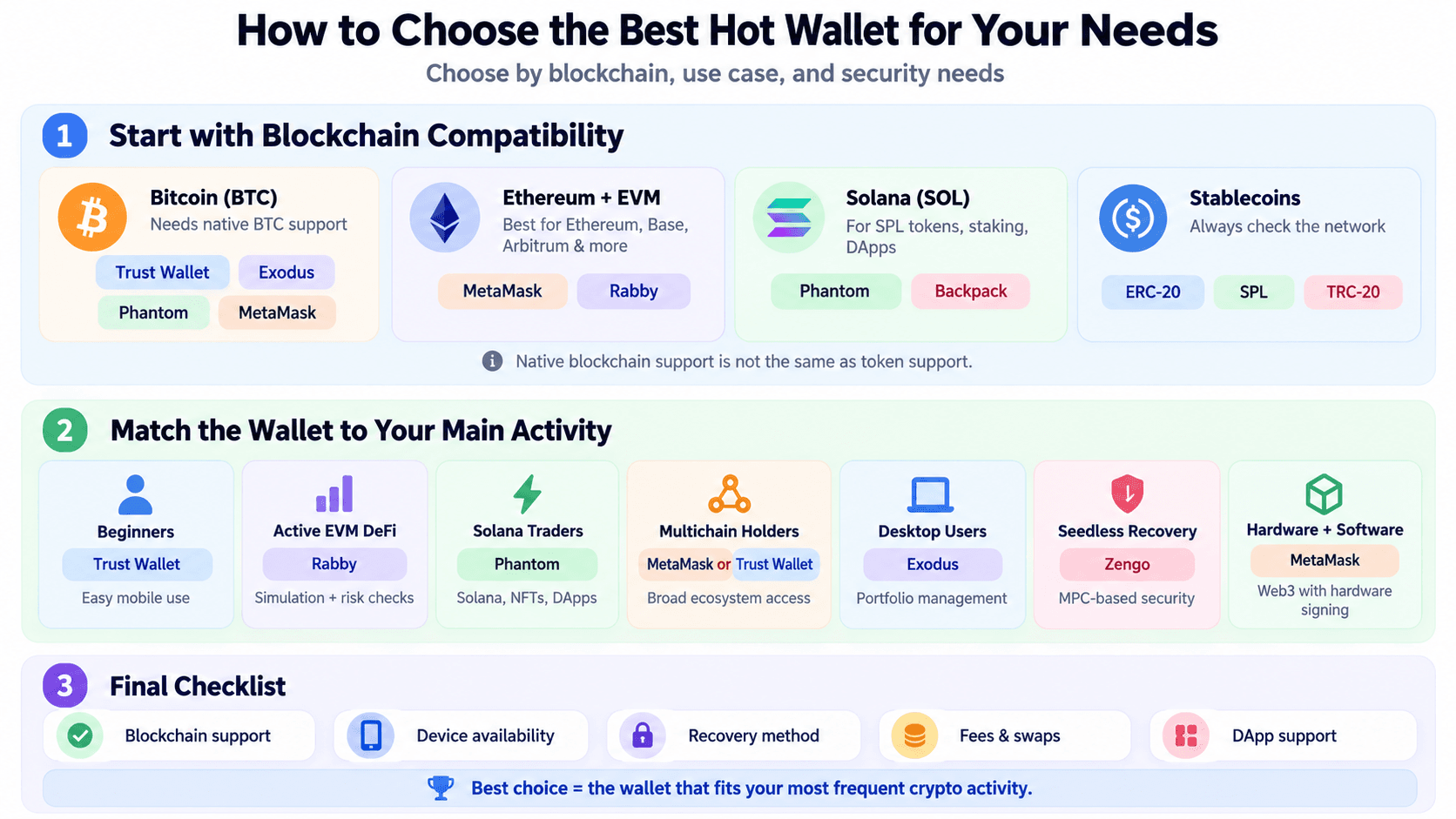 Choose A Hot Wallet Based On Compatibility, Security And Usage
Choose Based on Your Cryptocurrency and Blockchain
Different cryptocurrencies require different wallet capabilities:
- Bitcoin (BTC): Choose a wallet with native Bitcoin support, such as MetaMask, Trust Wallet, Exodus, or Phantom. Bitcoin support through wrapped tokens on Ethereum is not equivalent to managing native BTC.
- Ethereum and EVM networks: MetaMask and Rabby are strong options for Ethereum, Base, Arbitrum, and other compatible networks. Rabby is particularly useful for frequent DeFi transactions.
- Solana (SOL): Phantom and Backpack offer Solana-focused functionality, including SPL token management, staking, and DApp connectivity.
- Stablecoins (USDT and USDC): Verify the specific blockchain and token standard, such as ERC-20 on Ethereum, SPL on Solana, or TRC-20 on Tron.
Supporting USDT or USDC on one network does not guarantee support on another.
Native blockchain support is different from token support. A wallet may display tokens issued on Ethereum without supporting their native blockchain. Likewise, identical-looking hexadecimal addresses on different EVM networks do not make those networks interchangeable. Always verify the receiving wallet's supported network before transferring funds.
New to self-custody? Our guide to the best crypto wallets for beginners compares accessible options and explains their recovery and security requirements.
Choose Based on How You Use Crypto
Once blockchain compatibility is established, consider your primary activity.
| User Type | Recommended Wallet | Why Choose It | Main Compromise |
|---|---|---|---|
| Beginners and occasional transfers | Trust Wallet | Straightforward mobile interface and broad asset support | Limited advanced transaction analysis |
| Active EVM DeFi users | Rabby Wallet | Transaction simulation, risk warnings, automatic network recognition | Primarily focused on EVM networks |
| Solana traders and NFT users | Phantom | Solana staking, swaps, NFTs, and DApp connectivity | Limited support for some EVM networks |
| Multichain holders | MetaMask or Trust Wallet | Access to multiple blockchain ecosystems | Features differ across supported networks |
| Desktop portfolio users | Exodus | Desktop portfolio tracking, swaps, and asset management | Less specialized for advanced DeFi |
| Security-conscious users seeking alternative recovery | Zengo | MPC-based security without a conventional seed phrase | Provider-specific recovery dependencies |
| Users combining software and hardware wallets | MetaMask | Compatible hardware signing with broad Web3 access | Hardware compatibility varies by network and device |
The simplest approach is to choose based on your most frequent activity, rather than the wallet advertising the largest number of supported cryptocurrencies.
For users who primarily manage cryptocurrency on their phones, we've compared the best mobile crypto wallets for security, usability, and blockchain support.
Hot Wallet vs. Cold Wallet: Which Is Better?
Hot wallets are better for frequent transactions and DeFi activity, while cold wallets are generally safer for long-term cryptocurrency storage. The main difference is how private keys are protected. Hot wallets typically manage keys on internet-connected devices, whereas cold wallets keep signing keys offline, reducing exposure to remote attacks.
If you want stronger private-key isolation, explore our comparison of the best hardware wallets. For cryptocurrency you don't need to access frequently, our guide to the best cold storage wallets explores alternatives designed for long-term holdings.
Key Differences Between Hot and Cold Wallets
| Feature | Hot Wallet | Cold Wallet |
|---|---|---|
| Internet exposure | Keys are generally managed on connected devices | Signing keys remain offline |
| Security | Greater exposure to malware and online key theft | Lower exposure to remote key extraction |
| Convenience | Fast access for transfers, swaps, and DApps | Requires additional steps to authorize transactions |
| Recovery | Usually seed phrases, MPC, or supported passkey systems | Typically a recovery phrase or device-specific backup |
| Hardware required | Usually no dedicated device required | Hardware device or another offline signing setup |
| Main risks | Phishing, malware, exposed keys, malicious approvals | Recovery phrase theft, physical compromise, malicious signing |
| Best for | Everyday payments, trading, and DeFi | Long-term holdings and less frequently accessed assets |
| Examples | MetaMask, Rabby, Phantom, Trust Wallet | Ledger, Trezor, air-gapped signing devices |
Hardware wallets such as Ledger and Trezor keep private keys isolated from the connected computer or smartphone. However, offline key storage does not prevent every form of cryptocurrency theft. Users can still approve malicious smart contract transactions, fall for phishing attacks, or expose their recovery phrases.
Our hardware wallet vs. software wallet comparison explains how transaction signing, private-key protection, recovery, and everyday usability differ between the two approaches.
Should You Use a Hot Wallet With a Hardware Wallet?
Combining a hot-wallet interface with a hardware wallet offers a practical balance between convenience and security.
For example, users can connect a compatible Ledger or Trezor device to MetaMask. This approach is particularly useful for active DeFi users and investors holding larger cryptocurrency balances.
However, connecting a hardware wallet is not the same as importing its recovery phrase into a software wallet. Importing the phrase exposes the associated keys to an internet-connected environment and undermines the hardware wallet's key-isolation advantage.
For additional protection, users can maintain a separate hot wallet for everyday transactions and a hardware wallet for longer-term holdings.
How to Set Up and Use a Crypto Hot Wallet Safely
Setting up a crypto hot wallet is straightforward, but mistakes involving recovery phrases, blockchain networks, or transaction approvals can lead to permanent losses. The safest approach is to verify the wallet's source, secure recovery credentials, and test transactions before transferring larger amounts.
Essential Steps for Safe Hot Wallet Setup
Follow these seven steps to reduce common security risks:
- Download from official sources: Install the wallet through its verified website, official app store listing, or browser extension page. Avoid sponsored search results, unfamiliar download links, and unsolicited messages.
- Create or import your wallet: Generate a new wallet or import an existing one using its supported recovery method. Never enter your recovery phrase into an unfamiliar website.
- Secure your recovery credentials: Store seed phrases offline and verify your backup. For MPC or passkey wallets, understand the authentication factors and recovery procedures required after device loss.
- Enable security controls: Use a strong device password, wallet PIN, biometric authentication, and automatic locking where supported. Keep your operating system and wallet software updated.
- Verify the blockchain and address: Confirm that the receiving wallet supports the specific network and token standard, such as ERC-20, SPL, or TRC-20. Double-check the destination address before sending.
- Send a test transaction: Transfer a small amount first and verify its arrival before moving substantial funds. Remember that a successful test does not guarantee every subsequent transaction will succeed.
- Review before signing: Check recipient addresses, token allowances, smart contract permissions, and transaction simulations. Avoid unlimited token approvals unless necessary.
Never share your private key or recovery phrase with anyone claiming to represent wallet support. Legitimate support teams do not need these credentials to troubleshoot an account.
What to Do if Your Wallet Is Compromised
The appropriate response depends on what was exposed.
| Situation | Recommended Action |
|---|---|
| Suspicious DApp connection | Disconnect the application, check for token approvals, and investigate any transactions or signatures you authorized. |
| Malicious token approval | Revoke the affected allowance if it is safe to do so. Consider moving remaining assets to a new wallet if broader compromise is suspected. |
| Exposed recovery phrase or private key | Treat the wallet as compromised. Create a new wallet with fresh credentials on a trusted device and transfer remaining assets where feasible. |
| Malware or stolen device | Stop using the affected device, secure associated accounts, and recover or migrate funds using a trusted environment. |

Final Verdict
MetaMask is our overall pick for the best crypto hot wallet in 2026, thanks to its broad Web3 compatibility, multichain support, and hardware wallet integrations. However, the best choice ultimately depends on how you use cryptocurrency.
No hot wallet is universally the safest. Self-custody gives users control over their private keys, but security also depends on recovery practices, device protection, and transaction approvals. For larger or long-term holdings, a hardware wallet such as Ledger or Trezor can provide stronger private-key isolation.
Before choosing a wallet, verify its supported networks, recovery options, and transaction costs. The right wallet should balance convenience with the security controls your cryptocurrency activity requires.
Stronger private-key protection doesn't necessarily require a premium device, as our guide to the best cheap hardware wallets under $100 explains.