


SafePal S1 is a budget hardware wallet built for users who want cold storage without a premium price tag. It keeps private keys offline, signs transactions with QR codes, and works through the SafePal App for portfolio tracking, swaps, NFTs, staking, and DApp access.
This review breaks down how SafePal S1 works, how safe it is, which coins and chains it supports, how it compares with Ledger, Trezor, Keystone and KeepKey, and whether it is still worth buying in 2026.
Editor's Note (May 27, 2026): We fully updated this SafePal S1 review in May 2026 to reflect the wallet’s current specs, pricing, firmware status, asset support, security model, app experience, and position against Ledger, Trezor, Keystone, KeepKey, SafePal X1, and SafePal S1 Pro. We also added a clearer methodology, scorecard, buyer guidance, recovery notes, firmware update section, and updated context around Kraken Security Labs' 2021 findings.
SafePal S1 Review: Quick Verdict
SafePal S1 is best understood as a budget air-gapped hardware wallet for mobile-first crypto users. Its main appeal comes from QR code signing, offline private key storage, a CC EAL 6+ secure element, broad multi-chain support, NFT and DeFi access through the SafePal App, and a $49.99 price point. That makes it a strong fit for users who want cold storage without paying Ledger, Trezor, or Keystone prices.
Our take: SafePal S1 is one of the strongest low-cost air-gapped wallets for users who want mobile DeFi, NFTs, swaps, staking, and QR signing in one app-led setup. It is less ideal for desktop-first users, Bitcoin-only users, open-source purists, or anyone who wants the deepest third-party wallet compatibility.
Scorecard
-
1Security Architecture 4.6/5 QR signing, offline private key storage, a CC EAL 6+ secure element, PIN protection, passphrase support, and anti-tamper protections give the S1 a strong budget security base.
-
2Asset and Chain Support 4.8/5 Support for 200+ blockchains, unlimited tokens, NFTs, swaps, staking, and DApps makes SafePal S1 a strong fit for multi-chain users.
-
3Setup and Recovery 4.5/5 The setup flow is simple, and BIP39 seed phrase recovery gives users a familiar backup path across compatible wallets.
-
4Value for Money 4.9/5 At $49.99, the S1 is one of the cheapest hardware wallets with air-gapped QR signing and broad multi-chain support.
-
5User Experience 4.4/5 The SafePal App gives users a clean mobile workflow for assets, NFTs, DApps, swaps, staking, and QR transaction signing.
-
6Transaction Review Experience 4.3/5 The QR flow is smooth, but the small 1.3-inch screen is less comfortable than larger touchscreen wallets for detailed transaction checks.
-
7Overall Score 4.6/5 A strong budget air-gapped wallet for mobile-first users who want QR signing, broad asset support, DeFi access, NFTs, and low-cost cold storage.
Best For
- Budget-conscious users who want hardware wallet security under $50
- Mobile-first crypto users who are comfortable using the SafePal App
- Multi-chain users managing Bitcoin, Ethereum, BNB Chain, Solana, Polygon, TON, and other networks
- DeFi and NFT users who want offline signing with app-based access
- Users who want QR signing without paying Keystone prices
Not Ideal For
- Desktop-first users who want a full Ledger Wallet app or Trezor Suite-style workflow
- Bitcoin-only users who rely on Sparrow Wallet, Electrum, coin control, or PSBT workflows
- Users who want the strongest open-source wallet stack
- Users with very large holdings who may prefer multisig or a more specialized custody setup
- Users who want native MetaMask-style hardware wallet integration
SafePal S1 At A Glance
| Category | Details |
|---|---|
| Core Identity | Budget air-gapped hardware wallet built for offline private key storage and QR code transaction signing |
| Price | $49.99 on the official SafePal store, with taxes, duties, and regional checkout prices subject to change |
| Signing Method | QR code signing through the SafePal App, with no Bluetooth, WiFi, NFC, or USB data signing during normal transactions |
| Secure Element | CC EAL 6+ secure element, with PIN, passphrase support, device authentication, and anti-tamper protections |
| Screen and Battery | 1.3-inch color screen and 400 mAh battery |
| Asset Support | 200+ blockchains, unlimited tokens, and NFT support through the SafePal App |
| App Support | iOS, Android, and SafePal browser extension support, with the SafePal App acting as the main wallet hub |
| Backup Model | BIP39 seed phrase recovery, with restore support through SafePal hardware wallets and compatible BIP39 wallets |
| Main Trade-Off | Excellent price and QR-based cold signing, but weaker desktop support, smaller screen, and less third-party wallet compatibility than Ledger or Trezor |
Disclosure and Methodology
Some links in this article may be affiliate links. If you choose to use a service through these links, we may earn a commission at no additional cost to you.
For this SafePal S1 review, we evaluated the wallet across six main categories: security architecture, asset and chain support, setup and recovery, value for money, user experience, and transaction review experience. We looked at how the S1 works as a real-world cold wallet rather than judging it only by price or asset count. That included QR signing, the SafePal App workflow, BIP39 recovery, firmware update process, secure element design, anti-tamper protections, supported networks, NFT and DeFi access, browser extension support, historical Kraken Security Labs findings, current firmware maintenance, and comparisons with Ledger Nano S Plus, Trezor Safe 3, Keystone 3 Pro, KeepKey, SafePal X1, and SafePal S1 Pro. We also weighed the limitations carefully, including mobile dependency, small screen size, limited desktop workflow, partial transparency questions, and weaker third-party wallet compatibility than some mainstream alternatives.
What Is SafePal S1?
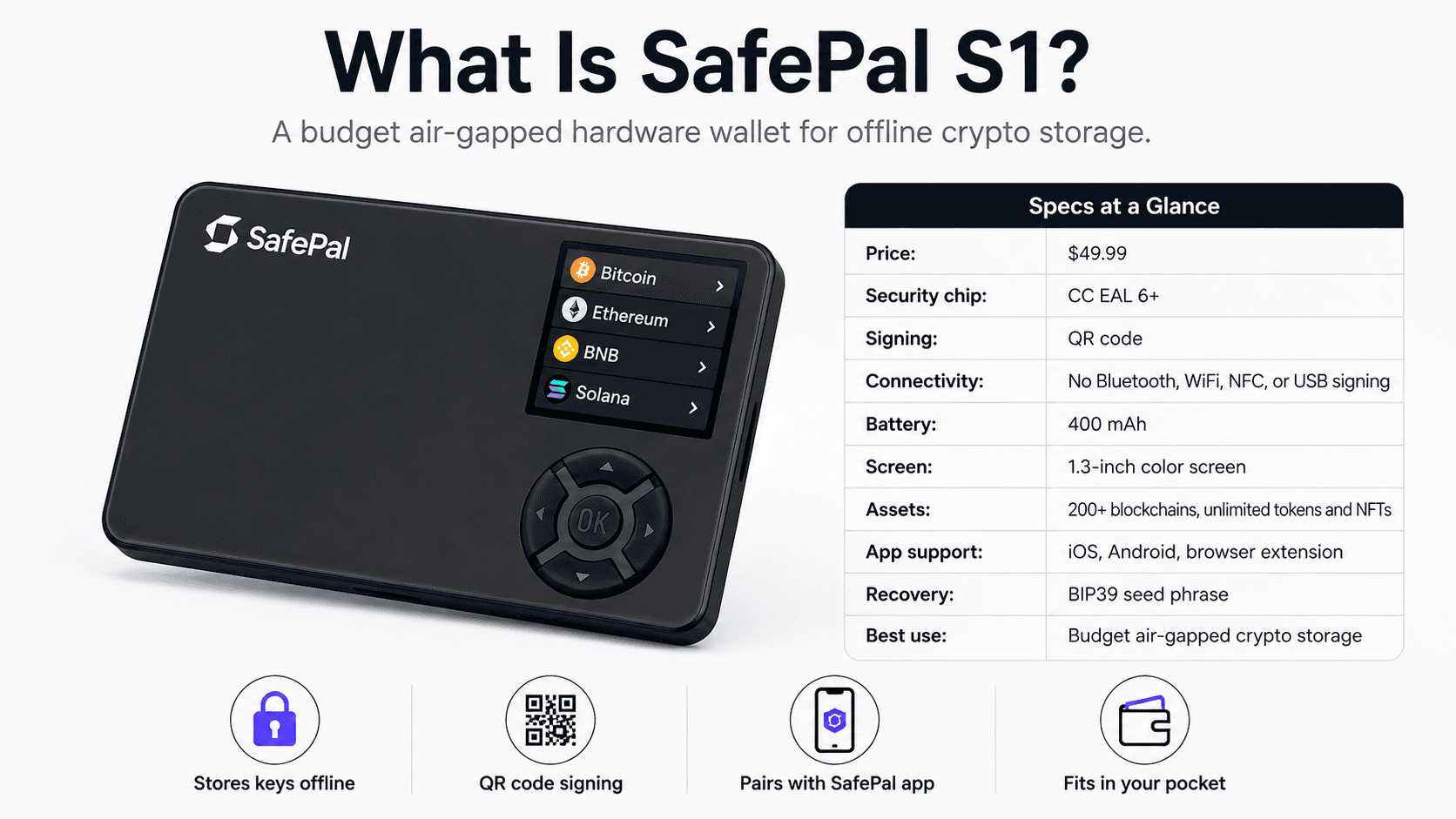
SafePal S1 is a small cold wallet built for offline private key storage and QR code transaction signing. It pairs with the SafePal App rather than working like a USB-first desktop wallet.
It signs transactions with QR codes, so normal transaction signing does not rely on Bluetooth, WiFi, NFC, or USB data connections. The device uses a camera and a 1.3-inch color screen to scan and display transaction data.
The wallet pairs with the SafePal App and the SafePal browser extension. The app handles portfolio management, DApps, swaps, NFTs, staking and transaction broadcasting. The S1 hardware wallet signs the transaction offline.
The S1 supports 200+ blockchains and unlimited tokens and NFTs. It sits below SafePal S1 Pro and SafePal X1 in the SafePal hardware wallet lineup. The S1 is the cheapest air-gapped model, the X1 is the Bluetooth model, and the S1 Pro is the upgraded air-gapped model.
If you're looking for budget friendly hardware wallets, check out our top picks for the most affordable hardware wallets.
 SafePal S1 is a Mobile-First Air-Gapped Wallet For Offline Crypto Signing
SafePal S1 Security: How Safe Is It?
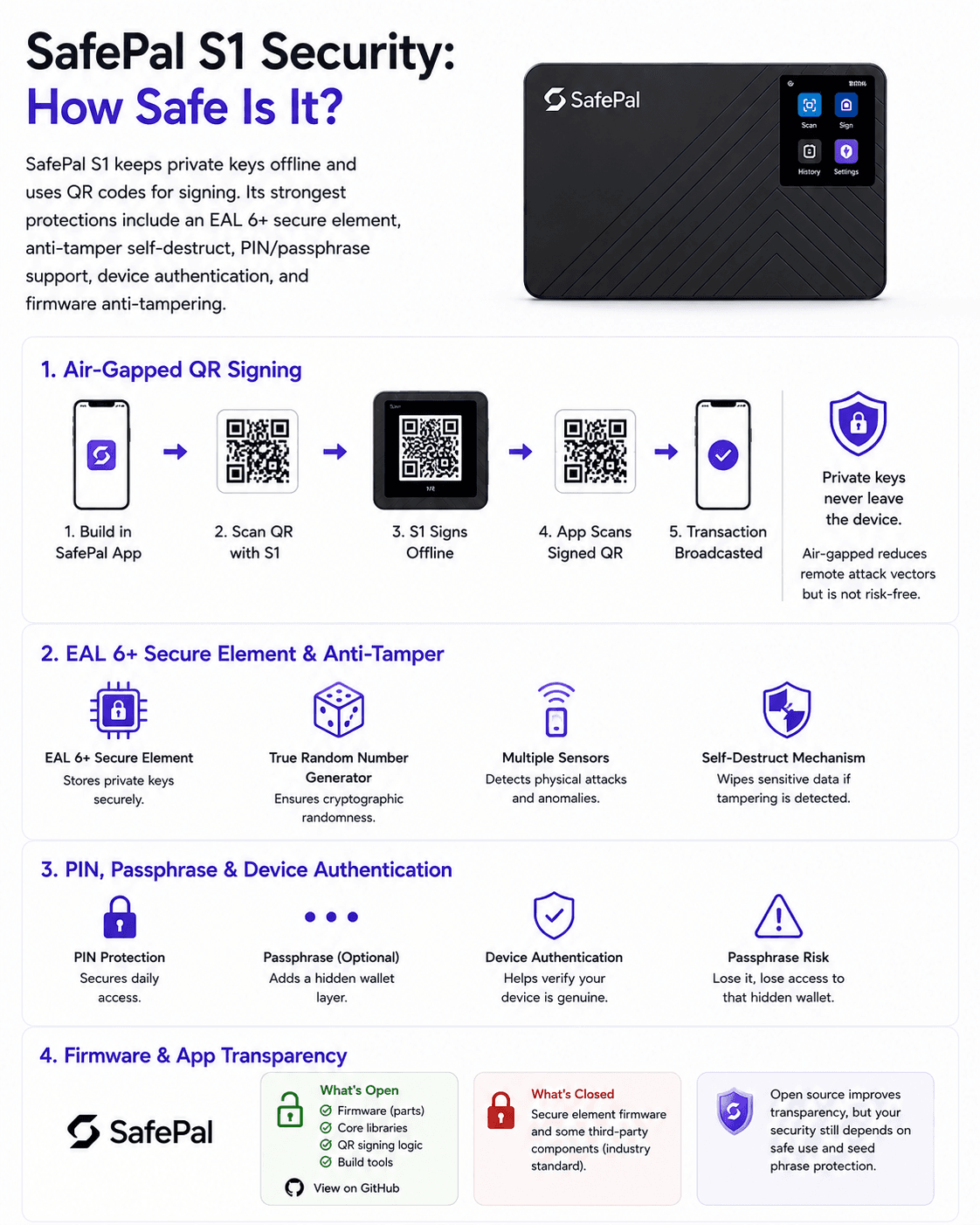
SafePal S1 is designed to reduce online attack surfaces by keeping private keys offline and using QR codes for transaction signing. Its main security features are the EAL 6+ secure element, anti-tamper self-destruct mechanism, PIN, passphrase support, device authentication and firmware anti-tampering protection.
 SafePal S1 Uses Air-Gapped Signing, EAL 6+ Security and QR Verification
Air-Gapped QR Signing
SafePal S1 uses air-gapped signing. Air-gapped means the wallet signs transactions without a normal data connection to an internet-connected phone or computer.
The workflow is simple:
- Transaction details are built in the SafePal App.
- The SafePal App shows a QR code.
- SafePal S1 scans that QR code.
- The S1 signs the transaction offline.
- The S1 shows a signed QR code.
- The SafePal App scans the signed QR code and broadcasts the transaction.
Private keys never leave the device during this QR transaction flow, which is arguably the main security appeal of the S1.
Air-gapped does not mean risk-free. It reduces remote attack vectors, but users still depend on app integrity, correct transaction review, safe firmware, secure seed phrase storage and avoiding phishing. A hardware wallet can help protect private keys, but it cannot protect users who approve malicious transactions without checking the device screen.
Our guide to hardware wallet security threats covers common attack paths in more detail.
EAL 6+ Secure Element and Anti-Tamper Design
The SafePal S1 boasts an EAL 6+ independent secure element, a true random number generator, multiple security sensors and an anti-tampering self-destruct mechanism. The secure element stores private keys in a separate chip designed for sensitive cryptographic data.
EAL stands for Evaluation Assurance Level. It is a security evaluation grade used in Common Criteria certifications. A higher EAL number usually means deeper testing and assurance, though it does not make a device immune to every attack.
SafePal’s self-destruct mechanism is designed to wipe sensitive data if physical tampering is detected. This can help against some physical attacks, but it is not a substitute for seed phrase safety. If the device wipes itself and the seed phrase is gone, the funds are gone too.
PIN, Passphrase and Device Authentication
The PIN protects daily access to SafePal S1. A thief with the device should not be able to open it without the PIN.
The optional passphrase adds another layer on top of the seed phrase. Lose the passphrase and you lose access to that hidden wallet, even if you still have the seed phrase.
Device authentication helps users verify that the SafePal hardware wallet is genuine. This is useful during setup, especially when buying from an authorized seller. It does not remove supply-chain risk completely, so users should buy from SafePal or trusted retailers, check packaging and avoid second-hand devices.
SafePal Firmware and App Transparency
SafePal describes parts of its wallet lineup as open source, but users should distinguish between firmware, hardware design, the mobile app, the browser extension and backend services.
The S1 product page includes open-source language. SafePal has also discussed transparency around parts of its wallet stack. Users should still avoid treating SafePal S1 as a fully open-source wallet unless current repositories, build instructions and firmware verification support that claim.
The SafePal App is the main interface for creating transactions and displaying QR codes. If parts of the wallet stack operate like a closed-source app, users must decide whether they are comfortable trusting the app interface while the hardware wallet signs transactions offline.
Kraken Security Labs Findings: What Happened in 2021?
Kraken Security Labs published SafePal S1 findings in 2021.
What Kraken Found
Kraken reported several issues involving SafePal S1 hardware wallet security. The main concerns included tamper detection bypass scenarios, a firmware downgrade attack, open-source licensing concerns and conditions where tamper detection did or did not trigger.
The firmware downgrade attack was the clearest technical issue. Kraken said it upgraded a wallet to firmware v1.0.18, then used a flash programmer to downgrade it to v1.0.17. The device kept working and did not detect the downgrade. This created a concern that an attacker with physical access and the right tools could push a device back to older firmware.
Kraken also discussed the relationship between the main processor, secure element, ECDH communication and the self-destruct mechanism. Physical attacks are not the same as remote malware. They require device access, tools and time. They still count because hardware wallets are often used for long-term storage.
How SafePal Responded
In response to that, SafePal said no user funds were stolen, disputed parts of Kraken’s interpretation, and argued that core private-key security was not compromised.
SafePal also addressed the downgrade issue and said the attack required removing flash from the main board and using a special flash programmer. SafePal patched the downgrade issue in firmware V1.0.24, which appears in the official firmware history as a Feb. 16, 2021 release.
What This Means for Buyers in 2026
The Kraken report should not be ignored, but it should not be treated as proof that SafePal S1 is unsafe today. It is a historical security finding with a vendor response and a firmware patch.
The buyer question is whether SafePal continues to maintain firmware, patch issues and document updates. The current SafePal S1 firmware history lists V1.0.79, released April 22, 2026, which is a positive maintenance signal.
SafePal S1 remains a budget device. Users with very large holdings may prefer a more premium wallet, a multisig setup, or a Bitcoin-focused wallet with deeper third-party auditability. Users with smaller to medium-sized portfolios who want air-gapped QR signing at a low price can still justify the S1, provided they update firmware only through official channels and secure the seed phrase properly.
Recovery and Backup: What Happens If You Lose Your SafePal S1?
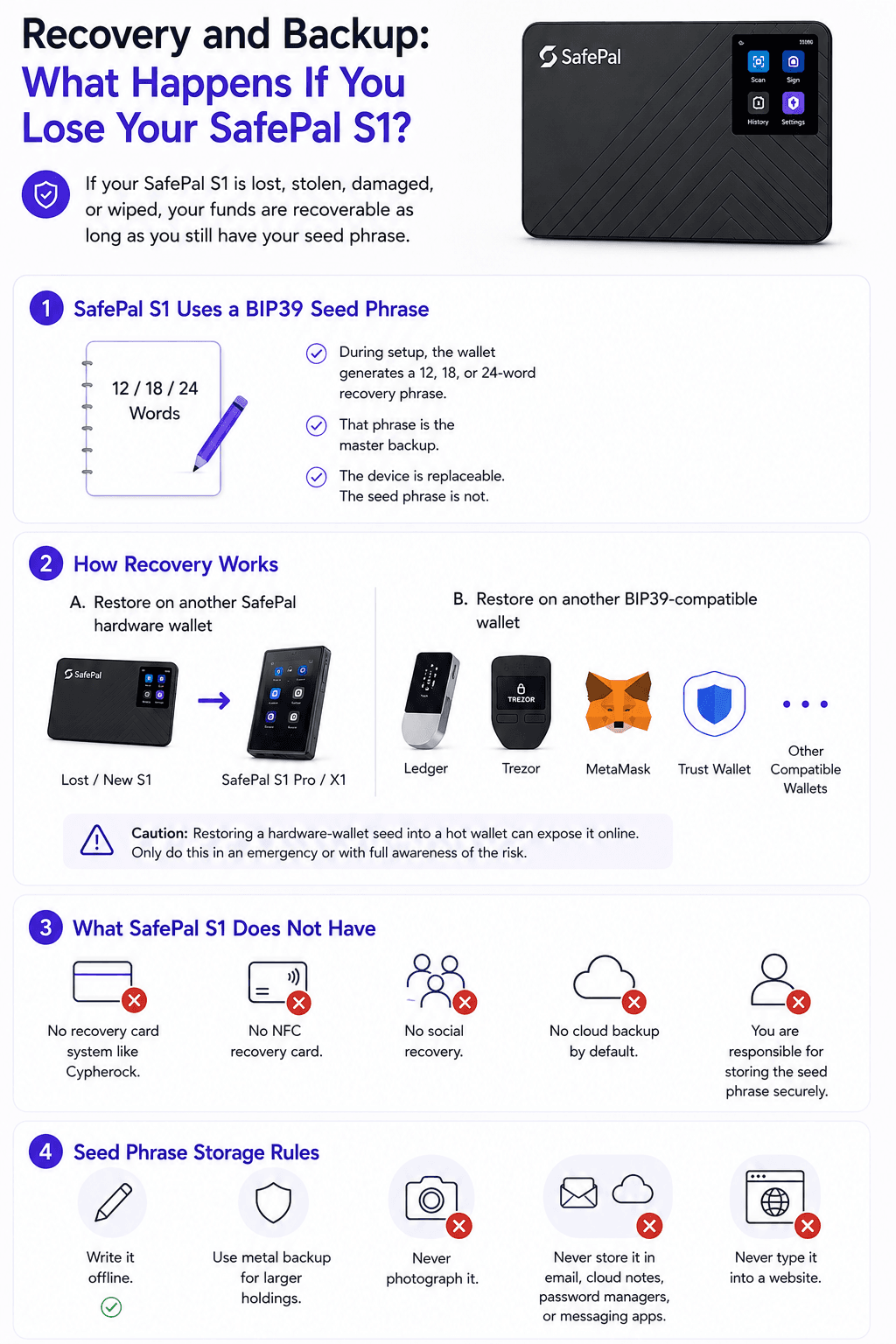
If your SafePal S1 is lost, stolen, damaged or wiped, your funds are recoverable as long as you still have your seed phrase. The device is replaceable, but the seed phrase is not.
 SafePal S1 Recovery Depends On Keeping Your Seed Phrase Secure And Offline
SafePal S1 Uses a BIP39 Seed Phrase
During setup, the wallet generates a recovery phrase, also called a seed phrase or mnemonic phrase. SafePal’s seed phrase backup page explains that mnemonic phrases can come in 12, 18 and 24-word sets, and its recovery flow supports BIP39 and BIP44 standards.
The seed phrase is the master backup for the wallet. It can recreate the private keys that control your crypto assets.
A 12-word seed and a 24-word seed are both used across the hardware wallet market. A 24-word seed has a larger security margin. The bigger risk for most users is not the word count. It is whether the phrase is written down correctly, stored offline and kept away from cameras, cloud apps and fake wallet sites.
How Recovery Works
There are two common recovery paths.
First, you can restore the wallet on another SafePal hardware wallet. This is the cleanest route if you want to keep your private keys in a cold wallet setup.
Second, you can restore on another BIP39-compatible wallet such as Ledger, Trezor, MetaMask, Trust Wallet, or another compatible wallet. SafePal’s wallet recovery page explains recovery through a mnemonic phrase.
Be careful with hot wallet recovery. Restoring a hardware-wallet seed into MetaMask, Trust Wallet or another internet-connected wallet can expose it online. Only do this in an emergency or with full awareness of the risk. After using a seed in a hot wallet, consider moving funds to a fresh hardware wallet seed.
Read our full guide on crypto wallet recovery, covering seed phrases, hardware wallets and exchange accounts
What SafePal S1 Does Not Have
SafePal S1 does not have a recovery card system like Cypherock. It does not use NFC recovery cards. It does not offer social recovery. It does not include cloud backup by default.
You are responsible for seed phrase backup.
This is normal for many hardware wallets, but it is also the main reason people lose funds in self-custody. The wallet can protect private keys from online attacks. It cannot recover a lost seed phrase.
Seed Phrase Storage Rules
Use these rules without exception:
- Write the seed phrase offline.
- Use a metal backup for larger holdings.
- Never photograph the recovery phrase.
- Never store it in email, cloud notes, password managers, or messaging apps.
- Never type it into a website.
- Never share it with anyone claiming to help with wallet recovery.
- Keep the passphrase separate from the seed phrase if you use one.
Firmwar Update Securitey: How SafePal S1 Updates Work
SafePal S1 uses USB only for charging and firmware update mode, not normal transaction signing. The firmware process is simple, but it adds a temporary trust step that users should handle carefully.
Current Firmware Status
SafePal’s official S1 firmware upgrade page lists SafePal S1 V1.0.79, released April 22, 2026. The same release appears in the firmware history and adds Solana gas fee changes plus ENI, MST and Lemon blockchain support.
Firmware status can change. Users should check the official SafePal upgrade page before installing any file.
How the Firmware Update Process Works
SafePal’s firmware upgrade instructions work like this:
- Download upgrade.bin from the official SafePal upgrade page.
- Use a PC, not mobile.
- Enter upgrade mode on the S1.
- Connect the device via USB.
- The device appears as a virtual disk.
- Drag upgrade.bin into the device.
- Start the upgrade from the S1.
SafePal tells users to back up the mnemonic phrase before updating, because any firmware failure could create recovery risk. The firmware file must also be named upgrade.bin, or the S1 device will not recognize it.
Does Firmware Updating Break the Air Gap?
Normal transaction signing remains air-gapped. The S1 signs QR transactions without Bluetooth, WiFi, NFC, or USB data signing.
Firmware updates are different. They require USB upgrade mode and a file transfer through a computer. That introduces a temporary trust step.
Users should download firmware only from SafePal’s official website, follow official instructions, back up the seed phrase first, and never install files from third-party sources. Fake firmware, fake upgrade pages and malicious browser ads are realistic risks for any hardware wallet user. Signed firmware and firmware anti-tampering protections help, but users still need to verify the source before installing anything.
SafePal S1 Supported Coins, Chains, NFTs and DeFi
SafePal S1 suits multi-chain users more than Bitcoin-only users. It supports broad asset management through the SafePal App, while the S1 hardware wallet handles offline transaction signing.
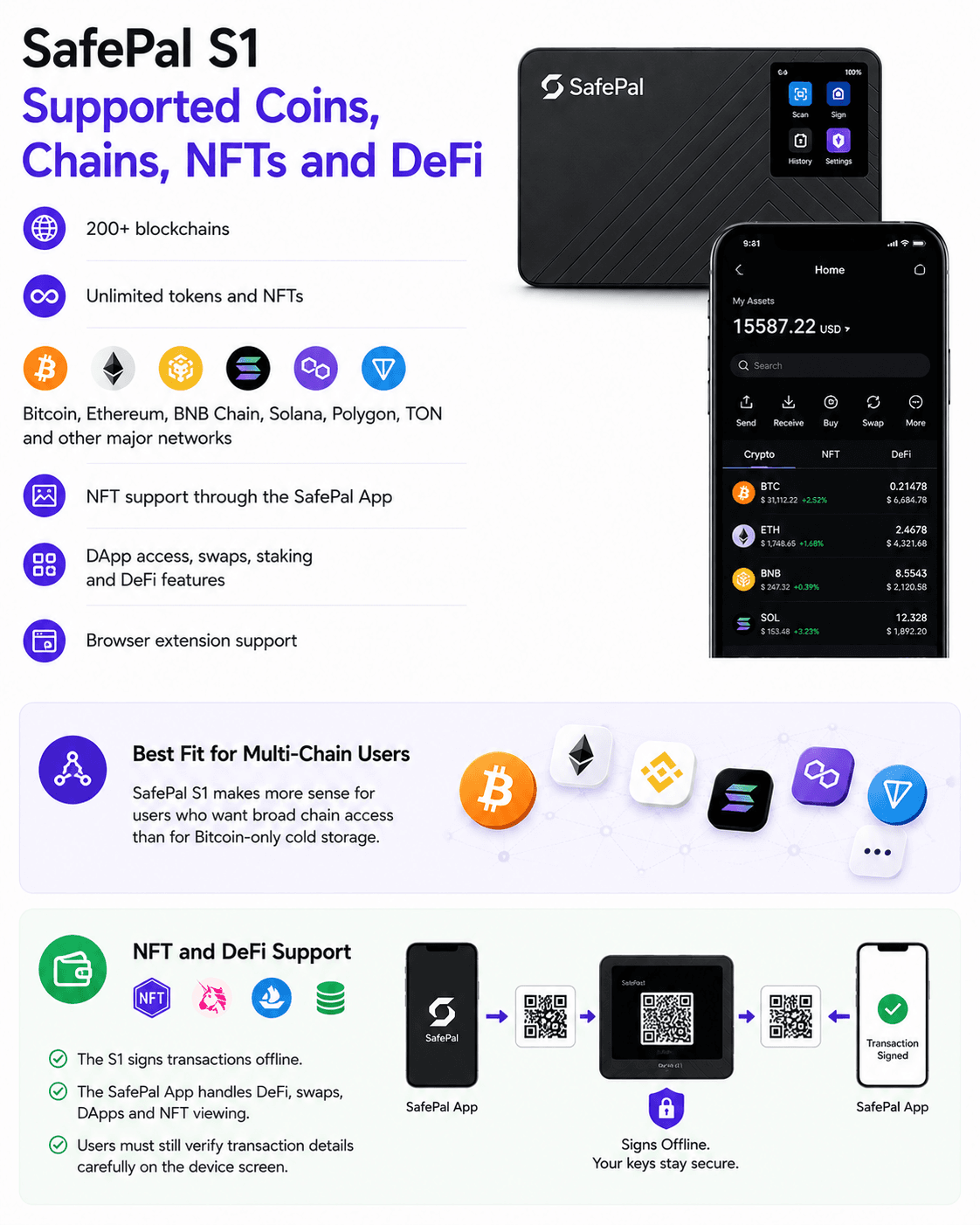
SafePal supports 200+ blockchains, unlimited tokens and NFTs. The supported networks include Bitcoin, Ethereum, BNB Chain, Solana, Polygon, TON and other major ecosystems. The SafePal browser extension also lists custom EVM networks, DApp access, WalletConnect-compatible imports, swaps and bridge services.
Supported assets can change quickly. Readers should treat chain support, token support, NFT support, DApp access, browser extension support and WalletConnect support as time-sensitive product data.
 Safepal Supports 200+ Blockchains, Unlimited Tokens and NFTs
Best Fit for Multi-Chain Users
SafePal S1 makes more sense for users who want broad chain access than for Bitcoin-only cold storage.
A Bitcoin-only user may care more about Sparrow Wallet, Electrum, coin control, PSBT workflows and open-source auditability. SafePal S1 is not the strongest wallet for that profile.
A multi-chain user may prefer SafePal because the app brings Bitcoin, Ethereum, BNB Chain, Solana, Polygon, TON, swaps, staking, NFTs and DApps into one mobile interface. That convenience is the main selling point.
NFT and DeFi Support
The S1 signs transactions offline. The SafePal App handles DeFi, swaps, DApps, staking and NFT viewing.
This setup gives users cold wallet signing with mobile DeFi access, but it also creates user responsibility. Always verify transaction details on the device screen before signing. DeFi transactions can include token approvals, smart contract permissions, bridge actions, staking operations and swaps. Those can expose users to smart contract bugs, malicious approvals, oracle risk, bridge risk, stablecoin risk, liquidity risk and counterparty risk through third-party services.
SafePal can help keep private keys offline. It cannot make every DApp safe.
SafePal S1 setup guide
How to Set Up SafePal S1
SafePal S1 setup is not hard, but small mistakes can be expensive. Buy from a safe source, create a new seed phrase offline, pair with the official app and test with a small transaction first.
↧Click a card to expand it.
01
Step 1: Buy From an Official Source
Buy from SafePal or trusted authorized retailers. Avoid second-hand devices.
Buy from SafePal or trusted authorized retailers. Avoid second-hand devices, even if the price looks attractive.
- When the device arrives, check the packaging and run device authentication.
- If the device fails authentication, looks opened, includes a pre-written seed phrase, or asks you to enter a seed into a website, stop using it.
02
Step 2: Create a New Wallet
Generate a new wallet on the device and write the seed phrase offline.
Power on the SafePal S1 and create a new wallet.
- The device will generate a seed phrase.
- Write it down offline.
- Do not photograph it, scan it, print it, or save it in cloud storage.
Set a PIN for daily access. Add an optional passphrase only if you understand how it works. A passphrase can add protection, but it also adds a second piece of information that can lock you out if lost.
03
Step 3: Pair With the SafePal App
Use the official SafePal App and bind the S1 with QR codes.
Download the official SafePal App from SafePal’s website or official app stores. Watch for fake wallet apps, sponsored ads and lookalike pages.
- SafePal’s S1 setup instructions use QR code binding between the app and hardware wallet.
- Bind the S1 with the SafePal App using QR codes.
- Do not type the S1 seed phrase into the SafePal App.
- The app should manage accounts and broadcast transactions, while the hardware wallet signs transactions.
SafePal also has a browser extension. Its extension flow can connect with an existing SafePal App wallet account, including a paired S1 hardware wallet, without importing the seed phrase into the browser extension.
04
Step 4: Test With a Small Transaction
Send a small amount first and confirm addresses on the device screen.
Send a small amount first. Practice receiving and sending before moving larger funds.
- Confirm addresses on the device screen.
- Malware on a phone or computer can alter copied addresses or trick users through fake interfaces.
- The hardware wallet screen is the final place to verify what you are signing.
SafePal S1 App Experience
The SafePal App is central to SafePal S1 experience. This gives users a clean mobile workflow, but it also makes the S1 weaker for people who prefer desktop-first cold storage.
The app is where users manage assets, view balances, access swaps, use DApps, monitor prices, manage NFTs, stake assets and prepare transactions. The S1 hardware wallet signs offline.
There is no dedicated desktop app in the Ledger Wallet app or Trezor Suite sense. SafePal does offer a browser extension, but the core S1 workflow remains mobile-first.
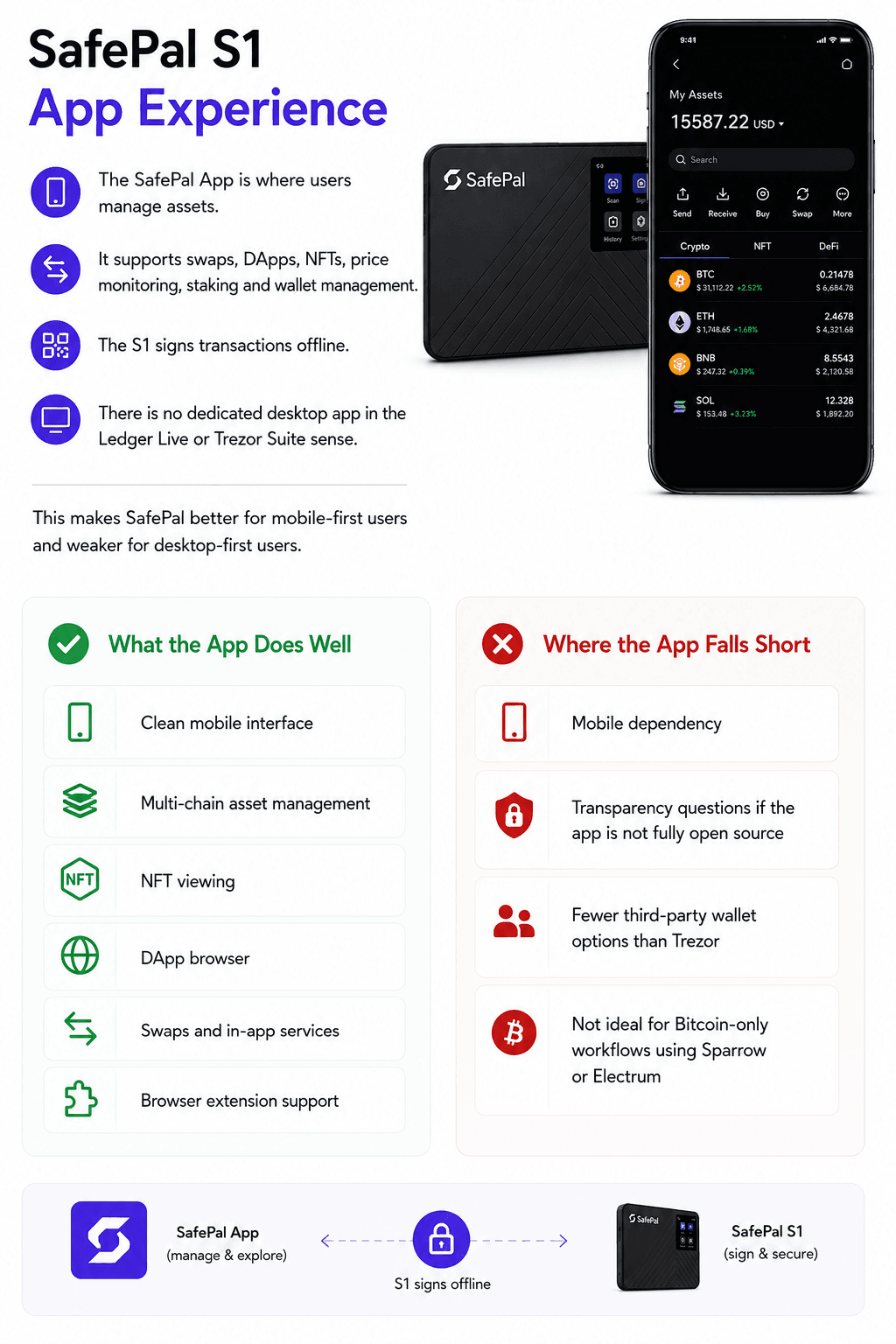 The SafePal App Brings Portfolio Tracking, Swaps, DApps And Mobile Signing Together
What the App Does Well
The SafePal App does several things well, such as:
- Clean mobile interface.
- Multi-chain asset management.
- NFT viewing.
- DApp browser.
- Swaps and in-app services.
- Staking and yield access.
- Browser extension support.
- QR transaction flow with the S1 hardware wallet.
SafePal S1 works well for mobile-first crypto users, BNB Chain users, Binance ecosystem users and people who use DeFi or NFTs across several chains.
No KYC is needed to use a self-custody wallet itself. Some in-app third-party services, such as fiat on-ramps, swaps, staking products, exchange services, or off-ramps, may have their own KYC, fees, regional restrictions and counterparty risk.
Where the App Falls Short
The same app-focused design creates trade-offs.
SafePal S1 has more mobile dependency than Ledger or Trezor. It is not ideal for users who want a desktop app, detailed Bitcoin wallet workflows, Sparrow Wallet, Electrum, or native MetaMask-style hardware wallet integration. The MetaMask hardware wallet hub lists Ledger and Trezor under direct connection wallets and Keystone under air-gapped wallets, but it does not list SafePal S1.
Transparency questions also remain if the full app stack is not fully open source. Users who want maximum auditability may prefer Trezor. Users who want the deepest mainstream app ecosystem may prefer Ledger.
SafePal S1 works best when users accept the SafePal App as the hub. It works less well when users want the hardware wallet to plug into many independent wallets.
SafePal S1 Price: Is It Good Value?
At $49.99, SafePal S1 is one of the cheapest hardware wallets with air-gapped QR signing and an EAL 6+ secure element. The value is strong, but the low price comes with build quality and workflow trade-offs.
SafePal S1 looks strongest against Ledger Nano S Plus, Trezor Safe 3, Keystone 3 Pro and KeepKey when the buyer wants low-cost QR signing. It looks weaker when the buyer wants desktop tools, open-source-first design, premium materials or broad third-party compatibility.
What You Get for $49.99
For $49.99, users get:
- S1 device.
- QR signing.
- EAL 6+ secure element.
- Battery-powered hardware wallet.
- SafePal App access.
- Multi-chain support.
- NFT support.
- DeFi access.
- DApp browser workflow.
- BIP39 seed phrase recovery.
That is a strong package for a budget hardware wallet. The S1 is especially attractive for users with smaller to medium-sized portfolios who still want cold storage.
Our best hardware wallets roundup is useful for comparing other storage devices before buying.
When It Is Worth Paying More
Pay more for S1 Pro if you want better build quality, aluminum alloy, tempered glass and longer battery life.
Pay more for Trezor if you want open-source-first design, Trezor Suite, Sparrow Wallet, Electrum and stronger third-party wallet support.
Pay more for Ledger if you want the Ledger Wallet app, mainstream app support and broader wallet integrations.
Pay more for Keystone if you want a larger, more premium air-gapped device with a stronger power-user feel.
Who Should Buy the SafePal S1?
SafePal S1 is best for users who want low-cost cold storage with a mobile DeFi and NFT workflow. It is less suitable for users who want desktop-first custody, Bitcoin-only tools, or the strongest open-source wallet stack.
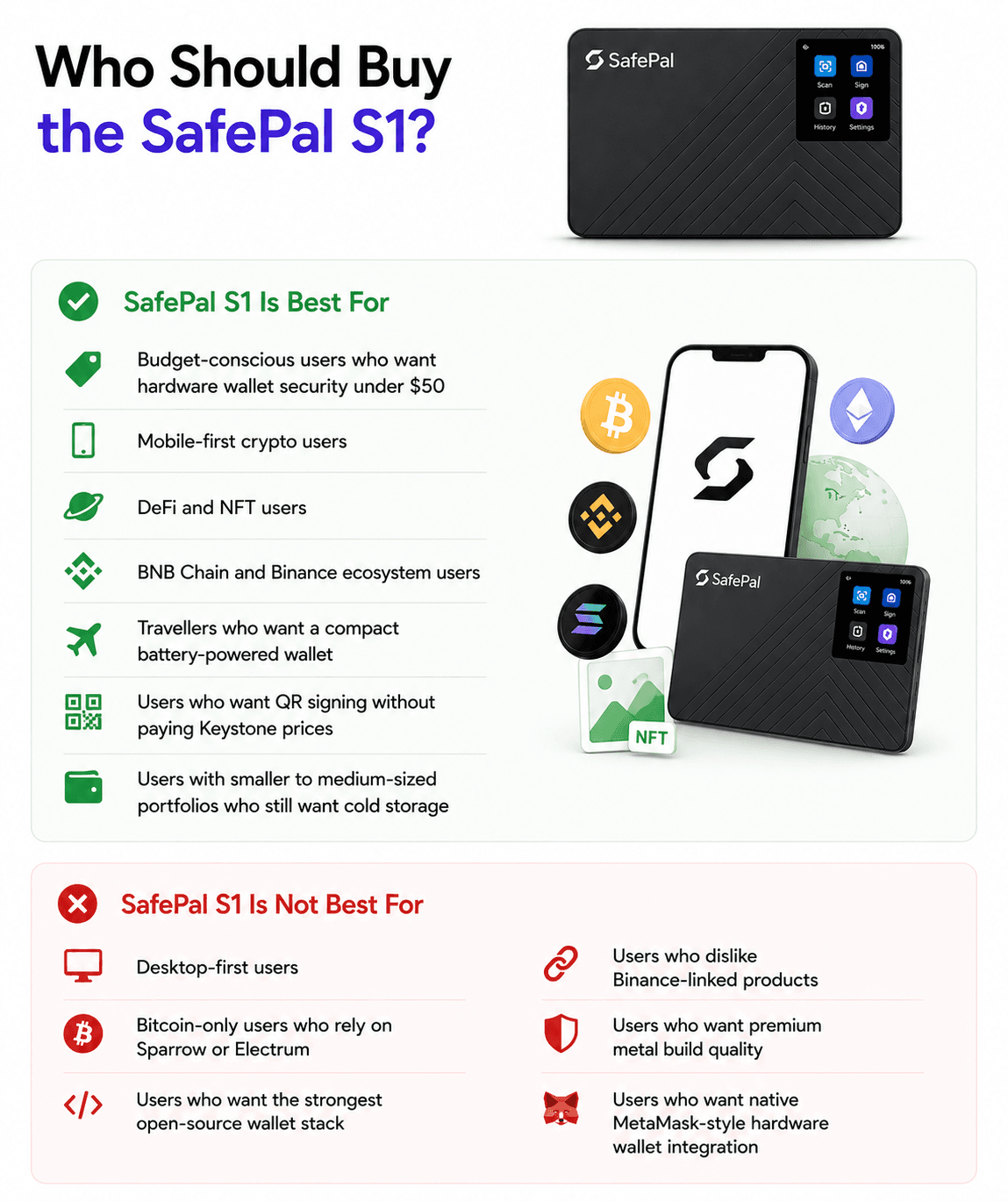 Safepal S1 is Best for Users WHO Want Low-cost Cold Storage With a Mobile Defi and Nft Workflow
SafePal S1 Is Best For
SafePal S1 is best for:
- Budget-conscious users who want hardware wallet security under $50.
- Beginners who want a simple mobile-first setup.
- Mobile-first crypto users.
- DeFi users.
- NFT users.
- BNB Chain and Binance ecosystem users.
- Travellers who want a compact battery-powered wallet.
- Users who want QR signing without paying Keystone prices.
- Users with smaller to medium-sized portfolios who still want cold storage.
- Multi-chain users who manage Bitcoin, Ethereum, BNB Chain, Solana, Polygon, TON and other networks.
SafePal S1 gives these users a practical mix of cold wallet security, QR signing, DApp access and low price.
SafePal S1 Is Not Best For
SafePal S1 is not best for:
- Desktop-first users.
- Bitcoin-only users who rely on Sparrow Wallet or Electrum.
- Users who want the strongest open-source wallet stack.
- Users who dislike Binance-linked products.
- Users who want premium metal build quality.
- Users who want native MetaMask-style hardware wallet integration.
- Users with very large holdings who may prefer multisig, higher-end hardware, or a more specialized custody setup.
Bitcoin maximalists, open-source purists and desktop users will likely prefer Trezor, Coldcard, Foundation, BitBox, or another wallet that better matches those workflows.
SafePal S1 vs Other Hardware Wallets
SafePal S1 competes most directly with Ledger Nano S Plus, Trezor Safe 3, Keystone 3 Pro and KeepKey. The buying decision comes down to air-gapped signing, desktop support, open-source scope, app ecosystem and build quality.
| Feature | SafePal S1 | Ledger Nano S Plus | Trezor Safe 3 | Keystone 3 Pro | KeepKey |
|---|---|---|---|---|---|
| Product page | SafePal S1 | Ledger Nano S Plus | Trezor Safe 3 | Keystone 3 Pro | KeepKey |
| Price | $49.99 | $59 (Official store price can vary by region and promotion) | $59 (Official store price can vary by region and promotion) | $149 | $59.95 |
| Air-gapped | Yes, QR signing | No, USB | No, USB | Yes, QR signing | No, USB |
| Secure element | CC EAL 6+ | CC EAL6+ secure element | EAL6+ secure element | Three secure element chips | No separate secure element listed |
| Open source | Partial, verify current scope | No full open-source stack | Yes | Open-source hardware and software claims | Open-source firmware and hardware claims |
| Mobile app | Yes | Yes | Yes | Yes | Limited |
| Desktop app | No dedicated desktop app | Ledger Wallet app | Trezor Suite | Wallet dependent | KeepKey desktop workflow |
| NFT support | Yes | Yes | Limited | Yes | Limited |
| Battery | Yes, 400 mAh | No | No | Yes | No |
| MetaMask compatibility | Limited | Yes | Yes | Yes | Limited compared with Ledger and Trezor |
| Best for | Budget air-gapped users | Mainstream multi-asset users | Open-source users | Advanced air-gapped users | Low-cost simplicity |
SafePal lists the S1 at $49.99, the X1 at $69.99 and the S1 Pro at $89.99 on its official store. Keystone lists the Keystone 3 Pro at $149. KeepKey lists its hardware wallet at $59.95. Ledger and Trezor prices should be checked on their official store pages before purchase because store pricing, promotions, taxes and regional checkout pages can change.
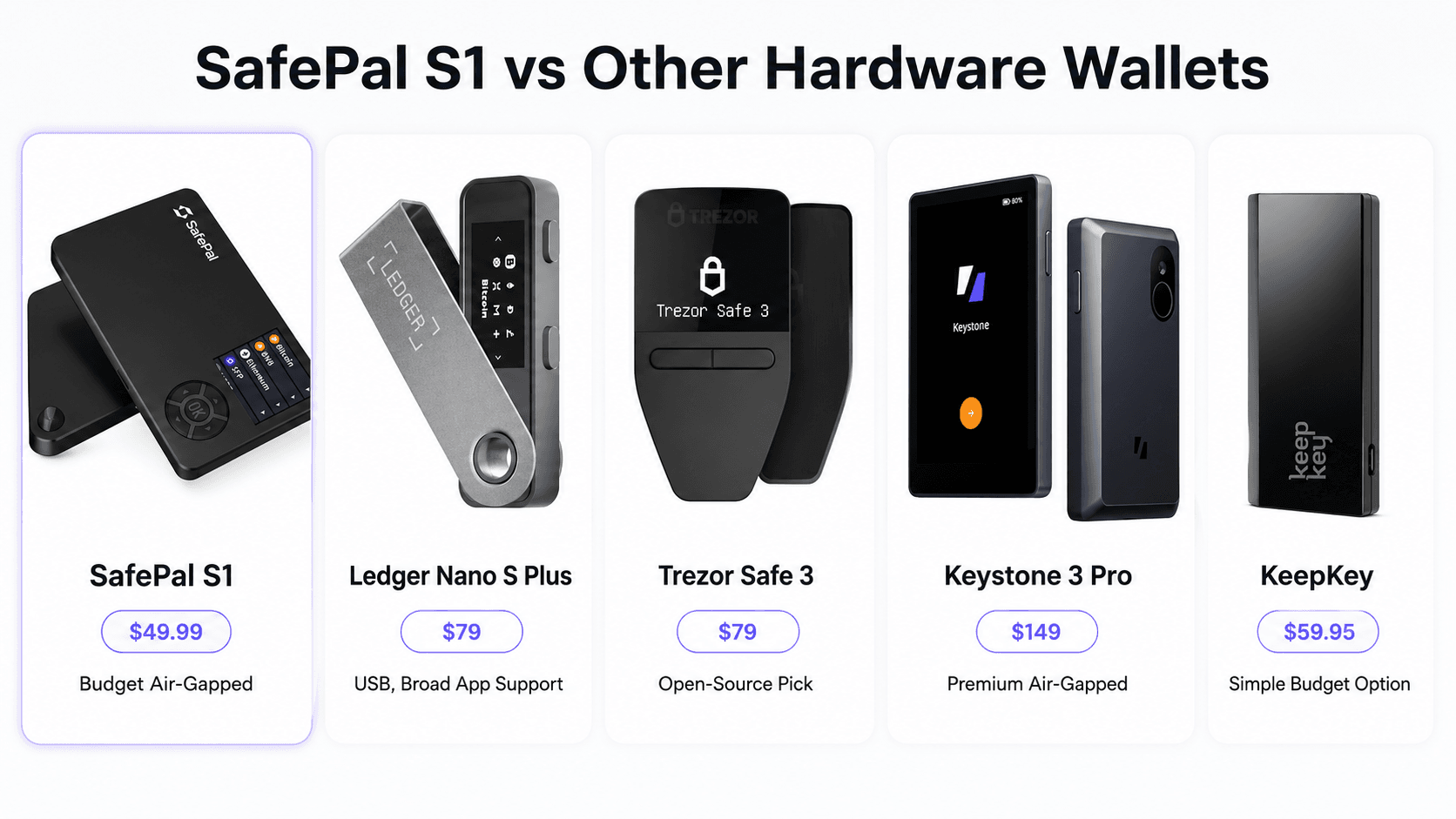 SafePal S1 Competes On QR Security, Mobile Pairing and Budget Pricing
SafePal S1 vs Ledger Nano S Plus
SafePal wins on air-gapped QR signing and battery. It signs transactions offline through QR codes and has a 400 mAh battery, so it feels more like a mobile-first cold wallet.
Ledger wins on app ecosystem, desktop experience and mainstream wallet integrations. Ledger Nano S Plus works with the Ledger Wallet app, supports desktop use, connects over USB-C and has broader third-party wallet support across many apps and chains.
SafePal S1 is stronger for mobile-first users who want offline QR signing at a lower price. Ledger Nano S Plus is stronger for users who want a more established desktop workflow, Ledger’s app ecosystem and wider integrations.
Read our full Ledger Nano S Plus review.
SafePal S1 vs Trezor Safe 3
SafePal is low-cost and air-gapped. Trezor Safe 3 has broader open-source credibility, Trezor Suite and stronger third-party wallet compatibility.
Trezor is the stronger pick for users who care about Sparrow Wallet, Electrum, MetaMask, auditability and open-source security. Its ecosystem is more comfortable for Bitcoin users and desktop-first users.
SafePal is stronger for budget users who want QR signing, a mobile app and broad multi-chain access without paying more than $50.
Read our full Trezor Safe 4 review.
SafePal S1 vs Keystone 3 Pro
SafePal S1 and Keystone 3 Pro both use QR-based air-gapped signing. Both aim to keep private keys offline while letting users interact with Web3 through companion software.
Keystone 3 Pro feels more premium and suits advanced users. It has a 4-inch touchscreen, three secure element chips, fingerprint support, passphrase support, Shamir backup support, anti-tamper self-destruction and deeper MetaMask support.
Keystone is the stronger power-user pick. SafePal is the stronger budget pick.
Read our full Keystone 3 Pro review.
SafePal S1 vs KeepKey
SafePal S1 and KeepKey both sit in the budget hardware wallet market, though KeepKey’s official page currently lists $59.95.
SafePal has the stronger security architecture for users who want air-gapped QR signing and an EAL 6+ secure element. KeepKey has a larger OLED screen, a simple USB workflow, open-source firmware and 12 or 24-word seed backup.
SafePal is the stronger security pick for budget users who want air-gapped signing. KeepKey may appeal to users who want a simple USB wallet with a large display and a more traditional desktop flow.
SafePal Hardware Wallet Lineup: S1 vs X1 vs S1 Pro
SafePal sells three main hardware wallets. The S1 is the cheapest air-gapped model.
| Model | Price | Best for | Signing method | Battery | Build |
| SafePal S1 | $49.99 | Budget air-gapped storage | QR codes | 400 mAh | ABS + PVC |
| SafePal X1 | $69.99 | Users who want Bluetooth convenience | Bluetooth | 200 mAh | ABS + tempered glass |
| SafePal S1 Pro | $89.99 | Better build and upgraded S1 experience | QR codes | 500 mAh | Aluminum alloy + tempered glass |
The SafePal hardware wallet store lists the S1, X1 and S1 Pro with those base prices, with VAT and duty excluded. Its specification table also lists the S1 build as ABS + PVC, X1 as ABS + tempered glass, and S1 Pro as aluminum alloy + tempered glass.
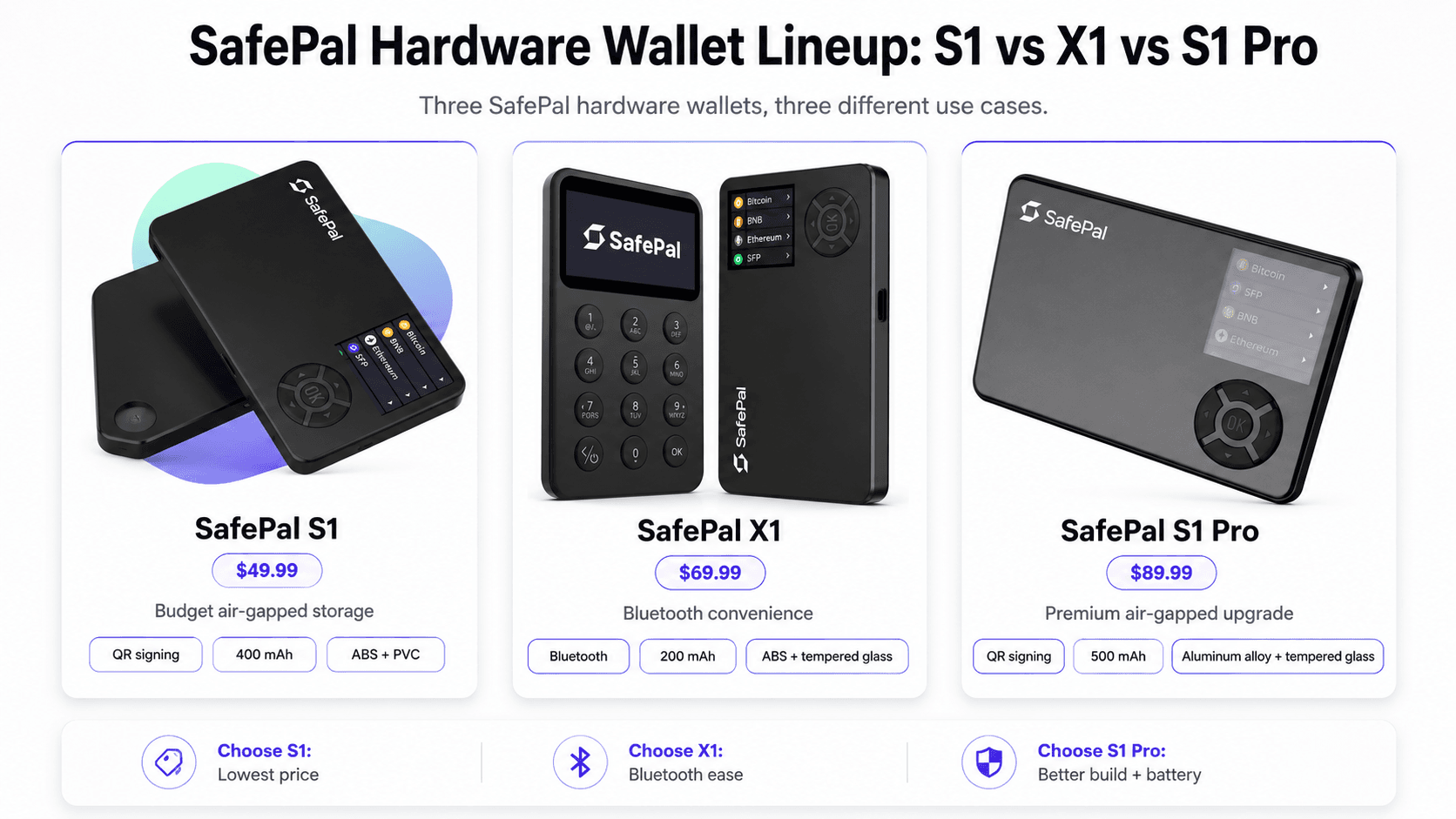 SafePal’s Hardware Lineup Covers Air-Gapped Storage, Bluetooth Access and Premium Builds
Should You Buy the S1 or S1 Pro?
Choose SafePal S1 if price is the main reason you are considering SafePal. It gives you QR signing, an EAL 6+ secure element, a 400 mAh battery and mobile DeFi access at $49.99.
Choose S1 Pro if you want a more premium build, aluminum alloy, tempered glass and longer 500 mAh battery life.
Choose X1 only if Bluetooth convenience is more important than strict air-gapped signing. The X1 is easier for users who dislike scanning QR codes, but it is not the same air-gapped wallet experience as the S1 or S1 Pro.

SafePal S1 Review Verdict: Is It Worth It in 2026?
SafePal S1 is worth it in 2026 if you want a low-cost air-gapped hardware wallet with broad multi-chain support and a strong mobile app. It is one of the best budget picks for users who want cold storage plus DeFi and NFT access.
However, SafePal S1 is not the cleanest choice for every user. Trezor is stronger for open-source users. Ledger has a broader app and integration base. Keystone offers a more premium air-gapped experience. KeepKey may appeal to users who want a larger screen and simple USB setup.
SafePal S1 is the best budget air-gapped wallet for mobile-first multi-chain users.