OKX Wallet is more than a place to hold crypto. It combines self-custody with swaps, bridges, DApp access, market tracking and onchain trading tools across multiple networks.
This review explains how OKX Wallet works, what it costs, how safe it is, which features stand out and how it compares with MetaMask, Trust Wallet, Rabby and Phantom. It also looks at who should use it, who may find it too complex and whether it works better as a trading wallet than a simple storage wallet.
Editor's Note (July 16, 2026): We fully updated this review in July 2026 to reflect OKX Wallet’s expanded multi-chain support, current fees, security tools, hardware-wallet compatibility, trading features and Smart Account automation. We also added hands-on comparisons with MetaMask, Trust Wallet, Rabby and Phantom, along with clearer guidance on who the wallet is best suited for.
OKX Wallet Review 2026: Quick Verdict
OKX Wallet is a powerful self-custody wallet for users who trade, bridge and interact with several blockchain ecosystems. Its strongest feature is the way it combines multi-chain asset management with swaps, DApp access, market discovery and automated onchain trading tools.
Our take: OKX Wallet is worth considering if you are an active multi-chain trader or DeFi user who understands gas, slippage, token approvals, contract risk and seed-phrase security. Its trading depth is impressive, but the wallet is less convincing for complete beginners or passive holders who only need simple, low-maintenance storage.
| Category | OKX Wallet Assessment |
|---|---|
| Wallet type | Self-custodial hot wallet |
| Best for | Active multi-chain and DeFi users |
| Less suitable for | Complete beginners and passive long-term holders |
| Main strength | Integrated swaps, bridges and onchain trading tools |
| Main weakness | Complexity and layered transaction costs |
| KYC | Not generally required for basic self-custody use |
| Hardware-wallet use | Available, but compatibility should be verified by device and platform |
| Platforms | Mobile app and browser extension |
| Overall verdict | Strong trading wallet, weaker as a simple storage wallet |
Scorecard
-
1Self-Custody and Asset Control 4.4/5 Standard OKX Wallet accounts keep private keys and recovery credentials under the user's control, separating wallet assets from funds held on the centralized OKX exchange.
-
2Trading and Execution 4.6/5 The wallet combines DEX aggregation, route splitting, cross-chain swaps, limit orders, Meme Mode, Smart Money signals and automated trading tools in one interface.
-
3Fees and Cost Transparency 3.8/5 The wallet is free to create, but transactions can include interface fees, gas, pool charges, bridge costs, slippage and price impact, making final costs harder to compare.
-
4Security 4.0/5 Risk warnings, domain screening, local passwords and supported hardware-wallet connections add protection, but seed theft, phishing, unsafe approvals and malicious contracts remain user-level risks.
-
5Features and Network Coverage 4.7/5 OKX Wallet supports broad multi-chain portfolio access, DApps, NFTs, bridges, custom networks, watch-only addresses, Smart Accounts, gas abstraction and agent-controlled workflows.
-
6User Experience 3.9/5 Experienced users gain a capable onchain dashboard, but beginners may struggle with network selection, token verification, route details, approvals, automation settings and transaction costs.
-
7Overall Score 4.23/5 OKX Wallet scores highly as an active multi-chain trading wallet, with its broad feature set offset by interface complexity, hot-wallet exposure and layered transaction risk.
Best For
- Active traders using several blockchain networks
- DeFi users who regularly connect to DApps
- Users who swap and bridge assets from self-custody
- Onchain traders using market signals and address tracking
- Experienced users who understand gas, approvals and contract risk
Not Ideal For
- Complete beginners creating their first crypto wallet
- Passive holders who rarely move their assets
- Bitcoin-only users who want a focused interface
- Long-term holders seeking fully offline cold storage
- Users who do not understand transaction signing or token approvals
Disclosure and Methodology
Some links in this article may be affiliate links. If you choose to use a service through these links, we may earn a commission at no additional cost to you.
Referenced product details were checked on July 16, 2026. Wallet features, supported networks, fee schedules, DEX routes, hardware compatibility and regional availability can change.
For this OKX Wallet review, we assessed the product across six main categories: self-custody and asset control, trading and execution, fees and cost transparency, security, features and network coverage, and user experience. We evaluated the mobile app and browser extension as multi-chain wallet interfaces rather than judging the product only as a place to store tokens.
We also weighed the main limitations, including seed-phrase responsibility, hot-wallet exposure, malicious contracts, layered transaction costs and feature differences between supported networks.
What Is OKX Wallet?
OKX Wallet is a self-custody, multi-chain crypto wallet that combines asset management with swaps, bridges, DApp connections and onchain trading tools.
Users can create or import blockchain accounts, receive assets, send transactions, connect to third-party protocols and trade through an integrated DEX aggregator. The standard wallet is non-custodial, which means the private keys and seed phrase remain on the user’s device rather than inside an OKX-controlled account.
Its purpose has moved beyond simple storage. Market pages, Smart Money tracking, Meme Mode, limit orders and automated strategies place trading close to the wallet balance. The current product interface also includes watchlists, copy trading, market signals and address-tracking tools.
That combination can shorten a fragmented DeFi workflow. It also puts more decisions, permissions and possible failure points on the same screen.
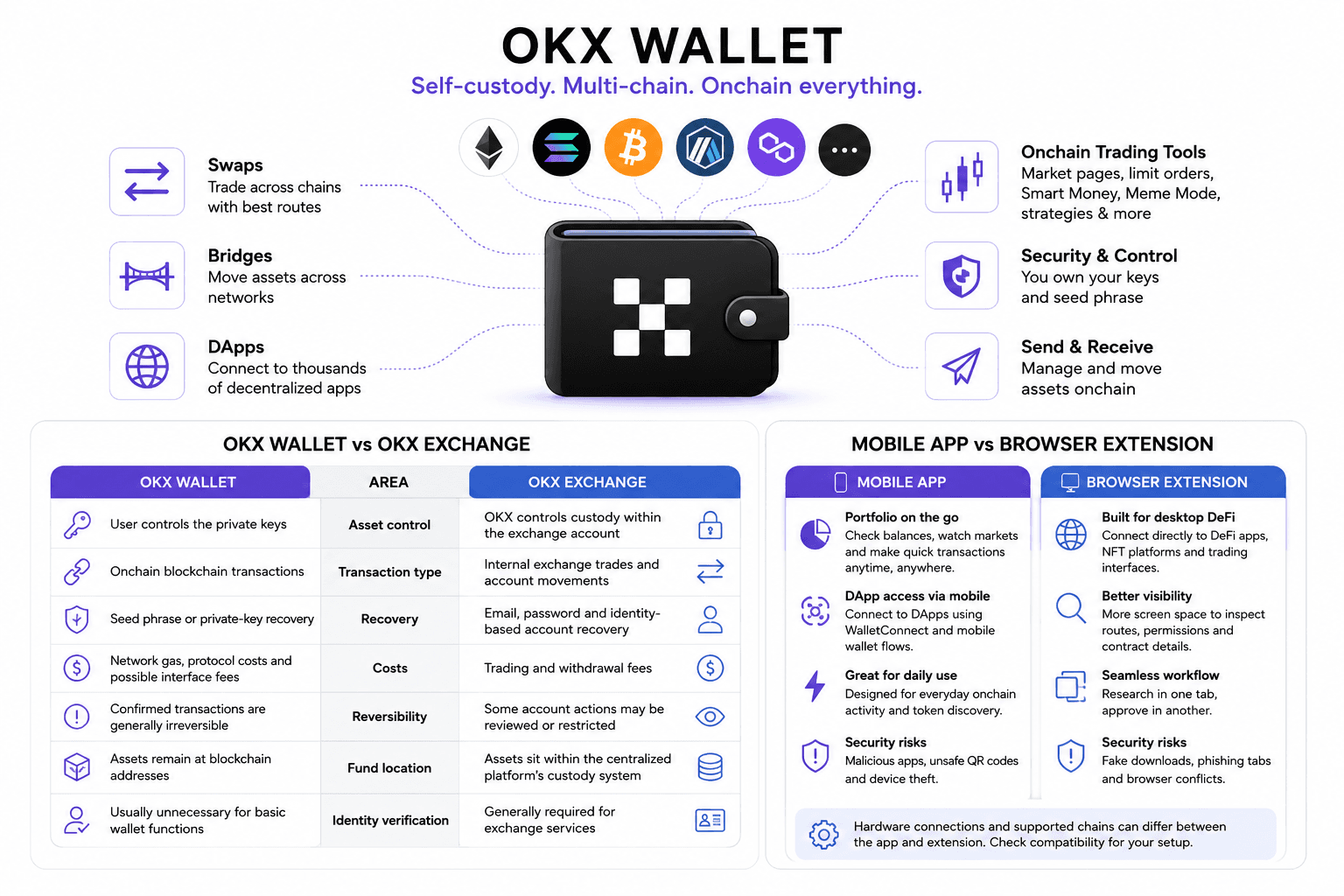 OKX Wallet Combines Self-Custody With Multi-Chain Trading Access
OKX Wallet vs OKX Exchange
The OKX exchange is a centralized trading platform. OKX Wallet is software for interacting directly with blockchain addresses and applications.
| Area | OKX Wallet | OKX Exchange |
|---|---|---|
| Asset control | User controls the private keys | OKX controls custody within the exchange account |
| Transaction type | Onchain blockchain transactions | Internal exchange trades and account movements |
| Recovery | Seed phrase or private-key recovery | Email, password and identity-based account recovery |
| Costs | Network gas, protocol costs and possible interface fees | Trading and withdrawal fees |
| Reversibility | Confirmed transactions are generally irreversible | Some account actions may be reviewed or restricted |
| Fund location | Assets remain at blockchain addresses | Assets sit within the centralized platform’s custody system |
| Identity verification | Usually unnecessary for basic wallet functions | Generally required for exchange services |
The shared branding does not create shared custody. Private keys and seed phrases for a standard OKX Wallet remain stored locally, and OKX cannot access, reset or recover them. Exchange credentials follow an account-recovery process because the centralized platform controls the account and holds the assets.
Some reliance on OKX remains. The company provides the interface used for built-in routing, market data, token screening, security warnings, customer support and automated trading functions. If that front end stopped working, the blockchain assets would still exist, but some integrated tools could become unavailable.
For a wider custody comparison, our crypto exchange versus crypto wallet guide examines recovery, ownership and platform-failure risk across both models.
Mobile App vs Browser Extension
The mobile app is designed for portfolio monitoring, token discovery and everyday onchain activity from a phone. Browser-based DApps can connect through mobile wallet flows such as WalletConnect, while the smaller screen makes it less comfortable for inspecting long contract interactions.
The browser extension fits desktop workflows. It can connect directly to DeFi applications, NFT platforms and trading interfaces, allowing users to research a token in one tab and approve the transaction in another.
The main differences are practical:
- Mobile portfolio management: The app is better suited to checking balances, watching markets and completing quick transactions away from a desktop.
- Desktop DApp access: The extension works more naturally with browser-based protocols that expect an injected wallet connection.
- Transaction visibility: A desktop screen provides more room to inspect routes, permissions and contract details before signing.
- Hardware connections: Supported devices and chains can differ between the app and extension, so compatibility should be checked for the exact setup.
- Security exposure: Mobile users face malicious apps, unsafe QR codes and device theft, while extension users face fake downloads, phishing tabs and browser conflicts.
The Chrome extension describes access to more than 140 blockchain networks, though that number should not be confused with full feature support on every chain.
Does OKX Wallet Require KYC?
Creating and using a standard OKX Wallet does not require mandatory identity verification. A user can generate a wallet, import a seed phrase, receive assets and connect to many DApps without completing exchange KYC.
That answer applies to the self-custody wallet layer rather than every service accessible through it.
- Wallet creation: A standard self-custody wallet can be generated without submitting identity documents.
- DApp connections: Most permissionless DApps only require a wallet signature, though the DApp may impose its own restrictions.
- Fiat purchases: Card, bank-transfer and other fiat on-ramp providers commonly require identity verification.
- OKX exchange products: Connecting to exchange services brings the exchange’s KYC and account rules into the process.
- Campaigns and rewards: Token launches, promotional campaigns or region-limited services may have separate eligibility requirements.
- Restricted jurisdictions: Wallet availability and ancillary services can vary where digital-asset activity is prohibited, restricted or sanctioned.
A self-custody wallet can therefore operate without KYC while individual services inside or around it still require verification.
Who Should Use OKX Wallet?
OKX Wallet fits users who actively move, trade and deploy assets onchain. Someone who opens a wallet twice a year to check a Bitcoin balance gains little from most of its feature set.
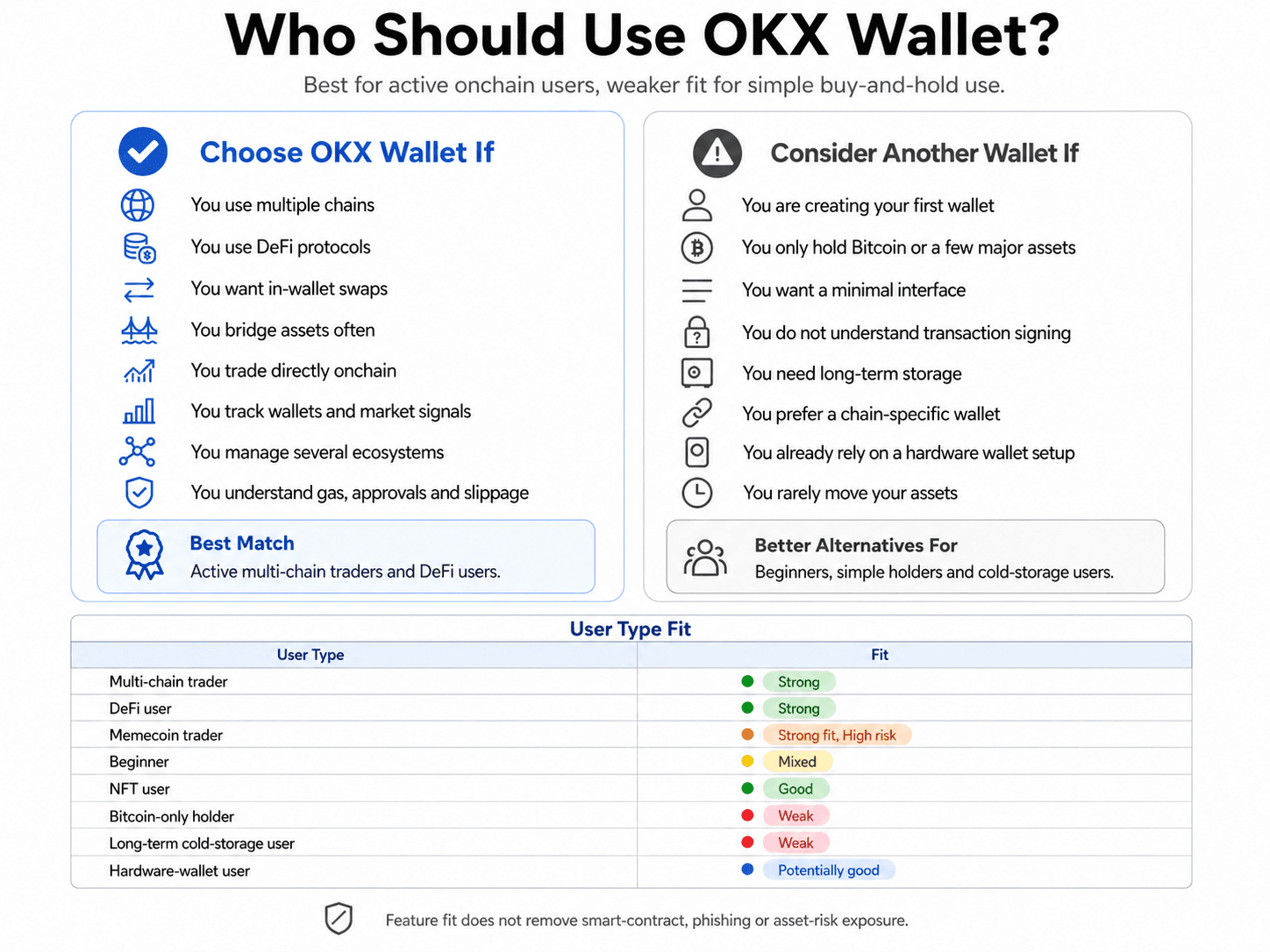 Active Multi-Chain Users Gain The Most From OKX Wallet
Choose OKX Wallet If
Choose OKX Wallet if you regularly use several networks and want to reduce the number of separate tools involved in trading.
- You move between multiple blockchains: The wallet is useful when funds regularly travel across Ethereum, Solana, Layer 2 networks and other ecosystems.
- You use DeFi protocols: Built-in DApp access reduces the friction of managing separate wallets for lending, liquidity pools and decentralized exchanges.
- You want swaps inside the wallet: The DEX aggregator compares external liquidity routes without requiring users to visit each exchange independently.
- You bridge assets regularly: Cross-chain tools place source-network, destination-network and bridge-route choices inside the same interface.
- You trade tokens directly onchain: Market, limit and advanced swap functions are aimed at users who execute from self-custody.
- You follow wallets and market signals: Address tracking, Smart Money data and discovery tools can reduce the number of external analytics tabs needed.
- You manage several ecosystems: A unified portfolio view is more convenient than checking separate balances through chain-specific wallets.
- You understand transaction mechanics: Gas tokens, slippage, approvals, contract addresses and network selection should already be familiar.
Consider a trader researching a token on Base, holding funds on Ethereum and planning to exit through Arbitrum. A basic wallet provides the addresses and signatures. OKX Wallet adds route comparison, token data and cross-chain execution around that process.
The convenience grows with activity. So does the number of contracts, permissions and data points the user must inspect.
Consider Another Wallet If
A beginner who only needs to receive and hold a few established assets may find OKX Wallet excessive. Its interface introduces markets, trading modes and cross-chain choices before the user has mastered basic recovery and network selection.
- You are creating your first wallet: A simpler interface makes it easier to understand seed phrases, receiving addresses and network fees before adding advanced tools.
- You only hold Bitcoin or a few major assets: A broad multi-chain trading layer adds little value to a portfolio that rarely moves.
- You want a minimal interface: Market signals, token discovery and trading prompts may feel like clutter when the main goal is storage.
- You do not understand transaction signing: Advanced DApp access becomes dangerous when approvals and contract messages are treated as routine pop-ups.
- You need long-term storage: An internet-connected wallet remains exposed to device compromise, phishing and malicious transactions.
- You prefer a chain-specific wallet: Solana-first or Bitcoin-only wallets may provide cleaner support for their native ecosystem.
- You already own a hardware wallet: Compatibility with the exact device, account type and chain may matter more than OKX Wallet’s broader feature list.
| User Type | Fit |
|---|---|
| Multi-chain trader | Strong |
| DeFi user | Strong |
| Memecoin trader | Strong feature fit, very high asset risk |
| Beginner | Mixed |
| NFT user | Good |
| Bitcoin-only holder | Weak |
| Long-term cold-storage user | Weak without hardware protection |
| Hardware-wallet user | Potentially good, subject to compatibility |
Memecoin traders receive fast discovery and execution, though those tools do not improve the quality of the asset being traded. Thin liquidity, concentrated ownership and malicious contracts remain separate problems.
First-time users can compare simpler options through our best crypto wallets for beginners guide. For balances intended to remain untouched, the more relevant comparison is our best hardware wallets guide.
OKX Wallet Features: What Stands Out?
OKX Wallet's strongest features fall into four connected groups. Routing handles execution, discovery surfaces trades, Smart Accounts support automation, and the broader wallet layer connects portfolios to DApps.
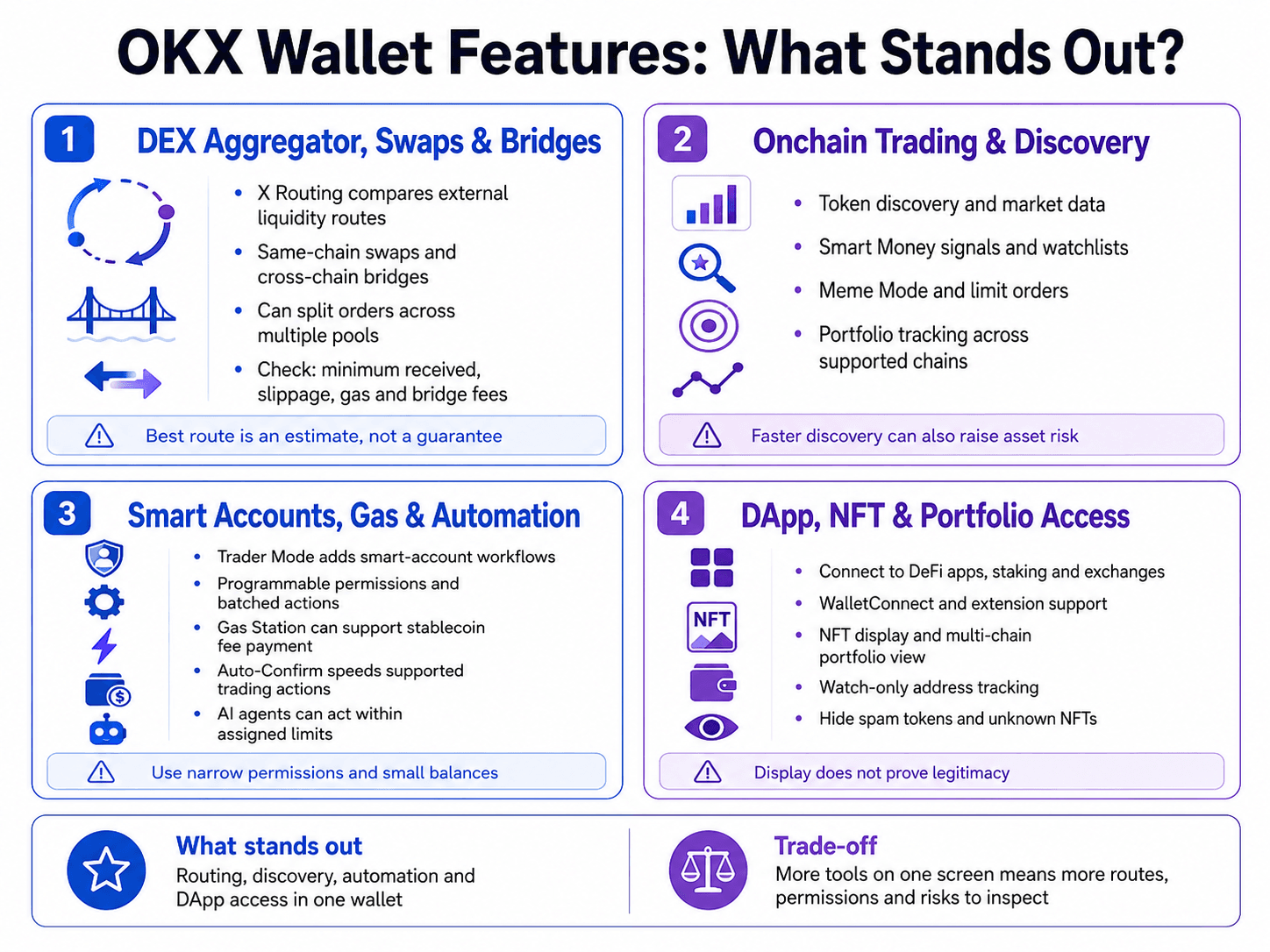 Integrated Trading Tools Push OKX Wallet Beyond Storage
DEX Aggregator, Token Swaps and Cross-Chain Bridges
OKX Wallet's DEX aggregator searches external liquidity sources for a token-swap route. Its X Routing system can compare pools and split an order across more than one route when that division is expected to improve execution.
The DEX currently advertises access to more than 400 DEXs across over 30 networks, although the available route depends on the selected chains, tokens and liquidity.
A same-chain swap and a cross-chain transaction solve different problems.
- A same-chain swap exchanges assets on one blockchain. ETH to USDC on Ethereum is a straightforward example. The trade may pass through one or several liquidity pools, but settlement remains on Ethereum.
- A cross-chain bridge moves value between blockchains. Sending USDC from Ethereum to Arbitrum introduces a bridge, messaging system or liquidity network between the source and destination.
Route splitting can improve a quote when no single pool has enough efficient liquidity. Yet the highest displayed token output may still produce a worse final result after gas, bridge charges or execution losses. A route through Ethereum can look attractive until the network fee is added. A smaller direct pool on a Layer 2 may quote less but settle more cheaply.
Onchain Trading and Discovery Tools
OKX Wallet combines token discovery, portfolio tracking, Smart Money signals, Meme Mode, market data, limit orders and automated strategies around the wallet interface. Its current market section includes watchlists, copy trading, address signals and token-filtering tools.
The commercial appeal is straightforward. A trader can move from finding a token to inspecting liquidity and placing an order without rebuilding the same search across several platforms.
The main tools serve different parts of that workflow:
- Token discovery: Trending and newly active assets can be found before the user opens a separate market-data platform.
- Market data: Price, liquidity, volume and recent trade activity help users inspect basic conditions around a token.
- Smart Money signals: Selected wallet activity can surface addresses or assets attracting onchain attention.
- Meme Mode: A faster trading interface targets newly launched and speculative tokens, where execution speed is often prioritised.
- Limit orders: Users can define an acceptable execution price rather than entering immediately at the market quote.
- Advanced swap modes: Additional route and execution controls give experienced traders more influence over the transaction.
- Portfolio tracking: Assets spread across supported chains can be viewed without checking each ecosystem separately.
These tools reduce tab-switching. They also remove useful friction.
Smart Accounts, Gas Abstraction and Automation
A Smart Account is a blockchain account controlled through programmable contract logic. Unlike a standard externally owned account, it can apply rules around permissions, fee payment, batching and automated execution.
OKX now refers to this product layer as Trader Mode. Users first create a standard seed-phrase wallet and then activate the additional account structure for supported trading workflows.
Several features sit under this broader model:
- Programmable permissions: Contract logic can define which actions may occur and under what limits.
- Transaction batching: Several actions can sometimes be packaged into a smoother workflow instead of requiring separate manual steps.
- Gas abstraction: Eligible transactions can pay network costs without the user holding the chain’s native token.
- Automated execution: Market orders, limit orders and strategy actions can move through a reduced-confirmation signing flow.
- Time-limited activation: Trader Mode permissions can be constrained by an active period rather than remaining open indefinitely.
- Agent-controlled actions: Supported AI agents can initiate transactions within the permissions and controls assigned to them.
The Gas Station supports payment of certain network fees with USDC, USDT or USDG. A third-party relayer advances the native gas asset and is reimbursed from the selected stablecoin within the transaction. The feature requires a supported app version, network and transaction type.
Auto-Confirm changes the signing flow more aggressively. In Trader Mode, it is enabled by default and cannot be disabled. Supported market orders, limit orders and order-management actions can proceed without repeated password or biometric confirmation. Token transfers, approval transactions, NFTs and general DeFi interactions remain outside that automatic flow.
That arrangement offers faster execution during volatile markets. It also removes a pause that often gives users time to catch a mistake. Device binding, daily limits and active periods narrow the exposure, though the initial permissions still deserve close review.
The automation layer expanded with the Agentic Wallet launch on March 18, 2026. Supported AI agents can initiate natural-language transactions across nearly 20 networks, while private-key operations are kept inside a Trusted Execution Environment.
Agent-controlled wallets remain an early product category. Small balances, narrow permissions and clear revocation paths make more sense than handing an autonomous wallet broad control over a general portfolio.
DApp, NFT and Portfolio Access
OKX Wallet connects to blockchain applications through its mobile interfaces, browser extension and WalletConnect-compatible workflows. The same account can hold tokens, display NFTs, track positions and sign transactions across supported ecosystems.
The main functions are:
- DApp connections: Users can connect directly to decentralized exchanges, lending protocols, staking platforms and other onchain applications.
- WalletConnect compatibility: Mobile and external DApps can establish a connection without requiring the wallet to be built directly into the browser.
- NFT display: Supported collectibles can appear alongside fungible-token balances, though display coverage varies by chain and standard.
- Multi-chain portfolio tracking: Assets spread across different ecosystems can be viewed from one dashboard.
- Watch-only tracking: Public addresses can be monitored without importing their private keys or gaining spending access.
Public addresses can receive spam tokens and NFTs without the owner accepting them. An unsolicited asset may contain a name, image or link designed to send the user toward a malicious claim page.
Displaying a token proves that the wallet can read the contract. It does not establish legitimacy. Unknown assets are usually safer left hidden than transferred, sold or “claimed.”
OKX Wallet Fees: What You Actually Pay
Creating and holding an OKX Wallet does not necessarily involve a subscription fee, but using it can involve wallet service fees, blockchain gas, protocol charges, slippage, price impact and cross-chain bridge costs.
The wallet download may be free. The transaction assembled inside it can carry several separate costs.
OKX Wallet Costs Extend Beyond Network Gas FeesWallet Service Fees and Swap Charges
OKX DEX charges a flat user-interface fee on selected token pairs. The fee is collected for using the OKX interface to access and transact through third-party decentralized exchanges.
As of July 16, 2026, the published fee schedule lists:
| Token-Pair Classification | Standard Interface Fee | Charged Asset |
|---|---|---|
| Other to Other | 0% | No charge |
| Group 1 to Group 1 | 0.10% | Target token |
| Group 1 to Group 2 | 0.25% | Group 1 token |
| Group 2 to Group 2 | 0.25% | Target token |
| Group 1 or Group 2 to Other | 0.50% | Group 1 or Group 2 token |
The interface fee should appear in the transaction summary. Users still need to establish whether pool fees, bridge charges and price impact are embedded in the quoted output or shown separately.
Check out our top picks for the best crypto swap platforms.
Gas, Slippage, Price Impact and Bridge Costs
Each cost represents a different source of value loss.
- Gas fee: This is paid to the blockchain network for processing the transaction, and it usually depends on computational work and network demand rather than trade size.
- Liquidity or protocol fee: A DEX pool or protocol may collect a fee that is already reflected in the quoted exchange rate.
- Slippage: The expected price can differ from the executed price when liquidity or market conditions change before confirmation.
- Price impact: A large order can move the pool price against the trader, particularly when available liquidity is shallow.
- Bridge fee: Moving value between networks can introduce source-chain gas, protocol charges, relayer costs and destination-delivery fees.
- Failed-transaction cost: A reverted transaction may still consume gas because the network processed the attempted instruction.
Gas fees fluctuate and appear on the transaction-confirmation screen before signing. They are generally charged per transaction rather than as a percentage of the amount sent, and fees spent on failed transactions are non-refundable.
A useful diagnostic formula is:
Total transaction cost = wallet service fee + network gas + protocol fee + slippage + price impact + bridge cost
The categories should not always be added mechanically. Pool fees and price impact may already sit inside the quoted output. Counting them again would exaggerate the cost.
Is OKX Wallet Safe?
Yes. OKX Wallet is self-custodial, so OKX does not directly hold the private keys to a standard wallet account. That reduces centralized custody risk and transfers responsibility for seed storage, transaction signing, DApp permissions and device security to the user.
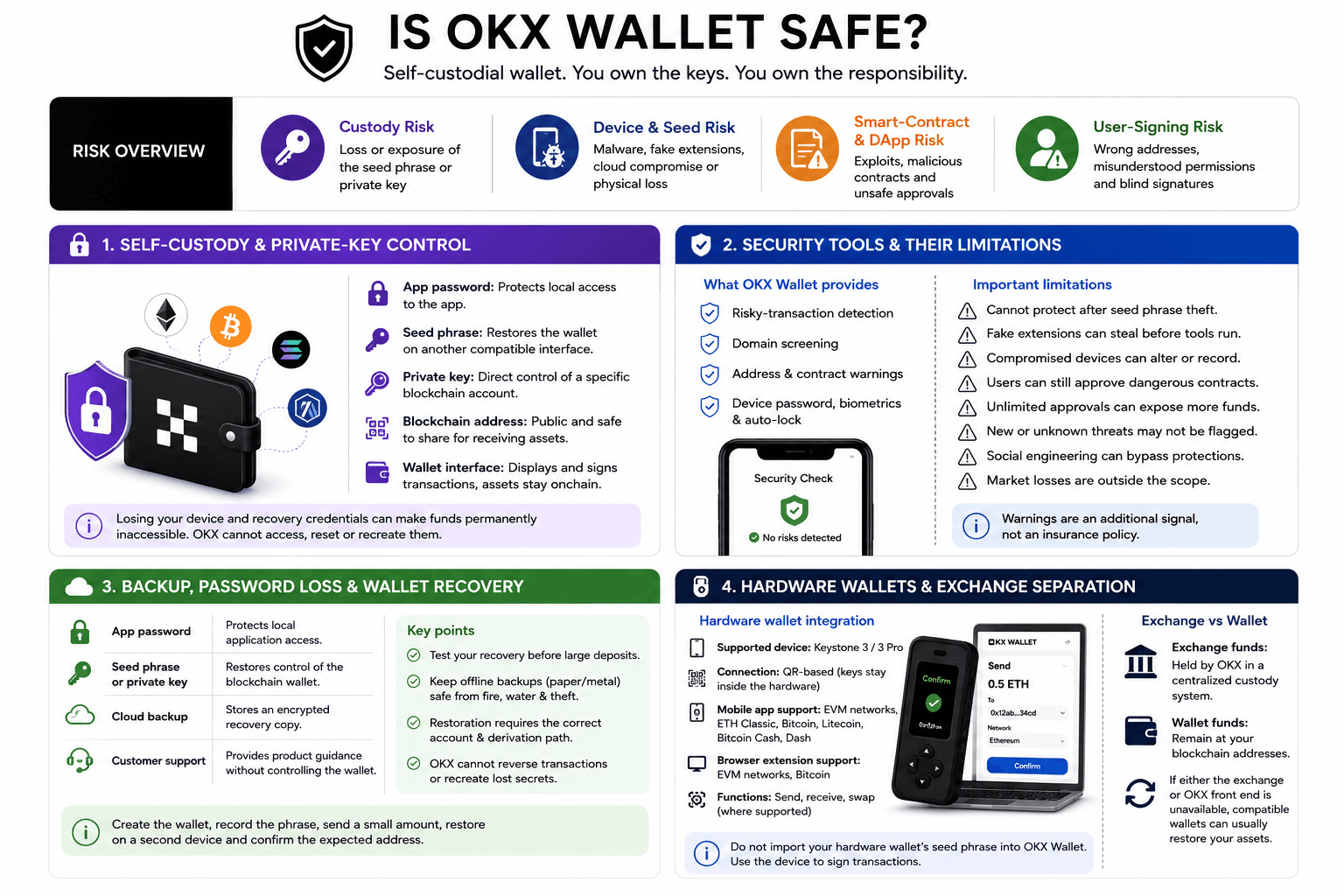 Self-Custody Reduces Custody Risk But Raises User Responsibility
The risk profile can be divided into four areas:
| Risk Category | Where Loss Can Occur |
|---|---|
| Custody risk | Loss or exposure of the seed phrase or private key |
| Device and seed risk | Malware, fake extensions, cloud compromise or physical loss |
| Smart-contract and DApp risk | Exploits, malicious contracts and unsafe approvals |
| User-signing risk | Wrong addresses, misunderstood permissions and blind signatures |
Self-Custody and Private-Key Control
Blockchain ownership comes from the cryptographic credentials controlling an address. The application displays and signs for that address, but the assets remain recorded on the blockchain.
The local wallet password and the seed phrase serve different purposes.
- App password: This protects local access to the installed application but does not replace the wallet’s recovery credentials.
- Seed phrase: This regenerates the private keys and can restore the wallet on another compatible interface.
- Private key: This provides direct control over a specific blockchain account and should receive the same protection as the seed phrase.
- Blockchain address: This is public and can be shared for receiving assets without exposing spending authority.
- Wallet interface: This displays balances and prepares transactions but does not contain the assets themselves.
A forgotten password can often be resolved by resetting the local wallet and restoring it with the seed phrase or private key. Losing the device and recovery credentials together can make the funds permanently inaccessible. OKX cannot access, reset or recreate them.
Compatible standard accounts can usually be restored in another wallet. Assets may not appear immediately when the receiving interface lacks the network, token contract or correct account derivation path. Some users also import the right seed while inspecting the wrong derived address.
Self-custody protects against direct exchange custody failure. It offers no protection when the owner signs away control.
Security Tools and Their Limitations
OKX Wallet includes risky-transaction detection, domain screening and other security warnings intended to catch suspicious activity before execution. The Chrome extension listing also identifies risky-transaction and domain-risk detection among the wallet’s active security features.
These tools can flag malicious addresses, dangerous ownership changes, unusual approvals or known scam contracts. Device passwords, biometrics and auto-lock settings add another barrier against casual local access.
Their limits are equally clear:
- Seed-phrase theft: A warning system cannot protect assets after the recovery phrase has been entered into a phishing site or shared with an attacker.
- Fake extension installation: A convincing imitation can capture credentials before the genuine OKX security tools ever run.
- Compromised devices: Malware may alter copied addresses, record screen activity or interfere with transaction prompts.
- Malicious signatures: A user can still approve a dangerous contract after receiving a warning.
- Unlimited token approvals: Broad spending allowances remain active until revoked and can expose more than the amount used in one trade.
- Previously unknown threats: A new malicious contract may not yet appear in reputation databases.
- Social engineering: Attackers can manipulate the user into bypassing protections voluntarily.
- Unsafe automation: Poorly configured Auto-Confirm or agent permissions can affect several actions instead of one isolated transaction.
- Market losses: Security tools cannot prevent losses caused by collapsing tokens, thin liquidity or manipulated prices.
A security warning is an additional signal rather than an insurance policy.
Unlimited approvals deserve particular care. They save repeated approval transactions but allow the authorised contract to spend up to the approved amount later. If that contract or operator is compromised, the wider balance may be exposed.
Backup, Password Loss and Wallet Recovery
OKX cannot recreate a lost recovery phrase or reverse a confirmed blockchain transaction. Support can identify official software and help troubleshoot interface or connection problems, but it cannot restore cryptographic ownership.
The recovery hierarchy is:
| Recovery Layer | Purpose |
|---|---|
| App password | Protects local application access |
| Seed phrase or private key | Restores control of the blockchain wallet |
| Cloud backup | Stores an encrypted recovery copy through a cloud account |
| Customer support | Provides product guidance without controlling the wallet |
Each layer solves a different problem:
- App-password loss: Reinstalling or resetting the wallet may restore access when the seed phrase or private key is available.
- Seed-phrase loss: There is no central reset process if every working wallet installation is also lost.
- Cloud backup: An encrypted copy adds convenience but creates dependence on the cloud account and backup password.
- Offline backup: Paper or metal storage avoids online-account risk but remains exposed to theft, fire, water damage and transcription mistakes.
- Customer support: Support may explain recovery steps but cannot generate keys, cancel transactions or return stolen assets.
- Restoration mismatch: The right seed can still show an unexpected address when the wrong account index or derivation path is selected.
A restoration test should happen before a large deposit. Create the wallet, record the phrase, send a small amount and restore the account on a trusted secondary device. Confirm the expected address before relying on the backup.
Our crypto wallet recovery guide covers seed derivation, missing accounts and hardware-wallet restoration in greater detail.
Hardware Wallets and Exchange Separation
Connecting OKX Wallet to a hardware device keeps the signing key behind the hardware security boundary. The software constructs the transaction, while the hardware wallet provides final authorization.
Importing a hardware wallet’s seed phrase into OKX Wallet removes that protection. Once entered into an internet-connected phone or browser, the seed can be targeted by malware or copied from device memory.
OKX currently documents direct integration with Keystone 3 and Keystone 3 Pro. Compatibility differs by interface:
- Mobile application: EVM networks, Ethereum Classic, Bitcoin, Litecoin, Bitcoin Cash and Dash are listed.
- Browser extension: EVM networks and Bitcoin are listed.
- Supported functions: Sending, receiving and swapping are available where the connected chain and route support them.
- Connection method: Keystone uses a QR-based flow rather than exposing the private key to the phone or browser.
- Other devices: Compatibility with another manufacturer should be verified through current documentation rather than assumed from the hardware-wallet category.
A hardware wallet also cannot protect users who approve unreadable instructions. Blind signing asks the device owner to authorise a transaction without complete human-readable details. The destination, asset movement and contract permissions should be verified on the trusted screen whenever possible.
Exchange and wallet funds should remain separate. If the centralized exchange failed, standard OKX Wallet assets would remain at their blockchain addresses because the exchange does not control the keys. If the wallet front end stopped operating, compatible standard accounts could generally be restored through another interface. OKX-specific routing, market data and automated services could still become unavailable.
Supported Networks, Tokens and Hardware Wallets
A supported-chain count gives an incomplete picture. A wallet can recognise an address without offering swaps, bridges, NFTs, DApps, Smart Accounts or hardware signing on that network.
OKX’s own public surfaces displayed different totals during this review. The main wallet page referred to 130+ native chains, while the Chrome extension listing advertised 140+ blockchain networks. These figures may reflect different update schedules or definitions of native, display, DApp and test-network support.
The largest number is less useful than checking the exact action the user plans to perform.
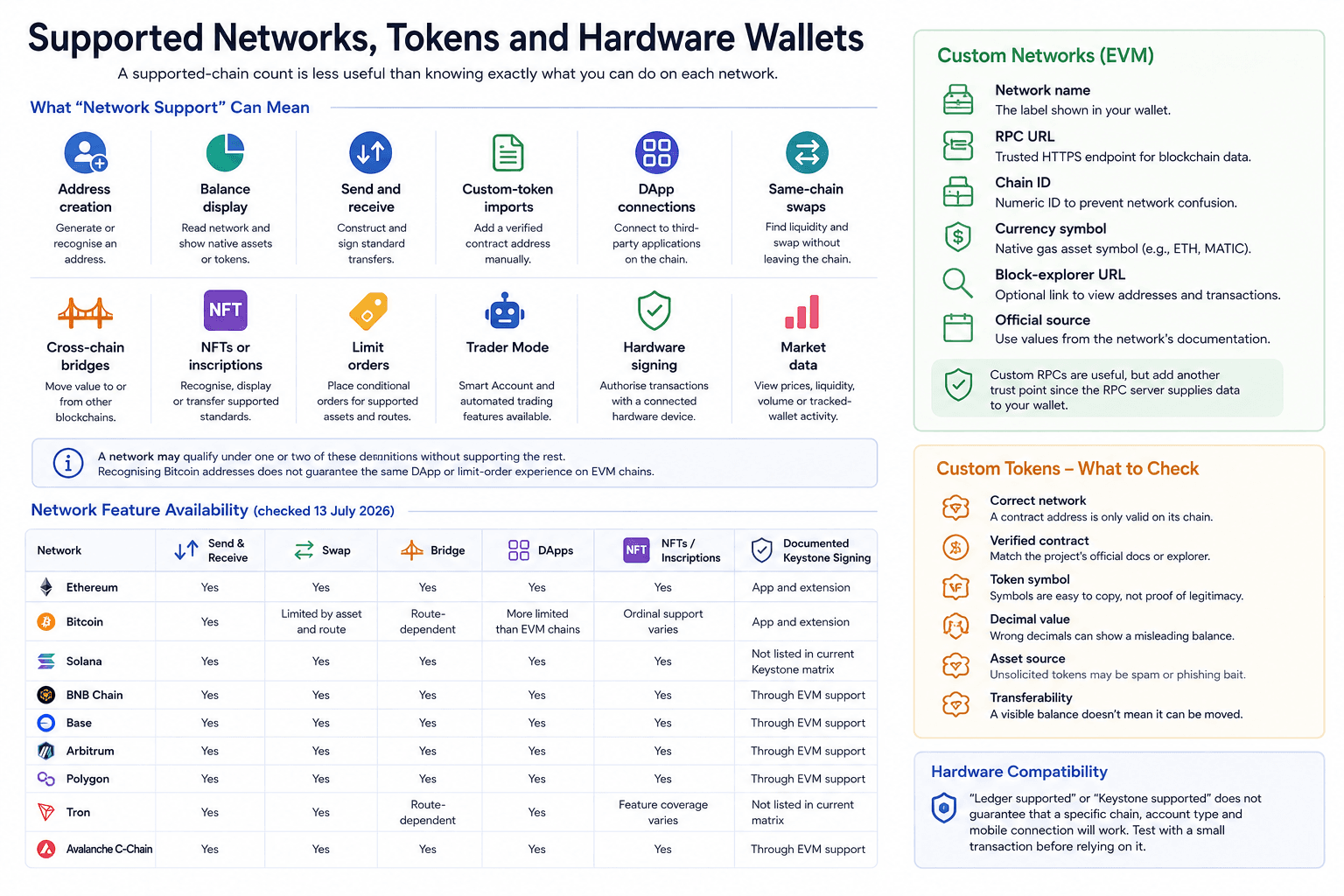 Network Support Varies By Features, Tokens And Devices
What Supported Network Really Means
Network support can describe several different capabilities:
- Address creation: The wallet can generate or recognize an address for that blockchain.
- Balance display: The interface can read the network and show supported native assets or tokens held at the address.
- Sending and receiving: Users can construct and sign ordinary transfers on the network.
- Custom-token imports: A verified contract address can be added when the asset does not appear automatically.
- DApp connections: The wallet can connect to third-party applications built on that blockchain.
- Same-chain swaps: Built-in routing can find executable liquidity without moving the asset to another network.
- Cross-chain bridges: A supported bridge route can move value between the network and another blockchain.
- NFT support: The wallet can recognize, display or transfer particular collectible and inscription standards.
- Limit orders: The trading interface can place conditional orders for supported assets and routes.
- Trader Mode: Smart Account and automated trading functions are available on the network.
- Hardware signing: A connected hardware device can authorize transactions for that chain through the selected interface.
- Market data: The wallet can display prices, liquidity, volume or tracked-wallet activity for assets on the network.
A network may qualify under one or two of these definitions without supporting the rest. Recognizing Bitcoin addresses, for example, does not guarantee the same DApp or limit-order experience available on an EVM network.
The table below reflects the public wallet, DEX and Keystone documentation checked on 13 July 2026. Built-in availability can still change by asset and route.
| Network | Send and Receive | Swap | Bridge | DApps | NFTs or Inscriptions | Documented Keystone Signing |
|---|---|---|---|---|---|---|
| Ethereum | Yes | Yes | Yes | Yes | Yes | App and extension |
| Bitcoin | Yes | Limited by asset and route | Route-dependent | More limited than EVM chains | Ordinal support varies | App and extension |
| Solana | Yes | Yes | Yes | Yes | Yes | Not listed in current Keystone matrix |
| BNB Chain | Yes | Yes | Yes | Yes | Yes | Through EVM support |
| Base | Yes | Yes | Yes | Yes | Yes | Through EVM support |
| Arbitrum | Yes | Yes | Yes | Yes | Yes | Through EVM support |
| Polygon | Yes | Yes | Yes | Yes | Yes | Through EVM support |
| Tron | Yes | Yes | Route-dependent | Yes | Feature coverage varies | Not listed in current matrix |
| Avalanche C-Chain | Yes | Yes | Yes | Yes | Yes | Through EVM support |
The DEX covers fewer networks than the wallet itself. Trading support requires executable liquidity, quote infrastructure and supported contracts, while a wallet may display or transfer an asset without offering a built-in route.
Custom Networks, Tokens and Hardware Compatibility
Users can add a custom RPC for an EVM-compatible network that is not preloaded. The setup requires several pieces of information.
- Network name: This is the label displayed inside the wallet and should match the chain’s official identity.
- RPC URL: The endpoint supplies blockchain data and must use a trusted HTTPS address.
- Chain ID: This numerical identifier prevents the wallet from confusing one EVM network with another.
- Currency symbol: The native gas asset, such as ETH or MATIC, appears under this symbol.
- Block-explorer URL: An optional explorer link makes it easier to inspect addresses and transactions.
- Official source: Every value should come from the network’s own documentation rather than an unknown social-media post.
Custom RPCs are useful for testnets, new EVM ecosystems and private networks. They also create another trust point because the RPC server supplies blockchain data to the wallet.
Custom-token imports require similar checks:
- Correct network: A contract address is only meaningful on the blockchain where it was deployed.
- Verified contract: The address should match the project’s official documentation or a reputable block explorer.
- Token symbol: Symbols are easy to copy and do not prove authenticity.
- Decimal value: Incorrect decimals can cause the wallet to display a misleading balance.
- Asset source: Tokens received without any user action may be spam or phishing bait.
- Transferability: A visible balance does not guarantee that the token can be sold or moved.
Ticker symbols are not unique across networks. USDT on Ethereum, Tron and Solana represents separate token contracts. Selecting the wrong network can send assets somewhere the receiving service does not support.
Setting Up and Using OKX Wallet
OKX Wallet can be created within minutes. A responsible setup takes longer because the backup and recovery process should be proven before substantial funds arrive.
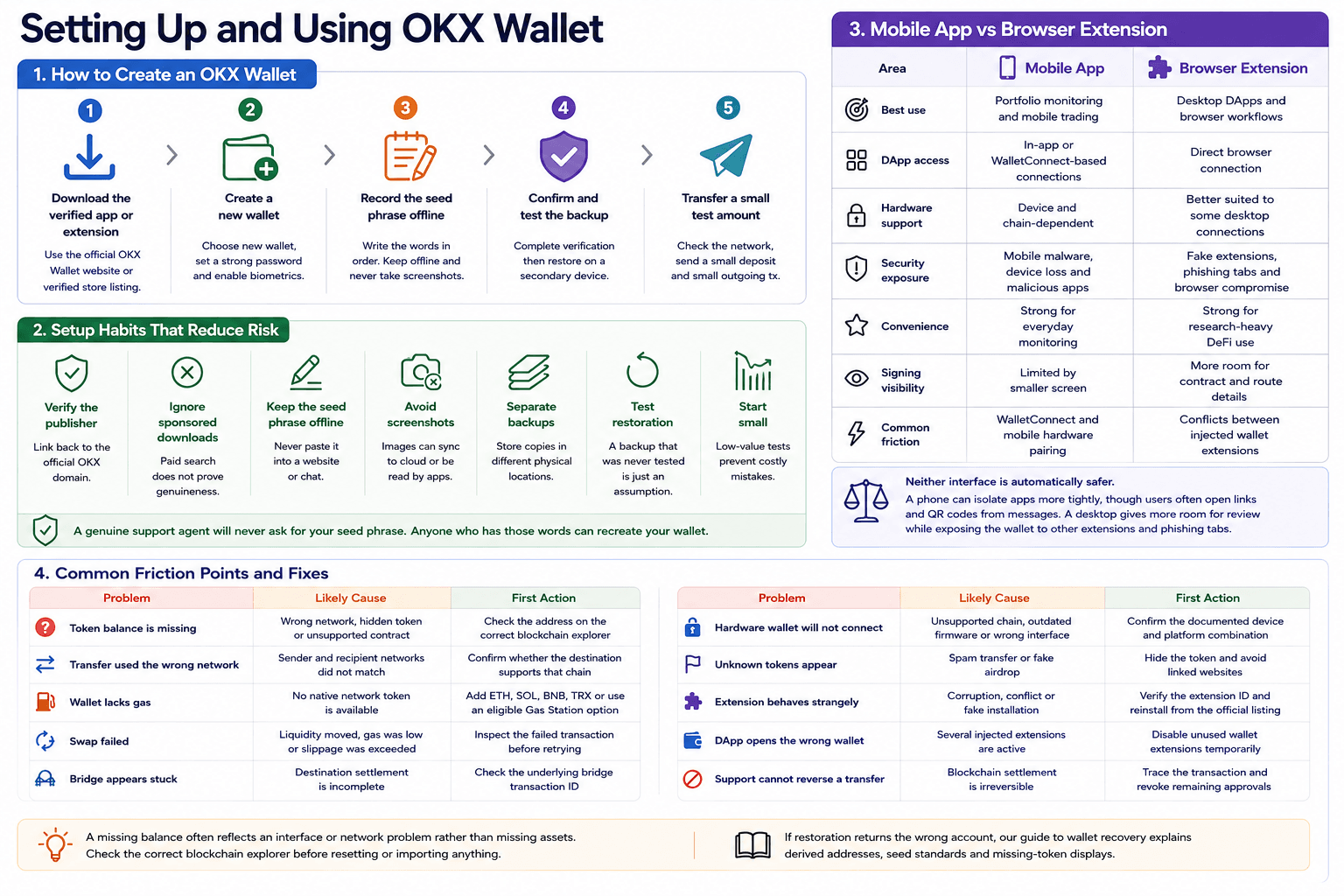 Secure Setup Starts With Verified Downloads And Recovery Testing
How to Create an OKX Wallet
- Download the verified application or extension.
Begin from the official OKX Wallet website or its verified store listing. Sponsored search results and imitation domains should be avoided. - Create a new wallet.
Select the new-wallet option, set a strong local password and enable supported biometric access. - Record the seed phrase offline.
Write the words in the correct order and keep them away from screenshots, email, messaging apps and unencrypted cloud notes. - Confirm and test the backup.
Complete the wallet’s verification flow, then restore the account on a trusted secondary device before depending on it. - Transfer a small test amount.
Check the receiving network, send a small deposit and complete a small outgoing transaction before moving a larger balance.
A few setup habits reduce the most common risks:
- Verify the publisher: The extension or app should link back to the official OKX domain.
- Ignore sponsored downloads: Paid search placement does not prove that an application is genuine.
- Keep the seed phrase offline: A recovery phrase should never be pasted into a website or support chat.
- Avoid screenshots: Images can be synchronized to cloud accounts or read by other applications.
- Separate backups: Storing every copy beside the same device leaves one physical point of failure.
- Test restoration: A backup that has never been restored remains an assumption.
- Start small: A low-value test exposes network and address mistakes before they affect a large balance.
A genuine support agent will not ask for the seed phrase. Anyone who has those words can recreate the wallet elsewhere.
Mobile App vs Browser Extension
| Area | Mobile App | Browser Extension |
|---|---|---|
| Best use | Portfolio monitoring and mobile trading | Desktop DApps and browser workflows |
| DApp access | In-app or WalletConnect-based connections | Direct browser connection |
| Hardware support | Device and chain-dependent | Better suited to some desktop connections |
| Security exposure | Mobile malware, device loss and malicious apps | Fake extensions, phishing tabs and browser compromise |
| Convenience | Strong for everyday monitoring | Strong for research-heavy DeFi use |
| Signing visibility | Limited by smaller screen | More room for contract and route details |
| Common friction | WalletConnect and mobile hardware pairing | Conflicts between injected wallet extensions |
Neither interface is automatically safer.
A phone can isolate applications more tightly, though users frequently open links and QR codes from messages. A desktop gives more room for transaction review while exposing the wallet to other extensions, copied addresses and phishing tabs.
Common Friction Points
| Problem | Likely Cause | First Action |
|---|---|---|
| Token balance is missing | Wrong network, hidden token or unsupported contract | Check the address on the correct blockchain explorer |
| Transfer used the wrong network | Sender and recipient networks did not match | Confirm whether the destination supports that chain |
| Wallet lacks gas | No native network token is available | Add ETH, SOL, BNB, TRX or use an eligible Gas Station option |
| Swap failed | Liquidity moved, gas was low or slippage was exceeded | Inspect the failed transaction before retrying |
| Bridge appears stuck | Destination settlement is incomplete | Check the underlying bridge transaction ID |
| Hardware wallet will not connect | Unsupported chain, outdated firmware or wrong interface | Confirm the documented device and platform combination |
| Unknown tokens appear | Spam transfer or fake airdrop | Hide the token and avoid linked websites |
| Extension behaves strangely | Corruption, conflict or fake installation | Verify the extension ID and reinstall from the official listing |
| DApp opens the wrong wallet | Several injected extensions are active | Disable unused wallet extensions temporarily |
| Support cannot reverse a transfer | Blockchain settlement is irreversible | Trace the transaction and revoke remaining approvals |
A missing balance often reflects an interface or network problem rather than missing assets. The correct blockchain explorer should be checked before the user resets or imports anything.
If restoration returns the wrong account, our guide to wallet recovery explains derived addresses, seed standards and missing-token displays.
OKX Wallet vs MetaMask, Trust Wallet, Rabby and Phantom
OKX Wallet is strongest when broad onchain trading integration drives the decision. Its competitors make different compromises around network scope, simplicity and transaction visibility.
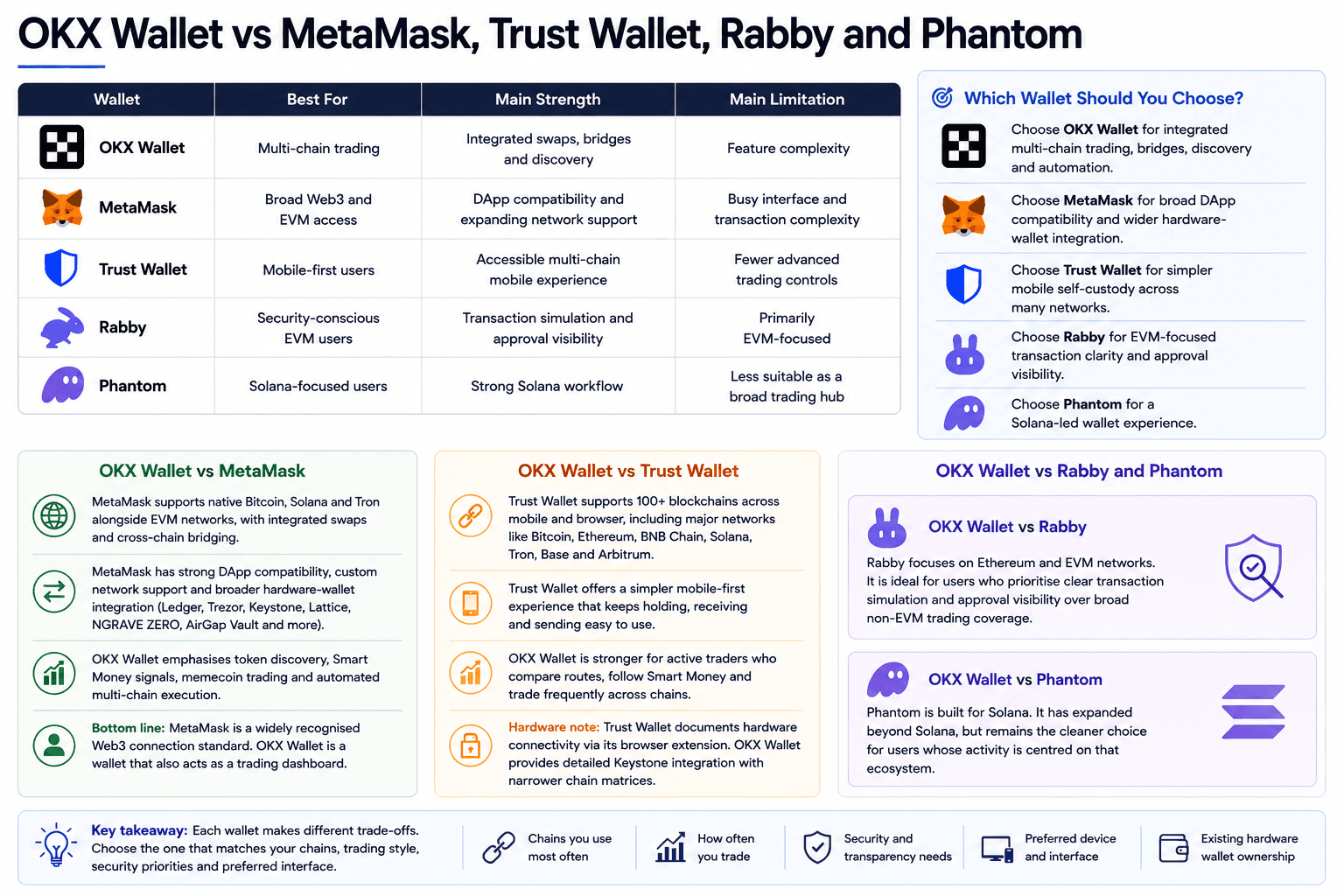 OKX Wallet Competes On Breadth, Rivals Win On Focus
| Wallet | Best For | Main Strength | Main Limitation |
|---|---|---|---|
| OKX Wallet | Multi-chain trading | Integrated swaps, bridges and discovery | Feature complexity |
| MetaMask | Broad Web3 and EVM access | DApp compatibility and expanding network support | Busy interface and transaction complexity |
| Trust Wallet | Mobile-first users | Accessible multi-chain mobile experience | Fewer advanced trading controls |
| Rabby | Security-conscious EVM users | Transaction simulation and approval visibility | Primarily EVM-focused |
| Phantom | Solana-focused users | Strong Solana workflow | Less suitable as a broad trading hub |
OKX Wallet vs MetaMask
MetaMask remains one of the most widely recognized browser wallets for Ethereum and EVM applications. Its compatibility with DApps, custom networks and several hardware-wallet brands gives it an infrastructure advantage. MetaMask’s current extension supports devices including Ledger, Trezor, Keystone, Lattice, NGRAVE ZERO and AirGap Vault, while mobile support is narrower.
The old description of MetaMask as an EVM-only wallet has become less accurate. Its current product supports native Bitcoin, Solana and Tron alongside EVM networks, with integrated swaps and cross-chain bridging.
OKX Wallet still places greater emphasis on token discovery, Smart Money signals, memecoin trading and automated multi-chain execution. A user who moves constantly between Solana and EVM ecosystems may prefer that integrated view.
MetaMask fits users who want a broadly recognised Web3 connection standard. OKX Wallet fits those who want the wallet to double as a trading dashboard.
Read our full MetaMask review.
OKX Wallet vs Trust Wallet
Trust Wallet offers a simpler mobile-first experience. Its current product supports more than 100 blockchains through its mobile and browser interfaces, covering major networks such as Bitcoin, Ethereum, BNB Chain, Solana, Tron, Base and Arbitrum.
That restraint helps beginners. Holding, receiving and sending remain easier to find, while market discovery creates less visual pressure.
OKX Wallet is stronger for users who compare routes, follow active addresses and trade frequently across networks. Trust Wallet suits people who want broad asset support without turning the wallet into a near-terminal experience.
Hardware workflows also differ. Trust Wallet documents hardware-wallet connectivity through its browser extension, while OKX provides a detailed Keystone integration with narrower chain matrices. Users who already own a device should begin with its documented compatibility rather than choosing a software wallet first.
Read our full Trust Wallet review.
OKX Wallet vs Rabby and Phantom
Rabby is built around Ethereum and EVM networks. Its narrower focus suits users who care more about transaction interpretation and approval visibility than broad non-EVM trading coverage. The product positions itself specifically as a wallet for Ethereum and EVM chains.
Phantom remains the cleaner option for Solana-first users. It has expanded beyond Solana, though its strongest fit remains users whose token, NFT and DApp activity centres on that ecosystem.
Read our full Phantom wallet review.
The practical recommendations are straightforward:
Choose OKX Wallet for integrated multi-chain trading, bridges, discovery and automation.
Choose MetaMask for broad DApp compatibility and wider hardware-wallet integration.
Choose Trust Wallet for simpler mobile self-custody across many networks.
Choose Rabby for EVM-focused transaction clarity and approval visibility.
- Choose Phantom for a Solana-led wallet experience.

OKX Wallet Review: Final Verdict
OKX Wallet is one of the stronger options for experienced users who move frequently between networks, trade through DEXs and connect to DeFi protocols. Its value comes from consolidating discovery, portfolio data, routing, bridges and execution inside one self-custody interface.
Before depositing meaningful funds, verify hardware compatibility, current network functionality, the complete transaction quote and the recovery process. OKX Wallet is a strong self-custody trading wallet for experienced multi-chain users, but it is not the best default wallet for every beginner or long-term holder.