Exodus is built for beginners and multichain portfolios, while Solflare offers deeper staking, DApp and hardware-wallet functionality for users focused on Solana.
This Exodus vs Solflare comparison looks at security, SOL staking, DApps, swaps, fees, hardware support and recovery to help you decide which wallet better fits how you use crypto.
Editor's Note (Sept. 18, 2026): We fully updated this Exodus vs Solflare comparison in September 2026 to reflect current staking terms, fees, DApp access, hardware-wallet support, recovery options, NFT functionality and Solana-specific features. We also refreshed the security comparison, added newer Exodus Ledger support and Solflare Shield, and updated the verdicts throughout.
Quick Verdict: Exodus or Solflare?
Solflare is the better choice for users focused primarily on Solana, while Exodus is better suited to beginners and multichain portfolios.
Solflare provides deeper SOL staking controls, stronger Solana DApp access, native NFT management and more Solana-focused hardware options. Exodus is broader, easier to use across multiple networks and better suited to users managing BTC, ETH, SOL and other assets from one portfolio.
Who Should Choose Which?
Choose Exodus if you want:
- A beginner-friendly wallet with a simpler interface
- BTC, ETH, SOL and other assets in one portfolio
- Broader multichain wallet support
- Portfolio tracking across several networks
- Ledger and Trezor hardware-wallet integration
- Simple SOL staking without choosing a validator
Choose Solflare if you want:
- A wallet built primarily around Solana
- Direct validator choice for native SOL staking
- Deeper access to Solana DApps
- Jupiter-routed token swaps
- Native Solana NFT management
- Ledger, Keystone or Solflare Shield hardware options
- More control over active Solana use
Exodus vs Solflare Winner by Category
| Category | Winner | Why |
|---|---|---|
| Best overall for Solana | Solflare | Solflare is built around Solana and combines staking, swaps, DApps, NFT management and hardware-wallet support in a more Solana-focused interface. |
| Best for beginners | Exodus | Exodus offers a simpler general-purpose wallet experience and removes some of the extra validator and stake-account decisions found in Solflare. |
| Best for multichain portfolios | Exodus | Exodus supports assets across multiple blockchain networks, making it more practical for users holding BTC, ETH, SOL and other cryptocurrencies in one portfolio. |
| Best for SOL staking | Solflare | Solflare gives users validator choice, commission visibility, stake-account control, partial unstaking and an optional Instant Unstake feature. |
| Best for Solana DApps | Solflare | Solflare provides web, extension and mobile DApp access, while Exodus Mobile ended support for WalletConnect and its mobile DApp browser in September 2026. |
| Best hardware-wallet flexibility | Depends | Exodus supports Ledger and multiple Trezor models across desktop and mobile, while Solflare supports Ledger, Keystone and its own Solflare Shield hardware wallet. |
| Best portfolio management | Exodus | Exodus is designed around managing assets across several networks from one portfolio interface rather than focusing primarily on Solana. |
| Best for active Solana users | Solflare | Solflare provides more direct control over staking, swaps, DApps, NFTs and trading tools for users who spend significant time on-chain within Solana. |
Features, fees, staking terms, hardware-wallet support and product availability were checked against information available as of Sept. 18, 2026. Wallet features and third-party integrations can change over time.
Disclosure
Some links in this guide may be affiliate links. If you choose to use a service through these links, we may earn a commission at no additional cost to you.
Disclaimer
This guide is educational only and is not financial advice. The comparison is based on public wallet documentation, staking information, hardware-wallet support, security features, fees and product availability at the time of writing.
Exodus vs Solflare at a Glance
Exodus is primarily a multichain wallet with Solana functionality, while Solflare is built around deeper interaction with Solana.
| Feature | Exodus | Solflare |
|---|---|---|
| Best for | Beginners and multichain portfolios | Solana-first users |
| Wallet type | Multichain software wallet | Solana-focused software wallet |
| Custody | Self-custody | Self-custody |
| Networks | Multiple blockchain networks | Solana-first |
| SOL/SPL support | Yes, including SPL and Token-2022 custom tokens | Yes |
| Native SOL staking | Yes | Yes |
| Minimum native SOL stake | 1 SOL | 1 SOL |
| Validator selection | No, Exodus delegates through Everstake | Yes |
| DApp access | Web3 Wallet extension; mobile Web3 access changed in September 2026 | Web, browser extension and mobile browser |
| Mobile app | iOS and Android | iOS and Android |
| Swaps | Third-party exchange API providers | Jupiter-routed Solana swaps |
| NFT support | Being sunset across Exodus | Solana NFT management supported |
| Ledger support | Nano X and Flex through Exodus Mobile | Ledger-controlled Solana accounts |
| Trezor support | Model One, Model T, Safe 3 and Safe 5 on Desktop; Safe 7 on Mobile | No current native integration documented |
| Keystone support | No current native integration documented | Keystone Essential and Pro through the Web App |
| Dedicated hardware option | No Exodus-branded hardware wallet | Solflare Shield |
| Standard recovery | 12-word secret key | 12-word recovery phrase |
| Alternative recovery | Mobile passkey backup | Shield has its own 12-word recovery backup |
| Primary drawback | Less Solana-specific control | Much narrower multichain use case |
| Coin Bureau verdict | Better general-purpose wallet | Better dedicated Solana wallet |
Exodus has stronger multichain coverage, while Solflare is more focused on Solana. A user holding Bitcoin, Ethereum, SOL and assets across several other networks can manage them from one portfolio interface. Exodus also supports custom tokens across 21 networks, including SPL and Token-2022 assets on Solana.
Solflare concentrates more heavily on what users can do once their assets are on Solana. Its web wallet, browser extension and iOS/Android apps combine staking, swaps, DApps and NFT management in a Solana-first interface.
Exodus is ending support for NFTs and its NFT Gallery. Users who actively manage Solana collectibles therefore get more native NFT functionality from Solflare, while Exodus remains more useful for broader portfolio management.
Hardware support has also become less one-sided. Exodus Mobile supports Ledger Nano X and Flex, while its Trezor integrations span several devices. Solflare supports Ledger and Keystone and adds Solflare Shield, which signs transactions through an NFC card. Solflare offers more Solana-specific hardware choices, while Exodus connects users to two established multichain hardware ecosystems.
Which Is Safer, Exodus or Solflare?
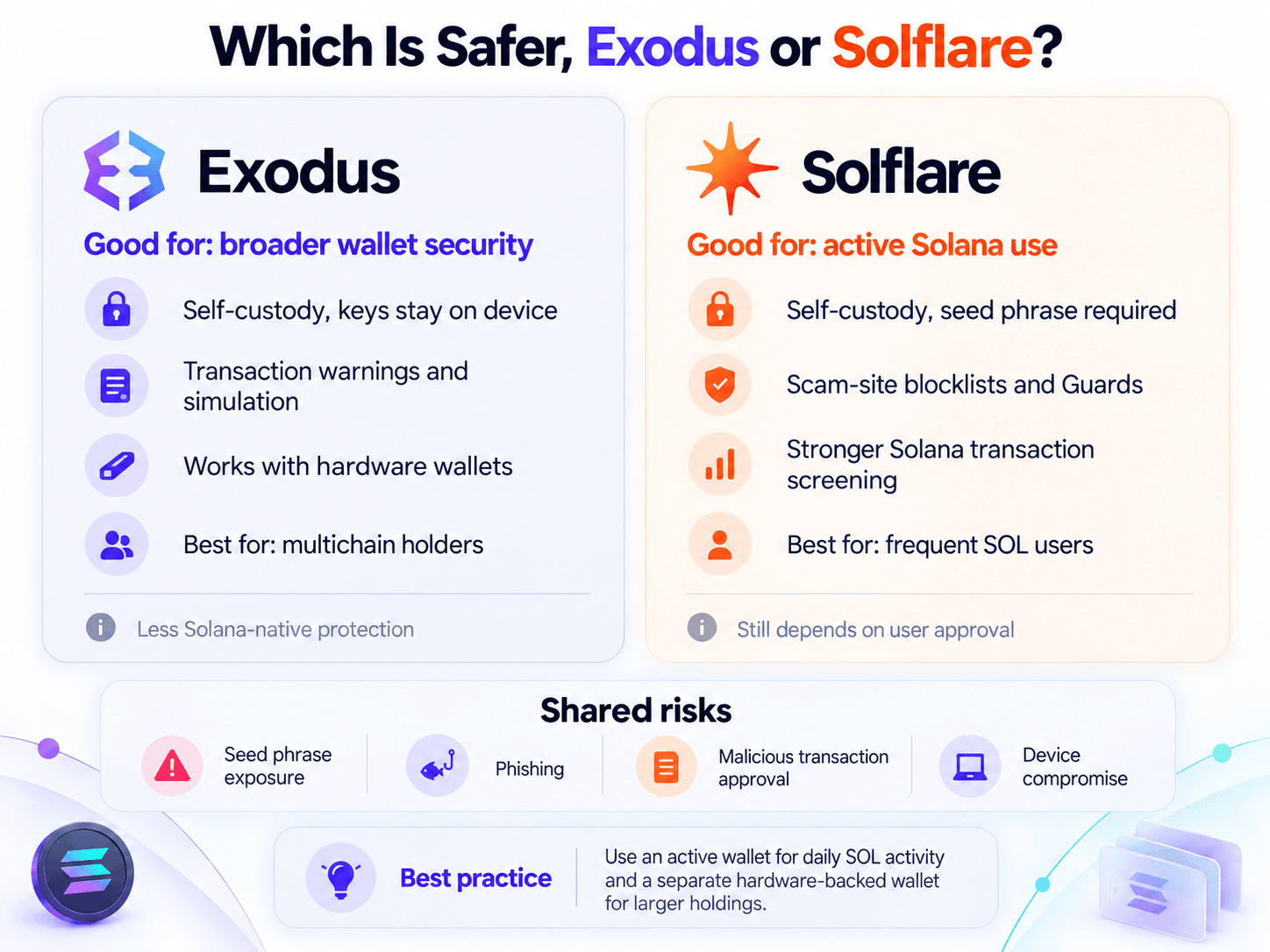
Solflare currently provides more Solana-specific protection around active transaction signing. Exodus has its own transaction simulation and warning system, alongside broader hardware integrations. Neither product can protect a user who exposes the recovery phrase or knowingly approves a malicious transaction.
 Security Comes Down to Keys, Signing and Recovery
Private Keys and Self-Custody
Both wallets are self-custody products. The user controls the credentials that ultimately authorize transactions.
In Exodus, the 12-word secret key and private keys are generated locally, and Exodus does not hold or have access to them. The private keys remain encrypted on the user's device rather than being stored on an Exodus server.
Solflare follows the same non-custodial model. Its recovery phrase acts as the master recovery credential, and Solflare does not store or have access to it. A standard Solflare mobile wallet currently generates a 12-word recovery phrase during setup.
The trade-off is responsibility. A centralized provider cannot freeze or recover the wallet, but it also cannot restore access when the recovery phrase is lost. Malware, fake wallet downloads, physical device compromise and seed theft can still expose the funds.
Transaction and Scam Protection
Exodus Web3 Wallet can warn about suspicious connections or risky Web3 requests. It can also simulate certain Web3 requests before approval and display a warning when the predicted outcome looks unsafe. The user can reject the request before signing.
Solflare uses a similar layer of protection but puts it closer to the center of its Solana product. Its security stack includes continuously updated scam-site blacklists and Solflare Guards, which inspect transactions for suspicious activity before the user signs.
Neither mechanism guarantees that every malicious transaction will be detected. Automated screening adds another checkpoint, but the final decision still sits with the person signing the transaction.
That layer becomes more useful as on-chain activity increases. A wallet used mainly for storage sees fewer DApp approvals. A wallet used for swaps, mints, staking, trading and DeFi exposes the user to far more signing prompts.
Security Transparency
Exodus combines proprietary and open-source components. The company confirms that some of its software is open source while other components are proprietary.
Solflare maintains a verified public GitHub organization with repositories covering its SDK, token infrastructure, blocklists and other components. Those public repositories provide some visibility into the codebase, although they do not establish that every production component of the mobile, web and extension wallets is open source.
Are Either Suitable for Large SOL Holdings?
A hardware wallet keeps private keys away from the general-purpose software environment. Exodus and Solflare can both act as interfaces while compatible hardware handles signing.
One practical setup is to split funds by purpose. The active wallet holds enough SOL for DApps, swaps and routine activity. A separate hardware-backed account holds the larger long-term balance and signs much less frequently.
For users who want to understand the offline-storage model itself, our guide to cold storage explains how it differs from internet-connected wallet storage. Our best hardware wallets guide then compares current devices.
Exodus vs Solflare for SOL Staking
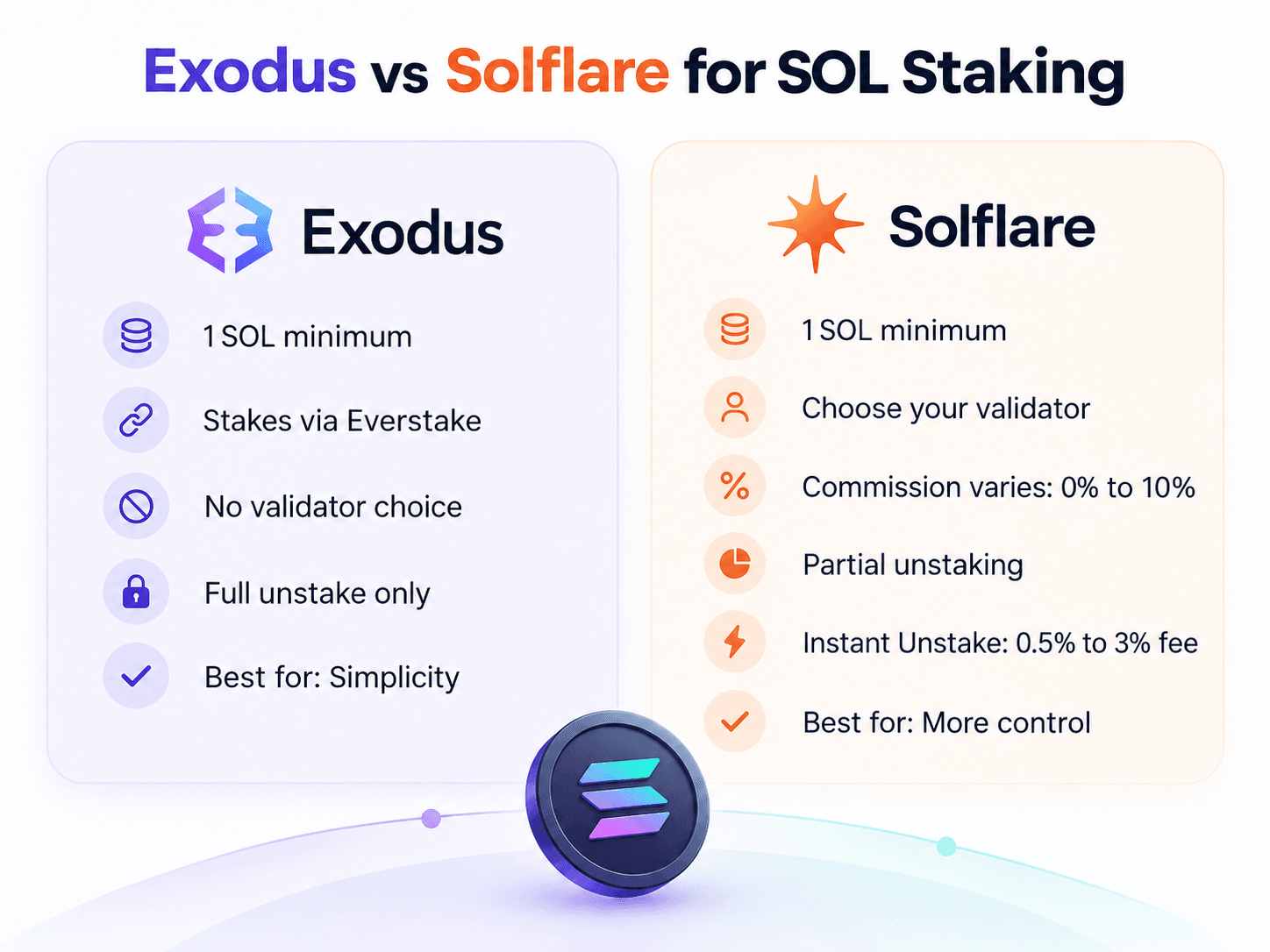
Solflare is the stronger wallet for users who want direct control over native Solana staking. Exodus is simpler because it delegates through one staking provider and removes validator selection from the workflow.
Both wallets currently require at least 1 SOL for their native staking flows. Solflare then exposes validator choice, commission and stake accounts, while Exodus routes the process through Everstake.
For readers choosing among the wider wallet market, our top Solana wallets guide compares other Solana-focused alternatives.
 Solflare Offers More Control Over Native SOL Staking
Staking SOL on Exodus
Exodus delegates SOL through its third-party staking API provider, Everstake. Users do not select another validator from inside the standard Exodus staking workflow.
Exodus requires a minimum stake of 1 SOL. Staked SOL becomes locked and cannot be sent or swapped until it has been unstaked and claimed.
Rewards are tied to Solana epochs. Exodus says the first staking rewards normally arrive after two epochs, or roughly four to eight days. After activation, rewards are paid at the end of each epoch, which Exodus currently describes as roughly two to four days.
The yield is variable rather than fixed. As of Sept. 18, 2026, Everstake's Solana page listed a 5.02% APR and a 7% validator fee. Everstake also lists a 1 SOL minimum and notes that its quoted APR can change with network conditions and validator performance.
That 7% figure is a commission on staking rewards, not 7% of the SOL principal. Staking, unstaking and claiming also create network transactions, but those are Solana network costs rather than an Exodus staking subscription.
Staking SOL on Solflare
Solflare gives users direct control over native validator delegation.
Creating a new native stake account currently requires a 1 SOL minimum and a temporary 0.002 SOL network fee. Solflare says the 0.002 SOL amount is refundable when the stake account is withdrawn and closed.
The staking interface displays an estimated annual return, total stake and validator-performance information. Users can then choose another validator rather than accepting the default.
Validator commission is visible because it directly affects rewards. Solflare's current staking guide says commissions typically range from 0% to 10%. The percentage belongs to the chosen validator, so there is no single Solflare staking APY or validator fee that applies to everyone.
Delegation is not instantly productive either. Solflare says newly delegated SOL may take two days or more before it starts earning rewards, depending on network conditions and epoch timing.
Unstaking and Instant Unstake
Normal Solana staking is epoch-dependent. Pressing "unstake" begins the deactivation process, but it does not immediately turn delegated SOL into spendable SOL.
Exodus says unstaking can take one epoch to several epochs, depending on network capacity. If the balance fully deactivates in one epoch, that can mean roughly two to four days. After deactivation, the user must manually claim the SOL, which creates another network transaction fee.
Solflare provides both standard and instant routes. Standard unstaking carries no additional Solflare unstaking fee and usually takes one to three days, typically until the end of the current epoch.
Users who want the balance immediately can turn on Instant Unstake. The current fee is 0.5% to 3%, depending on available liquidity, and the exact charge is shown before confirmation.
Solflare also supports partial unstaking by splitting a stake account. Its current rules require at least 1 SOL to remain in the original stake account and at least 1 SOL in the new account. A stake account below 2 SOL therefore cannot be split into two valid 1 SOL accounts.
Exodus takes a simpler route. Its current workflow requires users to unstake the full selected SOL staking balance, including accumulated rewards, rather than offering Solflare-style stake-account splitting or Instant Unstake.
Which Is Better for SOL Staking?
A casual holder who wants to stake SOL with minimal configuration can use Exodus comfortably. The trade-off is accepting Everstake and its current commission rather than choosing among validators.
Solflare better serves someone who wants validator choice, visible performance data, stake-account control, partial unstaking and an optional immediate exit.
Larger holders have another decision layered on top: where the staking key lives. Exodus supports SOL staking from compatible Ledger and Trezor Safe 7 portfolios, while Solflare can work with hardware-controlled Solana accounts. At that point, key storage may deserve as much attention as the staking interface.
DApps, Swaps and Active Solana Use
Solflare provides the deeper Solana-native experience, but Exodus still offers meaningful DApp access through its browser wallet. The main difference is where that functionality is available and how much Solana activity sits directly inside each product.
Connecting to Solana DApps
Exodus Web3 Wallet can connect directly to Web3 applications on Solana and other supported networks. Its current auto-connect list includes Jupiter, Raydium, Orca, Marinade, Solend and several other Solana applications.
Exodus Mobile now works differently. Support for WalletConnect and the mobile DApp browser ended on Sept. 13, 2026. Mobile users can no longer use those discontinued features to create or approve Web3 connections.
Exodus DApp access therefore depends on the client being used. The Web3 Wallet extension remains the route into supported Solana DApps, while Exodus Mobile no longer offers the same WalletConnect and in-app browser workflow.
Solflare is more consistent across active Solana use. Its iOS and Android apps include an in-app browser, staking and swapping, and the mobile browser can connect directly to protocols such as Raydium. Web and browser-extension interfaces provide additional access.
For users who routinely move between swaps, staking and Solana applications, Solflare keeps more of those actions inside the same ecosystem.
Swapping Tokens
Both wallets provide in-wallet swaps, but the routes behind those buttons differ.
Exodus Swap connects to third-party exchange API providers rather than operating one internal exchange. Swaps can include a network transaction fee and a variable spread. Exodus does not publish one permanent swap percentage because the spread changes with liquidity and market conditions.
Users see the amount being sent and the expected amount received before confirmation. That quoted output is more useful than trying to compare Exodus through a fixed fee that does not exist.
Solflare routes SPL-token swaps through Jupiter. Its current swap interface has a default slippage tolerance of 0.5%, although users can change it.
Solflare also recommends keeping at least 0.05 SOL available in the wallet to cover transaction costs, particularly when a swap requires multiple routes. That is a recommended buffer, not the fee for every swap.
Solflare's current SOL swap page describes the cost as a Solana network fee plus a DEX routing fee. Its terms also warn that displayed swap pricing can change because of third-party pricing, slippage or network congestion.
Solana Trading and Advanced Features
Solflare has expanded beyond staking and spot swaps.
Solflare Perps is an interface to Phoenix Trade's Solana-native perpetual futures order book. Perpetual futures allow traders to maintain derivative positions without a conventional expiry date, while funding and margin mechanics keep the product tied to the underlying market.
Solflare currently supports leveraged long and short positions on assets such as SOL, BTC and ETH using USDC collateral, with isolated margin, market orders and optional take-profit or stop-loss settings.
The feature is also region restricted. Solflare currently lists U.S. and U.K. retail users as fully blocked from Perps.
For active Solana traders, Perps adds another layer to Solflare beyond wallet storage and staking. Exodus remains more focused on holding, portfolio management and simpler asset-level activity across several chains.
Hardware Wallets and Recovery
Exodus now connects to both Ledger and Trezor devices, although support varies by platform and model. Solflare supports Ledger and Keystone and also offers Solflare Shield.
| Option | Exodus | Solflare |
|---|---|---|
| Ledger | Nano X and Flex through Mobile | Ledger with Solana app through Web Wallet |
| Trezor | Model One, Model T, Safe 3 and Safe 5 on Desktop; Safe 7 on Mobile | No current native integration documented |
| Keystone | No current native integration documented | Keystone Essential/Pro through Web App |
| Solflare Shield | No | Yes |
| SOL hardware signing | Yes | Yes |
| Hardware-backed SOL staking | Ledger Mobile and Trezor Safe 7 Mobile | Supported through hardware-controlled Solana wallets |
| Standard wallet recovery | Exodus 12-word secret key | Solflare 12-word recovery phrase |
| Additional recovery route | Passkey backup on Exodus Mobile | Shield can restore from its 12-word recovery phrase |
Hardware Wallet Support
Exodus Mobile currently supports two Ledger models: Nano X and Flex. The integration works through Bluetooth on iOS and Android and currently covers Bitcoin, Ethereum, Solana, Base, Polygon, TRON and XRP Ledger.
For staking, Exodus currently allows Ledger users to stake ETH, SOL and Polygon's MATIC on Ethereum. All staking actions have to be approved on the hardware device.
Exodus' Trezor integration follows a different platform split. Exodus Desktop supports Model T, Model One, Safe 3 and Safe 5. Those devices are connected over USB, and their Mobile representation is view-only.
Trezor Safe 7 is the exception. It is supported only through Exodus Mobile, where users can send, receive and manage supported assets. Safe 7 users can also stake SOL, with every staking transaction approved on the device.
Solflare's Ledger workflow is narrower but more directly tied to Solana. Its current guide requires a Ledger with the Solana application installed and connected through USB to the Solflare Web Wallet. Solflare imports the Ledger-controlled account into its interface while the hardware continues to hold the signing keys.
Solflare also supports Keystone Essential and Keystone Pro through the Web App, using a QR-based workflow.
Solflare Shield adds another option. Shield is a credit-card-sized NFC hardware wallet with no screen, cables, Bluetooth or battery. Its private keys stay inside a secure element, while transactions are initiated in Solflare Mobile and authorized by tapping the card to the phone and confirming with a PIN or biometrics.
Exodus gives multichain users access to two established hardware-wallet ecosystems. Solflare offers more hardware choices built specifically around Solana use, including an integrated tap-to-sign option.
Recovery and Backup
A seed phrase or equivalent recovery credential can recreate control of a self-custody wallet, so its protection is as important as the device holding the wallet.
Exodus uses a 12-word secret key. Writing it down once is enough to restore the standard Exodus wallet on another device. Exodus does not automatically back that phrase up through an ordinary iOS or Android device backup.
Exodus Mobile also offers a second route. Users can back up with a passkey and an iCloud or Google account. The passkey manager holds the credential needed to decrypt the encrypted wallet backup.
A manual seed backup depends on the user protecting 12 words. Passkey recovery instead depends on the security and continued availability of the associated passkey and cloud environment.
A standard Solflare software wallet also uses a 12-word recovery phrase. Solflare cannot retrieve it if the user loses it.
Solflare Shield has its own recovery process. A new Shield generates a 12-word recovery phrase inside its secure element, and the setup process displays that phrase once for offline backup. A replacement Shield can later restore the wallet from those 12 words.
Passwords and biometrics can protect access to an installed wallet, but neither company can recreate a lost self-custody wallet without the underlying recovery credentials.
Should You Use a Hot Wallet and Hardware Wallet Together?
For meaningful balances, an active-wallet and savings-wallet structure is often cleaner than forcing one account to handle every job.
The active wallet can hold enough SOL for swaps, mints and DApps. The hardware-backed account holds the larger balance and interacts less frequently.
Solflare itself describes Shield in similar terms, positioning the hot wallet for everyday activity and the hardware wallet for larger transfers, staking and longer-term holdings.
The security boundary comes from separate keys rather than separate app icons. Importing the same recovery phrase into Exodus, Solflare and several other software wallets creates more places where the same wallet can be compromised.
Using both products can still make sense. Exodus can manage a broad multichain portfolio while an independently created Solflare wallet handles Solana DApps. A hardware-backed Solflare or Exodus portfolio can then sit above either as the lower-frequency savings layer.
Exodus vs Solflare Fees
| Cost | Exodus | Solflare |
|---|---|---|
| Wallet/storage fee | Exodus charges no fee simply to send or receive through the wallet; network costs still apply | No single flat fee structure; individual functionality can carry network, staking, fiat, sending or swap fees |
| Base SOL transaction fee | Solana network fee | Solana network fee |
| Current Solana base fee | 5,000 lamports, or 0.000005 SOL, per signature | 5,000 lamports, or 0.000005 SOL, per signature |
| Priority fee | Optional network-controlled fee | Optional network-controlled fee |
| Swap cost | Variable spread + network fee | DEX routing/third-party fee + network fee |
| Default swap slippage | Quote dependent | 0.5% default |
| SOL staking minimum | 1 SOL | 1 SOL |
| Stake-account creation | Network transaction costs | 0.002 SOL temporary refundable network fee |
| Validator commission | Everstake currently 7% of rewards | Validator-specific, typically 0% to 10% |
| Standard unstaking | Network fees; epoch-dependent wait | No additional unstaking fee; usually 1-3 days |
| Instant unstake | No equivalent current option documented | 0.5% to 3% |
| Fiat purchase fees | Third-party processing + network fees | Third-party on/off-ramp fees; variable |
Sending SOL
For an ordinary SOL transfer, neither Exodus nor Solflare sets Solana's base protocol fee.
Solana currently charges a base fee of 5,000 lamports, or 0.000005 SOL, per signature. Transactions can also include an optional priority fee based on the requested compute-unit limit and price.
Exodus explicitly says it keeps none of the network fee when users send crypto. For standard sends, 100% of the transaction fee goes to the relevant blockchain network.
Solflare also passes Solana network costs through to the user. Its current fee guide recommends keeping roughly 0.01 to 0.05 SOL available as a buffer for transfers, swaps and application interactions. That 0.01 to 0.05 SOL is a recommended gas reserve, not the cost of one simple transfer.
Swap Costs
Swaps introduce costs that a basic SOL transfer does not.
Exodus says its swaps may include a variable spread and network transaction fee. The wallet routes trades through third-party API providers, and the spread changes with liquidity and market conditions. There is no single fixed Exodus swap percentage that applies to every asset pair.
The number to watch is the quote shown before confirmation: how much crypto leaves the wallet and how much is expected back.
Solflare routes SPL swaps through Jupiter. Its interface starts with 0.5% default slippage, which users can adjust.
Solflare's current SOL swap information describes two broad cost components: a Solana network fee and a DEX routing fee. Its terms also warn that displayed swap pricing can change because of third-party pricing, slippage and congestion.
Staking and Unstaking Costs
Staking has its own cost stack.
For Exodus, users pay Solana network fees when staking, unstaking and claiming unstaked SOL. Everstake then deducts its validator commission from rewards. As of Sept. 18, 2026, Everstake lists that validator fee at 7%.
That commission is separate from the current 5.02% quoted APR. The APR represents the estimated gross annualized staking return shown by Everstake, while its 7% commission is taken from earned rewards.
Solflare's native staking flow adds a temporary 0.002 SOL network fee when a new stake account is created. Solflare says the amount is refunded once that stake account is withdrawn and closed.
Validator commission varies because the user chooses the validator. Solflare currently describes typical commission as 0% to 10%.
Standard Solflare unstaking adds no extra unstaking service fee. The trade-off is waiting one to three days in the normal case. Instant Unstake replaces that wait with an additional 0.5% to 3% charge based on liquidity.
Exodus or Solflare: Which Should You Choose?
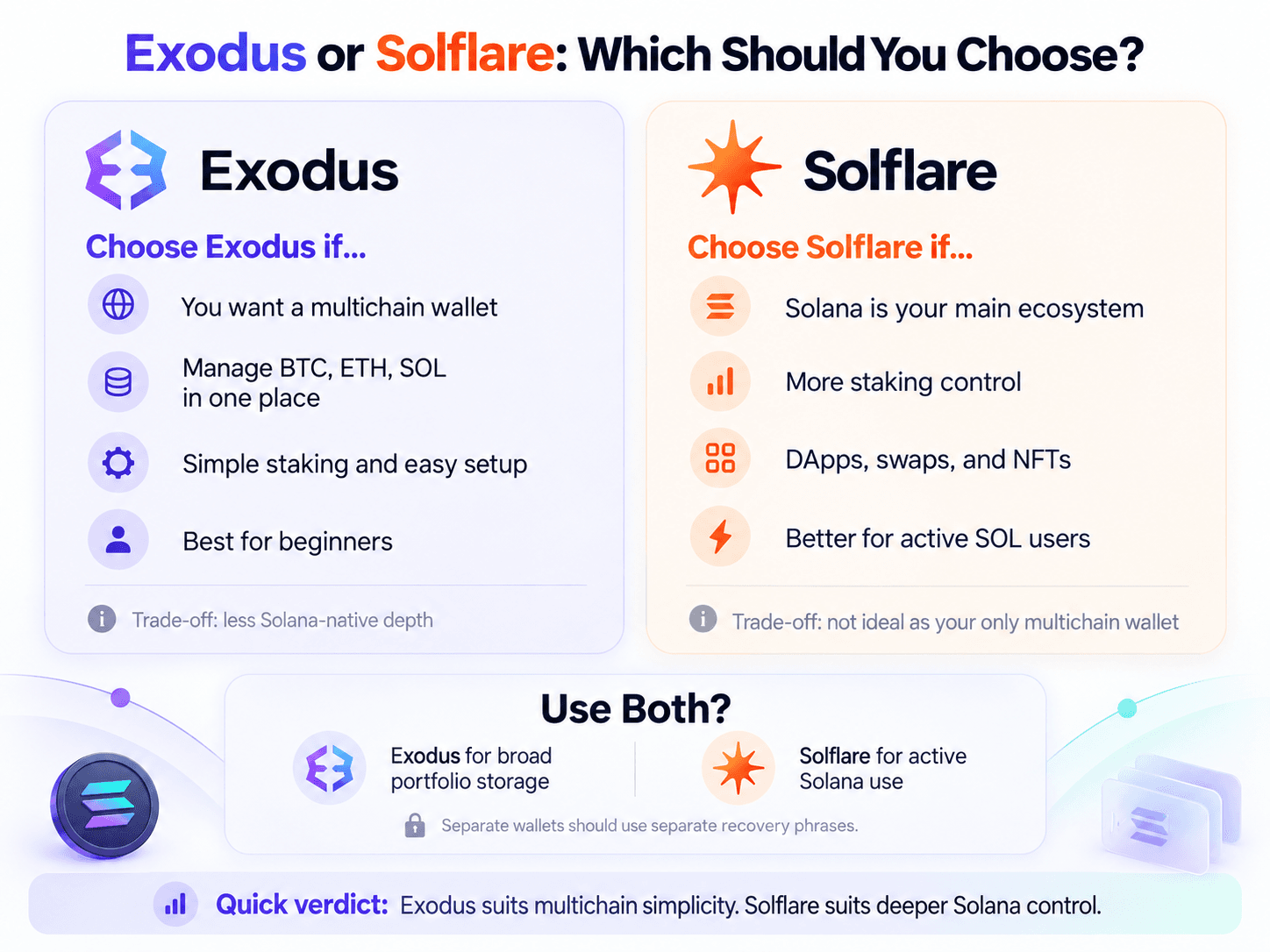
Exodus suits users whose wallet spans several chains. Solflare suits users whose wallet activity is concentrated on Solana.
The more time a user spends staking, swapping, connecting to DApps and trading on Solana, the more useful Solflare's extra controls become.
 Your Portfolio Structure Should Drive the Wallet Choice
Choose Exodus If You Want a Simple Multichain Wallet
Choose Exodus if you want BTC, ETH, SOL and assets from several other networks managed through one portfolio interface.
It works particularly well for beginners, multichain holders and users whose Solana activity mostly involves receiving SOL, sending it, making occasional swaps or staking without managing validators directly.
That simplicity comes with limits. SOL staking is tied to Everstake, mobile Web3 connectivity has been reduced, and NFT support is being sunset. Users who move from simply holding SOL to using Solana heavily may eventually need more direct control.
For first-time wallet users comparing that simplicity against other products, our best crypto wallets for beginners guide provides a broader field.
Choose Solflare If Solana Is Your Main Ecosystem
Choose Solflare if most of your wallet activity happens inside Solana.
Validator selection, native stake-account management, 0.5% to 3% Instant Unstake, Jupiter swaps, mobile DApp access, NFT management, Ledger and Keystone integration, Solflare Shield and newer trading tools all serve users who spend more time on-chain.
That specialization also narrows the wallet's role. Someone managing BTC, ETH and several other native chains will generally need another wallet alongside Solflare.
Consider Using Both If You Separate Storage From Active Use
Using both can be reasonable when the wallets serve different purposes.
A multichain holder could use Exodus as the general portfolio wallet while maintaining a separately created Solflare wallet for regular Solana DApp activity. A larger SOL balance could sit in another hardware-backed account and interact far less often.
Importing one seed phrase into several software wallets does not create separate security zones. Every interface still reaches the same underlying keys.
Separate wallets, separate recovery credentials and different levels of transaction exposure create a real boundary between active funds and longer-term holdings.

Exodus vs Solflare: Final Verdict
Solflare is the stronger choice for users primarily operating within Solana. Exodus is the better fit for beginners and multichain holders.
Both are self-custody wallets, both leave recovery and transaction approval with the user, and both support hardware-backed setups. As balances rise, separating long-term holdings from an active DApp wallet becomes more useful than trying to identify one software wallet as universally safer.
For the typical multichain holder, Exodus solves the broader wallet-management problem. For someone whose wallet is effectively a front door to Solana, Solflare gives them more control where that control is useful.