Pepe Coin has become one of the most recognizable meme coins in crypto. Listed under the ticker PEPE, it runs as an ERC-20 token on Ethereum and trades mainly on meme culture, market attention, exchange visibility and speculation.
But buying PEPE is not as simple as typing “Pepe” into an app and clicking buy. There are copycat tokens, similar tickers, fake contract addresses, network risks, wallet mistakes, gas fees, and high volatility to watch for.
This guide explains how to buy PEPE safely, where you can buy it, how to verify the correct token, what fees to expect, and whether you should keep it on an exchange or move it to a wallet. It also covers the main mistakes to avoid before putting money into a high-risk meme coin.
Quick Answer: How Do You Buy Pepe Coin?
You can buy Pepe Coin, listed as PEPE, through a centralized exchange, a crypto wallet swap, or a decentralized exchange such as Uniswap. For most beginners, a reputable centralized exchange is the simplest route because it reduces the chance of choosing a fake token. If you use a wallet or DEX, always verify that you are buying the Ethereum ERC-20 token, not a copycat PEPE asset on another network.
Best Ways To Buy PEPE
-
Centralized exchange Best for beginners who want fiat deposits, simpler order previews, and lower fake-token risk.
-
Crypto wallet swap Best for users who already understand self-custody, Ethereum gas fees, token imports, and recovery phrase security.
-
Decentralized exchange Best for experienced Ethereum users who can verify the contract address, review slippage, and manage wallet approvals.
-
Small PEPE buys A centralized exchange may be cheaper for small purchases because Ethereum gas fees can eat into wallet or DEX buys.
How To Buy PEPE Step By Step
- Choose a platform that supports PEPE in your country, such as a centralized exchange, crypto wallet, or Uniswap.
- Verify the token by checking the ticker, Ethereum network, trading pair, and contract address.
- Deposit funds or connect a wallet using fiat, stablecoins, ETH, USDT, USDC, or another supported asset.
- Buy PEPE with a market order, limit order, or wallet swap, depending on the platform you use.
- Review the costs before confirming, including trading fees, spreads, slippage, withdrawal fees, and Ethereum gas.
- Check your balance after the order or swap completes, then decide whether to keep PEPE on the exchange or move it to a wallet.
- Store it safely by using two-factor authentication, protecting your recovery phrase, and keeping enough ETH for future wallet transactions.
Disclaimer
This guide is educational only and is not financial advice. PEPE is a high-risk meme coin, and its price can move sharply based on speculation, liquidity, market sentiment, and meme coin cycles. Before buying, confirm the ticker, Ethereum network, trading pair, and contract address. Avoid copycat tokens, fake DEX pages, unsupported withdrawal networks, and hype-driven entries. Only use money you can afford to lose, and decide how you would sell before you buy.
Disclosure
Some links in this guide may be affiliate links. If you choose to use a service through these links, we may earn a commission at no additional cost to you.
What Is Pepe Coin?
Pepe Coin, listed under the ticker PEPE, is a meme coin inspired by internet meme culture and the Pepe the Frog character. Unlike Bitcoin, Ethereum, or many utility-focused crypto projects, PEPE is not built around payments, smart contract infrastructure, staking, or revenue-producing services. Its main appeal comes from meme culture, community attention, trading activity, exchange visibility, and broader appetite for high-risk meme coins.
PEPE is an ERC-20 token on Ethereum. That means it follows Ethereum’s common token standard for fungible tokens, allowing it to work across compatible wallets, exchanges, and decentralized applications. The ERC-20 standard defines basic token functions such as transfers and approvals, which is why ERC-20 tokens can be supported by wallets like MetaMask and traded through Ethereum-based platforms.
This also means PEPE is not its own blockchain. It exists as a token contract on Ethereum. When users buy, sell, or move PEPE through a self-custody wallet, they are interacting with Ethereum. That is why PEPE wallet transactions require ETH for gas fees when using Ethereum mainnet.
The key thing for buyers is token verification. The official Ethereum PEPE contract address is: 0x6982508145454Ce325dDbE47a25d4ec3d2311933
Etherscan lists this as the PEPE ERC-20 token contract, and CoinGecko shows the same contract address for adding PEPE to MetaMask.
“Pepe” is not a protected crypto name. There are many tokens with similar names, tickers, or branding. Some may be separate projects, bridged versions, low-liquidity copies, or outright scams. For example, market data sites list other assets such as “The Original Pepe,” “PEPE 0x69 ON BASE,” and “Pepe Coin” on BNB Chain, which are not the same as Ethereum PEPE.
PEPE At A Glance
| Detail | Information |
|---|---|
| Token name | Pepe |
| Ticker | PEPE |
| Network | Ethereum |
| Token standard | ERC-20 |
| Contract address | 0x6982508145454Ce325dDbE47a25d4ec3d2311933 |
| Main use case | Meme coin trading and speculation |
| Risk level | High |
Before You Buy PEPE: Make Sure You Are Buying The Correct Token
Buying PEPE is simple, but buying the wrong “Pepe” token is also easy. There are copycat tokens, similar tickers, fake contract addresses, tokens on other networks, and scam links that point to clone websites or fake DEX pages.
This is important with PEPE because market data sites list several Pepe-style assets. For example, CoinMarketCap lists PepeCoin under the ticker PEPECOIN, separate from Ethereum PEPE. CoinGecko also lists Solana-based Pepe tokens that use the PEPE name.
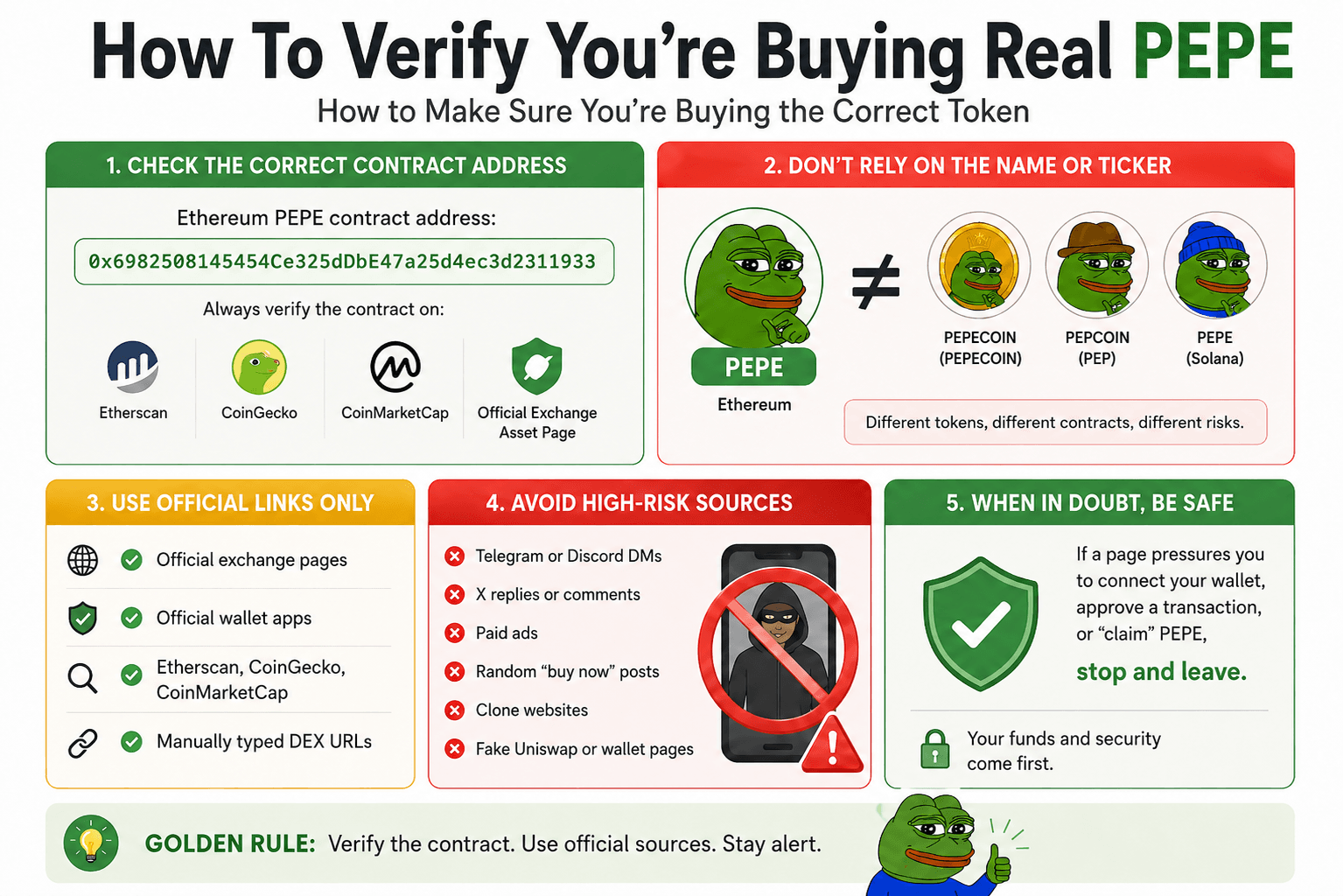 How To Verify The Real PEPE Token
Check The Correct PEPE Contract Address
If you are buying PEPE through a wallet or DEX, verify the token contract before you swap.
The Ethereum PEPE contract address is: 0x6982508145454Ce325dDbE47a25d4ec3d2311933
Before buying, compare the contract address on:
- Etherscan
- CoinGecko
- CoinMarketCap
- The official asset page on your chosen exchange
Do not rely on the token name alone. A fake token can use the same or similar ticker.
PEPE Vs PepeCoin Vs Other Pepe Tokens
PEPE on Ethereum is not automatically the same as every asset with “Pepe” in its name.
| Asset Type | What To Know |
|---|---|
| PEPE on Ethereum | The main PEPE token covered in this guide. It uses the Ethereum contract address above. |
| PepeCoin / PEPECOIN | A separate asset listed on CoinMarketCap under its own page and supply data. (CoinMarketCap) |
| Pepecoin / PEP | Another separate asset, listed under the ticker PEP. (CoinMarketCap) |
| Solana Pepe tokens | Separate Solana-based assets can also use the PEPE name. (CoinGecko) |
| BNB Chain lookalikes | CoinMarketCap also lists Pepe-style tokens on BNB Chain, separate from Ethereum PEPE. (CoinMarketCap) |
| Bridged PEPE | May represent PEPE on another network, but it is not the same as holding native Ethereum PEPE unless the bridge and token issuer are trusted. |
For beginners, the safest route is usually a reputable centralized exchange that clearly lists PEPE. If you use a wallet or DEX, paste the verified contract address instead of searching by name.
Use Official Links Only
Avoid buying PEPE through links found in:
- Telegram or Discord DMs
- X replies or comments
- Paid ads
- Random “buy now” posts
- Clone websites
- Fake Uniswap or wallet pages
Use official exchange pages, official wallet apps, Etherscan, CoinGecko, CoinMarketCap, or manually typed DEX URLs. If a page pressures you to connect your wallet quickly, approve a transaction, or “claim” PEPE, treat it as unsafe.
Best Ways To Buy PEPE Based On Your Situation
The best way to buy PEPE depends on your experience level, location, payment method, and whether you want to hold the token yourself. Beginners usually have the smoothest path through a centralized exchange, while experienced wallet users may prefer a wallet swap or Uniswap.
| User Type | Best Route | Why |
|---|---|---|
| Complete beginner | Centralized exchange | Easier fiat deposits and lower fake-token risk |
| Small buyer | Centralized exchange | Avoids Ethereum gas costs on tiny buys |
| Wallet user | MetaMask, Trust Wallet, Coinbase Wallet, or similar | Gives you self-custody and wallet control |
| DEX user | Uniswap | More control, but more responsibility |
| Region-limited buyer | Local exchange or wallet route | PEPE availability depends on country and platform support |
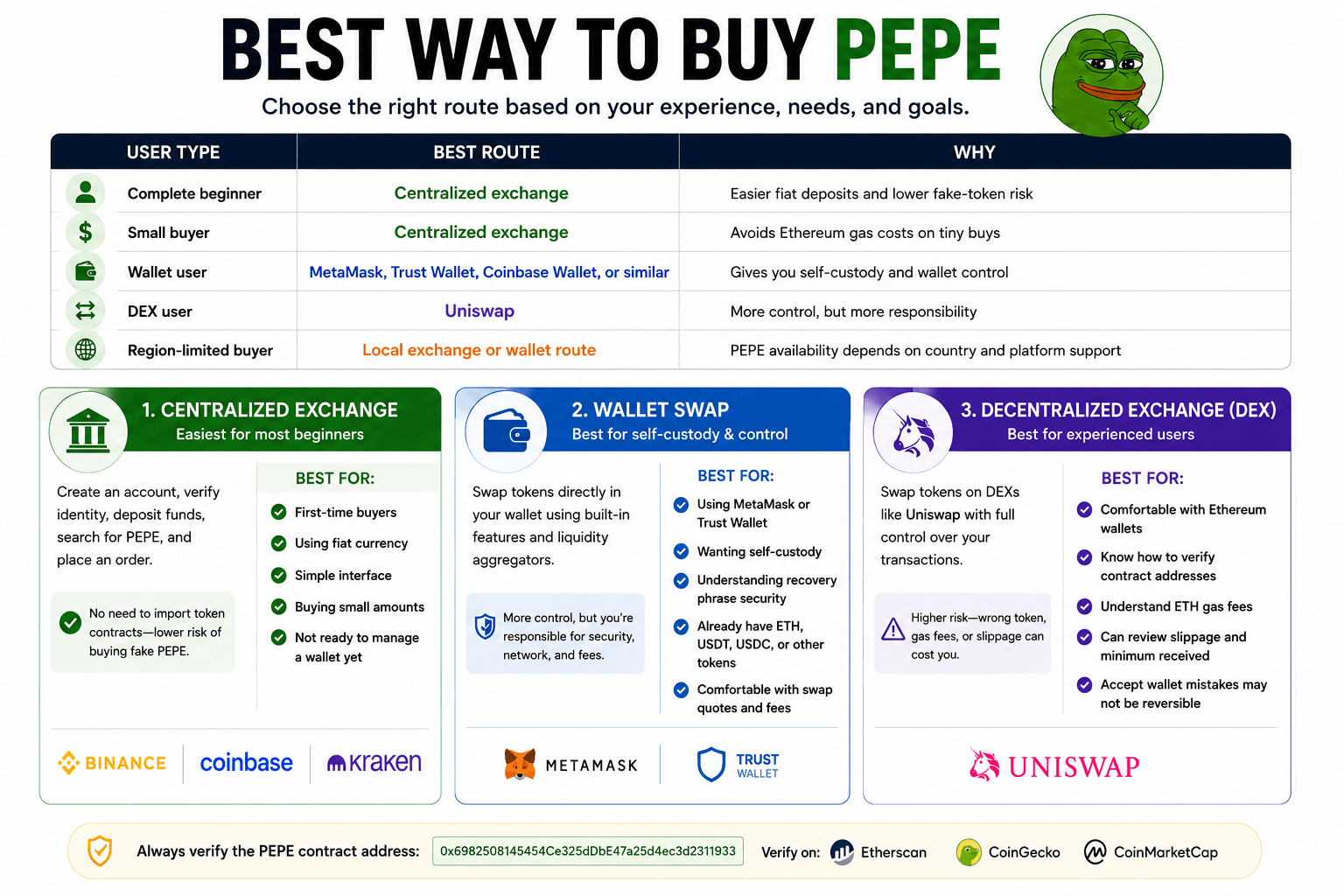 Choosing The Best PEPE Buying Route
When A Centralized Exchange Makes Sense
A centralized exchange is usually the easiest way to buy PEPE if you are new to crypto. You create an account, complete verification, deposit funds, search for PEPE, and place an order.
This route is useful because you do not need to import a token contract manually. That lowers the chance of buying a fake PEPE token through a wallet or DEX. It also gives you more payment options, such as card deposits, bank transfers, or stablecoin deposits.
The trade-off is that most major exchanges require identity verification. Coinbase says users need identity verification for legal, compliance, and fraud-prevention reasons, while Binance says card crypto purchases require identity verification. Kraken also says verified users can buy and sell crypto and deposit cash.
A centralized exchange may suit you if:
- You are buying PEPE for the first time
- You want to use fiat currency
- You want a simple interface
- You are buying a small amount
- You do not want to manage a wallet yet
Read out full Binance, Coinbase and Kraken reviews. Also, check out top picks for the best crypto exchanges.
When A Wallet Swap Makes Sense
A wallet swap makes sense if you want to hold PEPE in your own wallet instead of leaving it on an exchange.
Wallets such as MetaMask and Trust Wallet support in-app token swaps, which can route trades across multiple liquidity sources. This route gives you more control, but it also adds responsibility. You need to protect your recovery phrase, use the right network, review the swap quote, and understand fees.
A wallet swap may suit you if:
- You already use MetaMask or Trust Wallet
- You want self-custody
- You understand recovery phrase security
- You already have ETH, USDT, USDC, or another swappable token
- You are comfortable checking swap quotes and fees
Read our full MetaMask and Trust Wallet reviews.
When A DEX Makes Sense
A decentralized exchange route is best for users who already understand wallets and Ethereum transactions. Uniswap is one of the main DEX routes for Ethereum token swaps.
DEX buying gives you control, but the risks are higher. You can pick the wrong token, use the wrong contract address, set poor slippage, or pay more in gas than expected.
A DEX may suit you if:
- You are comfortable using Ethereum wallets
- You know how to verify a contract address
- You understand ETH gas fees
- You can review slippage and minimum received
- You accept that wallet mistakes may not be reversible
Read our full Uniswap review and top picks for the best decentralized exchanges.
Where Can You Buy Pepe Coin?
You can buy PEPE through centralized exchanges, crypto wallets, or decentralized exchanges. The right option depends on your country, payment method, and experience level.
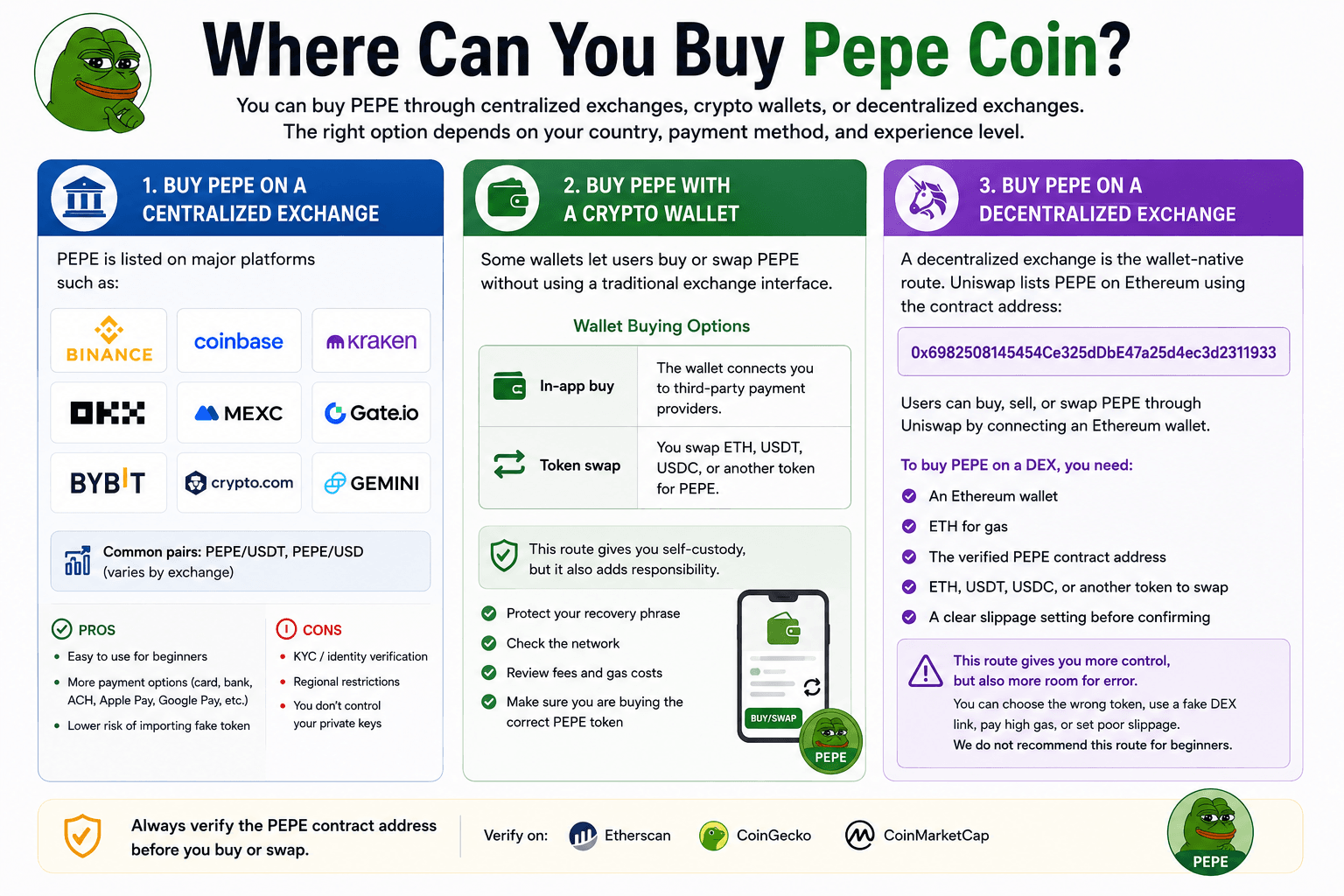 Popular Platforms Where You Can Buy PEPE
Buy PEPE On A Centralized Exchange
PEPE is listed on major platforms such as Binance, Coinbase, Kraken, OKX, MEXC, Gate.com, Bybit, Crypto.com and Gemini.
Common PEPE trading pairs include PEPE/USDT and PEPE/USD, depending on the exchange. OKX, Gate.com and Bybit list PEPE/USDT spot markets, while Kraken and Coinbase show PEPE price and trading support in supported regions.
Centralized exchanges are beginner-friendly because they reduce the risk of importing a fake token contract. They also tend to support easier funding routes, such as debit card, credit card, bank transfer, ACH, Apple Pay, Google Pay, or stablecoin deposits, depending on the platform and country.
The trade-offs are KYC, regional restrictions, and custody risk. You may need to verify your identity, and you do not fully control the private keys while PEPE stays on the exchange.
Buy PEPE With A Crypto Wallet
Some wallets let users buy or swap PEPE without using a traditional exchange interface.
Wallet buying can work in two ways:
| Wallet Route | How It Works |
|---|---|
| In-app buy | The wallet connects you to third-party payment providers. |
| Token swap | You swap ETH, USDT, USDC, or another token for PEPE. |
This route gives you self-custody, but it also adds responsibility. You need to protect your recovery phrase, check the network, review fees, and make sure you are buying the correct PEPE token. Wallet swaps may include provider fees, route fees, spreads, and Ethereum gas costs.
Buy PEPE On A Decentralized Exchange
A decentralized exchange is the wallet-native route. Uniswap lists PEPE on Ethereum using the contract address: 0x6982508145454Ce325dDbE47a25d4ec3d2311933
Users can buy, sell, or swap PEPE through Uniswap by connecting an Ethereum wallet.
To buy PEPE on a DEX, you need:
- An Ethereum wallet
- ETH for gas
- The verified PEPE contract address
- ETH, USDT, USDC, or another token to swap
- A clear slippage setting before confirming
This route gives you more control, but it also carries more room for error. You can choose the wrong token, use a fake DEX link, pay high gas, or set poor slippage. We do not recommend this route for beginners.
PEPE Availability By Region
| Region | PEPE Buying Routes Currently Available | Key Notes |
|---|---|---|
| United States | Coinbase, Kraken, Gemini, Robinhood, Crypto.com | Coinbase has a US “How to Buy Pepe” page. Binance.US lists PEPE/USDT and supports PEPE deposits and withdrawals on Ethereum. Robinhood lists PEPE for US crypto users, but says not all coins are available in every state. |
| United Kingdom | Coinbase, Kraken | Coinbase UK says PEPE is available on its centralized exchange, with bank account, debit card, or bank transfer support. It also says credit cards cannot be used to buy PEPE in the UK. Kraken has a UK PEPE price page in GBP. |
| European Union | Coinbase, Robinhood EU, Kraken, Uniswap | Coinbase has PEPE buying pages for EU countries such as Spain and Germany. Robinhood EU lists PEPE among its supported crypto assets. Uniswap remains an option for users who can legally access Ethereum wallet swaps in their country. |
| India | CoinDCX, CoinSwitch, WazirX, Uniswap | CoinDCX offers PEPE buying with INR and says users can start with ₹100. CoinSwitch also lists PEPE buying in India from ₹100. WazirX has PEPE/INR and PEPE/USDT pages. Indian users should also account for local VDA tax rules, including 30% tax on crypto gains and 1% TDS on certain transfers. |
| Global Users | Binance, OKX, KuCoin, MEXC, Gate.io, Bybit, Crypto.com, Uniswap | Binance has a PEPE buy page and PEPE/USDT spot market. KuCoin, Gate.com and Bybit show PEPE/USDT spot markets, while OKX and Crypto.com list PEPE market pages. Access still depends on the user's country and each platform's restricted-region rules. |
Note: Exchange listings, payment methods, and country access can change. Before depositing money, confirm that PEPE is available on the platform’s official asset page, check the supported trading pair, and review any local restrictions.
How To Buy Pepe Coin On A Centralized Exchange
A centralized exchange is usually the easiest way to buy PEPE. The basic process is simple: choose an exchange, verify your account, deposit funds, search for PEPE, place an order, and check your balance.
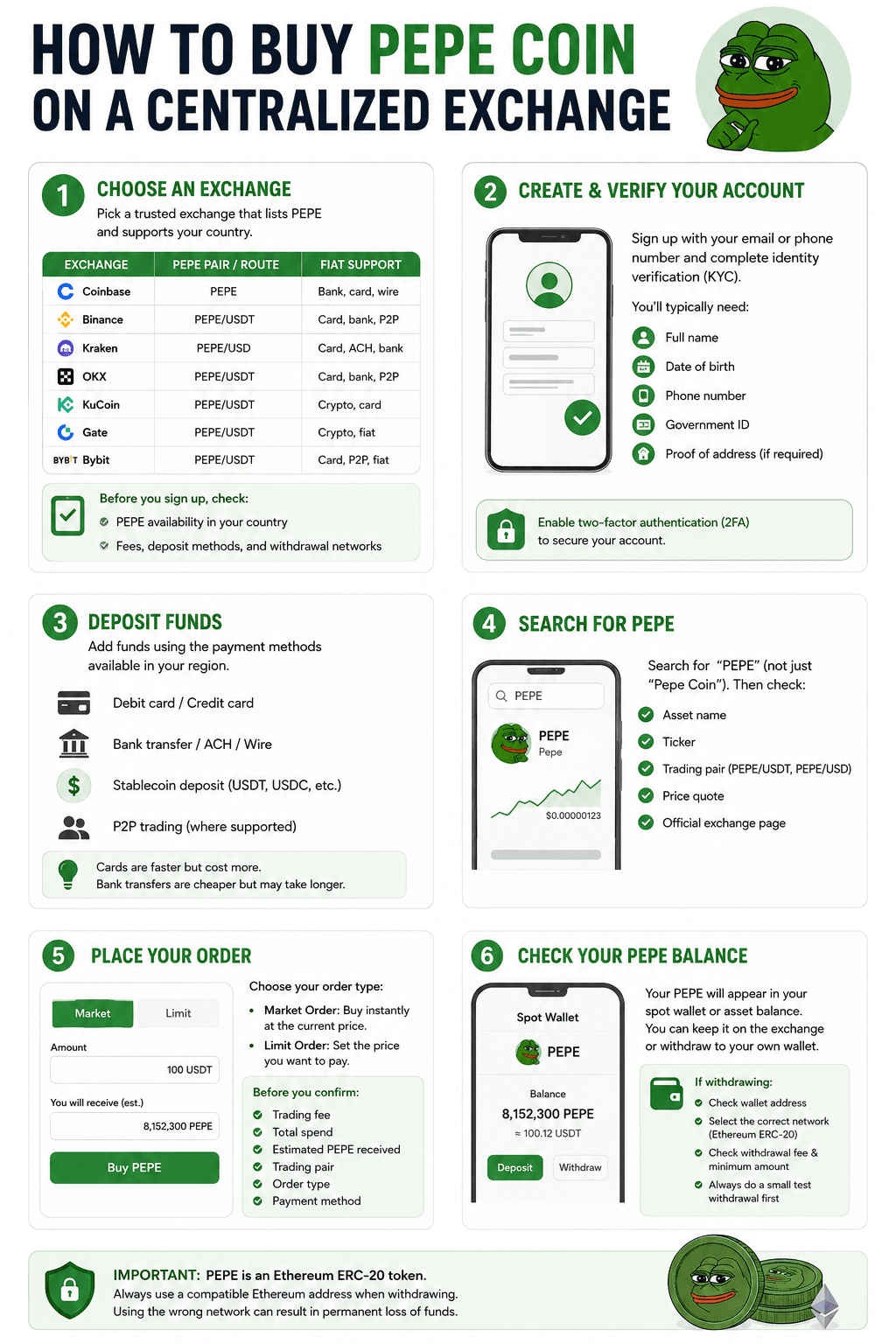 Step-By-Step PEPE Exchange Buying Guide
Step 1: Choose An Exchange That Lists PEPE
Start by choosing an exchange that supports PEPE in your country. Do not assume every global exchange offers the same coins, payment methods, or withdrawal networks in every region.
Before opening an account, check:
- Whether PEPE is available in your country
- Supported trading pairs, such as PEPE/USDT or PEPE/USD
- Fiat deposit options
- Trading fees
- Withdrawal fees
- PEPE withdrawal network support
Here are examples of major exchanges with PEPE markets or PEPE buying pages as of May 18, 2026:
| Exchange | PEPE Pair / Route | Fiat Support | Best For | Main Limitation |
|---|---|---|---|---|
| Coinbase | PEPE buy page, PEPE on centralized exchange | Bank account, debit card, wire transfer where supported | Beginners in supported regions | Availability and payment methods vary by country |
| Binance | PEPE/USDT spot market | Card, bank, P2P, and crypto deposits where supported | Global PEPE/USDT trading | Not available in all countries |
| Kraken | PEPE/USD and buy flow | Card, ACH, Apple Pay, Google Pay, bank methods where supported | USD buyers and regulated-market users | Some payment methods require higher verification |
| OKX | PEPE/USDT spot market | Card, bank, P2P, and crypto routes where supported | Active spot traders | Regional restrictions apply |
| KuCoin | PEPE/USDT spot market | Crypto, card, and third-party routes where supported | USDT-funded buyers | Fiat support depends on region |
| Gate | PEPE/USDT spot market | Crypto and selected fiat routes where supported | Altcoin traders | Not ideal for complete beginners |
| Bybit | PEPE/USDT spot market | Crypto, card, P2P, and fiat routes where supported | PEPE/USDT traders | Restricted in some countries |
Step 2: Create And Verify Your Account
After choosing an exchange, create an account using your email address or phone number. Most regulated exchanges require identity verification before you can buy, deposit, or withdraw crypto.
KYC usually means submitting:
- Full name
- Date of birth
- Phone number
- Government-issued ID
- Proof of address, if required
Coinbase says accounts have limited functionality until verification is complete, while Binance says users buying crypto with credit or debit cards must complete identity verification. Kraken also requires verified accounts for card purchases.
Before depositing funds, enable two-factor authentication. Coinbase says 2-step verification is required for access and certain account actions, with SMS, authenticator app, and security key options available.
Read our guide to learn how KYC and AML help exchanges prevent fraud, block illicit activity, and build user trust
Step 3: Deposit Funds
Once your account is verified, add funds using one of the payment methods available in your region.
Common options include:
- Debit card
- Credit card
- Bank transfer
- ACH deposit
- Wire transfer
- Stablecoin deposit, such as USDT or USDC
- P2P trading, where supported
Cards are usually faster, but they can cost more. Bank transfers are often cheaper, but they may take longer. Stablecoin deposits can work well if you already hold crypto and want to trade PEPE against a pair such as PEPE/USDT.
Step 4: Search For PEPE
After funding your account, search for the ticker “PEPE.” Do not search only by “Pepe Coin,” because similar names can appear on some platforms.
Before buying, check:
- The asset name
- The ticker
- The trading pair
- The price quote
- The exchange’s official PEPE asset page
Common pairs include PEPE/USDT and PEPE/USD.
Step 5: Place Your Order
Most beginners will use either a market order or a limit order.
- A market order buys PEPE immediately at the current available price. It is simple, but the final price can shift slightly during fast market moves.
- A limit order lets you choose the price you want to pay. The order only fills if the market reaches that price. This gives you more control, but the order may not fill.
Before confirming, review:
- Trading fee
- Total spend
- Estimated PEPE received
- Trading pair
- Order type
- Final payment method
Step 6: Check Your PEPE Balance
After the order fills, PEPE should appear in your exchange spot wallet or asset balance. From there, you can either keep it on the exchange or withdraw it to a self-custody wallet.
Check out our top picks for the best crypto wallets.
If you withdraw PEPE, check these details first:
- Receiving wallet address
- Withdrawal network
- Withdrawal fee
- Minimum withdrawal amount
- Whether the receiving wallet supports Ethereum ERC-20 tokens
PEPE is an Ethereum ERC-20 token, so withdrawals to a self-custody wallet should use a compatible Ethereum address unless the exchange clearly labels another supported network. Sending tokens through the wrong network can lead to loss of funds, so test with a small withdrawal first when fees allow.
How To Buy PEPE With MetaMask Or Another Ethereum Wallet
You can buy PEPE with an Ethereum wallet by connecting to a trusted decentralized exchange, importing the correct PEPE token, and swapping ETH, USDT, USDC, or another supported token. This route gives you self-custody, but it also puts the security work on you.
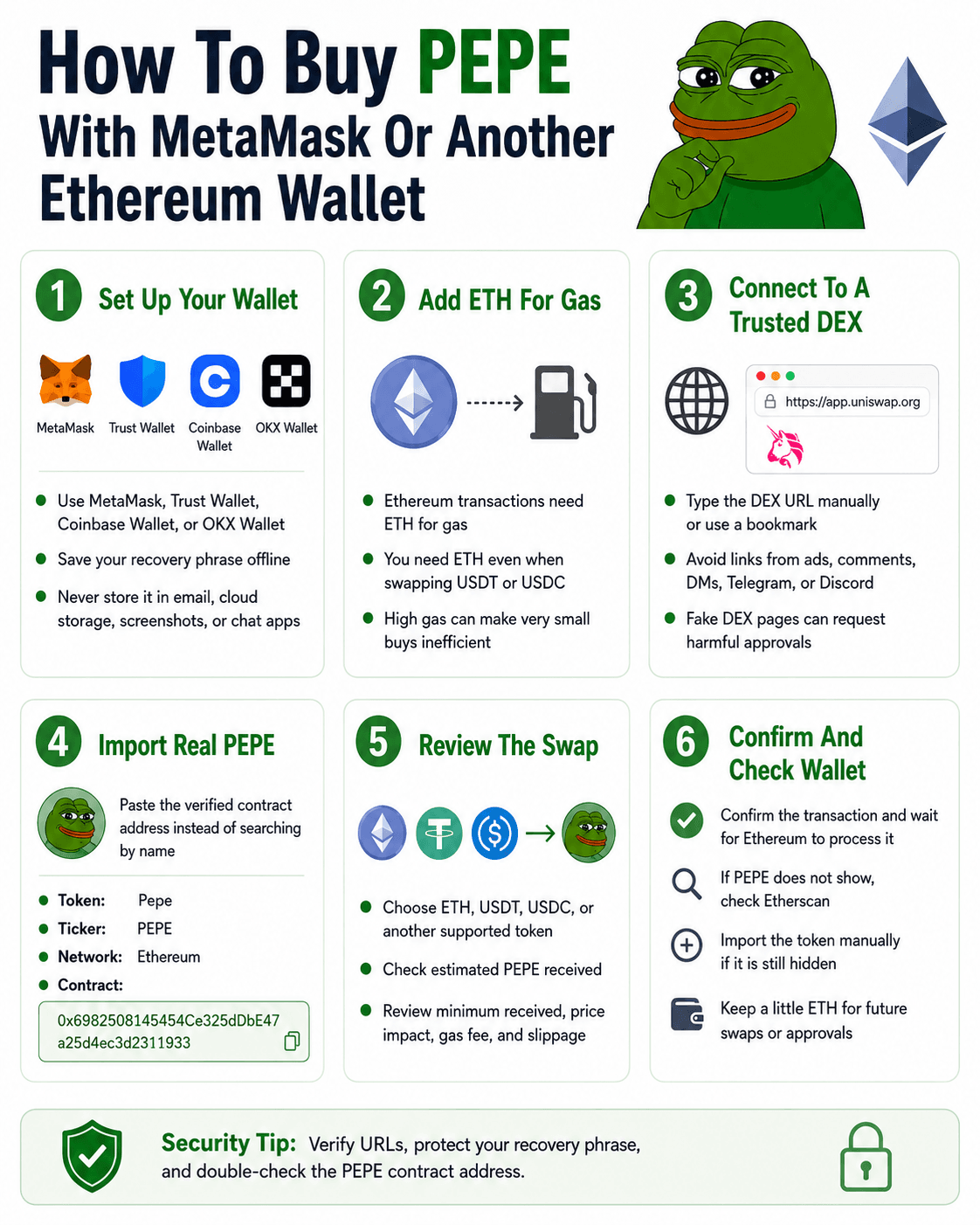 Step-by-Step on Buying PEPE With An Ethereum Wallet
Step 1: Set Up An Ethereum Wallet
Start with a wallet that supports Ethereum tokens. MetaMask, Trust Wallet, Coinbase Wallet, and OKX Wallet are common examples.
When you create a wallet, write your recovery phrase offline and store it somewhere private. Do not save it in email, cloud storage, screenshots, or chat apps.
Step 2: Add ETH For Gas Fees
Ethereum transactions require gas, and gas fees are paid in ETH.
That means you need ETH in your wallet even if you are swapping USDT or USDC for PEPE. Without enough ETH, the transaction will not go through. Small PEPE buys can also become inefficient when gas is high, because the network fee may take up a large share of the purchase.
Confused by gas fees? Read our full guide to understand crypto network fees.
Step 3: Connect To A Trusted DEX
Use a trusted decentralized exchange. Type the DEX URL manually or use a saved bookmark. Avoid links from ads, X replies, Telegram, Discord, DMs, comments, or “support” accounts. Fake DEX pages can look convincing and may ask you to approve harmful wallet permissions.
Step 4: Import The Correct PEPE Token
Before swapping, paste the verified PEPE contract address instead of searching by name. This lowers the risk of selecting a lookalike token.
Check that the token details match:
- Token name: Pepe
- Ticker: PEPE
- Network: Ethereum
- Contract address: 0x6982508145454Ce325dDbE47a25d4ec3d2311933
Step 5: Swap ETH, USDT, Or USDC For PEPE
Choose the token you want to swap, such as ETH, USDT, or USDC. Then enter the amount and review the quote before confirming.
Pay close attention to:
- Estimated PEPE received
- Minimum received
- Price impact
- Network fee
- Slippage tolerance
Learn what crypto slippage is, why it happens, and how to reduce its impact in our full guide.
Step 6: Confirm The Transaction And Check Your Wallet
After you confirm the swap, wait for the Ethereum transaction to complete. If PEPE does not appear in your wallet right away, check the transaction on Etherscan using your wallet address or transaction hash.
If the transaction succeeded but PEPE is still hidden, import the token manually using the verified contract address. Also keep a small amount of ETH in the wallet for future transfers, swaps, or approvals.
How Much Does It Cost To Buy Pepe Coin?
The cost of buying PEPE is not just the token’s market price. Your final cost can include trading fees, deposit fees, card fees, spreads, slippage, withdrawal fees, and Ethereum gas fees if you buy through a wallet or DEX.
Exchange Trading Fees
Centralized exchanges usually charge spot trading fees when you buy PEPE. These are often shown as maker and taker fees.
Fees vary by exchange and account tier. For example, Binance lists standard spot trading fees at 0.10% maker and 0.10% taker for regular users, with lower rates available at higher VIP levels. Coinbase says spreads may apply when users buy, sell, or trade crypto, and any fees are shown before confirmation.
Deposit And Card Fees
Funding your account can also add costs. Debit and credit cards are usually fast, but they can cost more than bank transfers. Bank transfers may be cheaper, but they can take longer to settle. Stablecoin deposits, such as USDT or USDC, can be useful if you already hold crypto and want to trade a PEPE/USDT pair.
Payment providers may also add their own fees. This is common when an exchange or wallet uses third-party card processors, bank partners, or instant-buy services. Always review the final quote before confirming the purchase.
Ethereum Gas Fees
If you buy PEPE through MetaMask, Trust Wallet or Uniswap, you will need ETH for Ethereum gas fees.
This can make small PEPE buys inefficient. For example, if you want to buy $20 of PEPE but the swap costs several dollars in gas, a large share of your purchase is lost to transaction costs before you even hold the token.
Spread And Slippage
The quoted price and final execution price may not always match.
Spread is the difference between the buy price and sell price quoted by a platform. Slippage is the difference between the price shown before a swap and the final price you receive after execution.
Slippage can increase when PEPE moves quickly, liquidity is thin, or the trade size is large compared with the available pool.
Is It Worth Buying A Small Amount Of PEPE?
Small PEPE purchases can make sense on a centralized exchange if the minimum order size and fees are reasonable. This is often the cleaner route for beginners because you avoid Ethereum gas fees during the initial purchase.
On Ethereum DEXs, very small buys can be inefficient. Gas fees, slippage, and swap costs can take a large percentage of the purchase. If the total fee is high compared with the amount you want to buy, waiting, using a centralized exchange, or increasing the purchase size may be more practical.
A simple rule: compare the total fee against the purchase size before buying. If fees take a large chunk of the trade, the route is probably too expensive for that buy size.
Should You Keep PEPE On An Exchange Or Move It To A Wallet?
After buying PEPE, you can leave it on the exchange or move it to a self-custody wallet. The better choice depends on how often you plan to trade and how comfortable you are with wallet security.
Keeping PEPE On An Exchange
Keeping PEPE on an exchange is simpler. You can sell faster, avoid wallet setup, and manage everything from one account. This can suit beginners or short-term traders.
The trade-off is custody. With an exchange account, the platform manages the private keys for you. That means you rely on the exchange for account access, withdrawals, and platform security.
Moving PEPE To A Self-Custody Wallet
A self-custody wallet gives you control over your assets and private keys.
The trade-off is personal responsibility. If you lose your recovery phrase, send PEPE to the wrong network, or approve a bad transaction, there may be no support team that can reverse it.
When A Hardware Wallet Makes Sense
A hardware wallet can make sense for larger holdings or long-term storage. Since PEPE is an Ethereum ERC-20 token, the wallet must support Ethereum tokens. You still need ETH for future gas fees, and you may need to import PEPE manually if it does not appear in the wallet interface.
Compare our top picks for the best crypto hardware wallets and find the right fit for your self-custody setup.
Withdrawal Safety Checklist
Before moving PEPE off an exchange:
- Match the withdrawal network
- Copy the correct Ethereum wallet address
- Send a small test transaction first, if fees allow
- Keep ETH in the wallet for future transfers
- Do not withdraw to an unsupported network
How To Sell Pepe Coin
Before buying PEPE, know how you would exit. You can usually sell PEPE through a centralized exchange or swap it through a wallet and DEX.
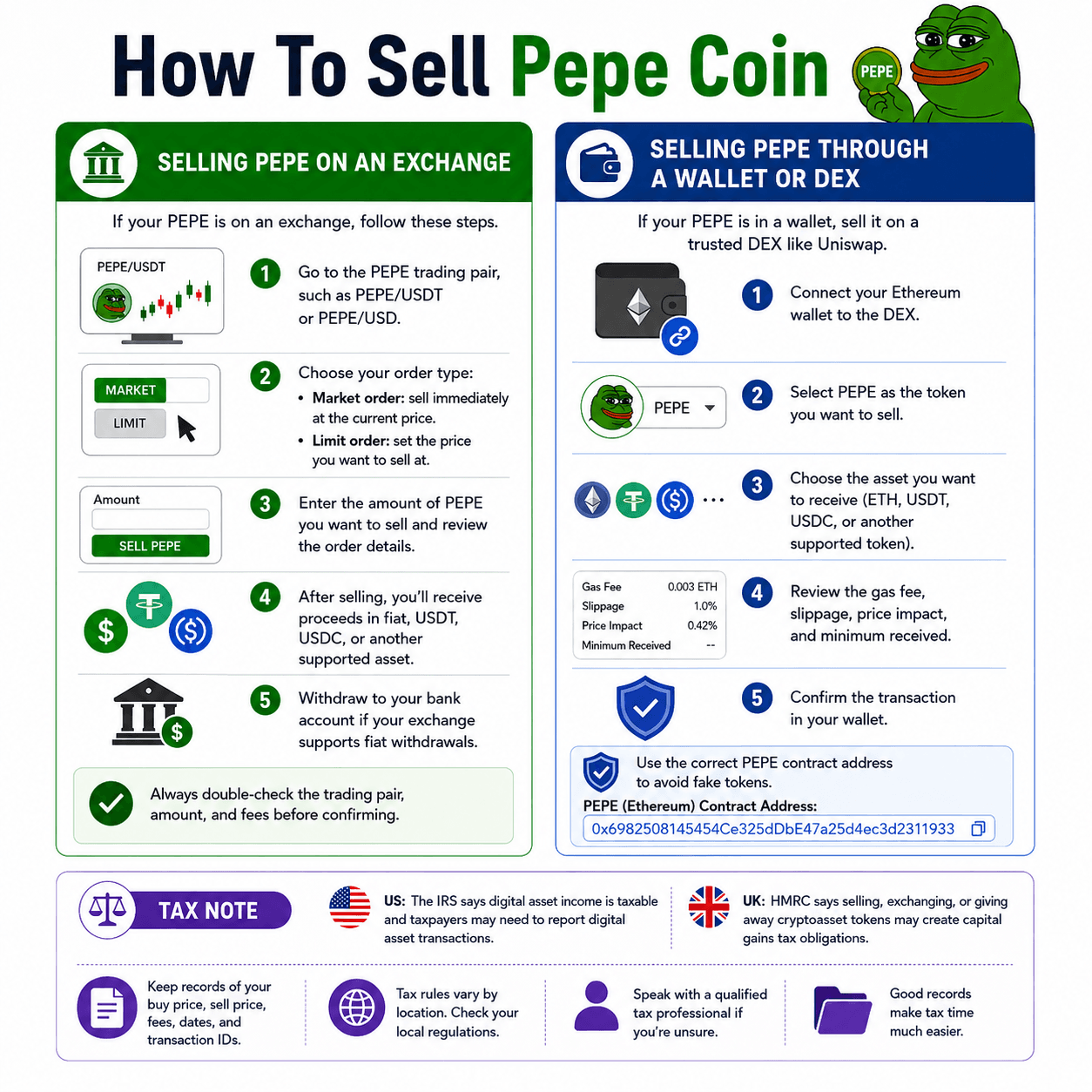 Here's How You Can Sell Pepe Coin Through Exchanges Or Wallets
Selling PEPE On An Exchange
If your PEPE is on an exchange, go to the PEPE trading pair, such as PEPE/USDT or PEPE/USD. Choose whether your want to sell via a market or a limit order.
After selling, you can keep the proceeds as fiat, USDT, USDC, or another supported asset. If your exchange supports fiat withdrawals, you can then cash out to a linked bank account.
Selling PEPE Through A Wallet Or DEX
If your PEPE is in MetaMask, Trust Wallet, Coinbase Wallet, or another Ethereum wallet, you can sell through a trusted DEX such as Uniswap.
The basic flow is:
- Connect your Ethereum wallet to the DEX
- Select PEPE as the token you want to sell
- Choose ETH, USDT, USDC, or another supported token as the asset you want to receive
- Review the gas fee, slippage, price impact, and minimum received
- Confirm the transaction in your wallet
Tax Note
Buying crypto is not always taxable, but selling, swapping, or spending it may create a taxable event depending on your country. In the US, the IRS says digital asset income is taxable and taxpayers may need to report digital asset transactions. In the UK, HMRC says selling, exchanging, or giving away cryptoasset tokens may create capital gains tax obligations.
Tax rules vary by location, so keep records of your buy price, sell price, fees, dates, and transaction IDs. Check your local rules or speak with a qualified tax professional before filing.
PEPE Buying Problems And How To Fix Them
Even if you buy the correct PEPE token, wallet and DEX transactions can still run into problems. Most issues come down to token visibility, gas fees, slippage, network selection or liquidity.
| Problem | Likely Cause | What To Do |
|---|---|---|
| PEPE is not showing in my wallet | Token not imported | Import PEPE using the verified contract address |
| My swap failed | Gas, slippage, or route issue | Review the quote, ETH balance, gas fee, and slippage setting |
| Gas is too expensive | Ethereum network activity is high | Wait, use a centralized exchange, or avoid very small DEX buys |
| I see multiple PEPE tokens | Copycats or lookalikes | Verify the contract address on Etherscan before buying |
| I sent PEPE to the wrong network | Network mismatch | Contact the exchange or wallet provider. Recovery is not guaranteed |
| I cannot sell PEPE | Liquidity, network, pair, or platform issue | Check the trading pair, gas fee, slippage, and exchange status |
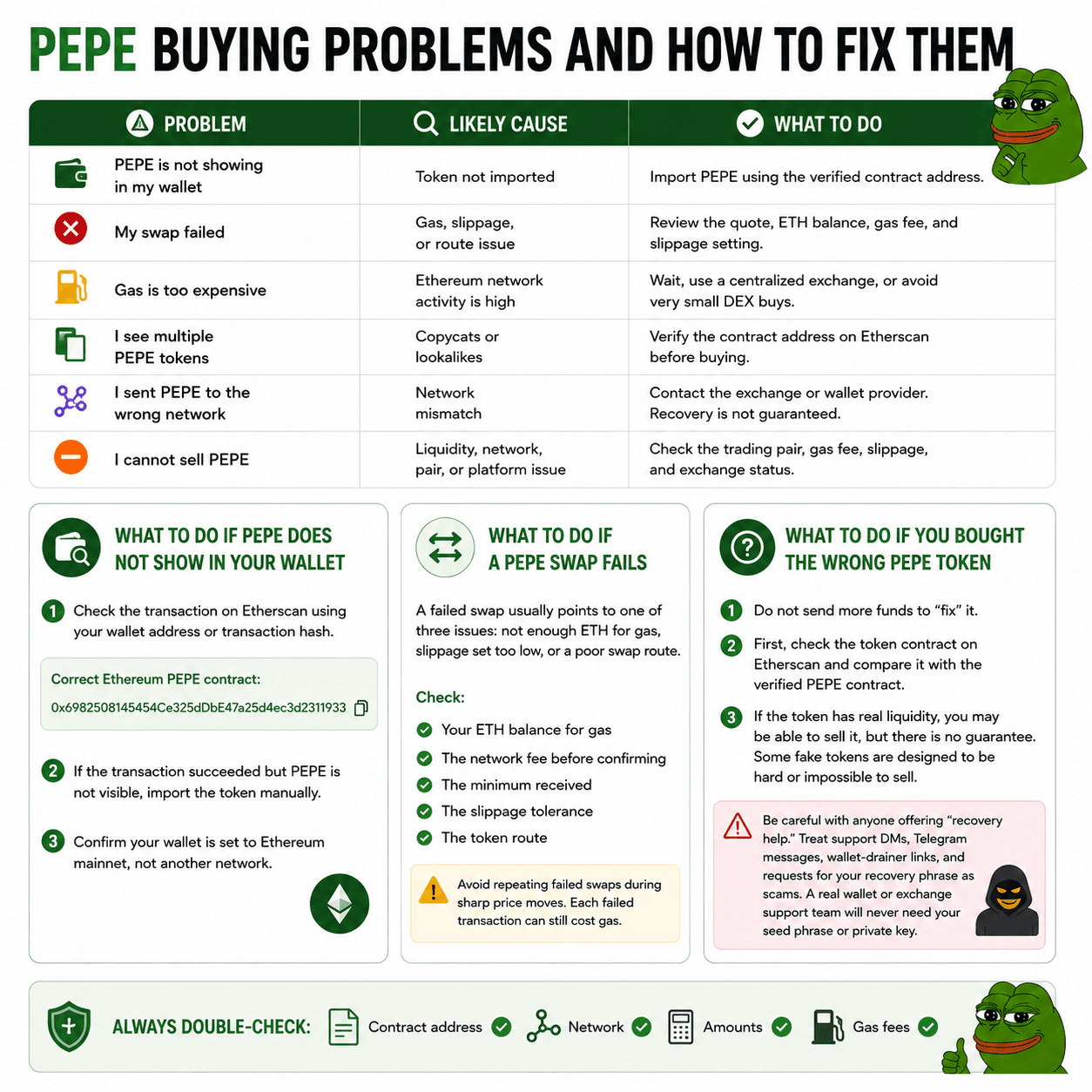 List of PEPE Buying Problems And Fixes
What To Do If PEPE Does Not Show In Your Wallet
First, check the transaction on Etherscan using your wallet address or transaction hash. The correct Ethereum PEPE contract is: 0x6982508145454Ce325dDbE47a25d4ec3d2311933
If the transaction succeeded but PEPE is not visible, import the token manually. Also confirm your wallet is set to Ethereum mainnet, not another network.
What To Do If A PEPE Swap Fails
A failed swap usually points to one of three issues: not enough ETH for gas, slippage set too low, or a poor swap route.
Check:
- Your ETH balance for gas
- The network fee before confirming
- The minimum received
- The slippage tolerance
- The token route
Avoid repeating failed swaps during sharp price moves. Each failed transaction can still cost gas.
What To Do If You Bought The Wrong PEPE Token
If you bought the wrong PEPE token, do not send more funds to “fix” it. First, check the token contract on Etherscan and compare it with the verified PEPE contract.
If the token has real liquidity, you may be able to sell it, but there is no guarantee. Some fake tokens are designed to be hard or impossible to sell.
Be careful with anyone offering “recovery help.” Treat support DMs, Telegram messages, wallet-drainer links, and requests for your recovery phrase as scams. A real wallet or exchange support team will never need your seed phrase or private key.
PEPE Buying Mistakes To Avoid
PEPE is easy to buy, but small mistakes can be expensive. Before placing an order or confirming a wallet swap, check the token, network, fees, and position size.
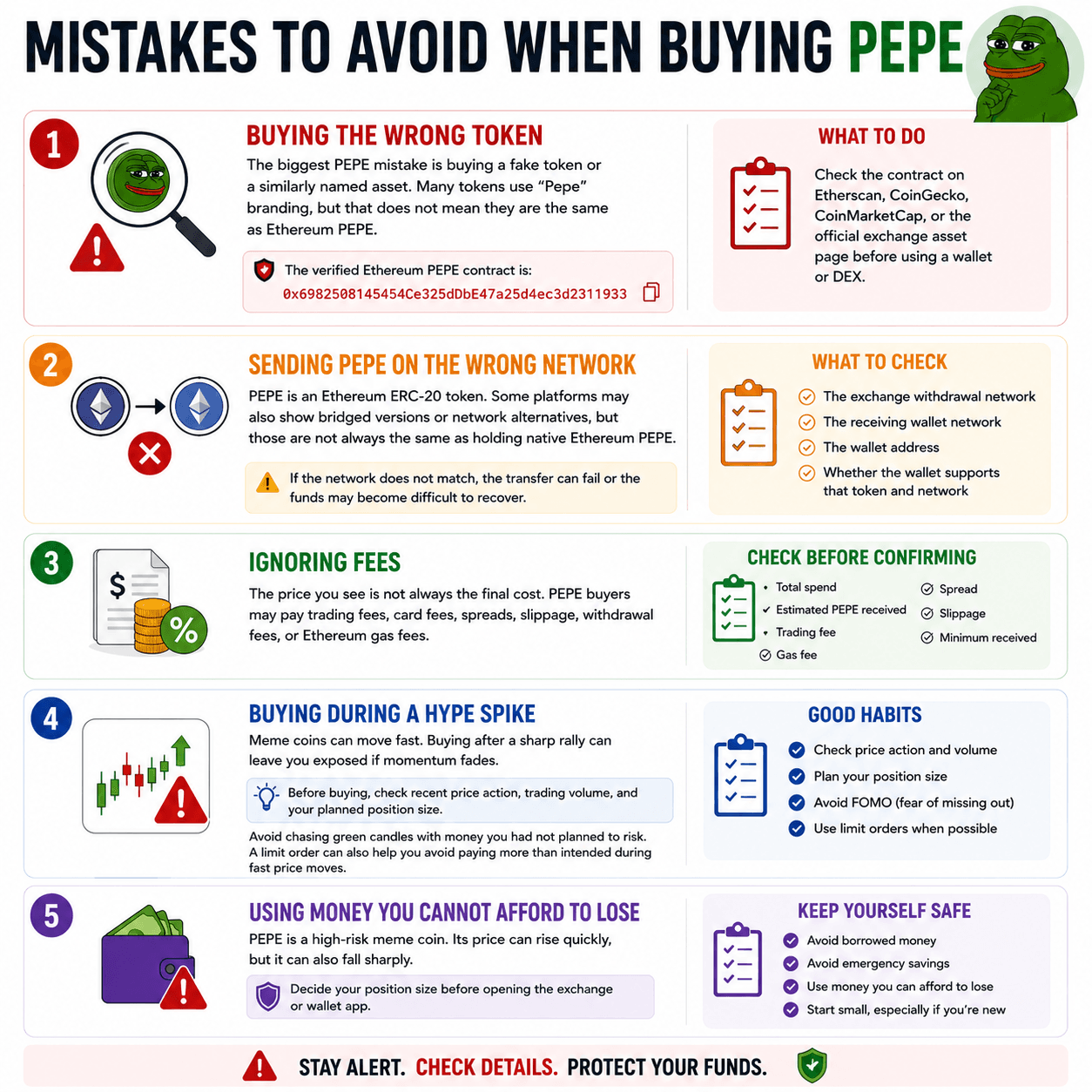 Avoid These Mistakes When Buying PEPE
Buying The Wrong Token
The biggest PEPE mistake is buying a fake token or a similarly named asset. Many tokens use “Pepe” branding, but that does not mean they are the same as Ethereum PEPE.
The verified Ethereum PEPE contract is: 0x6982508145454Ce325dDbE47a25d4ec3d2311933
Check the contract on Etherscan, CoinGecko, CoinMarketCap, or the official exchange asset page before using a wallet or DEX.
Sending PEPE On The Wrong Network
PEPE is an Ethereum ERC-20 token. Some platforms may also show bridged versions or network alternatives, but those are not always the same as holding native Ethereum PEPE.
Before withdrawing, confirm:
- The exchange withdrawal network
- The receiving wallet network
- The wallet address
- Whether the wallet supports that token and network
If the network does not match, the transfer can fail or the funds may become difficult to recover.
Ignoring Fees
The price you see is not always the final cost. PEPE buyers may pay trading fees, card fees, spreads, slippage, withdrawal fees, or Ethereum gas fees.
Before confirming, check:
- Total spend
- Estimated PEPE received
- Trading fee
- Gas fee
- Spread
- Slippage
- Minimum received
Buying During A Hype Spike
Meme coins can move fast. Buying after a sharp rally can leave you exposed if momentum fades.
Before buying, check recent price action, trading volume, and your planned position size. Avoid chasing green candles with money you had not planned to risk. A limit order can also help you avoid paying more than intended during fast price moves.
Using Money You Cannot Afford To Lose
PEPE is a high-risk meme coin. Its price can rise quickly, but it can also fall sharply.
Decide your position size before opening the exchange or wallet app. Avoid borrowed money, emergency savings, or funds you need for bills. For beginners, a small test purchase is safer than making one large emotional entry.
Is Pepe Coin a Good Investment?
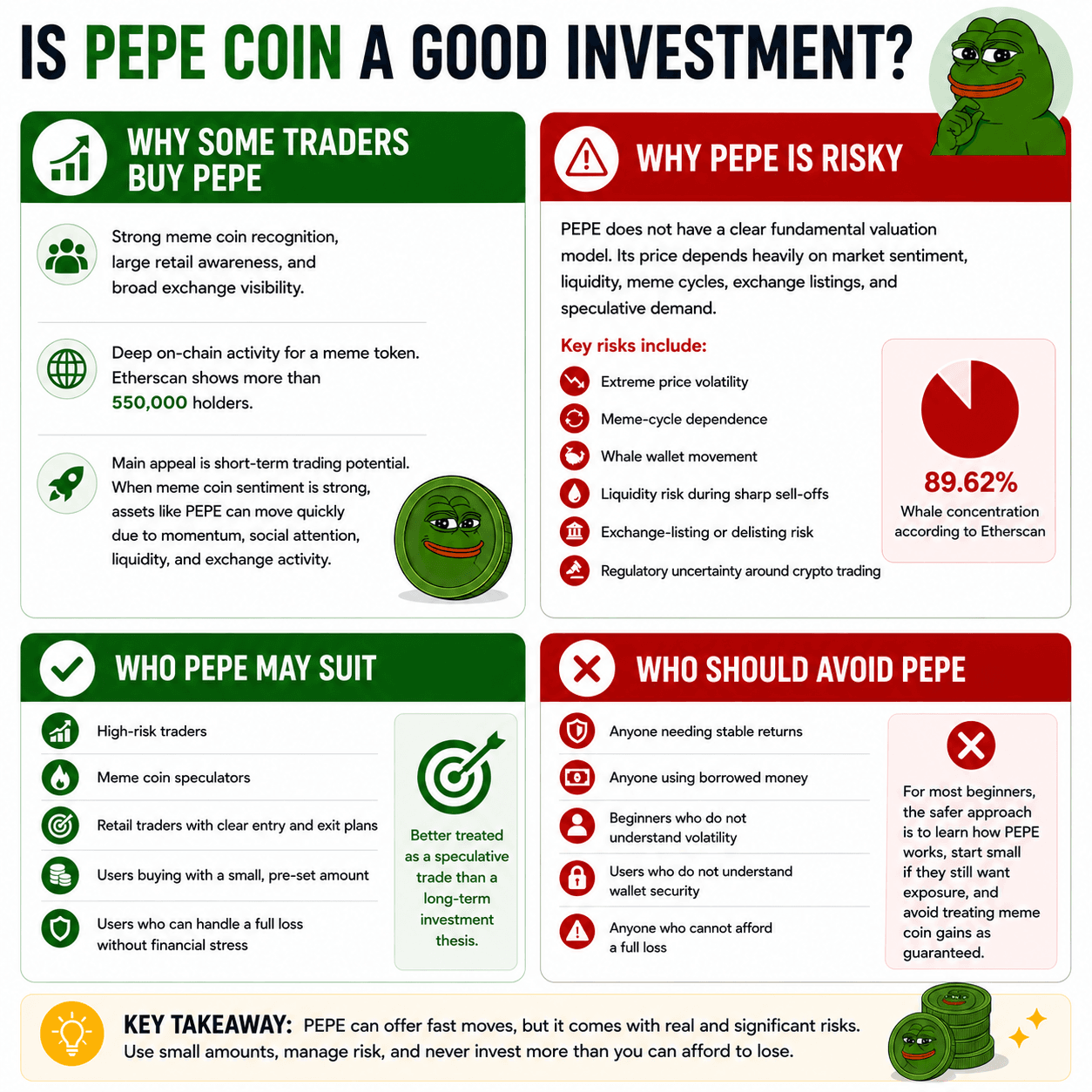
PEPE may suit high-risk traders who understand meme coin volatility, but it is not a fit for anyone looking for stable returns or clear long-term fundamentals.
 PEPE Investment Risks And Buyer Considerations
Why Some Traders Buy PEPE
Some traders buy PEPE because it has strong meme coin recognition, large retail awareness, and broad exchange visibility. It also has deep on-chain activity for a meme token, with Etherscan showing more than 550,000 holders.
The main appeal is short-term trading potential. When meme coin sentiment is strong, assets like PEPE can move quickly because traders respond to momentum, social attention, liquidity, and exchange activity.
Why PEPE Is Risky
PEPE is risky because it does not have a clear fundamental valuation model. Its price depends heavily on market sentiment, liquidity, meme cycles, exchange listings, and speculative demand.
Key risks include:
- Extreme price volatility
- Meme-cycle dependence
- Whale wallet movement
- Liquidity risk during sharp sell-offs
- Exchange-listing or delisting risk
- Regulatory uncertainty around crypto trading
Large holders can also affect price action. According to Etherscan, PEPE has a whale concentration of 89.62%.
Who PEPE May Suit
PEPE may suit:
- High-risk traders
- Meme coin speculators
- Retail traders with clear entry and exit plans
- Users buying with a small, pre-set amount
- Users who can handle a full loss without financial stress
It is better treated as a speculative trade than a long-term investment thesis.
Who Should Avoid PEPE
PEPE is not suitable for:
- Anyone needing stable returns
- Anyone using borrowed money
- Beginners who do not understand volatility
- Users who do not understand wallet security
- Anyone who cannot afford a full loss
For most beginners, the safer approach is to learn how PEPE works, start small if they still want exposure, and avoid treating meme coin gains as guaranteed.

Final Thoughts
The safest way to buy PEPE depends on your experience level.
For most beginners, a reputable centralized exchange is usually the simplest route. It reduces the risk of choosing a fake token, makes fiat deposits easier, and gives you a clearer order preview before you buy.
PEPE is a high-risk meme coin, so do not let hype set your position size. Start small, avoid borrowed money, and know how you plan to sell before buying.